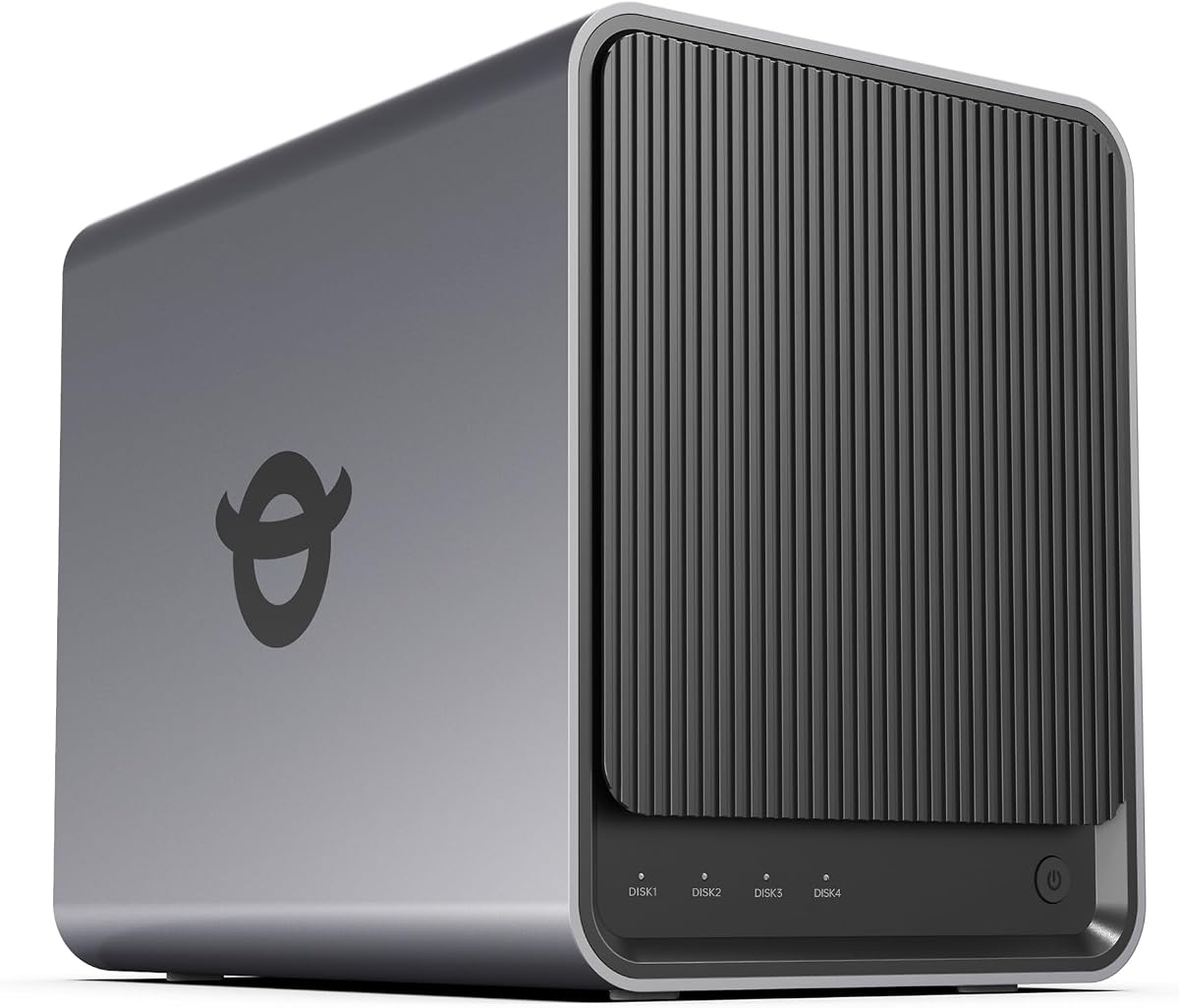
Yxk Zero1 Pro 4-Bay NAS
4.4Editor score
Intel N100 Processor
8GB DDR4 RAM
4K HDMI Output
This guide compares the top 4 Bay NAS devices for storage and security, reviewing performance, features, and value to help you choose the right network
Network attached storage has become essential for protecting your personal files and media collections. A good four bay model offers ample room for multiple drives while keeping your data safe from local hardware failures and cloud subscription costs.
We evaluated ten leading four bay NAS units based on processor power, memory capacity, network speeds, and software ecosystems. Our analysis focuses on real-world performance for media streaming, file sharing, and automated backups across various user needs.
Each pick highlights specific strengths like quiet operation, AI photo management, or enterprise-grade security. Keep in mind that drive costs and software updates can shift the value proposition over time, so check current prices before finalizing your purchase.
4.4Editor score

4.0Editor score

4.4Editor score
The following table provides a side-by-side comparison of all ten models to help you quickly identify which device matches your specific storage and performance requirements.





The TERRAMASTER F4-425 stands out as a strong entry in the four bay market due to its balanced hardware and focus on multimedia. It receives a solid rating for its ability to handle video transcoding without needing expensive add-ons. Users appreciate the quiet design which makes it suitable for living rooms or offices where noise matters.
We may earn a commission when you buy through this link, at no additional cost to you.
Its Intel x86 quad-core processor paired with 4GB of RAM allows for smooth multitasking between file backups and media streaming. The 2.5GbE port significantly boosts transfer speeds compared to standard gigabit connections ensuring fast file access. The Photos app uses AI to organize images which is a helpful feature for families with large photo libraries.
One trade-off is the limited memory which may restrict running many heavy apps like virtual machines simultaneously. Additionally the software ecosystem is not as mature as larger competitors meaning some niche features might be missing. However for core storage and media server tasks these limits are rarely noticeable in daily use.
We recommend this model for users who want a reliable home media server without breaking the bank. It fits well for those needing fast network speeds and silent operation in a shared space. If you need advanced business features you might look elsewhere but for personal use it delivers excellent value.
The system operates at just 21dB which ensures it stays nearly silent even during heavy file transfers or video transcoding tasks.
With a built-in 2.5GbE port you can move large video files or backups much faster than with standard Gigabit Ethernet setups.
We may earn a commission when you buy through this link, at no additional cost to you.
The UGREEN DXP4800 GT is designed for professionals who need serious speed and capacity. It earns a high rating for its powerful processor and dual 10GbE ports which enable lightning fast data transfers. This model is ideal for video editors or developers who need to access large files directly from the NAS.
We may earn a commission when you buy through this link, at no additional cost to you.
The AMD Ryzen processor handles multiple Docker apps and virtual machines smoothly. The 10GbE networking ensures that even large 4K video files can be edited over the network without lag. The SD card slot is a unique addition that lets creators import photos instantly without extra card readers.
The cost is higher than entry level models but justified by the speed and features. One limitation is that ECC RAM which is great for stability must be purchased separately as it is not included. For most users the non-ECC stock RAM is sufficient for stable daily operation.
Choose this if you need extreme speed and plan to run complex home lab services. It is perfect for tech enthusiasts who want a private cloud that rivals enterprise performance. The robust hardware ensures it will handle growth as your data needs increase over time.
With two 10GbE ports you can achieve link aggregation for up to 20Gbps total bandwidth which is incredibly fast for local file transfers.
The built-in SD card slot allows you to back up camera cards directly to the NAS saving you the step of using a PC.
We may earn a commission when you buy through this link, at no additional cost to you.
The Synology DS425+ is built with professional workflows in mind offering tools that go beyond basic storage. It receives a high rating for its centralized repository capabilities which help teams manage documents securely. The system is excellent for offices that need strict control over who can access specific files.
We may earn a commission when you buy through this link, at no additional cost to you.
Its data protection features combine RAID with automated backups and snapshots to prevent data loss. The surveillance system supports up to 30 cameras making it a great all-in-one security hub. Users benefit from Synology's strong reputation for reliable software and consistent updates.
The price reflects its enterprise focus which might be more than a home user needs. The learning curve can also be steeper for beginners used to simpler interfaces. However for small businesses the ability to manage permissions and audit logs is worth the extra investment.
This is the right choice for small teams needing secure file sharing and professional support. The three year warranty provides peace of mind for critical business environments. If you prioritize security and stability over budget this unit delivers a professional experience.
Advanced RAID and snapshot technology ensures that files are protected from accidental deletion or hardware failures automatically.
Manage access with granular controls so each team member sees only the folders they are authorized to view.
We may earn a commission when you buy through this link, at no additional cost to you.
The UGREEN DXP4800 Plus offers a blend of performance and ease of use that suits home offices. It earns a solid rating for its ability to handle Docker apps and virtual machines smoothly. The user interface is designed to be intuitive making it accessible for those new to network storage.
We may earn a commission when you buy through this link, at no additional cost to you.
The AI-powered photo album automatically organizes your pictures by faces and scenes which is a major convenience. Fast network ports ensure that file transfers are quick reducing wait times during busy workdays. The system supports a wide range of third-party drives giving you flexibility in hardware choice.
While it lacks Wi-Fi this is standard for most NAS units to ensure stable data speeds. The price is higher than basic models but the performance and features justify it for power users. The two-year warranty provides good coverage for typical home use scenarios.
Select this unit if you need a private cloud that balances advanced features with simplicity. It is ideal for small teams or families who want to centralize data without complexity. The strong performance ensures it will handle increasing data loads as your digital life grows.
The photo album uses artificial intelligence to recognize faces and scenes making it easy to find specific memories quickly.
Run a variety of apps including media servers or download tools within containers for an organized and isolated setup.
We may earn a commission when you buy through this link, at no additional cost to you.
The UGREEN NAS DH4300 Plus is an excellent option for those looking to start with network storage without overspending. It gets a strong rating for its value and focus on core home tasks. The design is beginner friendly which helps users transition from external drives easily.
We may earn a commission when you buy through this link, at no additional cost to you.
It includes an AI photo backup feature that keeps family memories organized with minimal effort. The NFC pairing function simplifies the initial setup process significantly. Despite the lower price it still offers a 2.5GbE port for fast local transfers.
The main trade-off is the lack of virtual machine support which limits advanced app usage. You also need to use wired Ethernet rather than Wi-Fi but this ensures better stability. For typical home backups and media streaming these limitations are not a concern.
This model is perfect for users wanting a private cloud on a budget. It saves money compared to long-term cloud subscriptions while giving you full control over your data. If you need simple reliable storage this unit delivers without unnecessary extras.
Set up your NAS quickly by tapping your phone to the NFC tag on the device which connects you instantly.
Over ten years the one-time cost of the NAS saves significant money compared to paying for paid cloud storage plans.
We may earn a commission when you buy through this link, at no additional cost to you.
The Synology DS925+ is a trusted choice for users who prioritize reliability and speed. It earns a good rating for its consistent performance in file management and media streaming. The hardware supports dual 2.5GbE ports which ensures fast network access for multiple users.
We may earn a commission when you buy through this link, at no additional cost to you.
Synology's operating system is known for being stable and easy to use over long periods. The built-in file management tools help organize data efficiently without needing third-party apps. The three year warranty adds confidence to the purchase for critical storage needs.
The price is higher than some competitors which might deter budget-conscious buyers. Some users might find the physical port options limited if they need extensive hardware expansion. However for standard NAS tasks these constraints are rarely an issue.
Choose this for a dependable long-term solution that works well out of the box. It suits users who want a set-and-forget system that handles backups and media without hiccups. The robust build quality ensures it stays running reliably for years.
Sequential read and write speeds reach up to 565 MB/s which provides excellent performance for moving large files quickly.
Dual 2.5GbE ports offer redundancy and aggregation for faster stable network connections to your main router.
We may earn a commission when you buy through this link, at no additional cost to you.
The Yxk Zero1 Pro brings a unique focus on home theater capabilities with its HDMI output. It receives a strong rating for its ability to act as a direct media player when connected to a TV. This feature simplifies streaming 4K content without needing a separate streaming stick.
We may earn a commission when you buy through this link, at no additional cost to you.
Powered by an Intel N100 processor it handles everyday storage and media tasks with ease. The aluminum housing helps dissipate heat which keeps the unit quiet during long playback sessions. Docker support allows for flexible app installation such as Plex or download tools.
The app ecosystem is not as extensive as major brands which can limit software choices. Setup instructions may vary depending on your preference for third-party operating systems. For home media use the hardware strengths are sufficient to deliver a smooth experience.
This model is ideal for those who want a direct connection between their NAS and TV. It reduces the need for extra cables or devices when watching movies on a large screen. If you want a versatile media hub this unit offers distinct advantages.
Connect directly to a monitor or TV via HDMI to play videos without routing them through another streaming device.
The aluminum alloy enclosure and dual fans keep internal temperatures low ensuring silent operation even under load.
We may earn a commission when you buy through this link, at no additional cost to you.
The Asustor Drivestor 4 Gen 2 provides a budget-friendly entry into the four bay NAS market. It earns a decent rating for its hardware features which punch above their weight class. The Realtek processor handles daily storage needs efficiently while keeping power consumption low.
We may earn a commission when you buy through this link, at no additional cost to you.
It features enterprise-grade data protection with Btrfs snapshots which help recover files quickly after accidental deletion. The 2.5GbE port provides a noticeable speed boost over older gigabit models. For home users this level of protection is robust and reliable.
The low memory capacity limits heavy multitasking but is fine for basic file sharing. The interface is functional but less polished than premium systems. Despite this it covers all essential tasks for backups and media streaming effectively.
This unit is best for cost-conscious users who still want modern networking and data safety. It is a solid choice for small offices needing affordable backup solutions. The value it offers makes it hard to beat in its price bracket.
Use Btrfs snapshots to restore files to a previous state instantly if something goes wrong or gets deleted.
The 2.5GbE port ensures that large backups complete faster and streaming media runs smoother without stuttering.
We may earn a commission when you buy through this link, at no additional cost to you.
The Synology DS423 focuses heavily on security and reliable backup features for families and small businesses. It gets a high rating for its private cloud capabilities which keep your data secure. The interface is simple enough for home users but strong enough for light business use.
We may earn a commission when you buy through this link, at no additional cost to you.
Its surveillance system supports multiple cameras and integrates well with file storage. Ransomware-resistant backup ensures that even if malware hits you can restore your data safely. The shared folder setup makes it easy to collaborate with family members or partners.
Camera licenses must be bought separately which adds to the total cost. The processor is basic compared to high-end models so complex apps might struggle. For storage and backup though it performs exactly as expected.
Pick this unit if you prioritize data safety and simple sharing features. It is a great fit for households that want a private cloud without complex configurations. The focus on security makes it a safe bet for important documents and memories.
Access your files from anywhere securely without exposing them to public cloud risks.
Immutable snapshots ensure that critical data remains intact even if malicious software attempts to encrypt files.
We may earn a commission when you buy through this link, at no additional cost to you.
The UGREEN DXP4800 Pro is the top tier option for users needing extreme performance. It earns a high rating for its powerful Core i3 processor and massive RAM capacity. This model is built for virtualization and heavy workloads that would stall on standard units.
We may earn a commission when you buy through this link, at no additional cost to you.
Its data Vault feature adds an extra layer of encryption for sensitive files protecting privacy. The 10GbE port ensures that large data transfers are nearly instant. For developers or professionals this hardware allows for running multiple services at once smoothly.
The cost is high and may not make sense for casual storage needs. It is powerful enough that many users might not utilize all its potential. However if you need workstation-level performance on a NAS it is unmatched.
This is the right choice for IT professionals or developers running complex servers. It serves as a robust private workstation that can grow with your demands. If you want the absolute best performance this unit delivers top-tier capabilities.
Store highly sensitive files in an encrypted vault that adds an extra layer of security beyond standard permissions.
Run virtual machines and containers simultaneously without lag thanks to the high-performance CPU and RAM.
We may earn a commission when you buy through this link, at no additional cost to you.
Selecting the right network attached storage requires understanding your needs for speed, security, and software features to ensure long-term satisfaction.
The processor dictates how smoothly your NAS can handle tasks like media transcoding or running apps. Higher performance processors allow for faster file indexing and better multitasking when multiple users access the system at once.
Look for Intel or AMD chips that match your expected workload to avoid bottlenecks during peak usage.
RAM is critical for running virtual machines or containerized apps efficiently. Systems with more memory can cache files better which improves read speeds for frequent tasks.
Ensure the unit allows for memory expansion if you plan to add more complex services later on.
Fast network ports are essential for transferring large video files or backups quickly. Gigabit ports are standard but 2.5GbE or 10GbE ports offer significantly higher speeds for modern networks.
Check that your router supports these speeds to fully utilize the network capabilities of your new device.
Verify that the NAS supports the type and size of drives you intend to use. Some units support larger capacities per drive which affects your total storage limit.
Also check for support of NVMe SSDs for caching which can speed up access to frequently used files.
The operating system should be user-friendly and offer the tools you need such as photo management or backup scheduling. Regular software updates ensure security and new features remain available.
Consider systems with mobile apps if you need remote access to files from your phone.
Look for RAID support and snapshot features that help protect against data loss from drive failure or accidental deletion. Encryption features keep your files safe during transfer and storage.
Choose a model with these security measures if you hold valuable data that needs constant protection.
A longer warranty period indicates confidence in the hardware quality and provides peace of mind. Access to customer support can help resolve setup issues quickly.
Prioritize brands with a track record of good support and reliable hardware to reduce downtime risks.
Start by installing compatible hard drives into the drive bays and connecting the NAS to your router via Ethernet. Use the mobile app to initialize the system and set up your user accounts for secure access.
Once set up configure automatic backups for your computers and phones to keep data safe. You can also set up media servers to stream movies and music to your smart TV.
Maintain your device by keeping it in a well-ventilated area to prevent overheating. Update the system software regularly to ensure you have the latest security patches and features.
Most models listed are sold as diskless meaning they do not include hard drives. You must purchase compatible SATA hard drives or SSDs separately to store your data. Check the compatibility list in the product details to ensure your chosen drives work correctly.
Yes most NAS units support secure remote access via their own apps. This lets you view files on your phone or laptop from anywhere with an internet connection. Ensure your router is configured properly to allow external access safely.
If you set up RAID configurations the NAS can rebuild data from the remaining drives automatically. This protects your files from being lost completely if a single drive stops working. Always keep critical data backed up to a second location as well.
Many of these models include built-in surveillance centers for IP cameras. They can record footage locally and detect motion to save storage space. Check the product specs for camera limits and licensing requirements before buying.
NAS devices use encryption and security protocols to protect data during transfer. However you should always use strong passwords and keep the firmware updated. Avoid leaving open ports exposed on your network to reduce risk.
Some units support 4K hardware transcoding or HDMI output to connect directly to a TV. This allows smooth playback without needing another streaming device. Verify the specific model supports the codecs used by your media files.
Capacity depends on the drive size but typically you can use up to 144TB total. This varies based on the RAID setup you choose which may reduce total usable space for redundancy. Check the max drive support per bay in the specs.
We have reviewed ten top options ranging from budget-friendly home storage to professional-grade servers. Each model offers unique strengths whether you need fast network speeds or simple family photo backup.
Prioritize your specific needs like RAM capacity or software features to find the right fit. A more expensive unit may not be necessary if you only need basic file sharing.
Remember to check current pricing and compatibility before buying to ensure you get the best deal. Network storage is a long-term investment so choosing wisely pays off with reliable data protection.