
TECKNET Compact Ambidextrous Wireless Mouse
4.6Editor score
Affordable price point
Quiet click design
Portable size for travel
Find the best External Mouse for Dell Laptop with this detailed guide comparing top wireless and wired options for performance, comfort, and compatibility.
Choosing the right external mouse for your Dell laptop can significantly boost your productivity and comfort during long work sessions. A reliable mouse offers better precision and ergonomic support than built-in trackpads, making it essential for professionals and students alike.
We compared ten top-rated mice based on connectivity, battery life, ergonomics, and value. Our analysis covers wireless and wired options from brands like Dell, Logitech, and TECKNET to help you find the perfect match for your setup.
Each pick highlights key features, pros, and cons to guide your decision. Remember that availability and prices may change, so check current listings before purchasing. This guide ensures you select a mouse that meets your specific needs effectively.
4.6Editor score

4.9Editor score

4.5Editor score
This table provides a side-by-side comparison of all ten selected mice, highlighting their key specifications and unique features to help you quickly identify the best option for your Dell laptop.





The Dell Advanced Wireless Compact Mouse MS510 stands out as the top choice for Dell laptop users seeking reliability and performance. With a 4.9 rating, it delivers exceptional connectivity and battery life that few competitors can match.
We may earn a commission when you buy through this link, at no additional cost to you.
Its dual-mode connectivity allows you to switch between 2.4GHz wireless and Bluetooth 5.0 effortlessly. The 36-month battery life means you rarely need to replace batteries, while the 1600 DPI sensor ensures precise tracking on various surfaces.
While the size may be slightly bulky for very small hands, the ergonomic shape supports comfortable all-day use. The inclusion of Dell Display and Peripheral Manager software adds value for users deep within the Dell ecosystem.
This mouse is ideal for professionals who need a dependable tool for daily tasks. Its robust build and advanced features justify its position as the best overall option for Dell laptop owners.
With up to 36 months of use on a single battery, this mouse reduces downtime and maintenance significantly compared to standard models.
Dell's proprietary software allows for deeper customization and performance optimization when paired with Dell PCs.
We may earn a commission when you buy through this link, at no additional cost to you.
The Dell Wireless Gaming Mouse MS5120W offers premium features tailored for users needing high precision and customization. Its 4000 DPI sensor makes it excellent for detailed work and gaming alike.
We may earn a commission when you buy through this link, at no additional cost to you.
It shares the same dual-mode connectivity as the MS510 but adds gaming-oriented enhancements. The 7 buttons provide extensive shortcuts, and the Dell Peripheral Manager software helps tailor the experience to your workflow.
Though designed with gaming in mind, its performance benefits productivity tasks requiring accuracy. The only downside is its aesthetic might not fit conservative office environments, but functionality remains top-tier.
For power users and gamers using Dell laptops, this mouse is a premium choice. Its balance of speed, customization, and battery life makes it a standout option.
The 4000 DPI sensor ensures smooth and accurate tracking even at high speeds or resolutions.
Seven buttons allow you to map shortcuts for enhanced workflow efficiency across different applications.
We may earn a commission when you buy through this link, at no additional cost to you.
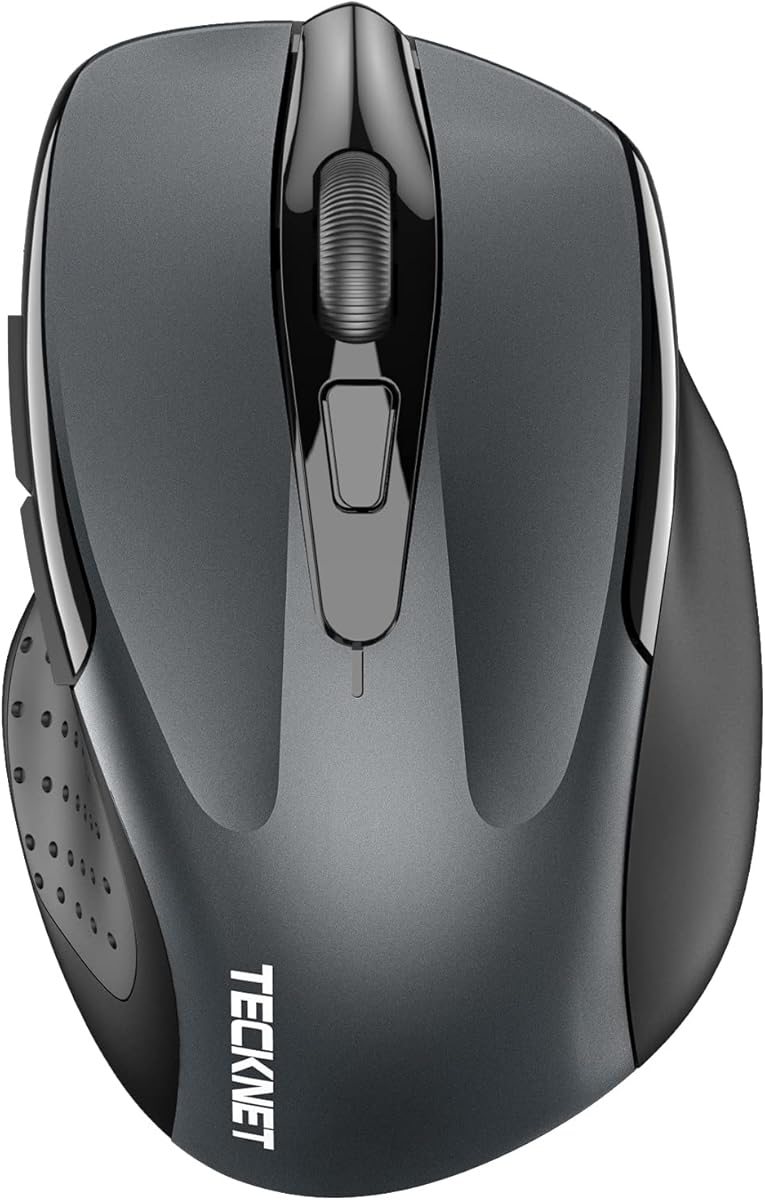
The TECKNET Compact Ambidextrous Wireless Mouse is the perfect budget option for Dell users needing a reliable, no-fuss mouse. Its lightweight design and quiet operation make it ideal for office environments.
We may earn a commission when you buy through this link, at no additional cost to you.
This mouse features a compact size that fits easily in bags and small workspaces. The soft clicks minimize noise disturbance, and its 2.4GHz wireless ensures stable connectivity up to 49 feet.
While it lacks advanced features like DPI switching or programmable buttons, it excels in simplicity and comfort. The mint green color also adds a touch of personality to your setup.
For students or travelers on a tight budget, this mouse delivers essential functionality without breaking the bank. It proves that affordability doesn't mean compromising on usability.
Weighing almost nothing, this mouse is easy to carry in a laptop bag for travel or commuting.
Silent clicks ensure you can work without disturbing colleagues or roommates in quiet spaces.
We may earn a commission when you buy through this link, at no additional cost to you.
The VssoPlor Wireless Mouse combines style with practical features for Dell laptop users. Its slim profile and quiet operation make it a great choice for modern offices.
We may earn a commission when you buy through this link, at no additional cost to you.
Powered by 2.4GHz wireless, it ensures stable connectivity up to 10 meters. The auto sleep mode helps conserve battery life, and the smooth frosted surface adds a premium tactile feel.
Though it lacks advanced customization, its simplicity and reliability are its strengths. The design is ergonomic enough for short to medium sessions without causing fatigue.
If you value aesthetics and quiet performance, this mouse is a solid contender. It offers a balanced experience for general computing tasks.
Auto sleep mode activates after 5 minutes of inactivity to save power and extend battery life.
The smooth frosted surface provides a comfortable grip and reduces fingerprints during use.
We may earn a commission when you buy through this link, at no additional cost to you.
The Logitech M510 is renowned for its comfort and versatile features. Its contoured shape supports hand position during extended work sessions, making it ideal for productivity-focused users.
We may earn a commission when you buy through this link, at no additional cost to you.
With two years of battery life and side-to-side scrolling, this mouse enhances navigation efficiency. The Logitech Unifying receiver allows you to connect multiple devices seamlessly without extra dongles.
Its larger size may not suit everyone, especially those with smaller hands. However, the comfort it provides often outweighs this limitation for most users.
For long workdays requiring precision and comfort, the M510 remains a top contender. Its reliable performance and ergonomic benefits justify its continued popularity.
Soft rubber grips and a broad palm area reduce strain during all-day computer use.
Side scrolling allows quick navigation through spreadsheets and wide webpages effortlessly.
We may earn a commission when you buy through this link, at no additional cost to you.
The Logitech M185 is a compact and reliable option for Dell laptop users who travel frequently. Its simple design makes it perfect for basic computing needs without unnecessary complexity.
We may earn a commission when you buy through this link, at no additional cost to you.
Featuring a nano USB receiver and one year of battery life, it balances portability with longevity. The ambidextrous design ensures comfort for both right and left-handed users.
While it lacks advanced features, its plug-and-play simplicity is a major benefit. The recycled plastic construction also appeals to environmentally conscious consumers.
Ideal for students or professionals needing a lightweight travel mouse, the M185 delivers consistent performance. It's a no-nonsense choice for everyday tasks.
Its compact size ensures it fits easily in any laptop bag or pocket for easy transport.
Plastic parts include certified post-consumer recycled materials reducing environmental impact.
We may earn a commission when you buy through this link, at no additional cost to you.
The Logitech M330 Silent Plus is designed for users seeking a quiet workspace. Its silent click technology reduces noise by over 90 percent, making it perfect for shared environments.
We may earn a commission when you buy through this link, at no additional cost to you.
With a contoured shape and 18-month battery life, it offers comfort and reliability without compromising on usability. It works seamlessly across multiple operating systems without requiring additional software.
Its limitation is that it is designed only for right-handed users, which might be a drawback for left-handed individuals. However, the quiet operation is a significant benefit for most.
This mouse is ideal for libraries, offices, or home settings where noise is a concern. It balances comfort with acoustic sensitivity effectively.
SilentTouch technology reduces clicking sounds significantly improving the shared workspace experience.
Naturally shaped grips support the hand comfortably during extended work sessions reducing fatigue.
We may earn a commission when you buy through this link, at no additional cost to you.
The TECKNET Wireless Mouse BT offers exceptional versatility with dual connectivity options. You can switch between Bluetooth and USB seamlessly, making it ideal for multitaskers.
We may earn a commission when you buy through this link, at no additional cost to you.
With up to 4800 DPI and silent operation, it meets both precision and quietness needs. The six buttons allow for shortcuts, and adjustable DPI settings adapt to different screen sizes.
While side buttons have limitations on Mac, the overall functionality remains strong for Windows users. Its ergonomic design supports comfort without being overly bulky.
For users managing multiple devices, this mouse provides excellent utility. Its features make it a powerful tool for productivity and navigation.
Connect two devices simultaneously and switch between them instantly for seamless workflow.
Adjustable DPI levels allow customization for tasks ranging from browsing to detailed design.
We may earn a commission when you buy through this link, at no additional cost to you.
The TECKNET Rechargeable Mouse stands out for its eco-friendly power solution. With a built-in battery that lasts up to three months per charge, it eliminates the need for disposable batteries.
We may earn a commission when you buy through this link, at no additional cost to you.
Its dual connectivity and silent operation make it a modern choice for versatile work environments. The rechargeable feature ensures you save money and reduce waste over time.
A minor drawback is that connection may weaken when the battery is low, though this serves as a reminder to recharge. Overall, it offers convenience and sustainability.
For environmentally conscious users, this mouse is an excellent investment. It combines performance with modern power efficiency seamlessly.
Rechargeable design reduces battery waste and lowers long-term costs for users.
Bluetooth and USB options ensure compatibility with various devices without extra accessories.
We may earn a commission when you buy through this link, at no additional cost to you.
The Dell Wired Mouse MS116 offers simplicity and reliability for users who prefer wired peripherals. It eliminates battery concerns and ensures a consistent connection without signal interference.
We may earn a commission when you buy through this link, at no additional cost to you.
Its compact design makes it suitable for small workspaces. Plug-and-play functionality means you can start using it immediately without installing drivers or software.
While the lack of wireless limits mobility, it remains an excellent backup or stationary option. It provides essential functionality at an affordable cost.
For basic computing tasks, this mouse is a practical choice. It proves that sometimes the simplest options deliver the most reliable performance.
Powered directly by USB, it never requires battery replacements or charging.
Plug and play means no additional software is needed to start using the mouse immediately.
We may earn a commission when you buy through this link, at no additional cost to you.
Selecting the right external mouse requires considering various factors such as connectivity, ergonomics, and battery life to ensure compatibility with your Dell laptop.
Choose between wireless and wired based on your mobility needs. Wireless mice offer flexibility while wired options ensure consistent performance.
Consider Bluetooth or USB receiver options for seamless integration with your Dell device.
Select a mouse shape that fits your hand comfortably to prevent strain during long sessions.
Ambidextrous designs suit both hands while ergonomic contours benefit right-handed users primarily.
Check battery specifications to avoid frequent replacements or recharging interruptions.
Long-lasting batteries or rechargeable models offer convenience for busy professionals.
Adjustable DPI settings allow you to control cursor speed for precision tasks or quick navigation.
Higher DPI values are beneficial for detailed work while lower DPI suits general browsing.
Ensure the mouse software supports your operating system to unlock full customization features.
Some brands offer Dell-specific tools enhancing performance and customization within the ecosystem.
Durable materials ensure the mouse withstands daily use without wear or failure.
Look for reputable brands offering warranties to protect your investment.
Pair your wireless mouse with your Dell laptop using Bluetooth or USB receiver following manufacturer instructions for optimal connectivity.
Clean the surface regularly with a dry cloth to maintain sensor accuracy and smooth tracking performance.
Store in a protective case when traveling to prevent physical damage and ensure readiness for use.
Yes, most mice are compatible with Dell laptops regardless of brand. Ensure your operating system supports the mouse drivers for full functionality and customization.
A DPI of around 800 to 1600 is suitable for general tasks like browsing and document editing. Higher DPI may be needed for graphic design or gaming tasks.
Enable Bluetooth on your Dell laptop, put the mouse in pairing mode, and select it from your device list. Some mice support Swift Pair for faster connection on Windows.
Most modern wireless mice use low-latency technology that prevents noticeable lag. Using the 2.4GHz wireless band minimizes interference for smooth performance.
With proper care, a quality mouse can last several years. Replace it if buttons become unresponsive or tracking issues develop beyond normal use.
Yes, many mice support customization via dedicated software. Install manufacturer utilities to remap buttons for enhanced productivity and workflow efficiency.
We reviewed ten exceptional mice tailored for Dell laptops, highlighting options for productivity, comfort, and budget.
Prioritize ergonomics and connectivity based on your daily tasks to ensure a satisfying user experience.
Always check current pricing and availability before purchasing to secure the best deal for your needs.