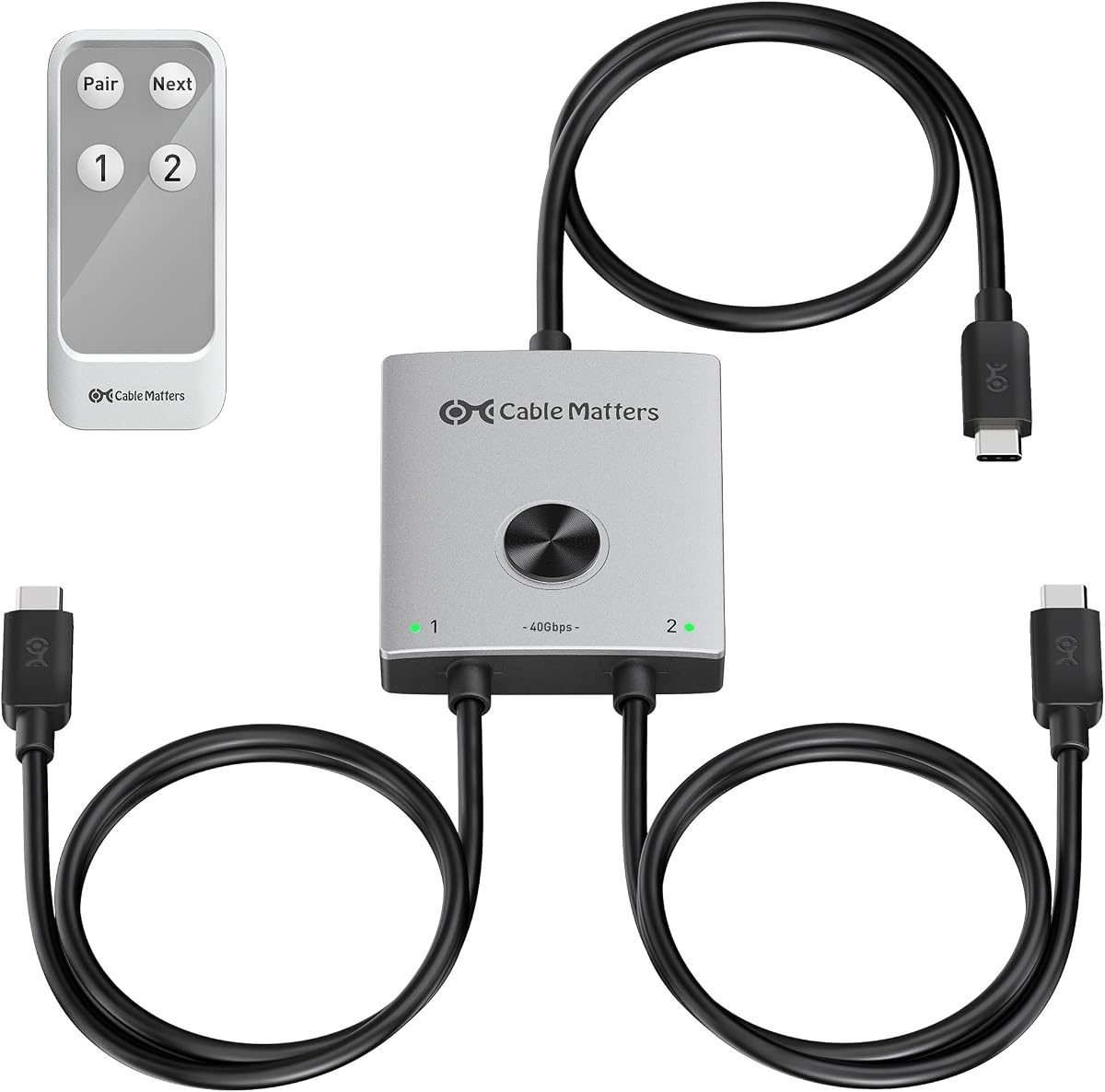
Cable Matters 40Gbps USB C KVM Switch for 2 Laptops
4.6Editor score
40Gbps bandwidth
Thunderbolt 4 compatible
140W power delivery
Discover the top laptops and KVM switches for seamless multi-computer setups. This guide compares performance, compatibility, and features to help you choose.
Finding the right laptop with KVM support can transform your workspace efficiency. Whether you manage multiple devices or need flexible connectivity, these solutions streamline your workflow effectively.
We evaluated ten top-rated products based on compatibility, speed, and ease of use. Our analysis covers USB-C hubs, docking stations, and dedicated KVM switches designed for modern laptops.
Each pick highlights key features, pros, and cons to guide your decision. Prices fluctuate frequently, so check current listings before purchasing to ensure you get the best deal available.
4.6Editor score

4.9Editor score

4.0Editor score
This comparison table summarizes the key features and specifications of the top ten laptop KVM solutions available in October 2026. Use it to quickly identify which model fits your specific connectivity needs and budget constraints.


This AV Access KVM switch delivers exceptional performance for users needing three monitors and two computers. With a 4.9 rating, it stands out for 8K@60Hz support and seamless switching capabilities.
We may earn a commission when you buy through this link, at no additional cost to you.
The device supports high refresh rates like 4K@165Hz, making it ideal for gaming and design work. Its shared Ethernet port ensures background downloads continue on the unselected computer, enhancing productivity.
While the price is higher than basic switches, the included features like 100W charging and SD card reader justify the cost. Users should note that HDMI and DisplayPort cables must be purchased separately.
Recommend this KVM switch for professionals managing complex multi-monitor setups. Its robust build and advanced features make it a top choice for demanding workflows.
The switch supports up to 8K@60Hz for desktop PCs, providing crystal-clear visuals for detailed tasks and immersive gaming experiences.
Unlike traditional KVMs, this device keeps the Ethernet connection active on both computers, allowing uninterrupted cloud sync and downloads.
We may earn a commission when you buy through this link, at no additional cost to you.
The Cable Matters KVM switch offers premium bandwidth for Thunderbolt 4 and USB4 docks. Its 4.6 rating reflects its ability to handle high-speed data and video without lag.
We may earn a commission when you buy through this link, at no additional cost to you.
Users can connect compatible docks to share displays and peripherals between two laptops. The 140W power delivery ensures devices stay charged while switching between active computers.
Note that it requires docks with detachable host cables, excluding models with built-in paths. This limitation ensures optimal performance but requires careful compatibility checks before purchase.
Ideal for users with high-end Thunderbolt setups needing maximum throughput. The RF remote adds convenience for switching without reaching for the device directly.
The switch works with Thunderbolt 4 docks like CalDigit TS4, ensuring full bandwidth and feature parity for connected peripherals.
With 140W pass-through charging, laptops remain powered during switching, eliminating the need for separate charging adapters on each device.
We may earn a commission when you buy through this link, at no additional cost to you.
This Hearvo HDMI KVM switch provides an affordable way to share a monitor between two computers. With a 4.0 rating, it balances cost and performance effectively for basic setups.
We may earn a commission when you buy through this link, at no additional cost to you.
Features like 4K@60Hz and USB 3.0 ports ensure smooth data transfer and high-quality visuals. The built-in remote allows switching without reaching under the desk.
While limited to one monitor, it supports various operating systems including macOS and Linux. It is perfect for users needing a simple dual-computer workspace without extra costs.
Choose this switch for budget-friendly home or office use. It simplifies cabling and improves efficiency without requiring additional power adapters or complex configurations.
No driver installation or power supply is required, making setup quick and easy for users of all technical levels.
The switch works with Windows, Mac, and Linux systems, ensuring broad support for different computer environments and peripherals.
We may earn a commission when you buy through this link, at no additional cost to you.
This hybrid KVM switch is designed for users managing four computers with two monitors. Its 4.2 rating reflects strong performance for multi-PC environments needing shared peripherals.
We may earn a commission when you buy through this link, at no additional cost to you.
It accepts various video interfaces like HDMI and DisplayPort, making it versatile for different desktop setups. The EDID emulator prevents window resizing issues when switching computers.
The 100W PD charging port is a major benefit for laptops, though it powers at 73-85W in practice. Users must connect USB cables to each PC for peripherals to work correctly.
Best suited for office setups with multiple desktop PCs and a laptop. It reduces desk clutter by centralizing connections, though it requires careful cable planning.
The switch accepts different video input combinations, allowing it to connect laptops and desktops with varied ports seamlessly.
The built-in EDID chip ensures stable switching by maintaining consistent display settings across all connected computers.
We may earn a commission when you buy through this link, at no additional cost to you.
This USB-C docking KVM switch expands a laptop to three monitors, ideal for multitasking professionals. Its 4.3 rating highlights effective MST functionality for extended displays.
We may earn a commission when you buy through this link, at no additional cost to you.
It supports dual 4K@60Hz and one 1080P output, creating a powerful workstation. The 10Gbps USB transfer ensures peripherals remain fast and responsive across connected devices.
Mac users should note that MST is not supported, limiting displays to mirrored mode. Also, laptops need an 11th-gen CPU or higher for stable three-screen output.
Choose this for Windows users needing triple-monitor productivity. It simplifies docking by combining KVM and hub functions into one efficient solution.
Expand a single laptop into a triple-monitor setup, enhancing multitasking capabilities for complex workflows.
USB 3.1 Gen 2 ports deliver 10Gbps speeds, ensuring external drives and peripherals operate without latency.
We may earn a commission when you buy through this link, at no additional cost to you.
The AV Access 8K KVM switch combines docking and switching for triple-monitor setups. With a 4.2 rating, it offers high-resolution support for modern workflows.
We may earn a commission when you buy through this link, at no additional cost to you.
It handles 8K@60Hz video, providing exceptional clarity for design and content creation. The shared Ethernet keeps both computers online, preventing interruption to background tasks.
MacBooks can only mirror displays here, limiting productivity for macOS users needing extended screens. Also, HDMI and DisplayPort cables must be sourced separately.
Best for users needing a clean desk with minimal cables. It replaces multiple devices with one dock, offering a streamlined solution for high-end setups.
This device acts as a complete docking station, reducing the need for separate hubs and card readers.
Support for 1080p@480Hz ensures smooth motion for gaming, catering to competitive and casual players.
We may earn a commission when you buy through this link, at no additional cost to you.
This KVM docking station simplifies dual-laptop workspaces by sharing monitors and peripherals. With a 4.2 rating, it ensures seamless switching between work and personal devices.
We may earn a commission when you buy through this link, at no additional cost to you.
It provides 60W charging for each laptop, reducing the need for separate chargers. The 12-in-1 design includes Ethernet, SD card, and audio ports for all needs.
Mac users should note that displays are mirrored, not extended. Also, it does not support FreeSync or G-Sync, which may affect gaming performance.
Ideal for professionals managing dual systems at home. It keeps the workspace organized and efficient while maintaining full connectivity for peripherals.
Charges two laptops simultaneously with 60W each, ensuring both devices stay powered throughout the workday.
Switches between laptops in 2-3 seconds using EDID emulation, minimizing downtime during workflow transitions.
We may earn a commission when you buy through this link, at no additional cost to you.
This AV Access model offers triple-monitor support for laptops and desktops. Its 4.9 rating underscores its reliability and high-end feature set for demanding users.
We may earn a commission when you buy through this link, at no additional cost to you.
It supports 8K@60Hz video, ideal for detailed work and gaming. The shared Ethernet ensures background tasks continue on both computers without interruption.
MacBook users are restricted to mirrored displays, so consider this carefully for macOS setups. Video cables are not included, adding to the total cost.
Recommend for users needing a powerful, centralized workstation. It replaces multiple devices with one dock, simplifying complex multi-computer environments.
Expand a single laptop into a triple-monitor setup, enhancing multitasking capabilities for complex workflows.
USB 3.2 Gen 2 ports deliver 10Gbps speeds, ensuring external drives and peripherals operate without latency.
We may earn a commission when you buy through this link, at no additional cost to you.
This dock allows two laptops to share two monitors and peripherals efficiently. With a 4.1 rating, it provides a stable solution for home offices.
We may earn a commission when you buy through this link, at no additional cost to you.
It features a shared Ethernet port for internet access and supports 100W charging. The fast switching ensures minimal delay between computers.
Note that MacOS only supports mirror mode here, limiting extended screen benefits. Also, original laptop adapters are needed for charging.
Choose this for dual-laptop users needing a centralized hub. It streamlines connections and ensures consistent performance across devices.
Both laptops can access the internet simultaneously through the shared Ethernet port, ensuring continuous connectivity.
Switches between laptops in 2-3 seconds with automatic wake-up, keeping workflows efficient and responsive.
We may earn a commission when you buy through this link, at no additional cost to you.
This KVM switch supports high-resolution Displayport outputs up to 8K@60Hz. With a 4.2 rating, it caters to users needing crisp visuals and fast refresh rates.
We may earn a commission when you buy through this link, at no additional cost to you.
It includes a wireless controller for convenient switching and features four USB 3.0 ports. External power ensures stable performance with high-draw devices.
Note that a Super Speed DP 1.4 cable is required for 8K, which is sold separately. This setup is best for desktop users prioritizing display quality.
Select this for gaming or video work requiring high resolution. It balances affordability with advanced video features for demanding users.
Supports 8K@60Hz video, delivering high-resolution visuals ideal for creative and technical applications.
Includes a wireless remote for switching, allowing flexible placement of the KVM switch away from the desk.
We may earn a commission when you buy through this link, at no additional cost to you.
This USB-C switch offers high-speed data transfer and charging for mobile professionals. With a 3.9 rating, it provides good performance for travelers needing quick setups.
We may earn a commission when you buy through this link, at no additional cost to you.
It supports up to 20Gbps transfer and 140W charging, keeping laptops powered while switching. The wireless remote adds convenience for switching between devices.
MacOS limits users to a single 4K@60Hz monitor, and Dell docks are not supported. Verify dock compatibility before purchase to avoid issues.
Choose this for portable workflows where USB-C dominates. It ensures devices stay charged and data moves quickly, making it ideal for digital nomads.
Compact and tool-free, this switch is easy to carry for work or play anywhere you go.
Enjoy up to 20Gbps transfer speeds, ensuring fast file sharing and peripheral responsiveness.
We may earn a commission when you buy through this link, at no additional cost to you.
This KVM switch delivers ultimate bandwidth for Thunderbolt and USB4 setups. With a 4.6 rating, it ensures zero lag for data and video transmission.
We may earn a commission when you buy through this link, at no additional cost to you.
It supports up to 8K@60Hz video and 140W power delivery. The RF remote allows switching from a distance without line-of-sight limitations.
Note that docks with built-in cables are not supported, requiring specific Thunderbolt-compatible models. This limitation ensures optimal performance for high-end users.
Recommend for professionals needing maximum speed and reliability. It is the ideal choice for users with advanced Thunderbolt 4 docking stations.
Experience the highest bandwidth available for USB-C, ensuring all data and video transfer without bottlenecks.
Use the RF remote to switch laptops without needing direct line of sight, adding convenience to any workspace.
We may earn a commission when you buy through this link, at no additional cost to you.
Selecting the right KVM switch for your laptop requires considering compatibility, video resolution, and port variety. This guide outlines key factors to help you make an informed decision.
Ensure the KVM switch supports your monitor's resolution, such as 4K@60Hz or 8K@60Hz. Higher resolutions require compatible bandwidth like HDMI 2.1 or DisplayPort 1.4.
Choose a switch matching your display needs to avoid quality loss or refresh rate issues during work or gaming.
Check for USB 3.0 or USB 3.1 ports to ensure fast data transfer for peripherals like drives and webcams. More ports allow sharing more devices between computers.
Prioritize USB 3.0 or higher for reliable performance, especially when transferring large files between systems.
Many modern KVM docks offer Power Delivery (PD) charging for laptops. Look for wattage like 100W or 140W to keep your laptop powered while switching.
Verify the KVM supports your laptop's charging requirements to eliminate the need for separate power adapters on your desk.
Confirm the switch works with your operating system. Some devices support Windows and Linux fully, but macOS may limit features like extended displays.
Read product notes carefully for macOS users to understand if your setup requires mirror mode instead of extended screens.
Decide how many computers and monitors you need. Basic switches handle 2 computers and 1 monitor, while advanced ones support 4 computers and 3 monitors.
Choose a KVM switch matching your current setup and potential future needs to avoid needing an upgrade soon.
Many KVM switches require cables to be purchased separately. Verify if HDMI, DisplayPort, or USB cables are included to avoid extra costs.
Ensure you have the correct cable types and lengths to avoid signal issues or the need for additional adapters during setup.
Fast switching speeds improve workflow efficiency. Look for KVM switches with EDID emulation to reduce switching times and prevent screen flicker.
Prioritize models with wired or wireless remotes for quick, seamless transitions between computers without reaching under your desk.
Some switches require external power for stable performance, especially with high-power USB devices. Others work without power for simpler setups.
Consider if you need a portable solution or a permanent station that can handle external power for maximum stability.
Connect all monitors and laptops to the KVM switch using compatible HDMI or DisplayPort cables. Ensure each computer has USB data cables connected to share peripherals.
Plug the KVM into a power outlet if required, then connect shared USB devices like keyboards, mice, and external drives to the switch ports.
Switch between computers using the front panel button or included remote. Avoid unplugging devices while active to prevent hardware or software damage.
KVM support refers to a switch that allows multiple computers to share one monitor, keyboard, and mouse. It simplifies multi-computer workspaces by centralizing input and display devices into one setup.
Some KVM switches require external power for stable operation, especially with high-power USB devices. Others work without power for simpler setups using low-power peripherals.
Yes, but macOS often limits extended displays to mirror mode. Always check the product specifications to confirm macOS compatibility for your desired monitor setup.
Many advanced KVM docking stations support Power Delivery charging. This allows your laptop to stay powered while using shared displays and peripherals simultaneously.
Switching is typically done via a front panel button, wired remote, or keyboard hotkeys. Some switches offer wireless remotes for convenience without reaching for the device.
Most KVM switches do not include video cables. You should verify what is included and purchase compatible cables separately to match your monitor and computer ports.
EDID emulation ensures stable switching by maintaining consistent display settings. It prevents window resizing or flickering when transitioning between different computers.
Yes, as long as the KVM switch has enough USB ports. Connect your printer to the switch so both computers can access it through the shared USB connections.
The AV Access KVM Switch and Cable Matters 40Gbps switch stand out as top choices for professionals needing high-resolution and fast data support. They offer advanced features that enhance productivity significantly.
When prioritizing, focus on resolution needs, charging power, and port variety. Selecting a KVM switch that matches your workflow ensures long-term satisfaction and stability.
Prices change frequently, so always check current listings before finalizing your purchase. This guide provides a strong foundation to help you pick the best device for your needs.