
ASRock DeskMini X300
4.2Editor score
AM4 Socket Support
Ultra Compact Design
Triple Display Output
Compare the top 10 AMD barebone PCs for 2026. Our guide evaluates performance, connectivity, and expandability for gaming and work.
Barebone PCs with AMD processors offer a unique blend of compact design and powerful performance for modern computing needs. These systems allow users to customize hardware components like RAM and storage to fit specific budget requirements and usage scenarios perfectly.
Our expert team analyzed ten distinct models based on processor architecture, cooling efficiency, port selection, and overall build quality. We prioritized systems that deliver strong multitasking capabilities while maintaining the small footprint essential for space constrained environments.
Each pick highlights specific strengths such as gaming readiness or workstation versatility tailored to different user profiles. Please note that product availability and pricing can fluctuate frequently so verify current details before finalizing your purchase decision.
4.2Editor score

4.0Editor score

3.1Editor score
This side by side comparison evaluates ten leading AMD barebone systems across critical performance and connectivity metrics to help you identify the ideal fit.





The AOOSTAR MACO stands out as a powerful contender for users seeking high performance in a compact form factor. Its rating reflects strong satisfaction among early adopters who value the flexibility of barebone configurations.
We may earn a commission when you buy through this link, at no additional cost to you.
Powered by the AMD Ryzen 7 PRO 8845HS this system delivers exceptional multi-threaded performance ideal for content creation and gaming. The integrated Radeon 780M graphics ensure smooth visuals without needing a discrete GPU immediately.
While the lack of included components means extra initial cost the high expansion potential makes up for it significantly. Users can tailor the system precisely to their needs ensuring long term usability and performance growth.
This unit is best suited for tech savvy users who want to customize their hardware stack completely. It offers a premium experience with robust connectivity options that justify its position as a top pick.
The VC heat spreader ensures stable performance even under heavy loads by efficiently dissipating heat away from critical components.
With dual USB4 and OCuLink ports this device supports diverse peripheral setups including external GPUs and high speed storage solutions.
We may earn a commission when you buy through this link, at no additional cost to you.
The AOOSTAR GEM12+ impresses with a high user rating that speaks to its reliability and performance capabilities. It balances raw power with energy efficiency making it suitable for various usage scenarios effectively.
We may earn a commission when you buy through this link, at no additional cost to you.
Its processor supports AV1 decoding and offers top AI performance which enhances media consumption and machine learning tasks significantly. The vapor chamber cooling system ensures the device remains quiet even during intense gaming sessions.
Users may find the barebone nature requires some technical knowledge to configure fully but the flexibility offered is substantial. This model supports up to four 4K displays making it excellent for multi monitor office setups.
Ideal for enthusiasts looking to build a compact gaming rig or a powerful workstation this system delivers robust capabilities. The inclusion of multiple power modes allows users to optimize for noise or performance as needed.
The advanced cooling design minimizes noise output allowing for a quieter computing environment even under heavy processing loads.
Support for four simultaneous 4K displays provides immense screen real estate for multitasking and creative workflows without lag.
We may earn a commission when you buy through this link, at no additional cost to you.
The AOOSTAR GEM12+ PRO differentiates itself with integrated security features like fingerprint recognition for quick and safe access. It maintains the high performance standards of the GEM12 series while adding practical daily usability enhancements.
We may earn a commission when you buy through this link, at no additional cost to you.
Its processor supports AV1 decoding and offers significant AI performance which enhances media consumption and machine learning tasks significantly. The vapor chamber cooling system ensures the device remains quiet even during intense gaming sessions.
Users who value data security will appreciate the convenience of biometric login alongside enterprise grade encryption capabilities. The system is fully DIY allowing you to select memory and SSD capacity freely per your budget needs.
This model is perfect for home offices or gaming setups where quick access and strong performance are equally important. It balances security with high throughput connectivity making it a versatile choice for modern users.
Fingerprint recognition simplifies login without complicated passwords enabling quicker and safer access to your device instantly.
Advanced power saving architecture cuts consumption by up to 20 percent ensuring lower electricity bills and less heat.
We may earn a commission when you buy through this link, at no additional cost to you.
The ASRock DeskMeet X300 boasts an exceptionally high rating from users who value its upgrade potential and robust power supply. It stands out by including a 500W PSU which saves buyers an extra expense during assembly.
We may earn a commission when you buy through this link, at no additional cost to you.
Its AM4 socket allows for a wide range of compatible processors making future CPU upgrades accessible without replacing the whole unit. The dedicated PCIe slot is rare in mini PCs and allows for discrete graphics cards.
While it uses DDR4 memory which is older than DDR5 the speed and capacity support remain very strong for most applications. The compact 8 liter chassis fits well on desks while offering desktop level expandability options.
This kit is ideal for enthusiasts who want a balance between compactness and full desktop power. The included power supply simplifies the building process significantly compared to other barebone options available today.
A dedicated PCIe 3.0 x16 slot allows for the installation of a discrete GPU for heavy graphics workloads.
The 500W PSU is included which reduces the need for additional purchases and simplifies the build process.
We may earn a commission when you buy through this link, at no additional cost to you.
The MINISFORUM X1 Lite offers impressive display capabilities allowing users to connect three independent screens simultaneously. This makes it an attractive choice for professionals who need extensive screen real estate in a small form factor.
We may earn a commission when you buy through this link, at no additional cost to you.
Its Ryzen 7 255 processor delivers strong multi-threaded performance and is paired with Radeon 780M graphics for smooth visual processing. The system supports DDR5 memory ensuring faster data transfer speeds than previous generations.
Users should note the average ratings which might indicate some variability in quality control but the specs remain compelling for the price. The chassis design focuses on three-dimensional airflow to prevent heat buildup during extended usage.
Best suited for creative professionals or data analysts this system handles complex workflows with ease. The support for multiple displays and high speed storage makes it a practical tool for multitasking environments.
Triple display output allows for efficient multitasking and streamlined workflows across multiple screens without extra docks.
Wi-Fi 6e support ensures ultra-fast wireless connectivity ideal for large file transfers and stable streaming connections.
We may earn a commission when you buy through this link, at no additional cost to you.
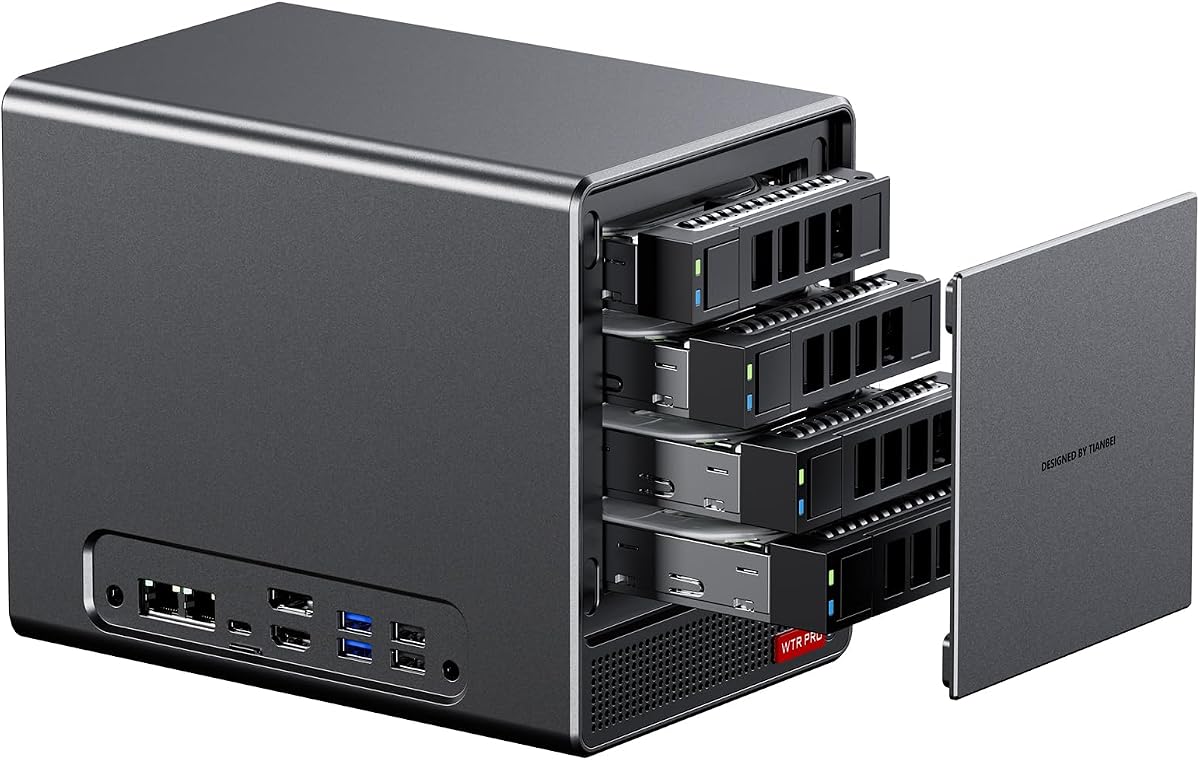
The AOOSTAR WTR PRO is specifically designed to function as a robust home server or Network Attached Storage device. Its 4 bay design allows for massive storage capacity which is essential for media libraries and backups.
We may earn a commission when you buy through this link, at no additional cost to you.
Powered by the Ryzen 7 5825U it offers sufficient processing power for transcoding media and running lightweight virtualization tasks. The dual M.2 slots provide fast access for operating systems or frequently accessed data.
Users looking for a 24/7 reliable server will appreciate the ultra-quiet operation and intelligent fan control features. The energy-efficient architecture helps keep electricity costs low while maintaining stable performance around the clock.
This system is perfect for tech enthusiasts building a DIY NAS solution with ample space for hard drives. The dual network ports offer redundancy or high speed connections for efficient data transfer and file sharing.
Support for four SATA drives allows expansion up to 88TB ensuring ample space for media and backups.
Intelligent fan control and dustproof design maintain low noise levels even during continuous heavy workloads.
We may earn a commission when you buy through this link, at no additional cost to you.
The ASRock DeskMini X300 is an excellent entry point for users seeking a compact PC without breaking the bank. Its tiny 1.92L form factor makes it incredibly space-saving for desks or small workspaces effectively.
We may earn a commission when you buy through this link, at no additional cost to you.
Despite its low cost it supports a wide range of AMD AM4 processors allowing for flexible performance upgrades as needed. The dual M.2 slots and 2.5G LAN port ensure it remains relevant for modern networking and storage needs.
This system supports triple display output which is rare at this price point and enhances productivity significantly for office work. Users should note that it is a barebone system requiring separate purchase of CPU memory and storage.
Best for budget conscious buyers who prioritize portability and space savings this mini PC delivers strong value. It is suitable for lightweight office tasks, media playback and general home use with easy component customization.
At just 1.92 liters this unit is one of the smallest options available for space constrained environments.
Triple display capability allows for efficient multitasking across multiple screens using HDMI DisplayPort and VGA.
We may earn a commission when you buy through this link, at no additional cost to you.
The ASUS ExpertCenter PN54 represents the cutting edge of mini PC technology with its next-generation AI processor and Wi-Fi 7 support. Its sleek ultra thin design sets a new standard for portable high performance computing today.
We may earn a commission when you buy through this link, at no additional cost to you.
Equipped with an XDNA2 NPU it delivers significantly faster AI performance which is crucial for modern applications like content creation and analysis. The toolless design allows for effortless customization without needing specialized tools or skills.
While the rating is lower likely due to its early adoption status the future-proof features justify its premium positioning. It supports up to four 4K displays ensuring that visual output remains top notch for demanding users.
Ideal for early adopters and professionals needing top-tier specs in a tiny chassis this model stands out. The 3-year warranty adds peace of mind for those investing in high-end hardware for long-term use.
The XDNA2 NPU delivers 50 TOPS of AI performance enabling faster processing for complex workloads and tasks.
Wi-Fi 7 support ensures ultra-fast wireless speeds for seamless streaming and large file transfers without cables.
We may earn a commission when you buy through this link, at no additional cost to you.
The AOOSTAR WTR PRO 4+2 offers a versatile storage layout that supports both traditional hard drives and fast NVMe SSDs. This flexibility makes it an ideal home server for mixed workloads ranging from backups to high-speed data processing.
We may earn a commission when you buy through this link, at no additional cost to you.
Its dual 2.5G LAN ports enable robust networking capabilities allowing for redundancy or separate connections for different services. The system supports virtualization technologies which is perfect for running multiple operating systems or containers simultaneously.
Users planning to run Linux should note potential SATA power management quirks but these can be resolved with simple rules. The triple display output adds value for users who want to use the server as a workstation too.
This model is best for advanced users setting up a centralized storage and server hub. It balances storage capacity with strong processing power to handle diverse tasks efficiently in a home or small office environment.
Dual 2.5G LAN ports provide high speed network connectivity ideal for file servers and multi-gigabit environments.
Supports various systems including Windows and Linux offering flexibility for diverse software and virtualization needs.
We may earn a commission when you buy through this link, at no additional cost to you.
The ASUS ExpertCenter PN54-S1 is designed for users who value ease of access and future upgrades without tools. Its thin 34mm chassis fits perfectly in tight spaces while maintaining robust performance capabilities for daily tasks.
We may earn a commission when you buy through this link, at no additional cost to you.
This model supports the Ryzen 200 series and Radeon 740M graphics ensuring solid multi-tasking and light gaming performance. The inclusion of Wi-Fi 7 ensures that wireless connectivity remains fast and reliable for modern networking standards.
Users can quickly upgrade components thanks to the tool-free design which simplifies maintenance and hardware swaps significantly. It is an eco-conscious build that balances sustainability with performance in a sleek package for offices.
Best for those who want a hassle-free build experience without sacrificing future proofing features this system stands out. It is an excellent choice for office environments needing reliable connectivity and easy component access.
Tool-free design allows quick access and easy component upgrades without hassle for quick maintenance and repairs.
Housed in a 34mm chassis this PC combines compact form with eco-conscious durability and long-term reliability.
We may earn a commission when you buy through this link, at no additional cost to you.
Selecting the right barebone PC requires balancing performance needs with physical space constraints and customization goals.
The processor is the heart of your system and determines overall speed and efficiency. Newer architectures like Zen 4 offer better power management and higher clock speeds which translate to smoother multitasking and faster application loading.
Look for a Ryzen 7 or Ryzen 9 processor if you plan on video editing or gaming to ensure you have enough headroom for demanding tasks.
Barebone systems allow you to choose your own RAM and storage but you must verify the maximum supported capacity. Ensure the motherboard supports DDR5 if you need future proofing or DDR4 for budget friendly options.
Check the number of M.2 slots available as this dictates how much storage you can add without external drives for better speed and convenience.
Integrated graphics like Radeon 780M are powerful enough for many modern games but you may need a discrete GPU for heavy rendering. If you plan to use an external GPU check for OCuLink ports for minimal performance loss.
Ensure the system has the right video output ports like HDMI 2.1 or DP 1.4 to support your monitor resolution and refresh rate effectively.
Ports such as USB4, USB 3.2, and Ethernet are critical for connecting peripherals and networking. More ports mean less reliance on dongles and better data transfer speeds for external drives and devices.
High speed LAN ports like 2.5G are valuable for fast local transfers or streaming without clogging your primary internet connection bandwidth.
Compact systems can struggle with heat so effective cooling is essential to maintain performance without throttling. Look for vapor chamber or large fan designs that dissipate heat quickly to keep temperatures low under load.
Proper cooling also ensures the device runs quietly which is important for office environments where noise can be distracting for colleagues.
Some kits include a power supply while others require you to buy one separately. Check if the included PSU is high wattage to support potential upgrades like a discrete GPU or high power storage arrays.
A reliable PSU ensures system stability and prevents unexpected shutdowns which can be frustrating during critical work or gaming sessions.
The materials used in the chassis affect durability and heat dissipation. Aluminum chassis are generally more durable and better at dissipating heat than plastic alternatives.
Look for sturdy construction that allows for easy access to internal components without damaging the case during upgrades or cleaning.
Most barebone PCs do not include an operating system so you must install one yourself. Verify if the hardware supports the OS you intend to use like Windows or Linux without driver issues.
Some models come with preloaded Windows licenses or compatibility with enterprise software which can save time and setup costs later.
First ensure you install compatible RAM and storage before attempting to boot the system as barebone units ship without these components. Follow the motherboard manual carefully to avoid damaging the slots or the components during installation.
Keep the vents free of dust by using compressed air regularly to maintain optimal airflow and cooling efficiency. Over time dust buildup can restrict airflow and cause the system to run hotter and louder than necessary.
Update your BIOS and drivers frequently to ensure you benefit from the latest security patches and performance improvements. Manufacturers often release updates that improve stability and compatibility with new peripherals or software.
Barebone means the computer comes without certain key components like RAM storage or an operating system. You must purchase and install these items separately to complete the build and make it functional.
Yes many AMD barebone PCs feature powerful integrated graphics or support external GPUs via OCuLink. They are excellent for gaming if you choose a model with high clock speeds and good cooling to sustain performance.
It depends on the socket type of the motherboard. AM4 sockets allow for processor upgrades while newer B550 or AM5 boards have specific compatibility lists you should check before swapping the CPU.
Barebone systems offer flexibility to pick components that fit your exact budget and needs. They often save money and allow for higher quality parts in storage or memory compared to prebuilt equivalents.
Most manufacturers provide a warranty on the chassis and motherboard but not on the parts you add later. Always check the specific warranty terms of the barebone kit before purchasing to understand coverage details.
Usually no the box does not include an operating system. You will need to create a bootable USB drive to install Windows or Linux yourself after assembling the components into the system.
OCuLink is a high speed external connection standard that allows you to connect an external GPU with minimal performance loss. It is better than USB4 for gaming because it uses a direct PCIe connection.
For general use 16GB of RAM is sufficient but for gaming or video editing 32GB is recommended. You can expand up to 64GB or more depending on the system capabilities and your future needs.
Our top picks highlight a range of options from the versatile AOOSTAR MACO to the budget friendly ASRock DeskMini X300. Each model offers unique strengths that cater to different needs whether you prioritize graphics performance or cost efficiency.
Consider your primary use case whether it is gaming or office work when selecting a system. Balancing raw power with portability ensures you get a machine that serves you well across different environments and tasks.
Prices and availability fluctuate so check current listings before finalizing your purchase to ensure you get the best deal available today. This guide provides a solid foundation but verifying specs locally is always wise for satisfaction.