
AceGamer Aurora II Controller
4.2Editor score
Hall Effect Joysticks
1000mAh Battery Life
2.4G Wireless Tech
Discover the top Game Controller for Mac options compared for compatibility, precision, and battery life to enhance your gaming experience on Apple devices.
Finding the right Game Controller for Mac can transform your gaming sessions into immersive experiences. Modern controllers offer seamless Bluetooth connectivity and precise inputs tailored for macOS environments.
We compared ten top-rated controllers focusing on compatibility, build quality, and features like Hall Effect joysticks. Our analysis ensures you find a device that works flawlessly with your Mac setup.
Each pick highlights specific strengths such as battery life, ergonomics, and price value. Note that prices change frequently, so verify current details before purchasing your new gaming gear.
4.2Editor score

4.5Editor score

4.4Editor score
This side-by-side comparison highlights key specifications and features across all ten selected controllers to help you make an informed decision for your Mac gaming setup.


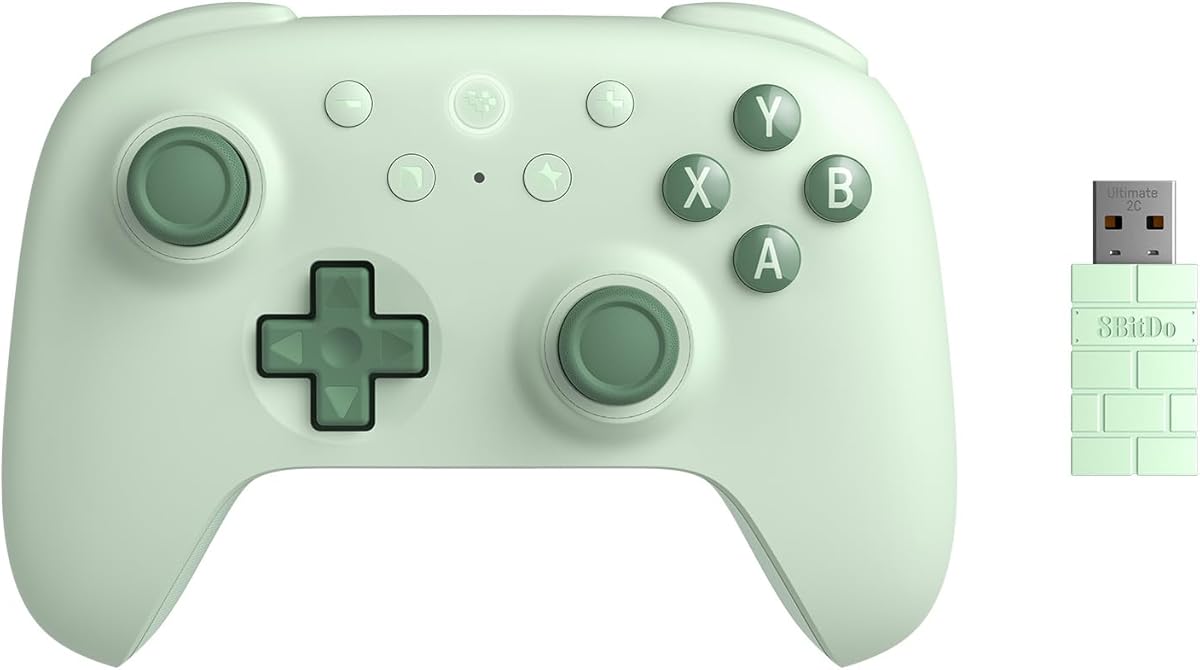

The 8Bitdo Ultimate 2 Wireless Controller stands out as the top choice for Mac users seeking professional-grade performance. With a solid 4.5 rating, this controller delivers high sensitivity and durability through its TMR joysticks.
We may earn a commission when you buy through this link, at no additional cost to you.
Its standout feature is the proprietary 8BitDo Exclusive Wireless Technology, which ensures a stable 2.4G connection with ultra-low latency under 1ms. This makes it ideal for competitive gaming where input lag cannot be tolerated. The trigger mode switch allows users to toggle between linear and non-linear tactile triggers depending on the game type.
While the price point is higher than many alternatives, the inclusion of a multifunctional charging dock and USB-C adapter adds significant value. The customizable 6-Axis Motion Control and Turbo function further enhance gameplay versatility across different genres.
If you prioritize precision and reliability in your Mac gaming setup, this controller is the clear recommendation. It balances advanced features with robust build quality, making it a worthy investment for serious gamers.
TMR joysticks offer higher sensitivity and greater precision than traditional sensors, ensuring smooth and accurate in-game movement without drift.
The 8Speed wireless technology provides rock-solid reliability with a 10m range and virtually no lag for seamless multiplayer experiences.
We may earn a commission when you buy through this link, at no additional cost to you.
The AceGamer Aurora II Controller offers exceptional value for budget-conscious gamers needing a reliable Game Controller for Mac. It features upgraded Hall Effect joysticks that significantly reduce drift, ensuring long-term accuracy during extended play sessions.
We may earn a commission when you buy through this link, at no additional cost to you.
A standout feature is the customizable back keys which allow for trigger combos or other custom inputs. This customization enhances gaming convenience without requiring expensive software. The 1000mAh battery provides extra-long playtime so you can game longer without interruptions.
Connectivity is handled through stable 2.4G wireless transmission which offers strong anti-interference and long connection distance. Although the pairing process for Bluetooth requires holding specific buttons, the receiver ensures a solid connection when plugged in.
For those seeking an affordable yet capable controller with advanced features like Hall Effect sensors and programmable buttons, the Aurora II is an excellent choice. It delivers strong performance suitable for casual and semi-competitive gaming alike.
Hall Effect sensors provide precise input detection and reduced stick drift for smoother movement and improved accuracy over time.
A large capacity 1000mAh battery allows for long gaming sessions without the worry of running out of power unexpectedly.
We may earn a commission when you buy through this link, at no additional cost to you.
The XBOX Wireless Gaming Controller is a premium option that delivers a polished experience for Mac gamers. With a rating of 4.4, it is known for its modernized design that fits comfortably in the hand during long gaming sessions.
We may earn a commission when you buy through this link, at no additional cost to you.
One of its strongest features is the battery life which provides up to 40 hours of wireless use on standard AA batteries. When the batteries run low, you can plug in the included USB-C cable and keep playing without missing a beat.
The controller includes a built-in audio jack allowing you to plug in compatible headsets for direct voice chat and immersive sound. Additionally, the textured grip on triggers and bumpers keeps your hands secure even during intense gameplay moments.
If you prefer a controller with a refined feel and extensive customization options via the Xbox Accessories app, this is the ideal pick. It balances premium build quality with reliable connectivity across multiple devices including your Mac.
Sculpted surfaces and refined geometry are designed around how you actually hold a controller for improved comfort and targeting.
Up to 40 hours of wireless battery life ensures you can play for days without needing to replace or recharge power sources.
We may earn a commission when you buy through this link, at no additional cost to you.
The abxylute C6 Wireless Controller is designed for seamless compatibility across multiple platforms including Mac. It features Dual Hall Effect Joysticks and Triggers that eliminate drifting and dead zones for precise control in every game.
We may earn a commission when you buy through this link, at no additional cost to you.
This controller achieves a 1000Hz polling rate in wired and dongle modes ensuring minimal input lag for competitive edge. The turbo modes allow you to customize rapid-fire attacks with a single press to free your fingers during gameplay.
While the gyro motion sensing is primarily available in Switch games, the controller still offers solid vibration feedback with 4 levels of intensity. The 600mAh battery delivers up to 18 hours of continuous gameplay on a single charge.
Ideal for users who want reliable performance without breaking the bank, the C6 offers essential features like Hall Effect sensors and turbo customization. Just note that the USB dongle mode is recommended for the lowest latency experience.
Hall Effect joysticks provide glitch-free responsive performance reducing wear and tear for a long lifespan.
Turbo feature can be customized to any button allowing rapid-fire attacks to be unleashed with a single press.
We may earn a commission when you buy through this link, at no additional cost to you.
The EasySMX X15 Wireless Controller is designed for Windows PC, Steam, Switch, Android, and iOS platforms. Its Hall Effect joysticks and triggers eliminate stick drift providing smooth and responsive input for FPS and racing games.
We may earn a commission when you buy through this link, at no additional cost to you.
Two programmable back buttons allow you to map combos and shortcuts enhancing your gaming convenience. The 1000mAh battery delivers up to 20 hours of playtime so you can game for extended periods without interruption.
Three connection modes cover all your devices including 2.4G wireless, Bluetooth, and wired USB-C. This flexibility ensures stable wireless minimizes random disconnects during critical gaming moments across different systems.
If you need a solid PC controller with custom back buttons and long battery life, the X15 is a strong contender. Just be aware it is designed without a mic jack or gyro sensor which might limit some specific use cases.
Hall effect technology eliminates stick drift for long-term precision essential for competitive PC gaming sessions.
Three connection modes including 2.4G wireless and wired USB-C ensure stable connectivity across all supported devices.
We may earn a commission when you buy through this link, at no additional cost to you.
The 8Bitdo SN30 Pro Bluetooth Wireless Gamepad Retro Controller brings classic aesthetics with modern features to Mac users. It boasts a full button set with clickable joysticks, rumble vibration, and motion controls for a complete retro experience.
We may earn a commission when you buy through this link, at no additional cost to you.
Hall Effect joysticks ensure higher precision and sensitivity while the 6-Axis gyro adds somatosensory motion control. The controller is officially supported by Mac and iPhone devices ensuring seamless connectivity and quick pairing.
With a 480mAh battery it offers up to 18 play hours with a 1-2 hour charging time. The compact size allows you to easily carry it in your pocket to play games on the go or at home.
Perfect for fans of retro gaming who need modern reliability, this controller combines a classic look with wireless convenience. Its official support for Apple devices makes it a safe and easy choice for Mac gamers.
Full button set with clickable joysticks and USB-C connector offers a proper d-pad and home buttons for complete control.
Officially supported by Mac iPhone iPad and Apple TV ensuring compatibility with minimal setup or driver issues.
We may earn a commission when you buy through this link, at no additional cost to you.
The 8Bitdo SN30 Pro Bluetooth Controller with Hall Effect Joystick (G Classic) is an upgraded transparent version of the popular retro controller. It features a classic cross button design with four shoulder buttons for a nostalgic look.
We may earn a commission when you buy through this link, at no additional cost to you.
Hall Effect joystick technology provides robust and long-lasting control offering higher precision and sensitivity. The controller is fully featured with rumble vibration motion controls and a rechargeable lithium ion battery.
Supporting dual mode via Bluetooth and USB-C cable you can connect easily to your Mac. The firmware update feature ensures you can keep the controller up to date for optimal performance on newer devices.
For gamers who appreciate a transparent retro design combined with modern features, this controller is a great option. Just note that battery life is around 16 hours which is solid but shorter than premium modern controllers.
This transparent version offers a modern look while maintaining the classic cross button and shoulder button design.
Upgraded Hall Effect joystick ensures robust and long-lasting control with higher precision and sensitivity.
We may earn a commission when you buy through this link, at no additional cost to you.
The Moonag Wireless PC Controller offers a feature-packed experience for Mac gamers with Hall Effect joysticks to prevent stick drift. It supports multi-platform compatibility allowing you to switch between devices without reconnecting for seamless gaming.
We may earn a commission when you buy through this link, at no additional cost to you.
With a 1000Hz polling rate it provides ultra-fast response time and minimal input lag ideal for FPS racing sports and competitive games. The turbo function and macro programming support complex commands enhancing your strategic gameplay.
Designed with an ergonomic shape and textured non-slip grip it fits comfortably in your hands to reduce fatigue during extended sessions. The dynamic RGB lighting creates an immersive gaming atmosphere around joysticks and buttons.
If you want a controller that combines competitive performance with aesthetic appeal this Moonag model is a strong choice. Just be aware it is incompatible with Xbox and PS consoles limiting its use primarily to PC and Switch ecosystems.
Hall Effect sensor joysticks effectively prevent stick drift and wear for smoother control and higher accuracy.
Programmable macro buttons allow you to execute complex commands quickly giving you a strategic advantage.
We may earn a commission when you buy through this link, at no additional cost to you.
The 8Bitdo Ultimate 2C Wireless Controller is designed for Windows PC and Android users but offers a refined tactile experience. It features Hall Effect joysticks and triggers along with remappable L4 and R4 bumpers for custom button mapping.
We may earn a commission when you buy through this link, at no additional cost to you.
With a 1000Hz polling rate this controller ensures quick response times essential for competitive gaming sessions. The wear-resistant metal joystick rings add durability and longevity to the controller's physical structure.
The refined bumpers and D-pad are light but tactile providing a satisfying click for every input. This design makes it easy to navigate menus and execute commands accurately during intense gameplay.
If you need a lightweight controller with precise triggers and remappable buttons this 2C model delivers solid performance. While it focuses on PC and Android the build quality makes it a compelling choice for portable gaming.
Custom button mapping without using software allows you to map extra R4 and L4 bumpers for quick access.
Refined bumpers and D-pad are designed to be light but tactile for responsive and satisfying button presses.
We may earn a commission when you buy through this link, at no additional cost to you.
The Logitech G F310 Wired Gamepad Controller is a classic option for those who prefer a reliable wired connection. It features a familiar control layout similar to an Xbox 360 controller making it easy to use without a learning curve.
We may earn a commission when you buy through this link, at no additional cost to you.
With 10 programmable buttons and an 8-way programmable D-pad you can customize your controls using the Profiler software. The six-foot cord lets you lean back and play a comfortable distance from your PC monitor or TV.
Although it is a wired model it ensures stable input without battery concerns or wireless interference. The floating D-pad rests on four switches allowing responsive quick changes in direction for platforming games.
For users who want a budget-friendly and straightforward controller for PC gaming this F310 delivers consistent performance. Just note it does not support wireless connectivity which may limit mobility compared to modern wireless options.
Control layout similar to Xbox 360 means you can use it instantly without needing to learn new button placements.
10 programmable buttons and 8-way D-pad allow for custom profiles tailored to your specific game needs.
We may earn a commission when you buy through this link, at no additional cost to you.
Selecting the right controller involves evaluating connectivity, features, and build quality to match your specific Mac setup and gaming needs.
Ensure the controller supports Bluetooth or has a compatible USB receiver for your Mac. Wired controllers are simpler but limit mobility. Dual mode options offer flexibility.
Check for compatibility with your specific Mac OS version to avoid driver issues. Wireless latency should be minimal for competitive gaming.
Hall Effect joysticks prevent drift and offer higher precision compared to traditional sensors. This feature extends the lifespan and reliability of the controller.
Prioritize models with Hall Effect if you want long-term accuracy. It ensures smooth input without requiring calibration over time.
Long battery life is essential for uninterrupted gaming sessions. Look for controllers with 15 hours or more of playtime on a single charge.
Rechargeable batteries are more convenient than replaceable ones. Consider fast charging features if you play frequently.
Comfort is key during long gaming sessions. Textured grips and balanced weight reduce hand fatigue and improve control.
Choose a controller that fits your hand size comfortably. Lightweight designs are better for portability.
Programmable back buttons and macro functions enhance gameplay convenience. These allow complex inputs without taking your thumb off the joystick.
Look for controllers that support software mapping or onboard memory profiles. This adds versatility for different games.
A higher polling rate such as 1000Hz ensures faster response times. This reduces input lag and makes gameplay more responsive.
Prioritize controllers with high polling rates for competitive gaming. It is especially useful in fast-paced shooters.
Dual vibration motors provide immersive feedback during gameplay. This enhances the sensation of in-game events like explosions or collisions.
Adjustable vibration levels allow you to tailor the intensity. Look for controllers that offer rumble customization.
Verify that the controller explicitly supports macOS and Apple devices. Some controllers prioritize Windows or consoles and may lack Mac support.
Check for official support status to ensure seamless pairing. Multi-platform controllers often offer better Mac integration.
Connect your controller to Mac via Bluetooth by entering pairing mode on the device. Ensure the OS is up to date to recognize the controller automatically without extra drivers.
To maintain performance charge the controller fully before first use and avoid depleting the battery completely. Regular firmware updates keep the controller functioning smoothly on Mac.
Clean the controller regularly with a dry cloth to remove dust and oils from buttons and joysticks. Store it in a cool dry place when not in use to preserve the battery and build quality.
Wireless controllers offer freedom of movement and work well with Mac via Bluetooth or USB receivers. Wired controllers provide zero latency and no battery concerns. Choose based on whether you prioritize mobility or strict response time.
Most modern controllers are plug and play and recognized by macOS automatically. Some advanced features may require specific software or apps to map buttons effectively. Check the product documentation for detailed driver needs.
A typical controller battery lasts between 15 to 40 hours depending on usage and features like vibration. Charging times usually range from 2 to 3 hours. Always check battery specs before purchasing.
Hall Effect joysticks use magnetic sensors to prevent stick drift and increase durability. They provide smoother and more precise input without wearing out over time. This makes them ideal for competitive gaming.
Yes you can use compatible Xbox controllers on Mac via Bluetooth or USB. Ensure your macOS is updated to support the connection. Most newer models are widely supported out of the box.
A polling rate of 1000Hz is ideal for competitive gaming as it minimizes input lag. Lower rates like 125Hz or 250Hz are acceptable for casual play. Higher rates ensure faster and more responsive commands.
Some brands offer controllers designed to support macOS explicitly. However many universal controllers work seamlessly across multiple platforms. Look for compatibility statements to confirm support for Apple devices.
Use a dry microfiber cloth to wipe down buttons and joysticks regularly. Avoid harsh chemicals that could damage the plastic or rubber parts. Store it away from moisture and dust when not in use.
We have reviewed ten top options ranging from budget-friendly picks to premium high-performance models. Each controller offers unique features tailored to different gaming styles and Mac configurations.
Prioritize features like Hall Effect joysticks and high polling rates if you play competitive games. Comfort and battery life remain essential factors for casual players who want long uninterrupted sessions.
Prices for these controllers can fluctuate so always check the current offers before buying. This guide helps you navigate options to find the perfect Game Controller for your Mac setup.