
Heavy Duty 3D Printer Stand with Filament Storage 23.6"×23.6"
4.8Editor score
Compact 23.6 inch design
Holds 32 filament spools
Adjustable leveling feet
Finding the right workspace is crucial for any 3D printing enthusiast. A dedicated stand with filament storage keeps your tools organized and your prints stable. This guide explores the best options available to maximize your creative potential.
We evaluated ten top-rated stands based on build quality, storage capacity, and user feedback. Our comparison covers heavy-duty metal frames, mobile carts, and integrated power solutions. Each product offers unique benefits for different workspace needs.
Each pick highlights specific strengths like vibration dampening or multi-spool capacity. Prices and availability change frequently, so check current listings before buying. This guide ensures you find a reliable stand that fits your budget and setup requirements.
4.8Editor score

4.3Editor score

4.6Editor score
As an Amazon Associate we earn from qualifying purchases.
This comparison table provides a quick overview of the ten best 3D printer stands with filament storage available in November 2026. Review key specifications like dimensions, storage capacity, and unique features to find the perfect match for your setup.
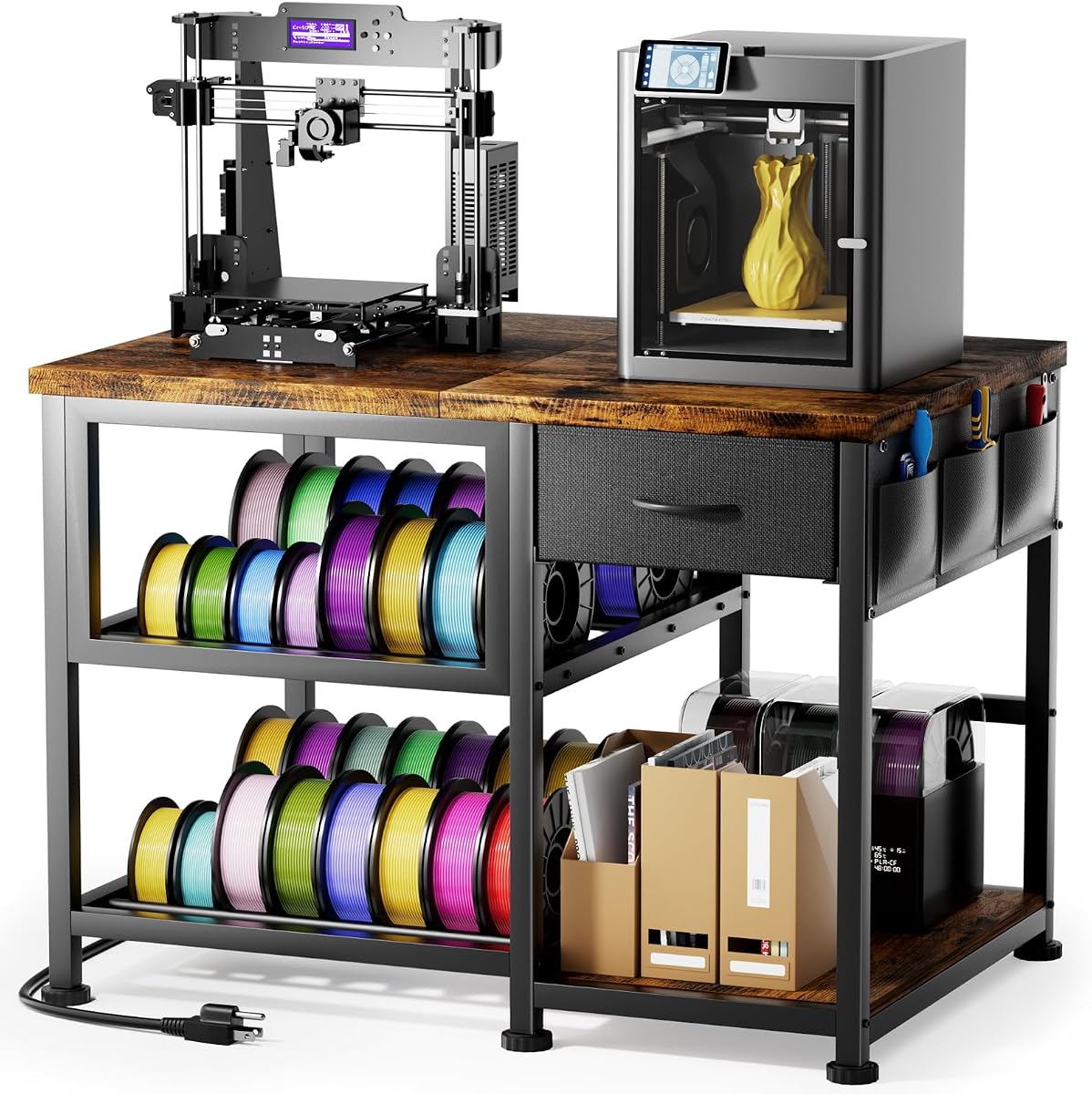


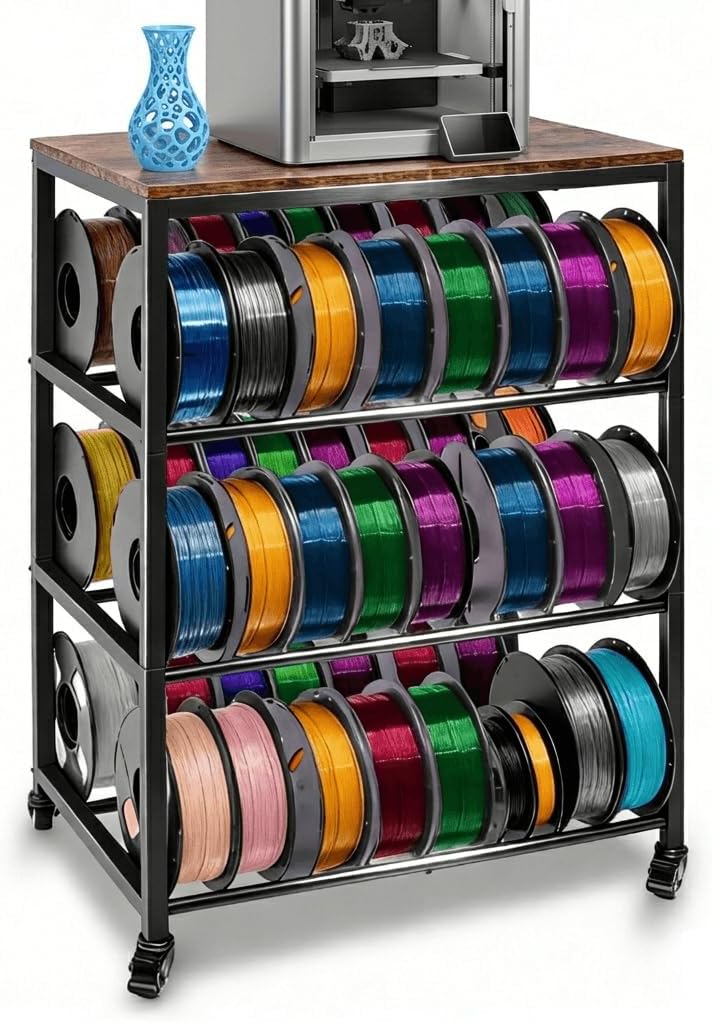
This stand is a powerhouse for serious 3D printing enthusiasts who need serious organization. With a rating of 4.3 stars, users praise its stability and massive storage capacity. The heavy duty metal construction ensures your printer stays level during long prints, which is essential for quality output.
We may earn a commission when you buy through this link, at no additional cost to you.
The standout feature is the open-shelf station that neatly packs up to 56 spools without taking over your floor space. This centralized material hub keeps your workshop efficient and your creative zone clutter-free. Additionally, the heavy-duty metal drawer is designed to keep essential hardware like nozzles and scrapers perfectly organized right at your fingertips.
While the assembly is straightforward, it does require about 25 minutes to set up properly. The size is compact for its capacity but still measures 36 by 23.6 inches, so ensure you have enough room. These trade-offs are acceptable given the industrial aesthetics and the ability to handle a massive 230 plus lbs workload.
Anyone with a multi-spool collection or a dedicated makerspace should consider this stand. It transforms a chaotic workshop into an organized environment. If you need a reliable, sturdy base that doubles as a command center for your prints, this model is a top recommendation for November 2026.
The open-shelf design allows you to store up to 56 spools, preventing clutter and making it easy to find the right color quickly.
Unlike standard desks, this heavy duty table absorbs mechanical vibrations, ensuring smooth surfaces on complex and tall 3D prints.
We may earn a commission when you buy through this link, at no additional cost to you.
This stand combines functionality with a modern aesthetic that fits seamlessly into any office or studio. Its 4.7 rating reflects high user satisfaction with its durability and style. The high-quality wood and metal combination provides both stability and an elegant look that enhances your workspace.
We may earn a commission when you buy through this link, at no additional cost to you.
One of the best features is the integrated power outlet, which eliminates the need for extra extension cords. The 3-tier structure optimizes vertical space, allowing you to store various filament types and colors without clutter. The spacious drawer and side storage pockets ensure all your tools are within arm's reach.
The mobile design ensures convenience if you need to rearrange your studio or transport filaments. However, the wood finish might require more care than a purely metal table to prevent scratches or wear over time. These minor cons are outweighed by the versatility and organizational efficiency it provides.
This stand is perfect for hobbyists and professionals who value aesthetics alongside utility. It accommodates various 3D printer brands and models, ensuring compatibility with your existing setup. If you want a centerpiece that reflects your passion for innovation while keeping things organized, this is a great choice.
Combining wood and metal, this stand provides sturdiness and elegance, making it not just a utility item but a centerpiece for your space.
The 3-tier metal filament spool holder accommodates various spool sizes and weights, ensuring stability and ease of use without tangling.
We may earn a commission when you buy through this link, at no additional cost to you.
This all-in-one workstation integrates a printer table, filament warehouse, and power hub into one compact system. With a 4.4 rating, it is praised for reducing clutter and saving space. The built-in power strip allows you to power your printer and laptop simultaneously, streamlining your workflow.
We may earn a commission when you buy through this link, at no additional cost to you.
The reinforced X-bracket stability provides superior support, reducing vibration and wobble significantly. The spacious 39 inch width accommodates all major 3D printer models and filament spool sizes. Every drawer and compartment is purpose-built for 3D printing essentials, ensuring zero wasted space.
While the stand is sturdy, its weight can make moving it once assembled more difficult. Assembly requires careful attention to the instructions, but the result is a highly functional station. The trade-off in mobility is worth the enhanced stability and power convenience it offers for daily use.
Ideal for studio professionals and heavy-duty creators, this setup helps you print, organize, and power your workflow from a single station. If you need a reliable base that minimizes setup time and maximizes efficiency, this model is a strong contender for your workshop.
Features a built-in power strip with 2 AC outlets and 2 USB ports, eliminating messy cables and multiple power strips.
Constructed from heavy-duty steel frame with X-shaped bracket reinforcement, providing superior stability and reducing vibration by up to 40%.
We may earn a commission when you buy through this link, at no additional cost to you.
This stand offers exceptional value for those needing a reliable base without breaking the bank. With an impressive 4.8 rating, it is loved for its sturdiness and simplicity. The thick steel tubing and solid MDF top hold heavy printers stably, eliminating vibrations for smooth printing.
We may earn a commission when you buy through this link, at no additional cost to you.
The dual-tier storage securely holds up to 32 filament rolls, preventing them from rolling around. Its compact 3-tier space saver layout frees up cluttered desktops while keeping tools and printers organized. The adjustable leveling feet ensure the stand balances perfectly on uneven floors.
The straightforward modular design allows for a quick 20-minute assembly by a single person. While it lacks advanced features like power strips or large drawers, it focuses on core functionality and durability. For budget-conscious buyers, these trade-offs are minor compared to the solid performance.
Perfect for small workshops or garages, this stand provides stability and basic storage efficiently. If you need a simple, heavy-duty base that prioritizes function over flair, this model is a top choice for a budget-friendly solution.
The compact vertical multi-layer layout frees up cluttered desktops, neatly organizing printers, filaments, and tools in one spot.
Thick steel tubing and solid MDF top hold heavy 3D printers stably, eliminating vibrations for smooth, precise printing.
We may earn a commission when you buy through this link, at no additional cost to you.
Designed for creators who run multiple printers, this stand features two dedicated working zones. With a 4.2 rating, it is appreciated for its rigidity and spacious platform. The thoughtfully divided tabletop allows you to service one printer without disrupting the other.
We may earn a commission when you buy through this link, at no additional cost to you.
Each zone has its own closed-loop metal frame, ensuring stability is not compromised. The unique dual-side hanging mesh racks hold over 48 filament spools, maximizing storage space. Built with a heavy-duty reinforced metal frame, it supports up to 300 lbs static load.
The assembly manual is ultra-detailed, which helps first-time builders finish quickly. However, the unit is larger and heavier, requiring more floor space. These cons are acceptable for users needing a high-capacity, dual-station solution.
Ideal for serious makers and small print studios, this workstation performs flawlessly across various scenarios. If you need to host two printers side-by-side with ample storage, this is a specialized and effective choice.
Two dedicated working zones help isolate vibration and minimize mutual interference during simultaneous printing jobs.
Dual-side hanging mesh racks match the dual-zoned layout to sort and store filaments by each printer station.
We may earn a commission when you buy through this link, at no additional cost to you.
This stand is designed for users who need a place for both heavy-duty stability and accessible tool storage. With a 4.1 rating, users note its spacious workstation and solid construction. The premium high-density particleboard and steel frame handle over 150 lbs with ease.
We may earn a commission when you buy through this link, at no additional cost to you.
The dual fabric accessory tool drawers are perfect for partitioning scrapers, pliers, and extra nozzle tips. Side and bottom shelves are engineered to securely organize over 50 filament spools. It also works well for home office printers, offering dual purposes.
Fabric drawers can collect dust compared to solid metal ones, so they may need occasional cleaning. The weight limit is slightly lower than all-metal options, but sufficient for most setups. These are minor trade-offs for the added organizational flexibility.
Great for hobbyists who value quick access to tools while printing, this desk combines durability with style. If you want a setup that keeps everything from spools to screwdrivers neatly in one place, this is a practical option.
Dual fabric drawers perfectly partition your scrapers, pliers, and extra replacement nozzle tips for easy access.
One shelf serves dual purposes, providing a spacious area to display printed products or using with a home office printer.
We may earn a commission when you buy through this link, at no additional cost to you.
This workstation combines a durable metal frame with a clean modern wood desktop. With a 4.3 rating, it is praised for its organized storage and power options. The massive filament storage keeps PLA and other spools visible and within easy reach while printing.
We may earn a commission when you buy through this link, at no additional cost to you.
Built-in power management includes AC outlets and USB ports, reducing loose extension cords. A pull-out drawer keeps small accessories like nozzles and cutters protected. The lower side shelf offers additional space for toolboxes and supplies.
Wood desktops are aesthetically pleasing but can be prone to scratches or heat marks if not careful. Assembly requires following instructions closely to ensure stability. These cons are typical for wood-style furniture and do not detract from its utility.
Suitable for home offices and workshops that value a clean look, this desk offers efficiency and style. If you want a setup that blends seamlessly into a modern environment without sacrificing functionality, this is a strong choice.
Equipped with 2 AC outlets and USB ports, provides convenient power access while reducing cable clutter around your printing area.
The spacious desktop provides a stable platform for your printer, laptop, tools, and printing accessories in one place.
We may earn a commission when you buy through this link, at no additional cost to you.
This table offers ultimate organization for equipment in a compact footprint. With a 4.5 rating, it is valued for its balance of size and storage. The multi-functional design features a spacious tabletop to securely hold your printer while offering ample storage for accessories.
We may earn a commission when you buy through this link, at no additional cost to you.
The built-in power strip with AC outlets and USB ports makes it easy to connect multiple devices. Two levels of storage include a metal tube rack ensuring filaments stay organized. Fabric drawers provide practical storage for parts and maintenance tools.
While the drawers are convenient, they may be small for larger toolboxes. However, this keeps the overall design compact and space-saving. These minor limitations are well worth the convenience offered for home offices and classrooms.
Perfect for users with limited space who need a functional setup, this stand fits seamlessly into any room. If you need a reliable base that integrates power and storage without dominating your floor, this is an excellent pick.
Stay charged and powered up with the embedded power strip featuring 2 AC outlets and 2 USB ports for multiple devices.
Includes two levels of storage with metal tube racks ensuring your filaments stay organized and easily accessible.
We may earn a commission when you buy through this link, at no additional cost to you.
This cart is designed for reliability and protection of sensitive materials in any environment. With a 4.6 rating, users appreciate its sturdy metal frame and organized storage. The lower enclosed compartment protects sensitive spools from dust and moisture, keeping everything within easy reach.
We may earn a commission when you buy through this link, at no additional cost to you.
The 360 degree swivel casters allow effortless movement, while locking brakes stabilize the unit during printing runs. Engineered for reliability, the frame effectively absorbs vibrations and shocks. The ample capacity allows for organized storage of all your printing tools and materials.
The cost is higher due to its specialized features like enclosed cabinets and heavy-duty wheels. The size is also larger than compact stands. For premium protection and mobility, these costs are justified by the durability and features provided.
Ideal for professional studios and workshops that require a clean, efficient workspace, this cart promotes a tidy environment. If you need to move your setup and protect your gear from environmental factors, this is a top-tier investment.
A lower enclosed compartment protects sensitive spools from dust and moisture, keeping everything within easy reach.
Four 360 degree swivel casters with two featuring locking brakes provide a perfect balance of portability and firm stability.
We may earn a commission when you buy through this link, at no additional cost to you.
This table is built for heavy loads and serious storage needs. With a 4.6 rating, it is praised for its load capacity and mobility. The bottom three layers provide ample storage space for 48 rolls of standard filament spools.
We may earn a commission when you buy through this link, at no additional cost to you.
Each layer bears over 120 pounds, ensuring accessories remain neat and stable. The table is equipped with lockable heavy-duty rotating industrial casters and adjustable feet. You can smoothly push the printer to any place where it needs to work.
The top surface is smaller at 24 by 16 inches, limiting space for large setups. However, the load capacity and storage make up for this. It is a practical choice for those needing high capacity without expensive power features.
Great for studios and workshops that need a mobile and robust solution, this stand ensures your spools are well-organized and safe. If you prioritize storage volume and mobility, this is a reliable and cost-effective option.
This table has an astonishing overall load capacity of up to 480 pounds, ensuring accessories remain stable and safe.
Equipped with lockable heavy-duty rotating industrial casters and adjustable feet for stability on uneven ground.
We may earn a commission when you buy through this link, at no additional cost to you.
Choosing the right 3D printer stand requires evaluating several factors to ensure stability, storage, and convenience for your specific workspace.
Stability is crucial for print quality. Look for heavy-duty metal frames or reinforced structures that absorb mechanical vibrations. Wobble can lead to ghosting and uneven layers, so X-brackets or solid MDF tops are beneficial.
Prioritize stands with thick tubing and leveling feet to ensure the printer remains level even on uneven floors.
Consider how many spools you own and plan to buy. Some stands offer open shelves for quick access while others have enclosed cabinets to protect from dust. Ensure the rack supports various spool sizes from 500g to 2kg.
Calculate your storage needs and select a stand with adjustable pipe spacing to accommodate different consumables comfortably.
Materials like steel, aluminum, and MDF affect durability and aesthetics. Metal frames provide maximum strength, while wood tops add a modern touch. Check the weight capacity to ensure it supports your printer and accessories without flexing.
Choose materials that suit your environment; metal is better for workshops while wood fits home offices.
If you need to move your setup frequently, look for stands with 360-degree swivel casters. Ensure the wheels have locking brakes to stabilize the unit during printing runs. This balance of portability and firm stability is essential.
Opt for heavy-duty casters with adjustable feet to handle uneven surfaces while protecting your floor from scratches.
Stands with built-in power strips and USB ports eliminate messy cables and multiple strips. This streamlines your workspace and powers laptops and lighting alongside your printer. Check for AC outlets and USB-C options if needed.
Select a model with enough outlets to connect all your devices without needing extra adapters.
Drawers or pockets for tools like scrapers and pliers keep everything within arm's reach. Fabric or metal drawers partition small parts effectively. Integrated side storage pockets can be handy for frequently used tools.
Ensure the storage compartments are accessible while printing so you can make adjustments without interruption.
Measure your available space before buying. Some stands are compact with a 23-inch width while others are wider for dual printers. Consider height to ensure ergonomic use and fitting under workbenches or shelves.
Choose a footprint that leaves room for other equipment while maximizing vertical storage space.
Clear instructions and included tools make setup faster. Look for modular designs that allow single-person assembly. Easy-to-clean surfaces protect against dust and filament residue over time.
Verify that customer service is responsive if you encounter issues during setup or use.
Position the stand in a level area with access to power outlets. Install the leveling feet to ensure stability before placing your printer. Secure the printer on the tabletop using anti-vibration pads if available.
Organize your filament spools on the designated shelves ensuring they are not too close to heat sources. Use drawers for small tools and accessories to maintain a clutter-free workspace.
Regularly clean the metal frames and shelves to prevent dust buildup. Check wheels and locks periodically if your stand is mobile. Tighten any bolts if you notice any wobbling over time.
A dedicated stand provides stability and reduces vibrations that can affect print quality. It also includes specific storage for filament and tools keeping everything organized and accessible for better workflow efficiency.
Most stands are designed with universal dimensions to fit standard desktop printers. However always check the weight capacity and surface dimensions to ensure compatibility with larger or heavier models.
Yes many stands feature adjustable pipe spacing to accommodate 500g 1kg and larger spools. Some include side racks specifically for different types of filament reels.
Some stands offer enclosed cabinets or drawers to protect sensitive spools from dust and moisture. Using ziplock bags for spools on open shelves is another effective option.
Most products include clear instructions and necessary tools for straightforward assembly. Detailed manuals with labeled diagrams help first-time builders finish setup quickly without extra help.
Some models come with built-in power strips and USB ports to streamline your setup. If not you can mount a compatible strip underneath the tabletop for convenient access.
We highlighted the top stands like the 56-spool heavy-duty table and the mobile dustproof cart. Each option offers unique benefits whether you need capacity mobility or power integration.
Prioritize stability and storage capacity to match your specific printing workflow and environmental needs. A well-organized workspace significantly improves efficiency and print quality.
Prices and availability change frequently so check current listings before buying. Ensure you review warranty and support options for long-term satisfaction with your purchase.