
YBING Keyboard Case for Samsung Galaxy Tab A11 Plus & Galaxy Tab A9 Plus
4.5Editor score
Affordable price point
Rainbow backlight options
360 degree rotation
This guide compares the top keyboard for Samsung A11 Tablet options with trackpads and detachable designs to help you find the perfect typing accessory for
Finding the right keyboard for Samsung A11 Tablet can transform your device into a powerful productivity machine. These accessories offer typing comfort and often include trackpads for easier navigation without touching the screen directly.
We evaluated ten top-rated models based on build quality, battery life, and connectivity. Each option was analyzed for compatibility with specific Samsung Galaxy Tab A11 Plus and A9 Plus models to ensure a perfect fit.
Each pick highlights key features like backlighting and magnetic attachments to help you decide. Remember that availability and pricing change frequently, so check current listings before finalizing your purchase for the best deal.
4.5Editor score

4.3Editor score

4.6Editor score
This side-by-side comparison lists all ten selected models with their core specifications to help you quickly identify the best match for your specific Samsung Galaxy Tab A11 Plus or A9 Plus device needs.




The Dexnor case transforms your Samsung Galaxy Tab A11 Plus into a laptop replacement with a built in multi touch trackpad. This model holds a strong rating for its ability to deliver smooth navigation and precise control without needing to touch the screen constantly.
We may earn a commission when you buy through this link, at no additional cost to you.
Its standout qualities include an ultra light design weighing just one point three six pounds which makes it ideal for travel. The strong magnets ensure the tablet stays securely attached while the ergonomic angle supports comfortable work sessions without fatigue.
While it does not elevate the screen like a cantilever design it provides solid stability for desk use. The keyboard folds securely with a magnetic clasp ensuring protection though it does not wrap completely around the back for compact storage.
This option is perfect for users who prioritize precision input and portability in equal measure. The long battery life and adjustable backlight ensure you can work in any lighting condition throughout the day.
The built-in trackpad supports multi-finger gestures for efficient multitasking and document editing without touching the screen.
Lightweight materials and a secure magnetic clasp make it easy to carry while keeping your device safe from drops.
We may earn a commission when you buy through this link, at no additional cost to you.
TUNKARMOR offers a versatile solution with a magnetically detachable keyboard that turns your tablet into a mini laptop quickly. It is designed specifically for the A11 Plus and A9 Plus models to ensure a snug fit and reliable connection.
We may earn a commission when you buy through this link, at no additional cost to you.
Key strengths include the ability to adjust the viewing angle easily and a built-in pen holder for convenience. The case features full edge coverage with a honeycomb grid pattern that helps protect against overheating and physical impacts.
While it lacks a trackpad which might be a drawback for some users the magnetic attachment is strong enough for steady typing. The auto sleep wake function helps save battery life automatically when you are not using the device.
This case is ideal for users who want flexibility and strong protection without a complex setup. It balances simplicity with functional design to support daily tasks efficiently.
Anti-slip slots allow you to adjust the tablet to three different angles for writing or reading comfort.
The honeycomb internal layer increases the tablet lifespan by providing cushioning and heat protection.
We may earn a commission when you buy through this link, at no additional cost to you.
This model stands out by including both a rechargeable Bluetooth mouse and a built-in smart trackpad for versatile navigation. It supports multi touch gestures to allow you to interact with your tablet using standard computer controls efficiently.
We may earn a commission when you buy through this link, at no additional cost to you.
The detachable backlit keyboard offers vibrant lighting effects with three different modes including constant on and breathing light. It connects seamlessly with Android and Windows systems to provide a familiar typing experience across different devices.
One trade-off is managing an extra mouse if you prefer a lighter setup though it offers great precision for editing. The battery life is impressive and the Type-C charging makes it easy to keep powered up for daily work.
Ideal for professionals who need precise cursor control this set adds desktop-like functionality to your Samsung tablet. The included mouse ensures you can navigate complex interfaces without lifting your hands from the keys.
Having both a trackpad and an included mouse provides unmatched flexibility for navigation and editing tasks.
Multiple backlight modes let you customize the look and feel of your typing environment at any time.
We may earn a commission when you buy through this link, at no additional cost to you.
Soke delivers a premium feel with strong magnetic wireless connection and support for three operating systems. This flexibility makes it a great choice if you use your tablet alongside other devices running different platforms regularly.
We may earn a commission when you buy through this link, at no additional cost to you.
The 7-color backlight provides a comfortable typing experience in dark environments while the magnetic stripes ensure a secure fit. The auto sleep wake function helps preserve battery life effectively so your tablet stays ready when needed.
While it only offers two viewing angles some users might prefer more options for different postures. The keyboard takes a bit longer to charge fully but the long wireless range makes up for it during daily use.
This option is best for users who value system compatibility and a polished typing experience. It balances functionality with style to support both work and entertainment needs effectively.
Support for iOS Android and Windows allows you to switch setups easily without buying multiple keyboards.
The ability to switch between seven colors lets you personalize the look of your keyboard for style.
We may earn a commission when you buy through this link, at no additional cost to you.
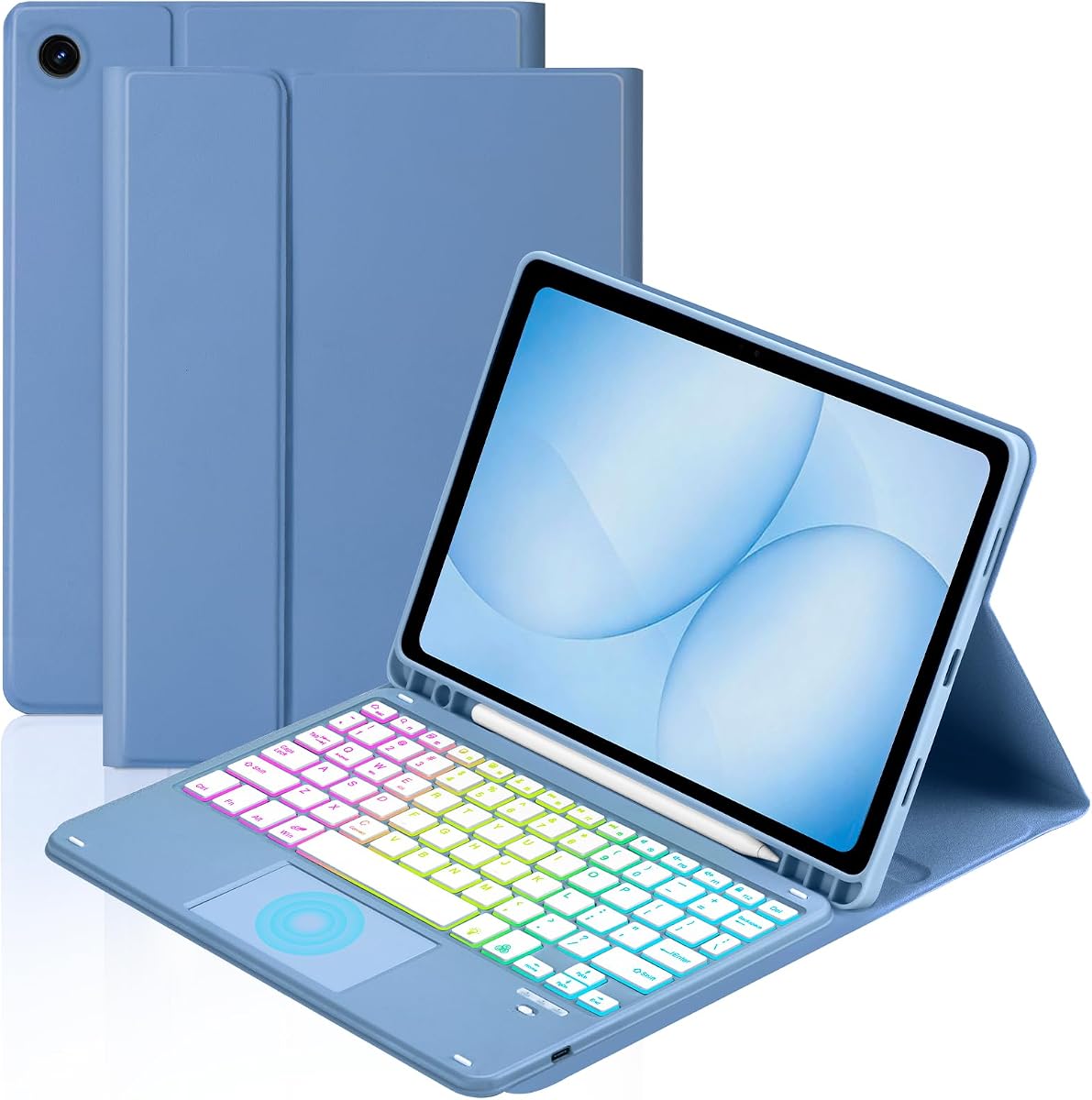
YBING offers an affordable option that does not skimp on essential features like rotation and backlighting. This model is perfect for those who want a versatile setup without spending extra on premium upgrades or accessories.
We may earn a commission when you buy through this link, at no additional cost to you.
The 360 degree rotation allows for both portrait and landscape viewing which is great for media consumption and reading. Shortcut keys help you manage tasks quickly while the built-in pencil holder keeps your stylus safe and accessible.
A minor trade-off is the shorter battery life when the backlight is on compared to other models. However for casual use and short sessions this remains a reliable and budget-friendly choice for daily work.
Choose this if you need a budget-friendly solution that covers all the basics well. It provides solid performance and flexibility at a price point that fits tight budgets without sacrificing usability.
Full 360-degree rotation means you can easily switch between landscape and portrait modes for any task.
Dedicated function keys allow quick access to common actions like copy and paste to boost efficiency.
We may earn a commission when you buy through this link, at no additional cost to you.
Harvopu provides a workstation style setup with an included wireless mouse that features adjustable DPI settings. This precision is great for users who need detailed control for editing or navigation tasks on their tablet.
We may earn a commission when you buy through this link, at no additional cost to you.
The case material is designed to be easy to clean and resistant to stains which keeps your device looking new longer. The keyboard has backlight modes to ensure visibility in dim environments without needing extra lighting.
While the added mouse adds weight it completes the desktop experience effectively for stationary work. The case design focuses on practical defense against daily wear and spills to protect your investment over time.
This is a strong pick for users who need precise input and easy maintenance. It combines essential tools into one package to streamline your workflow and keep your setup clean.
Adjustable DPI on the included mouse allows you to switch between fine detail work and fast browsing.
The stain-resistant case repels spills and marks for a fresh look with minimal maintenance effort.
We may earn a commission when you buy through this link, at no additional cost to you.
TiMOVO offers a solid battery life with a long standby time that keeps the keyboard ready for days. It supports three viewing angles to help you find a comfortable position for typing or reading easily.
We may earn a commission when you buy through this link, at no additional cost to you.
The 7-color backlight adds a fun visual touch while providing clear key visibility in dark rooms. When not in use the keyboard enters a deep hibernation state to save power and extend the life of the battery.
One thing to note is that the keyboard disconnects after ten minutes which might require a quick key press to reconnect. This is a minor inconvenience for most users who want maximum energy efficiency during idle periods.
This case is ideal for users who prioritize battery longevity and simple protection. It balances visual appeal with practical features to support a long and productive work session.
Extended standby mode keeps the keyboard ready for days without needing to recharge frequently.
Seven distinct colors let you customize the backlight to match your mood or environment.
We may earn a commission when you buy through this link, at no additional cost to you.
MePadKey stands out for its smart touchpad that supports up to four finger gestures for enhanced control. This feature allows for scrolling and screenshot functions without touching the screen which is great for accessibility.
We may earn a commission when you buy through this link, at no additional cost to you.
The detachable keyboard makes it easy to carry just the case when you do not need to type. Strong magnets ensure the keyboard stays in place securely while the rainbow backlight adds a modern touch to the design.
While the trackpad is functional it might not offer the precision of some premium models. However for general navigation and browsing it provides a smooth experience that improves productivity effectively on the go.
Choose this if you value gesture control and portability over advanced trackpad features. It offers a good balance of features for users who want a lightweight and efficient setup.
Multi-finger gestures allow for easy screenshots and app switching without reaching for the screen.
Strong magnetic adsorption keeps the keyboard stable while the detachable design aids easy transport.
We may earn a commission when you buy through this link, at no additional cost to you.
This version offers a 360 degree rotation capability which provides great flexibility for viewing in different positions. The multi-touch touchpad adds convenience for navigating menus and files without using the screen directly.
We may earn a commission when you buy through this link, at no additional cost to you.
Protection is a key focus with thickened convex edges that shield the corners from impacts during daily use. The keyboard allows you to switch systems using specific key combinations which adds versatility to your workflow.
It does not include a separate mouse which might be a limitation for users who prefer physical cursor control. However the touchpad support and sturdy build make it a reliable choice for general daily tasks.
This option is well suited for users who need a durable case with flexible viewing options. It combines protection with functional features to support a range of usage scenarios effectively.
Full rotation allows you to adjust the device position for any viewing scenario.
Thickened edges provide extra defense against drops and bumps to keep your device safe.
We may earn a commission when you buy through this link, at no additional cost to you.
Supveco uses a flexible silicone and TPU design with a honeycomb pattern that helps protect against overheating. This construction increases the lifespan of your tablet while providing a snug and secure fit for the device.
We may earn a commission when you buy through this link, at no additional cost to you.
The auto sleep wake function keeps battery consumption low by managing the tablet state based on the case position. A magnetic detachable keyboard allows you to separate typing needs from portable use easily and efficiently.
While charging takes a bit longer the long battery efficiency means you do not need to plug it in often. The built-in pencil holder ensures your stylus is always ready which adds convenience to daily work.
Choose this if you prioritize material quality and device health alongside typing functionality. It combines smart protection with essential features to support a reliable and long-lasting setup.
The honeycomb grid pattern helps keep the tablet cool and extends its operational lifespan.
Auto sleep wake features conserve battery life by automatically managing power based on usage.
We may earn a commission when you buy through this link, at no additional cost to you.
Selecting the right keyboard involves considering factors like connection type and additional features such as trackpads or mice.
Ensure the keyboard case explicitly lists support for your specific model number like SM-X230 or SM-X210 to avoid fit issues.
Always check the model number in settings before purchasing to guarantee the correct size and connection alignment.
Most options use Bluetooth which requires charging but offers a wireless experience for better mobility around your workspace.
Opt for a Bluetooth model if you want freedom of movement without being tethered by cables to your tablet device.
Some models include a built-in trackpad while others offer a separate wireless mouse for different navigation preferences and needs.
Choose a trackpad if you want a compact solution or a mouse if you prefer traditional cursor control for editing.
Backlit keys are essential for working in low-light environments and usually offer color options to suit your visual style.
Look for models with multiple brightness levels to ensure comfort in both bright and dark working conditions.
Consider the battery capacity and expected usage time especially if you plan to work for long sessions without access to power.
A keyboard with a standby mode helps extend battery life so you can use it for weeks on a single charge.
Protective cases should offer full edge coverage and materials that shield your tablet from bumps and dust over time.
A case with a honeycomb or padded interior can prevent overheating and adds extra durability against accidental drops.
A built-in S Pen holder ensures your stylus is always accessible and prevents it from getting lost or damaged during travel.
Check that the holder is secure so your pen stays in place even when the case is closed and moved around.
Cases with adjustable viewing angles allow you to find the most ergonomic position for reading or typing without strain.
Multiple groove options let you tilt the screen to suit your posture and reduce neck fatigue during long use.
To get started charge the keyboard fully before pairing to ensure stable connection and long use. Open the case to wake the tablet and let Bluetooth connect automatically.
Use the magnetic slots to attach the keyboard firmly before typing to prevent slipping during long sessions. Adjust the viewing angles to find a comfortable position for your eyes and hands.
Clean the keys and case with a dry cloth to avoid damaging the material or internal components. Store the device in a safe place when not in use to maintain the longevity of the battery.
Check the compatibility list in the product description to confirm it matches your model number. Most of these cases are designed specifically for the A11 Plus and A9 Plus models.
No once paired the keyboard will reconnect automatically when you open the case and wake the device. You can simply open the lid to start using it immediately.
Most models use a USB-C cable which comes in the box to charge the battery. The charging time varies but usually takes around three hours for a full charge.
Yes the keyboard is usually detachable so you can use the tablet independently when you do not need to type. This adds flexibility for reading or watching videos.
The keys are designed with a scissor or membrane mechanism for a smooth and responsive typing experience. They are spaced to avoid accidental presses during fast typing.
Yes most cases include a front cover that closes over the screen to protect it from dust and scratches. Ensure the cover closes securely for full protection.
We reviewed ten models ranging from budget options to premium setups with trackpads and mice to suit your needs.
Focus on battery life and connectivity features to ensure the accessory supports your daily workflow effectively.
Check current availability and features before buying as specifications and offers may change over time.