
Nektar SE49
4.5Editor score
Excellent value pricing
Full DAW integration
Includes Bigwig Studio DAW
This guide compares ten top 49 key MIDI keyboards for music production, covering features, integration, and value to help you choose the perfect controller.
Selecting the right keyboard controller is crucial for any music producer looking to streamline their workflow and enhance creative expression. A 49 key MIDI keyboard offers a balanced range of notes without taking up excessive desk space, making it ideal for home studios and mobile setups.
We have carefully evaluated ten leading models based on keybed quality, software integration, build durability, and included bundles. Our analysis focuses on how each controller interacts with major digital audio workstations to ensure seamless performance during recording and mixing sessions.
Each review highlights specific strengths and potential limitations to help you match a device with your musical style and technical requirements. Please note that product availability and pricing may fluctuate over time so always verify current details before making your final purchase decision.
4.5Editor score

4.7Editor score

4.4Editor score
The following table provides a side-by-side technical comparison of all ten featured MIDI keyboards to help you quickly identify key specifications and unique features.




The Novation Launchkey 49 MK4 stands out as the top performer in this lineup due to its exceptional build quality and seamless software integration. It offers a highly responsive playing surface that captures every nuance of your performance while providing deep control over your digital audio workstation.
We may earn a commission when you buy through this link, at no additional cost to you.
Its standout feature is the set of 16 FSR drum pads which offer polyphonic aftertouch allowing for expressive playing beyond simple triggering. The integrated workflow supports major DAWs like Ableton Live Logic and FL Studio making it incredibly easy to start producing music immediately upon connection.
While the price is higher than entry level options the investment is justified by the premium components and extensive software bundle included with the device. The scale and chord modes help users create complex harmonies without deep music theory knowledge which is perfect for modern producers.
This keyboard is ideal for producers who need reliable hardware control and expressive features for studio work or live performance. Its robust design and comprehensive feature set make it a versatile choice for both beginners and experienced musicians seeking professional results.
The 16 FSR pads respond dynamically to velocity and aftertouch enabling complex beat patterns and expressive triggering.
Custom scripts ensure knobs and faders control transport mixing and automation without manual configuration for every project.
We may earn a commission when you buy through this link, at no additional cost to you.
The Arturia KeyLab mk3 49 represents the premium end of the market with its sleek design and durable aluminum construction. It is designed for musicians who prioritize tactile feedback and visual appeal in their studio setup while needing reliable MIDI control.
We may earn a commission when you buy through this link, at no additional cost to you.
Its keybed offers full aftertouch which adds an extra layer of expression to your playing allowing for dynamic modulation while holding notes. The inclusion of USB-C power ensures modern connectivity while the large encoders provide precise control over parameters in your software.
While it comes at a premium price and does not include a software bundle like some competitors the hardware quality itself justifies the cost for serious professionals. The white finish adds a distinctive look to any desk setup making it visually appealing as well as functional.
This unit is best suited for experienced users who already own software or do not require bundled applications. It delivers the highest quality build and feel in this category making it a future proof choice for long term studio use.
Full aftertouch on keys allows for dynamic modulation and expression while holding down notes during performance.
USB-C power connection reduces cable clutter and ensures compatibility with modern laptop ports and hubs.
We may earn a commission when you buy through this link, at no additional cost to you.
The Nektar SE49 is an excellent entry level controller that provides essential functionality without breaking the bank. It delivers full DAW integration out of the box ensuring you can control your music software immediately upon connecting to your computer.
We may earn a commission when you buy through this link, at no additional cost to you.
Its primary strength lies in its value proposition offering comprehensive MIDI features and a compatible bundle including Bigwig Studio. This makes it a complete package for beginners who need everything to start creating music without purchasing additional software licenses.
While the keybed is basic compared to premium models it is sufficient for most practice and recording needs. The lightweight design makes it easy to transport which is beneficial for users who move their setup between different locations regularly.
This keyboard is perfect for students and hobbyists looking for a reliable tool to learn and create. It avoids unnecessary complexity focusing on core features that allow you to focus on music making rather than configuration.
Includes Bigwig Studio DAW and sound content to provide a full production environment right out of the box.
Works seamlessly across Mac PC and iOS devices ensuring flexibility for various production workflows.
We may earn a commission when you buy through this link, at no additional cost to you.
The M-AUDIO Keystation 49 MK3 is designed for simplicity and reliability offering a straightforward MIDI experience. It focuses on essential controls like a volume fader and octave buttons to ensure core functionality without overwhelming complexity.
We may earn a commission when you buy through this link, at no additional cost to you.
It comes with a substantial software suite including MPC Beats and Ableton Live Lite which provides a strong foundation for production. This ensures that new users have access to industry standard tools immediately without needing to look elsewhere.
The keybed is responsive and velocity sensitive making it suitable for expressive playing within its limitations. While it lacks the advanced controls found on higher end models it excels at providing a stable platform for learning and recording.
This controller is best for users who want a no fuss interface that just works. It is ideal for those transitioning from piano to digital production who need a familiar feel without extra features they might not use.
Includes MPC Beats and Ableton Live Lite to help new users start creating music immediately.
Features volume fader and transport buttons to offer necessary studio control without clutter.
We may earn a commission when you buy through this link, at no additional cost to you.
The M-AUDIO Oxygen 49 MKV strikes a solid balance between features and cost making it a strong contender in the mid range category. It offers extensive control with faders and knobs to manage your mix and plugin parameters effectively.
We may earn a commission when you buy through this link, at no additional cost to you.
Its NKS support allows seamless integration with Native Instruments products which is a huge advantage for users invested in that ecosystem. The Smart Chord and Scale modes facilitate complex harmony creation quickly and intuitively without deep music theory knowledge.
The drum pads are responsive and backlit adding a professional touch to the overall experience. While you must download the software separately the bundle is comprehensive providing everything needed for full production capabilities right from the start.
This model is recommended for producers who need hands on control for mixing and sound design. It offers a professional workflow that grows with your skills without requiring an upgrade to premium pricing levels.
Native Kontrol Standard support provides instant recognition of presets and parameters for Native Instruments users.
Smart Chord and Scale modes simplify complex note selection for easier and more intuitive songwriting.
We may earn a commission when you buy through this link, at no additional cost to you.
The Arturia KeyLab Essential mk3 is highlighted by its incredible software bundle which provides access to thousands of presets via Analog Lab V. This allows you to explore a vast range of sounds immediately after setting up the controller.
We may earn a commission when you buy through this link, at no additional cost to you.
Its dedicated LCD screen provides real-time feedback on parameters which helps you see exactly what you are tweaking during your sessions. The RGB backlit pads offer a responsive surface for triggering clips and drum patterns with visual clarity.
Custom DAW scripts ensure that the knobs and faders control the right parameters in your software without manual setup. While it lacks aftertouch the overall package is compelling for those who value sound variety and clear visual feedback.
This unit is a top choice for producers who want instant access to diverse sounds. It balances hardware performance with software depth making it a powerful tool for sound design and composition.
Access over 2000 presets covering vintage synths to modern hybrids for endless creative possibilities.
Bright LCD screen displays parameter values in real time for precise and intuitive control.
We may earn a commission when you buy through this link, at no additional cost to you.
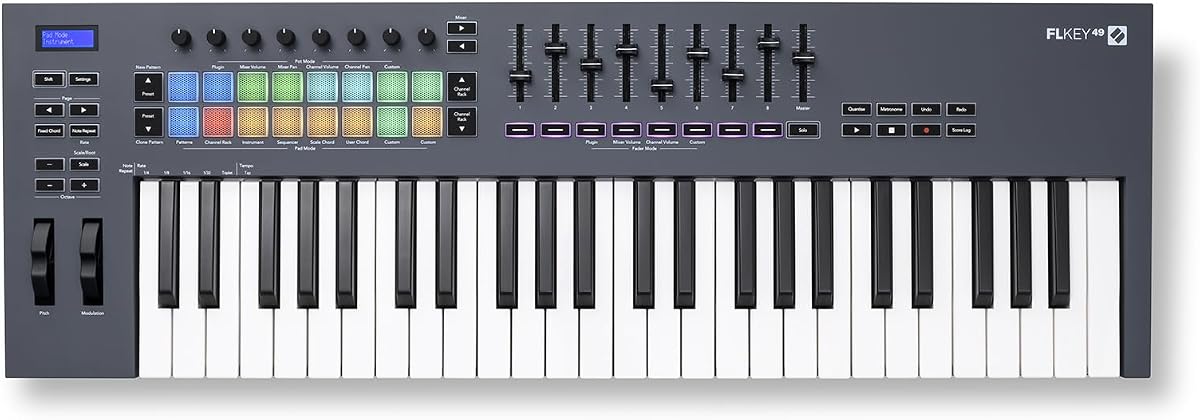
The Novation FLkey 49 is purpose built for users of FL Studio offering hardware that mirrors the software layout perfectly. This eliminates the need for manual mapping and allows for immediate control over the mixer and channel rack.
We may earn a commission when you buy through this link, at no additional cost to you.
Its Sequencer Mode turns the pads into a step sequencer enabling fast beat programming that feels natural and intuitive. The dedicated transport and score log buttons help you stay focused on creation without reaching for the mouse.
While it excels in FL Studio it may feel less optimized for other digital audio workstations. However the scale mode and chord features make it versatile enough for general composition tasks beyond just drum patterns.
This keyboard is the definitive choice for anyone deeply invested in the FL Studio ecosystem. It streamlines the production process significantly allowing you to focus on creativity rather than technical configuration.
Dedicated faders control mixer tracks and channels directly reducing reliance on mouse clicks.
Pads map directly to FL Studio's step sequencer for fast and precise beat programming.
We may earn a commission when you buy through this link, at no additional cost to you.
The M-AUDIO Oxygen Pro 49 offers a more robust feature set including semi weighted keys and full size faders. This makes it a strong candidate for users who need a complete studio control surface in a compact form factor.
We may earn a commission when you buy through this link, at no additional cost to you.
Its inclusion of 5 pin MIDI out allows connection to external hardware synthesizers making it a central hub for hybrid setups. The semi weighted keys provide a more authentic playing feel which is appreciated by those transitioning from acoustic instruments.
The RGB pads are highly responsive and support note repeat for complex rhythm patterns. While it is pricier than basic models the additional hardware features ensure it remains relevant as your studio expands.
This controller is ideal for serious producers needing extensive physical control and hardware integration. It bridges the gap between simple controllers and complex studio consoles with its comprehensive layout.
Full 5 pin MIDI output allows seamless control of external synthesizers and hardware gear.
Large faders provide precise control over mix levels and automation without feeling cramped.
We may earn a commission when you buy through this link, at no additional cost to you.
The midiplus AK490 is a no frills option designed for basic MIDI functionality without extra features. It serves as a simple input device for those who primarily use mouse and software controls for production.
We may earn a commission when you buy through this link, at no additional cost to you.
It includes a Din MIDI jack allowing connection to older gear which is rare in modern controllers. While it lacks software bundles or advanced buttons it provides the essential velocity keys and wheels needed for standard recording.
The build is functional but basic which is expected at this price point. It is best suited for temporary setups or environments where a simple input device is all that is required for testing or practice.
This model is appropriate for those on extremely tight budgets who need basic MIDI access. It delivers fundamental performance without the frills making it a practical tool for specific use cases.
Includes a 5 pin Din MIDI port for connecting legacy hardware synthesizers and drum machines.
Focuses on essential keys and wheels without complex buttons or software dependencies.
We may earn a commission when you buy through this link, at no additional cost to you.
The Generic ABS 49 Key Controller is a basic option focused on providing a minimal MIDI footprint for desktop use. It features a compact profile that fits easily into small spaces or mobile setups where space is limited.
We may earn a commission when you buy through this link, at no additional cost to you.
It is constructed from ABS material offering a practical and portable design. However detailed specifications about key quality or software support are limited which may be a consideration for professional users seeking specific features.
While it serves the basic purpose of MIDI input its utility is best suited for casual users. The black finish ensures it blends into most environments without standing out as a piece of equipment.
This model is suitable for those needing an affordable and compact input device without advanced controls. It is a pragmatic choice for basic tasks where high end features are not a priority.
Designed with a small profile to fit easily on limited desk space or mobile setups.
Focuses on core MIDI input functionality without complex controls or software bundles.
We may earn a commission when you buy through this link, at no additional cost to you.
Choosing the right controller depends on your production needs and existing gear.
Keybed action significantly impacts your playing experience and the expressive range of your performance. Look for velocity sensitivity as a minimum requirement and consider semi weighted or aftertouch features if you plan on performing complex parts.
Prioritize keybeds that feel comfortable and responsive to ensure they support your creative flow.
Effective DAW integration saves time by mapping controls directly to your software without manual configuration. Check if the controller offers specific scripts for your primary digital audio workstation to streamline mixing and automation.
Ensure the controller supports your main software to maximize productivity during recording sessions.
Many controllers come bundled with DAW versions or instrument plugins which add significant value to the purchase. These bundles can save hundreds of dollars and provide immediate tools for new producers starting their journey.
Evaluate the included software carefully to ensure it meets your production needs effectively.
Build quality determines how well the controller withstands regular use and potential transport. Models with metal chassis and reinforced components generally offer longer lifespans and a more professional feel during use.
Invest in robust construction if you plan to use the controller frequently or on the go.
The arrangement of pads faders and knobs defines how quickly you can access essential production functions. A clear layout with dedicated transport buttons helps reduce interruptions in your workflow during creative moments.
Choose a layout that matches your preferred workflow to minimize distractions while working.
Connectivity options such as USB type and presence of 5 pin MIDI out affect how you connect other gear. Modern USB-C provides better power and data transfer while DIN MIDI ensures compatibility with external synthesizers.
Ensure the ports match your current and future hardware requirements for a flexible setup.
Portability is essential for musicians who move their setups between home and studio environments frequently. A 49 key model offers a great balance between note range and desk space efficiency for most producers.
Check dimensions and weight to ensure the controller fits comfortably in your intended space.
Your budget should guide you towards models that offer the essential features you need without unnecessary extras. Entry level options provide core functionality while premium models offer enhanced control and build quality.
Balance your financial constraints with the features that matter most to your workflow needs.
Connect your controller to your computer using a high quality USB cable to ensure stable data transfer. Most modern controllers are plug and play so they should be recognized automatically without needing complex driver installations.
Install any required companion software or drivers from the manufacturer's website to unlock full functionality and custom mappings. Keep the firmware updated to benefit from performance improvements and bug fixes over time.
Clean the keys and surface regularly with a soft dry cloth to prevent dust buildup that can affect performance. Store the controller in a dry safe place when not in use to prevent damage to sensitive internal components.
Most 49 key MIDI keyboards require a connection to a computer or mobile device to function fully as they transmit MIDI data rather than audio. However some models may have limited standalone features or can connect to tablets via adapters for basic functionality.
Included software licenses such as DAW Lite versions are typically permanent but come with feature limitations. Full versions of these software packages can be purchased separately if you wish to unlock advanced capabilities or remove restrictions.
Semi weighted keys provide a slight resistance and return force similar to acoustic pianos while unweighted keys offer a light and fast action similar to electric pianos. Semi weighted keys are generally preferred for expressive playing whereas unweighted keys suit fast synth lines.
Yes many modern MIDI keyboards support iOS or Android devices via USB OTG adapters or direct USB connections. Ensure your DAW app supports external MIDI controllers to utilize the keyboard fully on mobile platforms.
Most USB powered MIDI keyboards draw sufficient power from your computer or host device without needing an external adapter. Some larger professional models may require an external power supply for maximum functionality of LEDs and additional controls.
You typically update firmware by visiting the manufacturer's website and using their specific update tool or utility application. Always back up your custom settings before updating to prevent data loss during the installation process.
NKS stands for Native Kontrol Standard which allows hardware controllers to automatically recognize and control Native Instruments software presets and parameters. This integration eliminates manual mapping so you can browse and tweak sounds directly from the hardware.
Aftertouch allows you to modulate parameters by pressing keys harder after the initial strike adding dynamic expression. While not essential for everyone it is highly valuable for synthesizer performances and expressive live playing scenarios.
We have reviewed ten distinct options ranging from entry level utility to premium performance ensuring there is a choice for every producer. Whether you need simple control or advanced features this guide highlights the strengths of each model clearly.
Prioritize integration with your current software and the physical feel of the keys to ensure the device enhances rather than hinders your workflow. A well chosen controller acts as an extension of your creative process making music production more intuitive.
Always check current product availability and pricing before purchase as these details change frequently due to market conditions. Your ideal controller awaits based on your specific needs and technical requirements.