
CERRXIAN 90 Degree SATA Adapter
4.6Editor score
Supports up to 6Gbps speed
Includes two adapters in pack
Right angle design saves space
When building a computer inside a tight case, routing straight cables can be difficult. A 90 Degree SATA Adapter helps you turn the connection to fit better. It reduces strain on the port and keeps your inside tidy.
We analyzed ten real adapters based on user ratings and technical specs. Our list covers different angles and connection types to help you choose. Each entry shows key features and where to find it.
Every pick includes a short overview and detailed notes on performance. Prices and stock change often so check the link before buying. We focus on reliability and compatibility for your specific drive setup.
4.6Editor score

5.0Editor score

4.4Editor score
As an Amazon Associate we earn from qualifying purchases.
The table below shows key details for each adapter so you can compare them side by side. We include the main features and connection types to help you find the right fit for your PC case.


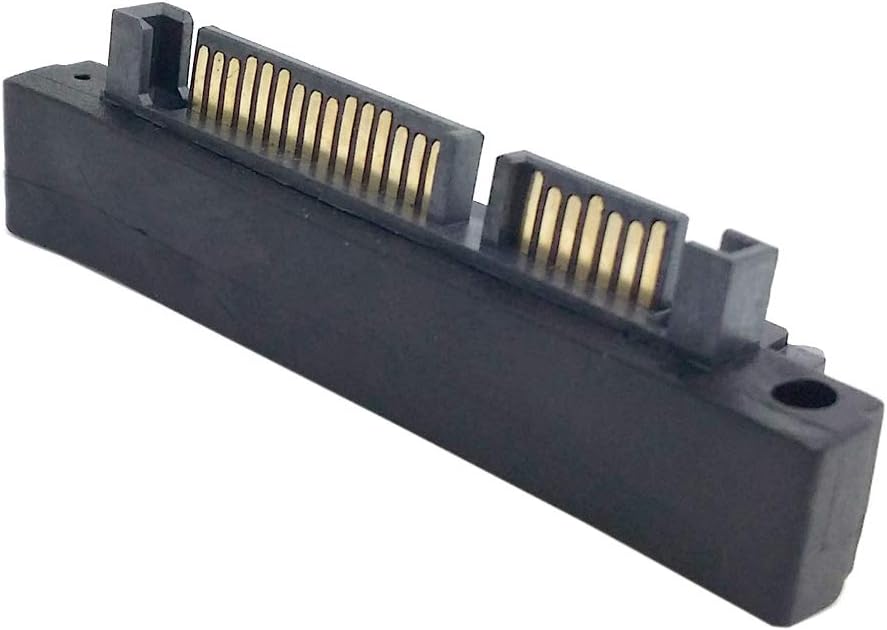


This adapter is a strong choice for anyone needing a simple turn for their data cable. It holds a solid rating and matches the SATA III spec for speed. Users note it helps when a straight cable cannot fit well.
We may earn a commission when you buy through this link, at no additional cost to you.
The key benefit is the 90 degree turn which changes the cable direction from vertical to horizontal. This solves the problem where a chassis prevents straight insertion. The pack includes two units so you have a spare for another drive.
Keep in mind this is a data only adapter. It does not carry the power needed for the drive. You will still need a separate power connector plugged into the drive. This is standard for data adapters.
Buy this if you need a cheap fix for cable routing in a desktop case. It works well for SSDs and HDDs that are limited by space. The two pack offers good value compared to buying singles.
Use this when the vertical SATA interface faces inward and an elbow cable will not work. It allows better cable management in those cases.
This adapter supports older SATA I and II speeds as well. It adapts to 1.5Gbps or 3Gbps if your system needs it.
We may earn a commission when you buy through this link, at no additional cost to you.
This adapter is unique because it splits one input into two outputs. This allows you to reach two drives from one cable turn. It carries a good rating and supports standard SATA speeds for your drives.
We may earn a commission when you buy through this link, at no additional cost to you.
The main feature is the dual female connector which helps in low profile setups. It solves problems where the SATA cable is bent too much due to lack of space. The right angle design ensures better cable management in tight spots.
Be sure to check your case to see which way you need the adapter to be angled. The pack includes two adapters which can be used for replacement or spares. It is a cost effective way to get spares for RAID setups.
Choose this if you have limited space and want to route a cable to two drives. It works for standard HDDs and SSDs on your motherboard. Just ensure the angle matches your case layout.
Use this right angle dual adapter to install the SATA 7pin power cable from vertical to horizontal. It helps reduce cable strain in compact cases.
This adapter is fully SATA III compliant but also works with older SATA 1.0 and 2.0 ports. It ensures reliable performance across different generations of drives.
We may earn a commission when you buy through this link, at no additional cost to you.
This adapter stands out because it handles both power and data lines in one unit. It is designed for changing the connection direction without altering speed or definition. Users appreciate the clean look it brings to internal wiring.
We may earn a commission when you buy through this link, at no additional cost to you.
The connector transfers 5V and 12V power along with 6Gbps data. This makes it versatile for various hard disk drives. The angled type allows you to connect it to a female port even if space is limited around the port.
While it is not the cheapest option it offers better functionality than data only adapters. The design allows for more aesthetically pleasing wiring inside your case. It is a reliable choice for those who want to simplify cables.
Buy this if you want a single adapter that handles power routing too. It fits well in desktops with limited vertical space. It helps keep your build tidy without extra extension cables.
This connector changes the connection direction of the 2.5 and 3.5 SATA Hard Disk Drive. It does not change the transmission speed or interface definition.
The adapter works for both 2.5 inch and 3.5 inch drives. This flexibility makes it useful for mixed setups in desktops.
We may earn a commission when you buy through this link, at no additional cost to you.
This adapter is designed to extend and redirect a combined power and data connector. It uses a 22Pin setup which covers both needs. The down angle helps when you need clearance below the drive mount.
We may earn a commission when you buy through this link, at no additional cost to you.
It can work for SATA 2.5 and 3.5 disk drives effectively. The transfer includes 12V and 5V power along with 6Gbps data. This makes it a versatile choice for full connectivity in one turn.
The end is SATA 22P male and the other end is SATA 22P Female. This extension style helps you route cables without kinking them. It is a good option for those who need a power adapter.
Buy this if you need to angle the power and data connector together. It helps when the straight connector hits a barrier. The down angle provides a clean exit for the cable.
The angled type allows you to connect it to a female port even if space around the port is limited. It handles the full 22Pin connection.
It works for SATA 2.5 and 3.5 disk drives. This makes it useful for mixed setups in your desktop case.
We may earn a commission when you buy through this link, at no additional cost to you.
This adapter is a solid extension piece for power and data needs. It uses a 90 Degree Right Angled type connector to redirect the cable. The black color blends well inside most computer cases.
We may earn a commission when you buy through this link, at no additional cost to you.
One end is SATA 22P male and the other end is SATA 22P Female connector. This setup handles both power and data in one line. It is designed to prevent kinks in tight spaces.
The new adapter is simple and direct which reduces the chance of errors. It has a strong rating from users who need a clean install. The build is compact yet sturdy for daily use.
Buy this if you need a reliable extension for your main connector. It works well in small cases where a straight cable is too long. The angle helps you route the cable away from obstructions.
This 90 Degree Right Angled Type Connector helps you redirect the flow of the cable. It ensures you can manage space better in your desktop.
It supports the standard 22Pin connector used on most drives. This ensures compatibility with a wide range of storage devices.
We may earn a commission when you buy through this link, at no additional cost to you.
This adapter pack gives you both up and down options. It is designed for changing SATA 7pin Disk cable installation direction. The mix of angles makes it easy to fit different layouts.
We may earn a commission when you buy through this link, at no additional cost to you.
You can install the 7pin cable from vertical to horizontal direction with this adapter. Which will solve the installation for the limited height chassis. The package included 2pcs same adapters which gives you options.
The data only design keeps the connector small and simple. It focuses on signal integrity without extra bulk. This is good for systems where power is routed differently.
Buy this if you want flexibility with up or down turns. It is a cost effective way to get spares for future upgrades. The two pack helps you cover multiple drives at once.
The package includes 2pcs same adapters which can be used for different needs. You get both up and down angled variants for flexibility.
You can install the 7pin cable from vertical to horizontal direction with this adapter. This solves issues in cases where the chassis height is limited.
We may earn a commission when you buy through this link, at no additional cost to you.
This adapter is designed to handle both power and data with a downward angle. The connector changes the direction without changing transmission speed or definition. It helps you route cables cleanly in a tight case.
We may earn a commission when you buy through this link, at no additional cost to you.
The connector transfer 5V and 12V power and 6Gbps Data. This makes it reliable for standard hard disk drives. The angled type allows you to connect it to a female port even if space is limited.
It is useful when you need to direct the cable down away from a drive. The work allows for better cable management and more aesthetically pleasing wiring. It helps reduce clutter on the motherboard.
Buy this if you need a power and data adapter with a down angle. It fits well for desktops with tight clearance below the ports. It simplifies the internal wiring of your drive.
The connector only changes the connection direction of the 2.5 and 3.5 SATA Hard Disk Drive. It maintains the interface definition while redirecting flow.
It can work for 2.5 and 3.5 SATA Hard Disk Drive. This makes it a flexible choice for different drive sizes in your system.
We may earn a commission when you buy through this link, at no additional cost to you.
This adapter is a top choice for reliable data connections. It holds a perfect rating from users who need a quality turn. It uses gold plated contacts to ensure signal integrity over time.
We may earn a commission when you buy through this link, at no additional cost to you.
The right angle adapter features a 7-pin female to 7-pin male SATA connector with a 90-degree turn design. This supports SATA III specifications with data transfer rates up to 6Gb/s for fast and reliable performance.
The space saving design allows for flexible cable routing in compact PC cases. It reduces cable strain and improves airflow management inside your system. The durable construction ensures long-lasting durability in daily use.
Buy this if you want a high quality data adapter with proven performance. It works with all standard SATA devices including HDDs and SSDs. The gold plated contacts make it a premium choice for signal.
Built with high-quality materials and gold-plated contacts for reliable signal transmission. This design ensures a secure connection for your drive.
Works with all standard SATA devices including HDDs and optical drives. It is compatible with motherboards that have 7-pin SATA data ports.
We may earn a commission when you buy through this link, at no additional cost to you.
This pack gives you four adapters with a mix of angles for flexibility. It is used for Desktop PCs where space is limited inside the computer. The compact design makes it convenient for use in tight spaces.
We may earn a commission when you buy through this link, at no additional cost to you.
The package includes 2 pcs Up and 2 pcs Down adapters. This helps you route cables in different directions as needed. The plug and play setup means no complicated tools are required for install.
Made of high quality material it has good electrical and insulation properties. The small size and light weight make it durable for long service life. It supports standard data transfer rates for SATA interface.
Buy this if you need multiple adapters for a large build. It is a great value to get spares for future upgrades. The mix of angles ensures you can cover all routing needs.
The package includes 2 pcs Up and 2 pcs Down adapters. This mix gives you flexibility for different cable routing needs in your system.
Made of high quality material it has good electrical and insulation properties. The small size and light weight make it durable for long service life.
We may earn a commission when you buy through this link, at no additional cost to you.
This adapter is designed for changing SATA 7pin Disk cable installation direction. It uses a down angled design to help when space is tight. The pack includes two adapters which is helpful for multiple drives.
We may earn a commission when you buy through this link, at no additional cost to you.
You can install the 7pin cable from vertical to horizontal direction with this adapter. Which will solve the installation for the limited height chassis. The data only design keeps the connector small and simple.
It is a good choice for desktops where power is handled separately. The two unit pack gives you a spare or a second option. It helps keep cables tidy without extra bulk in the case.
Buy this if you need a down angle turn for data only. It works well for desktops with tight vertical space. The pack value makes it a cost effective choice for multiple drives.
Which will solve the installation for the limited height chassis. It redirects the cable to avoid obstructions in tight cases.
The adapter is designed for changing SATA 7pin Disk cable installation direction. This simple design focuses on signal routing without extra power lines.
We may earn a commission when you buy through this link, at no additional cost to you.
Choosing the right adapter requires understanding your connection type and space needs. The following factors help you pick the correct adapter for your desktop.
Most adapters in this list are data only which means they route the signal from the motherboard to the drive. If your drive needs power routed through the connector you need a 22Pin version.
Check your drive and motherboard to see if you need power lines on the adapter. This prevents buying a data adapter when you need power as well.
The direction of the bend depends on your case layout. A down angle helps when you need to route below the drive. An up angle works when you need to route above.
Look at where your SATA ports face inside your case. This will tell you which angle adapter will make the connection easier.
Some adapters provide one input and one output which is standard for most builds. Others provide a dual female output which helps reach two drives from one turn.
Choose a dual connector if you have two drives next to each other that need cable routing help. This saves space and reduces cable clutter in your case.
Modern adapters should support SATA III speeds for fast data transfer. This ensures your SSD works at full speed without bottlenecks on the adapter.
Check the specs to confirm the adapter supports 6Gbps transfer. This is standard for most new adapters but is important for performance.
Adapters come in different sizes which may impact clearance. A compact adapter is better for tight cases where space is limited.
Measure the space around your ports to ensure the adapter fits. A bulky adapter may cause more issues than a straight cable.
High quality materials ensure the adapter lasts long and holds a good connection. Look for gold plated contacts for better signal transmission.
Cheap plastic can crack over time if you move the case often. Investing in a durable adapter saves money in the long run.
Many adapters come in packs of two or four which can be a better value. This gives you spares or allows you to use them on multiple drives.
Consider buying a pack if you have more than one drive. It is often cheaper than buying singles for each drive.
Plug the male end of the adapter into the motherboard port first. This secures the anchor point for the cable turn.
Insert the drive cable into the female end of the adapter. Make sure it clicks into place to ensure a solid connection.
Keep the adapter away from high heat sources inside the case. This helps maintain the quality of the internal contacts over time.
You only need an adapter if the straight cable does not fit due to space constraints. If your case allows a straight connection you can skip the adapter.
A quality adapter will not slow down your SSD as long as it supports SATA III. Ensure the adapter is rated for 6Gbps for best results.
Up adapters bend the cable upward while down adapters bend it downward. The choice depends on where your motherboard ports are located.
Yes some adapters are 22Pin and handle both. Most others are data only and need a separate power cable for the drive.
Yes they work with standard 2.5 and 3.5 SATA drives. They are not compatible with M.2 drives which use a different interface.
You need a dual adapter if you want to route one cable to two drives. Otherwise single adapters are enough for one drive per port.
Adapters can reduce cable strain which helps airflow. They keep cables away from fans and components in tight cases.
No these adapters are plug and play. You can install them by hand without any tools.
We reviewed ten adapters ranging from simple data turns to power and data connectors. The top picks offer the best value and reliability for most desktop builds.
Focus on getting the right angle direction and connection type for your case. This ensures your drives connect cleanly without stress on the ports.
Always check current stock and shipping details before buying online. We hope this guide helps you build a tidy and efficient system.