
Redragon K617 Wired 60% Compact Hot-Swap RGB Gaming Mechanical Keyboard
4.6Editor score
Compact 60% layout saves desk space
Hot swap socket for 3 and 5 pin switches
Vibrant RGB lighting with preset modes
Explore our expert guide comparing the top hot swappable keyboards for gaming and work, featuring detailed reviews and comparisons to help you choose the
Hot swappable keyboards offer enthusiasts the freedom to change switches without soldering, making them ideal for customization. This guide explores ten top models that balance performance, build quality, and value for diverse user needs.
We evaluated each keyboard based on switch compatibility, connectivity options, build materials, and overall typing experience. Our analysis covers wired and wireless models across various layouts to ensure you find the right fit for your setup.
Each pick highlights unique strengths such as gasket mounting, RGB lighting, or wireless connectivity. Please note that pricing and availability may fluctuate over time, so verify details before making your final purchase decision.
4.6Editor score

4.5Editor score

4.3Editor score
This comparison table provides a side-by-side overview of the ten selected hot swappable keyboards, highlighting key specifications and unique features to help you quickly identify the model that best suits your preferences.






The Keychron C1 stands out as a reliable entry-level mechanical keyboard designed for users seeking a hot-swap experience without breaking the bank. With a high rating of 4.7 stars, it offers a tenkeyless layout that saves space while maintaining functionality. The keyboard features Gateron G Pro Brown switches pre-installed, providing a tactile experience that appeals to both typists and casual gamers.
We may earn a commission when you buy through this link, at no additional cost to you.
Its design focuses on reliability with a detachable USB Type-C cable and an inclined bottom frame for comfort. The double-shot ABS keycaps allow the white backlight to shine through clearly. Compatibility is a strong suit, as it includes keycaps for both Mac and Windows, making it versatile for mixed-device environments. Users appreciate the ability to customize switches without soldering.
While the white backlight limits RGB enthusiasts, the trade-off ensures a clean, focused typing environment. The build quality is solid for the price, though the keycaps feel less premium compared to higher-end models. For those just starting to explore mechanical keyboards, this board offers a practical and durable foundation.
We recommend the Keychron C1 for users who need a dependable, budget-friendly mechanical keyboard with hot-swap capabilities. It is ideal for office work or light gaming where customization potential is more important than flashy lighting effects. If you value versatility and ease of use, this model is a top contender in its category.
The hot-swap socket allows users to replace almost all MX style 3-pin and 5-pin mechanical switches easily.
Included extra keycaps for both operating systems ensure seamless compatibility across different devices.
We may earn a commission when you buy through this link, at no additional cost to you.
The Logitech G316 X 98 delivers elite gaming performance with near-instantaneous responsiveness and an 8 kHz report rate. Rated 4.8 stars, this keyboard offers a compact 98% layout that retains the numpad while saving desk space for mouse movements. The hot-swappable switches and double-shot PBT keycaps ensure longevity and customization without wear issues.
We may earn a commission when you buy through this link, at no additional cost to you.
Its gasket-mounted structure includes sound-dampening silicone and foam layers, providing a refined and quiet typing experience. The interactive LED dot-matrix display and dial add intuitive on-board controls for volume and brightness. LIGHTSYNC RGB lighting reacts to your setup, creating an immersive environment tailored to your style.
While the focus on linear switches limits tactile fans, the precision and speed benefit competitive gamers. The high-quality build stands up to intense sessions, though the price reflects its premium features. The software integration via G HUB allows deep customization for game modes and macros.
We recommend the Logitech G316 X 98 for serious gamers who demand speed and precision in a compact form factor. The combination of performance features and comfort design makes it a standout choice for high-end setups. If you prioritize gaming responsiveness and build quality, this keyboard is an excellent investment.
The 8 kHz report rate ensures quick signal transmission for precise, game-ready response times.
Hot-swappable switches and PBT keycaps allow easy customization of look and feel.
We may earn a commission when you buy through this link, at no additional cost to you.
The AULA F99 provides exceptional wireless versatility with tri-mode connectivity supporting Bluetooth 5.0, 2.4GHz, and USB-C. Rated 4.5 stars, it connects to up to five devices simultaneously, making it ideal for multitaskers. The hot-swappable custom PCB allows users to replace switches without soldering, ensuring long-term flexibility.
We may earn a commission when you buy through this link, at no additional cost to you.
Pre-lubed linear switches deliver a smooth typing feel and fast response for gaming. The gasket structure with PCB single key slotting optimizes resilience and stability. A massive 8000mAh battery ensures long-lasting power, while double-shot PBT keycaps maintain vibrance and durability over time.
The RGB lighting includes 16 effects and music rhythm modes for a dynamic atmosphere. However, the software required for macro recording and editing may present a learning curve. Despite this, the keyboard balances productivity and gaming features effectively.
We recommend the AULA F99 for users who need a reliable wireless keyboard with robust customization capabilities. Its large battery and multi-device support make it practical for complex setups. If you value connectivity and smooth typing feel, this model meets diverse needs well.
Users can connect to up to five devices at once and switch between them easily.
Pre-lubed linear switches bring smooth typing feeling and pleasant typing sound.
We may earn a commission when you buy through this link, at no additional cost to you.
The Redragon K617 maximizes desk space with a 60% compact layout that frees up room for wide mouse swipes. Rated 4.6 stars, it features an upgraded socket accepting almost any 3-pin or 5-pin switch. The stock Red linear switches keep clicks discreet, making it suitable for shared environments.
We may earn a commission when you buy through this link, at no additional cost to you.
Vibrant RGB lighting offers up to 20 preset modes with adjustable brightness and flow speed. The switches are rated for 50 million keypresses, ensuring durability. Pro software enables advanced macro programming and custom keybindings for deeper personalization.
The clean white and grey colorway stands out from typical all-black boards. While the lack of arrow keys can be an adjustment, the compact design benefits gamers who need mouse room. The customization options add depth to the user experience.
We recommend the Redragon K617 for users seeking an affordable, compact mechanical keyboard with strong customization. Its smooth switches and durable build make it a solid choice for gaming and work. If you prioritize space-saving design and budget value, this model is hard to beat.
Ditching the numpad and nav cluster frees up desk space for wide mouse swipes.
The upgraded socket accepts almost any 3-pin or 5-pin switch for easy customization.
We may earn a commission when you buy through this link, at no additional cost to you.
The Redragon K771 combines a full-size 108-key layout with wireless freedom, featuring four dedicated hotkeys for common tasks. Rated 4.4 stars, its gasket mount design and 5-layer foam padding absorb hollow noise for a clean, quiet experience. The pre-lubed linear switches reduce scratchiness and enhance comfort.
We may earn a commission when you buy through this link, at no additional cost to you.
Tri-mode connectivity supports up to five devices, paired with an 8000mAh battery for marathon sessions. RGB lighting is vibrant and customizable via PRO software, allowing macro programming and key remapping. The striking blue-white-black colorway adds character to any desktop.
The weight of a full-size wireless board may be a consideration for portability, but it provides stability for long typing sessions. The software offers advanced key bindings to optimize workflow. While the interface is basic, the hardware performance compensates.
We recommend the Redragon K771 for users needing a full-size wireless keyboard with robust noise dampening. Its smooth switches and dedicated hotkeys make it practical for work and gaming. If you value a traditional layout without wires, this model fits the bill.
Five integrated layers of foam and silicone absorb noise for ultra-quiet acoustics.
Pair up to 5 devices and switch seamlessly between them with tri-mode connection.
We may earn a commission when you buy through this link, at no additional cost to you.
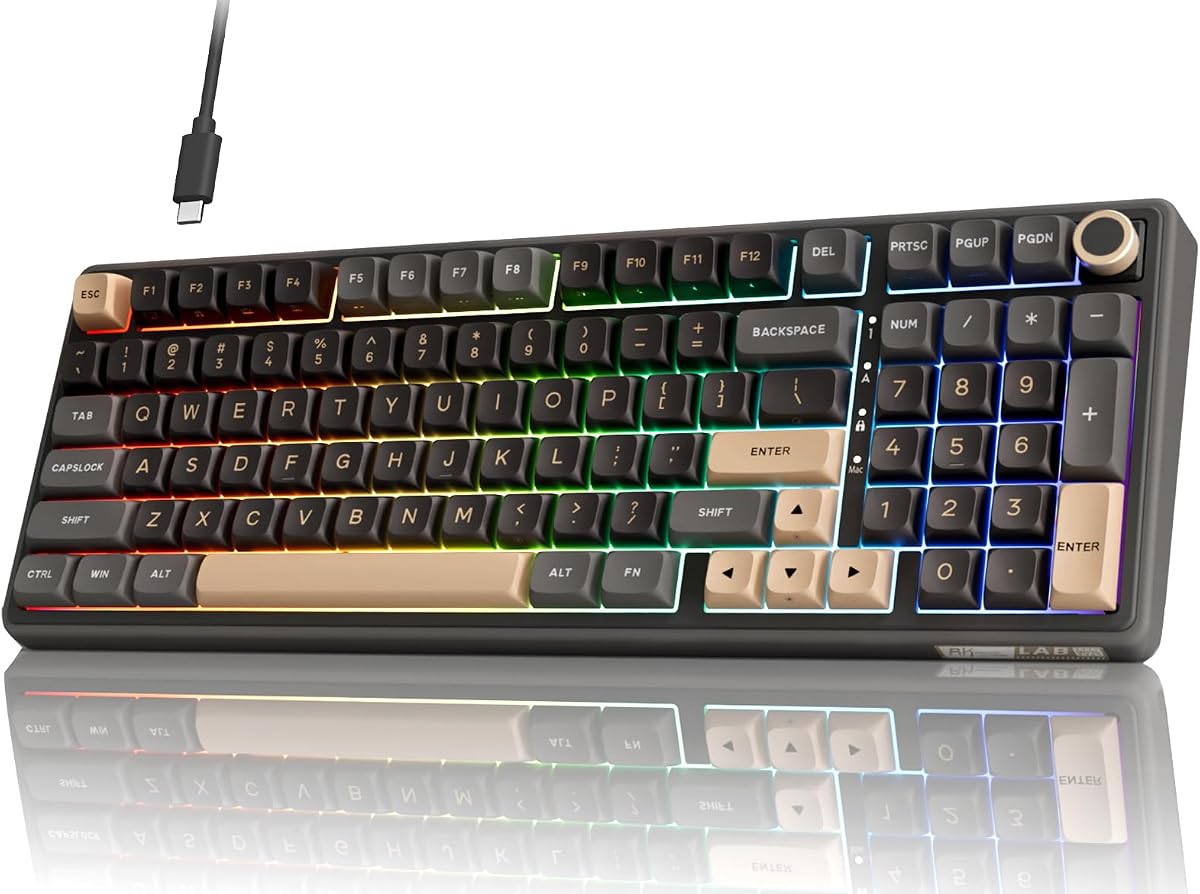
The RK ROYAL KLUDGE R98 Pro offers a 96% layout that balances space-saving with functionality, including a numpad. Rated 4.5 stars, it uses a gasket mount design with five layers of sound-absorbing foam for a thocky, creamy feel. Hot-swappable pre-lubed linear switches deliver a smooth and pleasant experience.
We may earn a commission when you buy through this link, at no additional cost to you.
PBT keycaps with MDA profile ensure durability and a non-fading surface. The detachable aluminum volume knob provides quick adjustments, while indicator lights show status clearly. Online driver support allows key customization and macro settings for efficient workflows.
RGB backlighting includes over 20 dynamic modes to personalize the setup. While it is wired only, the build quality ensures stability. The software may lack advanced features compared to premium brands but covers essentials well.
We recommend the RK ROYAL KLUDGE R98 Pro for users wanting a creamy typing sound with gasket mount benefits. Its compact layout and dedicated controls make it ideal for office and gaming. If you prioritize sound and feel over wireless freedom, this model is a strong choice.
Computer keyboard adopts gasket mount for optimized resilience and stable feel.
Double-shot PBT keycaps maintain vibrance and durability with non-fading matte surface.
We may earn a commission when you buy through this link, at no additional cost to you.
The Logitech G512 X stands out with Dual Swap technology allowing users to switch between magnetic analog and mechanical switches for maximum versatility. Rated 4.5 stars, it features Tunnel Magneto-Resistance sensors delivering high-resolution responsiveness for smooth gameplay. Customizable actuation from 0.1 to 4.0 mm offers a tactical advantage.
We may earn a commission when you buy through this link, at no additional cost to you.
With 8K performance, it toggles between 1K and 8K report rates for zero-latency command speed. SAPP rings provide tangible feel at second actuation points for complex combos. The build includes silicone gasket mount and recycled plastic, ensuring durability and environmental consideration.
Rapid Trigger on analog switches enables instant re-actuation, ideal for competitive play. The powerful G Hub software allows for multi-layer programming and macro creation. While the learning curve is steep, the precision gained is significant.
We recommend the Logitech G512 X for competitive gamers seeking unmatched precision and customization. Its innovative switch technology and fast response make it a top-tier choice. If you value performance features and build quality, this keyboard justifies the investment.
TMR Analog Sensors deliver high-resolution responsiveness for a competitive edge.
Switch between magnetic analog and mechanical switches across beds.
We may earn a commission when you buy through this link, at no additional cost to you.
The TECKNET Mechanical Keyboard delivers exceptional value with tri-mode wireless connectivity for up to five devices. Rated 4.5 stars, it supports Bluetooth 5.0, 2.4GHz, and USB-C modes. Hot-swap customization allows easy replacement of 3-pin and 5-pin switches without soldering.
We may earn a commission when you buy through this link, at no additional cost to you.
Sky switches are tuned for smooth keystrokes and a soft thock sound thanks to 5-layer dampening. The 96% compact layout includes a numpad within a durable metal frame. It comes with 16.8M RGB lighting and supports software control on Windows.
Mac users may find software customization limited to basic RGB via FN keys. The 36-month warranty and 24/7 support provide peace of mind. The build quality is solid for the price point.
We recommend the TECKNET Mechanical Keyboard for users seeking a versatile wireless keyboard on a budget. Its multi-device support and smooth switches make it practical for daily tasks. If you prioritize value and warranty coverage, this model is a smart buy.
Switch across Win/Mac/Linux with ultra-low latency wired performance for gaming.
A 5-layer dampening structure reduces noise while delivering a soft thock typing sound.
We may earn a commission when you buy through this link, at no additional cost to you.
The EPOMAKER X Aula F75 MAX combines a compact 75% layout with a TFT smart screen and knob for enhanced utility. Rated 4.6 stars, it supports Bluetooth, 2.4GHz, and cable modes. The screen displays GIFs, connectivity status, and battery monitor, acting as a productivity booster.
We may earn a commission when you buy through this link, at no additional cost to you.
Gasket-mount structure and flex-cut PC plate separate the PCB from the shell for a soothing typing experience. The switches are factory-lubed and tuned for a creamy sound. Anti-ghosting ensures stable performance without double chattering in wireless modes.
The south-facing LEDs make RGB lighting shine brightly with pre-set dynamic effects. Key remapping and macro editing are supported via software. The ergonomic design with kickstands reduces wrist strain.
We recommend the EPOMAKER X Aula F75 MAX for users wanting a modern keyboard with visual feedback. The TFT screen and knob offer unique utility in a compact form. If you value ergonomics and customization, this model delivers an advanced experience.
Gif-showing screen makes backlight customization fun and easy.
Cherry-profile keyboard becomes an ergonomic assistant to reduce wrist strain.
We may earn a commission when you buy through this link, at no additional cost to you.
The Keychron K10 HE transforms typing with advanced magnetic switch technology delivering ultra-responsive performance. Rated 4.3 stars, it uses Hall Effect switches that detect keypresses via magnetic sensors. Hot-swappable switches allow users to adjust actuation points and enable rapid trigger and snap action easily.
We may earn a commission when you buy through this link, at no additional cost to you.
Tri-mode connectivity lets you pair up to three devices via Bluetooth 5.2. The Launcher Web Configurator helps customize every key and create macros. OSA-profile double-shot PBT keycaps resist shine, finished with natural wood sidings for a refined look.
Cross-system compatibility supports macOS, Windows, and Linux with dedicated keys and remapping capabilities. The setup process requires clearing browsing data for the config tool. However, the resulting customization options are extensive.
We recommend the Keychron K10 HE for users exploring advanced magnetic switch technology. Its wireless versatility and rapid trigger features are ideal for gaming and professional work. If you want a high-tech, customizable full-size keyboard, this model is a unique choice.
Hall Effect magnetic switches detect keypresses using magnetic sensors to reduce wear.
Launcher Web Configurator allows customization of actuation points and macros.
We may earn a commission when you buy through this link, at no additional cost to you.
Choosing the right hot swappable keyboard involves understanding several key factors that affect usability, customization, and durability. This guide outlines essential considerations to help you make an informed decision.
Hot swappable keyboards allow you to change switches without soldering, but compatibility varies. Look for boards supporting both 3-pin and 5-pin switches to ensure maximum flexibility. Check if the PCB supports SMD-LED compatible switches if backlighting is a priority.
Always verify that your preferred switch types fit the socket design to avoid frustration.
Layouts range from 60% compact to full-size with numpads. Consider your desk space and need for function keys. Compact layouts offer more mouse room, while full-size supports productivity workflows.
Select a layout that matches your primary use case whether gaming, coding, or general typing.
Options include wired USB-C, Bluetooth, and 2.4GHz wireless. Wired connections offer zero latency ideal for competitive gaming. Wireless provides flexibility for multi-device setups and cleaner desks.
Decide based on whether portability or raw speed is your priority.
Materials like aluminum frames, PBT keycaps, and gasket mounting affect durability and sound. PBT keycaps resist shine better than ABS, and gasket mounts provide a softer typing feel. Sound dampening layers reduce unwanted noise.
Prioritize materials that ensure long-term comfort and stability.
Many keyboards come with software for macros, key remapping, and RGB control. Evaluate how intuitive the software is and if it supports your operating system. Look for features like onboard memory for profile storage.
Robust software expands your keyboard functionality beyond basic typing.
Wireless models vary in battery capacity. Larger batteries like 8000mAh support longer use between charges. Consider whether you need quick charging or extended runtime for your workflow.
Check battery specs to avoid frequent recharging interruptions.
Hot swappable keyboards range from budget-friendly options to premium models with advanced tech. Balance cost with features like magnetic switches or OLED screens. Determine how much you are willing to invest for customization capabilities.
Set a realistic budget while ensuring essential features are included.
To change switches safely, use the included puller to gently remove old switches from the socket. Align the pins of the new switch correctly with the socket before pressing down firmly. Ensure the switch sits flush without tilting to maintain stability.
Clean the keyboard regularly by turning it upside down to remove debris. Use compressed air to clean between keycaps and around switches. Wipe the surface with a soft cloth to maintain appearance.
Store the keyboard in a dry environment away from extreme temperatures. If using wireless modes, fully charge the battery before storage. Check for software updates periodically to ensure optimal performance.
Hot swappable keyboards allow users to replace switches without soldering. You can easily remove and install different switch types to customize feel and sound. This flexibility makes them ideal for enthusiasts who want to experiment.
Yes, hot swappable sockets are designed for repeated switching. High-quality PCBs ensure longevity even with frequent changes. The sockets maintain contact integrity over many uses.
Most hot swappable boards support 3-pin and 5-pin switches. Verify compatibility on the product page before purchasing. Some boards require SMD LED compatible switches for backlighting.
Many hot swappable models feature RGB lighting. Ensure the board supports SMD-LED switches if you want per-key lighting. Check for software customization to adjust lighting effects.
Turn off the keyboard and remove keycaps gently. Use compressed air to clear dust from switches and PCB. Wipe the surface with a soft cloth. Avoid moisture near electronic components.
Yes, hot swappable keyboards are excellent for gaming. You can choose fast linear switches for quick responses. Customizable layouts allow efficient gaming setups tailored to your play style.
Our top picks highlight diverse options from entry-level to premium models. The Logitech G512 X leads in gaming precision with its magnetic switch technology. The Redragon K617 offers unmatched value for compact layouts.
Prioritize connectivity, layout, and switch compatibility when shopping. Consider your primary use cases to find the best fit. Balancing budget and features ensures you get a keyboard that meets your specific needs.
Prices and availability change frequently so check current details before buying. Verify warranty terms and customer support options. Investing in the right keyboard elevates your productivity and gaming experience.