
Mouse Jiggler Mover Wiggler Undetectable Shaker
4.7Editor score
Plug and Play Setup
Compatible with Multiple OS
Compact and Portable
This guide compares the best laptop jiggler devices for remote work and office use to keep your computer active without triggering IT security alerts.
A laptop jiggler is a practical tool for remote workers and students who need to keep their systems awake during long tasks or meetings.
We compared ten top-rated models based on design, compatibility, detection risk, and ease of use to help you find the right device for your setup.
Each pick includes detailed specs, pros, cons, and real-world performance notes so you can choose confidently. Prices and availability change frequently.
4.7Editor score

4.7Editor score

4.1Editor score
The table below provides a side-by-side comparison of all ten laptop jiggler models we reviewed, highlighting key specs and unique features for quick decision making.


The TECH8 USA undetectable mouse mover jiggler earns the top spot for its blend of style and function. It simulates natural movement without software, keeping your device active while looking premium on your desk.
We may earn a commission when you buy through this link, at no additional cost to you.
Its 3D hologram disc and ambient glow ring make it a standout choice for those who care about desk aesthetics. The three motion levels ensure flexibility, while the auto timer adds convenience for long work sessions.
The main trade-off is reliance on an external power source rather than USB-only operation. However, the sleek design and Austin-based customer support make it a reliable and visually appealing solution for remote workers.
Buy this if you want a discreet yet stylish jiggler that prevents sleep mode without raising IT flags. It is ideal for professionals who value desk setup quality and need consistent performance.
The ambient glow ring and hologram disc elevate your workspace while ensuring your system stays active during idle periods.
Choose from low, medium, or high motion levels to suit your workflow and avoid unwanted cursor disruptions during tasks.
We may earn a commission when you buy through this link, at no additional cost to you.
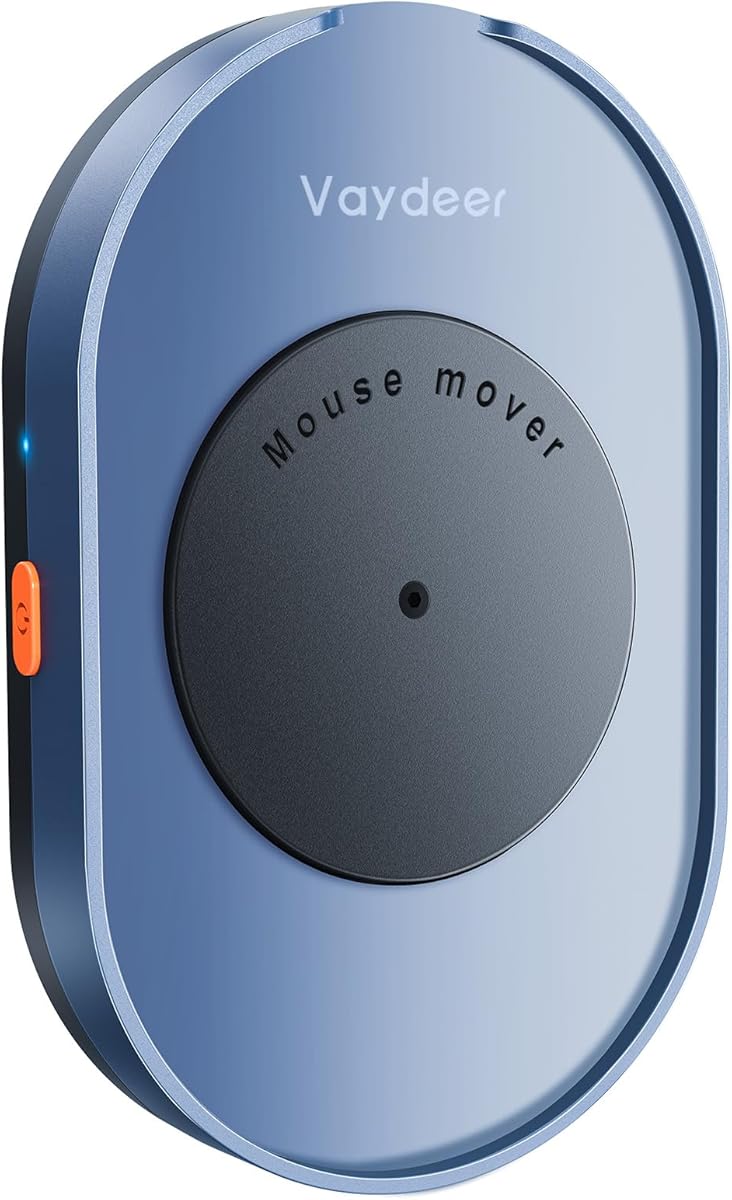
The Vaydeer model offers a secure and quiet solution for keeping your laptop awake. It is ISO certified and runs silently, making it suitable for shared office spaces or late-night work sessions.
We may earn a commission when you buy through this link, at no additional cost to you.
Its ability to operate with an external power adapter or USB port adds flexibility. The switch design avoids frequent plugging, and the motor stays under 45dB for minimal distraction.
While alignment of the sensor area is key, the device delivers consistent results. The upgraded version improves durability and user experience, justifying the price for professional environments.
Choose this if you prioritize security certification and silence. It is a solid pick for users who need discreet operation without worrying about hardware detection issues.
ISO certification ensures IT safety while the ultra-silent motor keeps your workspace peaceful during long tasks.
Power via USB or adapter to suit your setup without constant cable management or unplugging.
We may earn a commission when you buy through this link, at no additional cost to you.
This two-pack from WFB offers excellent value for households or small teams. It mimics a standard 2.4G mouse, so IT systems recognize it as a normal peripheral, keeping your PC active seamlessly.
We may earn a commission when you buy through this link, at no additional cost to you.
The slight shaking movement ensures the cursor shifts just enough to prevent sleep without affecting your document editing or media viewing. It works instantly once plugged in with no driver required.
The compact design means it takes up minimal desk space, but may need stable surface placement. For the price of two units, it is an efficient way to manage multiple devices.
Buy this if you need multiple jigglers at a low cost. It is perfect for remote workers or students who want reliable uptime without breaking the budget.
Get two devices in one order for multi-device setups or to share with colleagues and family members.
The minimal pixel shift keeps your system active while allowing normal use during meetings or work tasks.
We may earn a commission when you buy through this link, at no additional cost to you.
The AUEDROT jiggler stands out for its native USB-C support, ideal for newer laptops. It functions as a trusted USB composite device, ensuring IT security and seamless integration with modern systems.
We may earn a commission when you buy through this link, at no additional cost to you.
Two jiggle modes let you choose between slight or random movement, giving flexibility depending on your activity. The switch button controls power without needing to unplug the device.
It is a practical choice for users with USB-C only ports, though the design assumes a stable surface. The compact form ensures portability while maintaining reliable cursor simulation.
Select this if your laptop lacks USB-A ports and you want a plug-and-play solution. It balances modern connectivity with dependable performance for remote workers and students.
Native USB-C support fits contemporary laptops and reduces the need for adapters.
Toggle between slight and random modes to match your workflow and minimize disruption during tasks.
We may earn a commission when you buy through this link, at no additional cost to you.
Yonktoo delivers a compact, mechanical mouse mover designed to stay out of sight. Its slim profile fits neatly into home offices while a longer cable offers flexibility in device positioning.
We may earn a commission when you buy through this link, at no additional cost to you.
Once plugged in, the device starts automatically. The motor remains quiet, ensuring it does not disturb your focus during meetings or work sessions. It is fully hardware based with no software needs.
While the construction is basic, it performs consistently for everyday use. The auto-start and pause button simplify daily usage and remove the need to unplug repeatedly.
Choose this if you want a minimal setup that works instantly. It is ideal for users who value simplicity and space-saving design in their workspace.
The slim design minimizes desk clutter while ensuring the device fits into tight workspaces.
The device activates on connection and includes a pause button for quick control without disconnection.
We may earn a commission when you buy through this link, at no additional cost to you.
Meatanty offers one of the few models with an adjustable interval timer and LED visual feedback. This lets you customize how often the cursor moves, giving more control over activity simulation.
We may earn a commission when you buy through this link, at no additional cost to you.
The large turntable accommodates different mouse sizes, and the edge protection prevents slipping. Powered via USB or adapter, it works across multiple operating systems without drivers.
The bigger size may limit desk space usage, but the customization options are a major plus. It suits users who want detailed control over movement frequency during long work periods.
Pick this if you need precise interval settings and visual confirmation of operation. It is best for those who prioritize adjustability and reliability in a mechanical mover.
Set intervals between five and sixty seconds to match your specific workflow and avoid unnecessary movement.
The LED display shows timer settings at a glance for confident operation without checking software.
We may earn a commission when you buy through this link, at no additional cost to you.
This model uses aluminum alloy construction, offering greater durability and a premium feel than plastic alternatives. It supports two jiggle modes and includes a USB-C adapter for broader compatibility.
We may earn a commission when you buy through this link, at no additional cost to you.
The trusted device ID ensures IT systems do not flag it, while the switch button simplifies power management. The compact design fits easily into most laptop setups.
The added weight provides stability but means it is less portable than lighter options. However, the metal build ensures it lasts through frequent travel and daily use.
Choose this if you want a durable and versatile jiggler for professional environments. It is ideal for users who value build quality and need reliable performance on the go.
Aluminum alloy ensures the device withstands regular use and retains its look over time.
Switch between motion patterns and use the included adapter for newer USB-C devices.
We may earn a commission when you buy through this link, at no additional cost to you.
TECKNET offers three smart movement modes, including slight, fixed area, and variable-speed random. A discreet color LED confirms the active mode so you always know what is running.
We may earn a commission when you buy through this link, at no additional cost to you.
One button controls all functions, from power to mode switching. The device is compact enough for travel, making it useful for remote workers who move between locations.
While the indicator light is subtle, it avoids visual distraction. The three modes provide enough variety to handle different use cases from reading to gaming.
Buy this if you want clear mode control and portability. It suits users who value simplicity and flexibility without needing complex software.
Select from slight, area, or random movement to suit your task and avoid unwanted disruptions.
The color LED provides feedback on active settings without drawing attention during meetings.
We may earn a commission when you buy through this link, at no additional cost to you.
This model is one of the most affordable options that still delivers reliable performance. It is recognized as a regular mouse, avoiding detection and keeping your device awake during idle periods.
We may earn a commission when you buy through this link, at no additional cost to you.
The compact size makes it easy to carry in a laptop bag. It supports Windows, Mac, and Linux, ensuring broad compatibility across different systems.
Though it uses basic materials, it includes a 12-month warranty for added peace of mind. It is perfect for users seeking a no-fuss, budget-friendly solution.
Select this if you want maximum value with essential features. It is ideal for students or casual users who need an effective and affordable jiggler.
Low cost paired with consistent performance makes it accessible for all budgets.
Works seamlessly across Windows, Mac, and Linux without additional drivers or configuration.
We may earn a commission when you buy through this link, at no additional cost to you.
This unique device simulates touchpad movement without any cables or connections. It runs on AA batteries for months, making it perfect for cordless setups and laptops without spare USB ports.
We may earn a commission when you buy through this link, at no additional cost to you.
It is fully undetectable and silent, blending into your workspace. Just adjust touchpad sensitivity to ensure it registers movement properly during use.
The main drawback is the need for settings adjustments and the higher price compared to USB-based units. However, it offers unmatched convenience for laptop-only users.
Choose this if you rely on the trackpad and want a completely wireless solution. It suits professionals who value mobility and a clutter-free workspace.
No cables or USB ports required, giving you full mobility across desks and laptops.
One battery lasts up to six months of daily use, minimizing maintenance and waste.
We may earn a commission when you buy through this link, at no additional cost to you.
Selecting the right jiggler depends on your workflow, device type, and workplace security policies.
Choose devices recognized as standard peripherals rather than software-based solutions to avoid IT alerts. Look for USB-based movers that emulate mouse signals.
Prioritize hardware units with trusted device IDs to reduce scan risks.
Ensure the jiggler supports your operating system. Most USB units work on Windows and macOS, while some offer Linux support.
Check USB-C versus USB-A connectivity based on your laptop ports.
Slight cursor shifts prevent sleep without disrupting tasks, while random modes add unpredictability.
Match the motion to your typical workflow to avoid interference with work.
USB-powered units offer convenience but use laptop ports; external adapter models save ports but need outlets.
Battery-powered options provide cordless flexibility but may require setup adjustments.
Aluminum or metal housings offer durability and premium aesthetics over plastic designs.
Invest in durable models for frequent travel and daily use scenarios.
Look for models with switches or buttons to control power and modes without unplug.
Timer and interval settings help customize movement frequency for your needs.
Check for at least a 12-month warranty to cover manufacturing defects and ensure longevity.
Responsive customer support improves your experience with technical questions.
Compact and lightweight devices are ideal for remote workers who move between locations.
Consider size if you share your workspace or travel often with your laptop.
Place the device on a stable surface and position your mouse on top. Plug in the USB or power adapter and press the switch if required.
Check cursor movement to ensure it is working without interfering with tasks. Adjust sensitivity or motion levels as needed.
Keep the unit clean and dry. Store it securely when traveling and replace batteries promptly for cordless models.
Hardware jigglers that mimic mouse signals are generally safe and undetectable. Ensure your device is recognized as a standard peripheral. Avoid software solutions that can trigger security policies.
Most USB models work seamlessly on macOS. Check compatibility details before purchasing. Some require no drivers, making setup easy across platforms.
Most units have auto timers or manual switches to stop movement. Unplugging also turns off USB-powered devices. Use built-in controls for safe operation.
Trackpad models suit users without external mice, but require sensitivity adjustments. Mouse movers are more universal. Choose based on your input method.
Yes, jigglers work regardless of display setup. They keep the system active, which helps prevent sleep in multi-screen configurations.
Look for slight cursor shifts or status LEDs on the device. Test by opening a blank document to confirm subtle movement. If unsure, try different motion modes.
The TECH8, Vaydeer, and Trackpad models offer the best balance of design, reliability, and flexibility for different needs.
Prioritize undetectable hardware with trusted device IDs and adjustable movement settings for professional environments.
Prices and availability change often, so check current listings before purchasing to ensure the best deal.