
X99 LGA 2011-3 Motherboard for Intel Xeon E5 V3/V4
3.9Editor score
Dual Channel DDR4 up to 128GB
NVME M.2 slot up to 3600M/S
Realtek ALC897 audio codec
This guide compares the top Lga 3 X99 Motherboard options for performance, compatibility, and value to help you choose the right server or gaming platform
Finding the right motherboard for high-performance computing requires careful attention to socket compatibility and expansion capabilities. The Lga 3 X99 Motherboard offers robust support for Xeon and Core i7 processors, making it ideal for workstations and enthusiasts.
We evaluated ten distinct models based on their chipset features, memory support, and connectivity options. Each product was assessed for its ability to handle demanding tasks while maintaining stable power delivery and thermal management standards.
Our detailed reviews highlight the strengths and trade-offs of each board to guide your selection process. Keep in mind that availability and specific configurations may vary, so always verify compatibility before purchasing your new hardware.
3.9Editor score

4.1Editor score

3.7Editor score
The following table provides a side-by-side overview of all ten motherboards included in this review. Use these specs to quickly compare memory slots, CPU support, and key connectivity features across the different models.



The MACHINIST X99 V9S Mainboard is a powerful contender for those needing robust server capabilities on a budget. It offers extensive NVME M.2 support and broad CPU compatibility with Xeon E5 and Core i7 processors.
We may earn a commission when you buy through this link, at no additional cost to you.
This board features a 6-phase power supply with dedicated VRM cooling, ensuring stable performance under load. The 4-channel DDR4 architecture allows for massive memory capacity, reaching up to 128GB for heavy workloads.
While it includes many essential ports like Gigabit LAN and USB 3.0, users should note that the manual is not packaged with the motherboard. You may need to request the file from the seller or download it online.
This motherboard is ideal for builders seeking high core counts and memory capacity without breaking the bank. Just ensure you have all necessary components like the CR2032 battery before starting your installation.
The 4-channel DDR4 slot design allows for significant memory bandwidth, which is crucial for virtualization and data processing tasks.
With three NVME M.2 slots supporting PCIe 3.0 X4 bandwidth, you can attach multiple high-speed SSDs for RAID configurations or fast storage pools.
We may earn a commission when you buy through this link, at no additional cost to you.
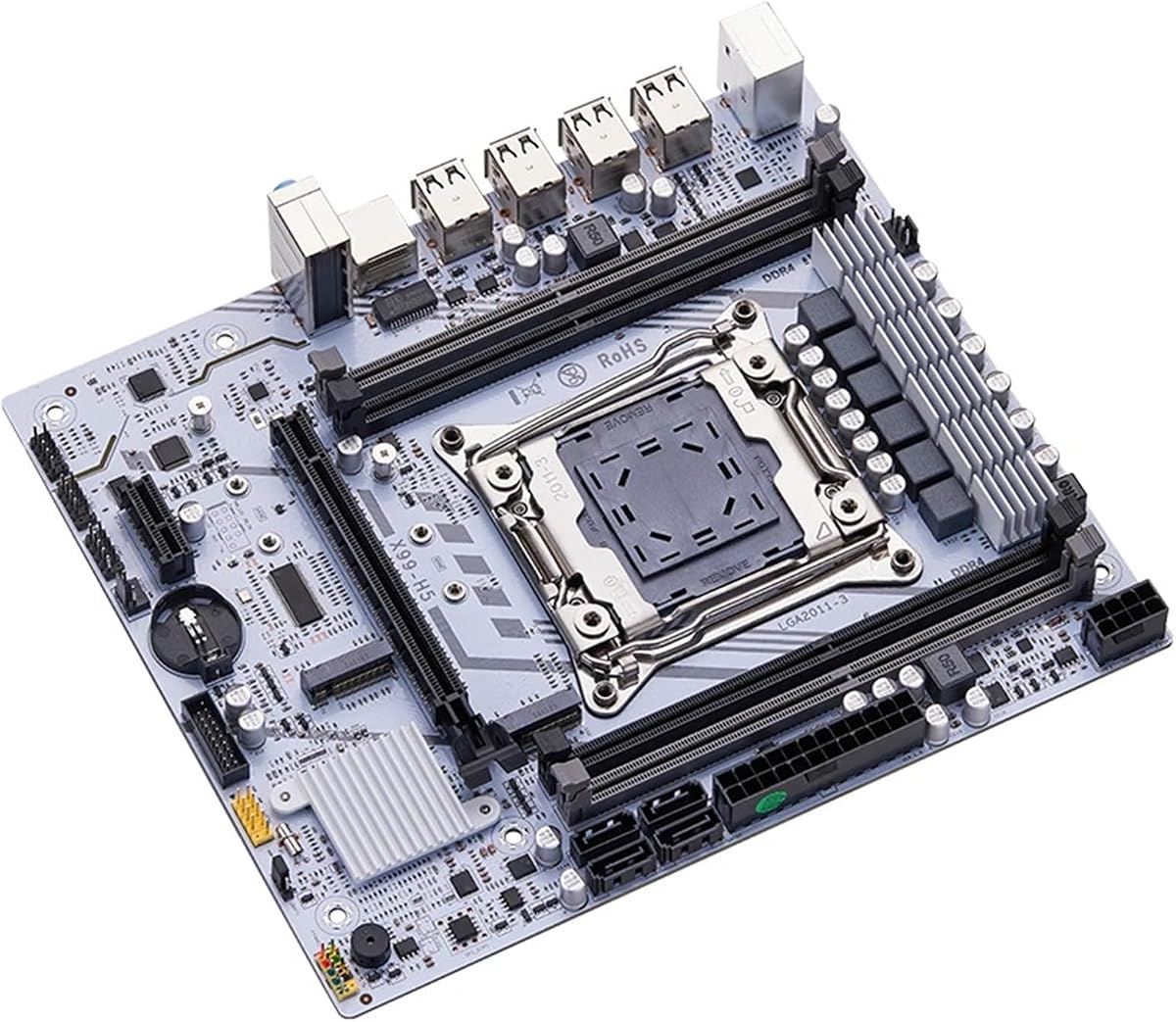
The X99 PR9-H White is an excellent choice for budget-conscious builders who still need serious workstation capabilities. Its Micro ATX design fits smaller cases while offering full Xeon E5 and Core i7 support.
We may earn a commission when you buy through this link, at no additional cost to you.
Connectivity is a strong point here, featuring a high-speed NVME M.2 slot that can reach up to 3600M/S. The audio is handled by the Realtek ALC897 codec, providing decent sound quality for general use.
Although it includes convenient features like a pre-assembled I/O shield and CPU cooler bracket, the user manual is not included in the box. You will need to contact the seller for digital documentation if you need assistance.
This board is perfect for entry-level servers or hobbyist builds. Just remember to purchase the CR2032 battery separately and ensure your memory is compatible with the dual-channel requirements.
Priced competitively, this motherboard offers a great balance between affordability and performance, making server builds accessible to more users.
The NGFF/NVME M.2 slot supports PCIe 3.0 x4 speeds, allowing you to boot your OS from a lightning-fast SSD for improved system responsiveness.
We may earn a commission when you buy through this link, at no additional cost to you.
The ASUS EATX X99-E WS/USB 3.1 stands out as a premium workhorse designed for demanding graphics and compute tasks. Its quad-way PCIe support makes it suitable for multi-GPU setups in rendering or AI training.
We may earn a commission when you buy through this link, at no additional cost to you.
USB 3.1 connectivity is integrated directly into the board, offering twice the speed of standard USB 3.0 for fast external storage transfers. The board also features the ASUS Q Code Logger for easier troubleshooting during system assembly.
While the EATX size requires a larger case and typically costs more than standard options, the reliability and feature set justify the investment for professional users. The 5-Way Optimization simplifies tuning the system for peak performance.
We recommend this board for users building high-end workstations that require maximum expansion and data throughput. It delivers on stability and performance for critical production environments.
With four-way PCI-E Gen3 x16 links, this motherboard supports NVidia GeForce SLI and AMD CrossFireX for massive graphical rendering capabilities.
Premium components ensure industry-leading power efficiency, which helps maintain system stability even under heavy multi-core loads.
We may earn a commission when you buy through this link, at no additional cost to you.
The ASUS X99-A ATX is a reliable choice for those who prefer a standard ATX layout with proven brand support. It focuses on ease of use with features like the 5-Way Optimization for automated tuning.
We may earn a commission when you buy through this link, at no additional cost to you.
The OC Socket is designed to drive 8-core CPUs and DDR4 performance beyond standard limits, adding extra potential for overclocking. Audio and networking are handled by Crystal Sound 2 and Intel Gigabit Ethernet for a solid gaming combo.
While it supports PCI Express 3.0 M.2, it does not have the latest USB 3.1 found on the higher-end WS model. However, it remains a stable platform for general workstation and gaming applications.
This board is well-suited for users building a balanced desktop with room for standard expansion cards. The ASUS ecosystem provides good software tools for monitoring and tuning your system.
The 5-Way Optimization allows for one-click overclocking and cooling adjustments, simplifying system tuning for users of all skill levels.
Crystal Sound 2 and Intel Gigabit Ethernet provide a high-quality combo for gaming and media consumption without extra add-in cards.
We may earn a commission when you buy through this link, at no additional cost to you.
This X99 Motherboard is designed for users who need to run two CPUs simultaneously for extreme multi-threaded workloads. With 8 DDR4 slots, it offers massive memory capacity for virtualization or large datasets.
We may earn a commission when you buy through this link, at no additional cost to you.
The board includes two PCIe x16 slots which can be used for dual graphics cards or a mix of storage and GPU expansion. It also provides multiple USB headers for internal device connectivity like front panels or fans.
While the specs indicate solid power for multi-CPU setups, the product lacks a confirmed user rating in the current data. You should verify community feedback before purchase to ensure stability with dual sockets.
Ideal for specialized servers or rendering stations, this board prioritizes raw throughput over flashy features. Ensure your power supply and case can handle the additional load of two processors.
The ability to support two CPUs allows for significantly higher core counts, which is vital for server virtualization and scientific computing.
Eight DDR4 DIMM slots allow you to install up to 256GB of RAM, providing ample headroom for memory-intensive applications.
We may earn a commission when you buy through this link, at no additional cost to you.
The Tangxi X99 Gaming Motherboard aims to combine workstation power with gaming aesthetics and features. It supports a wide range of CPUs including the popular E5 V3 and V4 series for high core counts.
We may earn a commission when you buy through this link, at no additional cost to you.
An 8-layer PCB and full solid capacitor design suggest a focus on durability and electrical stability. The board supports 4-channel DDR4 memory up to 128GB, which is useful for gaming scenarios requiring large memory pools.
However, the user rating for this specific model is lower than some competitors, which may indicate variability in quality or customer support. It includes standard I/O interfaces but lacks advanced audio features found on higher-end boards.
If you are building a budget gaming server, this board offers the necessary speed and connectivity. Proceed with caution and check recent user feedback to manage expectations regarding build quality.
The 8-layer PCB design helps maintain signal integrity and reduce interference, which is important for stable high-speed data transfer.
The M.2 interface supports both NVME and NGFF drives, allowing you to choose the best balance of price and performance for your system drive.
We may earn a commission when you buy through this link, at no additional cost to you.
This model is similar to the previous entry, focusing on supporting dual CPU configurations and ample memory. It is designed for users who need to scale performance across multiple processors without switching to enterprise-grade boards.
We may earn a commission when you buy through this link, at no additional cost to you.
With 8 DDR4 DIMM slots, you can install a vast amount of RAM to handle multiple virtual machines or heavy data analysis tasks. The presence of two PCIe x16 slots allows for expansion with multiple graphics or network cards.
The low user rating suggests potential compatibility issues or manufacturing inconsistencies. It is important to review detailed feedback before buying this specific SKU to avoid potential hardware conflicts.
This board is a niche option for specialized low-cost servers. Ensure you have the necessary cooling and power infrastructure to support two processors and high RAM loads.
The dual CPU support allows for flexible scaling of your compute power by adding a second processor as your workload grows.
Multiple PCIe slots give you the flexibility to add specialized cards such as capture cards or network adapters alongside your GPU.
We may earn a commission when you buy through this link, at no additional cost to you.
This motherboard stands out by offering flexibility in memory support, accommodating both DDR3 and DDR4 standards. This can be advantageous if you have existing DDR3 RAM and want to upgrade later to DDR4.
We may earn a commission when you buy through this link, at no additional cost to you.
The inclusion of dual M.2 NVME slots provides robust storage options for boot drives and caching. The design features aluminum heatsinks and a passive chipset heatsink to manage thermal output effectively.
While the specs indicate high quality with optimized power design and signal integrity improvements, the price is significantly higher than other options on this list. Verify the seller details before committing to this investment.
This board is best for users who need specific memory compatibility or want high-speed storage without extra controllers. It is a solid middle ground for those seeking specific flexibility.
Supporting both DDR3 and DDR4 allows you to reuse older memory kits or transition to newer standards at your own pace.
The aluminum heatsinks and optimized layout help maintain lower operating temperatures, ensuring the stability of the CPU and chipset.
We may earn a commission when you buy through this link, at no additional cost to you.
Designed for smaller chassis, this M-ATX motherboard brings X99 capabilities into a compact form factor. It supports the essential E5 V3 V4 and DDR4 RAM for a cost-effective build.
We may earn a commission when you buy through this link, at no additional cost to you.
The presence of PCIe 3.0 16X SATA and NVME M.2 indicates a focus on connectivity. You can attach high-speed storage and graphics cards despite the smaller footprint of the board.
However, the limited size means fewer expansion slots compared to ATX boards. Check the specific layout to ensure it fits your intended case and component configuration.
Ideal for compact servers or space-constrained workstations, this board balances size and performance. Verify compatibility with your power supply and cooling solution before purchase.
The M-ATX form factor allows you to build a powerful workstation in a smaller desktop footprint for home offices or labs.
Despite its size, the board offers essential SATA and NVME ports for connecting multiple storage devices efficiently.
We may earn a commission when you buy through this link, at no additional cost to you.
This E5 MR9A V1.0 X99 motherboard is a straightforward ATX option that covers the basics for Xeon and i7 processors. It supports DDR4 memory and includes an NVME M.2 slot for modern storage.
We may earn a commission when you buy through this link, at no additional cost to you.
The solid power supply and cooling features help maintain stability under full load. The board includes complete external interfaces and multiple safety protections for general building, office, or gaming use.
While it offers standard ATX compatibility, detailed technical specs are less extensive than the premium ASUS models. This makes it suitable for builders who do not need extreme expansion capabilities.
Recommended for general-purpose builds where reliability and basic performance are key. Always double check your case and power supply requirements before installation.
The solid power supply design ensures stable voltages for the CPU and components, which is vital for system stability.
USB 3.0 and NVME M.2 support provide the necessary speeds for fast data access and peripheral connectivity.
We may earn a commission when you buy through this link, at no additional cost to you.
Choosing the right X99 motherboard involves evaluating several key technical factors that impact performance and longevity. This section breaks down what you should look for to ensure a successful build.
Verify that the motherboard supports your specific processor. Most boards support LGA 2011-3 for Xeon E5 V3/V4 and Core i7 5th/6th gen, but some may have unique limitations. Check the manufacturer's CPU support list before purchasing.
Always confirm that the BIOS supports your specific CPU model to avoid compatibility issues upon installation.
X99 platforms typically support quad-channel DDR4 memory, which offers significantly higher bandwidth than dual-channel. Ensure the board has enough slots for your required capacity and that it supports ECC or Non-ECC RAM as needed.
Consider your total memory needs and ensure the motherboard supports up to 128GB or more if you plan to use large datasets.
Look for NVME M.2 slots that support PCIe 3.0 x4 for maximum SSD speeds. Some boards offer multiple slots allowing for RAID configurations, while others may have only one or rely on SATA Express.
Prioritize boards with M.2 slots on the M-ATX board NVME support for boot drives to achieve faster system performance.
Quality power delivery is critical for stable CPU performance, especially with high core-count Xeon processors. Check for robust VRM designs and heatsinks or fans to prevent thermal throttling during long workloads.
A stable power system extends the life of your components and ensures reliable performance under continuous heavy usage.
Motherboards come in ATX, M-ATX, and EATX sizes. Measure your case before purchasing to ensure a fit. EATX boards offer more slots but require larger chassis.
Choose the form factor that best suits your available space and expansion needs.
Most modern X99 boards include Gigabit LAN and decent audio codecs. Check for high-quality Realtek ALC series codecs if audio fidelity matters to your use case.
Standard Gigabit Ethernet is usually sufficient for most users, but look for additional NICs if you need specialized network redundancy.
Consider how many PCIe slots you need for graphics cards or other expansion devices. Quad-way boards are essential for multi-GPU setups but are rare on budget models.
Ensure the physical slots match your card sizes and cooling requirements to avoid clearance issues.
Third-party or generic brands may lack detailed documentation. Always check if the seller provides a manual or BIOS updates. Reputable brands often offer better long-term support.
Ensure you have access to support resources in case of installation or compatibility problems.
Always ensure the motherboard is handled by the edges and installed in a static-free environment to prevent damage to sensitive components. Verify that the CPU and RAM are seated firmly before powering on.
Keep the system in a well-ventilated area to maintain optimal temperatures. Dust accumulation can reduce cooling efficiency, so clean the filters and fans periodically with compressed air.
Update your BIOS and drivers from the manufacturer's website to ensure compatibility and stability. Check for updates regularly to benefit from performance improvements and security patches.
Most Lga 3 X99 Motherboards support Intel Xeon E5 V3 and V4 series processors as well as Core i7 5th and 6th gen CPUs. Always check the specific manufacturer's CPU support list to ensure full compatibility before purchasing.
Many X99 boards support ECC and RECC memory which is crucial for workstation and server stability. However, some specific models only support non-ECC RAM so verify the specifications to avoid compatibility issues.
ATX boards are larger and typically offer more expansion slots for cards and storage. M-ATX boards are more compact and fit in smaller cases but may have fewer PCIe slots or ports.
Most X99 boards are designed specifically for DDR4 memory. However some newer or special models may support both DDR3 and DDR4 so check the product details carefully before buying.
Yes dual CPU configurations require a higher wattage power supply to handle the increased load. Ensure your PSU meets the recommended requirements for the specific CPU combination you plan to use.
Most modern X99 boards include at least one NVME M.2 slot. However the speed and number of slots vary so check if the specific model supports PCIe 3.0 x4 for maximum SSD performance.
First check that the power connections and CPU power cables are properly seated. Verify that the RAM modules are installed correctly and clear the CMOS to reset BIOS settings if needed.
Most Xeon and i7 processors on this platform do not have integrated graphics so you will need a dedicated graphics card to see any display output on your monitor.
Our top picks range from budget-friendly options like the X99 PR9-H White to premium choices like the ASUS EATX X99-E WS/USB 3.1. Each board offers different strengths depending on your specific workload and budget.
Prioritize compatibility with your CPU and memory needs when selecting a model. Features like NVME support and robust VRM cooling are essential for long-term stability in heavy use scenarios.
Always verify current availability and pricing before making a final decision. Specifications and stock can change so ensure the board you select meets your needs today.