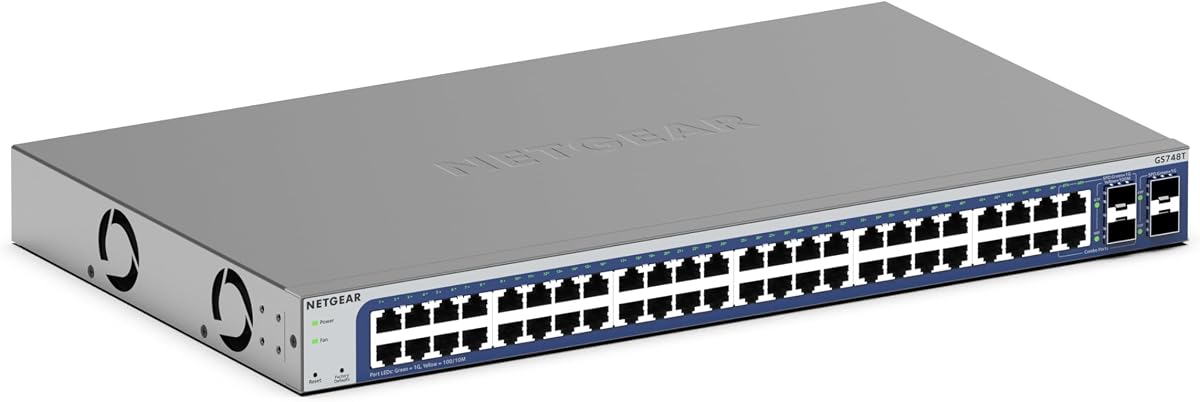
NETGEAR GS748T
4.4Editor score
48 Gigabit Ethernet Ports
4 SFP Connectivity Options
Energy Efficient Operation
This guide compares the top 48 Port Gigabit Managed Switch options for enterprise and business networks offering detailed specs and performance insights.
Building a robust network infrastructure requires reliable hardware that can handle high traffic volumes without compromising speed or security. A 48 Port Gigabit Managed Switch serves as the backbone for many business environments, providing extensive connectivity while allowing precise control over data flow and network policies. These devices enable administrators to segment traffic, prioritize critical applications, and monitor performance effectively across large-scale deployments.
We evaluated ten leading models based on key criteria including management features, security protocols, power efficiency, and overall reliability. Each product offers distinct advantages ranging from cloud integration capabilities to advanced Layer 3 routing functions. Our analysis focuses on real-world applicability for small to medium enterprises seeking scalable solutions that support modern networking demands without excessive complexity.
Each selection in this guide highlights specific strengths tailored to different operational needs and budget considerations. Detailed reviews provide insights into port configurations, cooling designs, and warranty support to help you make an informed decision. Please note that product availability and pricing may fluctuate over time so verify current details before finalizing your purchase through the provided links.
4.4Editor score

4.7Editor score

4.8Editor score
The following table presents a side-by-side overview of all ten selected switches highlighting their core specifications and unique capabilities for easy comparison.




The TP-Link SG2452LP stands out as a top-tier choice for businesses needing extensive connectivity and intelligent management. With a 4.7 rating it delivers reliable performance through its Omada platform integration which simplifies network monitoring and configuration remotely. Its fanless design ensures silent operation making it ideal for office environments where noise is a concern.
We may earn a commission when you buy through this link, at no additional cost to you.
Key strengths include comprehensive security capabilities like 802.1X authentication and DHCP snooping that protect against unauthorized access. The switch supports Zero Touch Provisioning allowing quick deployment across multiple sites without manual intervention. Additionally its fanless passive cooling design maintains optimal temperatures even under full load without generating noise.
While the switch offers powerful features it does require familiarity with the Omada Cloud Management Platform for full utilization. This learning curve might be a minor hurdle for teams new to software-defined networking. However the long-term benefits of centralized control and advanced automation outweigh this initial setup effort.
This switch is best suited for small to medium enterprises seeking scalable and secure networking solutions. Its combination of performance features and warranty support makes it a solid investment for critical business infrastructure. We highly recommend it for organizations prioritizing reliability and modern management capabilities.
The Omada platform allows administrators to manage multiple switches from a single interface reducing operational complexity.
Built-in security features including ACL and DoS protection help safeguard sensitive data against external threats.
We may earn a commission when you buy through this link, at no additional cost to you.
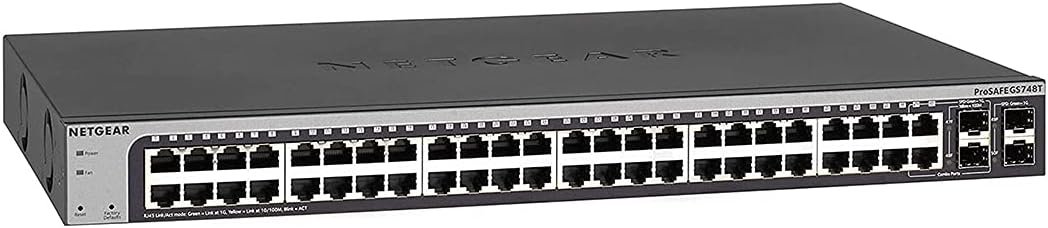
The NETGEAR GS748T offers an excellent entry point into managed switching with a balanced feature set at a competitive price. It provides 48 Gigabit ports plus SFP connectivity for fiber expansion making it versatile for growing networks. The smart managed interface simplifies configuration while still offering essential tools for traffic control and security.
We may earn a commission when you buy through this link, at no additional cost to you.
Its energy efficient operation aligns with modern sustainability goals by reducing power consumption without sacrificing performance. The fanless design ensures quiet operation suitable for desktop or rack environments where noise levels matter. Users can manage the switch locally via web GUI or remotely through included Insight software for added flexibility.
Although it lacks the deep routing capabilities of higher-end models it handles basic VLANs and access control effectively. This limitation might be noticeable for complex enterprise deployments requiring Layer 3 functions. However for most SMB scenarios its feature set provides sufficient control without unnecessary complexity.
Businesses looking for cost-effective smart switching will find this model a reliable choice. It supports both desktop and rack mounting offering installation versatility. We recommend it for teams needing managed features without a large upfront investment.
IEEE 802.3az compliance ensures reduced power usage during periods of lower network traffic.
Included SFP ports allow future integration with fiber optic links for extended range connectivity.
We may earn a commission when you buy through this link, at no additional cost to you.
The UBIQUITI Networks EdgeSwitch Lite delivers top-tier performance with a massive switching capacity designed for demanding environments. Its 140 Gbps capacity ensures non-blocking throughput even during peak traffic times supporting high-density deployments. The inclusion of both SFP+ and SFP ports offers significant flexibility for diverse network topologies.
We may earn a commission when you buy through this link, at no additional cost to you.
Premium features include advanced traffic prioritization and robust security mechanisms that protect critical business data. The DC power input option supports redundant power supplies enhancing uptime for mission-critical applications. Although it requires more technical knowledge to configure it rewards users with granular control over network behavior.
The high cost may be prohibitive for smaller operations but justified for environments where performance is paramount. Users should expect a steeper learning curve compared to simpler managed switches. However the reliability and speed make it a valuable asset for growing enterprises.
This model is ideal for organizations requiring high-speed data handling and advanced management capabilities. Its durable design supports both wall and rack mounting for flexible installation. We suggest it for businesses prioritizing long-term scalability and performance over initial savings.
Non-blocking switching design ensures all ports can operate at full speed simultaneously.
DC input option allows connection to backup power sources for improved reliability.
We may earn a commission when you buy through this link, at no additional cost to you.
The Omada SG3452 provides a blend of manageability and performance with Layer 2 plus capabilities. It features 48 Gigabit ports alongside 4 SFP slots ensuring sufficient connectivity for various network needs. The Omada SDN integration allows seamless management across multiple device types from a unified controller.
We may earn a commission when you buy through this link, at no additional cost to you.
Static routing enhances internal traffic efficiency reducing congestion and improving overall network performance. Standalone mode ensures you can use the switch without a dedicated controller if needed for flexibility. Comprehensive security features like IP-MAC binding further strengthen your network against unauthorized access attempts.
Users must ensure devices run SDN firmware for optimal compatibility which may require initial configuration time. Some reports suggest mixed experiences with setup complexity depending on network size. Despite this the feature set remains competitive for its price range in the managed market.
This switch fits businesses seeking a balance between advanced features and operational simplicity. The 5-year protection plan adds peace of mind for long-term usage. We recommend it for teams comfortable with SDN configurations.
Static routing capabilities help direct internal traffic more efficiently across subnets.
Support for web CLI and SNMP offers multiple ways to configure and monitor the device.
We may earn a commission when you buy through this link, at no additional cost to you.
This NETGEAR model offers a straightforward managed solution with the added benefit of a lifetime limited hardware warranty. It includes 48 Gigabit ports and flexible SFP options for fiber expansion ensuring connectivity reliability. The smart software interface simplifies setup and access control for routine administrative tasks.
We may earn a commission when you buy through this link, at no additional cost to you.
Compliance with energy efficient standards helps reduce operational costs over time while maintaining high speeds. The compact metal design supports both desktop and rack placement with all mounting hardware included in the box. operation ensures it fits well in shared office spaces without causing distractions.
While effective for basic managed needs it may lack some advanced cloud features found in newer models. Users prioritizing longevity might appreciate the lifetime warranty coverage for hardware issues. It remains a solid choice for those seeking proven reliability.
Ideal for small offices needing dependable switching without complex configurations. The lifetime warranty provides significant value compared to standard limited terms. We suggest it for buyers focused on long-term hardware protection.
Lifetime hardware coverage ensures peace of mind for long-term infrastructure investments.
Included mounting hardware allows easy transition between desktop and rack environments.
We may earn a commission when you buy through this link, at no additional cost to you.
The TP-Link TL-SG3452P excels in powering connected devices with 48 PoE+ ports supporting up to 384W total. This makes it perfect for deploying IP cameras and wireless access points without separate power adapters. Integrated Omada SDN management allows centralized control across your entire network ecosystem.
We may earn a commission when you buy through this link, at no additional cost to you.
PoE auto recovery ensures connected devices restart automatically after a power loss minimizing downtime. Static routing features enhance internal traffic efficiency for better overall performance. IPv6 support future-proofs your network for upcoming connectivity standards and protocols.
The high cost reflects the PoE capabilities which are essential for many modern setups. Users must ensure adequate power supply capacity to handle the 384W load during peak usage. Despite the investment it offers robust functionality for growing environments.
This switch is best for businesses requiring extensive PoE power and advanced management. The Omada integration simplifies monitoring and configuration tasks. We recommend it for deployments needing reliable power delivery and scalability.
PoE auto recovery feature ensures connected devices reboot automatically after outages.
IPv6 support ensures compatibility with next-generation network protocols and standards.
We may earn a commission when you buy through this link, at no additional cost to you.
The NETGEAR GS348 offers a simple plug-and-play solution for businesses requiring straightforward connectivity. With 48 Gigabit ports it supports high-speed connections without complex setup or software installation. The fanless design ensures silent operation making it suitable for shared office environments.
We may earn a commission when you buy through this link, at no additional cost to you.
Its unmanaged nature means users cannot configure VLANs or security policies but it works reliably for basic needs. Compact metal design supports both desktop and rack mounting for flexible placement options. Energy efficient technology reduces power consumption while maintaining consistent performance.
Users needing advanced control like VLAN segmentation will need to look elsewhere. However for simple network extension it provides excellent reliability and ease of use. The high user rating reflects its dependability in everyday scenarios.
This switch is ideal for teams prioritizing simplicity and immediate deployment. It requires no technical knowledge to get started. We recommend it for small offices needing reliable connectivity without configuration burdens.
Plug-and-play functionality allows immediate use without any configuration or software.
Fanless cooling design ensures silent performance suitable for quiet office spaces.
We may earn a commission when you buy through this link, at no additional cost to you.
The renewed NETGEAR GS748T offers the same managed features as new units at a lower price point. It includes 48 Gigabit ports and 4 SFP ports for versatile connectivity and expansion. Users benefit from smart managed capabilities including web interfaces and SNMP support for routine tasks.
We may earn a commission when you buy through this link, at no additional cost to you.
Renewed products undergo inspection to ensure functional reliability though no rating is currently available. ProSAFE lifetime protection applies giving confidence against hardware failures over time. This makes it an attractive option for budget-conscious buyers.
Potential risks include cosmetic wear compared to new units though performance remains consistent. Buyers should verify warranty terms upon purchase to confirm coverage details. It suits those comfortable with refurbished hardware for cost savings.
This model fits teams needing managed features at reduced expense. The lifetime protection adds significant value. We recommend it for organizations prioritizing budget efficiency.
Renewed units offer significant cost savings without sacrificing core managed functionality.
ProSAFE lifetime protection ensures long-term support against hardware failures.
We may earn a commission when you buy through this link, at no additional cost to you.
YuanLey provides a powerful L3 managed switch with 48 PoE+ ports and a substantial 460W power budget. The inclusion of 6 SFP+ slots allows high-speed fiber uplinks ideal for data centers or backbone needs. Advanced features like ACL and QoS ensure traffic prioritization and security control.
We may earn a commission when you buy through this link, at no additional cost to you.
Fanless cooling maintains quiet operation while managing heat efficiently. Web-based management simplifies configuration for administrators without needing complex CLI tools. Its design supports flexible placement including rack mounting for professional environments.
As a newer brand users should evaluate long-term support availability compared to established names. Initial setup might require some technical familiarity with L3 functions. However the feature set offers strong value for the price.
This switch is best for businesses needing high PoE capacity and L3 capabilities. The SFP+ slots add significant scalability for future growth. We recommend it for growing enterprises.
460W power budget supports numerous high-demand devices simultaneously without overload.
ACL and QoS features allow precise management of network traffic priorities.
We may earn a commission when you buy through this link, at no additional cost to you.
The NETGEAR GS348TPv2 combines 48 PoE+ ports with a 380W budget to power diverse devices efficiently. Smart managed software provides secure setup and SNMP tools for network monitoring. It supports auto-negotiation ensuring optimal speed for connected devices without manual configuration.
We may earn a commission when you buy through this link, at no additional cost to you.
Four SFP ports enable fiber connectivity for extended network reach and scalability. The compact metal design supports both desktop and rack mounting for flexible installation. Its high rating reflects strong performance in real-world deployments.
The cost is higher than basic models but justified by full PoE coverage and management features. Users requiring extensive power delivery will find it reliable for IP cameras or access points. It remains a solid choice for growing businesses.
This switch suits organizations needing comprehensive PoE support with smart management tools. The SFP ports allow for future uplink upgrades easily. We recommend it for teams prioritizing full coverage.
380W budget ensures consistent power for multiple PoE devices across the network.
Included SFP ports support fiber links for long-range network expansion needs.
We may earn a commission when you buy through this link, at no additional cost to you.
Selecting the right switch requires understanding your network demands and growth plans to avoid unnecessary upgrades later.
Managed switches offer control over VLANs security and traffic prioritization essential for business networks while unmanaged units provide simple connectivity. Consider whether your team needs access control and monitoring capabilities before deciding.
Prioritize managed options if security and traffic control are critical to your operations.
If you plan to connect cameras or access points ensure the switch provides sufficient PoE wattage per port and total budget. Underpowered units may fail to support all devices simultaneously during peak usage.
Verify total PoE budget meets your device power needs before purchasing.
Beyond 48 ports consider SFP or SFP+ slots for fiber uplinks that enable faster and longer connections. Having expansion capacity ensures you won't need a full hardware replacement as network grows.
Check for SFP slots to enable future fiber network scalability options.
Evaluate whether the switch offers web GUI CLI or cloud-based management depending on your technical comfort level. Some platforms integrate with existing software ecosystems to simplify administration tasks.
Select a management method that aligns with your team's existing skills.
Look for built-in security features like 802.1X ACL and SSH support to protect against unauthorized access. These tools are vital for maintaining data integrity in any commercial environment.
Ensure robust security features are included to safeguard network traffic.
Fanless designs offer silent operation suitable for office spaces while fans provide active cooling for high-power models. Quiet performance prevents disruptions in shared work environments during operation.
Choose fanless models for noise-sensitive environments like conference rooms.
Reliable manufacturers offer warranties ranging from one year to lifetime coverage with technical support access. This protection minimizes downtime risks if hardware failure occurs unexpectedly.
Prioritize products with extended warranty and responsive technical support teams.
Models compliant with Energy Efficient Ethernet standards reduce power consumption during idle times saving costs over time. Lower power draw also contributes to sustainable operational practices.
Select Energy Efficient Ethernet compliant switches to reduce power usage.
Proper installation begins with secure rack mounting to prevent accidental falls and ensure ventilation space around the unit for cooling. Connect all devices using quality Ethernet cables to maintain signal integrity and avoid potential data loss during transmission.
Configure initial settings through the web interface using default credentials then immediately update passwords for security. Apply VLAN and access policies according to your security plan before connecting production traffic.
Regular firmware updates from the manufacturer address vulnerabilities and add features. Monitor network logs periodically to detect unusual activity that could indicate unauthorized access or performance issues.
A managed switch allows administrators to control traffic, configure VLANs, and implement security policies, whereas an unmanaged switch simply forwards data without configuration options. Managed switches are essential for businesses needing network segmentation and monitoring capabilities.
Check the power requirements of each PoE device like cameras and access points then sum them up to calculate total wattage. Ensure the switch's total PoE budget exceeds this sum to guarantee consistent power delivery to all connected equipment.
Yes, managed switches can connect to unmanaged devices without issues since they maintain standard Ethernet protocols. The managed features apply only to traffic passing through the switch's internal configuration settings.
Fiber is necessary if you need to connect devices over long distances beyond copper cable limits. SFP ports on these switches allow you to add fiber optics for extended range and higher bandwidth.
Check manufacturer release notes quarterly for critical security patches and stability improvements. Delaying updates can leave your network vulnerable to known exploits affecting older firmware versions.
Most high-quality managed switches last five to ten years depending on usage intensity and environmental conditions. Regular maintenance and updates help extend operational life and maintain security.
While dedicated hardware controllers exist Omada switches can also be managed via software controllers or cloud platforms. This flexibility allows smaller deployments to use existing hardware without extra expenses.
Use strong unique passwords, enable SSH or HTTPS for encrypted access and limit management access to specific IP addresses. Regularly audit user accounts to prevent unauthorized administrative access.
The ten models reviewed offer diverse solutions ranging from basic connectivity to advanced Layer 3 management and high-power PoE support. Selecting the right option depends on your specific budget and technical requirements.
Prioritize switches with robust security and reliable warranties to minimize long-term operational risks. Ensure the management style fits your team's skill level to avoid unnecessary complexity.
Prices and availability fluctuate so check the links for the most current information before purchasing. Investing in the right switch now ensures a stable network foundation for future growth.