
Digital Magnifier 5 Inch Electronic Auto Focus
3.9Editor score
2X-32X zoom magnification
Simplified button interface design
Foldable bracket for stability
Finding the right digital magnifier for low vision can significantly improve daily reading and independence. These devices use cameras and screens to enlarge text and images, offering customizable contrast and brightness settings that traditional glasses cannot provide. Choosing the best model depends on your specific visual needs, budget, and desired portability for home or travel use.
We have carefully evaluated ten leading models available in the market today to help you make an informed decision. Our comparison focuses on critical aspects such as magnification power, screen resolution, battery life, and ease of use for elderly users. Each product offers unique features designed to assist individuals with macular degeneration, diabetic retinopathy, or general low vision challenges effectively.
Each pick in this list highlights key strengths and potential trade-offs to ensure you find the perfect match for your lifestyle. Please note that prices and availability can change frequently, so we recommend checking the latest details before making a purchase. Our goal is to provide clear, honest insights that empower you to enhance your visual experience with confidence and ease.
3.9Editor score

4.6Editor score
4.0Editor score
As an Amazon Associate we earn from qualifying purchases.
The following table provides a side-by-side comparison of all ten digital magnifier for low vision devices featured in this guide. It highlights key specifications such as screen size, magnification range, and special features to help you quickly identify which model aligns best with your specific visual requirements and budget constraints.


The Eyoyo 3.5" Portable Digital Video Magnifier stands out as the top recommendation for users seeking a balance of portability and functionality. With a strong rating of 4.6 stars, this device offers a versatile magnification range from 2X to 25X, making it suitable for reading menus, books, and labels with ease.
We may earn a commission when you buy through this link, at no additional cost to you.
Its standout quality lies in the eight adjustable color modes, which allow users to customize contrast levels to match their specific visual needs. The snapshot and screen lock functions add practical value by letting you capture images for later review or freeze text to reduce eye strain during extended reading sessions.
While the 3.5-inch screen is smaller than some competitors, it ensures the device remains highly portable and easy to handle for long periods. The AV output feature is a significant advantage for home use, allowing connection to a television for a larger viewing experience without sacrificing the unit's compact footprint.
This magnifier is ideal for individuals who need a reliable tool for daily tasks and want the flexibility to take it on the go. Its ergonomic design and foldable bracket make it comfortable for both desk and handheld use, solidifying its place as the best overall choice in this category.
The eight color modes provide essential flexibility for users with varying degrees of light sensitivity and color perception needs.
AV output allows seamless connection to televisions, extending the utility of the device for larger text display at home.
We may earn a commission when you buy through this link, at no additional cost to you.
This digital magnifier offers a compelling entry point for users seeking a large screen without breaking the bank. The 5-inch HD color LCD screen provides ample real estate for reading text clearly, while the 2X-32X zoom range covers a wide spectrum of visual needs from casual reading to detailed inspection.
We may earn a commission when you buy through this link, at no additional cost to you.
The simplified button design is particularly beneficial for elderly users or those with limited dexterity, ensuring that operation remains straightforward and intuitive. The ability to memorize user habits before shutdown means you do not need to adjust settings repeatedly, saving time and reducing frustration during daily use.
Although the user rating is lower than some premium options, the core functionality remains robust for essential reading tasks. The ergonomic handle and foldable bracket ensure stability on flat surfaces, allowing users to read without hunching over and reducing physical strain during extended sessions.
For those prioritizing cost-effectiveness and ease of use, this model delivers significant value. It supports multiple color modes to enhance contrast, making it a versatile tool for individuals with low vision, color blindness, or amblyopia who need a reliable aid for everyday activities.
Simplified buttons remove unnecessary complexity, making it easier for seniors to navigate settings quickly and effectively.
The integrated handle and bracket allow for stable placement on documents, improving comfort during prolonged reading tasks.
We may earn a commission when you buy through this link, at no additional cost to you.
This portable video magnifier is designed for users who prioritize clarity and comfort in their visual aid. The 5.0-inch screen features a crisp 800×480 resolution that ensures text remains sharp even at higher magnification levels. The 2X-32X zoom range provides significant flexibility for various reading scenarios.
We may earn a commission when you buy through this link, at no additional cost to you.
With 26 customizable color modes, this device offers exceptional adaptability for different lighting conditions and personal preferences. The memory function is a key feature, as it recalls your preferred settings after shutdown, ensuring a seamless experience every time you pick up the device for use.
The ergonomic handle integrates seamlessly with the magnifier, featuring a foldable bracket that positions the screen at an optimal angle. This design significantly reduces the need to hunch over, promoting better posture and comfort during extended reading sessions at home or in the office.
While it may be heavier than ultra-compact options, the trade-off is a more stable and comfortable viewing experience. It is an excellent choice for individuals with macular degeneration or low vision who need a reliable, high-performance tool that supports daily independence and productivity.
The HD LCD screen paired with image processing DSP ensures text remains sharp and undistorted during high magnification.
Foldable handle and bracket allow for angled positioning, reducing physical strain and improving reading posture significantly.
We may earn a commission when you buy through this link, at no additional cost to you.
This model focuses on delivering a straightforward and effective solution for low vision users who need reliable magnification. The 5.0-inch screen provides a clear view of text and images, while the simplified buttons make navigation effortless for users of all ages and technical abilities.
We may earn a commission when you buy through this link, at no additional cost to you.
Designed with versatility in mind, it supports a wide range of visual impairments including color blindness and amblyopia. The ability to connect to a television expands the utility of the device, allowing for larger display sizes when reading at home for extended periods.
The memory function ensures that your preferred settings are saved, removing the hassle of reconfiguring the device each time you use it. This reliability makes it a practical tool for daily tasks such as reading grocery lists, medicine labels, or mail without unnecessary frustration.
While it may lack some advanced features found in premium models, its core functionality remains strong for essential reading needs. It is an excellent option for those seeking a no-frills magnifier that prioritizes simplicity, stability, and clear visual output over complex features.
Designed specifically for visually impaired users, ensuring that all features prioritize clear vision and ease of use.
Ergonomic design ensures the device stays steady on pages, allowing for uninterrupted focus on text and images.
We may earn a commission when you buy through this link, at no additional cost to you.
The VEVOR Portable Digital Magnifier distinguishes itself with powerful magnification capabilities and versatile lens options. The 13MP near and far dual lens system allows users to switch between close-up document reading and viewing distant objects like street signs or boards effectively.
We may earn a commission when you buy through this link, at no additional cost to you.
With a magnification range extending up to 48X, this device offers significant power for users with severe visual impairments who need extreme enlargement. The AV and HDMI dual outputs provide flexibility for connecting to multiple display types, enhancing its utility in various environments.
Users can personalize their experience with 26 color modes and adjustable LED lighting to reduce eye strain during long sessions. The foldable stand ensures stability when reading on flat surfaces, while the compact and lightweight design makes it easier to carry around despite its advanced features.
While the user rating suggests some complexity in operation, the feature set is robust for those needing high magnification and connectivity. It is a strong candidate for travelers or home users who require a versatile tool capable of handling diverse reading and viewing tasks.
Near and far lenses allow for seamless switching between close-up text and distant objects without changing devices.
Dual AV and HDMI outputs ensure compatibility with a wide range of display devices for larger viewing screens.
We may earn a commission when you buy through this link, at no additional cost to you.
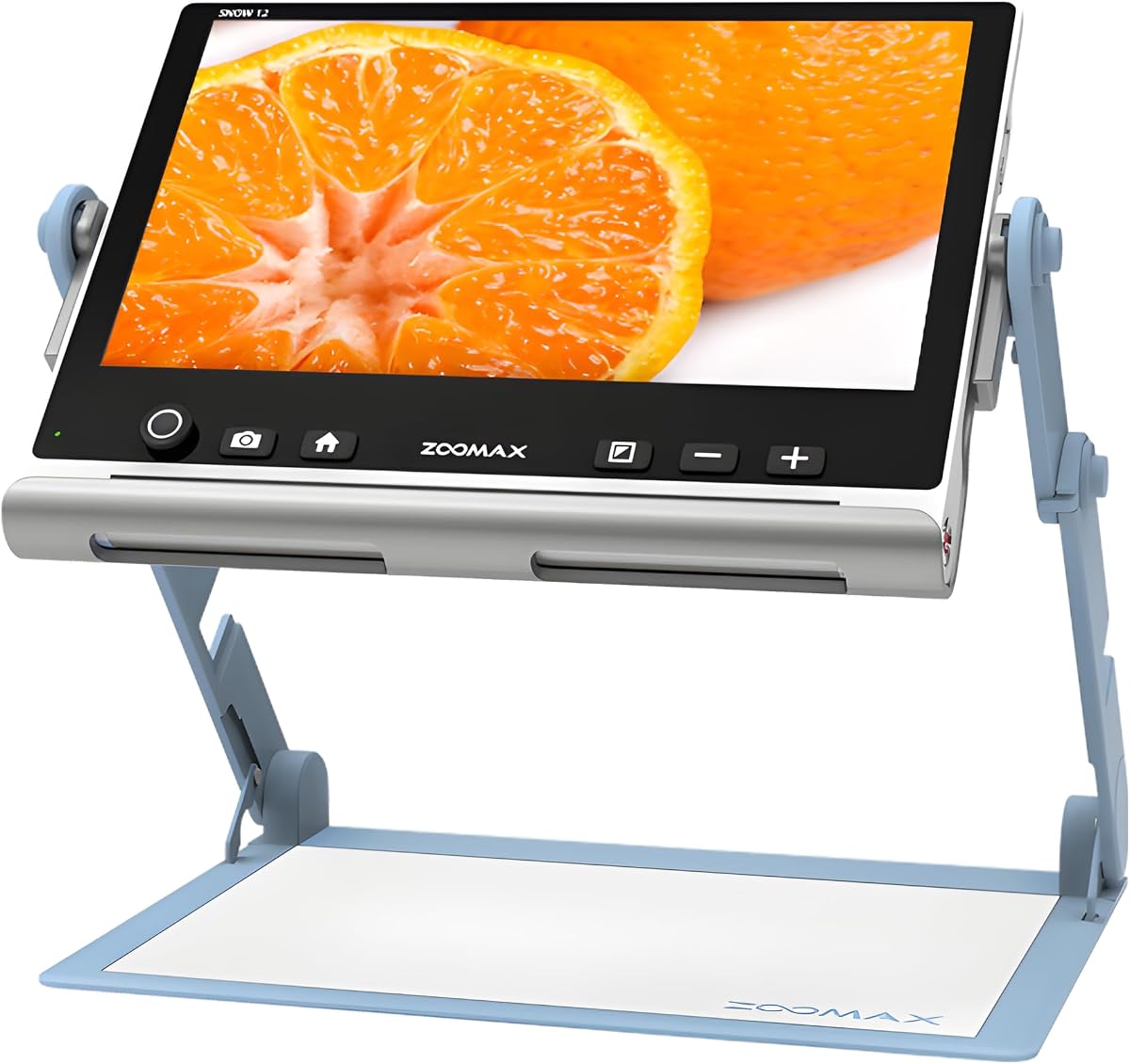
The Zoomax Snow 12 represents the premium end of the digital magnifier market, offering advanced features for enhanced independence. Its standout feature is the Optical Character Recognition (OCR) technology, which can convert printed text into speech, allowing users to listen to content instead of just reading it visually.
We may earn a commission when you buy through this link, at no additional cost to you.
The 12-inch screen provides an expansive viewing area that rivals a tablet, making it comfortable for reading lengthy documents or watching video content. With over 20 language support for text-to-speech, it is an ideal tool for users who speak multiple languages or are in multilingual households.
Despite its large display, the unit is designed to be lightweight and ultra-portable, ensuring it can be carried easily for travel or use outside the home. The foldable stand adds stability and flexibility, allowing users to adjust the viewing angle to reduce strain during extended periods of use.
While it is a significant investment, the combination of OCR, speech output, and large screen size makes it unmatched for productivity. This model is best suited for users who need a high-end assistive device that bridges the gap between visual aid and accessibility software.
OCR technology allows users to hear text read aloud, providing a crucial alternative for severe low vision needs.
The 12-inch display reduces the need for constant eye movement, making reading larger sections of text easier.
We may earn a commission when you buy through this link, at no additional cost to you.
The Eyoyo 5" Portable Digital Video Magnifier is recognized for its reliable performance and impressive battery life. With a 4500mAh battery, it provides over four hours of continuous operation, which is ideal for long reading sessions or travel days where access to power may be limited.
We may earn a commission when you buy through this link, at no additional cost to you.
The 5-inch LCD screen delivers a clear and sharp display, ensuring that text remains readable even at higher zoom levels. The 17 color modes and five brightness levels allow users to customize contrast and glare settings to match their comfort and lighting preferences.
The foldable and lightweight handle ensures a comfortable grip for extended use, reducing hand fatigue. It supports photo capture and playback via TF cards, allowing users to save and review images later without needing a separate device for documentation.
This model strikes a great balance between functionality and usability, making it a solid choice for daily readers. Its simplicity and long battery life make it especially appealing for seniors who want a device that works consistently without frequent charging interruptions.
The large battery capacity ensures the device lasts through long reading sessions without needing a recharge.
Multiple brightness and color settings help reduce glare and eye strain in various lighting environments.
We may earn a commission when you buy through this link, at no additional cost to you.
This model emphasizes contrast and clarity, offering 26 color modes to help users find the best visual setting for their needs. The 5.0-inch screen ensures that text appears large and sharp, while the memory function remembers your preferences after shutdown for quick access.
We may earn a commission when you buy through this link, at no additional cost to you.
The integrated handle and bracket design allow for stable placement on books or documents without hunching over, improving posture during reading. It supports TV connection via cable, providing an option for larger screen viewing when reading at home for extended periods.
Designed specifically for individuals with macular degeneration, low vision, or color blindness, it provides a reliable tool for daily independence. The large and prominent buttons make it accessible for users with limited dexterity, ensuring that navigation remains smooth and intuitive.
While the unit may be slightly heavier than ultra-compact options, its stability and clarity make it a strong contender for home use. It is a practical choice for those who prioritize visual comfort and ease of use over extreme portability.
The wide range of color modes ensures that users can find the high contrast settings that suit their vision best.
Integrated bracket ensures the device stays in place on flat surfaces, preventing unnecessary adjustments.
We may earn a commission when you buy through this link, at no additional cost to you.
The Eschenbach SmartLux is a lightweight and portable handheld option designed for those who prioritize mobility. Its digital video capabilities allow for quick enlargement of text, making it suitable for on-the-go tasks like reading restaurant menus or medicine labels.
We may earn a commission when you buy through this link, at no additional cost to you.
With five viewing modes and a magnification range from 5x to 12x, it offers a solid balance of usability and power for casual reading. The image capture feature allows users to save text for later reference, adding value for those who need to record information quickly.
As a brand known for optical quality, Eschenbach ensures that the device delivers clear images without significant distortion. It is particularly useful for individuals who do not need extreme magnification but want a reliable tool for occasional tasks.
While it may not be as powerful as larger models, its portability and ease of use make it a valuable companion for travel. It is an excellent choice for users who want a simple, high-quality digital aid that fits easily into a pocket or bag.
Its lightweight and compact design ensures it can be carried easily for reading tasks while traveling.
Known for optical quality, this model offers consistent performance and durability for long-term use.
We may earn a commission when you buy through this link, at no additional cost to you.
This digital magnifier offers a strong magnification range up to 48X, making it effective for users with significant vision challenges. The simplified buttons and memory function ensure that operation remains straightforward, with settings saved to avoid repeated adjustments each time you use the device.
We may earn a commission when you buy through this link, at no additional cost to you.
The 5.0-inch display provides a clear view of text, and the lightweight design makes it portable for use in stores or at the pharmacy. It is particularly helpful for reading prescription labels, price tags, and other small text where high detail is essential.
While it may not be ideal for reading full novels, its utility for quick reading tasks is significant. The external battery lasts over four hours, providing sufficient power for most daily activities without the need for frequent recharging.
It is a thoughtful gift for seniors or parents facing eyesight issues, offering them greater independence in daily tasks. For those needing high magnification and simplicity, this model provides a reliable and accessible solution for reading needs.
Up to 48X zoom ensures even the smallest text can be read clearly without strain.
Ideal for reading labels and short documents, offering efficient visual aid for quick tasks.
We may earn a commission when you buy through this link, at no additional cost to you.
Selecting the right digital magnifier for low vision requires careful consideration of several key factors to ensure the device meets your specific needs. Understanding magnification ranges, screen sizes, and additional features will help you choose a tool that enhances your reading and daily activities effectively.
The magnification range determines how large text and images can appear on the screen. Most devices offer ranges between 2X and 48X, so you should select a model that provides sufficient enlargement for your level of visual impairment. Higher magnification is beneficial for severe low vision, but too much zoom can limit the field of view.
Look for a device with adjustable zoom that covers your daily reading needs, whether it is menus, books, or documents.
Screen size affects how much text you can see at once without constant scrolling. Options range from 3.5 inches to 12 inches, with larger screens providing a more comfortable reading experience. While larger screens are great for home use, smaller ones are more portable for carrying around.
Choose a screen size that balances comfort with portability based on whether you plan to use the device primarily at home or while traveling.
Different users have different preferences for contrast and color. Models offer anywhere from 8 to 26 color modes, including high contrast settings like white on black or yellow on blue. These modes help reduce glare and make text stand out, which is crucial for people with light sensitivity or color blindness.
Ensure the device you choose offers a variety of color options to customize your viewing experience according to your comfort.
Battery life is critical if you plan to use the magnifier away from a power source. Look for a device with at least four hours of continuous operation to cover your daily tasks without interruption. Some models have rechargeable batteries, while others use external power sources.
Prioritize models with longer battery life if you intend to use the device for extended periods throughout the day.
Simplicity is key for many users, especially seniors. Devices with simplified buttons, large controls, and memory functions are easier to navigate and reduce the learning curve. Avoid overly complex interfaces that require multiple steps to change basic settings.
Look for a model that feels intuitive and allows you to start using it immediately without confusion.
Many magnifiers offer AV or HDMI outputs, allowing you to connect the device to a television for a larger viewing experience. This feature is valuable for home use when you need an even bigger screen for reading or watching content. Check if the required cables are included with the purchase.
Consider whether you need this feature to enhance your home viewing experience before making a final decision.
If you plan to take your magnifier with you when you leave home, weight and size matter. Lightweight models with handles or foldable designs are easier to carry and set up in different locations. A compact unit fits better in a bag and reduces physical strain.
Ensure the device is light enough to carry comfortably if you intend to use it for shopping or dining out.
Some models include extra features like text-to-speech, OCR, or image capture, which can significantly enhance accessibility. These tools allow you to save text for later or listen to content instead of just reading it visually. While these features add value, they may also increase the price.
Decide which extra features are essential for your needs and weigh them against your budget constraints.
To begin using your digital magnifier, charge the battery fully before the first use to ensure optimal performance. Turn on the device and place it close to the text or object you wish to read. Adjust the focus using the camera settings until the image on the screen appears sharp and clear.
Experiment with the color modes and brightness settings to find the combination that is most comfortable for your eyes. If you are using a foldable handle or stand, adjust the angle to ensure the screen is positioned at a comfortable height for viewing. This helps maintain good posture and reduces neck strain.
For long-term care, clean the screen with a soft, lint-free cloth to avoid scratches. Store the device in a cool, dry place when not in use to protect the internal components. Regularly check the battery connections and ensure the camera lens is free from dust for consistent image quality.
A digital magnifier offers adjustable magnification levels, color contrast modes, and brightness controls that a traditional glass magnifier cannot provide. It also reduces physical strain by allowing the text to be viewed on a screen at a comfortable distance. This flexibility makes it much more adaptable to different lighting conditions and visual needs.
Yes, many digital magnifiers offer high magnification ranges that can assist individuals with severe vision loss. Models with large screens and high-contrast modes are particularly beneficial. However, severe cases may also benefit from text-to-speech features found in premium models for complete independence.
Battery life varies by model but typically ranges from four to eight hours of continuous use. High-capacity batteries are available in more premium models. It is advisable to charge the device fully before leaving home if you plan to use it throughout the day.
Many digital magnifiers come with AV or HDMI output options that allow connection to a television or larger monitor. This feature provides a bigger viewing area for extended reading sessions at home. Check the product specifications to ensure the necessary cables are included with the purchase.
Yes, most modern digital magnifiers support image capture and playback via SD or TF cards. This function allows you to save important text or diagrams for later review. It is a useful feature for remembering information like labels or addresses while traveling.
Several models feature ergonomic handles and foldable brackets that can be adjusted or installed for both left and right-handed use. This design ensures comfort regardless of your dominant hand. Always check the product manual for instructions on adjusting the handle orientation.
We hope this guide has helped you narrow down the best options for your visual needs. Whether you choose the Eyoyo 3.5" for portability, the Zoomax Snow 12 for advanced features, or a budget-friendly model, each option offers unique benefits for improving your daily reading experience.
When making your final decision, prioritize the factors that matter most to you, such as screen size, battery life, or specific accessibility features. The right digital magnifier for low vision can significantly enhance your independence and make daily tasks like reading labels and books much easier.
Remember to check current prices and availability before purchasing, as stock and deals change frequently. We encourage you to read the latest customer reviews to ensure the device you choose fits your specific lifestyle and requirements perfectly.