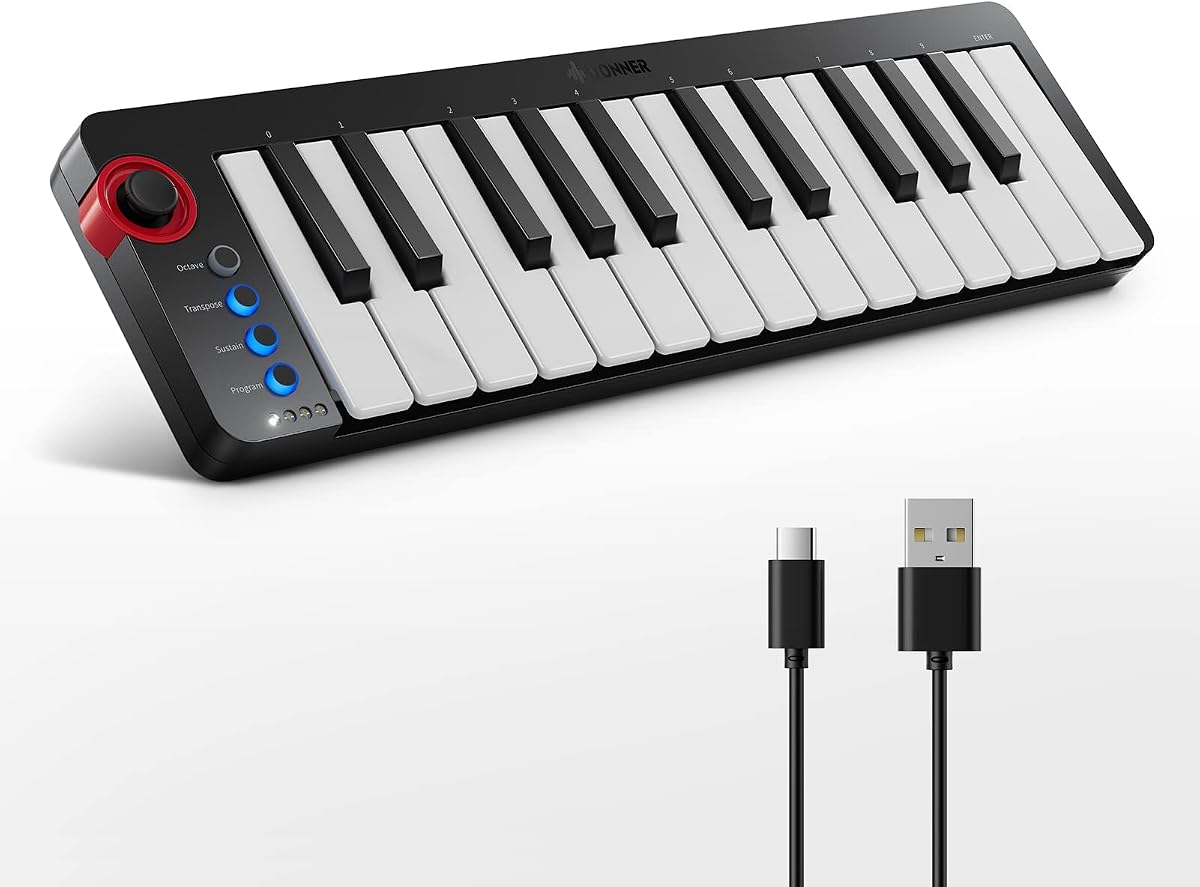
Donner Mini MIDI Keyboard N-25
4.1Editor score
Compact portable design
40 teaching courses included
Light-up rocker buttons
This expert guide compares the top 25 Key MIDI Controllers for October 2026, evaluating features like key feel, DAW integration, and portability to help you
Choosing the right 25 Key MIDI Controller can transform your music production workflow significantly. These compact devices offer essential controls for playing melodies, triggering samples, and managing software instruments without taking up much desk space. Whether you are a beginner or a seasoned producer, finding a model that matches your creative needs is crucial for staying inspired.
We evaluated these top models based on build quality, key responsiveness, software integration, and overall versatility. Our analysis covers USB connectivity, included software bundles, and unique features like built-in speakers or Bluetooth support. Each controller was assessed for its ability to handle modern DAWs and provide a seamless experience for both studio and live performance scenarios.
Each pick highlights specific strengths such as budget-friendly pricing, premium features, or specialized workflows for certain software. You will find detailed breakdowns of specs, pros, and cons to help you make an informed decision. Please note that prices and availability can change frequently, so verify current details before purchasing your next controller.
4.1Editor score

4.6Editor score

4.6Editor score
This side-by-side comparison highlights the key specifications and unique selling points of each model to help you quickly identify which controller fits your specific production needs and budget constraints.


The Akai Professional MPK Mini MK3 stands out as a top choice for producers seeking a balance of portability and professional features. With a rating of 4.6, it is widely appreciated for its velocity-sensitive mini keys and robust control layout. This model is designed to handle everything from beat-making to full studio composition with ease.
We may earn a commission when you buy through this link, at no additional cost to you.
Its standout features include 8 backlit MPC-style pads that offer excellent tactile feedback for drum programming. The 4-way thumbstick provides precise control over pitch and modulation, enhancing expressive performance capabilities. Additionally, the integration with Native Instruments software via NKS makes it a versatile tool for users of popular virtual instruments.
While the keys are compact, some users might find them slightly stiff compared to larger keyboards. However, this trade-off ensures durability and a consistent feel during intense production sessions. The lack of built-in speakers means it relies on external audio output, which is standard for this class of controller.
If you want a reliable controller that works seamlessly with major DAWs and offers extensive customization, the MPK Mini MK3 is a top recommendation. It is ideal for beginners and intermediates who want room to grow without upgrading gear soon. Consider this model for its comprehensive feature set and industry-standard software support.
The velocity-sensitive pads allow for dynamic drum patterns and sample triggering directly from your controller.
NKS integration ensures you can browse and control sound libraries without manual mapping.
We may earn a commission when you buy through this link, at no additional cost to you.
The Donner Mini MIDI Keyboard N-25 is an excellent entry-level option for those starting their music production journey. Rated at 4.1, it offers essential features like velocity-sensitive keys and a user-friendly layout that simplifies the learning process. Its compact size makes it perfect for small spaces or travel.
We may earn a commission when you buy through this link, at no additional cost to you.
One of its biggest advantages is the inclusion of 40 teaching courses designed to help novices understand music theory and arrangement. The light-up buttons provide visual guidance, making it engaging for learners. It connects easily via USB to Mac and PC, ensuring compatibility with various DAWs without driver issues.
However, the build quality is primarily plastic, which may feel less robust than premium models. The included software is functional but may not match the depth of professional bundles. These factors are acceptable given the low price point and the focus on education and accessibility.
For students or hobbyists on a tight budget, the Donner N-25 provides a fantastic starting point. It prioritizes ease of use and learning resources, making music creation less intimidating. If you need a simple, effective controller to learn and compose without breaking the bank, this is a strong candidate.
The 40 courses cover arrangement essentials to help you unlock creativity quickly.
Seamless support for Mac, PC, and mobile devices ensures flexible usage.
We may earn a commission when you buy through this link, at no additional cost to you.
The Novation Launchkey Mini 25 MK4 is designed for serious producers who need deep integration with their DAWs. With a rating of 4.6, it is praised for its responsive FSR pads and innovative scale mode that prevents wrong notes. This model bridges the gap between a simple keyboard and a full production workstation.
We may earn a commission when you buy through this link, at no additional cost to you.
Its 16 pads support polyphonic aftertouch, allowing for complex drum programming and clip launching. The scale mode enables you to trigger lush chords from single keys, which is great for live performance and rapid idea generation. It comes bundled with major DAWs and sound packs, adding immediate value.
The premium price reflects the superior build and feature set, though it is slightly larger than some competitors. While not as pocket-friendly, the increased functionality justifies the size for dedicated studios. The learning curve for all features may be steep for absolute beginners but rewarding for experienced users.
If you prioritize control over software parameters and need a tool that feels like an extension of your DAW, the Launchkey is the best choice. It is ideal for Ableton Live users who want clip launching and scale tools. Consider this for professional workflows where precision and integration are paramount.
Restricts notes to a chosen scale so you never hit a wrong note while improvising.
Polyphonic aftertouch on pads allows for dynamic control over sounds and samples.
We may earn a commission when you buy through this link, at no additional cost to you.
The Akai Professional LPK25 is a straightforward choice focused solely on keybed performance and simplicity. It has a rating of 4.7, reflecting its robust construction and consistent performance in various studio environments. This controller strips away extra features to focus on playing melodies and bass lines effectively.
We may earn a commission when you buy through this link, at no additional cost to you.
Its dedicated octave buttons allow you to transpose range easily without changing settings. The built-in arpeggiator adds a creative layer to your performances, making it easy to generate complex patterns. Since it is USB powered, you can use it anywhere without needing extra adapters or cables.
The lack of pads and knobs limits its utility for mixing or drumming, but for keyboardists, this is often acceptable. It is designed to work with all major applications, ensuring you never run into compatibility issues. The sleek design fits well alongside existing equipment without cluttering the desk.
If you want a dedicated input device for virtual instruments without the distraction of other controls, the LPK25 is perfect. It is best for live performers or producers who already have separate tools for other functions. Prioritize this if you value a clean, focused interface and high reliability.
The responsive keys and octave buttons ensure you can play melodies with feel and dynamics.
Generates rhythmic patterns instantly to inspire creative songwriting without plugins.
We may earn a commission when you buy through this link, at no additional cost to you.
The Arturia MiniLab 3 offers a sleek white design that adds style to your desk while providing robust control features. It holds a rating of 4.7, thanks to its adaptive workflow design and premium keybed. This model is versatile enough to handle track muting, drum punching, and instrument tweaking with ease.
We may earn a commission when you buy through this link, at no additional cost to you.
It features 8 drum pads and 4 faders, giving you hands-on control over mixing levels and triggers. The keys are velocity-sensitive, ensuring dynamic playback of your virtual instruments. Its universal compatibility ensures it works with various DAWs without needing complex setup procedures.
The faders are compact, which might require a bit of precision for exact volume adjustments. The software bundle is lighter compared to some competitors, so you may need to purchase additional sounds. However, the controller itself is robust and well-designed for creative flow.
For producers who want a mix of keys and mixing controls in a compact form, the MiniLab 3 is excellent. It is best for those who value aesthetic design and tactile faders. Choose this if you need to manage tracks and drums simultaneously while composing melodies.
Adapts to your style and workflow to minimize mouse usage during production sessions.
The 4 faders allow direct control over volume and effects without menu diving.
We may earn a commission when you buy through this link, at no additional cost to you.
The Rhymo 25 Key Controller is designed for portability with modern connectivity options like USB-C and Bluetooth MIDI. It is rated 4.1 and offers a slim profile that fits easily into bags for on-the-go production. This model is perfect for musicians who want to create ideas anywhere with minimal gear.
We may earn a commission when you buy through this link, at no additional cost to you.
Its X-Y joystick allows for expressive pitch bend and modulation control, adding depth to performances. The arpeggiator and loop function provide creative tools for beat making without needing external software. It supports up to a 10-octave range via octave buttons, ensuring full melodic flexibility.
While the build is basic, it meets the needs of hobbyists and travelers who prioritize function over luxury. The Bluetooth capability means you can connect to tablets without a cable, though latency can vary. This makes it a versatile tool for mobile music creation.
If you need a lightweight controller that connects wirelessly or via USB-C to your tablet or phone, Rhymo is a great pick. It is ideal for field recording or travel sketches. Consider this if you value convenience and modern connection standards in a compact form.
USB-C and Bluetooth MIDI ensure compatibility with modern devices without adapters.
The X-Y joystick adds dynamic pitch and modulation control to your performances.
We may earn a commission when you buy through this link, at no additional cost to you.
The M-VAVE 25 Key Controller stands out with its wireless capabilities and robust battery life. With a 4.5 rating, it is appreciated for allowing untethered work via Bluetooth or 2000 mAh battery. This model is great for those who want to compose without cable clutter in their home studio.
We may earn a commission when you buy through this link, at no additional cost to you.
It features 8 RGB backlit pads and 8 assignable knobs for mixing and tweaking sounds. The smart chord feature lets you trigger chords easily, which is helpful for quick idea generation. It supports Windows, Mac, Android, and iOS, ensuring broad compatibility across devices.
You will need to charge the battery occasionally, which adds a step to setup. The keys are semi-weighted and dynamic but may not feel premium to experienced players. Still, the convenience of wireless connectivity makes this a standout option for mobile use.
If you want to compose without being tethered to a computer, the M-VAVE offers excellent freedom. It is ideal for casual producers who value flexibility and visual feedback. Choose this if you need a portable tool that can run on battery for hours.
The built-in battery and Bluetooth allow you to work from anywhere without cables.
Smart chord function simplifies harmony creation for those with limited theory knowledge.
We may earn a commission when you buy through this link, at no additional cost to you.
The Akai MPK Mini Play MK3 is unique for its built-in speaker, making it a standalone instrument. Rated 4.5, it is perfect for sketching ideas or learning without needing a computer. It combines the functionality of a MIDI controller with the convenience of a portable synthesizer.
We may earn a commission when you buy through this link, at no additional cost to you.
It features an OLED display to show internal sounds and settings, enhancing usability. The 8 backlit MPC-style pads and arpeggiator offer extensive creative tools. You can use it with batteries or USB, making it truly versatile for travel or live situations.
The built-in speaker is convenient but not meant for high-fidelity monitoring. You will still need headphones or speakers for serious production. However, for inspiration and on-the-go use, it provides unmatched independence from a computer setup.
If you want a controller that works independently when you don't have a computer handy, this is the best choice. It is ideal for travelers or beginners who want to learn sounds. Consider this for its unique ability to produce sound without external gear.
Built-in speaker and internal sounds allow for creating music without a computer.
The OLED display makes navigating sounds and settings clear and intuitive.
We may earn a commission when you buy through this link, at no additional cost to you.
The Akai MPK Mini MK3 Black offers the same reliable performance as its white counterpart but with a classic finish. It has a rating of 4.6 and is a staple in many studios for its consistent functionality. This model ensures you get all the control you need without any extra frills.
We may earn a commission when you buy through this link, at no additional cost to you.
It includes 1500+ sounds and a full starter kit to get you started immediately. The knobs and pads are fully assignable, giving you total control over plugins and samples. Its compatibility with major DAWs means you can dive into work right away.
While it lacks unique new features compared to the original, it is a proven workhorse. The black finish may hide scratches better than lighter models. The compact keys remain a trade-off for portability, which is standard for this product line.
If you prefer a sleek, dark design and want a trusted industry standard, this is an excellent buy. It is best for producers who need reliability and comprehensive software bundles. Choose this if you want a professional tool that integrates smoothly into existing setups.
Includes 1500+ sounds and a full starter kit to launch your creative workflow.
Assignable knobs and pads give you full command over your virtual instruments.
We may earn a commission when you buy through this link, at no additional cost to you.
The Akai APC Key 25 MK2 is designed specifically for Ableton Live users who need precise clip launching and control. With a rating of 4.4, it is praised for its 5×8 RGB pad matrix that provides visual color feedback. This controller transforms your computer screen into a tactile performance surface.
We may earn a commission when you buy through this link, at no additional cost to you.
It includes dedicated navigation buttons to move through tracks and scenes easily. The 25 mini keys allow you to play chords and melodies while launching clips. Its pre-mapped design means you do not need to spend time setting up controls for the DAW.
While highly specialized for Ableton, it may not integrate as well with other DAWs. The keys are small, which is typical for this class, but can limit complex playing. However, for live performances, its clip launching workflow is unmatched.
If you use Ableton Live as your main DAW and need clip launching, this is the best option. It is ideal for electronic musicians and live performers. Consider this for its unique ability to streamline the Ableton workflow effectively.
Pre-mapped to work out of the box with Ableton Live 11.2.7 onwards.
The 5×8 RGB pad matrix shows clip status at a glance for live use.
We may earn a commission when you buy through this link, at no additional cost to you.
Selecting the right 25 Key MIDI Controller depends on your workflow, budget, and specific software needs. Here are the main factors to consider before making a purchase.
25-key controllers use mini keys to save space. Look for velocity-sensitive keys to ensure dynamic control. The physical size of keys can affect playability, especially for complex chords.
If you plan to play complex melodies, ensure the keys are responsive and well-spaced for your fingers.
Check if the controller supports your specific Digital Audio Workstation. Deep integration allows for one-touch control of volume, pan, and transport. This reduces mouse usage and speeds up your workflow significantly.
Choose a model that is pre-mapped to your preferred DAW for a seamless start.
Pads are essential for beat makers and drummers. Look for velocity-sensitive and backlit pads for visual feedback. Knobs and faders help you mix tracks without opening software panels.
More controls offer flexibility but can increase complexity. Select only what you need.
If you travel, USB-C or Bluetooth connectivity is vital. Battery options allow standalone use without a computer. Size and weight should match your typical usage environment.
Prioritize models that fit easily into your bag if you move around frequently.
Many controllers come with DAWs and virtual instruments. These extras can save you money on initial setup costs. Check which versions are included and their expiration dates.
Look for bundles that include software you actually need to avoid clutter.
Plastic bodies are lighter but may feel less premium. Metal accents can add longevity and stability on the desk. Read user reviews for long-term durability reports.
Invest in a sturdy build if you use your controller daily.
Prices vary widely based on features and brand reputation. Higher prices often mean better keys and deeper integration. Weigh cost against the specific needs of your studio.
A budget option might be better if you only need basic input for melodies.
Some models include courses or tutorials. These are great for beginners learning music theory or DAW basics. They help you learn to play rather than just configure.
Consider these resources if you are new to music production.
Start by connecting your controller via USB or Bluetooth to your computer or tablet. Ensure the drivers are installed if required, though most modern units are plug-and-play. Check your DAW settings to recognize the device and map controls.
Use the octave buttons to expand your playable range. Adjust knobs to control effects and volumes directly. Explore the built-in arpeggiator to generate patterns quickly. Experiment with different modes to find what works best.
To maintain your controller, keep it dust-free with a soft cloth. Avoid exposing it to extreme heat or moisture. Store it in a protective case when not in use to prevent damage to keys and pads. Regularly update firmware for better performance.
Most modern controllers are class compliant and work with all major DAWs like Ableton, Logic, and FL Studio. However, some may require specific drivers for full integration. Check manufacturer compatibility lists before buying.
Velocity-sensitive keys detect how hard you press to vary volume and tone. This adds expressiveness to your playing. Regular keys trigger notes without dynamic variation, which is less realistic.
Most require a computer or mobile device to produce sound. Some models with built-in speakers and sound engines can work standalone. Check the specs to confirm if standalone functionality is included.
Most modern controllers are plug-and-play on Mac and Windows without drivers. However, advanced features like editor software may require drivers. Always check the product page for system requirements.
Yes, 25 keys are sufficient for melodies, bass lines, and basic chords. For full compositions, octave buttons allow you to shift the range. Many professionals use them as secondary controllers for specific tasks.
A USB cable and sustain pedal are essential accessories for better expression. Consider a sturdy stand or case for protection if you travel. Software subscriptions may be needed if not included in the bundle.
The top picks highlight the versatility of modern MIDI technology for musicians at every level. Whether you choose the MPK Mini MK3 for control, the Donner N-25 for learning, or the Launchkey for DAW integration, each offers unique value.
Prioritize features that match your specific workflow rather than buying the most expensive option. Consider how much control you need over mixing, drumming, and melody creation. Your daily usage patterns should dictate the best investment.
Always verify current prices and compatibility before purchasing to ensure you get the best deal. Technology evolves quickly, so check for the latest firmware updates. Happy composing with your new gear.