
NexiGo N60 1080P Webcam
4.3Editor score
1080p Full HD resolution
Built in noise cancelling mic
Privacy cover included
Choosing the right external webcam for your Mac can transform your video calls and streaming setup. High quality sensors and accurate color reproduction ensure you look professional during meetings or content creation sessions.
We evaluated ten top rated models based on resolution, microphone quality, and macOS compatibility. Each product was selected for its ability to deliver crisp video and reliable performance across common conferencing platforms.
Every pick below includes detailed specs and pros to help you decide quickly. Note that pricing and availability may change over time so check the current listings before making your final purchase decision.
4.3Editor score

4.6Editor score

4.6Editor score
As an Amazon Associate we earn from qualifying purchases.
The following comparison table highlights key specifications for all ten models allowing you to see differences in resolution focus type and connectivity at a glance.


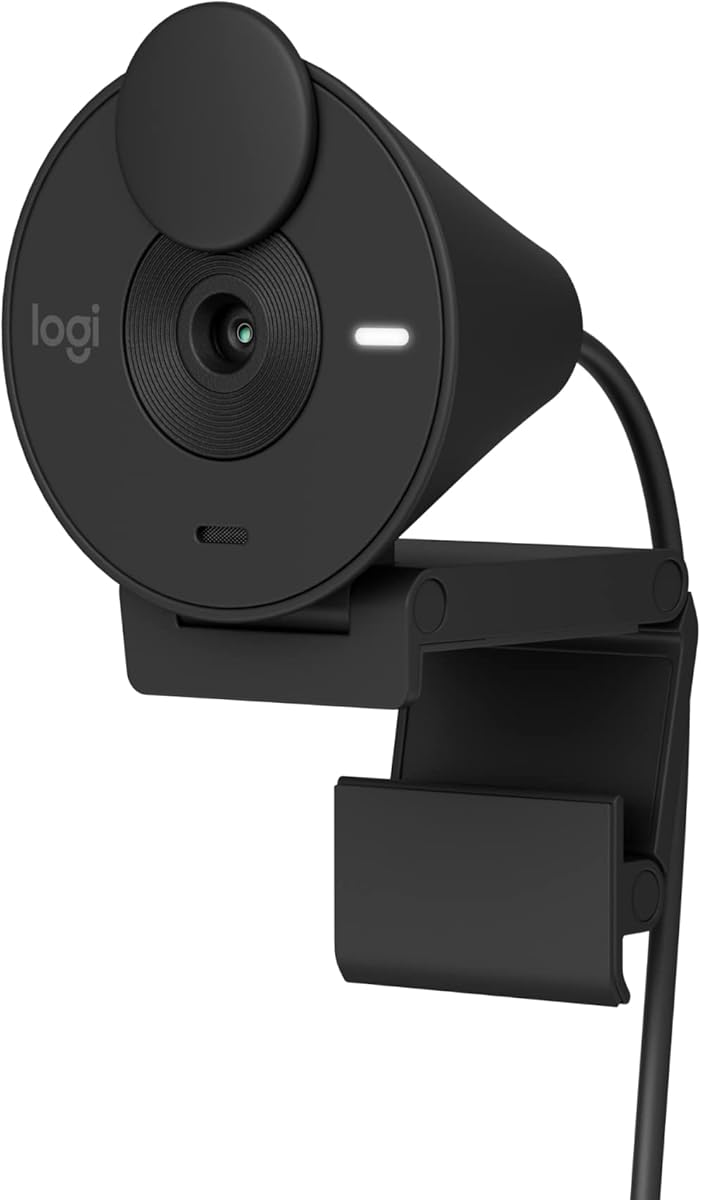


The Acer 4K Webcam stands out with its true UHD resolution and premium unibody design. Rated 4.6 stars it delivers crisp visuals and reliable performance ideal for Mac users seeking high definition calls.
We may earn a commission when you buy through this link, at no additional cost to you.
Its Sony sensor captures balanced true-to-life visuals even in low light. The Phase Detection Autofocus ensures sharp focus without blurriness while the dual mics filter ambient noise for clear audio.
While it may require an adapter for older Macs the included USB-C to A connector ensures compatibility. The magnetic privacy cover adds security though the unit is slightly heavier than budget options.
Choose this if you need professional grade video quality and durability. Its blend of advanced optics and build material makes it the top pick for serious remote work and streaming on macOS.
The large CMOS sensor and UHD resolution ensure every detail remains clear during meetings.
Aerospace grade aluminum ensures durability and efficient heat dissipation during long sessions.
We may earn a commission when you buy through this link, at no additional cost to you.
The NexiGo N60 offers solid 1080p video at a very accessible price point. With a 4.3 rating it serves as an excellent entry level option for Mac owners needing reliable web conferencing.
We may earn a commission when you buy through this link, at no additional cost to you.
Its 1080p CMOS sensor produces sharp images optimized for typical indoor distances. The built-in noise-cancelling mic enhances clarity and the included privacy cover adds peace of mind between calls.
Fixed focus may limit flexibility compared to premium models but it works well for standard setups. You must manually adjust the angle and there is no advanced lighting correction beyond basics.
For those on a tight budget this webcam provides essential features without compromising too much. It is a practical choice for students or casual users who need clear video without extra cost.
Delivers Full HD video and privacy protection at one of the lowest price points available.
No drivers required and works instantly with Mac OS X 10.7 and higher.
We may earn a commission when you buy through this link, at no additional cost to you.
The Logitech C920e is designed for professional environments with certification for Zoom and Microsoft Teams. Rated 4.6 stars it balances performance and reliability for business users on Mac systems.
We may earn a commission when you buy through this link, at no additional cost to you.
Two omnidirectional microphones capture natural audio from up to one meter away. The 78 degree field of view frames individuals well while the attachable privacy screen ensures visual security.
It lacks USB-C connectivity and higher resolution options but delivers consistent 1080p video. The sturdy clip fits most laptop screens and the 1/4 inch thread supports tripod mounting for stability.
Select this model if you work in corporate settings requiring certified hardware. It is a robust solution for daily meetings where audio clarity and privacy are critical priorities.
Designed and certified for seamless integration with major business conferencing platforms.
Dual mics ensure your voice sounds natural and clear even in office environments.
We may earn a commission when you buy through this link, at no additional cost to you.
The second Acer 4K Webcam variant targets streamers and creators with premium image quality. Its 4K rating ensures vibrant visuals while the unibody metal design maintains durability during long sessions.
We may earn a commission when you buy through this link, at no additional cost to you.
PDAF autofocus keeps your face sharp even when moving. The dual mics reduce ambient noise effectively and the magnetic cover provides quick access when privacy is needed on macOS.
It connects via USB-A which might limit newer Mac models but offers stable data transfer. The fast cooling system ensures consistent performance over time though it requires adequate ventilation.
Ideal for content creators who need 4K without a large footprint. This model combines streaming quality with professional build standards for those who prioritize video fidelity.
All-aluminum body dissipates heat efficiently for reliable 24/7 video performance.
Compact size fits easily into travel kits for on-the-go recording.
We may earn a commission when you buy through this link, at no additional cost to you.
The EMEET C960 brings true 4K resolution to home offices at a competitive price. It features PDAF focus and dual microphones ensuring stable video and clear audio during meetings.
We may earn a commission when you buy through this link, at no additional cost to you.
Automatic light correction helps manage over-exposed or dark settings. The privacy cover keeps the lens protected and the webcam supports various platforms like Zoom and Teams.
Note that it defaults to 1080p unless adjusted via EMEETLINK software. This adds a step to setup but ensures optimal performance once configured correctly on your Mac.
Choose this for high-end visuals without breaking the bank. Its versatility with mounting options and software tools makes it a strong contender for hybrid work setups.
Adjusts exposure automatically so you remain visible in various lighting conditions.
Tripod thread allows stable placement on desks or shelves beyond laptop clips.
We may earn a commission when you buy through this link, at no additional cost to you.
The Logitech C922x remains a favorite among content creators for its streaming features. Rated 4.6 stars it offers 1080p at 30fps or 720p at 60fps providing smooth visuals for Mac users.
We may earn a commission when you buy through this link, at no additional cost to you.
HD light adjustment produces bright images in low settings. Stereo audio and dual mics capture natural sound making it ideal for recorded videos and live calls.
It includes a three-month XSplit VCam license for background changes without a green screen. However there is no privacy shutter so you must cover it manually when not in use.
Best for creators needing flexibility in streaming software. Its combination of video quality and audio performance justifies its price despite the lack of a physical cover.
Software tools enable advanced video processing and background replacement for professional output.
Stereo mics record natural sound during calls and recorded videos effectively.
We may earn a commission when you buy through this link, at no additional cost to you.
The Logitech C920S simplifies video calling with essential features like a privacy shutter. Its 4.6 rating reflects consistent performance and reliability for Mac users needing a dependable webcam.
We may earn a commission when you buy through this link, at no additional cost to you.
Full HD video calls ensure you look professional while HD autofocus keeps the image sharp. Stereo audio with dual mics captures natural sound clearly for all types of online meetings.
Although it lacks the XSplit license from the C922x it covers most daily needs. The built-in cover protects the lens and allows you to control visibility with ease.
Select this for balanced performance across tasks. It suits both personal and professional use where privacy and video quality are standard requirements for Mac systems.
Built-in shutter puts you in control of what you show during calls.
Full HD quality makes you look like a professional on every call.
We may earn a commission when you buy through this link, at no additional cost to you.
The Logitech Brio 301 focuses on making you look your best in meetings. It earns a 4.4 rating for its RightLight 2 technology and certified compatibility with major platforms.
We may earn a commission when you buy through this link, at no additional cost to you.
Auto light correction compensates for poor conditions automatically. The mono noise reduction mic helps everyone hear you clearly while the spin privacy shutter offers quick visual security.
While it uses a mono mic which is less immersive than stereo it reduces background noise effectively. The device is made with recycled plastic aligning with eco-friendly values for some users.
Ideal for business professionals prioritizing appearance and convenience. It is a strong alternative to standard webcams if you want advanced lighting and sustainable design.
Automatically compensates for poor lighting so you are seen clearly always.
Spin privacy shutter blocks the lens easily when you are not on screen.
We may earn a commission when you buy through this link, at no additional cost to you.
The Logitech Brio 100 brings Full HD video with a touch of style. Rated 4.4 stars it is designed for streaming and meetings while offering a choice of sophisticated colors.
We may earn a commission when you buy through this link, at no additional cost to you.
RightLight boosts brightness by up to 50 percent to reduce shadows. The integrated cover ensures reliable privacy and the built-in mic helps others hear you clearly.
It works with most platforms and supports various colors to match your setup. However the white finish may show dust over time requiring occasional cleaning to maintain appearance.
Choose this if aesthetics matter alongside video quality. It is a solid choice for home offices that want a polished look and reliable conferencing performance.
Choose fun yet sophisticated colors that coordinate with your setup.
Made with a minimum of 34 percent post-consumer plastic.
We may earn a commission when you buy through this link, at no additional cost to you.
The Anker PowerConf C200 delivers sharp 2K video for professional conferences. It earns a 4.4 rating for its advanced audio clarity and superior low-light correction on Mac.
We may earn a commission when you buy through this link, at no additional cost to you.
Dual mics with AI noise cancellation ensure voices are clear in noisy environments. Choose from three viewing angles via software to frame your perfect shot comfortably.
The integrated cover slides easily for security between calls. You must install the software to adjust angles which is a minor inconvenience for the flexibility gained.
Select this for sharper than standard HD video. It is a reliable choice for professionals needing clear visuals and audio without moving into the 4K price tier.
Advanced noise cancellation ensures voices are crystal clear even in noisy rooms.
Enjoy sharp detailed video enhancing your PC setup for meetings.
We may earn a commission when you buy through this link, at no additional cost to you.
Selecting the right webcam involves balancing resolution audio and compatibility. This section outlines the critical factors to consider for Mac users.
Resolution determines how clear your video appears during calls. Options range from 1080p Full HD to 2K and 4K. While 1080p is standard and sufficient for most meetings higher resolutions like 4K provide exceptional detail for content creation.
Look for true 4K sensors rather than upscaling for best results.
Autofocus ensures your face stays sharp if you move. Standard fixed focus works for static setups but Phase Detection Autofocus offers faster more accurate focusing. This is useful if you gesture or shift positions often.
PDAF is recommended for professional or streaming needs.
Built-in mics vary in clarity. Dual omnidirectional mics capture natural sound while noise cancellation filters out keyboard clicks or ambient noise. If you rely solely on the webcam for audio this feature is vital.
Ensure the mic supports clear audio from a distance.
Not all rooms have perfect lighting. RightLight or auto light correction adjusts brightness automatically so you look visible in dim or over-exposed settings. This reduces shadows and improves overall image quality.
Prioritize models with advanced light adjustment for home offices.
Privacy covers are essential for security. A physical cover or shutter ensures the lens is blocked when not in use. Magnetic or sliding mechanisms allow quick access and protect the sensor from scratches.
Always verify the cover is included if you value privacy.
Most webcams connect via USB-A or USB-C. Newer Macs use USB-C so verify if an adapter is included. Wired connections are generally more secure and reliable than wireless options for data transfer.
Check connector type to ensure compatibility with your Mac model.
Clips and tripods affect placement. A sturdy clip works for laptop screens while a 1/4 inch thread allows mounting on external monitors or tripods. Stable mounting prevents image shake during calls.
Choose mounting based on your desk setup.
Certification for Zoom Microsoft Teams or Google Meet ensures seamless integration. Some models come with proprietary software for settings adjustments. Confirm macOS compatibility and driver requirements before purchasing.
Ensure the webcam works without complex setup on your OS.
Plug the webcam into an available USB port on your Mac. If needed use a USB-C to USB-A adapter. Wait a few seconds for your system to recognize the device.
Open the Camera app to check video output. Adjust brightness or angle as needed using the lens ring or settings in your conferencing app. Use the privacy cover when not in use.
Clean the lens gently with a microfiber cloth to remove smudges. Avoid harsh chemicals and keep the USB connector dry. Regular cleaning maintains image clarity and extends the device's lifespan.
Yes most external webcams listed are compatible with macOS 10.11 or later. They use plug-and-play connectivity requiring no additional drivers. Just connect via USB and select the device in your video app.
If you need high detail for streaming or professional calls 4K is valuable. For standard meetings 1080p suffices. Consider your use case and if your Mac supports 4K processing.
Yes you can but a cover adds security. You may need to cover the lens manually with tape if the model does not include one. This protects your privacy between calls.
Models like the Acer 4K or Logitech Brio 301 offer advanced light correction. These adjust automatically to dim conditions ensuring clear visibility without extra lamps or natural light.
Most webcams work without drivers. Some offer optional software for settings like angles or filters. Basic functionality remains available through macOS camera apps or conferencing platforms.
Most webcams use wired USB connections for stability. Wireless models exist but are less common. Check specifications carefully if you require a Bluetooth connection for setup.
You can use a USB-C to USB-A adapter. Many models include this adapter. Verify the box contents before purchase to ensure immediate compatibility.
Quality models last several years with regular use. Proper care such as cleaning the lens and using the cover helps durability. Avoid dropping or bending the mounting clip.
We have reviewed ten top external webcams for Mac ranging from budget options to premium 4K models. The Acer 4K Webcam leads as the best overall while the NexiGo N60 offers great value.
Prioritize resolution autofocus and privacy features based on your needs. For business use consider certified options like the Logitech C920e. For casual use the C920S is reliable.
Prices and availability may change so check the latest listings before buying. This guide helps you pick a webcam that ensures clear video and professional communication.