
22MP Film & Slide Scanner with 5" LCD
4.3Editor score
22MP Resolution Output
Built In Memory
HDMI And USB
Easy Interface Design
Preserving precious memories requires the right tools to convert old film into digital formats. A high-quality 35mm slide scanner ensures your negatives and slides are captured with clarity. Choosing the best device helps you maintain image integrity while simplifying the archiving process.
Our team analyzed ten top-rated scanners to evaluate performance, features, and user experience. We looked at resolution, screen size, connectivity options, and software capabilities. This list covers standalone units and versatile models designed for various film types and user needs.
Each pick highlights specific strengths like touchscreens, batch processing, or standalone operation. You will find options for beginners and enthusiasts alike. Please note that product availability and pricing may change over time, so check current listings before purchasing.
4.3Editor score
4.4Editor score

5.0Editor score
As an Amazon Associate we earn from qualifying purchases.
The following table provides a side-by-side comparison of all ten selected scanners. It highlights key specifications like resolution, screen size, and supported film formats to help you make an informed decision quickly.






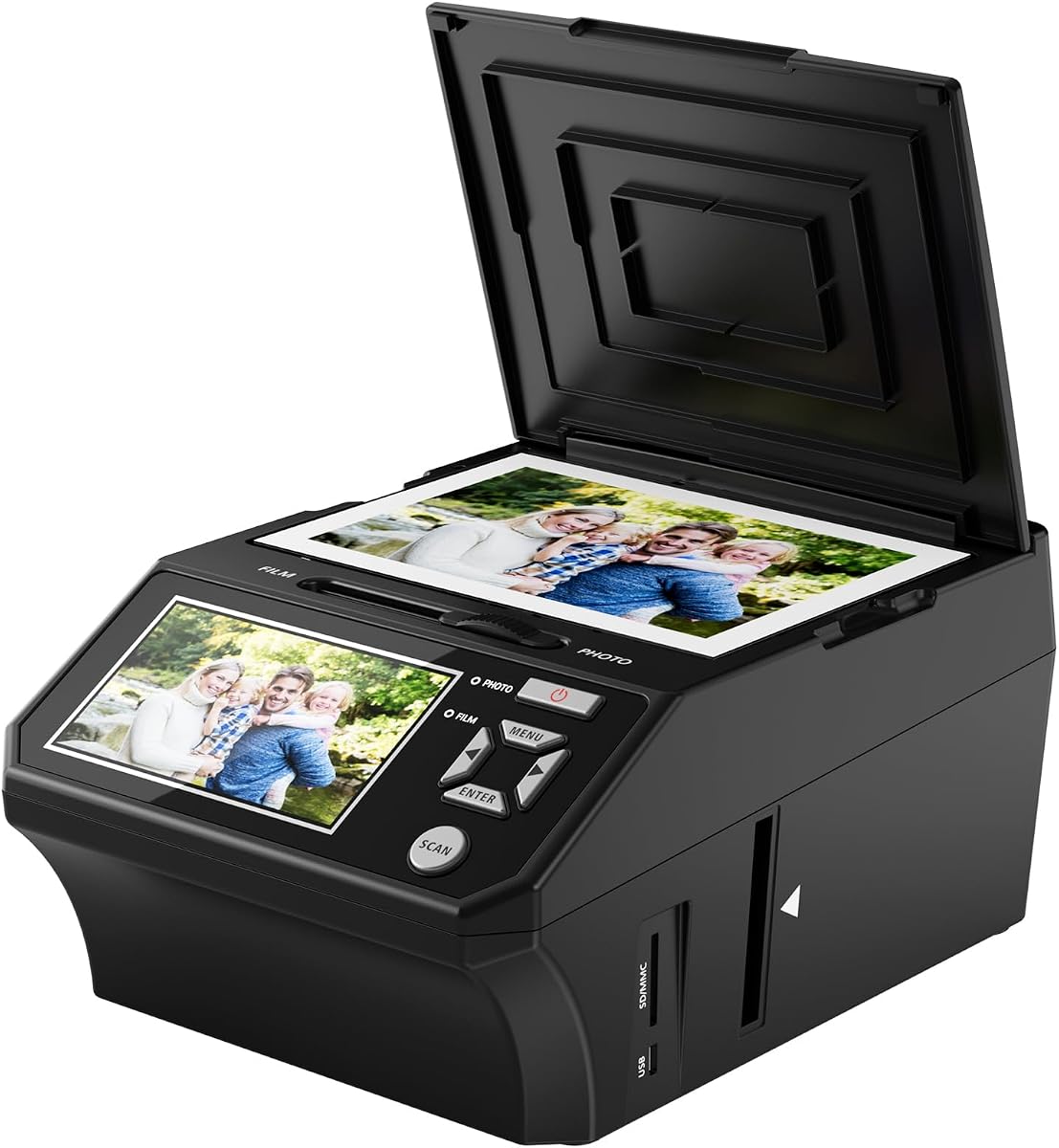
This all-in-one digital photo converter stands out for its large 5-inch HD viewing screen. It achieves a solid 4.4 rating from users who appreciate its straightforward design. The device handles 35mm slides and negatives along with printed photos seamlessly.
We may earn a commission when you buy through this link, at no additional cost to you.
Its standout feature is the intuitive one-touch scanning mechanism. You can preview and edit images directly on the device without needing a computer. The bundle includes necessary adapters and an 8GB SD card, making it ready to use right out of the box.
While the included memory card is modest in size, it suffices for small batches. The fixed brightness might not suit all lighting conditions but remains visible for most users. The 3-year warranty provides significant peace of mind for long-term use.
Ideal for families wanting to digitize albums quickly, this scanner simplifies the process. It is perfect for seniors or non-tech-savvy users. We recommend it as the top choice for reliable standalone scanning.
The wide-angle display allows you to review scans immediately, ensuring quality before saving. This eliminates the guesswork often associated with film digitization.
Beyond slides, it converts printed photos and business cards. This versatility makes it a comprehensive archive tool for mixed media collections.
We may earn a commission when you buy through this link, at no additional cost to you.
This budget-friendly unit offers high resolution without a high cost. Rated at 4.3 stars, it provides a solid entry point for home archiving. It supports a variety of formats including Super 8 film.
We may earn a commission when you buy through this link, at no additional cost to you.
The built-in memory allows quick saves without an SD card. HDMI connectivity lets you view scans on a TV for family sharing. The kit includes all necessary adapters and cables.
The lack of an SD card in the box might be a minor inconvenience. The casing feels lightweight compared to premium models. However, it performs well for the price.
Best for budget-conscious buyers, this scanner delivers core features effectively. It balances affordability with functionality. Choose this if you need a reliable standalone tool.
Built-in memory provides a quick backup before transferring to SD. This ensures no data loss during the scanning workflow.
HDMI output transforms the scanner into a viewing station. You can show photos to guests without a computer.
We may earn a commission when you buy through this link, at no additional cost to you.
The ClearScan T7 earns a perfect 5.0 rating for its user experience. It features a large 7-inch touchscreen that simplifies navigation. This model is perfect for families wanting to digitize old film.
We may earn a commission when you buy through this link, at no additional cost to you.
Its touch interface reduces confusion compared to physical buttons. The included 16GB SD card means you can start immediately. It handles negatives and slides efficiently.
The cost is higher than basic units. Touch screens can sometimes be less responsive in cold environments. These trade-offs are acceptable for the convenience offered.
For those seeking a premium experience, this scanner excels. It makes archiving accessible for non-tech users. We recommend it for ease of use and quality.
Touch controls allow intuitive navigation. Menus are clear and easy to manage for all ages.
Included accessories eliminate the need for separate purchases. This makes it a complete solution out of the box.
We may earn a commission when you buy through this link, at no additional cost to you.
KODAK brings its legacy to this scanner model. It is rated 4.3 and offers 22MP resolution. The large screen helps view images clearly without magnification.
We may earn a commission when you buy through this link, at no additional cost to you.
The gallery mode lets you browse scans like a photo frame. Loading trays support continuous action for efficiency. HDMI connectivity allows immediate viewing on a TV.
Users might find the screen brightness limited in bright rooms. Not finding an SD card in the box requires a separate purchase. These are minor issues for the brand value.
Ideal for collectors with large slide volumes. The brand reputation adds confidence to the purchase. Choose this for a balance of features and reliability.
The device acts as a digital frame between tasks. This keeps your memories visible on the desk.
Trays allow rapid loading of multiple films. This increases throughput for large archives.
We may earn a commission when you buy through this link, at no additional cost to you.
Magnasonic offers a powerful tool for home digitization. It earns 4.3 stars with a 24MP sensor. The standalone design removes the need for a PC.
We may earn a commission when you buy through this link, at no additional cost to you.
Support for Super 8 film extends its utility. Large SD capacity ensures ample storage. Speeds are competitive for high throughput.
Manual buttons can be slightly cumbersome. Without an included card, you must source storage. Still, the performance justifies this.
Great for mixed media collectors. The Super 8 option is a strong differentiator. Pick this for technical capability and speed.
Unique among many units, it handles Super 8. This is vital for vintage movie preservation.
Operate completely without drivers or software. This saves setup time for beginners.
We may earn a commission when you buy through this link, at no additional cost to you.
The Slide N Scan Max focuses on efficiency. Rated at 4.2, it features a moving tray for seamless scanning. It supports a wide range of film types.
We may earn a commission when you buy through this link, at no additional cost to you.
Direct saving to SD streamlines the workflow. The tray design reduces manual repositioning needs. The unit stands out with its sleek finish.
The base sensor is lower than others. An external SD card is needed immediately. These are trade-offs for portability.
Suitable for travelers or mobile users. The tray design is ergonomic for long sessions. Recommend for ease of operation.
The moving tray handles slides smoothly. This prevents manual handling errors.
Its design fits well in a travel bag. It is a portable solution for on-site work.
We may earn a commission when you buy through this link, at no additional cost to you.
HP delivers a modern interface with a touch screen. Rated 4.0, it features a 7-inch display for management. It allows quick scanning with fast feed trays.
We may earn a commission when you buy through this link, at no additional cost to you.
Batch scanning handles multiple slides efficiently. The gallery mode turns the unit into a display. Connectivity options are flexible and standard.
The sensor resolution is lower than top models. Without an included card, setup is delayed. It remains a strong option.
Best for those who prefer touch interfaces. It simplifies management for large collections. Choose for a modern user experience.
The 7-inch screen aids visibility. It simplifies menu navigation significantly.
Touch input reduces physical button stress. It feels more natural for navigation.
We may earn a commission when you buy through this link, at no additional cost to you.
The HPFS500 offers versatility with USB-C connectivity. Rated 4.3, it provides 22MP interpolated images. The touch screen simplifies operation for users.
We may earn a commission when you buy through this link, at no additional cost to you.
USB-C power allows use with modern PCs. The CMOS sensor ensures clarity. Interpolation boosts output resolution.
Requires specific USB-C ports for power. The base sensor count is not the highest. Still, it performs consistently.
Great for modern tech setups. Its flexible power source is a major plus. Choose for USB-C convenience.
Connects to modern laptops easily. No need for bulky legacy adapters.
CMOS sensor captures details well. Interpolation enhances output resolution.
We may earn a commission when you buy through this link, at no additional cost to you.
The SCANZA model is robust for older formats. Rated 4.2, it handles 8mm and Super 8. It includes multiple adapters for various needs.
We may earn a commission when you buy through this link, at no additional cost to you.
Adjustable brightness suits different environments. The tilt screen helps reduce glare. A video cable allows for TV output.
The screen size is small for previewing. An SD card must be purchased. It remains a solid legacy choice.
Best for vintage film collectors. The 8mm support is rare. Pick this for format versatility.
Handles 8mm and Super 8. This is essential for rare collections.
Tilt screen reduces glare. This aids visibility in bright spaces.
We may earn a commission when you buy through this link, at no additional cost to you.
This DigitConvert unit focuses on portability. Rated 3.9, it is lightweight for travel. Setup is simple with plug-and-play design.
We may earn a commission when you buy through this link, at no additional cost to you.
Batch scanning handles multiple negatives fast. The small screen is adequate for checks. USB interfaces work with standard systems.
The display is quite small for editing. Resolution is lower than premium units. It suits basic archiving tasks.
Best for casual users or travel. Its size makes it convenient. Choose if portability is your priority.
Small size fits easily in bags. It is great for mobile scanning.
No drivers needed. It works instantly when connected.
We may earn a commission when you buy through this link, at no additional cost to you.
Selecting the right scanner involves understanding technical specifications. This guide highlights the essential factors to consider for your needs.
Resolution defines the clarity of scanned images. Higher megapixels capture more detail from film. Look for at least 10MP for good prints.
Prioritize high-resolution sensors for professional results.
A built-in screen allows standalone operation. Larger displays make previewing easier. Touchscreens can simplify navigation for some users.
Ensure the screen size is comfortable for your workflow.
Standalone units do not need a PC. This saves space and reduces setup time. They save directly to memory cards.
Choose standalone if you want a simpler workflow.
Verify that the device handles your film types. Common ones include 35mm 110 and 126. Some models also support Super 8.
Confirm format compatibility before purchasing to avoid limitations.
Batch processing lets you scan multiple slides. It increases speed significantly for large archives. Quick-feed trays aid this process.
Look for continuous feeding features to save time.
USB or HDMI connections help transfer images. HDMI allows viewing on a TV. USB-C is a modern standard.
Check ports to match your current setup.
Software features allow color correction. On-device editing saves time. Some units require separate software for adjustments.
Prefer built-in tools for immediate results.
Accessories like adapters affect usability. Ensure the package includes necessary trays. Check if memory cards are included.
Verify the contents to avoid extra costs.
To begin, insert a film strip into the correct adapter. Ensure the film is aligned with the guide marks. Press the scan button to start the capture process.
Review the preview on the LCD screen. Use the editing tools to adjust brightness or color. Save the file to your memory card.
Clean the light box regularly using the included brush. Dust can cause spots on your scanned images. Store the scanner in a dry place.
Many modern models operate without a computer. Standalone units save directly to SD cards. This reduces setup time and hardware requirements.
Most support standard formats like 35mm and 110. Some include adapters for 126 and Super 8. Check specifications for niche types.
Yes, most units handle both formats. They use built-in light boxes for negatives. Ensure the adapter matches the film type.
Yes, many models include HDMI ports. This allows connection to a TV or monitor. It is useful for family viewing sessions.
Use the included brush to remove dust. Clean the glass surface gently. Avoid using liquids directly on the scanner.
Most standalone scanners have built-in tools. Basic editing is done on the device. Advanced editing may require external software.
We highlighted ten top options ranging from budget to premium. The selection depends on your specific film formats. Our top picks offer excellent value for most users.
Prioritize resolution and standalone features for ease of use. Screen size matters for previewing accuracy. Consider connectivity needs for your workflow.
Always check current availability before buying. Prices may fluctuate. Visit the links to view the latest listings.