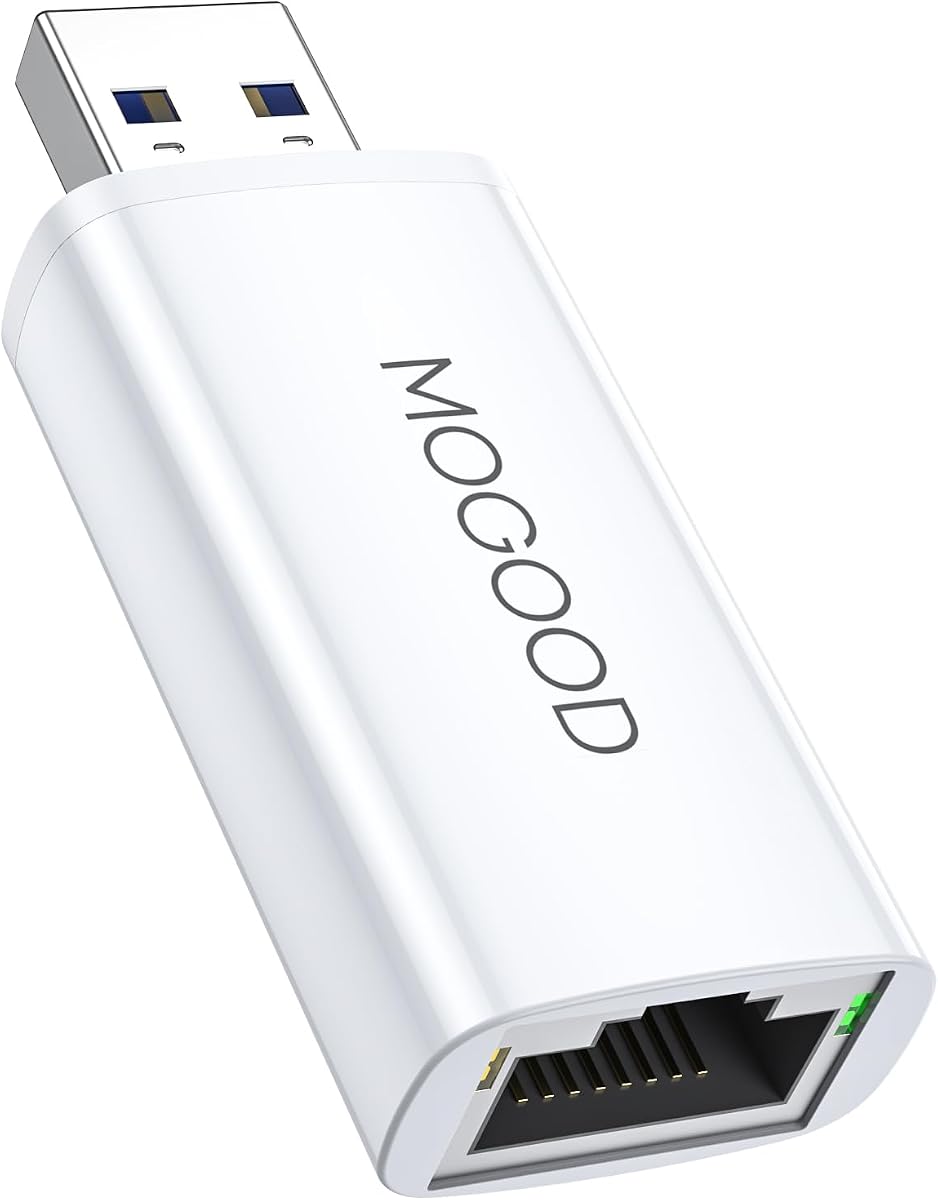
MOGOOD USB 3.0 to Gigabit Ethernet Adapter
4.4Editor score
Up to 1000 Mbps wired speed
Works with Fire TV Cube and laptops
No driver required for instant use
This guide compares the top 10 Ethernet adapter for Fire TV devices to help you choose the best wired connection for stable streaming performance.
Streaming devices often struggle with weak Wi-Fi signals leading to buffering and interruptions during your favorite shows. An Ethernet adapter for Fire TV devices provides a stable wired connection to eliminate these issues and ensure smooth playback without lag or dropouts.
We have carefully evaluated ten top-rated adapters based on compatibility, build quality, ease of setup, and performance reliability. Each product was selected to meet the diverse needs of users owning different generations of Fire TV sticks, cubes, and other streaming devices.
Every pick includes detailed specs, real pros and cons, and setup advice to help you find the perfect match for your home network. Please note that prices and availability change frequently so check the current listings before making your final purchase decision.
4.4Editor score

4.5Editor score

4.4Editor score
This side-by-side comparison highlights the key specifications and compatibility details for each of the ten selected Ethernet adapters to help you make an informed decision based on your specific streaming device model.


This Micro-USB Ethernet Adapter is designed specifically for Amazon Fire TV devices requiring a wired internet connection for stable streaming performance. With a solid 4.5 star rating it delivers 10/100 Ethernet speeds directly to your streaming box or stick.
We may earn a commission when you buy through this link, at no additional cost to you.
The adapter connects via the micro-USB port on your Fire TV to provide a consistent internet feed that frees up WiFi bandwidth for other devices in your home network. It is compatible with Fire TV Stick Lite 2nd Gen 4K Max and Cube models among others.
Setup is straightforward requiring no software installation beyond plugging the adapter into the USB port and connecting an Ethernet cable from your router. Keep in mind that devices with USB-C ports like the newer Fire TV Stick HD will need a different USB-C adapter.
This is the best choice for anyone with older Fire TV models who wants to eliminate buffering and enjoy smooth 4K streaming without relying on unstable wireless signals. It is a dependable solution for home theater setups needing reliable internet access.
By connecting directly to your router via Ethernet this adapter removes the variability of wireless signals ensuring your streams play smoothly without interruption.
Using a wired connection for your Fire TV frees up valuable WiFi bandwidth for phones tablets and other devices sharing your home internet connection.
We may earn a commission when you buy through this link, at no additional cost to you.
The Right Angle USB-C Ethernet Adapter is the dedicated solution for owners of the newest Fire TV Stick HD which uses USB-C connectivity for power and data. It ensures a stable wired connection with a compact design that fits tight spaces behind TVs.
We may earn a commission when you buy through this link, at no additional cost to you.
This accessory supports up to 480 Mbps when paired with the Fire TV Stick HD 2nd Gen providing sufficient bandwidth for high definition streaming and gaming without lag or interruption. The right angle connector helps reduce cable clutter.
It is important to note that this adapter only works with devices having USB-C ports so it will not fit older Fire TV models with micro-USB ports. Users should verify their device generation before purchasing to ensure compatibility.
This premium adapter is the ideal choice for users upgrading to the latest Fire TV Stick HD who need a reliable wired connection that matches their device modern USB-C interface without sacrificing space or aesthetics.
Tailored for the newest Fire TV Stick HD this adapter ensures seamless integration with USB-C devices for a modern streaming experience.
The angled connector keeps cables from dangling and saves valuable space behind your television for a cleaner entertainment setup.
We may earn a commission when you buy through this link, at no additional cost to you.
The ELECTOP 1000 Mbps Ethernet Adapter offers extreme performance with Gigabit speeds to support smooth video playback and gaming on compatible Fire TV sticks and other streaming devices. It is built with a durable aluminum alloy casing to prevent overheating.
We may earn a commission when you buy through this link, at no additional cost to you.
This adapter features a micro USB to RJ45 design that works with devices like Fire TV Stick 4K and Chromecast Ultra. The included LED indicator helps you confirm your network status at a glance for hassle-free setup.
It requires a stable power supply which may need an additional power cable for optimal performance on some devices. Also note that it is not compatible with Fire TV Stick 1st Gen or USB-C models like Fire TV Stick 4K Max.
For users needing faster wired speeds without breaking the bank this adapter delivers excellent value with its Gigabit capabilities and thoughtful design features like heat dissipation and secure mounting options.
Upgrade to 1000 Mbps Ethernet to enjoy fast LAN access and smooth video playback without lag from weak WiFi signals.
The casing effectively dissipates heat during long streaming sessions maintaining optimal performance and safety with over-voltage protection.
We may earn a commission when you buy through this link, at no additional cost to you.
This Firestick Ethernet Adapter is optimized to eliminate buffering and lag by providing a stable 100 Mbps wired internet connection for your Fire TV Stick 4K and other compatible models. It features a premium aluminum alloy construction for durability.
We may earn a commission when you buy through this link, at no additional cost to you.
The adapter connects directly to your Fire TV Micro USB port for instant activation with no drivers needed. It includes self-adhesive tapes to secure the adapter in place ensuring optimal contact and avoiding issues from hanging cables.
Keep in mind this adapter is not compatible with USB-C devices such as Chromecast with Google TV or newer Fire TV Stick Max models. Users should verify their port type before purchasing to ensure the adapter will fit.
Ideal for users with older Fire TV models needing reliable 4K streaming this adapter delivers consistent performance and a sturdy design that maintains stability during extended viewing sessions without overheating.
Transform your streaming experience by delivering stable 100 Mbps wired internet instead of relying on weak wireless signals.
Included tapes help locate the adapter properly avoiding poor contact due to dangling wires behind your TV setup.
We may earn a commission when you buy through this link, at no additional cost to you.
The ZEXMTE Ethernet Adapter offers rock-solid wired internet speeds for Fire TV Sticks including Lite 2nd and 3rd Gen 4K and 4K Max models. It ensures seamless streaming and lag-free gaming with its reliable 10/100 Mbps Ethernet connection.
We may earn a commission when you buy through this link, at no additional cost to you.
Setup takes just one minute by plugging the adapter into the Fire TV USB port and connecting to your router. The aluminum casing helps keep the device cool during binge-watching sessions and smart status lights confirm connection status.
This adapter does not require drivers and works with devices having Micro USB ports. It is important to verify port compatibility as it is not designed for USB-C devices like newer Chromecast models.
For users seeking a quick reliable solution to eliminate buffering this adapter provides excellent value with its durable build and straightforward setup that works with a wide range of Fire TV devices.
Just plug the adapter into your Fire TV port and connect to your router for instant activation and a stable high-speed connection.
Stay cool during binge sessions without overheating worries thanks to the durable aluminum casing design.
We may earn a commission when you buy through this link, at no additional cost to you.
This Ethernet Adapter provides universal TV stick compatibility for devices like Fire TV Stick 4K Google Home Mini and Chromecast Ultra. It ensures fast reliable 10/100 Mbps Ethernet speeds plus Micro USB 2.0 for smooth streaming and lag-free browsing.
We may earn a commission when you buy through this link, at no additional cost to you.
Plug-and-play setup means no drivers are needed simply connect the adapter to your Micro USB port and plug in the Ethernet cable. The LED indicator shows real-time working status and adhesive tapes help secure the adapter in place.
Users should note this adapter is not compatible with Type-C devices such as Chromecast with Google TV. Always double check your device port before purchasing to avoid compatibility issues.
For home users needing a dependable wired solution across different streaming devices this adapter offers solid performance and a sturdy design that keeps your connection stable during marathon TV sessions.
Compatible with Fire TV Stick 4K Google Home Mini Chromecast Ultra Audio Raspberry Pi Zero and more streaming devices.
The built-in LED indicator shows real-time working status at a glance for easy connection monitoring.
We may earn a commission when you buy through this link, at no additional cost to you.
The UGREEN Ethernet Adapter for Fire TV Stick offers a practical solution with a 3.3 ft long power cable to help when there is little wiggle room behind your TV. It provides 100 Mbps internet speed for stable streaming.
We may earn a commission when you buy through this link, at no additional cost to you.
The USB-A power cord allows powering the adapter and TV Stick at the same time eliminating the need for extra cables. Simply connect the micro USB to the TV Stick and plug in the power supply for operation.
Note that this adapter is not compatible with Roku devices or USB-C devices like Chromecast with Google TV. Always verify port types to ensure compatibility with your streaming device model.
Ideal for users needing extended cable reach and a stable wired connection this adapter combines convenience with reliable performance for uninterrupted streaming and browsing at home.
The long Micro USB and USB power cable comes in handy if you have little-to-no wiggle room behind your TV.
Power the network adapter and TV Stick at the same time without needing to buy extra cables for setup.
We may earn a commission when you buy through this link, at no additional cost to you.
Cable Matters Micro USB to Ethernet Adapter delivers high-speed data transmission up to 300 Mbps for faster and more reliable connections than wireless networks. It eliminates video buffering caused by unreliable Wi-Fi signals for seamless streaming.
We may earn a commission when you buy through this link, at no additional cost to you.
The adapter includes a 3-foot USB power cable for easy connection to a USB wall charger and allows powering the device while maintaining a wired Ethernet connection. This reduces clutter behind your entertainment unit.
Installation is easy with no drivers needed simply plug in the adapter and router for instant use. Note that it supports backward compatibility with earlier Ethernet standards for almost 5x the speed of traditional Fast Ethernet.
Best for users wanting reliable wired streaming with convenient power management this adapter ensures stable performance for your Fire TV Stick and Chromecast devices during long viewing sessions.
Supports up to 300 Mbps Ethernet speed offering a faster and more reliable connection than wireless networks.
The 3-foot USB power cable allows easy connection to a USB wall charger for both power and wired connection.
We may earn a commission when you buy through this link, at no additional cost to you.
This Ethernet Adapter hard wires your internet connection for streaming devices like Fire Stick 2nd Gen 3rd Gen and 4K Versions. It reduces buffering and lagging by providing a steady internet stream that is more reliable than WiFi.
We may earn a commission when you buy through this link, at no additional cost to you.
The plug and play setup means no driver installation is needed. Simply connect it to your Micro USB Type B device and router and it works immediately without channel or frequency issues.
Note that WiFi can be slow and use large bandwidth causing buffering. While this adapter removes the common cause of WiFi interference buffering may not be eliminated completely as other factors can contribute.
An affordable and straightforward solution for home users seeking better internet connections this adapter offers consistent performance without complexity or extra software requirements.
Reduce buffering and lagging issues by adding the TV xStream Ethernet Adapter for your device with Type B Micro USB connection.
The device is designed to give you a better internet connection by removing the cause of buffering with a steady stream.
We may earn a commission when you buy through this link, at no additional cost to you.
The MOGOOD USB 3.0 to Gigabit Ethernet Adapter delivers up to 1000 Mbps wired network speed for fast stable internet connections on laptops TVs and desktop users. It works with Fire TV Cube and other devices for gaming and streaming.
We may earn a commission when you buy through this link, at no additional cost to you.
This adapter is backward compatible with USB 2.0 and provides stable gigabit LAN connections across Windows Mac and Chrome OS systems. The plug and play design means no driver is required on most systems for instant setup.
It is ideal for replacing unstable Wi-Fi connections especially when streaming gaming or making video calls where lag is unacceptable. The build is sturdy and designed to last for daily home and office use.
For users needing versatility across multiple devices and high-speed wired connections this adapter offers excellent value and reliability for streaming gaming and video calls without lag.
USB 3.0 to RJ45 adapter delivers up to 1000 Mbps wired network speed for fast and stable internet connection.
Works with laptops Chromebooks Mac Surface Pro Fire TV Cube and Switch for wired connectivity without Wi-Fi lag.
We may earn a commission when you buy through this link, at no additional cost to you.
Selecting the right Ethernet adapter for your Fire TV device requires careful consideration of compatibility, speed, and build quality to ensure optimal streaming performance.
Verify whether your Fire TV device uses Micro-USB or USB-C ports as this determines which adapter type will work. Older Fire TV Sticks typically use Micro-USB while newer models like the Fire TV Stick HD use USB-C.
Check your device specifications carefully before purchasing to avoid compatibility issues that would render the adapter useless with your streaming setup.
Consider the Ethernet speed supported by the adapter such as 10/100 Mbps versus 1000 Mbps Gigabit speeds for smoother streaming and gaming experiences. Higher speeds ensure your connection can handle 4K content without buffering.
Choose an adapter with sufficient speed for your internet plan to maximize the benefits of a wired connection over unstable wireless networks.
Many adapters require external power via a USB cable to maintain stable performance especially during long streaming sessions. Ensure the adapter comes with a power cable or that you have a compatible USB power source.
Verify that you can provide adequate power to the adapter to avoid connection drops caused by insufficient current from the TV USB port.
Look for adapters made from durable materials like aluminum alloy which help dissipate heat and extend the lifespan of the device. A compact design with right angle connectors can also save space behind your television.
Prioritize adapters with sturdy construction and thoughtful design features to ensure reliability during extended use without overheating.
Choose plug and play adapters that do not require drivers or complex configuration to save time and avoid installation issues. Simple setups ensure you can start streaming immediately after connecting the cables.
Adapters that work out of the box provide a hassle-free experience especially for users who are not tech-savvy.
Features like LED status lights adhesive mounting tapes and long power cables can enhance usability and convenience. These details help with proper placement and quick confirmation of network status.
Consider these extra features when comparing models to find one that fits your specific setup needs and preferences.
Reputable brands often offer better customer support warranties and reliability which can be crucial for long-term use. Established manufacturers tend to have more consistent quality control and fewer compatibility issues.
Research brand reviews and support policies to ensure you are investing in a product from a trustworthy company.
Balance your budget with the features and performance offered by the adapter to get the best value for your money. While cheaper options are available they may lack durability or speed features needed for optimal streaming.
Investing in a slightly more expensive adapter often pays off in reliability and longevity for your home entertainment setup.
To begin setup simply connect the Ethernet adapter to your Fire TV device using the appropriate Micro-USB or USB-C port. Then plug one end of an Ethernet cable into the adapter and the other end into your router.
If your adapter requires external power connect the included USB power cable to a wall charger to ensure stable performance. Some devices can draw power from the TV but an external source is often recommended for best results.
Secure the adapter in place using any included adhesive tapes to avoid loose connections and ensure the cables are not hanging. Keep the adapter in a well ventilated area to prevent overheating during long streaming sessions.
No, compatibility depends on your device port type. Older Fire TV Sticks use Micro-USB ports while newer models like the Fire TV Stick HD use USB-C. Ensure you select the correct adapter for your specific device model before purchasing.
Yes, an Ethernet adapter provides a more stable connection that reduces buffering and lag. Wired connections are less prone to interference and signal drops compared to Wi-Fi especially in homes with many connected devices.
No, most Fire TV Ethernet adapters are plug and play and do not require driver installation. Simply connect the adapter and Ethernet cable and your device should recognize the wired connection automatically.
Yes, a wired connection ensures consistent bandwidth which helps maintain high-quality 4K streaming without interruptions. This is especially important if your Wi-Fi signal is weak or congested by other devices.
Yes, many adapters support Fire TV Cube models. Check the product compatibility list to confirm it works with your specific generation of Fire TV Cube before making your purchase.
Some adapters may require external power for stable performance while others can draw power from the TV USB port. It is recommended to use the included power cable connected to a wall outlet for best results.
All Fire TV Sticks have USB ports for power which can be used to connect the Ethernet adapter. If you are unsure check your device specifications or consult the manual to identify the port type.
Many adapters feature LED indicator lights that show connection status. You can also check your Fire TV settings to confirm that the device is connected via a wired network instead of Wi-Fi.
We have reviewed ten top Ethernet adapters for Fire TV devices including standout options like the Micro-USB Ethernet Adapter for Amazon Fire TV Devices and the RIGHTGOOD USB 3.0 to Gigabit Ethernet Adapter for their reliability and performance.
When selecting an adapter prioritize port compatibility network speed and build quality to ensure a stable connection that eliminates buffering. Whether you choose a budget-friendly or premium model the right adapter can significantly improve your streaming experience.
Remember to check current prices and availability before purchasing as these details can change over time. With the right Ethernet adapter you can enjoy seamless uninterrupted streaming on your Fire TV device at home.