
ARCTIC P9 PWM PST
4.5Editor score
Wide RPM range
High static pressure
Cable splitter included
This guide compares the top 92mm case fans for quiet cooling and high performance. We evaluate specs, noise levels, and value for every build type.
Choosing the right cooling solution is critical for maintaining optimal system performance. Compact builds often rely on smaller fans to move air efficiently without adding excessive noise or bulk to the chassis.
We evaluated ten leading options based on airflow, static pressure, and acoustic performance. Our analysis focuses on PWM control, bearing durability, and real-world suitability for various hardware configurations.
Each pick highlights specific strengths for different users ranging from silent offices to high-performance workstations. Please note that pricing and availability can fluctuate frequently across online retailers.
4.5Editor score

4.8Editor score

4.8Editor score
The following table provides a side-by-side overview of the key specifications and features for all ten models reviewed in this guide.


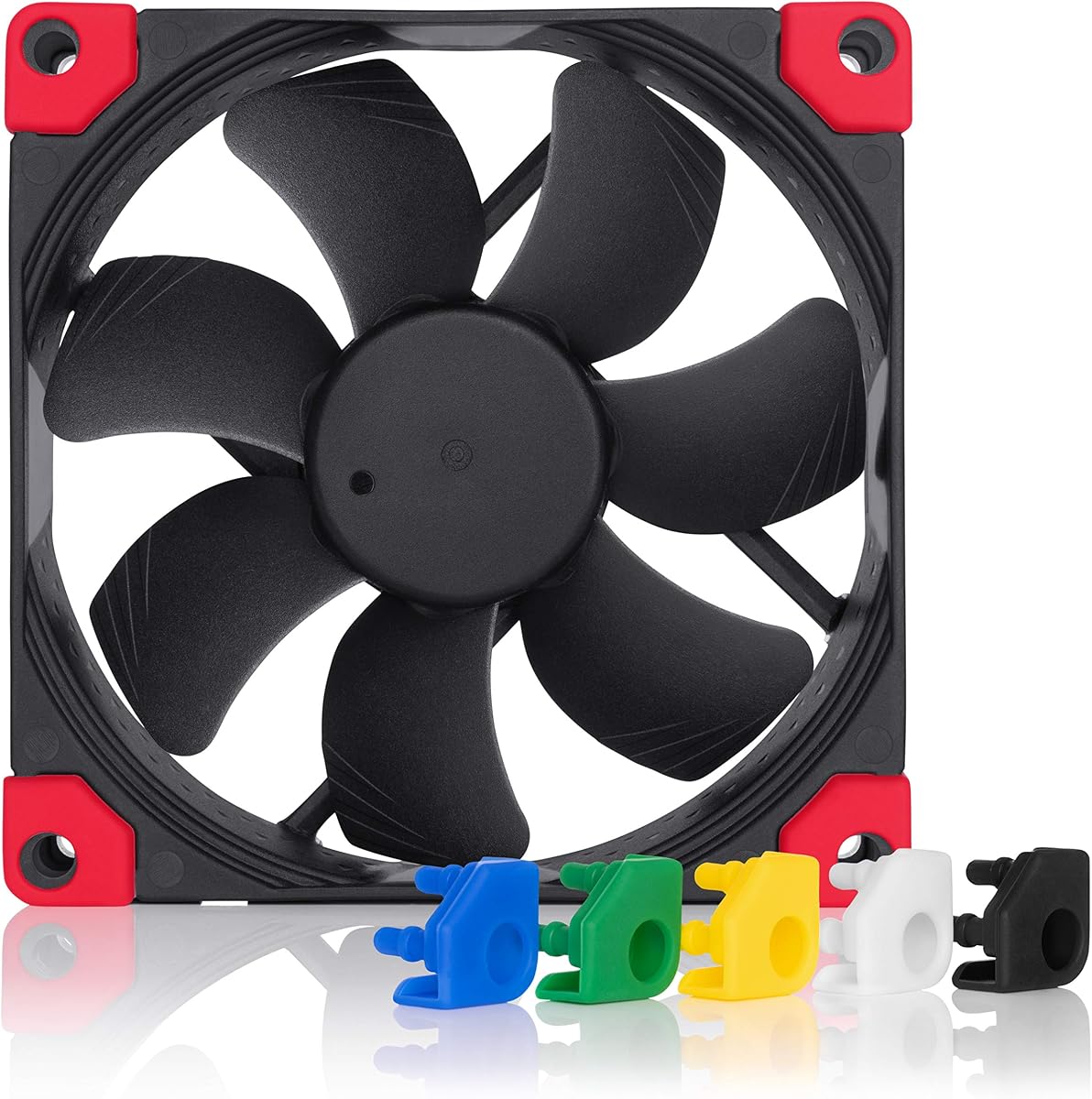


The Noctua NF-A9 PWM stands out as a top choice for users seeking a balance of performance and silence. With a high 4.8 rating from thousands of buyers, it delivers consistent airflow while maintaining low acoustic levels. This fan is specifically engineered for compact cases where noise and space are critical constraints.
We may earn a commission when you buy through this link, at no additional cost to you.
Its flow acceleration channels and advanced acoustic optimization frame work together to minimize turbulence and noise. The 4-pin PWM connector allows for precise speed control directly from the motherboard, ensuring the fan only spins as fast as needed. This automatic adjustment helps reduce unnecessary noise during idle periods when cooling demands are low.
While the price is higher than average, the inclusion of anti-vibration mounts and extension cables justifies the cost. The fan operates quietly even at maximum speed, making it suitable for silent office PCs. The 150,000-hour MTTF suggests it will last for many years of daily use without degradation.
Anyone building a high-end small form factor system should strongly consider this model. It is ideal for 9cm CPU coolers and NAS replacements where reliability is paramount. The premium materials and engineering make it a reliable long-term investment for a cooling solution.
The advanced frame design ensures that the fan moves air efficiently without generating distracting noise levels during operation.
The 4-pin PWM interface enables the motherboard to adjust fan speeds dynamically based on real-time system temperatures.
We may earn a commission when you buy through this link, at no additional cost to you.
The ARCTIC P9 PWM PST offers exceptional value for builders on a tight budget. It maintains a strong 4.5 rating due to its impressive performance relative to its low cost. This fan delivers high static pressure, making it well-suited for radiators and heat sinks where resistance is higher.
We may earn a commission when you buy through this link, at no additional cost to you.
The wide RPM range allows for versatile speed control via the 4-pin connector. It includes a cable splitter for daisy-chaining fans, which simplifies cabling in cramped cases. The motor is developed to be barely perceptible even at low speeds, ensuring a peaceful computing environment.
While it lacks the premium finishing of more expensive models, its functional design is solid. The alloy and lubricant combination helps reduce friction and heat buildup, which is critical for long-term stability. Users report that it performs well in standard case setups without issues.
For those needing a reliable fan without spending much, this is a top recommendation. It fits perfectly in budget builds or as a replacement for noisy stock coolers. The inclusion of the 0dB mode means it can stop completely when the system is cool enough.
Designed to push air through restrictive areas like radiators, ensuring effective cooling even when airflow is restricted.
The included splitter allows multiple fans to connect to a single motherboard header, saving ports and reducing cable clutter.
We may earn a commission when you buy through this link, at no additional cost to you.
This variant of the NF-A9 series excels in thin CPU coolers and tight spaces. It is a premium model with a 4.8 rating, reflecting its high build quality and effective cooling. The 14mm thickness allows it to fit on low-profile coolers that standard 25mm fans cannot accommodate without interference.
We may earn a commission when you buy through this link, at no additional cost to you.
The HS-PWM version allows for a semi-passive operation where the fan stops at 0% PWM. This feature eliminates noise entirely during light loads. The chromax.black.swap edition includes self-adhesive anti-vibration pads in multiple colors, giving users the option to customize the look of their system.
The Flow Acceleration Channels help maintain efficiency despite the reduced thickness. Even though it is thinner, it delivers strong airflow suitable for cooling sensitive components. The bearing system ensures longevity, matching the reliability expected from the Noctua brand.
It is an excellent choice for users prioritizing aesthetics and low clearance. The black design blends well with modern black systems, and the swappable pads add a personal touch. Those with specific clearance requirements will find this fan indispensable for their build.
The thin design ensures compatibility with compact CPU coolers and cases where vertical clearance is strictly limited.
Self-adhesive anti-vibration pads in various colors allow you to match your system's theme without buying extra parts.
We may earn a commission when you buy through this link, at no additional cost to you.
The standard version of the 14mm fan shares the same performance core as the chromax edition. It offers a robust solution for tight build environments while maintaining the brand's reputation for quality. Users appreciate its ability to move air effectively despite the slim form factor.
We may earn a commission when you buy through this link, at no additional cost to you.
The SSO2 bearing ensures smooth operation and minimizes noise over time. This bearing technology is a key reason why this fan is a top choice for compact cases. The 4-pin PWM connection supports automatic speed adjustment, which is crucial for dynamic thermal management.
While it does not have the color customization of the black swap version, it is equally effective functionally. The retail packaging provides protection during shipping and ensures you get the full accessory kit. It remains a staple for builders needing specific clearance dimensions.
Consider this fan if you need a thin profile but prefer a simpler design. It is perfect for ITX cases where every millimeter counts. The high rating reflects its success in real-world scenarios where space is at a premium.
The advanced bearing technology reduces friction and noise, extending the operational life of the fan significantly.
Its reduced thickness makes it ideal for small form factor builds where standard fans might conflict with other components.
We may earn a commission when you buy through this link, at no additional cost to you.
Thermalright has established a reputation for providing high value hardware, and this fan is no exception. It delivers strong performance for a low price, earning a solid 4.7 rating. The 7-blade design helps optimize airflow, making it effective for CPU coolers and case ventilation.
We may earn a commission when you buy through this link, at no additional cost to you.
The S-FDB bearings are designed to keep noise to a minimum while extending the fan's lifespan. Four vibration damping pads reduce friction during rotation, which helps prevent the rattling common in cheaper fans. It is a practical choice for those needing a direct replacement for noisy units.
While it may not have the refined frame of premium brands, it gets the job done efficiently. The maximum speed of 2200 RPM provides enough airflow for most standard cooling needs. Users note that it is a good match for downward coolers where heat dissipation is critical.
This fan is recommended for budget-conscious builders who still want quiet operation. It is easy to install and works well with standard PWM headers. The low noise combination performance ensures it will not disrupt your daily computing experience.
The automatic speed control adjusts fan speed according to motherboard temperature, ensuring efficient cooling when needed.
Soft silicone feet and vibration pads ensure that the fan runs smoothly without transferring vibrations to the case.
We may earn a commission when you buy through this link, at no additional cost to you.
This model is designed for users who prioritize simplicity and silence over variable speed control. It operates at a fixed 1900 RPM, which is tuned to provide a balance between airflow and noise. The high 4.6 rating indicates strong user satisfaction with its consistent performance.
We may earn a commission when you buy through this link, at no additional cost to you.
The optimized design focuses on static pressure, making it a strong candidate for radiator cooling. The bearing technology prevents excessive heat build-up, which is vital for maintaining performance during continuous operation. It works well for passive or semi-passive setups where PWM is not a priority.
While it lacks the flexibility of PWM, the fixed speed reduces complexity in system configuration. It is particularly effective when used with heat sinks that require consistent air movement. The alloy and lubricant combination ensures the bearing runs smoothly over many hours.
For those seeking a no-fuss quiet fan, this is a practical solution. It is ideal for cases where the motherboard does not support PWM headers. The low noise level ensures it will not interfere with audio production or quiet office work.
The fixed 1900 RPM speed ensures consistent cooling without the need for complex motherboard configuration.
High static pressure allows the fan to push air through dense radiator fins effectively for water cooling loops.
We may earn a commission when you buy through this link, at no additional cost to you.
This black version of the NF-A9 combines top-tier performance with a sleek aesthetic. It retains the high 4.8 rating of the original model while offering an all-black appearance. The chromax.black.swap edition includes swappable pads, allowing users to customize their system's look easily.
We may earn a commission when you buy through this link, at no additional cost to you.
It features Flow Acceleration Channels and an AAO frame for superior quiet cooling. The 4-pin PWM version supports automatic speed control, and the fan can stop completely at 0% PWM for semi-passive systems. This makes it versatile for different cooling needs without sacrificing silence.
The anti-vibration pads come in multiple colors, offering a creative touch for black systems. Users can change the colors if they wish, adding a personal flair to their build. The quality of the materials ensures that the fan performs reliably even in demanding environments.
For those wanting a modern look without compromising on cooling, this is the right choice. It is suitable for compact PC cases and NAS replacements. The swappable pads ensure that the fan fits seamlessly into various color schemes.
The all-black design ensures the fan blends seamlessly into modern black builds without visual distraction.
Anti-vibration pads in different colors allow for customization of your system's aesthetic without extra tools.
We may earn a commission when you buy through this link, at no additional cost to you.
This slim fan is a budget-friendly option for those needing a compact solution. It has a perfect 5.0 rating, likely due to its high performance relative to its low price. The 15mm thickness is ideal for tight CPU coolers where space is extremely limited.
We may earn a commission when you buy through this link, at no additional cost to you.
Despite the low cost, it offers automatic speed control via a 4-pin PWM interface. The maximum speed reaches 2700 RPM, providing strong airflow for cooling down CPUs effectively. The vibration damping pads help reduce noise, allowing for quiet operation even at higher speeds.
It is a perfect match for downward coolers and standard case fans. The silicone feet on the corners reduce friction, ensuring the fan operates smoothly. Users appreciate its ability to fit into small spaces without compromising on cooling potential.
If you need a slim fan that delivers high air pressure without a high price tag, this is it. It is easy to install and works well with standard headers. While it may lack some premium features, its functional performance is impressive.
The slim 15mm design ensures compatibility with ultra-tight cases and low-profile CPU coolers.
With a max speed of 2700 RPM, this fan delivers powerful cooling for demanding thermal situations.
We may earn a commission when you buy through this link, at no additional cost to you.
The FLX version is tailored for users with older motherboards that lack PWM headers. It uses a 3-pin Molex connector but still delivers premium quiet performance. The 4.7 rating reflects its success as a silent cooling solution for systems where noise is a primary concern.
We may earn a commission when you buy through this link, at no additional cost to you.
It includes Low-Noise and Ultra-Low-Noise Adaptors to fine-tune the speed. You can choose between 1600, 1250, or 1050 RPM settings based on your needs. This versatility ensures that you can balance airflow with silence according to your specific environment.
The fan operates at a max noise level of 17.1 dB(A), which is exceptionally low. This makes it perfect for silent PCs where any sound is noticeable. The anti-vibration mounts further reduce noise transmission to the case structure.
This model is ideal for legacy systems or silent builds where PWM is not an option. The adaptors ensure you get the exact performance you need. It remains a reliable choice for those who prioritize silence above all else.
Included Low-Noise Adaptors allow you to select from multiple speed settings to suit your noise tolerance.
With a maximum noise level of 17.1 dB(A), this fan ensures a truly silent computing environment.
We may earn a commission when you buy through this link, at no additional cost to you.
The P9 Max is a powerhouse in the budget category, offering massive airflow capabilities. It supports a wide RPM range up to 4300 RPM, allowing for extreme cooling when needed. The 4.6 rating suggests users appreciate its raw performance for the price it demands.
We may earn a commission when you buy through this link, at no additional cost to you.
It features a fluid dynamic bearing that provides silent operation at low speeds and brute power at maximum. This makes it versatile for both quiet office use and intense gaming sessions. The optimized static pressure ensures it can push air through radiators effectively.
While the noise levels rise at max speed, the fan provides exceptional cooling when required. It includes a 0dB mode for silent standby, which reduces unnecessary spin when cooling is not required. This balance of power and silence makes it a great choice for high-end budget builds.
Choose this fan if you need to move a lot of air without spending a fortune. The high airflow ensures your components stay cool even under heavy loads. It is an excellent pick for those who prioritize cooling efficiency over aesthetic refinement.
Optimized for static pressure, this fan guarantees efficient cooling even with increased air resistance in radiators.
The bearing design ensures long service life while maintaining silent operation at lower speeds.
We may earn a commission when you buy through this link, at no additional cost to you.
Selecting the right 92mm fan involves balancing airflow, noise, and physical constraints to match your specific build needs.
Airflow is the volume of air the fan moves, measured in cubic feet per minute. Static pressure is the ability to push air through resistance, which is critical for radiators or dense filters.
Prioritize static pressure for radiators and airflow for open cases.
Noise is measured in decibels, with lower numbers indicating a quieter fan. Some fans include dampening features to reduce vibration and noise transmission.
Look for fans rated below 23dB(A) for silent environments.
PWM fans use four pins for precise speed control based on temperature. Voltage controlled fans use three pins and rely on voltage drops to adjust speed.
Choose PWM for automatic and efficient speed management.
Standard fans are 25mm thick, while thin fans are 14mm or 15mm. This dimension matters for low-profile coolers and compact cases.
Check case clearance before choosing thin or standard variants.
Bearings support the fan shaft and reduce friction. Common types include sleeve, ball, and fluid dynamic bearings.
Fluid dynamic bearings offer the best longevity and noise performance.
Mean Time To Failure (MTTF) predicts how long a fan will last. Higher MTTF means a lower chance of mechanical failure over time.
Look for MTTF ratings of 150,000 hours for maximum reliability.
Prices range from budget-friendly options to premium models with high-end features. Higher prices often reflect better materials and quieter operation.
Determine your budget early to narrow down your choices effectively.
Install the fan so that airflow is directed toward the CPU cooler or radiator to optimize heat transfer.
Secure the fan using anti-vibration mounts or rubber grommets to prevent noise and rattling.
Regularly clean dust from the blades to maintain airflow and prevent overheating.
No, many modern 92mm fans are engineered to be exceptionally quiet. Premium models operate below 24dB(A) even at high speeds. Budget models may be louder but still quieter than standard stock coolers.
The main difference is thickness. 25mm fans move more air and are standard, while 14mm fans fit in tighter spaces. Use 14mm if your case or cooler has limited vertical clearance.
You can use an adapter ring to mount a smaller fan on a larger hole. This allows you to keep the smaller fan while fitting the standard case opening size.
Yes, PWM allows precise speed control directly from the motherboard. It ensures fans run only as fast as needed, reducing noise and power consumption during idle times.
No, use the accessories that fit your needs. Vibration mounts help with noise, while extension cables help with routing. You do not have to use every item included in the box.
Most high-quality fans last for many years. The MTTF rating often indicates a lifespan of over 150,000 hours. Proper maintenance and clean environments extend this life even further.
The top picks highlight the best options for performance, budget, and specialized needs. Each model offers unique strengths depending on your specific cooling requirements.
Consider your case constraints and noise tolerance before making a final decision. Balancing airflow with silence is key to a successful build.
Check current availability and pricing before buying as these values can change quickly. Investing in a reliable fan ensures long-term system stability.