
Revopoint MetroY Ultra 3D Scanner
4.9Editor score
0.01mm Single-Frame Precision
90 FPS Scanning Speed
Industrial-Grade Accuracy
Choosing the right 3D scanner can transform how you approach design, engineering, and creative projects. Whether you need precise industrial measurements or vibrant full-body scans, modern devices offer incredible capabilities. This guide explores the best options available today to help you find the perfect fit for your needs.
We analyzed ten top-rated scanners based on accuracy, scanning speed, software compatibility, and ease of use. Our evaluation considers everything from entry-level hobbyist tools to advanced industrial-grade systems. Each product was reviewed for its real-world performance in capturing intricate details and handling various surface types.
Every pick in this list highlights specific strengths tailored to different users and applications. You will find detailed insights into hardware specs, software features, and practical usability. Please note that product availability and pricing can change frequently, so check current listings before making your final purchase decision.
4.9Editor score

5.0Editor score

4.8Editor score
As an Amazon Associate we earn from qualifying purchases.
This side-by-side comparison highlights the key specifications and unique capabilities of each scanner to help you make an informed decision based on your specific requirements and budget constraints.


The Creality Pika stands out as a top-tier portable 3D scanner combining high accuracy with intelligent software features. Its unique dual-mode system allows users to capture fine details or full-body scans effortlessly. This device delivers professional results for both hobbyists and industrial users.
We may earn a commission when you buy through this link, at no additional cost to you.
Its accuracy of up to 0.03mm ensures intricate details on small parts or mechanical components are captured flawlessly. The AI-powered body completion feature generates full 3D models from just a face scan, which is unmatched in the portable category. Dual-mode scanning switches between blue laser for detail and NIR for body scans.
While the scanner is highly capable, it comes with a premium price tag that might deter casual users. The need for a power adapter during extended sessions can limit pure wireless freedom despite the battery options. However, the performance justifies the investment for serious professionals.
Ideal for engineers and designers needing precision without sacrificing portability, the Pika is a robust choice. It streamlines workflows with marker-free scanning and easy exporting to standard 3D printing formats. We highly recommend it for those prioritizing accuracy and smart features in a compact device.
Built-in AI body completion and hole filling streamline the scanning process by automating complex post-processing tasks. These features save significant time and ensure clean, print-ready models from the start.
Switching between 7 blue laser lines for fine details and NIR structured light for full-body scans offers unmatched versatility. This dual capability means you only need one device for a wide range of applications.
We may earn a commission when you buy through this link, at no additional cost to you.
The Revopoint POP 4 is a powerhouse designed for those who demand industrial-grade performance in a handheld unit. It offers exceptional accuracy and a wide range of scanning modes to tackle diverse environments. Its AI capabilities significantly reduce post-processing time for users.
We may earn a commission when you buy through this link, at no additional cost to you.
With single-frame accuracy reaching 0.03 mm, this scanner reproduces fine surface details and complex geometries faithfully. The five distinct scanning modes cover everything from small parts to large industrial components. It also excels in outdoor conditions, maintaining stability even in bright sunlight.
One limitation is the software dependency on Windows for advanced features like Revo Design. This restricts flexibility for Mac or Linux users compared to other cross-platform options. Additionally, some advanced features require separate paid software purchases.
This scanner is perfect for professionals in engineering or architecture needing high precision and versatility. It handles reflective surfaces well and offers wireless freedom for complex scenes. Choose the POP 4 if you need reliable performance across varied lighting and object types.
The POP 4 achieves volumetric accuracy of 0.03 mm + 0.05 mm x L(m), ensuring faithful reproduction of complex shapes. This level of precision is ideal for reverse engineering and quality control.
Equipped to handle up to 100,000 lux ambient light, this scanner remains stable in harsh conditions. This makes it a reliable tool for fieldwork and construction sites.
We may earn a commission when you buy through this link, at no additional cost to you.
The Creality Otter Lite Basic offers an impressive balance of performance and affordability for budget-conscious users. It brings high accuracy and full-color scanning capabilities to a lower price range. The quad-camera design allows it to handle a wide variety of object sizes effectively.
We may earn a commission when you buy through this link, at no additional cost to you.
With 0.05mm accuracy, this device captures fine details suitable for most 3D printing and prototyping needs. Its unique quad-camera setup combines long and short focal lenses to scan from small coins to large vehicles. It also handles dark and metallic surfaces without requiring any spray.
While it excels in value, it lacks some automation features found in premium models like automatic turntables. The scanning speed is moderate at 30fps, which is efficient but slower than high-end rivals. However, for the price, these trade-offs are very acceptable.
This scanner is ideal for students, hobbyists, and small businesses looking to enter 3D scanning. It delivers professional-quality results without the hefty price tag. If you need reliable scanning for general purposes without breaking the bank, this is a top choice.
The innovative quad-camera system with dual long and short focal lenses enables scanning objects ranging from 0.8 inches to 78 inches. This flexibility ensures you never need multiple devices for different project scales.
Using Class I laser safety and invisible near-infrared light, it is safe for scanning faces and full bodies. This feature makes it versatile for various applications including heritage preservation and e-commerce.
We may earn a commission when you buy through this link, at no additional cost to you.
The Revopoint INSPIRE 2 is designed for users who need reliable scanning with a focus on portability and ease of use. It balances accuracy with a lightweight design that makes it easy to carry anywhere. Its dual modules offer flexibility for different scanning scenarios.
We may earn a commission when you buy through this link, at no additional cost to you.
With up to 0.05mm accuracy and advanced optical zoom, it captures intricate details on mixed-geometry surfaces effectively. The device supports wireless streaming and interactive operations, allowing for seamless remote workflows. It also handles challenging surfaces like dark or reflective objects without spray.
While it performs well indoors, outdoor capabilities are somewhat limited compared to higher-end models. The software ecosystem relies on Windows for advanced editing, which may limit Mac users. Despite this, it offers strong value for its feature set.
This scanner suits product designers and engineers needing portable, accurate solutions for daily tasks. Its intuitive software and full-color capture make it great for product visualization. If you need a balance of price and performance, the INSPIRE 2 is a solid choice.
Built-in WiFi 6.0 enables real-time PC-to-mobile interactive streaming for seamless remote operations. This feature enhances flexibility and allows users to monitor scans from different angles easily.
Adjustable optical zoom allows the scanner to focus projected light on specific areas for enhanced detail. This is particularly useful for mixed-geometry surfaces that require precise capture.
We may earn a commission when you buy through this link, at no additional cost to you.
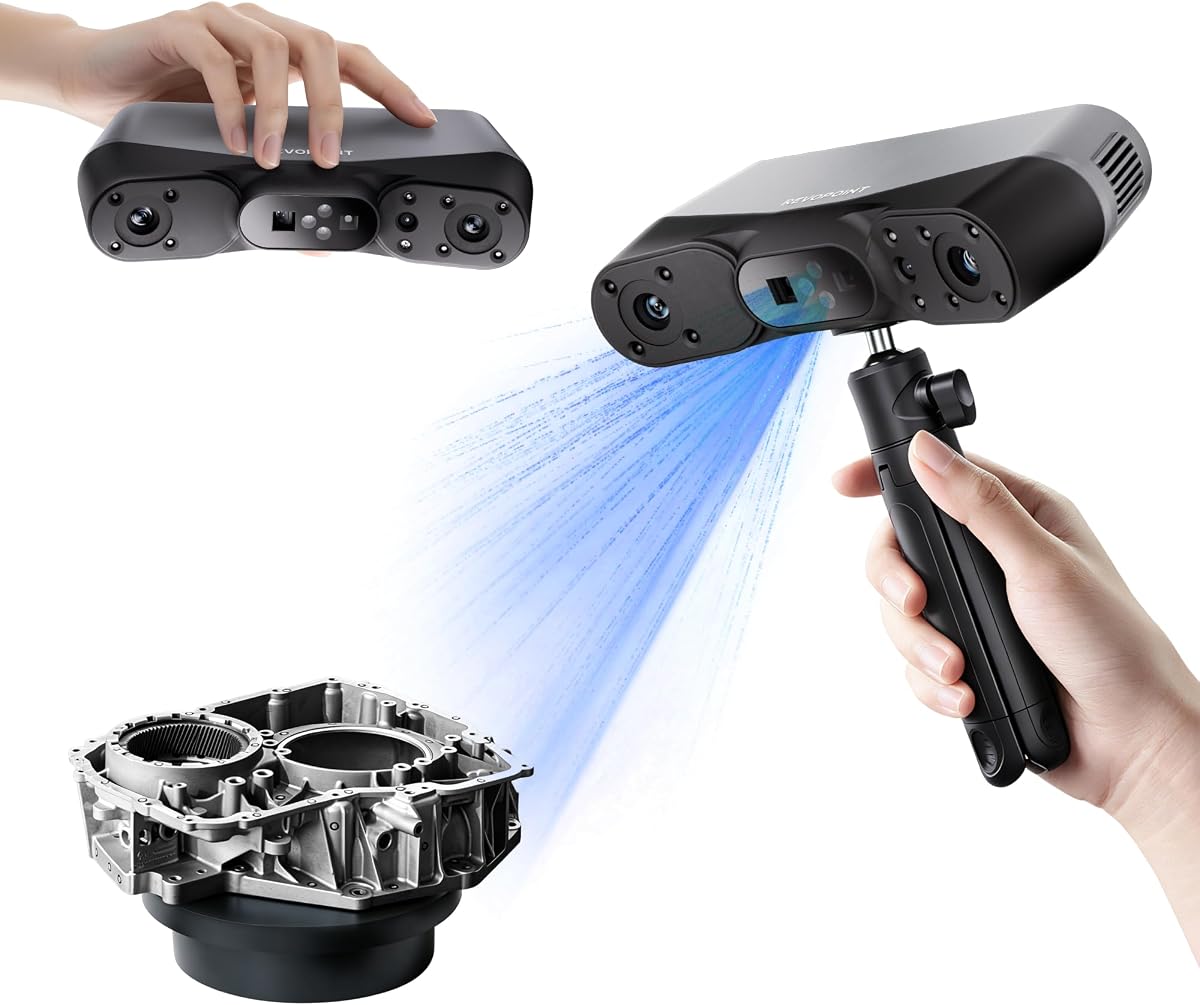
The Revopoint MetroY Ultra pushes the boundaries of speed and precision with its advanced blue laser technology. It delivers incredibly fast scans without sacrificing the high-quality detail needed for industrial applications. The device is built to handle a variety of complex industrial scenarios.
We may earn a commission when you buy through this link, at no additional cost to you.
Its 0.01mm single-frame precision ensures flawless capture of intricate geometric details and tight tolerance measurements. The scanner operates up to 90 fps with NVIDIA GPU support, making it efficient for large-area scans. It also handles dark or high-gloss surfaces without the need for spray.
The device comes with a higher price point and might require a more technical setup for optimal results. Users may find the sheer number of modes initially overwhelming for quick tasks. However, for professional needs, the performance gains are significant.
This scanner is ideal for quality control and reverse engineering professionals needing speed and reliability. It streamlines workflows by capturing data quickly and accurately in various conditions. If you prioritize efficiency in an industrial setting, the MetroY Ultra is a powerful tool.
Capable of capturing up to 90 frames per second, the MetroY Ultra significantly boosts productivity. This speed reduces data acquisition time while maintaining high data quality.
Advanced blue laser technology allows direct scanning of dark or shiny surfaces without preparation. This saves time and protects delicate parts from harsh scanning sprays.
We may earn a commission when you buy through this link, at no additional cost to you.
The Revopoint MetroX Pro is an advanced tool designed for high-precision industrial measurement and modeling. It combines blue laser technology with intuitive software to ensure accurate and repeatable results. Its design focuses on handling complex shapes and varied materials effectively.
We may earn a commission when you buy through this link, at no additional cost to you.
With 0.01mm single-frame precision, this device captures every detail and dimension flawlessly. It features four scanning modes to handle different scenarios from flat surfaces to deep grooves. Real-time PC-to-mobile streaming allows for better visibility and control during long scans.
While powerful, the system relies heavily on Windows for its most advanced software features. This can be a barrier for Mac users or those preferring open ecosystems. Additionally, the total cost of ownership increases with necessary paid add-ons.
Ideal for engineers and manufacturers needing reliable metrology-grade tools, this scanner is a strong contender. It supports a smooth workflow from scanning to final design with robust data export options. Choose this if you need top-tier precision for critical applications.
The MetroX Pro delivers 0.01mm single-frame precision and 0.02mm single-frame accuracy. This level of detail ensures it meets strict industrial measurement needs.
Stream scan data to phones or tablets via Revo Mirror for real-time monitoring. This improves workflow efficiency by allowing users to check data gaps easily.
We may earn a commission when you buy through this link, at no additional cost to you.
The 3DMakerpro Fox offers an accessible entry point into 3D scanning for hobbyists and beginners. It simplifies the process with intuitive software that handles much of the technical work. The device captures sufficient detail for most creative and prototyping projects.
We may earn a commission when you buy through this link, at no additional cost to you.
At 0.07mm accuracy, it provides solid resolution that exceeds many typical entry-level scanners. Its markerless AI visual tracking relocks onto the object if you move too fast, preventing lost progress. This makes the scanning process more forgiving and easier for casual users.
While it is user-friendly, it lacks some advanced capabilities found in higher-end models like industrial precision. Users may find the feature set limited for complex engineering tasks. However, for general 3D printing and modeling, it serves well.
This scanner is perfect for creators looking to digitize objects for printing without a steep learning curve. It delivers reliable three-dimensional models for meaningful project outcomes. If you are starting your journey in 3D scanning, the Fox is a friendly starting point.
Fox's markerless AI feature recognition relocks onto your object in seconds if movement is too fast. This prevents the need to restart scans and saves valuable time.
The included JMStudio software integrates scanning, editing, and optimizing into one seamless process. This simplifies post-processing significantly for non-technical users.
We may earn a commission when you buy through this link, at no additional cost to you.
The Creality Otter Lite Basic offers a strong value proposition with high accuracy and a versatile camera system. It is designed to handle a wide range of object sizes from coins to cars efficiently. The device prioritizes ease of use and practical functionality.
We may earn a commission when you buy through this link, at no additional cost to you.
With 0.05mm accuracy, it delivers precise scans suitable for reverse engineering and quality inspection. Its quad-camera system enables scanning of large objects quickly, reducing overall project time. It also captures true-to-life 24-bit full color textures for realistic models.
While it is an excellent budget choice, it lacks some convenience features like automatic turntables. The scanning speed is good but slower compared to high-performance industrial scanners. However, for general users, these trade-offs are minor.
This scanner is ideal for small businesses and creators needing versatile and affordable scanning solutions. It handles dark and metallic surfaces well, reducing prep work. If you need a reliable tool for general scanning needs, this is a solid investment.
The innovative quad-camera system supports objects ranging from 0.8 inches to 78 inches in size. This wide coverage eliminates the need for multiple devices.
Advanced DOE technology allows scanning dark and metallic surfaces without any powder. This speeds up the process and protects delicate parts.
We may earn a commission when you buy through this link, at no additional cost to you.
The Creality CR-Ferret SE is an upgraded desktop scanner tailored for beginners needing reliability and ease of use. It incorporates anti-shake tracking to help new users capture smooth scans even with shaky hands. The device produces colorful and vivid 3D models.
We may earn a commission when you buy through this link, at no additional cost to you.
It boasts 0.1mm precision and 30fps scanning speed, ensuring efficient capture of dimensional data. The one-shot 3D imaging technology significantly increases scan success rates by reducing errors. Its flexible range handles medium to large objects effectively.
While user-friendly, the precision is lower than professional models, limiting use for high-accuracy needs. The scanning range is flexible but not suitable for very large industrial parts. However, for general hobbyist or educational use, it performs well.
This scanner is perfect for students and hobbyists looking for an affordable and robust starting point. It offers vivid textures and reliable tracking for everyday projects. If you are new to 3D scanning, the Ferret SE provides a good introduction.
One-shot 3D imaging technology improves tracking efficiency to ensure smooth and error-free results. This feature reduces the learning curve for new users.
The 2MP high-resolution color camera captures intricate details with original colors. This brings every detail to life for realistic 3D models.
We may earn a commission when you buy through this link, at no additional cost to you.
The Revopoint MIRACO Plus is a unique standalone 3D scanner that combines scanning and processing in one device. It features a high-quality AMOLED screen and powerful internal hardware to handle tasks without a PC. This design offers unparalleled portability and flexibility.
We may earn a commission when you buy through this link, at no additional cost to you.
It supports photogrammetric metrology for high-resolution capture of small details on large objects. The 6-inch flip screen allows for comfortable viewing from any angle during operations. It captures up to 10,000 frames and offers dual scanning modes for different needs.
While powerful, the device is heavier than handheld units and may require careful handling. The software is compatible only with x86_64 architecture which limits some users. Despite this, it is a highly capable all-in-one solution.
This scanner is ideal for professionals needing to scan complex structures outdoors without a laptop. It streamlines workflows by combining capture and processing into one seamless unit. If you want a truly autonomous scanning experience, the MIRACO Plus is a top choice.
Integrated photogrammetric metrology enables high-resolution capture of details on large objects. The included kit provides the necessary tools for precise measurements.
With an 8-core processor, 32GB RAM, and a 6-inch flip screen, the MIRACO Plus handles processing efficiently. This allows for quick transfer and export of projects to other systems.
We may earn a commission when you buy through this link, at no additional cost to you.
Selecting the right 3D scanner requires understanding your specific needs and the technical factors that affect performance. This guide breaks down the key elements to consider to help you make an informed decision.
Accuracy refers to how close the scan data is to the real object, while precision relates to consistency. For industrial measurement or engineering, you should look for accuracy in the range of 0.01mm to 0.05mm. Hobbyists may find 0.1mm sufficient for most creative projects.
Higher accuracy ensures your models match the physical object closely. Always check the single-frame accuracy and volumetric accuracy specifications to get a full picture of performance.
Scanning speed determines how quickly you can capture an object. Higher frame rates (FPS) allow for smoother workflows and the ability to scan moving subjects. Professional devices can reach speeds over 90 FPS, while entry-level models may operate around 30 FPS.
If you work with large or complex scenes, a higher frame rate will reduce the time needed for data acquisition. Ensure your computer can handle the data throughput of high-speed scanners.
Most handheld scanners use structured light or laser technology. Structured light is great for capturing color and fine details on non-reflective surfaces. Laser scanners, especially those using blue light, are often better at handling dark or shiny objects without spray.
Consider the surface types you scan most often. If you work with metallic parts or dark objects, choose a model with laser capabilities or special spray-free modes.
Handheld scanners offer freedom to move around large objects or capture them in situ. Some models are pocket-sized and battery-powered for true mobility. Others are desk-bound or require a PC connection which limits flexibility.
Evaluate where you will primarily use the scanner. Field work requires a lightweight device with good battery life, whereas studio work might benefit from a stable, stationary setup.
Software is crucial for processing raw scan data into usable models. Look for intuitive interfaces with features like automatic alignment and hole filling. Cross-platform support for Windows, macOS, and mobile devices adds significant value.
Ensure the software supports the file formats you need for your workflows. Some vendors offer paid add-ons for advanced CAD integration which can impact the total cost.
Ambient light can interfere with scanning accuracy if not controlled. High-quality scanners use filters or laser technology to perform well in bright environments. If you work outdoors, check the lux rating to ensure reliability.
A scanner that performs consistently in various lighting conditions saves time on setup. Look for models with all-weather capabilities if you need to scan in diverse locations.
Not all scanners capture color textures effectively. For heritage preservation or product design, 24-bit color mapping is essential. RGB cameras integrated into the scanner body provide true-to-life texture data.
Verify the camera resolution to ensure textures are sharp and detailed. Good color capture makes models look realistic and professional without requiring extra post-processing.
The cost of 3D scanners varies widely from budget hobbyist options to industrial-grade systems. Consider not just the hardware price but also subscription fees or required accessories. A higher initial investment often pays off in time savings and precision.
Match your budget to your specific requirements. Sometimes a mid-range model offers the best balance of features and cost for most users.
Calibration is essential before starting any scanning session to ensure accuracy. Most manufacturers provide a calibration board to help align the camera and sensors correctly. Follow the software prompts to perform this step at the beginning of your workflow.
Maintain a stable environment during scanning by minimizing vibrations and controlling lighting. For handheld devices, hold the scanner steadily and move at a consistent pace to capture overlapping data. This overlap helps the software stitch the points together smoothly.
Store your scanner in a protective case when not in use to prevent damage from dust or moisture. Clean the lenses regularly with a soft microfiber cloth to avoid scratches that could affect image quality. Proper care extends the lifespan of the device significantly.
Many modern scanners come with laser modes or specific settings that allow scanning black and metal surfaces without spray. This saves time and keeps the objects clean. However, some older or basic models may still require a matte spray to capture these surfaces effectively.
Scan time depends on the size and complexity of the object. Simple small items may take a few minutes, while large objects or full-body scans can take 10 to 20 minutes. Faster frame rates and efficient alignment modes significantly reduce this time.
Transparent objects like glass or clear plastic are difficult to scan directly because the light passes through or reflects unpredictably. You may need to apply a temporary matte coating or use specialized photogrammetry techniques for best results.
Many modern handheld scanners support macOS, but some advanced software features may still require Windows. Always check the software compatibility list for the specific model you are interested in to ensure it works with your computer.
Most 3D scanners export to standard formats like STL, OBJ, PLY, and ASC. These formats are compatible with most 3D printing and CAD software. Some models also support advanced formats like GLTF for web and game applications.
Yes, but you need a model designed for outdoor use with filters to handle bright sunlight. The scanner must be robust enough to handle varying lighting conditions. Wireless models offer more freedom when moving around large outdoor objects.
High-resolution scans produce large point cloud files that require significant storage. A few gigabytes can hold many small scans but large industrial objects may need hundreds of gigabytes. Consider investing in an external SSD for efficient storage.
Most handheld scanners use eye-safe infrared or structured light technology that is safe for scanning humans. Always check the safety certification of the specific device. Avoid pointing laser scanners directly at eyes without proper safety protocols.
We have explored the top 10 3D scanners available today, highlighting their unique strengths and ideal applications. Whether you need industrial precision or creative versatility, there is a device on this list for you.
When choosing, prioritize the factors that matter most to your workflow such as accuracy, speed, and ease of use. Consider the software ecosystem and connectivity options to ensure seamless integration with your existing tools.
Prices and availability can change frequently so always check the latest product listings before purchasing. Investing in the right 3D scanner now can open up new possibilities for design and engineering projects.