
RasTech Pi Zero 2W Kit
4.2Editor score
Affordable starter bundle
Includes HDMI adapter and OTG
Compact and lightweight design
This guide compares the best Bedt Raspberry Pi Zero 2 W Kit options including features, performance, and accessories to help you choose the right starter
Finding the right starter kit for your Raspberry Pi Zero 2 W project can be challenging. This guide helps you identify the most reliable and complete packages available on the market today.
We have analyzed ten top-rated kits based on performance, included accessories, and user feedback. Our comparison ensures you get the best value for your specific DIY needs.
Each pick highlights key features and potential drawbacks to help you decide. Prices and availability change frequently, so check current listings before making your final purchase decision.
4.2Editor score

4.6Editor score

5.0Editor score
This side-by-side comparison covers all ten kits in our list. Review the specifications and included accessories to find the perfect match for your specific project requirements.


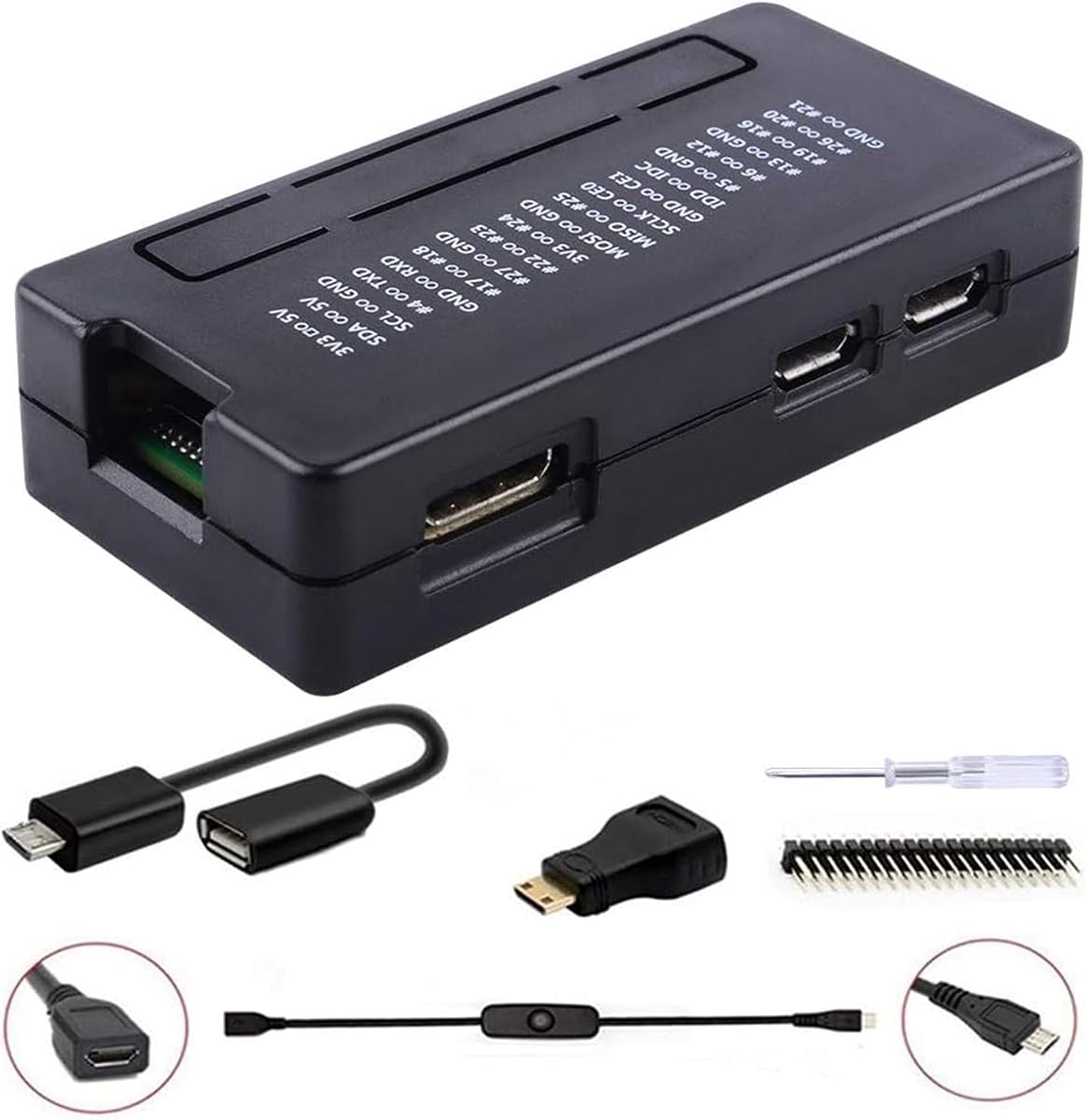
The Raspberry Pi Zero 2W Kit offers exceptional performance with a quad-core 64-bit processor. It includes essential accessories like an aluminum heatsink to ensure stable operation.
We may earn a commission when you buy through this link, at no additional cost to you.
This kit supports seamless wireless communication with built-in Wi-Fi and Bluetooth. The mini HDMI port enables high-quality video output for multimedia projects.
While the board itself is powerful, users need to purchase a power supply and SD card separately. These additions are minor trade-offs for the included performance.
This kit is perfect for developers needing a balance of power and size. We highly recommend it for home automation and embedded systems.
The quad-core ARM Cortex-A53 processor delivers five times the performance of previous models.
The included aluminum heatsink ensures the board stays cool under heavy workloads.
We may earn a commission when you buy through this link, at no additional cost to you.
The RasTech Pi Zero 2W Kit provides a cost-effective solution for beginners. It includes the board plus essential adapters for display and peripheral connectivity.
We may earn a commission when you buy through this link, at no additional cost to you.
This kit supports a quad-core 64-bit processor for improved performance. The aluminum heatsink helps maintain stability during extended use.
While it lacks a power supply and SD card, the low price makes it accessible. It is suitable for simple IoT projects and learning.
Buyers on a tight budget will appreciate this value-oriented kit. It simplifies the initial setup process significantly.
You get a powerful quad-core processor at a fraction of the cost of other kits.
The included HDMI and OTG cables ensure you can connect peripherals immediately.
We may earn a commission when you buy through this link, at no additional cost to you.
The Vemico Raspberry Pi Zero 2WH Kit stands out with a pre-soldered header. This feature saves significant time and effort for immediate project setup.
We may earn a commission when you buy through this link, at no additional cost to you.
It features a quad-core 64-bit processor delivering enhanced speed. The board supports seamless wireless communication via built-in Wi-Fi and Bluetooth.
Although the price is higher, the convenience of the pre-soldered header justifies it. It is ideal for professionals needing quick deployment.
This kit is best for users who value convenience and top-tier performance. We highly recommend it for complex AI or IoT projects.
The pre-soldered header eliminates the need for manual soldering and reduces setup time.
With a 1GHz quad-core processor, this board handles demanding tasks effortlessly.
We may earn a commission when you buy through this link, at no additional cost to you.
This kit includes a color-coded header for easier identification of GPIO pins. It simplifies wiring tasks and reduces the chance of connection errors.
We may earn a commission when you buy through this link, at no additional cost to you.
The board features a shielded enclosure for reliable wireless communication. It supports high-quality video output up to 1080p30.
While it lacks standard accessories like a power supply, the header adds significant value. It is great for beginners needing clear wiring guides.
Buyers looking for ease of connection will find this kit ideal. The color coding makes it accessible for new hobbyists.
The color-coded header makes connecting GPIO pins much easier and more intuitive.
A shielded enclosure ensures stable Wi-Fi and Bluetooth performance in various environments.
We may earn a commission when you buy through this link, at no additional cost to you.
The Freenove Ultimate Starter Kit is perfect for learning electronics. It includes over 128 projects with detailed step-by-step tutorials.
We may earn a commission when you buy through this link, at no additional cost to you.
It supports multiple programming languages including Python, C, and Java. The 223 items cover most common sensors and modules.
Note that the Raspberry Pi board is not included in this kit. You will need to purchase a compatible board separately.
This kit is best for students and hobbyists focused on learning. It provides a comprehensive resource for project development.
The 962-page tutorial offers detailed guidance for every project included in the kit.
Code is available in Python, C, and Java to support different skill levels.
We may earn a commission when you buy through this link, at no additional cost to you.
The iUniker Pi Zero Case Kit offers excellent passive cooling with an aluminum case. It includes a power switch for convenient management.
We may earn a commission when you buy through this link, at no additional cost to you.
It features a USB OTG hub to expand connectivity options. This helps when multiple devices need to be connected to a single port.
The kit does not include the Raspberry Pi board itself. It is designed for users who already own the hardware.
Buyers prioritizing protection and ease of use will find this kit useful. The switch and hub add significant practical value.
The aluminum case helps passively cool the board during operation to prevent overheating.
The included on/off switch cable allows for easy and safe shutdown of the system.
We may earn a commission when you buy through this link, at no additional cost to you.
This kit includes the Raspberry Pi Pico 2 W board with wireless capabilities. It is designed for users interested in the Pico platform.
We may earn a commission when you buy through this link, at no additional cost to you.
It comes with a detailed tutorial and supports MicroPython and C. The package includes 119 projects for diverse learning.
Note that this kit does not include the Pi Zero 2 W hardware. It is specifically tailored for the Pico development board.
Users looking for a complete Pico setup should consider this kit. It offers comprehensive learning resources and included hardware.
The included board features onboard Wi-Fi and Bluetooth for versatile connectivity.
119 detailed projects help you master electronics and programming concepts quickly.
We may earn a commission when you buy through this link, at no additional cost to you.
The GeeekPi Pi Zero 2 W Case Kit includes a power supply which is often missing. It also provides a 4-port USB hub for extensive connectivity.
We may earn a commission when you buy through this link, at no additional cost to you.
It features a heatsink for efficient cooling and access to all board ports. The case design allows for easy installation and maintenance.
While the Raspberry Pi board is not included, the accessories cover most basic needs. It simplifies the process of building a functional system.
Buyers needing a complete accessory set will find this kit valuable. The inclusion of power and USB ports is particularly helpful.
Having a power supply included reduces the need for extra purchases immediately after buying.
The 4-port USB hub allows you to connect multiple peripherals simultaneously.
We may earn a commission when you buy through this link, at no additional cost to you.
The Orange Pi Zero 2W 4G offers significantly more RAM and wireless features. It is a powerful alternative for those who want higher specs.
We may earn a commission when you buy through this link, at no additional cost to you.
It supports Wi-Fi 5 and Bluetooth 5.0 with dual-band capability. The board runs various operating systems including Android and Ubuntu.
However, it is not compatible with Raspberry Pi accessories or software. Users must adapt to a different hardware and software ecosystem.
This board is best for advanced users needing high RAM or specific connectivity. It offers excellent performance for media or IoT.
The inclusion of Wi-Fi 5 and Bluetooth 5.0 ensures faster speeds and better range.
With 4GB of RAM, this board handles multitasking better than standard Zero options.
We may earn a commission when you buy through this link, at no additional cost to you.
The GeeekPi 7 in 1 Basic Starter Kit is an affordable option for protection. It includes an acrylic case and switch cable for convenience.
We may earn a commission when you buy through this link, at no additional cost to you.
It provides essential adapters like HDMI and OTG cables. The design ensures full access to all ports on the board.
The acrylic case may be less durable than metal alternatives. However, it offers sufficient protection for most indoor applications.
Buyers seeking a budget-friendly basic kit will find this useful. It covers the essentials without a high price tag.
This kit offers a cost-effective way to protect your board while maintaining access to all ports.
Includes essential cables and adapters to get your project started quickly.
We may earn a commission when you buy through this link, at no additional cost to you.
Choosing the right kit involves understanding what components are essential for your specific needs. This guide breaks down the key factors to consider.
Ensure the kit includes a board with a quad-core 64-bit processor. This specification provides the speed needed for modern projects.
Look for boards with ARM Cortex-A53 cores for optimal efficiency.
Check for built-in Wi-Fi and Bluetooth to enable wireless communication. This reduces the need for extra adapters or dongles.
Verify the presence of HDMI and USB ports for peripheral support.
Some kits include essential items like HDMI adapters and OTG cables. These save time and money during initial setup.
Determine if a power supply or SD card is included or sold separately.
Look for kits that include a heatsink or a case designed for cooling. Overheating can lead to performance throttling.
Aluminum cases or dedicated heatsinks are preferred for stability.
Some kits come with pre-soldered headers which save significant time. Others require manual soldering which may be difficult for beginners.
Choose based on your comfort level with electronics assembly.
Ensure the kit is compatible with your existing projects or future plans. The Raspberry Pi Zero 2 W offers broad HAT support.
Verify that the board size matches your existing enclosures or cases.
Determine if you need a premium kit with all accessories or a basic one. Price often correlates with the number of included items.
Balance the cost against the value of included hardware like power supplies.
Some manufacturers provide detailed guides or software support. This can be crucial for beginners needing step-by-step instructions.
Check for online resources or community forums for the specific kit.
Start by installing an operating system on a compatible SD card using a computer. Connect the HDMI adapter to a display to access the interface.
Ensure you connect a sufficient power supply to avoid instability. Use a good quality adapter to prevent voltage drops.
Regularly update the software to ensure security and performance. Handle the board carefully to avoid static discharge or physical damage.
The Raspberry Pi Zero 2 W features a quad-core 64-bit processor compared to the single-core on the original. This provides a significant performance boost for demanding tasks.
Most kits do not include a power supply. You will need to purchase a compatible 5V power adapter separately for operation.
Yes, these kits are ideal for home automation. They have built-in Wi-Fi and Bluetooth to connect with smart home devices and sensors.
Some kits include pre-soldered headers which save time. Others require you to solder them yourself using a standard soldering iron.
Generally, an SD card is not included. You will need to purchase a compatible microSD card to install the operating system.
The Raspberry Pi Zero 2 W supports up to 1080p30 video output. This is sufficient for most multimedia and display projects.
We have reviewed ten top kits offering a range of options for every budget. The Vemico Pi Zero 2WH Kit stands out for its pre-soldered convenience.
Prioritize kits with essential accessories like heatsinks to ensure stability. Consider your specific project needs to avoid overspending on unused items.
Prices and availability fluctuate frequently so check current listings. Always review product details to ensure the kit meets your specific requirements.