
NGTeco Standalone Time Clock
4.3Editor score
Zero setup hassle
USB export data
Up to 500 users
This guide compares the top biometric fingerprint scanner time clocks for small businesses, evaluating features like cloud access, security, and ease of use.
Selecting the right time tracking solution is crucial for modern businesses aiming to improve efficiency and accuracy. A biometric fingerprint scanner time clock offers a secure method to record employee attendance, reducing errors associated with traditional paper methods or manual entry. These devices use unique biological markers to ensure that every clock-in is legitimate, preventing issues like buddy punching and time theft while streamlining payroll processes.
Our comprehensive analysis examines ten leading models available today, focusing on their core capabilities, user experience, and reliability. We evaluated factors such as fingerprint recognition speed, data storage options, connectivity features like WiFi or LAN, and the presence of cloud-based reporting tools. Each product was assessed based on its ability to handle various workforce sizes and its compatibility with different payroll systems to provide a clear picture of performance.
In the following sections, you will find detailed reviews of each top pick, highlighting their standout features and potential limitations. Whether you need a standalone device with no monthly fees or a cloud-connected system for remote management, this list covers diverse needs. Please note that product specifications and pricing can change over time, so verify the latest details before making your final purchasing decision.
4.3Editor score

4.7Editor score

4.1Editor score
The following table provides a side-by-side comparison of all ten biometric fingerprint scanner time clocks analyzed in this guide. It highlights key specifications such as user capacity, connectivity options, and unique features to help you quickly identify which model aligns best with your business requirements and operational needs.



This biometric time clock stands out for its robust security features, offering face, palm, fingerprint, badge, and PIN options. Rated 4.1 stars, it is designed to eliminate buddy punching through precise authentication methods that ensure only authorized employees can clock in. The web-based system allows for real-time monitoring, making it an excellent choice for businesses prioritizing data integrity and accuracy.
We may earn a commission when you buy through this link, at no additional cost to you.
Its standout quality lies in the versatility of tracking options, allowing you to choose between quick PIN codes or high-security biometric scans. The included mobile app provides geo-fencing and GPS coordinates, enabling location-based time tracking which is ideal for remote or field teams. Additionally, the system automates payroll processing by generating alerts for early or late punches and tracking overtime efficiently.
While the initial setup is straightforward with no software installation required, users should note that a monthly subscription plan is necessary after a 30-day free trial. This ongoing cost might be a consideration for smaller businesses with tight budgets, but the convenience of cloud storage and automated reporting often outweighs the expense for growing companies.
This device is best suited for small businesses that need a comprehensive solution to prevent time theft and streamline payroll. If you require advanced features like facial recognition and real-time online reporting, this model offers a reliable and secure platform to manage your workforce effectively without the hassle of manual paperwork or complex installations.
The combination of multiple biometric methods ensures that unauthorized access is nearly impossible, protecting your business from costly errors.
Cloud connectivity allows managers to monitor attendance from anywhere, enhancing control over distributed teams without physical presence.
We may earn a commission when you buy through this link, at no additional cost to you.
The NGTeco Standalone Time Clock is a top choice for businesses seeking a simple and effective solution without monthly fees or complex setups. With a rating of 4.3 stars, it offers true standalone operation that gets you started in minutes. You can easily export attendance data via a USB drive to ready-to-use Excel reports, which simplifies payroll integration significantly.
We may earn a commission when you buy through this link, at no additional cost to you.
This device supports up to 500 user profiles and 50,000 punch records, making it scalable for growing teams. Its internal backup system ensures that employee records remain secure even during unexpected power loss, providing reliability that many other standalone devices lack. The durable industrial-grade materials ensure it can withstand daily use in various environments like warehouses or retail counters.
However, because it lacks WiFi or cloud connectivity, remote monitoring is not possible without physically accessing the device. This limitation might be a drawback for businesses with multiple locations or managers who need real-time access to attendance data from offsite locations. It is designed primarily for on-premise management and manual data extraction.
If you are looking for a cost-effective system that prioritizes ease of use and data security over advanced connectivity, this model is an ideal pick. It effectively ditches wasteful paper cards and printer ribbons, offering a precise digital tracking method that keeps supply costs low while maintaining a professional and efficient office environment.
Exporting data via USB to Excel means you do not need complex software, making payroll processing quick and straightforward for any user.
With support for hundreds of users and thousands of records, this device grows with your business without requiring immediate hardware upgrades.
We may earn a commission when you buy through this link, at no additional cost to you.
The uAttend JR2000 simplifies employee time tracking through its cloud-based system designed specifically for business efficiency. Rated 3.7 stars, it allows you to view and manage attendance in real-time from any device, providing flexibility for managers who need to monitor their workforce remotely. This feature is particularly useful for businesses that value agility and immediate access to labor data.
We may earn a commission when you buy through this link, at no additional cost to you.
Key strengths include its ability to automate payroll tasks using time and attendance data, which reduces the manual effort typically required for tax filings and wage calculations. The system offers in-depth reporting capabilities that give valuable insights into attendance trends and productivity. Automatic cloud backups ensure that your data remains secure and available even if the local device encounters issues.
One trade-off is that while basic functionality is available, accessing premium features like robust reporting and remote management often requires a subscription service. This adds an ongoing cost to the initial hardware purchase. Additionally, the user rating suggests that some users may find the interface or connectivity less intuitive compared to standalone options with simpler workflows.
This system is best for businesses that prioritize remote management and detailed reporting capabilities over a one-time purchase model. If you need to integrate time tracking with payroll systems and require real-time data visibility across your organization, the JR2000 provides a comprehensive cloud solution that handles these tasks effectively.
By automating payroll tasks and tax filings, the system reduces administrative overhead and minimizes the risk of human error in calculations.
Managers can track attendance from any device, allowing for flexible oversight and quick response to workforce needs without being on-site.
We may earn a commission when you buy through this link, at no additional cost to you.
With a high rating of 4.7 stars, the NGTeco Time Clock offers an exceptional user experience through its fast fingerprint recognition and intuitive app control. It authenticates wet or dry fingerprints in just 0.5 seconds, ensuring quick and secure clock-ins for employees working around the clock. This speed reduces wait times significantly, keeping operations smooth during busy shift changes.
We may earn a commission when you buy through this link, at no additional cost to you.
The ability to edit attendance punches via a mobile app is a major advantage for managers who need to correct errors or adjust hours quickly. It syncs instantly across the system when on the same local network, ensuring that all records remain accurate for payroll processing. This flexibility simplifies administrative tasks and provides better control over employee time records.
While the device offers robust features, real-time synchronization requires the app and device to be on the same local network, which might limit remote editing capabilities. Additionally, the built-in data protection handles power outages well, but users should ensure they have a stable network connection for full functionality. Despite this, the US-based support and warranty add significant value.
This time clock is recommended for businesses that value speed and ease of use in their daily operations. If you need a reliable system that combines fast biometric scanning with flexible app control and strong customer support, this model stands out as a top choice for improving attendance management efficiency in small businesses.
The advanced sensor technology ensures employees can clock in within half a second, reducing congestion at the time clock during peak hours.
Using a mobile app to edit punches allows managers to adjust records on the fly, making payroll adjustments and corrections seamless and fast.
We may earn a commission when you buy through this link, at no additional cost to you.
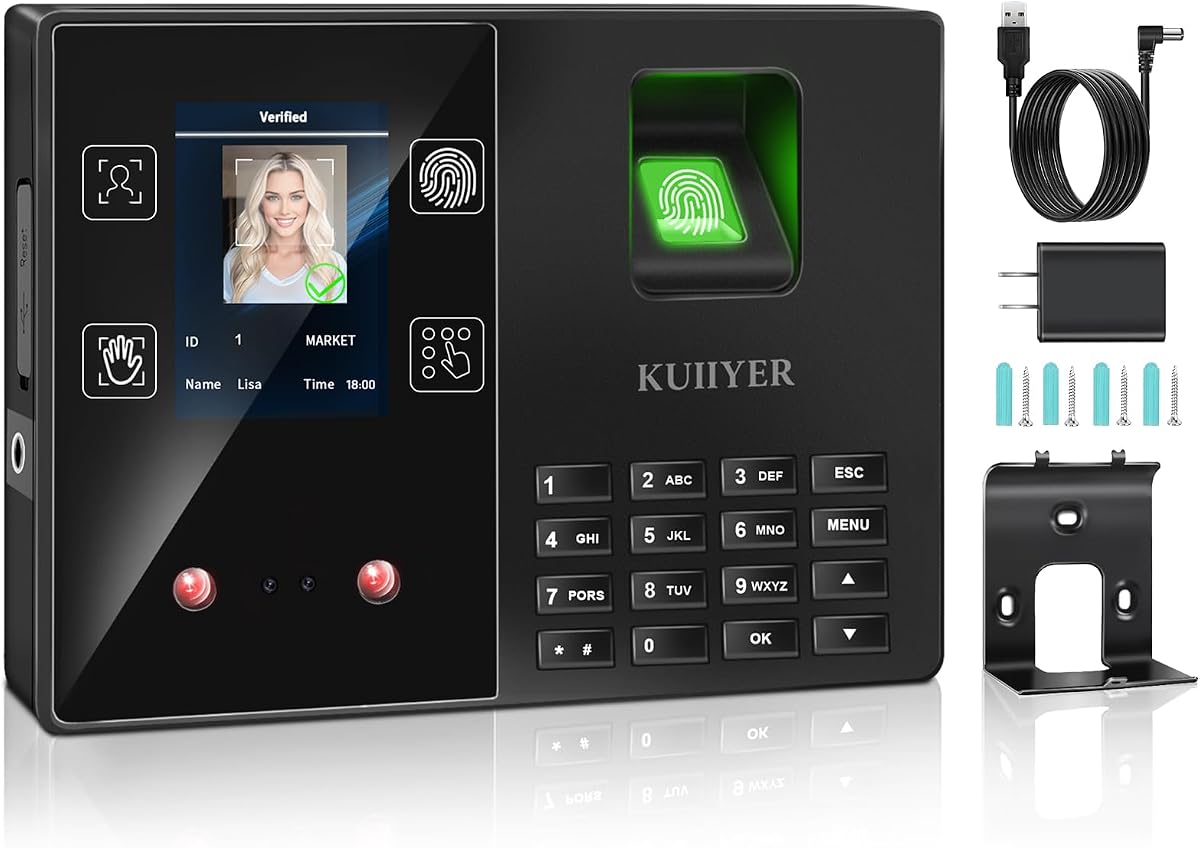
The KUIIYER 4 in 1 Time Clock offers impressive versatility by supporting face, fingerprint, palm print, and PIN identification methods in one device. Rated 3.7 stars, it is designed to meet the needs of various small businesses with up to 1000 employees. The system uses infrared cameras to identify faces even in dim environments, ensuring reliable performance under different lighting conditions.
We may earn a commission when you buy through this link, at no additional cost to you.
Its highlight is the lack of monthly fees, making it a cost-effective option for businesses that want advanced biometric features without recurring costs. The TFT color LCD display and intelligent voice announcements make the interface user-friendly, supporting 12 different languages to accommodate diverse workforces. It also stores up to 160,000 records, providing ample space for long-term data retention.
One limitation is that the USB flash drive is not included with the set, requiring a separate purchase for data export. Additionally, the device relies on offline management, which might be less convenient for businesses accustomed to cloud-based real-time access. The lower user rating suggests that some users may have experienced issues with setup or hardware durability over time.
This device is best suited for small to medium-sized businesses that prefer a standalone solution with multiple recognition options. If you need a system that supports a large number of users and avoids monthly subscriptions while still offering face and palm recognition, this clock provides a practical and economical solution for attendance tracking.
Offering four distinct ways to clock in ensures that every employee can find a method that works best for them without security compromises.
Supporting 12 languages and intelligent voice announcements makes this device accessible to international teams, simplifying onboarding and usage.
We may earn a commission when you buy through this link, at no additional cost to you.
This USB-based fingerprint time clock offers a compact and lightweight solution for businesses that already use attendance software. It features a fast and accurate fingerprint recognition algorithm that ensures secure user verification with efficient tracking. The plug and play USB interface allows for easy connection to computers, making setup quick and reliable for office environments.
We may earn a commission when you buy through this link, at no additional cost to you.
Its design makes it convenient for desktop use or portable access control, fitting seamlessly into existing setups without taking up much space. The device supports multiple user enrollments and works with most attendance and access control software, providing flexibility in how you manage your workforce. This integration capability is ideal for offices that need a simple hardware component for software-driven systems.
However, unlike standalone devices, this scanner requires a computer to be running and connected to function, which limits its use for 24/7 shifts without constant computer access. It also depends on external software for data management, meaning you must have the appropriate programs installed to utilize its full potential. This dependency might complicate operations for smaller teams without dedicated IT support.
If you need a simple hardware component to add biometric scanning to an existing software workflow, this USB device is a practical choice. It offers reliable performance and easy connectivity, making it suitable for businesses that prioritize software flexibility and want a compact, lightweight scanner for their office desks.
Compatibility with most attendance software means you can leverage existing systems without needing to replace your entire management workflow.
Its lightweight and compact structure allows for flexible placement on desks or counters, making it accessible for various office layouts.
We may earn a commission when you buy through this link, at no additional cost to you.
The H3 Standalone Biometric Clock is designed with privacy in mind, requiring no WiFi or network setup to function. Rated 4.1 stars, it keeps your data local and secure via USB transfer, ensuring that sensitive employee records are not stored in the cloud. This device is ready to use out of the box, making it ideal for businesses concerned about internet-based data risks.
We may earn a commission when you buy through this link, at no additional cost to you.
It features automatic and accurate hour calculations, eliminating the need for manual work and reducing payroll errors. The device supports multiple languages, allowing you to switch to your preferred option easily. Additionally, it includes five RFID cards for flexible clocking options, providing an alternative for employees who may not want to use biometric scans.
A notable limitation is the lack of remote access; you cannot check attendance records from outside the physical location. Data export requires a USB drive, meaning you must physically visit the device to retrieve records. While this enhances security, it might be less convenient for managers who need to manage attendance from home or another branch.
This clock is best for small businesses that prioritize data privacy and offline security. If you want a reliable system with no monthly fees and the ability to keep all employee data within your own facility, the H3 offers a secure and straightforward solution for accurate time tracking.
By keeping data local and avoiding network connections, you reduce the risk of external breaches and maintain full control over employee records.
Including RFID cards gives employees an alternative way to clock in, making the system accessible for those without usable fingerprints.
We may earn a commission when you buy through this link, at no additional cost to you.
The NGTeco Cloud Time Clock provides real remote access via a free cloud service, allowing managers to access punch data from anywhere. Rated 3.8 stars, it supports various shift types and customizable rules to fit different workflows. The device uses AWS US servers with end-to-end encryption to ensure your attendance data is stored securely and compliant with global standards.
We may earn a commission when you buy through this link, at no additional cost to you.
It supports up to 200 users and 30,000 logs, offering offline functionality that automatically syncs to the cloud once the network is restored. This ensures no data loss even during internet outages, making it reliable for environments with unstable connections. The free management app covers core features like auto time calculation, saving costs on monthly fees.
While basic features are free, advanced capabilities like GPS check-ins require a separate subscription. The user rating suggests that some customers may have faced challenges with initial setup or connectivity. Additionally, the device relies heavily on network stability for full functionality, which might be a concern for completely offline operations.
This clock is ideal for businesses that want cloud connectivity without immediate monthly fees and need robust data security. If you require remote management capabilities and customizable shift configurations to handle complex schedules, the NGTeco Cloud Time Clock offers a secure and flexible platform for modern workforce tracking.
Using AWS servers with encryption ensures that sensitive workforce records are protected from unauthorized access and comply with data protection standards.
Customizable shift options allow you to define complex schedules, reducing manual errors in overtime calculations and improving payroll accuracy.
We may earn a commission when you buy through this link, at no additional cost to you.
The H1 time clock is a straightforward standalone device that keeps your data private and fully under your control. Rated 3.9 stars, it works without any WiFi or internet connection, making it a secure choice for businesses that prefer offline operations. You can easily export records via USB for offline management, ensuring your workforce data remains within your facility.
We may earn a commission when you buy through this link, at no additional cost to you.
This system automatically totals employee hours, helping you reduce payroll errors and eliminating paper time cards and ink ribbons. It supports multiple languages such as English, Spanish, and German, which is helpful for diverse teams. The setup process is designed to be quick and easy, allowing you to start tracking time in under ten minutes with minimal technical experience.
While the device is reliable for basic needs, it lacks advanced features like cloud access or remote monitoring. This simplicity might limit its usability for businesses needing real-time updates or complex reporting. Additionally, the user rating indicates that some users may find the interface or support less comprehensive than more expensive models.
This clock is best for small businesses that need a simple, fee-free solution for accurate time tracking. If you want a system that eliminates manual calculations and keeps all data local without ongoing costs, the H1 provides a practical and efficient option for managing employee attendance.
With no monthly subscriptions or hidden costs, this device offers a predictable one-time purchase that helps keep operational expenses low.
The device is designed to be up and running quickly without technical experience, making it accessible for businesses without dedicated IT staff.
We may earn a commission when you buy through this link, at no additional cost to you.
This NGTeco Cloud Time Clock offers dual-band WiFi support for stable connectivity, ensuring uninterrupted performance in various network environments. Rated 4.2 stars, it allows managers to monitor clock-ins and generate reports remotely via an intuitive mobile app or web portal. The device includes a 2000mAh battery backup to keep running during power outages, preventing data loss when electricity fails.
We may earn a commission when you buy through this link, at no additional cost to you.
It features flexible overtime rule configuration to automate hourly calculations and simplify payroll work. The data is stored securely on AWS cloud servers with end-to-end encryption, protecting sensitive business information. Additionally, the free management app covers basic team affairs, making it a cost-effective choice for essential attendance tracking without immediate monthly fees.
While basic features are free, advanced tools like GPS check-ins require a subscription. The reliance on a stable network connection means it may not function well in locations with poor internet. However, the dual-band capability helps mitigate connection issues, providing a robust link for cloud synchronization in most settings.
This model is best for businesses that need reliable connectivity and remote management features. If you want a system that handles overtime calculations automatically and protects data with secure cloud storage, the NGTeco Cloud Time Clock delivers a practical and efficient solution for modern workforce tracking.
Equipped with both 2.4GHz and 5GHz WiFi, the device ensures fast and stable connections, reducing lag and maintaining smooth daily operations.
The built-in battery keeps the device running during power cuts, ensuring that attendance data is never lost due to unexpected electricity failures.
We may earn a commission when you buy through this link, at no additional cost to you.
Selecting the right time clock requires evaluating several critical factors to ensure it meets your business needs. Below we explore key aspects you should consider before making a purchase.
Connectivity determines how you manage data. Standalone devices store data locally and require USB transfer, while cloud-connected models allow remote access via the internet. Choose based on whether you need real-time monitoring from outside the office or prefer offline security.
Prioritize cloud models for remote management or standalone options for privacy-focused businesses.
Consider the number of employees you need to track. Devices range from supporting 200 to 1000 users. If your workforce is growing, ensure the device can scale without needing frequent hardware upgrades to avoid extra costs later.
Check the maximum user limit to match your current and future team size.
Most devices offer fingerprint recognition, but some include face, palm, PIN, or RFID options. A multi-method system ensures all employees can clock in easily, especially if fingerprints are damaged or hard to read for certain individuals.
Select a model with multiple identification options for maximum flexibility and accuracy.
Efficient data management is vital for payroll. Look for features like automatic hour calculation, report generation, and easy export options like USB or Excel files. Some systems integrate with payroll software to reduce manual entry errors.
Choose a system with automated reporting and easy export to streamline payroll processes.
Many cloud-based systems require monthly or annual subscriptions for full functionality. Standalone devices usually involve a one-time purchase. Consider your budget and whether you prefer recurring costs for advanced features or a one-time investment for basic tracking.
Evaluate the total cost of ownership including any ongoing fees for software or cloud access.
Time clocks are often used multiple times a day, so build quality matters. Industrial-grade materials and sturdy designs ensure longevity in high-traffic environments like warehouses or retail stores. Check the warranty period for added assurance.
Look for durable devices with strong warranties to handle frequent daily use.
Unexpected power outages can disrupt tracking and cause data loss. Some devices include internal backup batteries or systems that preserve records during failures. This feature ensures continuity and reliability in critical operations.
Prioritize devices with built-in power backup to prevent data loss during outages.
Access to reliable customer support is essential for troubleshooting issues. Look for manufacturers offering US-based support and clear warranty policies. Lifetime technical support or free replacements add value to your purchase.
Choose brands with responsive support teams and generous warranty terms for peace of mind.
Begin by installing the device according to the manufacturer's instructions. Ensure it is connected to a power source and mounted securely at a convenient height for employees. For network models, connect to your WiFi or LAN to enable cloud synchronization.
Enroll employees by capturing their biometric data using the device's scanner. This may involve placing a finger on the sensor or entering a PIN. Assign user IDs and departments if supported to organize records efficiently. Test each entry to verify accuracy.
Regularly clean the scanner surface to ensure consistent recognition. Avoid harsh chemicals and use a soft cloth. Check software updates periodically for new features. Back up data frequently via USB or cloud export to prevent loss from hardware failure.
A biometric fingerprint scanner time clock is a device that uses unique fingerprint patterns to verify employee identity for attendance tracking. It replaces traditional punch cards with a secure digital method that records clock-in and clock-out times automatically for payroll accuracy.
Not all devices require an internet connection. Standalone models operate offline using local storage, while cloud-based models need WiFi or LAN to send data to servers. Choose based on whether you need remote access or prefer local data management.
Fingerprint data is generally secure as it is encrypted and stored locally or on secure servers. Devices often use advanced algorithms to match prints, preventing unauthorized access. Always choose models with strong security features like encryption and automatic backups.
Many models support integration with payroll systems via file exports or direct connections. Check the device's compatibility before buying. Some systems automate payroll tasks by converting time records into ready-to-use reports for tax and wage calculations.
Some devices include internal backup batteries that preserve attendance records during power outages. If your model lacks this, ensure it saves data locally to prevent loss. Always verify backup features before purchasing to avoid disruptions.
Capacity varies by model. Some standalone devices support up to 1000 users, while others handle fewer. Check the maximum user profile limit to ensure it fits your workforce size. Expandable storage options may also be available for larger teams.
Choosing the right biometric fingerprint scanner time clock can significantly improve workforce management and payroll accuracy. Whether you prioritize security, remote access, or cost-effectiveness, there are options to suit every business need.
Consider your current team size and future growth when selecting a model. Prioritize features that align with your workflow, such as cloud connectivity for remote monitoring or standalone options for privacy.
Always check current product details and pricing as specifications may change over time. Verify warranty terms and support availability to ensure long-term reliability for your business operations.