
TenTrend Power Strip Tower
4.5Editor score
230W total power output
14-in-1 device capacity
Compact 3.15 inch width
This guide compares the top charging tower models for 2026, evaluating outlet count, USB speed, safety features, and space-saving designs for home and office
Modern workspaces require efficient power solutions to keep multiple devices running smoothly without cluttering desks or floors. A charging tower consolidates numerous outlets into a vertical stack, offering easy access and organized cable management. Choosing the right model ensures your electronics stay powered safely while maintaining a clean and professional environment.
We evaluated ten leading charging towers based on outlet variety, charging speeds, safety certifications, and build quality. Our analysis focuses on real-world usability, including cord length, plug design, and device compatibility. This list covers options ranging from compact desktop units to robust power strips designed for high-demand setups.
Each pick highlights specific strengths such as fast USB charging, surge protection, or space-saving designs. Readers will find detailed breakdowns of features and performance metrics to guide their decision. Note that availability and pricing may vary over time, so checking current listings is recommended before purchase.
4.5Editor score

4.5Editor score

4.7Editor score
The following table provides a side-by-side comparison of all ten charging towers evaluated in this guide. Each entry highlights key specifications such as outlet count, USB port types, cord length, and protection ratings to help you identify the best fit for your needs.


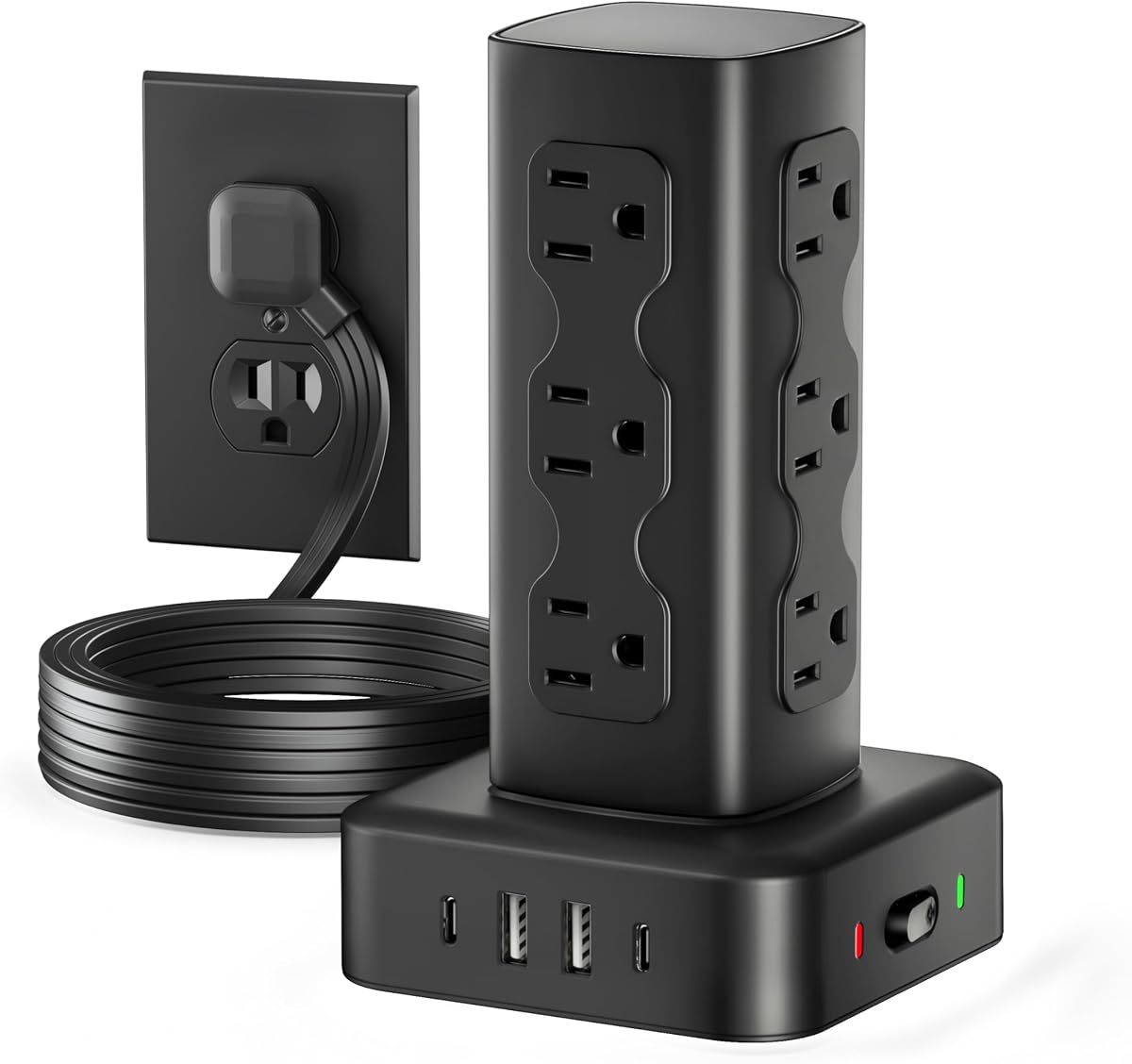


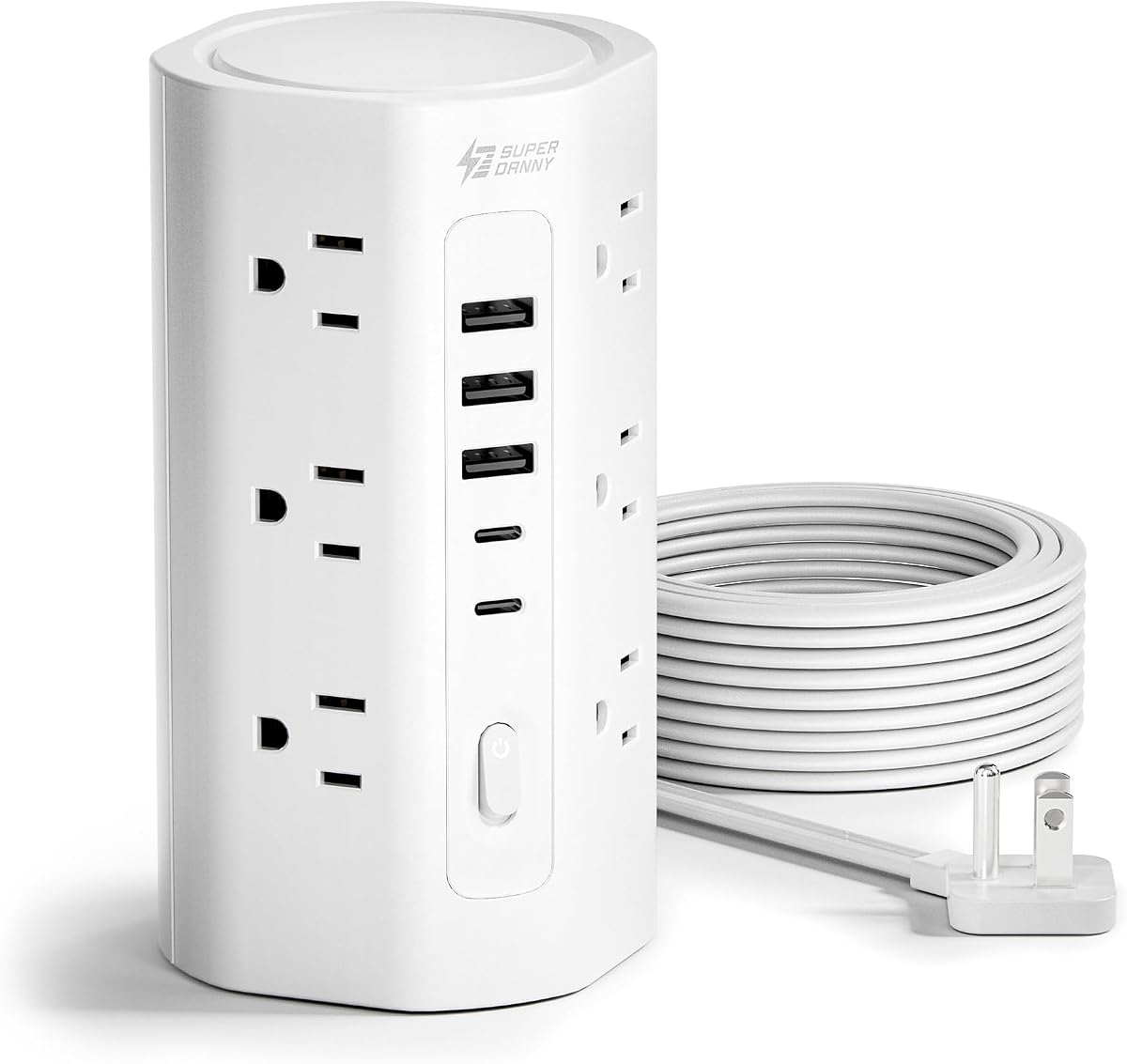
This charging tower stands out as the top choice for users needing high-speed USB charging alongside traditional AC outlets. With a 115W total USB output and support for Power Delivery on multiple ports, it handles laptops and phones simultaneously without throttling. The retractable cord feature is a game changer for keeping workspaces tidy.
We may earn a commission when you buy through this link, at no additional cost to you.
The design includes nine AC outlets spaced widely enough for large adapters, plus eight USB ports divided between USB-C and USB-A types. This allows up to eighteen devices to be charged at once. The anti-slip rubber feet ensure the tower stays stable even when plugged in heavily. A built-in safety light indicates power status clearly.
While the tower is compact, the retractable cord mechanism requires rotating the base to extend or retract, which can be slightly inconvenient for some users. Additionally, charging notes suggest removing phone cases to prevent overheating during fast charging sessions. These are minor trade-offs given the robust power distribution.
Ideal for home offices or dorm rooms where device count is high and desk space is limited. The combination of fast charging and flexible cord management makes it a versatile solution. Users looking for a balance of power and organization will find this model highly effective for daily use.
Two USB-C ports deliver up to 65W each, perfect for charging laptops quickly while other devices draw power from remaining ports.
The four-sided tower design maximizes vertical space, allowing outlets on all sides to prevent cord blocking and improve accessibility.
We may earn a commission when you buy through this link, at no additional cost to you.
This model prioritizes maximum device connectivity with eighteen total ports including nine AC and eight USB options. It is designed for environments where numerous devices need simultaneous charging such as shared workspaces or media centers. The retractable cord system helps maintain a clean look when the tower is not in active use.
We may earn a commission when you buy through this link, at no additional cost to you.
Safety features are prominent with a 15A circuit breaker and fire-resistant ABS shell rated for high temperatures. Individual outlet switches allow users to cut power to specific devices without unplugging them. The ultra-slim plug fits easily behind furniture without blocking adjacent outlets due to its angled design.
The retractable base is a unique feature but may require a bit of practice to operate smoothly. Some users might find the tower slightly heavier than standard strips due to the internal mechanisms. However, the durability and safety certifications justify the build quality for long-term use.
Best suited for users who need to plug in many devices at once and value safety certifications. The retractable cord adds a premium touch that reduces tripping hazards. It is a solid choice for offices or larger rooms where power access is spread out.
Overload protection and fire-resistant materials ensure that high-wattage appliances can be safely managed without risk of overheating.
The 6ft flat cord retracts into the base, allowing you to store it neatly when not needed for extended reach.
We may earn a commission when you buy through this link, at no additional cost to you.
The JACKYLED tower offers a versatile setup with twelve widely spaced AC outlets and six smart USB ports. This configuration supports a wide range of devices from gaming setups to office equipment. The independent switches on each layer provide granular control over power distribution which is useful for managing energy use.
We may earn a commission when you buy through this link, at no additional cost to you.
Surge protection and overload safeguards protect connected electronics from voltage spikes. The USB ports use smart charging technology to detect device needs and adjust power output accordingly. The 6.5ft retractable cord is made of pure copper ensuring efficient current delivery over distance.
One consideration is the overall height of the tower which might not fit under low clearance desks. The surge protection rating is adequate for most home use but might be lower than industrial-grade options. However, the layer switches offer a distinct advantage for power management.
Ideal for users who need to frequently toggle power for different device groups without unplugging. The wide spacing accommodates bulky adapters better than many other models. It is a reliable option for home offices or entertainment centers requiring organized power access.
Each layer has its own switch and indicator, allowing you to control subsets of devices independently for better efficiency.
USB ports detect device requirements automatically to deliver safe charging speeds without the need for extra adapters.
We may earn a commission when you buy through this link, at no additional cost to you.
This tower focuses on providing ample AC outlets with twelve sockets plus four USB ports. It is a great choice for users who need to power many traditional plugs simultaneously. The 2000J surge protection offers strong defense against power spikes ensuring equipment safety over time.
We may earn a commission when you buy through this link, at no additional cost to you.
The flat plug design is particularly useful for fitting behind furniture or in corners where space is tight. It does not block adjacent outlets thanks to its slim profile. The 6ft cord allows for flexible placement without needing extension cords of its own.
The main limitation is the lack of individual switches for outlets which means you cannot cut power to a single device easily. USB options are limited to two types-C ports which may not meet all modern charging needs. However, the overall power capacity is excellent.
Perfect for budget-conscious buyers needing to power multiple appliances or electronics at once. The high surge protection makes it a safe bet for expensive gadgets. It works well in living rooms or workspaces where many devices are plugged into one source.
With 2000 joules of protection this tower shields devices from sudden voltage spikes that could damage sensitive electronics.
The 0.31 inch flat plug allows the tower to sit flush against the wall reducing visual clutter and saving space.
We may earn a commission when you buy through this link, at no additional cost to you.
This compact tower delivers impressive USB power with 230W total output and support for laptop charging. It is ideal for desks where USB charging is a priority over AC outlets. The small footprint ensures it does not take up much desk space while still offering significant connectivity.
We may earn a commission when you buy through this link, at no additional cost to you.
The tower includes six AC outlets and eight USB ports allowing for diverse device connections. The 5ft flat cord lies flush on the floor or desk edge preventing tripping hazards. This design is particularly helpful in tight spaces or bedrooms.
The number of AC outlets is lower than some competitors so it may not suit setups with many traditional plugs. The cord is also shorter which might require closer access to a wall outlet. However, the USB capabilities are a strong selling point.
Best for users focused on charging phones, tablets, and laptops via USB-C with minimal space usage. The compact size makes it easy to move between rooms. It is a cost-effective choice for modern device-heavy environments.
With 230W total USB output it supports fast charging for laptops and other power-hungry devices simultaneously.
The 3.15 inch width keeps the tower slim and easy to fit in corners or between monitors on a desk.
We may earn a commission when you buy through this link, at no additional cost to you.
This model offers a remarkable 10ft extension cord which provides significant flexibility in placement. The ultra-thin flat plug ensures it fits into tight spaces behind sofas or beds without blocking other outlets. It supports up to twenty devices simultaneously with a mix of AC and USB ports.
We may earn a commission when you buy through this link, at no additional cost to you.
The cord is made of pure copper ensuring efficient current carrying capacity. Safety features include a fire-resistant ABS and PC material and built-in overload protection. This makes it a safe option for prolonged use in homes or offices.
The USB ports are limited to 20W PD which is great for phones but may not charge laptops quickly. The long cord can be bulky when stored but offers great utility for reaching distant outlets. The overall capacity is impressive for the price.
Ideal for bedrooms or large rooms where the outlet is far from the desk. The long cord eliminates the need for additional extension cords. It is a practical choice for those prioritizing reach and safety in their power setup.
The 10ft cord allows you to place the tower exactly where needed without worrying about distance from the wall.
Made with fire-resistant materials rated to withstand high temperatures ensuring safety during extended charging sessions.
We may earn a commission when you buy through this link, at no additional cost to you.
This charger represents a premium approach to desktop power with a focus on build quality and USB-C capability. The 100W single port allows for rapid laptop charging without needing separate bricks. The design is sleek and stable with a weight that prevents sliding during use.
We may earn a commission when you buy through this link, at no additional cost to you.
Safety is prioritized with an 8-point safety system protecting against various electrical risks. While the number of AC outlets is lower the USB connectivity is top-tier for professional use. The compact design keeps desk surfaces looking organized and professional.
The lower number of AC outlets limits its use for devices that require traditional plugs. It is also priced higher than many standard towers which may be a consideration for budget buyers. However the performance and reliability are outstanding.
Best for professionals needing a clean and powerful desktop charging solution. The 100W port handles laptops efficiently while the safety features protect valuable equipment. It is an ideal choice for those who value build quality over sheer outlet count.
One USB-C port delivers 100W allowing you to charge high-performance laptops without a separate power adapter.
Weighing 560 grams the tower remains stable on desktops preventing accidental tipping when plugging or unplugging.
We may earn a commission when you buy through this link, at no additional cost to you.
This tower is designed to handle the charging needs of a whole family with seventeen total ports. The dedicated 20W PD port ensures fast charging for iPhones and other compatible devices. It is perfect for busy environments like RVs or guest rooms.
We may earn a commission when you buy through this link, at no additional cost to you.
The outlets are widely spaced to prevent bulky adapters from blocking each other. The 10ft cord provides plenty of reach for flexible placement. A weighted base prevents tipping making it safe for use around children.
The cord length might be more than needed for a small desk which could lead to cable management issues. The USB power is shared among ports which may slow charging if all are used simultaneously. However the overall capacity is very high.
Ideal for households with many devices needing charging in one central location. The wide spacing and flat plug make it versatile for different settings. It is a great gift for those who value organization and capacity.
With space for seventeen devices this tower meets the charging needs of everyone at home without running out of ports.
The weighted base keeps the tower secure on uneven surfaces or furniture tops where it might otherwise tip over.
We may earn a commission when you buy through this link, at no additional cost to you.
This tower focuses on a slim profile that fits easily into tight spaces. The ultra-thin plug and narrow tower width ensure it does not intrude on nearby furniture. It offers twelve AC outlets and four USB ports for versatile charging options.
We may earn a commission when you buy through this link, at no additional cost to you.
Surge protection is robust with 1800J rating to keep devices safe from spikes. The wide spacing of outlets prevents congestion even with bulky adapters. A reset/off switch helps manage power usage efficiently when leaving the room.
The limited number of USB ports may not be enough for heavy USB charging needs. Individual outlet switches are absent which limits control over specific devices. However the compact design makes it a great fit for desks.
Best for users needing a simple and space-saving solution. The slim plug and narrow tower fit into corners or between tight furniture. It is a practical choice for small apartments or dorms.
The narrow width and thin plug allow this tower to fit into spaces where bulkier units would not work.
Widely spaced AC outlets ensure that large power bricks do not block adjacent sockets during use.
We may earn a commission when you buy through this link, at no additional cost to you.
This tower offers a 10ft flat cord ideal for reaching distant outlets without tripping hazards. The vertical design saves desk space and keeps cords organized. With twelve AC outlets and five USB ports it handles a wide variety of devices effectively.
We may earn a commission when you buy through this link, at no additional cost to you.
Safety is highlighted with a full spectrum of protections including overload and short-circuit safeguards. The manufacturer offers a 3-year maintenance plan adding value to the purchase. Anti-slip feet keep the tower stable on desktops or floors.
The long cord requires some management to keep the area tidy but offers flexibility. Lack of individual switches means you cannot cut power to single devices. However the safety features are comprehensive for peace of mind.
Ideal for settings where the outlet is far away such as bedrooms or large living rooms. The flat cord and wide outlet spacing make it versatile. It is a strong choice for those valuing safety and reach.
Included 3-year maintenance or replacement plan provides extra peace of mind regarding long-term reliability.
The 10ft flat cord tucks neatly along walls preventing trips and keeping the room looking clean.
We may earn a commission when you buy through this link, at no additional cost to you.
Selecting the right charging tower involves considering several key factors to ensure it meets your specific power and space needs. This guide breaks down the most important elements to evaluate before making a purchase.
Determine how many AC outlets and USB ports you need based on your devices. Some towers offer over twenty ports which is great for families while others focus on USB-C fast charging for laptops. Ensure the ports are widely spaced to accommodate bulky adapters without blocking others.
Check that the tower has enough total connections to avoid daisy-chaining which can be unsafe.
USB charging capabilities vary widely with some towers offering 100W Power Delivery for laptops while others offer standard 2.4A for phones. If you need to charge laptops quickly look for models with dedicated high-wattage USB-C ports. Total USB output matters when multiple devices are connected at once.
Prioritize towers with fast charging protocols like PD to reduce charging times for modern devices.
The length of the extension cord determines how far you can place the tower from the wall. Look for cords between six and ten feet depending on your room layout. Flat cords are preferable as they lie flush against the floor reducing tripping risks.
Retractable cords are a premium feature that helps keep workspaces tidy when the tower is not fully extended.
Safety certifications like UL and FCC ensure the tower meets electrical standards. Surge protection ratings in joules indicate how well it protects against power spikes. Overload protection and fire-resistant materials are critical for preventing damage and hazards.
Always choose a tower with at least 1000J surge protection for reliable device safety.
Consider the physical footprint of the tower and whether it fits your desk or floor space. Slim plug designs allow the tower to sit flush against walls without blocking adjacent outlets. Vertical designs save desk space but may require height clearance.
Look for anti-slip feet to keep the tower stable on smooth surfaces during use.
Build quality affects durability and safety. Materials like fire-resistant ABS or PC are preferred for housing. The weight should be sufficient to prevent tipping but not too heavy for portability if needed.
A sturdy build ensures the tower lasts longer and handles high-wattage loads safely.
Individual outlet switches allow you to control power to specific devices without unplugging them. Master switches help save energy when you leave the room. Some towers include indicator lights to show power status.
Switches are a convenient feature for managing power consumption and device access.
Choosing a reputable brand often guarantees better customer service and warranty coverage. Companies with long-standing reputations in electronics tend to have rigorous testing processes. Read reviews to see how the product holds up over time.
A solid brand reputation can provide peace of mind regarding reliability and support.
Place the tower on a stable, flat surface to prevent tipping when devices are plugged in. Ensure the cord is not stretched or bent sharply which could damage the internal wiring. If using a retractable cord, rotate the base gently to extend or store the cable.
Avoid overloading the tower beyond its rated wattage to maintain safety and longevity. Check that the vents are not blocked by books or other items to allow proper airflow. Regularly inspect the cord and plug for signs of wear or damage and replace if needed.
Unplug the tower when not in use for extended periods to save energy and reduce risk. Keep the area around the tower free from flammable materials. Use individual switches to turn off devices completely when they are not actively charging.
Yes, many modern charging towers include USB-C ports with Power Delivery support that can charge laptops. Models offering 65W or higher on USB-C ports are suitable for most laptops. Always check the wattage requirements of your laptop to ensure compatibility before purchasing.
When certified by reputable safety standards like UL and FCC these towers are safe for long term use. Features like overload protection and fire-resistant housing help prevent hazards. Ensure you do not exceed the rated wattage to maintain safe operation over time.
A flat plug allows the tower to sit flush against the wall which saves space and prevents blocking adjacent outlets. This design is especially useful in tight spaces like behind sofas or desks. It also reduces the risk of the plug being accidentally pulled out.
Most towers include built-in surge protection rated in joules to protect devices from voltage spikes. This feature helps safeguard sensitive electronics from damage during electrical disturbances. Check the surge rating in the specifications to confirm protection levels.
Capacities range from nine to twenty devices depending on the model. Some towers combine AC outlets and USB ports to reach these numbers. Ensure the total wattage does not exceed the tower's limit when connecting multiple high power devices.
Yes, many models are designed specifically for desktop use with compact bases and anti-slip feet. Ensure the height fits under your monitor or desk area if space is limited. Vertical designs help keep cords organized and prevent desk clutter.
We have reviewed ten charging towers that offer a range of features from high wattage USB-C ports to extensive AC outlet counts. The top picks provide excellent value and performance for various settings including home offices and family rooms. Choosing the right one depends on your specific power needs and space constraints.
Prioritize safety features and surge protection to ensure your devices are well guarded. Consider the cord length and plug type to fit your room layout comfortably. Models with individual switches or retractable cords add convenience for daily use.
Prices and availability may change so verify current details before purchasing. We hope this guide helps you find the perfect charging solution to keep your workspace organized and powered. Stay connected without the hassle of tangled cords and clutter.