
HP DeskJet 2955
3.7Editor score
Compact home design
Dual band Wi-Fi
Instant Ink trial
Finding an affordable all in one printer can be challenging when you need reliable performance without breaking the bank. This guide helps you identify top models that deliver quality prints scanning and copying at budget friendly price points.
We evaluated ten real products based on wireless connectivity mobile support print speed and overall value. Each entry highlights key features strengths and potential drawbacks to help you make an informed decision for your specific printing needs.
Every product section includes detailed specs pros cons and practical advice tailored to home users and small offices. Keep in mind that availability and pricing may vary over time so check current listings before purchasing your next device.
3.7Editor score

4.2Editor score

4.3Editor score
As an Amazon Associate we earn from qualifying purchases.
The following table provides a side by side overview of key specifications and features across all ten selected models to streamline your comparison process.



The HP DeskJet 2955 offers essential home printing with a compact design and AI assisted layout optimization. It earns a solid rating for its ease of setup and reliable dual band Wi-Fi connectivity.
We may earn a commission when you buy through this link, at no additional cost to you.
Its standout features include HP AI which removes unwanted content from web pages and emails for cleaner prints. The Instant Ink trial helps manage costs while the mobile app streamlines daily tasks.
Trade-offs include lower print speeds and lack of automatic double sided printing which may affect high volume users. These limitations are acceptable for light home users focused on affordability.
Buy this model if you need a simple affordable printer for basic documents and occasional photos. It fits well in small spaces and supports mobile workflows effectively.
HP AI automatically adjusts print layouts to remove unnecessary whitespace and headers ensuring cleaner output for emails and web pages.
Dual band Wi-Fi allows flexible connection to 2.4GHz or 5GHz networks improving stability and speed in modern home setups.
We may earn a commission when you buy through this link, at no additional cost to you.
The Canon PIXMA TS3720 delivers fast single sided printing with easy setup and reliable wireless connectivity. Its high rating reflects user satisfaction with performance and simplicity for everyday tasks.
We may earn a commission when you buy through this link, at no additional cost to you.
Key strengths include quick print speeds and intuitive setup that gets users running in minutes. The free poster creation software adds creative value for home users wanting personalized projects.
Trade-offs involve lack of automatic duplex printing which may increase paper usage over time. Basic controls are functional but less intuitive than touchscreens on premium models.
Choose this printer if you need fast reliable output for schoolwork or basic documents without advanced features. It supports mobile printing and fits well in compact home offices.
With up to 7.7 pages per minute in black the TS3720 handles text documents efficiently reducing wait times for common print jobs.
POSTERARTIST Online software enables users to design banners and signage directly from the browser enhancing creative possibilities.
We may earn a commission when you buy through this link, at no additional cost to you.
The Canon PIXMA TS4320 provides versatile wireless printing with automatic duplex and crisp output for documents and photos. Its balanced feature set earns strong ratings from hybrid workers and home users alike.
We may earn a commission when you buy through this link, at no additional cost to you.
Standout features include hybrid ink delivering vivid colors and automatic double sided printing saving paper. Reliable dual band Wi-Fi ensures smooth mobile printing from any device on your network.
Trade-offs include absence of an auto document feeder limiting multi page scanning convenience. The compact form factor is ideal but limits advanced control options compared to larger models.
Pick this model if you value paper savings and high quality prints in a small footprint. It suits users needing occasional photos and frequent document output without complex features.
The 2-cartridge hybrid ink system produces sharp text and vibrant colors without the need for multiple cartridge replacements.
EPEAT Silver and ENERGY STAR certifications confirm the printer meets strict standards for energy efficiency and sustainability.
We may earn a commission when you buy through this link, at no additional cost to you.
The HP DeskJet 4355 stands out with an auto document feeder and AI powered layout tools for efficient home printing. It supports quick text output while keeping the design compact and sustainable.
We may earn a commission when you buy through this link, at no additional cost to you.
Strengths include HP AI that removes unwanted web content and a 35-sheet auto document feeder simplifying multi page tasks. Instant Ink trial and recycled materials highlight HP focus on convenience and sustainability.
Trade-offs involve reliance on Instant Ink subscription after trial and average user ratings. Setup is easy but long term costs may increase without careful management of ink usage.
Select this printer if you need fast printing with basic document feeding and smart formatting. It fits well for home offices needing occasional scanning and reliable wireless output.
A 35-sheet auto document feeder streamlines scanning and copying of multi page documents without manual page loading.
The HP app enables seamless printing scanning and copying directly from smartphones for enhanced mobility and control.
We may earn a commission when you buy through this link, at no additional cost to you.
The Canon PIXMA TS6520 features a distinctive OLED display and reliable wireless performance for crisp document and photo prints. Its high rating reflects satisfaction with print quality and intuitive operation.
We may earn a commission when you buy through this link, at no additional cost to you.
Key strengths include the OLED screen for quick status checks and automatic double sided printing reducing waste. Hybrid ink delivers sharp text and vivid colors while mobile apps enable flexible printing from any device.
Trade-offs involve higher cost and lack of an auto document feeder limiting multi page workflow efficiency. The compact size is great but may limit tray capacity for heavy users.
Choose this model if you want premium feedback display and quality prints in a small footprint. It suits home users prioritizing design and reliable wireless connectivity over heavy scanning tasks.
The 1.42-inch OLED screen offers clear visual feedback on ink levels and printer status at a glance.
Two high capacity cartridges provide sharp text and vivid colors minimizing replacement frequency and cost.
We may earn a commission when you buy through this link, at no additional cost to you.
The Canon PIXMA TR4720 combines printing copying scanning and faxing in a compact design with Alexa integration for smart ink alerts. Its feature set supports home offices needing basic telecommunication and scanning.
We may earn a commission when you buy through this link, at no additional cost to you.
Strengths include built-in fax auto document feeder and smart reorder via Alexa. The 100-sheet tray and borderless photo printing enhance versatility for documents and creative projects.
Trade-offs include lower black print speeds and fax functionality that may feel dated. Ink alerts help manage costs but the overall performance suits moderate rather than heavy usage.
Opt for this model if you need fax capability alongside standard home office tasks. It fits users who want wireless convenience and smart alerts without advanced enterprise features.
Connecting to Alexa enables voice notifications and smart reordering when ink runs low without manual checks.
Support for borderless prints up to 8.5 by 11 inches allows creative photo and document customization.
We may earn a commission when you buy through this link, at no additional cost to you.
The Brother Work Smart 1360 delivers fast printing speeds and large paper capacity for home office demands. Its compact build includes color display and cloud connectivity for straightforward daily use.
We may earn a commission when you buy through this link, at no additional cost to you.
Key strengths include 16 pages per minute black speed and 150-sheet paper tray reducing reload frequency. Cloud app support enables easy printing from services like Google Drive and Dropbox.
Trade-offs involve smaller color screen and lack of fax compared to competitors. While fast and efficient it suits moderate users prioritizing speed and simplicity over multifunctional features.
Buy this if you need fast reliable output for reports and documents in a compact setup. It fits users needing large paper capacity and cloud connectivity without extra complexity.
Up to 16 pages per minute in black speeds up workflows for frequent document printing in home offices.
Direct integration with Google Drive Dropbox and Box simplifies printing without computer dependencies.
We may earn a commission when you buy through this link, at no additional cost to you.
The Canon PIXMA TR7120 stands out with premium OLED display and auto document feeder for streamlined multi-page tasks. Its top rating reflects high satisfaction with performance quality and ease of use.
We may earn a commission when you buy through this link, at no additional cost to you.
Strengths include OLED feedback on ink status and robust auto document feeder supporting quick scanning and copying. Auto duplex and hybrid ink balance speed and quality for diverse home printing needs.
Trade-offs include higher cost and lack of fax which may limit telecommunication needs. Setup is intuitive but ongoing ink costs depend on usage and subscription choices.
Choose this if you need premium feedback and efficient handling of multi-page documents. It suits users wanting high quality prints and reliable connectivity in a compact modern design.
The ADF allows quick scanning and copying of multi-page documents without manual page loading.
Hybrid ink cartridges deliver sharp text and vivid colors enhancing overall print quality for documents and photos.
We may earn a commission when you buy through this link, at no additional cost to you.
The HP DeskJet 2855e is a compact wireless printer with HP AI layout optimization and a free Instant Ink trial. It delivers straightforward printing for basic home documents and occasional scanning.
We may earn a commission when you buy through this link, at no additional cost to you.
Key strengths include AI powered web and email formatting plus seamless mobile app integration. Dual band support is limited but the compact design suits small spaces and simple printing needs.
Trade-offs involve single band Wi-Fi and lack of auto duplex which may reduce flexibility. Setup is easy but users must manage subscription options carefully after the trial.
Buy this if you need basic reliable printing and smart layout assistance. It fits small homes prioritizing space saving and mobile convenience over advanced features.
HP AI automatically formats web pages and emails removing unwanted content for cleaner more efficient prints.
A three month Instant Ink trial provides automatic ink delivery helping manage ongoing printing costs effectively.
We may earn a commission when you buy through this link, at no additional cost to you.
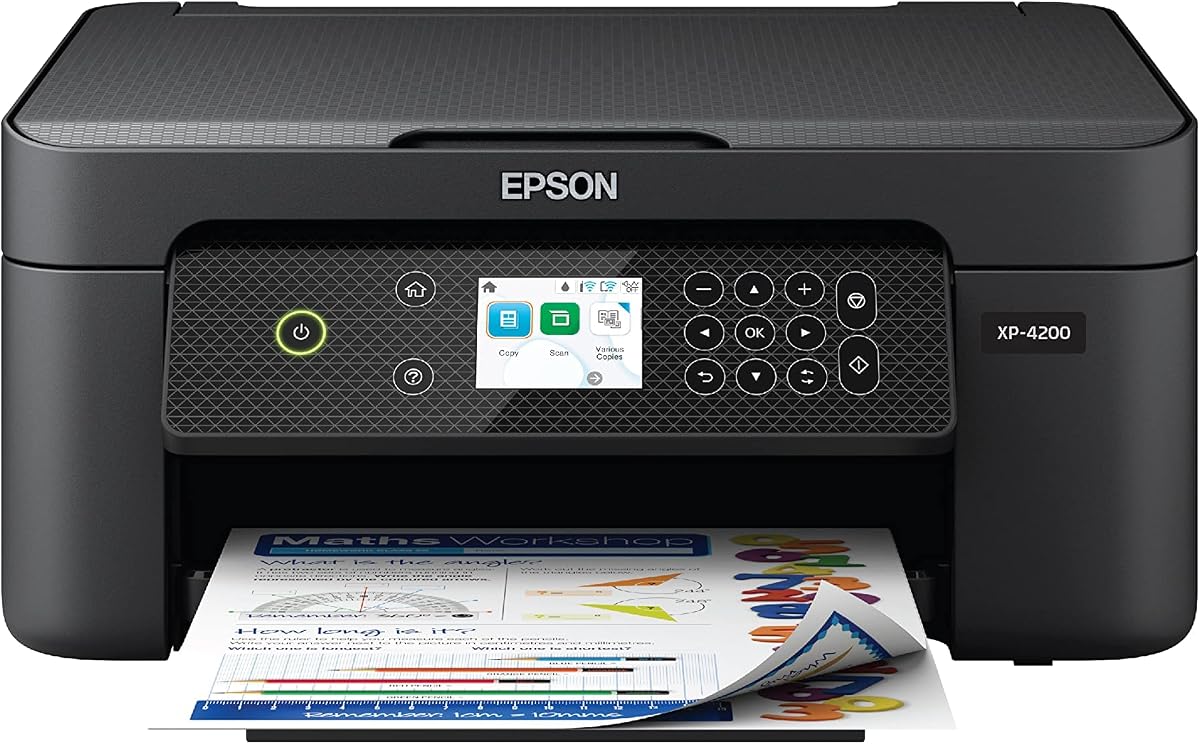
The Epson Expression XP-4200 supports voice activated printing and individual ink cartridges for flexible and efficient output. Its Micro Piezo technology delivers consistent quality for home documents and photos.
We may earn a commission when you buy through this link, at no additional cost to you.
Strengths include hands-free voice printing via Alexa and auto duplex to reduce paper waste. Epson ScanSmart software adds value by creating searchable PDFs enhancing document organization.
Trade-offs involve smaller paper capacity and strict requirement for genuine cartridges limiting third-party options. Setup is straightforward but users should weigh long-term ink costs before buying.
Pick this if you want voice convenience and flexible ink replacement. It suits users needing reliable quality and smart features without complex multifunctional capabilities.
Connect to Alexa for hands-free printing commands enhancing accessibility and convenience in home setups.
Individual cartridges allow replacing only depleted colors reducing waste and overall operating costs.
We may earn a commission when you buy through this link, at no additional cost to you.
Selecting the right budget-friendly all in one printer requires balancing essential features with cost effectiveness to meet your specific home or small office needs.
Print speed affects how quickly documents appear while quality determines sharpness and color accuracy. Look for models offering at least 7 pages per minute black to keep up with daily tasks and check sample outputs for vibrant text and images.
Prioritize printers that balance speed with clarity so your documents and photos look professional without sacrificing efficiency.
Modern printers should support Wi-Fi and mobile printing apps for flexible operation from phones and tablets. Dual band Wi-Fi provides better stability while Bluetooth and USB offer backup connection methods.
Choose models with reliable wireless features to ensure seamless printing from any device in your home network.
Input tray size determines how often you reload paper impacting convenience during busy periods. Models with 60 sheets or more reduce interruptions while auto document feeders help with scanning multi-page files.
Opt for larger trays if you print frequently to minimize manual paper changes and improve overall workflow efficiency.
Ink systems vary from individual cartridges to hybrid or multi-pack designs affecting long-term costs. Individual inks let you replace only used colors while bundled options may save upfront but cost more over time.
Consider total cost of ownership and availability of affordable replacements when choosing cartridge types for your printer.
Automatic double-sided printing saves paper and time by handling both sides in one pass. This feature is vital for eco-friendly printing and frequent document output but may not be present in budget models.
If reducing waste is a priority select a model with built-in duplex to streamline your printing tasks effectively.
Robust mobile apps and support for AirPrint or Mopria enable effortless printing without needing computers. Look for intuitive interfaces and cloud app integration to manage tasks from your smartphone or tablet.
Ensure the printer supports your preferred mobile platforms to maximize convenience and accessibility in daily use.
Compact designs fit easily into small home offices or countertops without overwhelming space. Consider dimensions and weight to ensure the printer fits your workspace while maintaining functional features and stability.
Choose models with a minimal footprint to keep your desk organized while retaining full scanning and copying capabilities.
Features like voice activation fax or AI layout tools can add significant value depending on your needs. Evaluate whether smart conveniences like smart reordering or document feeders justify extra cost for your usage patterns.
Select extras only if they directly improve your workflow avoiding unnecessary complexity or expense in your setup.
Start by placing the printer on a stable flat surface away from direct sunlight or heat sources. Connect it to your Wi-Fi using the on-screen menu or mobile app following setup prompts to enable wireless access.
Regularly clean the paper feed rollers and exterior with a soft lint-free cloth to prevent jams and dust buildup. Replace ink cartridges promptly when low and keep printer covered when not in use to protect internal parts.
Keep firmware updated through manufacturer apps or websites to maintain optimal performance and security. Run test prints periodically to ensure nozzle health and adjust settings based on your specific document or photo needs.
A suitable model combines essential features like wireless connectivity mobile app support and reliable print quality without high costs. Look for compact designs and easy setup to handle daily documents and photos efficiently.
Yes most include support for Apple AirPrint Mopria and proprietary apps enabling print from iOS or Android devices. This flexibility allows seamless integration with your existing mobile workflow without computer dependency.
Use draft mode for text documents enable duplex printing when possible and consider subscription plans or refill options where available. Monitor usage and switch cartridges before complete depletion to maintain consistent output quality.
Automatic double-sided printing is less common but available in mid-range models. Check product specs carefully to confirm if this feature is included since it saves paper and enhances efficiency for frequent users.
Dual band Wi-Fi ensures stable connections while Bluetooth and USB offer alternatives for direct access. Verify your network compatibility and preferred mobile app support to avoid setup or integration issues later.
Only models with an auto document feeder support batch scanning without hand feeding pages. This feature speeds up copying multi-page documents and is valuable for home office or hybrid work setups.
Regularly clean print heads and paper paths update firmware and run nozzle checks when needed. Proper storage and avoiding prolonged idle periods also help prevent clogs and ensure consistent color and sharpness.
Most include a one-year limited warranty covering manufacturing defects and hardware failures. Review warranty terms carefully and consider extended options if you plan heavy or commercial use beyond basic home tasks.
This guide highlights ten reliable models balancing affordability with practical features for home and small office printing. Top picks like the Canon PIXMA TS6520 and HP DeskJet 4355 offer excellent value across diverse user needs.
Prioritize what matters most to your workflow whether that is mobile app support duplex printing or compact design. Each option brings unique strengths ensuring you find a printer that fits your space and budget effectively.
Always verify current availability and check recent user feedback before purchasing since features and support can change. With careful consideration you can secure a reliable budget-friendly printer that meets your everyday requirements.