
SANSUI 34-Inch Curved Gaming Monitor
4.4Editor score
200Hz refresh rate
AI built-in features
VESA compatible stand
Finding an affordable ultrawide monitor can transform your workspace without breaking the bank. These displays offer expansive screen real estate that enhances productivity and immersion. Whether you need it for gaming or professional tasks, there is a budget option that fits your needs perfectly.
We compared ten top models based on resolution, refresh rate, panel technology, and connectivity options. Our analysis focuses on value, performance, and build quality to ensure you get the most for your money. Each product was selected for its ability to deliver premium features at a accessible price point.
Every pick in this list highlights key strengths and potential trade-offs to help you decide. Ratings and specifications are drawn directly from manufacturer data and verified user feedback. Please note that prices and availability change frequently, so check current listings before making your final purchase decision today.
4.4Editor score

4.2Editor score

4.6Editor score
As an Amazon Associate we earn from qualifying purchases.
This side-by-side comparison highlights the key specifications and features of all ten selected monitors. Use this table to quickly identify which model offers the best balance of performance, resolution, and connectivity for your specific use case and budget constraints.


This SANSUI model delivers exceptional value with its high refresh rate and curved display. It scores well for budget-conscious gamers who need speed and immersion without paying premium prices. The AI features add a modern touch to an otherwise standard monitor package.
We may earn a commission when you buy through this link, at no additional cost to you.
Its 200Hz refresh rate ensures smooth motion in fast-paced titles. The VA panel provides good contrast ratios for deep blacks in dark scenes. Connectivity includes HDMI 2.1 which supports higher bandwidth for modern consoles and PCs.
The lack of speakers means you will need external audio for gaming sessions. The stand offers tilt but lacks height adjustment which may limit ergonomics for some users. However, the VESA mount allows for easy replacement with a better arm.
Buyers looking for a fast, curved display at a low cost should choose this option. It balances performance features with affordability better than many competitors in this price range. The AI crosshair and sniper scope features provide a tactical edge in shooters.
The 200Hz refresh rate combined with the 1500R curve creates a highly immersive gaming experience.
Built-in AI tools like PQ and Crosshair help optimize visual settings for competitive play automatically.
We may earn a commission when you buy through this link, at no additional cost to you.
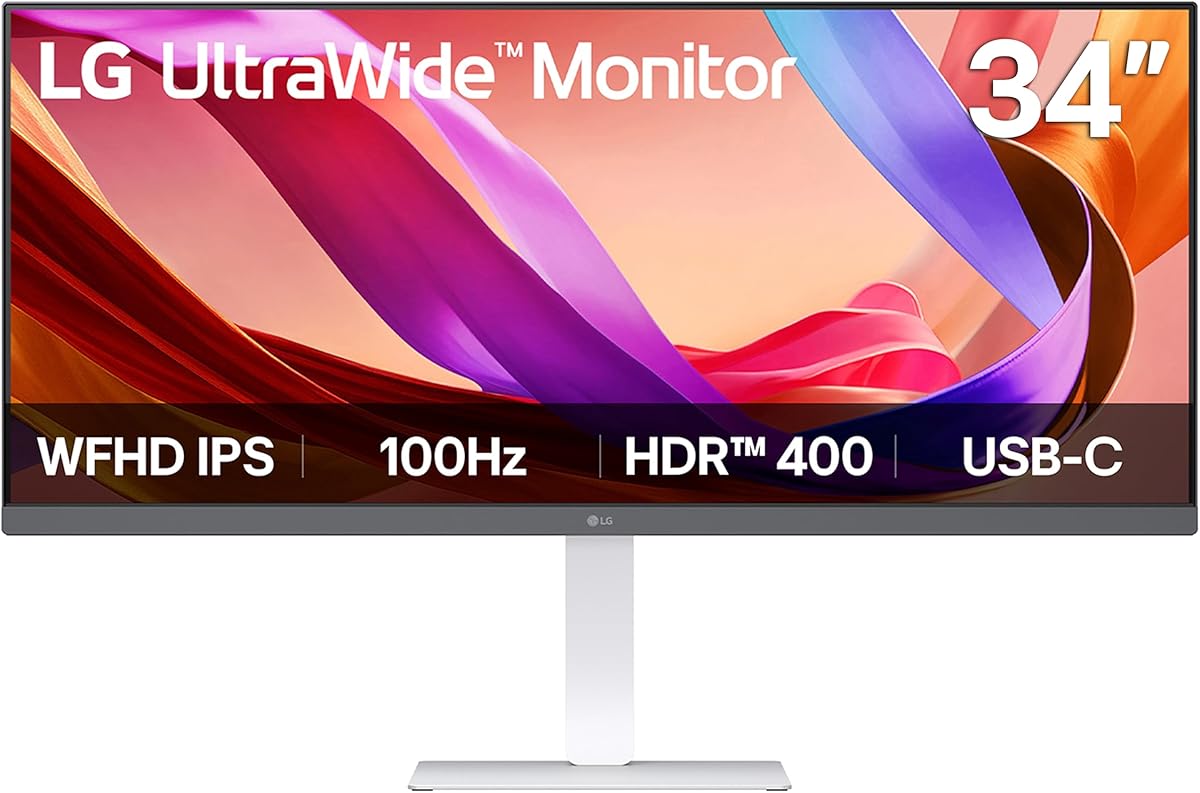
LG's 34-inch UltraWide is a strong contender for general productivity and casual gaming. It offers a full stand with height and swivel adjustments which is rare at this price point. The IPS panel ensures consistent colors across the wide screen surface.
We may earn a commission when you buy through this link, at no additional cost to you.
USB Type-C support simplifies laptop connections by handling video and data in one cable. The built-in speakers with Waves MaxxAudio provide decent sound for calls and media without extra hardware. HDR 400 adds some brightness and contrast improvement for supported content.
The WFHD resolution is lower than UWQHD which may show less text clarity for professionals. The HDR implementation is basic and not suitable for critical color work. However, the ergonomics and connectivity make it a versatile choice for office setups.
Users who prioritize desk ergonomics and single cable laptop connection will appreciate this model. It fits well in environments where comfort and ease of use matter more than raw pixel density. The white finish adds a clean aesthetic to modern workspaces.
USB Type-C allows you to connect your laptop with a single cable for video and data transfer.
Height and swivel adjustments let you position the screen perfectly to reduce neck strain during long work sessions.
We may earn a commission when you buy through this link, at no additional cost to you.
This MSI monitor stands out for delivering UWQHD resolution at an accessible price point. The 120Hz refresh rate offers smooth motion that bridges the gap between office and gaming use. Its VA panel provides excellent contrast for detailed text and media.
We may earn a commission when you buy through this link, at no additional cost to you.
The TÜV Rheinland certification for low blue light and flicker free operation helps reduce eye strain. It comes with HDMI and DisplayPort inputs that support high bandwidth for the full resolution and refresh rate. Speakers are included for basic audio needs.
The stand is functional but limited in adjustment compared to premium models. You might want to mount it on a VESA arm for better positioning. Despite this, the screen quality and connectivity make it a versatile tool for multitasking.
Professionals and gamers who need high resolution without high cost should consider this option. It balances display quality with health features effectively. The Adaptive-Sync ensures tear-free visuals whether you are editing spreadsheets or playing casual games.
UWQHD resolution provides significantly more screen real estate for multitasking than standard HD monitors.
Certified low blue light technology helps protect your vision during extended periods of screen time.
We may earn a commission when you buy through this link, at no additional cost to you.
LG continues to lead in display technology with this high-quality curved model. It offers vibrant HDR10 support and 99 percent sRGB coverage for accurate color reproduction. The build quality and stand ergonomics are superior to budget competitors.
We may earn a commission when you buy through this link, at no additional cost to you.
Connectivity is robust with USB Type-C capable of delivering up to 65W power to your laptop. The onscreen control software makes multitasking easier by allowing screen splitting and input management. Reader mode helps reduce eye strain during document work.
While 100Hz is lower than some gaming-focused monitors it remains smooth for general tasks. The price is higher than entry-level options but justified by the features and build quality. It serves well as a primary display for creative work or mixed use.
Users seeking reliable performance and color accuracy will find this model satisfying. The height adjustable stand ensures comfort for all-day use. It is a solid investment for those who want premium features without moving to flagship tier pricing.
99 percent sRGB coverage ensures images and videos look true to life for creative projects.
Height and tilt adjustments allow you to customize the viewing angle for maximum comfort.
We may earn a commission when you buy through this link, at no additional cost to you.
This LG model combines IPS color quality with a high wattage USB-C connection. It supports up to 96W power delivery which can fully charge many modern laptops while displaying video. The curved design enhances the sense of immersion during media consumption.
We may earn a commission when you buy through this link, at no additional cost to you.
DepthSound speakers provide richer audio than typical built-in monitor sound systems. HDR10 support adds dynamic range to compatible content for more visual depth. The narrow bezel design helps maintain focus on the screen without distractions from borders.
The lack of height adjustment is a trade-off for the premium features offered. It is best suited for desks where the screen height is already optimal or with an external stand. The IPS panel ensures viewing angles remain clear from different positions.
Users who rely on single cable laptop setups will value the 96W USB-C connection. It streamlines your workspace and reduces cable clutter effectively. This monitor is ideal for professionals who need color accuracy and charging capabilities in one device.
Up to 96W power delivery over USB-C can charge high-performance laptops while you work.
DepthSound technology enhances bass and clarity for a better audio experience without external speakers.
We may earn a commission when you buy through this link, at no additional cost to you.
Samsung delivers a reliable ultrawide option with strong gaming features and eye care tech. AMD FreeSync ensures smooth gameplay without tearing on compatible graphics cards. The ambient light sensor adjusts brightness automatically based on your room lighting conditions.
We may earn a commission when you buy through this link, at no additional cost to you.
Picture-in-Picture allows you to view two inputs simultaneously which aids multitasking. The borderless design maximizes screen space and looks sleek in any setup. HDR10 brings out more detail in bright and dark areas of supported content.
The absence of USB-C limits connectivity for modern laptop workflows compared to other models. It is more geared towards desktop PC users or those with older peripherals. Despite this it offers good performance for its price category.
Gamers and office users who need eye care features will find this appealing. The FreeSync integration is a key benefit for AMD GPU owners. It provides a balanced experience for work and entertainment in a well designed chassis.
Ambient light sensor and Eye Saver Mode help reduce strain during long periods of use.
PIP lets you monitor a video call while working on a main project on the same screen.
We may earn a commission when you buy through this link, at no additional cost to you.
This Samsung variant mirrors the S50GC line with similar features and performance specs. It focuses on seamless integration between gaming and productivity tasks. The thin bezels help create an expansive view when used in multi-monitor setups.
We may earn a commission when you buy through this link, at no additional cost to you.
AMD FreeSync technology keeps frame rates in sync with refresh rates to prevent tearing. HDR10 support adds visual impact to movies and games with better dynamic range. The PBP feature allows two sources to be viewed side by side easily.
The lack of USB-C remains a constraint for laptop users needing data and power over one cable. It is best utilized with separate video and charging connections. Still it offers solid value for those prioritizing screen real estate and refresh rate.
Those looking for a reliable brand with strong eye care features should consider this. It handles both work and play competently without requiring high-end specs. The design is clean and modern fitting well into various office environments.
AMD FreeSync reduces stuttering and tearing for smoother motion during gameplay.
Thin bezels minimize gaps when placing this monitor next to another for an extended display.
We may earn a commission when you buy through this link, at no additional cost to you.
CRUA brings a competitive offer with a high refresh rate IPS panel at this size. The 165Hz rate supports fluid visuals in fast-paced gaming scenarios. Its 120 percent sRGB gamut ensures vibrant colors for media and creative work.
We may earn a commission when you buy through this link, at no additional cost to you.
The inclusion of speakers simplifies audio for video calls and casual entertainment. Dual HDMI and DisplayPort inputs offer flexibility for connecting multiple devices. PIP and PBP modes help organize workflows without needing extra hardware.
VESA mounting is available for those who prefer custom stand solutions. The panel quality is solid though build materials may feel less premium than top brands. It represents a cost-effective way to get fast IPS technology in ultrawide format.
Gamers who prefer IPS color over VA contrast will find this appealing. The refresh rate is a significant advantage for competitive titles. It is a strong choice for users who want performance without breaking their budget constraints.
165Hz refresh rate delivers smoother motion for competitive gaming and dynamic content.
120 percent sRGB coverage ensures colors appear rich and true across your display.
We may earn a commission when you buy through this link, at no additional cost to you.
Acer focuses on speed with this Nitro model offering a 200Hz refresh rate. The 2560×1080 resolution is efficient for gaming and keeps hardware requirements lower. The 1800R curve wraps around your vision for a cozy immersive feel.
We may earn a commission when you buy through this link, at no additional cost to you.
AMD FreeSync Premium ensures that tear-free gaming even in demanding titles. The 1ms response time minimizes ghosting during rapid movement. It is designed primarily for users who prioritize smooth motion over pixel density.
The resolution is lower than UWQHD which affects text clarity for heavy writing work. It is ideal for secondary gaming screens or casual home setups. The stand is simple but functional for desk placement.
Competitive gamers on a budget will appreciate the high refresh rate. It delivers fluid motion at a cost-effective price point. This monitor is best suited for play rather than detailed professional content creation tasks.
200Hz refresh rate provides ultra-smooth visuals for fast-paced competitive gaming sessions.
Lower resolution requirements make it easier to drive high frame rates on mid-range PCs.
We may earn a commission when you buy through this link, at no additional cost to you.
KTC offers a compelling combination of resolution and speed in this model. The 180Hz refresh rate supports smooth gameplay while maintaining UWQHD clarity. The HVA panel delivers high contrast which enhances black levels in dark scenes.
We may earn a commission when you buy through this link, at no additional cost to you.
The stand provides full tilt pivot swivel and height adjustments for comfort. A three-year warranty adds peace of mind for long-term ownership. PIP and PBP modes help with productivity and multitasking on the fly.
USB-C is not present so external power or video connections are needed for laptops. The lack of USB power delivery means more cables on your desk. Despite this the feature set is impressive for the price category.
Users who need high specs and ergonomics at a low cost will find this great. The warranty and stand adjustments set it apart from other budget models. It is a strong contender for home offices and gaming desks alike.
Height swivel and pivot adjustments let you position the screen for optimal comfort.
A three-year warranty ensures reliable support and protection for your investment.
We may earn a commission when you buy through this link, at no additional cost to you.
Selecting the right ultrawide monitor involves weighing resolution refresh rate and panel type against your budget and usage needs.
Ultrawide monitors typically use a 21:9 aspect ratio which offers more horizontal space than standard 16:9 screens. The most common resolutions are WFHD (2560×1080) and UWQHD (3440×1440). UWQHD provides sharper text and more workspace for productivity but requires a more powerful graphics card for gaming. WFHD is more affordable and easier to drive but may appear less crisp for detailed work.
Choose UWQHD if you need text clarity and detail for professional tasks. Choose WFHD if you prioritize cost and lower hardware demands for casual use.
Refresh rate measures how many times the screen updates per second with higher numbers meaning smoother motion. Standard monitors are 60Hz but gaming models often offer 100Hz 120Hz or higher. Response time indicates how quickly pixels change color with lower values reducing blur and ghosting. For fast games aim for at least 120Hz and 5ms or less.
High refresh rates improve smoothness for both gaming and scrolling. Lower response times ensure clarity during rapid movements and transitions.
VA panels offer high contrast and deep blacks making them great for movies and dark games. They can sometimes suffer from slower response times compared to other types. IPS panels provide better color accuracy and wider viewing angles which suit designers and general users. TN panels are less common in ultrawide formats but offer fast response times.
VA is best for media consumption and high contrast needs. IPS is best for color-critical work and mixed use cases.
Ports determine how you connect your devices and impact performance. HDMI 2.1 supports higher bandwidth for high resolutions and refresh rates. DisplayPort is often preferred for PC gaming. USB Type-C can carry video data and power allowing a single cable connection for laptops. Check your devices to ensure compatible ports are available.
USB-C simplifies setups for laptop users by combining power and video. HDMI 2.1 ensures full performance for modern consoles and PCs.
An adjustable stand helps maintain good posture and reduces strain during long sessions. Look for tilt height and swivel adjustments. Some budget models only offer tilt so VESA mounting compatibility is important for flexibility. A 100x100mm VESA pattern allows you to use a monitor arm for better positioning.
Adjustability ensures the screen is at eye level and close enough to avoid leaning. VESA support adds flexibility if the stock stand is limited.
Prolonged screen use can lead to eye strain so features like flicker free technology and low blue light modes are valuable. These reduce harmful emissions that cause fatigue. Some monitors include ambient light sensors that adjust brightness automatically to match your room.
Eye care features are essential for long working hours. Look for certifications like TÜV Rheinland for added assurance.
Features like Picture-in-Picture (PIP) and Picture-by-Picture (PBP) allow you to view multiple inputs at once. Onscreen Control software can help split the screen and manage windows efficiently. These tools reduce the need for multiple monitors and keep your workspace tidy.
PIP and PBP are useful for monitoring streams while working. Onscreen tools simplify window management for productivity.
A good warranty protects your investment against defects and failures. Brands often offer one to three year coverage. Customer support responsiveness is also key if you encounter issues with settings or hardware. Check the policy details before buying to ensure you are covered.
Extended warranties provide peace of mind for expensive tech. Reliable support ensures quick resolutions if problems arise.
Set your graphics card to output the native resolution and refresh rate of the monitor for best results. Use DisplayPort if available for higher bandwidth and smoother performance. Adjust your settings to use the full width of the screen without black bars.
Clean the screen with a microfiber cloth and mild solution to avoid scratches. Avoid touching the panel with rough materials that can cause permanent marks. Keep cables organized to prevent tripping and ensure good airflow around the unit.
Use built-in features like blue light filters during night work to reduce eye strain. Adjust brightness based on ambient light to maintain comfort. Regularly check for firmware updates from the manufacturer to keep performance optimized.
Yes many affordable models offer high refresh rates and adaptive sync technologies that reduce tearing and stuttering. Focus on specs like 144Hz refresh rates and low response times for a smooth experience. Ensure your PC can handle the resolution to avoid lag.
Most modern monitors support Picture-in-Picture or Picture-by-Picture modes for dual inputs. You can view two signals simultaneously using HDMI and DisplayPort inputs. This helps streamline your desk and reduces clutter from multiple screens.
They reduce the need for multiple smaller monitors freeing up desk surface area. The single wide frame eliminates gaps between screens and provides more horizontal workspace. This creates a cleaner and more organized work environment.
Use DisplayPort for most PC setups to access full resolution and refresh rates. HDMI 2.1 works well for consoles and modern PCs. Older cables may limit bandwidth and prevent you from reaching the highest settings.
Curved screens offer a more immersive experience by matching the natural curve of your vision. They reduce strain on your eyes during long viewing sessions. Flat screens are better for design work where straight lines matter most.
Check if your monitor supports VESA mounting standards like 100x100mm. Use a VESA bracket kit to secure it to the wall. Ensure the mount can support the weight and size of the wide screen safely.
We reviewed ten affordable ultrawide monitors covering a range of needs from gaming to productivity. Models like the SANSUI 34-Inch and MSI PRO MP341CQ E12 offer strong performance for their price points. LG and Samsung provide reliable options with advanced features for general use.
Prioritize resolution and refresh rate based on your main tasks. Gamers should look for high Hz rates and low response times. Professionals need high resolution and ergonomic adjustments for comfort during long work hours.
Prices and availability change regularly so verify details before purchasing. Check current specs to ensure they match your system requirements. Investing time in comparing these factors will help you find a monitor that offers the best value and longevity.