
RDS – Licensed Nintendo Action Grip NES Classic Controller
4.5Editor score
Textured silicone material for grip
Licensed Nintendo accessory manufacturer
Comfortable ergonomic grip design
Discover the top Classic Nes Controller Replacement options for retro gaming setups in October 2026 with detailed comparisons and expert insights.
Finding the right Classic Nes Controller Replacement can transform your retro gaming experience entirely. Whether you need a durable wired option or a modern wireless solution, choosing wisely ensures smooth gameplay without frustrating input lag or connection issues.
We compared ten top-rated controllers based on build quality, cable length, compatibility, and user feedback. Our analysis focuses on authentic feel, responsiveness, and value to help you select the perfect replacement for your console or emulator setup.
Each pick highlights unique strengths and ideal use cases so you can decide confidently. Prices and availability may change quickly, so verify current details before purchasing to ensure you get the best deal for your specific gaming needs today.
4.5Editor score

3.7Editor score

4.4Editor score
Explore the side-by-side comparison of ten leading Classic Nes Controller Replacement options. This table details key specifications like connection type, cable length, and compatibility to help you narrow down choices quickly.


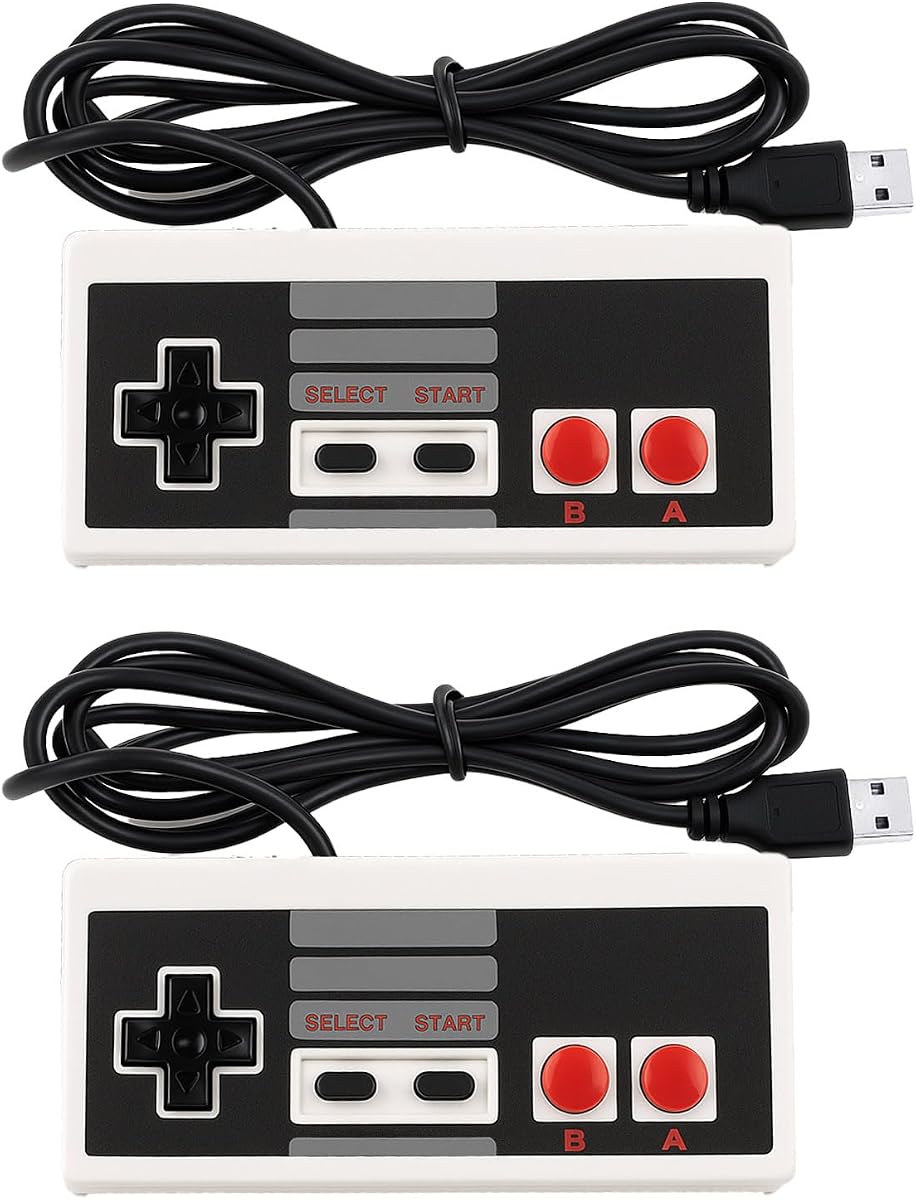


The NGHTMRE 2 Pack stands out as a top contender for Classic Nes Controller Replacement needs. With a rating reflecting real user experiences, this wired option offers precision control and an extended cable for flexibility during gameplay sessions.
We may earn a commission when you buy through this link, at no additional cost to you.
Its sensitive buttons eliminate delay, providing an authentic feel that mimics original hardware. The 10ft cable ensures you can sit back comfortably away from screens while maintaining full control over your retro titles.
While it does not work with older 1985 models, compatibility with the 2016 HDMI version covers most modern setups. Some users note mixed ratings, but the core functionality delivers reliable performance for casual and serious gamers alike.
If you need two controllers for multiplayer without sacrificing distance, this pack is ideal. It balances durability with ease of use, making it a strong recommendation for those seeking a direct replacement solution today.
The 10ft cable length gives players freedom to relax further from the screen without compromising control or connection stability.
Super sensitive buttons ensure quick responses, bringing back the classic responsiveness expected from vintage gaming hardware.
We may earn a commission when you buy through this link, at no additional cost to you.
The ZAMPAM 2 Pack offers a wireless alternative for Classic Nes Controller Replacement seekers. It delivers a 4.0 rating from users valuing cable-free convenience and long battery life across various desktop operating systems.
We may earn a commission when you buy through this link, at no additional cost to you.
Its 2.4GHz connection ensures stable input without lag, while the rechargeable battery supports up to 100 hours of play. The turbo function adds versatility for rapid-fire actions in specific retro titles or emulators.
Be aware that it requires a USB adapter and software setup on PC systems, and it explicitly excludes Nintendo Mini consoles. This makes it more suited for PC retro gaming than direct console replacements.
Choose this if you prioritize wireless ease over direct console compatibility. It excels on modern computers and supports extensive system ranges, making it a versatile choice for emulation enthusiasts.
Enjoy untethered gameplay up to 10 meters away, reducing cable clutter in your gaming space significantly.
Set your own rapid button configurations to enhance performance in action-heavy retro games without hardware mods.
We may earn a commission when you buy through this link, at no additional cost to you.
The XYAB Classic USB Controller is a straightforward option for Classic Nes Controller Replacement on PCs and Macs. While its rating is low, users seeking budget-friendly plug-and-play hardware often consider it for retro titles.
We may earn a commission when you buy through this link, at no additional cost to you.
It features a classic design with a 6-foot cable for decent reach. The ergonomic layout aims for comfort during extended sessions, and its USB connection simplifies setup for emulator users immediately.
However, the low rating suggests potential reliability issues or mixed customer experiences. Buyers should expect standard functionality but might face quality control variances compared to more established brands.
Ideal for collectors or casual gamers on tight budgets. If you need a simple backup controller for PC emulation, this offers a direct path to retro play without complex configurations or high costs.
Simply plug into your computer and start playing immediately without needing to install any additional software drivers.
Classic D-pad and A/B buttons are positioned for comfortable use during long gaming sessions without hand strain.
We may earn a commission when you buy through this link, at no additional cost to you.
The happymaxplus pack earns a strong 4.8 rating by targeting AV and HD retro consoles with its 9 Pin design. It is a solid Classic Nes Controller Replacement choice for users of specific hardware like the AV 620.
We may earn a commission when you buy through this link, at no additional cost to you.
Continuous fire buttons add tactical advantage in shooter games, and the 2-pack setup encourages multiplayer fun. Its easy setup ensures quick testing without technical barriers for family gaming sessions.
Note that it is a third-party alternative, so checking setup compatibility beforehand is wise. However, the positive feedback indicates reliable performance for those needing compatible hardware for non-standard retro devices.
Recommended for owners of compatible consoles like HD 821 units. If you need fire buttons and shared play, this high-rated pack delivers value and functional design for retro gaming.
Enhanced buttons allow rapid firing actions for pinpoint precision and dominance in classic challenges easily.
Two controllers in one pack help build memories by sharing gaming moments with kids or friends effortlessly.
We may earn a commission when you buy through this link, at no additional cost to you.
The ZENANBiBi 2-Pack targets retro emulation enthusiasts seeking a Classic Nes Controller Replacement with broad system support. It offers a 3.8 rating from users needing compatibility with Linux, Mac, and RetroPie environments.
We may earn a commission when you buy through this link, at no additional cost to you.
Its authentic feel brings back nostalgic memories with a standard cable length for flexible seating. Both 2 controllers enable instant multiplayer without extra accessories, making it perfect for sharing favorite titles.
It excludes modern consoles like Switch or Wii, focusing strictly on PC-based retro setups. Users must ensure their emulator configurations match standard inputs for best results.
Best for Raspberry Pi or PC setups requiring reliable wired inputs. If you need two controllers for local emulation, this provides solid functional value and authentic design for retro fun.
Two controllers in one package mean instant sharing of nostalgic moments with friends without additional purchases.
Supports multiple operating systems including Windows and Linux for versatile retro gaming options across devices.
We may earn a commission when you buy through this link, at no additional cost to you.
The MAYFLASH adapter serves as a versatile Classic Nes Controller Replacement tool by allowing SNES or NES controllers to work on different systems. It holds a 3.9 rating from users valuing system flexibility and ease of use.
We may earn a commission when you buy through this link, at no additional cost to you.
It eliminates driver installation needs, ensuring immediate connectivity. The built-in turbo feature and swappable stick position add customizable options for comfort and performance during extended play sessions.
This is not a direct controller but an interface solution, meaning you need existing compatible hardware to utilize it fully. It bridges gaps between older controllers and modern consoles effectively.
Perfect for retro collectors with existing SNES controllers needing to connect to Wii U. If you need expandability beyond standard options, this adapter offers robust support and practical functionality.
Use your favorite SNES controllers on NES Classic or Wii systems without compatibility restrictions or extra cables.
Exchange D-pad and stick positions to suit your preference for improved ergonomics and control during play.
We may earn a commission when you buy through this link, at no additional cost to you.
The eXtremeRate housing transforms standard Switch controllers into a retro classic with its 4.4 rating. This option offers a high-end approach for players wanting to upgrade their Joycons with a custom NES aesthetic and feel.
We may earn a commission when you buy through this link, at no additional cost to you.
Its soft-touch material provides a premium, anti-slip grip essential for long sessions. The ergonomic D-pad version specifically enhances precision for games relying heavily on directional inputs.
Note that installation requires moderate electronic skill and involves replacing external housing parts only. You must follow specific guides carefully to avoid damaging internal electronics during the process.
Ideal for Switch users wanting a unique look. If you value tactile quality and custom design, this premium solution delivers a distinct gaming experience that stands out from standard controllers.
Soft touch material keeps hands dry and comfortable even during intense long periods of game playing.
Add personality to your Switch with unique retro styling options that replace boring standard gray colors.
We may earn a commission when you buy through this link, at no additional cost to you.
This accessory bundle addresses basic needs with a Classic Nes Controller Replacement approach alongside power and extension cables. Despite a 2.4 rating, it remains a choice for users needing a bundled setup quickly.
We may earn a commission when you buy through this link, at no additional cost to you.
The two extension cables extend reach beyond standard limits, allowing comfortable couch play. Including a power supply ensures you have essential hardware components in one purchase.
However, lower ratings suggest potential quality or durability concerns with included components. Buyers should weigh the convenience against possible replacement needs over time for better reliability.
Consider this only if you need a complete starter kit. It simplifies sourcing essential parts for the Classic Edition, but prioritize checking individual component quality before committing to the set.
Get a controller power supply and extension cables in one package for easy setup of your classic console.
Two long 6ft extension cables provide extra distance so you can play comfortably from a couch or chair.
We may earn a commission when you buy through this link, at no additional cost to you.
The RDS controller brings official licensing to Classic Nes Controller Replacement with a 4.5 rating. Its textured silicone material ensures grip and precision for players needing reliable performance during intense gaming sessions.
We may earn a commission when you buy through this link, at no additional cost to you.
As a licensed accessory, it promises superior quality materials that reduce wear over time. The comfortable grip design extends control significantly compared to generic or non-standard alternatives available.
It offers a limited red color choice but excels in functional quality. While not offering extra features like wireless, its build quality remains consistent with official Nintendo standards.
Pick this if you want assurance of official quality. Its balance of price and material makes it a top recommendation for those valuing durability and licensed consistency for their console.
Produced by the number one licensed manufacturer, ensuring superior quality and official compatibility standards.
Textured silicone provides a comfortable grip that enhances precision for your play sessions.
We may earn a commission when you buy through this link, at no additional cost to you.
The KIWITATA 2X controller delivers high precision for retro emulation with a 4.3 rating. Its ergonomic design and anti-sweat surface ensure comfort for long gaming sessions across various operating systems.
We may earn a commission when you buy through this link, at no additional cost to you.
Frosted concave keys reduce slippage while standard USB 2.0 connections offer plug-and-play simplicity. Manual mapping provides full control over button assignments for different emulator software requirements.
While it doesn't auto-assign axes, this flexibility benefits advanced users. It works with most emulator types, ensuring you can customize the setup to match your preferred titles.
Best for PC users needing two controllers with anti-sweat durability. If you value precision keys and cross-platform support, this option delivers strong performance and practical features for emulation.
Design fits hand contours comfortably, making holding easy even during extended gaming sessions.
Frosted concave design prevents slipping and keeps hands dry during intense game play.
We may earn a commission when you buy through this link, at no additional cost to you.
Selecting the right controller replacement involves checking several factors to ensure comfort and reliability.
Verify that the controller works with your specific console model. Some options only fit the 2016 HDMI version or PC systems.
Check system requirements before buying to avoid incompatibility issues during setup.
Longer cables allow you to sit further from the screen for better eye comfort. Options range from 5 feet to 10 feet or more.
Prioritize length based on your seating arrangement to ensure comfortable reach.
Wired options usually offer zero latency and no charging needs. Wireless solutions provide freedom of movement but require battery management.
Choose wired for reliability or wireless for convenience depending on your setup.
Look for durable materials like textured silicone or sturdy plastics. High-quality construction ensures buttons respond well over time.
Invest in better build quality for longevity and consistent performance.
Comfortable grips reduce hand strain during long sessions. Ergonomic designs contour to natural hand positions for better control.
Test or read reviews regarding comfort before making a final decision.
Some controllers include turbo functions or custom button mapping capabilities. These features can enhance gameplay in specific retro titles.
Consider if added features align with your gaming needs and preferences.
Buying bundles with power supplies or extension cables saves time. These sets simplify your setup process significantly.
Evaluate if a bundle offers value compared to purchasing items separately.
Prices vary significantly between basic and premium models. Decide how much you are willing to spend for your replacement.
Balance cost with expected quality and features for the best value.
Plug the controller directly into the console or computer USB port. Ensure connections are secure before powering on your system.
For wireless units, charge the battery fully before first use. Follow manual instructions to pair the device properly with your console.
Keep controllers away from moisture and direct sunlight to preserve materials. Store them in a clean, dry place when not in use.
Most modern replacements are designed for the 2016 HDMI model rather than the original 1985 hardware. Always check product compatibility details to ensure your setup is supported.
The Classic Edition console itself does not natively support wireless controllers without adapters. Some third-party options exist but may require additional hardware to function.
Yes, many wired USB replacements work well with PC emulators. Check specific OS support like Windows, Linux, or Mac compatibility in the product specs.
Try reconnecting the controller or checking cable integrity. Sometimes restarting the console or emulator software resolves input lag issues.
Packs often offer better value for multiplayer gaming. Single units work fine if you only need one controller for your setup.
Most USB replacements are plug-and-play and do not require drivers. However, some advanced mapping features might need software configuration on certain systems.
We reviewed ten top options covering wired, wireless, and bundle solutions to suit different needs. Each brings unique strengths for comfort, compatibility, and reliability in retro gaming setups.
Prioritize factors like cable length and system compatibility to avoid future hassles. Selecting a high-quality replacement enhances your overall gameplay experience significantly.
Prices and stock levels change frequently across retailers. Verify current details and reviews before purchasing to ensure you secure the best deal for your controller needs.