
Learning Resources Code & Go Robot Mouse Activity Set
4.5Editor score
Screen-free coding basics
Designed for ages 4+
Includes maze grids and cards
This guide compares the top coding toys for kids in October 2026, evaluating screen-free options, robotics kits, and educational robots to help you choose.
Coding toys have revolutionized how children learn logic and problem-solving skills through interactive play. These educational tools introduce programming concepts in a fun, accessible way that engages young minds without requiring extensive technical knowledge from parents.
We evaluated the leading coding toys available today based on educational value, ease of use, and age appropriateness. Our analysis considers screen-free options, robotics kits, and app-enabled robots to provide a comprehensive overview for parents seeking quality STEM learning tools.
Each pick showcases unique features that cater to different learning styles and age groups. While our recommendations are based on current market offerings, remember that pricing and availability can change over time, so checking retailer sites is always wise before purchasing.
4.5Editor score

4.1Editor score

4.6Editor score
The following comparison highlights key specifications across all ten selected coding toys to help you quickly identify which option best fits your child's age, learning goals, and play preferences.





The Thames & Kosmos My Robotic Pet stands out as a top-tier coding toy that combines physical assembly with interactive programming. With a solid 4.1 rating from users, this robotic chameleon offers a unique blend of engineering and coding education without screen dependency.
We may earn a commission when you buy through this link, at no additional cost to you.
Kids build the 15-inch model themselves, learning about articulated joints and robotic components through a detailed 48-page manual. The color-sensing technology allows programming via physical cards, creating a tangible coding experience that teaches logic through observation and experimentation in three distinct play modes.
While the assembly process requires patience and adult supervision for children under 12, this investment yields a high-quality robotic companion. Some users note sensor calibration nuances, but these minor trade-offs are outweighed by the educational value and engaging gameplay that encourages repeated interaction and learning.
This toy is ideal for children aged 8 and up who enjoy hands-on building and want to explore coding principles without staring at a screen. It delivers authentic engineering lessons while remaining fun and accessible, making it a standout choice for STEM-oriented families.
Using physical colored action cards eliminates screen time while teaching core sequencing and logic concepts through direct interaction.
The articulated eyes, torso, and leg joints create lifelike movements that captivate children and demonstrate mechanical engineering in action.
We may earn a commission when you buy through this link, at no additional cost to you.
The Makeblock mBot serves as an excellent introduction to robotics and programming for children aged 8 to 12. It earned a high 4.6 rating for its balance of simplicity and educational depth, allowing kids to transition smoothly from basic coding to more complex concepts.
We may earn a commission when you buy through this link, at no additional cost to you.
With clear building instructions, the kit can be assembled in about 15 minutes, providing immediate gratification while teaching electronics and machinery basics. The compatibility with Scratch and Arduino platforms ensures children can grow their skills over time, supported by rich tutorials and free apps like mBlock.
The need to purchase separate AA batteries for the robot and a CR2025 battery for the remote controller is a minor inconvenience that parents should plan for. However, the open-source nature and compatibility with LEGO parts add significant versatility, making this a long-term investment in STEM learning.
This kit is perfect for young engineers who want a hands-on experience with robotics components. It offers the flexibility to expand into larger projects while remaining accessible enough for beginners, striking a commendable balance between fun and educational rigor.
From Scratch to Arduino, the included resources guide children through programming concepts at a comfortable, interactive pace.
Compatible with 100+ modules and LEGO parts, allowing kids to customize and grow their robot as skills advance.
We may earn a commission when you buy through this link, at no additional cost to you.
The Sphero Mini delivers an impressive amount of functionality in a tiny form factor comparable to a ping pong ball. It holds a 4.6 rating among users who appreciate its blend of gaming and educational coding features, making it a versatile choice for kids and teens aged 8 and up.
We may earn a commission when you buy through this link, at no additional cost to you.
Powered by the free Sphero Edu app, this robot allows programming through drag-and-drop blocks or JavaScript, offering flexibility for different skill levels. Drive modes like Joystick, Slingshot, and Tilt make initial engagement fun and accessible, while the included cones and pins enable immediate obstacle course creation.
One notable limitation is the battery life, which offers about one hour of play time per charge. Additionally, reliance on a smartphone app means it is not screen-free, which may be a consideration for parents seeking to limit screen exposure during learning activities.
For families with limited space or children interested in coding through a mobile interface, the Sphero Mini is an excellent option. Its portability and interactive gameplay keep learning dynamic, making it a great addition to any STEM-focused toy collection.
The robot doubles as a game controller for arcade-style games, seamlessly blending entertainment with educational coding concepts.
Drawing paths on the screen provides an intuitive entry point before advancing to block or text-based coding.
We may earn a commission when you buy through this link, at no additional cost to you.
The Learning Resources Code & Go Robot Mouse is an accessible and affordable option for introducing very young children to coding concepts. Its 4.5 rating reflects strong user satisfaction, particularly among parents and educators looking for screen-free STEM tools suitable for ages 4 and up.
We may earn a commission when you buy through this link, at no additional cost to you.
Children use simple buttons and coding cards to program the mouse to navigate mazes, reinforcing sequencing and logic skills through tangible interaction. The kit includes maze grids, walls, tunnels, and activity cards, providing plenty of variety for classroom centers or home learning sessions.
While the functionality is more basic than advanced robotics kits, this simplicity is a strength for younger learners who need a clear introduction to cause-and-effect programming. The requirement for AAA batteries is standard but should be noted, as they are not included in the package.
This toy is ideal for families or classrooms seeking a budget-friendly, age-appropriate tool to foster early programming confidence. Its focus on foundational skills without screen distractions makes it a practical and reliable choice for emerging coders.
Designed specifically for young learners, it teaches sequencing and directional understanding through playful, trial-and-error coding.
Maze grids and activity cards support structured rotations and small-group work, ideal for educational environments.
We may earn a commission when you buy through this link, at no additional cost to you.
The TEACH TECH Mech-5 offers a robust mechanical coding experience tailored for aspiring engineers aged 10 and up. With a 4.5 rating, it is appreciated for its focus on physical engineering principles combined with coding, providing a unique alternative to purely software-based robotics kits.
We may earn a commission when you buy through this link, at no additional cost to you.
The robot can throw, lift, kick, and draw, controlled by snapping coding buttons onto a coding wheel. This tactile approach to programming helps children understand mechanical engineering through hands-on building, following detailed step-by-step instructions that take several hours to complete.
The significant build time required may be challenging for some children who prefer immediate gratification, but it contributes to a deeper learning experience. Parents seeking a true project-based STEM activity will find the investment worthwhile for the lasting skills gained.
This kit is best suited for children who enjoy building and want to understand the mechanics behind robot movement. It combines coding with engineering in a way that feels authentic and rewarding, making it an excellent choice for older kids ready for more complex challenges.
Snapping buttons onto the coding wheel directly translates programming decisions into physical robot actions.
The design encourages solving mechanical problems through specific tasks, reinforcing practical engineering application.
We may earn a commission when you buy through this link, at no additional cost to you.
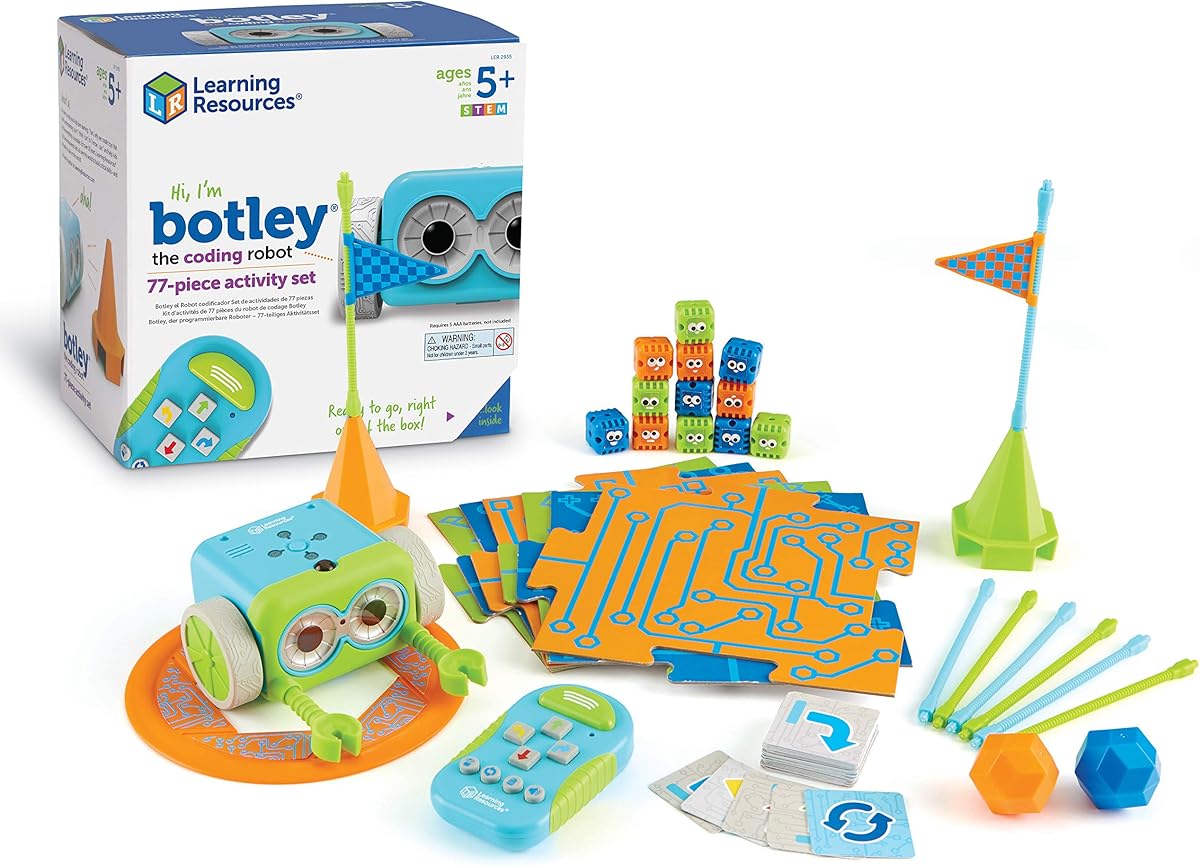
Botley the Coding Robot from Learning Resources stands out as a versatile screen-free option for kids aged 5 and up. It has earned a 4.6 rating for its ability to engage children in programming through physical interaction, supported by a comprehensive 77-piece activity set that encourages exploration.
We may earn a commission when you buy through this link, at no additional cost to you.
The remote programmer allows children to send commands and create sequences without needing a tablet or phone, making it ideal for families focused on reducing screen time. Features like object detection, looping commands, and obstacle course navigation introduce sophisticated coding concepts in a playful manner.
The need for multiple batteries for both the robot and remote is a common requirement for battery-operated toys but adds to ongoing costs. Additionally, the complexity of some features might require parental guidance initially, but this supports collaborative learning and problem-solving.
Botley is perfect for early coders who benefit from tactile learning tools. Its open-ended play potential and educational depth make it a reliable choice for building confidence and logic skills in a fun, accessible format.
Looping commands and object-sensing reactions introduce advanced logic concepts without requiring digital interfaces.
Includes detachable arms and 40 coding cards to encourage creative problem-solving and extended play.
We may earn a commission when you buy through this link, at no additional cost to you.
The Ozobot Evo Coding Robot Kit offers an extensive educational resource suitable for children aged 5 to 11. It holds a 4.6 rating for its ability to adapt to various learning styles, combining physical color-coding with digital Blockly programming for a comprehensive STEM experience.
We may earn a commission when you buy through this link, at no additional cost to you.
This kit includes dual-tip Color Code Markers that allow children to draw codes on paper that the robot reads, enabling screen-free play. The online Blockly platform supports more advanced coding, ensuring the kit grows with the child's abilities over time rather than becoming obsolete quickly.
While the price is higher than entry-level options, the inclusion of over 700 free lessons and durable classroom-ready accessories justifies the investment. The hard-shell zip case for markers adds convenience, though managing the extra accessories requires a bit more organization.
For educators and parents seeking a long-term coding solution, the Ozobot Evo provides the flexibility and resources needed to foster sustained learning. Its adaptability and rich curriculum make it an outstanding tool for developing critical thinking and problem-solving skills.
Color codes enable offline play while Blockly provides an online path, catering to different preferences and skill levels.
Five skill levels ensure the kit remains relevant as children progress from beginner to master coding concepts.
We may earn a commission when you buy through this link, at no additional cost to you.
Botley 2.0 builds on the original's foundation with enhanced features that add depth for older or more experienced young coders. With a 4.5 rating, it offers improved capabilities like object-sensing reactions and 45-degree turns, making obstacle navigation more challenging and engaging.
We may earn a commission when you buy through this link, at no additional cost to you.
The 16 secret code combinations introduce open-ended play possibilities, encouraging children to experiment with unique sequences. Combined with lights, sounds, and musical feedback, this version delivers a multisensory experience that keeps coding fun and interactive without screen dependency.
The primary trade-off is the need to purchase batteries separately for the robot and remote. While this is standard, parents should be aware of the ongoing cost. Additionally, while it improves on the original, those with a first-generation Botley may find the core experience similar.
This updated set is ideal for children who have mastered basic sequencing and want to tackle more complex problem-solving tasks. It balances educational growth with playful features, making it a smart upgrade for families seeking a screen-free coding partner.
Object-sensing and 45-degree turns allow for precise route design and more sophisticated programming logic.
Secret code combinations invite creative testing and discovery, keeping engagement high across multiple sessions.
We may earn a commission when you buy through this link, at no additional cost to you.
The Wonder Workshop Dash Robot is a premium choice for children aged 6 to 11, offering a polished and fully functional coding experience. With a 4.6 rating, it is widely recognized for its usability and educational depth, serving as a standard in over 40,000 schools globally.
We may earn a commission when you buy through this link, at no additional cost to you.
Unboxing Dash requires no assembly, allowing children to start coding immediately. Its responsiveness to voice commands, along with capabilities to sing, dance, and navigate obstacles, creates an engaging personality that keeps children motivated to explore sequencing, loops, and algorithms.
The longer battery life supports up to 5 hours of active play, reducing interruptions, though the higher price reflects the advanced features. Reliance on apps for full functionality may be a consideration for families prioritizing screen-free play, but the flexibility it offers is substantial.
For parents seeking a high-quality, reliable coding robot that balances fun with educational rigor, Dash is a top recommendation. Its widespread adoption in educational settings underscores its effectiveness as a tool for teaching STEM skills to young learners.
The ability to respond to voice commands and move autonomously introduces advanced interactive coding concepts.
Five compatible apps provide varied learning modes, ensuring the robot remains engaging as skills develop.
We may earn a commission when you buy through this link, at no additional cost to you.
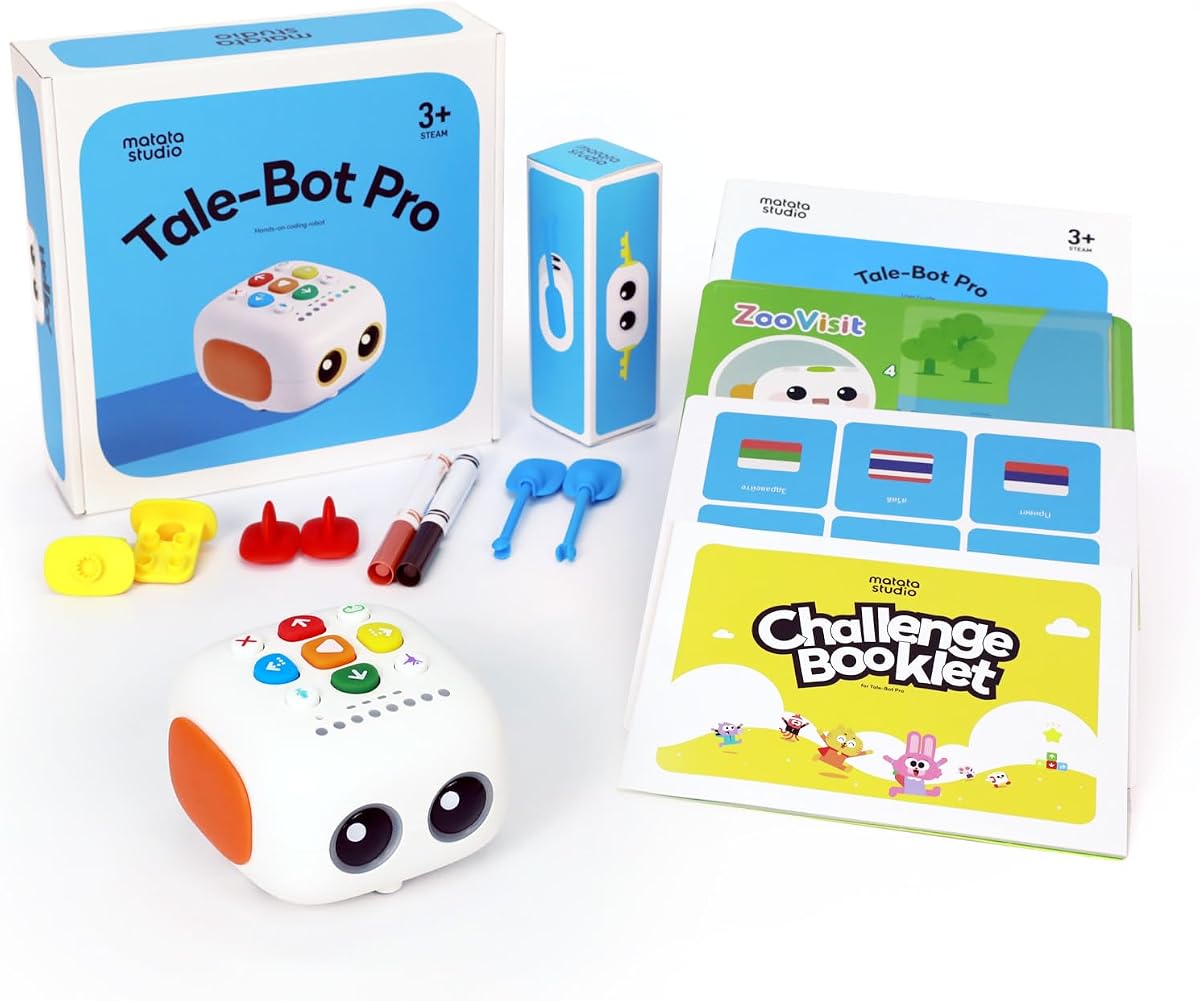
The TaleBot Pro is specifically designed for the youngest learners, ages 3 to 5, offering a gentle introduction to coding through storytelling and interactive play. It has earned an impressive 4.7 rating for its ability to engage toddlers without overwhelming them with complex interfaces.
We may earn a commission when you buy through this link, at no additional cost to you.
Using command buttons, children can make the robot walk, draw, sing, and speak, learning basic programming concepts like sequences and loops through a tactile and auditory experience. The included interactive map and storytelling features encourage creativity and language development alongside coding basics.
Since the toy is tailored for toddlers, older children may find it too simple once they grow. However, the compatibility with Lego blocks adds versatility for creative building. Parents should note that while it supports 10 languages, guidance may be needed for non-English speakers.
For families with very young children, the TaleBot Pro offers a safe and educational entry into STEM. Its focus on creativity, imagination, and multi-sensory interaction makes it a valuable tool for early childhood development and play.
Voice recording and interactive maps let children bring their own stories to life through robot actions.
Up to 256 commands help toddlers understand logic and sequencing before entering formal schooling.
We may earn a commission when you buy through this link, at no additional cost to you.
Selecting the right coding toy involves considering age, screen time preferences, educational goals, and budget. This guide outlines key factors to help you make an informed decision.
The age range recommended by the manufacturer is critical because coding concepts vary in complexity. For preschoolers and early elementary children, simple button-based or screen-free robots are ideal. Older kids benefit from more advanced features like app integration and text-based coding.
Many parents prefer screen-free coding toys to limit device time. Physical cards, buttons, and tangible components provide a tactile experience. App-based robots offer broader features and scalability but require a smartphone or tablet, which may not suit all household preferences.
Some toys emphasize robotics and mechanical engineering, while others focus on pure programming logic. If your child enjoys building, kits that require assembly and teach mechanics are suitable. For coding-focused learning, choose toys with clear programming challenges and tutorials.
Toys with add-on packs or compatibility with other systems grow with your child. Robots that support new modules or integrate with platforms like Scratch provide long-term value. Consider whether the toy offers advanced features once basic skills are mastered.
Quick setup encourages immediate play, especially for younger children. Kits requiring extensive assembly might be better for parent-child collaboration. Check if batteries are included or if additional tools are needed to start using the toy.
Prices vary significantly across coding toys. Entry-level options are affordable and great for beginners, while premium robots offer more features. Evaluate what fits your budget without sacrificing essential educational elements or durability.
Robots should withstand regular play, especially in shared environments. Materials should be non-toxic and parts should be securely attached to prevent choking hazards. Durable construction ensures the toy lasts longer and remains a safe play option.
Toys with robust online communities, lesson plans, or support resources enhance the learning experience. Access to challenges and tutorials keeps children engaged and helps parents guide them through complex programming concepts effectively.
Start by reading the instruction manual carefully to understand the robot's capabilities and any safety guidelines. Familiarize yourself with the buttons, sensors, and accessories included to maximize the learning experience and avoid confusion during initial setup.
For screen-free robots, use the provided cards or buttons to program sequences before attempting more complex challenges. For app-enabled toys, download the recommended applications and explore their tutorials. Gradually increase difficulty as your child gains confidence and mastery.
Proper care ensures long-term usability: store batteries properly to prevent corrosion, keep electronic components dry, and clean sensors regularly with a soft cloth. Encourage your child to return accessories to their case after play to avoid lost parts and maintain organization.
Children as young as 4 can begin with simple, screen-free coding toys that focus on sequencing and logic. These early experiences build foundational skills without requiring advanced reading or technical abilities. Most comprehensive kits are designed for ages 8 and up.
Not all coding toys require devices. Screen-free options use physical cards, buttons, and remotes. App-enabled robots offer more advanced features but need a compatible device. Choose based on your family's screen time preferences and educational goals.
Yes, many coding toys are designed with intuitive interfaces and step-by-step guides. Parents can participate in the learning process together with their children. Tutorials and community resources further assist those unfamiliar with programming concepts.
Coding toys foster logical thinking, problem-solving, creativity, and resilience. They teach children to break down complex tasks into manageable steps. These skills transfer to other academic subjects and real-world scenarios effectively.
Many coding toys are classroom-friendly and support group activities. Teachers appreciate their adaptability for STEM centers and lessons. Durable kits with lesson plans work well in structured educational environments.
Engagement often depends on variety and challenge. Introduce new missions or projects to maintain interest. Consider robots with expandable features that grow with skills. Consistent encouragement helps children appreciate the long-term value.
The top picks reviewed offer diverse options ranging from affordable screen-free kits to advanced robotics. Whether your child prefers building, storytelling, or app-based challenges, there is a toy suited to their interests and developmental stage.
Prioritize toys that align with your educational goals and screen time preferences. A balance of tangible interaction and progressive learning will keep your child engaged while building lasting STEM skills over time effectively.
Remember that product availability and pricing may change. Always verify current details with retailers before purchasing to ensure you get the best value and features available at the time of your decision.