
NZXT H5 Flow – Compact ATX Mid-Tower PC Case
4.6Editor score
Exceptional GPU cooling design
Ultra-fine mesh panels airflow
Seamless cable management channels
This guide compares the top cooling computer case options for airflow and thermal performance to help you choose the right chassis for your build.
Choosing a cooling computer case is essential for maintaining optimal system performance. A well-designed chassis ensures heat dissipates efficiently keeping your components cool during intensive tasks.
We evaluated ten top models based on airflow design fan support and build quality. Each product offers unique features tailored to different build styles and thermal requirements.
Every pick highlights key strengths and potential trade-offs for informed decisions. Please note that availability and stock levels may change over time.
4.6Editor score

4.7Editor score

4.6Editor score
The following table provides a side-by-side overview of key specifications and features for all ten models discussed in this guide.


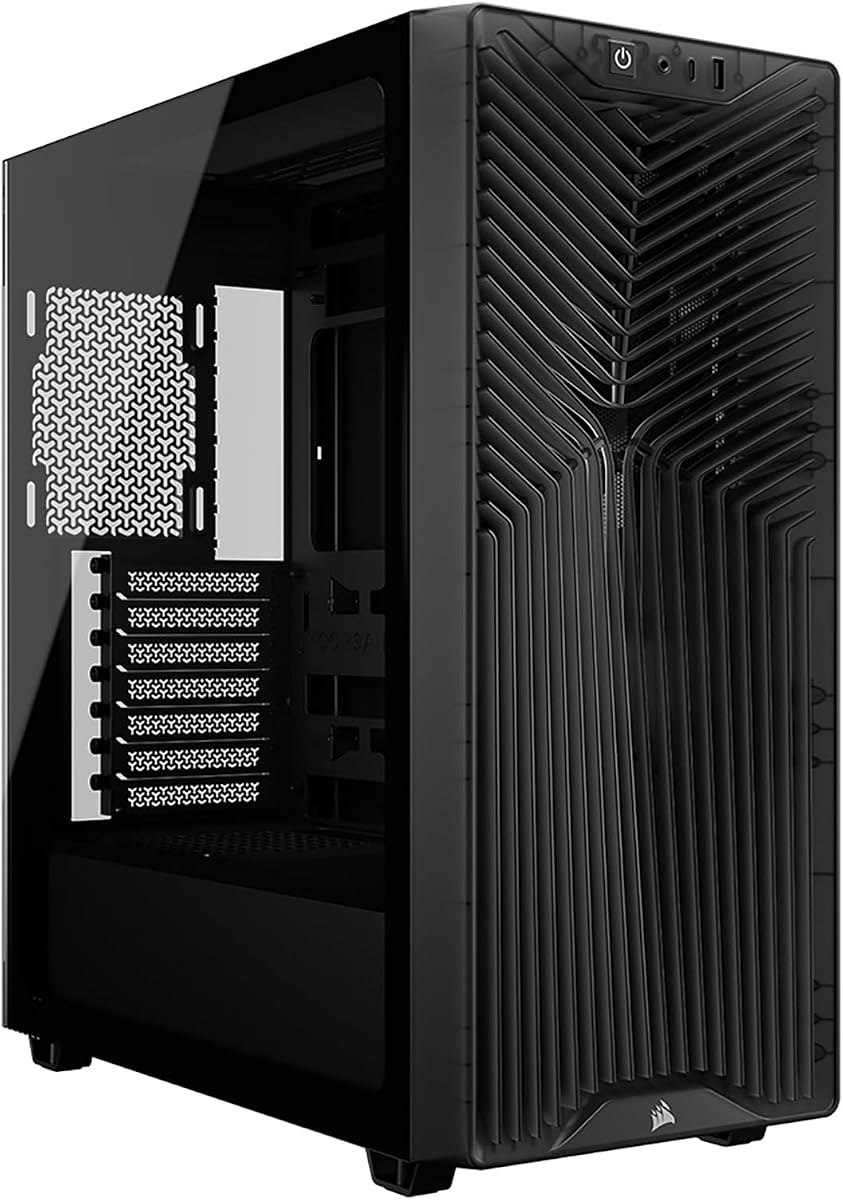


The CORSAIR 4000D RS stands out as a top contender for those seeking a versatile cooling computer case. With a rating of 4.7 stars it delivers strong performance and aesthetic appeal.
We may earn a commission when you buy through this link, at no additional cost to you.
Its FRAME system allows users to upgrade components like the motherboard tray or I/O panel easily. The pre-installed RS fans provide robust airflow while remaining quiet at low loads.
While the modular design is a huge plus it may require additional investment for specific upgrades. The InfiniRail system offers flexibility but can be tricky to adjust initially.
This case is ideal for builders who value future-proofing and clean airflow. It balances form and function effectively for most high-end configurations.
The FRAME system lets you swap parts like the tray or I/O panel without replacing the whole case.
InfiniRail technology allows fans to slide and mount virtually anywhere on the front or roof for targeted airflow.
We may earn a commission when you buy through this link, at no additional cost to you.
The NZXT H5 Flow is a compact option that punches above its weight in airflow efficiency. It earns a 4.6 rating for its smart design and practical features.
We may earn a commission when you buy through this link, at no additional cost to you.
Perforated PSU shrouds allow air from two 120mm fans to reach the GPU directly. The ultra-fine mesh on all panels ensures maximum airflow while filtering dust.
One downside is the lack of included fans on certain configurations which can add to the cost. Front radiator support is also limited to 360mm.
Ideal for budget builders needing strong thermal performance. It combines style and utility in a smaller footprint.
The side and bottom perforations on the PSU shroud enable optimal air intake from bottom fans.
Ultra-fine mesh on top front and side panels creates maximum airflow and filters dust effectively.
We may earn a commission when you buy through this link, at no additional cost to you.
The CORSAIR AIR 5400 RS defines premium cooling with its unique triple-chamber architecture. Rated 4.6 it is built for users demanding top-tier thermal management.
We may earn a commission when you buy through this link, at no additional cost to you.
Isolated chambers for CPU GPU and PSU prevent heat cross-contamination. Airflow ducts in the bottom fan array accelerate airflow without increasing fan noise.
This premium case comes at a higher price and requires ample desk space. However the thermal performance justifies the cost for high-end builds.
Perfect for enthusiasts who want both performance and showpiece aesthetics. It sets a new standard for PC case design.
Isolated chambers for CPU GPU and PSU ensure that heat from one component does not affect others.
Ducts on the bottom fan array force air into narrow channels increasing velocity without added noise.
We may earn a commission when you buy through this link, at no additional cost to you.
The Antec Flux Pro offers a full-tower solution with six PWM fans included for immediate airflow. It has a 4.7 rating for its high-quality construction and thermal efficiency.
We may earn a commission when you buy through this link, at no additional cost to you.
Crafted with metal glass and wood it provides a unique texture. The iShift PSU mount rotates power supply for better clearance and dual temp display aids monitoring.
Its full tower size may not fit smaller desks and managing six fans can be complex. Yet it supports massive radiators like 420mm plus 360mm simultaneously.
Best for users needing maximum expansion and included cooling. It is a robust choice for extreme gaming setups.
Pre-installed 3x Tranquil 140 PWM fans front 2x P12R reverse fans and 1x rear fan provide strong airflow.
The iShift PSU mount rotates power supply 90 degrees to improve component clearance and airflow paths.
We may earn a commission when you buy through this link, at no additional cost to you.
The Lian Li V100 delivers a high-quality build with four pre-installed PWM-controlled fans. It boasts a 4.8 rating for its reliability and user-friendly features.
We may earn a commission when you buy through this link, at no additional cost to you.
Integrated ARGB strips and daisy-chain fan connectivity offer vibrant lighting and easy setup. Tool-less side panels make access to internal components quick and convenient.
While fans can be loud at maximum RPM the tool-less design simplifies maintenance. It supports up to 420mm GPUs and back-connect motherboards for cleaner cable routing.
Ideal for builders valuing ease of access and lighting. It balances performance and aesthetics well.
Each side panel features a tool-less mounting mechanism for easy and fast access to internal components.
Daisy-chainable 4-pin PWM connections allow for organized fan wiring and zero RPM mode support.
We may earn a commission when you buy through this link, at no additional cost to you.
The Cooler Master HAF II 500 features oversized 220mm and 180mm fans for massive airflow. Its 4.8 rating reflects excellent thermal management and build features.
We may earn a commission when you buy through this link, at no additional cost to you.
The Mighty40 cooling system reduces airflow resistance through large ventilation openings. Split-level cable management creates space for oversized rear exhaust cooling.
It is a large and heavy case that may require sturdy desks. The MasterRail system supports multiple fan and radiator sizes for customization.
Perfect for users prioritizing raw airflow performance. It handles high-heat components with ease.
Two 220 x 40 mm front intake fans and one 180 x 40 mm rear exhaust fan drive high airflow.
Dual-Mode GPU Holder clamps a single GPU for stability or supports two GPUs up to 3.6 slots thick.
We may earn a commission when you buy through this link, at no additional cost to you.
The MSI MAG Forge 321R emphasizes RGB and airflow with support for up to 11 fans. It has a 4.6 rating for its gamer-friendly features.
We may earn a commission when you buy through this link, at no additional cost to you.
Built-in ARGB fans and a control board allow extensive lighting customization. Mystic Light Sync provides complete control over lighting effects through one software.
The magnetic dust filter on top simplifies cleaning. However full sync potential requires using MSI software which may not appeal to all.
Ideal for RGB enthusiasts wanting high flexibility. It brings style and cooling together for gaming rigs.
1 to 6 ARGB LED control board gives you more ways to decorate your gaming rig lighting.
Up to 11 x system fans could be installed to provide whole system ventilation for better stability.
We may earn a commission when you buy through this link, at no additional cost to you.
The CORSAIR 3200D RS is designed for easy building with ample room for 9x 120mm fans. It carries a 4.6 rating for reliability and user-centric features.
We may earn a commission when you buy through this link, at no additional cost to you.
Features like a built-in GPU Anti-sag Stabilization Arm and single connector for front cables simplify setup. USB Type-C and Type-A ports on front I/O enhance connectivity.
The smoke tinted panels may limit component visibility for some. Top radiator support extends to 360mm for powerful CPU cooling.
Best for builders valuing convenience and stability. It ensures smooth installation and strong cooling.
The 3200D includes a built-in GPU Anti-sag Stabilization Arm to support super-heavy GPUs.
Built-in shroud hides cables and single connector for front cables make building a breeze.
We may earn a commission when you buy through this link, at no additional cost to you.
The CORSAIR AIR 5400 LX offers a triple-chamber design with panoramic glass panels. It is rated 4.7 for its blend of form and function.
We may earn a commission when you buy through this link, at no additional cost to you.
Its isolated CPU cooling chamber ensures heat does not affect other components. Massive vertical airflow in the central chamber cools components thoroughly before exhaust.
Premium pricing and glass weight are considerations for some users. However the visual impact and cooling efficiency are unmatched.
Ideal for those wanting a premium showpiece build. It delivers both beauty and performance.
Panoramic glass panels showcase your build from the front and sides for a stunning view.
Superior cooling performance is possible due to isolated chambers for CPU GPU and PSU.
We may earn a commission when you buy through this link, at no additional cost to you.
The MONTECH XR Panoramic delivers a wide view with panoramic glass and included ARGB fans. It holds a 4.7 rating for its value and design.
We may earn a commission when you buy through this link, at no additional cost to you.
The wood-grain I/O area adds a warm accent to the black chassis. Three pre-installed 120mm fans provide ready cooling and lighting for new builds.
Fingerprints may show on glass and fan quality may not match premium brands. Yet the clearance for large GPUs is excellent for upgrades.
Perfect for budget-conscious buyers wanting a showpiece case. It offers great aesthetics and cooling value.
The wood-grain I/O area adds a warm accent to the black chassis for unique styling.
Panoramic front and side tempered-glass panels keep the GPU cooling and lighting in view.
We may earn a commission when you buy through this link, at no additional cost to you.
Selecting the right cooling computer case involves evaluating several critical factors to ensure optimal thermal performance and build compatibility.
Look for cases with mesh panels perforated front and large openings to maximize airflow. Efficient airflow prevents heat buildup around critical components.
Prioritize models with high airflow ratings and minimal obstructions inside.
Check how many fans the case supports and where they can be mounted. More fans usually mean better airflow but noise may increase.
Ensure the case supports standard sizes like 120mm or 140mm for easy replacement.
If using liquid cooling verify the case supports your desired radiator size. Top front or rear mounts offer different cooling layouts.
Choose cases with 360mm radiator support for maximum CPU cooling potential.
Measure your GPU length CPU cooler height and motherboard size to ensure they fit. Full towers offer more room but take up desk space.
Select a case that matches your hardware footprint without forcing tight fits.
Good cable management features help maintain clean airflow by hiding excess wires. Look for tie points routing channels and hidden compartments.
Cases with built-in shrouds simplify hiding cables behind the motherboard tray.
Magnetic or washable filters keep dust out and reduce maintenance frequency. Clean filters maintain optimal airflow over time.
Check filter locations at front bottom and top for complete coverage.
Steel aluminum or tempered glass panels affect durability and heat transfer. Thick steel provides rigidity while glass enhances aesthetics.
High-quality materials ensure stability and long-term reliability of your build.
RGB lighting ARGB fan headers and design accents contribute to visual appeal. Ensure the case matches your desired color theme.
Choose models with customizable lighting to personalize your setup.
Install all included fans correctly ensuring intake fans face inward and exhaust fans outward for proper airflow. Connect fan cables to motherboard headers or controllers for easy control.
Keep dust filters clean by removing and washing them regularly. This maintains airflow efficiency and reduces noise caused by clogged vents.
Ensure cables are routed neatly away from fans to avoid obstruction. Use tie points and channels to organize wires behind panels.
High-end builds benefit from cases with large fan support and mesh panels to maximize airflow. Look for triple-chamber designs or models with ample space for large radiators.
Check the GPU clearance specs provided in the case specifications. Compare this with your GPU length and thickness to ensure a proper fit.
Glass panels are mostly aesthetic but cases can still perform well if designed with ventilation. Look for glass cases with mesh fronts or side vents for airflow.
Many cases come with pre-installed fans which may be enough for standard builds. Check if additional fans are needed for liquid cooling or high-performance setups.
Budget cases should still offer adequate airflow with mesh panels and fan support. Prioritize cases with good reviews for cooling despite lower costs.
Yes most cooling computer cases allow you to upgrade fans easily. Ensure the case supports standard fan sizes like 120mm for easy replacements.
This guide has highlighted ten excellent options ranging from budget-friendly to premium triple-chamber models. Each offers unique strengths for airflow customization and build ease.
When choosing prioritize your specific thermal needs and hardware requirements. Balance airflow capacity with aesthetic preferences to create the ideal setup.
Keep in mind that availability and features may change so verify details before purchasing. A right case ensures your system stays cool and performs at its best.