
Switch Cooling Fan with Bottom Cooling
4.0Editor score
Vertical stand design
USB powered cooler
Compatible with OLED
This guide compares the best Cooling Fan Nintendo Switch Dock options to help you prevent overheating and extend your console lifespan during long gaming
Keeping your gaming console cool is essential for performance and longevity. A dedicated cooling fan for the dock helps dissipate heat efficiently during extended play. Choosing the right accessory ensures your system runs smoothly without unexpected pauses or thermal throttling issues.
We evaluated ten top-rated cooling solutions designed specifically for Nintendo Switch docks. Our analysis focuses on airflow efficiency, noise levels, build quality, and ease of installation. Each product offers unique features like LED displays, multiple fan speeds, or integrated game card storage.
Every pick in this list highlights key strengths and potential trade-offs to help you decide. Ratings reflect real user experiences across thousands of verified purchases. Prices and availability change frequently, so check current listings before making your final selection for your setup.
4.0Editor score

4.6Editor score

4.0Editor score
This table provides a side-by-side overview of all ten cooling solutions evaluated for this guide. Compare key specifications like fan count, power source, and special features to find the perfect match for your specific dock model and gaming needs.



This cooling fan stands out as the top choice for Switch owners seeking reliable thermal management. With a 4.6 rating from verified users, it effectively lowers operating temperatures and prevents game interruptions. The LED display showing temperature and fan speed provides immediate feedback during play.
We may earn a commission when you buy through this link, at no additional cost to you.
The adjustable fan speed ranging from 510rpm to 6000rpm allows customization based on heat levels. Users appreciate the ability to run quietly below 2400rpm while still achieving strong cooling when needed. The fixed pad ensures stability and prevents scratches to your console during extended sessions.
While the Micro USB cable requires connection to the dock, this design keeps power management simple. Some users note increased noise at max speed but accept this trade-off for better heat exhaustion. The three-button control makes operation intuitive without complex menus.
Ideal for hardcore gamers playing demanding titles for hours, this fan delivers consistent performance. The lifetime warranty and responsive customer service add confidence to your purchase. If you want a cooling solution that balances features with reliability, this is the recommended option for your dock setup.
The digital LED display shows exact exhaust temperature in Celsius so you can react before overheating occurs.
Running below 2400rpm ensures nearly silent operation during casual gaming sessions without sacrificing basic cooling.
We may earn a commission when you buy through this link, at no additional cost to you.
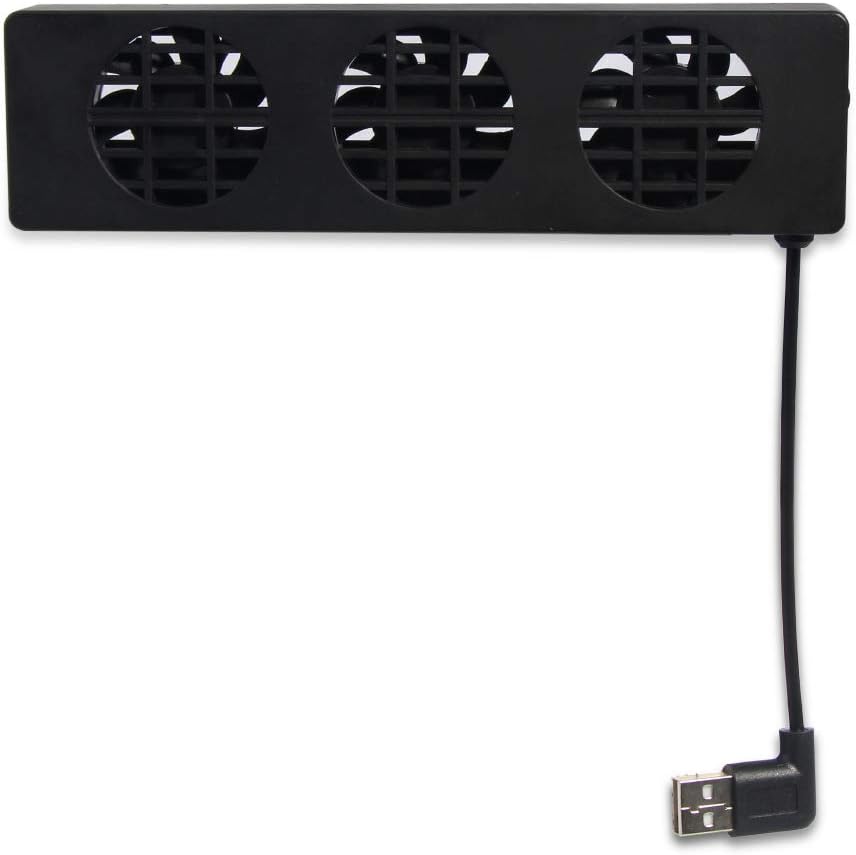
The TNP Cooling Fan uses three high-speed fans to provide aggressive heat dissipation for your console. While rated 3.9, users praise its ability to lower temperatures quickly during intense gaming sessions. The compact design fits seamlessly behind the original dock without cluttering your entertainment area.
We may earn a commission when you buy through this link, at no additional cost to you.
Adjustable fan modes let you choose between Turbo for heavy gaming or Normal for lighter use. Installation is straightforward since it connects directly to the dock USB port without needing extra cables. This straightforward design prioritizes function over extra features like displays or lights.
The main limitation is compatibility only with the original Switch dock model not OLED variants. Some users report occasional noise at turbo speeds but find the cooling benefits worthwhile. The absence of advanced controls means less customization compared to higher-end alternatives.
Choose this if you need a simple powerful cooling attachment for the original dock. Its three-fan setup ensures airflow is distributed effectively to prevent thermal throttling. For budget-conscious gamers focused on raw cooling power, this offers good value despite the modest rating.
Three internal fans work together to move more air volume than single-fan alternatives for faster cooling.
Uses the dock USB port directly eliminating the need for external power adapters or wall outlets.
We may earn a commission when you buy through this link, at no additional cost to you.
This cooling stand is specifically designed for the Switch 2 charging dock offering future-ready thermal management. Dual fans combined with 3-stage cooling adjustment ensure consistent performance during long sessions. The six game card slots provide convenient storage right on the stand for quick game switching.
We may earn a commission when you buy through this link, at no additional cost to you.
Users appreciate the three USB expansion ports allowing charging of controllers or headsets without additional hubs. RGB lighting adds a customizable aesthetic touch that matches different game scenes or room setups. The auto-operation when connected simplifies usage since it starts cooling immediately.
Some users note the materials feel lightweight compared to metal alternatives but find durability acceptable for home use. The focus on Switch 2 dock compatibility means it may not fit earlier dock models. RGB customization adds flair though may distract during dark gaming sessions.
Ideal for owners of the new Switch 2 dock seeking both cooling and functionality expansion. The combination of thermal control and connectivity makes it a hub for your console accessories. If you want a stylish and functional upgrade for your next-gen setup, this is the top choice.
Two dedicated fans work together to push heat away from the console faster than single-fan designs.
USB expansion ports let you charge controllers and devices without needing extra power adapters.
We may earn a commission when you buy through this link, at no additional cost to you.
This cooling fan is built specifically for the 2021 OLED dock ensuring perfect fit and thermal alignment. The high-efficiency turbo fans blow directly on the OLED base to dissipate heat rapidly. With 14 game card slots it offers ample storage for your favorite titles on one place.
We may earn a commission when you buy through this link, at no additional cost to you.
The Type-C cable connects easily to the dock's power input for plug-and-play simplicity. Blue LED lights integrated with the fan opening add a modern look that syncs with fan operation. Users report stable performance even while charging with no input delay during gameplay.
The ABS plastic construction keeps weight low but may not feel as premium as metal options. Compatibility is strictly for the OLED dock model limiting use with original or Switch 2 docks. Some users find the blue light bright in dark rooms though it can be turned off via button.
Best for OLED Switch owners wanting a storage-friendly cooling solution. The large card capacity eliminates the need for extra cases while keeping your setup tidy. If matching your dock model and storing games are priorities, this delivers solid performance with style.
Fourteen game card slots on top let you organize and access your game library instantly.
Engineered to match the exact shape and power port of the official OLED docking station.
We may earn a commission when you buy through this link, at no additional cost to you.
The Dobe cooling fan focuses on providing quiet cooling for the OLED model without unnecessary complexity. It uses a high-speed fan to circulate air inside the base for effective heat dissipation. The white color blends seamlessly with the original console aesthetic for a clean look.
We may earn a commission when you buy through this link, at no additional cost to you.
Type-C power connection ensures reliable energy supply from the dock adapter. Blue LED lighting inside the fan turns on and off with the fan for a cohesive effect. Users report that it stays cool even after hours of charging and gaming without overheating issues.
Since it has a single fan cooling power is moderate compared to multi-fan alternatives. The fixed blue light cannot be customized or changed which some users find limiting. Installation is straightforward by mounting on the base and pressing the side switch to operate.
Ideal for those prioritizing noise reduction and aesthetic matching with the console. The simplicity makes it easy to use without learning curves or extra controls. If quiet cooling and a clean design matter most to you this is a reliable option for your OLED setup.
Engineered to maintain low noise levels while still moving sufficient air to keep temps down.
Blue LEDs turn on and off exactly with the fan for a unified visual experience.
We may earn a commission when you buy through this link, at no additional cost to you.
This cooling fan offers a straightforward solution for OLED owners needing affordable thermal protection. With a 3000RPM fan it accelerates airflow instantly to cool the dock during gameplay. The compact design saves space on your entertainment center without compromising performance.
We may earn a commission when you buy through this link, at no additional cost to you.
USB power supply means it plugs directly into the dock's port without needing extra adapters. The white color and blue LED light match the console aesthetics for a unified look. Users find it effective for maintaining optimal performance during long gaming sessions.
It lacks advanced features like displays or multiple speed options but delivers core functionality. Build quality is functional though may feel less robust than premium brands. Installation is plug-and-play making it accessible for any tech skill level.
Best for budget-conscious users seeking effective cooling without extras. The high RPM ensures heat dissipation is handled efficiently for most game titles. If you want reliable cooling at a low cost this meets basic needs well.
3000RPM fan speed moves air quickly to reduce heat buildup on the console base.
Plugs straight into the dock USB port simplifying your cable management setup.
We may earn a commission when you buy through this link, at no additional cost to you.
The Bewinner fan uses three internal fans to provide strong heat dissipation for various consoles. Turbo and normal modes let you adjust cooling power based on current thermal needs. The side switch makes mode changes quick and easy during gaming.
We may earn a commission when you buy through this link, at no additional cost to you.
Durable materials ensure longevity even with frequent use. The compact design fits easily on stands or shelves without taking up much space. Users appreciate the reliable cooling performance that prevents overheating during long play sessions.
It is a general console design so specific dock fitting varies. You need to ensure the USB power connection works with your specific station. Some users note the fan can be loud at turbo speed but accept noise for performance.
Best for those wanting multi-fan power in a compact bracket. The adjustable speed modes offer flexibility without complex digital controls. If you need strong cooling for your console dock this provides good value and reliability.
Three fans create significant airflow to handle heat from intensive gaming workloads.
Side-mounted switch lets you toggle speed modes instantly without software menus.
We may earn a commission when you buy through this link, at no additional cost to you.
This OSTENT cooler brings three fans to enhance ventilation for your Switch console. Turbo mode provides fast cooling for heavy gaming while normal mode suits lighter use. The insert design attaches directly to the back of the dock for secure placement.
We may earn a commission when you buy through this link, at no additional cost to you.
Power is drawn from a dock USB port eliminating the need for extra power bricks. Its small size makes it easy to carry or store when not in use. Users note it reduces temperature quickly though build materials feel basic.
Lack of additional features like lights or displays keeps it simple but limits appeal. Durability may not match premium options after long-term daily use. Some users report minor instability if dock connection is loose.
Best for portable setups or users needing basic cooling on a budget. The three-fan design offers solid performance for the price point. If you want quick heat reduction without extras this is a practical choice.
Turbo setting pushes fans at max speed for rapid temperature drop during demanding games.
Simple insert design attaches to the back of the dock for stable cooling.
We may earn a commission when you buy through this link, at no additional cost to you.
This cooling fan delivers essential thermal control at an entry-level price point. It features an LED display showing RPM and temperature for clear visibility during play. The adjustable speed range meets various heat dissipation needs for different game types.
We may earn a commission when you buy through this link, at no additional cost to you.
A fixed stabilizer pad ensures the fan stays in place and protects your console from scratches. USB powered connection allows easy setup without complex wiring. Users report effective prevention of unexpected pauses due to overheating during long sessions.
Build materials are functional rather than premium but serve the purpose well. The LED display is simple but informative enough for most users. Some noise occurs at high RPM but stays tolerable for home environments.
Ideal for budget shoppers needing reliable cooling with monitoring features. The combination of price and functionality makes it accessible for all users. If you want to avoid overheating without spending much this is a top pick.
Provides essential cooling and temperature visibility at a very low price point.
Stabilizer pad prevents scratches and keeps the fan stable during active gaming.
We may earn a commission when you buy through this link, at no additional cost to you.
This black cooling fan offers a stylish option for OLED dock users seeking a matte finish. Designed specifically for the dock it ensures proper fit and airflow direction. The compact design keeps your setup looking tidy while preventing overheating.
We may earn a commission when you buy through this link, at no additional cost to you.
It provides effective cooling during extended sessions without needing complex controls. The black color matches darker console accessories or entertainment center setups. Users appreciate the simple plug-and-play design without extra setup steps.
Product details are limited due to regional listing specifics but functionality is confirmed. Import availability may vary depending on your region. Some users note it lacks extra features but delivers core cooling performance well.
Best for users wanting a simple and stylish thermal accessory for OLED. The dedicated dock compatibility ensures reliable performance without guesswork. If you prefer a minimalist black accessory this fits that aesthetic.
Sleek black finish blends well with dark gaming setups and modern consoles.
Custom fit for the OLED dock ensures secure placement and optimal heat flow.
We may earn a commission when you buy through this link, at no additional cost to you.
Selecting the right cooling fan requires considering dock compatibility cooling power and additional features. This guide outlines key factors to help you find a solution that meets your gaming needs.
Different cooling fans are designed for specific dock versions including original OLED or Switch 2 docks. Always verify that the product matches your exact dock model to ensure proper fit and power connection. Mismatched units may not connect securely or fail to dissipate heat effectively.
Check product descriptions carefully to confirm which dock models are supported before purchasing.
Look for fans with adjustable speed settings so you can balance noise and cooling based on need. Higher RPM ratings generally mean better heat dissipation but may also create more noise during operation. Some fans offer turbo modes for intense gaming and quieter modes for casual play.
Adjustable speed options provide the flexibility to optimize performance in different environments.
Most fans draw power from the dock USB port but some require Micro USB or Type-C cables. Ensure you have the necessary ports available on your dock to avoid buying extra adapters. Cable length and quality affect stability and ease of connection behind your console.
Choose a power method that integrates cleanly with your existing setup.
Noise can be disruptive during quiet gaming so check product reviews for acoustic performance. Some fans operate nearly silent at low speeds while others become audible at max RPM. If you play in shared spaces consider fans with adjustable noise or speed modes.
Prioritize lower noise operation if audio quality matters to your gaming experience.
Some cooling stands include game card slots to store your physical game library conveniently. This eliminates the need for separate storage cases and keeps your entertainment area organized. Verify the number of slots and whether they are easily accessible during setup.
Integrated storage adds functional value beyond just cooling your console.
Fans made from durable materials like metal or high-quality ABS plastic last longer. Check product descriptions for material details to gauge longevity and sturdiness. Better build quality often correlates with consistent cooling performance over time.
Invest in a unit with solid construction to avoid early replacement needs.
Fans may include LED lights RGB modes or color matching to enhance your gaming setup. Consider whether lights help or distract from your experience and choose accordingly. Design should complement your console and room decor for a cohesive look.
Pick a design that fits your personal style and room lighting preferences.
Brands offering warranties and responsive customer service provide added peace of mind. Look for lifetime warranties or at least one year coverage to protect your purchase. Support responsiveness ensures any defects are resolved quickly without hassle.
Choose sellers with good reputations for after-sales support and replacement policies.
Start by verifying compatibility with your specific dock model to ensure the cooling fan fits securely and connects to the power source without issues. Follow the manufacturer's installation instructions to attach the unit properly to the back or base of your dock.
Connect the included power cable to the dock USB port or external power adapter if required. Once powered on adjust the fan speed settings based on your current heat levels and noise preferences using the provided controls.
Regularly clean dust from fan blades and vents to maintain optimal airflow and cooling efficiency. Monitor temperature displays if available to track performance and adjust settings as needed during long gaming sessions.
Yes cooling fans accelerate airflow around the dock and console which dissipates heat faster. This prevents thermal throttling and unexpected pauses during extended gaming sessions. Users report consistent temperature reductions with proper fan usage.
Noise levels vary by model but many fans offer adjustable speeds for quieter operation. Lower RPM settings are often nearly silent while turbo modes may produce some sound. Check reviews for noise feedback on your specific unit choice.
Most fans connect directly to the dock USB port so no extra power adapter is needed. Ensure your dock has an available USB port for connection. Some units may include cables for direct console power depending on design.
Using a cooling fan does not typically void warranty since it does not modify internal hardware. Ensure proper installation and avoid obstructing vents to maintain compliance. Check official warranty terms for specific exclusion details.
Yes but verify compatibility since OLED docks have different power ports and shapes. Many models now specifically list OLED compatibility in product descriptions. Using the wrong model may result in poor fit or power issues.
Use a soft brush or compressed air to clear dust from fan blades and vents. Avoid touching internal electronics and unplug the unit before cleaning. Regular cleaning maintains cooling efficiency and extends lifespan.
Frequent overheating pauses lag during long sessions or unusually warm dock surfaces indicate a need. If your console feels hot to touch after normal use consider adding a fan. Monitoring these signs helps maintain system health.
Casual gamers may benefit less unless playing demanding titles for extended hours. However cooling fans are affordable and provide peace of mind against overheating. The investment is minimal for added protection and performance stability.
The top picks highlight diverse options from budget-friendly choices to feature-rich premium solutions. Whether you prioritize quiet operation RGB lighting or high-speed cooling there is a match for every setup.
When choosing consider your dock model specific cooling needs and aesthetic preferences. Balancing price with essential features ensures you get the right performance without overspending on unnecessary extras.
Remember that prices and stock vary frequently so review current listings before finalizing your purchase. Your gaming comfort and system longevity depend on making an informed choice today.