
Thermalright Assassin X120 Refined SE
4.7Editor score
Four heatpipe single tower
TL-C12C PWM fan included
AGHP gravity independent design
This guide compares the top ten CPU air cooler fan heatsink models to help you find efficient thermal performance and quiet operation for any build.
Selecting the right CPU air cooler fan heatsink is essential for maintaining stable temperatures and preventing thermal throttling during demanding tasks. A quality unit ensures your processor runs efficiently while keeping noise levels low for a comfortable computing environment.
We evaluated each model based on cooling capacity, build quality, noise performance, and compatibility with modern motherboard sockets. Our analysis covers a wide range of budgets and case sizes to help you find the perfect match for your specific setup.
Each pick highlights key strengths and real-world performance traits so you can compare features with confidence. Note that availability and shipping times may vary by region, so checking current stock levels is always recommended before placing your order.
4.7Editor score

4.8Editor score

4.8Editor score
This side-by-side comparison summarizes the key specifications and performance traits of every model in our list to help you quickly identify which cooler fits your case and socket requirements.


The Noctua NH-D15 chromax.Black earns top marks for combining extreme thermal performance with remarkably low noise levels. This dual tower cooler uses two 140mm fans to push air through a massive fin stack, keeping even high-end processors cool during heavy workloads or gaming sessions.
We may earn a commission when you buy through this link, at no additional cost to you.
Its six copper heatpipes efficiently transfer heat from the base to the fins while the all black finish blends seamlessly into modern dark themed builds. The SecuFirm2 mounting system ensures secure contact across Intel and AMD platforms while the included NT-H1 paste simplifies installation.
While the 135mm width may not fit every compact case, the performance-to-noise ratio justifies the space requirement for enthusiasts who demand silence without throttling. The offset mounting option also helps avoid blocking adjacent RAM slots on dense motherboards.
If you prioritize top tier cooling and acoustic comfort over budget savings, this model delivers reliable results that stand the test of time. It remains the reference standard for air cooling in demanding desktop environments.
The NF-A15 fans are optimized to move high air volumes while keeping blade noise minimal even at maximum speeds. Low noise adapters let you throttle RPM further when silence matters more than peak performance.
Mounting kits cover current Intel LGA 1700 1851 and AMD AM4 AM5 platforms so you can reuse the cooler across multiple builds without needing new hardware.
We may earn a commission when you buy through this link, at no additional cost to you.
Thermalright delivers exceptional value with the Assassin X120 Refined SE which offers performance closer to mid-range coolers while costing far less. Its four heatpipes and single 120mm fan handle thermal dissipation efficiently for mainstream processors and casual overclocking.
We may earn a commission when you buy through this link, at no additional cost to you.
The AGHP technique prevents gravity from affecting heat pipe performance so you can mount the cooler vertically or horizontally without losing efficiency. This flexibility simplifies routing in tight cases where standard orientation might block cables or components.
While it lacks the visual flair of RGB fans, the focus remains on reliable thermal control and quiet operation. The aluminum heatsink cover protects internal fins from dust while the metal fasteners ensure secure mounting across modern socket types.
This model is ideal for builders seeking effective cooling without overspending on unnecessary features. It proves that budget units can still deliver serious thermal headroom when designed with quality materials and smart engineering.
AGHP ensures heat pipes perform consistently regardless of case orientation so you never worry about thermal throttling when tilting your system for maintenance or transport.
At just 148mm height the cooler fits within most mid tower limits without blocking tall RAM modules or adjacent PCIe slots on ATX boards.
We may earn a commission when you buy through this link, at no additional cost to you.
The NH-U12A chromax.Black proves that a single tower design can match dual tower performance when paired with optimized fans. Its two NF-A12x25 fans push high static pressure through a dense fin stack delivering strong cooling while staying remarkably quiet.
We may earn a commission when you buy through this link, at no additional cost to you.
With a slim 120mm width the cooler avoids overhanging RAM slots or blocking PCIe connectors on most motherboards. This compatibility makes it perfect for dense builds where memory modules or M.2 heatsinks need clear access.
The all black aesthetic blends cleanly into dark cases while the nickel plated base resists corrosion and maintains good contact over time. Six heatpipes ensure rapid heat transfer from CPU to fins without bottlenecking under load.
Choose this model when you need high performance but cannot accommodate the wider dual tower designs. It balances thermal efficiency with spatial constraints better than any other air cooler in this category.
NF-A12x25 fans use advanced blade geometry to reduce turbulence noise while increasing airflow efficiency at low RPM settings for silent operation.
Anodized aluminum fins resist fingerprints and scratches so the cooler retains its premium look even after months of heavy use in warm environments.
We may earn a commission when you buy through this link, at no additional cost to you.
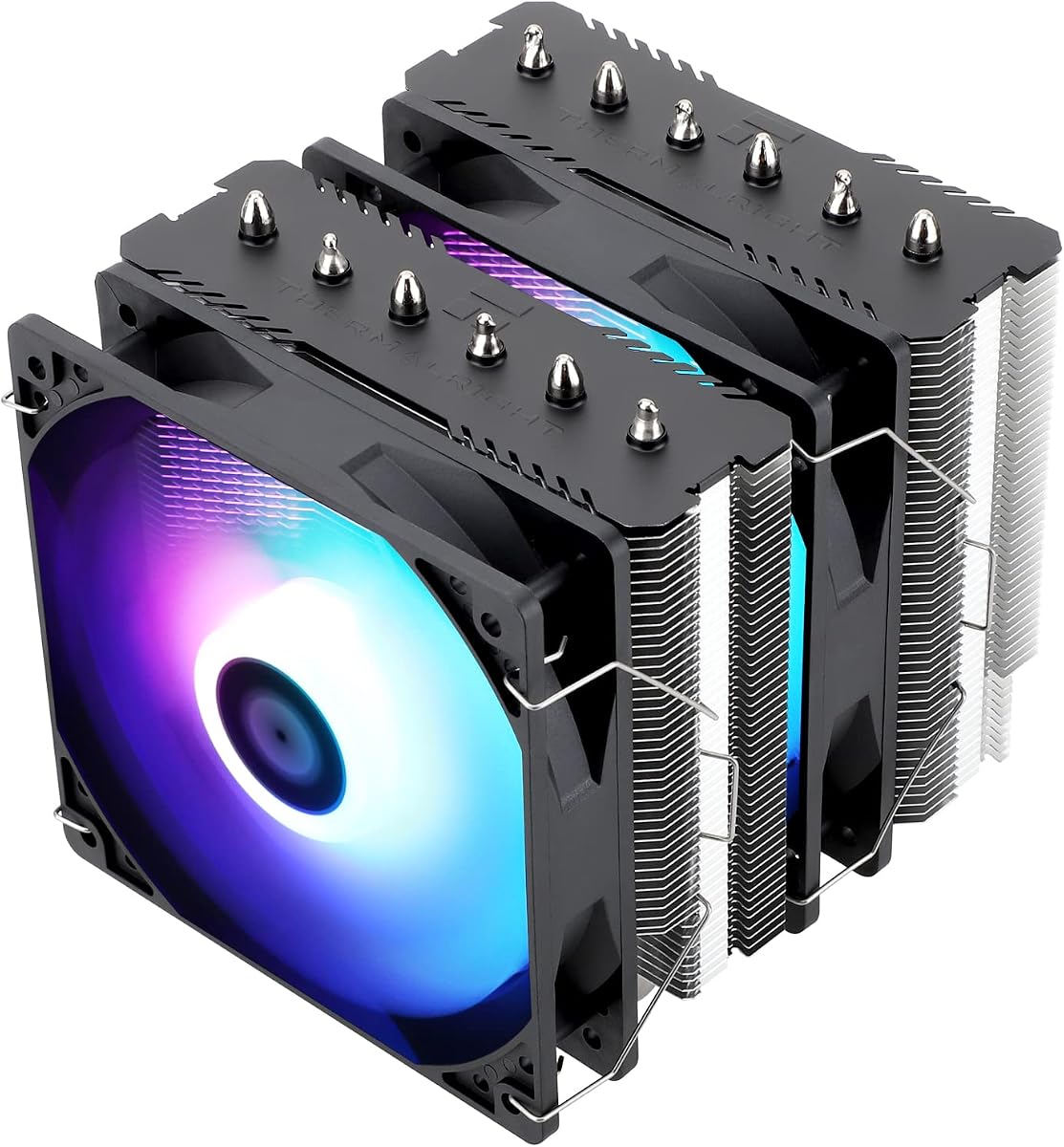
The Peerless Assassin 120 SE ARGB combines powerful dual tower cooling with customizable lighting for builds that need both performance and visual impact. Six heatpipes distribute heat evenly across a wide fin stack while two PWM fans maintain steady airflow during gaming.
We may earn a commission when you buy through this link, at no additional cost to you.
Its ARGB fans sync with motherboard 5V headers to create vibrant lighting effects without sacrificing cooling capacity. The offset layout leaves room for tall RAM modules so you can mix style and practicality in a single unit.
Thermalright continues to challenge premium brands by offering comparable specs at lower prices. AGHP ensures the pipes perform consistently whether mounted upright or sideways which helps avoid thermal hotspots during heavy processing.
If you want a dual tower that handles high TDP CPUs and looks great under case lighting this model is a top contender. It balances aesthetics with thermals better than most competitors at this price point.
ARGB LEDs support standard 5V 3 pin headers so you can match lighting themes across your system without additional controllers or complex wiring.
Pure copper heatpipes connect directly to a nickel plated base for rapid heat transfer from CPU to fins during peak thermal loads.
We may earn a commission when you buy through this link, at no additional cost to you.
The NH-D15 sets the standard for air cooling reliability with over two hundred design awards backing its performance claims. Two 140mm fans move massive air volumes through a thick fin stack keeping high power CPUs cool without raising ambient noise.
We may earn a commission when you buy through this link, at no additional cost to you.
Noctua focuses on acoustic comfort so even at full load the fans produce a low smooth hum instead of sharp whine. The dual tower design spreads heat evenly across the fins to prevent localized hotspots during extended sessions.
Installation is straightforward thanks to the SecuFirm2 mounting system which works across current and legacy sockets. A six year warranty shows confidence in the build quality and long term durability of every component inside.
For those who value proven reliability and top tier thermal performance the NH-D15 remains the safest choice. It offers consistent results that rarely disappoint even as system demands increase over time.
Decades of design refinement ensure every part from fan blades to mounting brackets withstands years of continuous operation without failure.
Low noise adapters reduce fan speed during idle or light use so the system stays nearly inaudible when full cooling power is not needed.
We may earn a commission when you buy through this link, at no additional cost to you.
This model introduces a digital screen into the heatsink top allowing live monitoring of CPU temperature and usage without opening software dashboards. The 120mm fan delivers steady airflow while the four heatpipes handle heat efficiently for most consumer processors.
We may earn a commission when you buy through this link, at no additional cost to you.
The display connects through standard headers so you can customize data readouts to suit your preferences. While the feature is novel, cooling performance remains consistent with other single tower units in the same price tier.
At 151mm height it clears most cases but may be tight for low profile chassis. The ARGB fan adds colorful lighting that syncs with motherboard headers so the visual appeal extends beyond the screen itself.
If you want quick access to thermal data while gaming or streaming this cooler offers a practical convenience. It blends functional monitoring with standard air cooling performance for a unique build option.
The digital screen uses TRCC software to display real time metrics so you can spot thermal spikes before they impact performance.
ARGB synchronization supports standard 5V headers so you can match case fans and RAM lighting without extra controllers.
We may earn a commission when you buy through this link, at no additional cost to you.
The NH-D15S chromax.Black modifies the classic dual tower by offsetting the fins to fit narrow cases without sacrificing much cooling power. A single 140mm fan moves air efficiently across the stack while keeping noise levels low during everyday tasks.
We may earn a commission when you buy through this link, at no additional cost to you.
This asymmetrical design clears tall RAM modules and PCIe slots that broader coolers might block. It is ideal for builds that need high performance but still want to keep memory and expansion cards fully accessible.
Noctua includes low-noise adapters to throttle the fan further for silent operation. The all black finish pairs well with modern hardware while the 160mm height fits within most standard mid tower cases.
Choose this cooler when you need premium cooling but cannot accommodate a wider dual fan unit. It delivers near top tier performance with better spatial flexibility for dense builds.
The asymmetrical design allows clearance for tall memory kits while keeping airflow focused on the CPU for efficient heat dissipation.
NF-A15 fans maintain consistent airflow even at low RPM so you get strong cooling without distracting noise during light workloads.
We may earn a commission when you buy through this link, at no additional cost to you.
For small form factor builds the NH-D9L offers dual tower performance within a minimal 110mm height profile. A single 92mm fan moves air efficiently through the compact fin stack while keeping noise low enough for home theater or desk setups.
We may earn a commission when you buy through this link, at no additional cost to you.
Its small footprint ensures it does not overhang RAM or PCIe slots which is critical in tight ITX enclosures. This model proves that air cooling can still deliver solid thermal results in constrained spaces.
Noctua equips the unit with low-noise adapters for further acoustic tuning. While it cannot match full size dual towers in raw cooling power, it excels in balance between size and performance for mini builds.
If you prioritize portability and compact design the NH-D9L is a reliable choice. It keeps systems quiet and cool without demanding excessive clearance.
Dual tower layout in 110mm height provides better airflow distribution than typical single tower units for compact enclosures.
Mounting kits support modern sockets so you can reuse this cooler when upgrading from HTPC to a more powerful compact system.
We may earn a commission when you buy through this link, at no additional cost to you.
The NH-U12S uses a classic 120mm slim tower to balance cooling and compatibility. A focused NF-F12 fan pushes air efficiently through the fins so you get steady thermal performance without excessive noise during typical tasks.
We may earn a commission when you buy through this link, at no additional cost to you.
Its narrow width avoids overhanging RAM or blocking PCIe slots on most boards. This makes it ideal for dense builds where space around the CPU is limited by memory or M.2 heatsinks.
Noctua includes all necessary hardware to support current socket types so setup is quick and secure. The 150mm height fits within most mid tower enclosures but may be tight for low profile cases.
Choose this model when you need reliable cooling without the bulk of a dual tower unit. It delivers consistent results with minimal clearance demands.
NF-F12 blades optimize air pressure so even at lower speeds the fan keeps temperatures stable without raising noise levels.
Single tower design clears surrounding components so you can use tall RAM modules without worrying about interference during installation.
We may earn a commission when you buy through this link, at no additional cost to you.
The Peerless Assassin 120 SE delivers strong dual tower cooling using six heatpipes and two high airflow fans. Its offset asymmetrical layout leaves space for tall RAM so you get performance without compromising memory or motherboard features.
We may earn a commission when you buy through this link, at no additional cost to you.
AGHP technology ensures heat pipes perform consistently in vertical or horizontal installs so thermal resistance stays low regardless of case orientation. The brushed top cover and nickel plated pipes add durability while keeping the look clean.
Two TL-C12C PWM fans move substantial air through the fins even at moderate speeds. This helps maintain low temperatures during gaming or rendering without driving up power draw or noise too much.
If you need dual fan performance without paying premium prices this model delivers reliable thermal control. It balances cost efficiency with the features that matter most for high-end system cooling.
The asymmetrical tower spacing clears taller memory modules so you can use RGB RAM without needing to lower fan speeds for clearance.
Dual fans push air through densely packed fins to keep thermal resistance low during long rendering or gaming sessions.
We may earn a commission when you buy through this link, at no additional cost to you.
Choosing the right air cooler depends on matching thermal capacity, physical dimensions, and noise tolerance to your specific build requirements and motherboard layout.
Check the cooler rated TDP against your CPU power draw to ensure it can handle peak loads. High performance processors need dual tower or high static pressure fans while mainstream chips can work with single tower options.
Always pick a cooler rated higher than your CPU TDP to give yourself headroom for overclocking or long term efficiency.
Measure your case maximum CPU cooler height before buying to avoid clearance issues with side panels or fans. Dual tower units often require 150mm or more while slim single towers fit lower profile enclosures.
Verify the cooler width to ensure it does not block PCIe slots or interfere with tall memory modules or GPU coolers.
Confirm the package includes mounting hardware for your current socket type and future upgrades. Some coolers require separate kits for newer AMD or Intel platforms that may add cost.
Check that the mounting system supports offset mounting if your motherboard places RAM close to the CPU socket for better clearance.
Look for PWM fans that support automatic speed control so they spin down during idle to reduce noise. Lower decibel ratings matter if you plan to use the PC in shared living spaces or quiet offices.
Choose fans with S-FDB or fluid dynamic bearings for long term reliability and consistent noise performance over years of use.
Six heatpipes generally spread heat more evenly across a dual tower than four but ensure they are soldered or welded to the base for consistent contact.
Nickel plated copper bases resist corrosion and maintain thermal efficiency while direct contact fin designs reduce potential hot spots.
Decide if you need RGB synchronization to match your system theme or if you prefer a clean look without extra lighting hardware.
Some models include digital screens or special cover designs that add novelty but may raise cost without improving cooling performance.
Check manufacturer warranty terms since longer coverage indicates confidence in component durability and customer support responsiveness.
Look for reinforced mounting brackets and secure heatpipe connections that reduce the risk of loosening during transport or cleaning.
Apply a thin even layer of thermal paste to the center of the CPU before mounting the base. Too much paste can create air gaps while too little may cause hotspots. The included paste from most brands is sufficient for most use cases.
Connect the fan to the motherboard CPU_FAN header and enable PWM control in the BIOS so speeds adjust automatically based on temperature. This ensures the cooler runs quietly when idle but ramps up during heavy workloads.
Clean dust from the fins and fans every few months with compressed air to maintain airflow efficiency. Ensure the CPU cooler remains level and secure so mounting brackets do not loosen over time which could cause vibration noise.
High-end dual tower air coolers can match entry level AIO liquid coolers for most users while avoiding leak risks and pump noise. They are often more cost effective and require less maintenance for daily desktop use.
Most cases support up to 160mm but verify your specific model limits. Low profile enclosures may only accept coolers under 120mm. Ensure the width does not block nearby RAM or PCIe components.
Yes always replace old paste when removing and remounting a cooler. Old paste hardens and creates thermal resistance which raises CPU temperatures. A pea sized fresh application ensures reliable contact.
PWM allows automatic speed control based on system temperature so fans run silently when not under load. It saves power and reduces noise without manual BIOS adjustments or constant high RPMs.
Most modern coolers ship with multi platform kits covering LGA 1700 1851 and AM4 AM5. Always confirm included mounting parts match your motherboard before purchase to avoid extra hardware costs.
Fan size bearing type and blade design all influence noise. Larger 140mm fans move more air at lower RPMs so they stay quieter than 120mm units. S-FDB bearings reduce friction noise over time.
Our top picks highlight models that deliver strong thermal results across budgets and case sizes. The Noctua NH-D15 chromax.Black leads for overall performance while Thermalright offers excellent value with the Assassin X120 and Peerless Assassin units.
Prioritize cooler dimensions and fan control features to match your case and noise needs. A properly matched unit keeps temperatures stable during gaming or work without unnecessary loudness or clearance issues.
Always check current availability and socket support before buying since hardware standards evolve quickly. This guide helps you pick a unit that keeps your CPU cool and quiet for years of reliable use.