
Creality Falcon 10W
4.2Editor score
72W effective power output
Large 15.7 by 16.3 workspace
Anti UV filter for eye safety
Finding the right laser engraver can transform your creative projects into professional results. Creality offers a range of machines designed for hobbyists and professionals alike, ensuring precision and ease of use in every build.
We evaluated ten top models based on power, speed, safety features, and software compatibility. Our goal is to highlight which engraver fits your specific needs while maintaining high standards for quality and reliability in your workshop.
Each pick below showcases unique strengths from budget-friendly options to high-end performers. Prices and availability can change frequently so please check current listings for the most accurate information before making your final purchase decision today.
4.2Editor score

4.1Editor score

4.2Editor score
As an Amazon Associate we earn from qualifying purchases.
This side by side comparison highlights key specifications across all ten selected models to help you quickly identify the right fit for your specific engraving and cutting requirements.



The Creality Falcon A1 10W stands out as a top choice for its combination of safety and performance. With a high rating from users it delivers professional quality engraving without compromising on ease of use for beginners.
We may earn a commission when you buy through this link, at no additional cost to you.
Its 80W output power allows it to cut through 6mm wood in a single pass while the CoreXY system ensures speeds up to 600mm/s. The smart camera automatically recognizes materials which removes the guesswork from setup and calibration.
While it is highly capable the machine is restricted to specific honeycomb panel sizes and cannot handle highly reflective materials like mirror finished metals. These limitations are acceptable given the high level of safety and precision offered.
This model is ideal for hobbyists and small businesses looking for a reliable fully enclosed system. It balances power and safety effectively making it a strong recommendation for most general engraving needs.
The Class 1 safety rating means it blocks 99 percent of laser light so you do not need goggles during normal operation.
Pre assembled design and intuitive software mean you can start creating projects immediately after unboxing.
We may earn a commission when you buy through this link, at no additional cost to you.
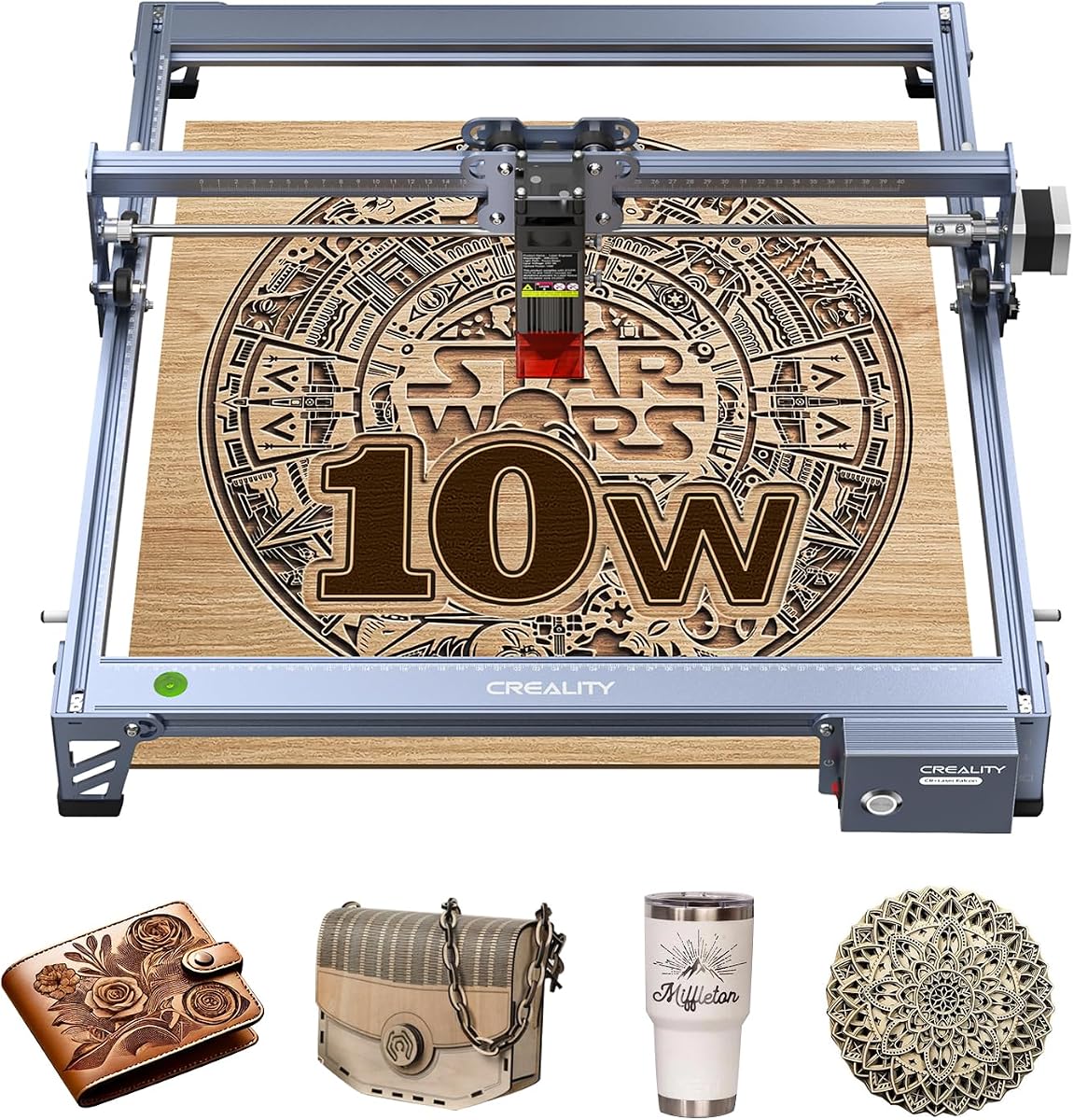
The Creality Falcon 10W offers exceptional value for those new to laser engraving. It provides strong cutting power at a budget friendly price making it accessible for DIY enthusiasts and home makers.
We may earn a commission when you buy through this link, at no additional cost to you.
With an effective power of 72W it can cut 12mm wood and 5mm black acrylic in one pass. The larger workspace allows for bigger projects without needing multiple setups which increases overall efficiency.
It lacks the full enclosure of higher end models but includes an anti UV filter and goggles for protection. While you may spend more time setting it up initially the performance justifies the effort for casual users.
This machine is perfect for beginners who want to experiment with different materials without a large investment. It supports popular software and offline modes ensuring flexibility for various workflow preferences.
The 72W power output handles thick materials quickly ensuring clean edges even on demanding jobs.
Support for LightBurn and LaserGRBL gives you freedom to choose the best tool for your designs.
We may earn a commission when you buy through this link, at no additional cost to you.
The Falcon A1 Pro 20W brings professional grade capabilities to the desktop market. Its 180W output and advanced features make it a top contender for serious crafters and small production studios.
We may earn a commission when you buy through this link, at no additional cost to you.
Speeds up to 600mm/s and an optional infrared module allow for precise engraving on metals and fine details. The touch screen and app control streamline operation so you can manage tasks from anywhere in your home.
While the cost is higher than standard models the included features like autofocus and smart safety shields provide long term value. You do get extra protection and precision that justify the investment for heavy users.
Buy this if you need maximum power and control for diverse materials. It is built for efficiency and ease of use with features that enhance both safety and workflow productivity significantly.
The smartphone style touchscreen and app let you operate the machine without tangled cables or complex setups.
Auto focus technology ensures perfect alignment every time which is critical for detailed engraving tasks.
We may earn a commission when you buy through this link, at no additional cost to you.
This model builds on the Falcon A1 design by adding an integrated air assist system. This feature significantly improves cut quality by reducing burn marks and clearing debris during operation.
We may earn a commission when you buy through this link, at no additional cost to you.
The CoreXY motion system ensures rapid acceleration and consistent speed for clean results. Smart camera positioning and material recognition make setup faster while graphic extraction helps turn photos into engraving paths easily.
There are some limitations such as incompatibility with larger panels and restrictions on cutting clear acrylic. However for most wood and leather projects this machine delivers professional results efficiently.
It is recommended for users who prioritize clean cuts and automation. The air assist makes a noticeable difference in finish quality which is worth considering for detailed work.
Air flow keeps the lens clean and reduces smoke which improves visibility and cut quality.
Graphic outline extraction turns visual designs into engraving paths with just a few clicks.
We may earn a commission when you buy through this link, at no additional cost to you.
The Creality Laser Engraver 10W is designed for DIY users who want a sturdy machine at a reasonable price. It focuses on core performance and reliability without many of the advanced automation features of newer models.
We may earn a commission when you buy through this link, at no additional cost to you.
It handles 5mm basswood and 3mm acrylic efficiently thanks to its 72000mW power. The aluminum alloy structure ensures stability during operation which is essential for maintaining precision over time.
Setup is straightforward and the included focusing plate simplifies adjustments. While it lacks smart cameras and auto focus it provides solid performance for those willing to manage settings manually.
Choose this if you want a reliable workhorse for standard projects. It offers good value for the price and supports a wide range of materials for everyday engraving tasks.
The all aluminum alloy structure provides rigidity and durability for consistent engraving results.
Wi Fi USB and SD card options let you transfer files wirelessly or offline as needed.
We may earn a commission when you buy through this link, at no additional cost to you.
The Falcon2 Pro S 22W is a powerhouse for batch production with features like auto cut through compensation. This technology adjusts parameters automatically to ensure clean cuts across varying material thicknesses.
We may earn a commission when you buy through this link, at no additional cost to you.
Its 22W output allows it to cut 15mm basswood and 10mm acrylic in one pass. The integrated enclosure and flame detector add essential safety layers that are crucial for extended production runs.
Some users may find the cost and slightly lower rating compared to other models a consideration. However the productivity gains from faster processing and less manual intervention can outweigh these factors.
Ideal for small studios needing high efficiency this machine balances power with safety. The debris drawer also simplifies cleanup which keeps your workspace tidy during long sessions.
The auto cut through feature adjusts the path to ensure consistent cuts without manual tweaking.
Flame detection and limit switches provide multiple layers of protection during operation.
We may earn a commission when you buy through this link, at no additional cost to you.
The Falcon A1C introduces AI tools that simplify design creation and material recognition. Its intelligent workflow turns photos into engraving ready artwork quickly which is perfect for beginners.
We may earn a commission when you buy through this link, at no additional cost to you.
Speeds up to 15000mm/min ensure quick turnaround on projects. The interchangeable platform allows you to swap heads to match specific tasks which increases versatility for different material types.
While the working area is smaller than some models it remains sufficient for most small goods like coasters and gifts. The high rating reflects its ease of use and innovative AI capabilities.
Choose this if you want to save time on design prep. The AI features and compact size make it a strong choice for home studios and makerspaces.
AI background removal and smart layout tools reduce the time spent on design preparation significantly.
You can expand capabilities by swapping laser modules to suit different engraving requirements.
We may earn a commission when you buy through this link, at no additional cost to you.
This version of the A1 Pro emphasizes a streamlined user interface with a smart touchscreen. It allows for quick access to history files and previews without needing a computer connected.
We may earn a commission when you buy through this link, at no additional cost to you.
The 180W power and air assist ensure clean edges on cuts. Auto focus within three seconds and full bed previews make positioning accurate and effortless for users of all skill levels.
While it shares many specs with the standard A1 Pro the interface difference is significant for those who prefer mobile management. It keeps the workspace clean and reduces cable clutter effectively.
Recommended for users who value a cable free workflow. The touchscreen adds a layer of convenience that modernizes the engraving experience for daily use.
The touchscreen lets you reopen recent projects with a single tap for faster workflow.
Air assist functions reduce smoke and debris for a cleaner workspace during engraving.
We may earn a commission when you buy through this link, at no additional cost to you.
The Falcon A1C Mini combines portability with advanced AI features for a compact solution. It supports over 300 materials and allows quick module swaps to adapt to different tasks easily.
We may earn a commission when you buy through this link, at no additional cost to you.
With auto focus and a smart camera setup is fast and accurate. The lightweight design means you can move it between classrooms studios or maker events without hassle.
While the working area is smaller it remains sufficient for small projects. The high rating suggests users appreciate its convenience and the AI software tools included with the machine.
Perfect for those who need flexibility and portability. It is a great tool for education or mobile makers who want a professional experience on the go.
Switching between laser modules takes just 15 seconds allowing rapid adaptation to new materials.
Lightweight build and compact footprint make it easy to carry to different locations.
We may earn a commission when you buy through this link, at no additional cost to you.
This model stands out for its zero assembly requirement allowing you to start immediately. It maintains the speed and precision of the Falcon A1 series in a compact footprint.
We may earn a commission when you buy through this link, at no additional cost to you.
With instant acceleration to 600mm/s and aerospace grade aluminum construction it delivers durable performance. The intuitive three step operation simplifies engraving for beginners while keeping high standards for quality.
While it is priced higher than some models the time saved on setup is significant. The six safety protections ensure safe operation even in small home environments.
Ideal for users who want ready to go convenience. It is a strong pick for those prioritizing speed and safety without needing to build anything.
Zero assembly means you can unbox and start engraving within minutes of delivery.
Aerospace grade aluminum ensures long lasting durability and structural stability for projects.
We may earn a commission when you buy through this link, at no additional cost to you.
Selecting the right engraver requires understanding key factors that affect performance safety and usability in your workshop environment.
Laser power determines how fast and thick a material you can cut. Higher wattage like 20W or 22W allows cutting thicker woods and metals more efficiently than standard 10W models.
Look for models with effective output ratings to ensure you get the power you need for your specific projects.
The working area determines the maximum size of material you can engrave in one pass. Larger models accommodate bigger boards while compact ones save desk space.
Choose a size that matches your typical project dimensions to avoid frequent repositioning of materials.
Class 1 enclosed designs are essential for safe home use as they block hazardous laser light and smoke. Look for emergency stop buttons and auto lock features to prevent accidents.
Always prioritize models with robust safety certifications to protect your eyes and workspace effectively.
Check if the engraver supports your preferred software like LightBurn or LaserGRBL. Native software can simplify setup but third party support offers more flexibility.
Ensure the machine has drivers and connectivity options that work with your operating system.
Higher speeds like 600mm/s reduce production time for batch projects. Precision is often measured in spot size and positioning accuracy which affects detail quality.
Look for CoreXY motion systems which provide better speed and stability compared to traditional belts.
Smart cameras allow you to preview designs and align them before engraving. Autofocus reduces manual setup time by automatically adjusting the lens height.
These features are especially helpful for beginners and when working with uneven surfaces.
Some machines work better with specific materials like wood or leather. Others offer optional infrared modules for metals and reflective surfaces which adds versatility.
Ensure the laser type matches the materials you intend to engrave regularly.
Aluminum alloy structures and steel rails provide stability and longevity. Look for machines with good user reviews regarding long term performance and build materials.
Durable builds reduce maintenance and ensure consistent results over time.
Before using your engraver place it on a stable surface and ensure proper ventilation. Install the recommended software and update firmware to the latest version for best performance.
Always test your settings on scrap material before starting a final project. Use the camera or manual focus to ensure the laser is calibrated correctly for the material thickness.
Clean the lens and air filter regularly to prevent smoke buildup and maintain clarity. When not in use keep the lid closed to protect internal components from dust and debris.
Standard 10W models can mark dark metals but cannot cut through them. For cutting metal you need an infrared module like the 2W IR option available for certain A1 Pro models.
Class 1 enclosed models like the Falcon A1 block 99 percent of laser light so goggles are not strictly needed during operation. However using them provides extra protection and peace of mind.
You can engrave wood leather acrylic paper and dark metals. Avoid highly reflective materials like mirrors or polished metals unless you use a specialized infrared module.
Diode laser modules typically last several thousand hours of use. Proper ventilation and avoiding continuous max power operation will extend the lifespan of the module significantly.
Yes most Creality models support LightBurn which offers advanced design tools and better control. Check the manual to ensure your firmware is compatible with the software.
Enclosed models are designed to reduce noise and smoke. They are generally quiet enough for home use but fans may produce some background hum during operation.
The Creality Falcon A1 series offers a range of powerful and safe engravers for various needs. The A1 10W stands out as the best overall while the 10W budget option provides great value.
Prioritize safety and software compatibility when making your choice. Features like camera positioning and air assist can significantly improve your workflow and final results.
Remember that prices and stock may change over time. Verify the current specs and warranty details on the official store before completing your purchase decision today.