
8mm & Super 8 Film to Digital Converter
3.7Editor score
32GB SD card included
2.4 inch display screen
Universal reel capacity
Preserving vintage film reels is essential for keeping family memories alive. Digital converters allow you to transform old 8mm and Super 8 film into modern digital formats easily.
We compared ten top-rated digitizers based on resolution, ease of use, and compatibility with various reel sizes. Our analysis highlights the strengths of each model.
Each pick details key features and performance aspects to help you choose wisely. Please note that product availability and pricing may change over time.
3.7Editor score

4.1Editor score

4.0Editor score
As an Amazon Associate we earn from qualifying purchases.
The following table provides a side-by-side comparison of all ten selected digitizers to help you evaluate their specifications quickly.




The KODAK REELS Digitizer stands out as a leading choice for converting vintage film. It delivers high-quality 1080p MP4 files directly to an SD card without needing a computer.
We may earn a commission when you buy through this link, at no additional cost to you.
Its standout feature is the large 5 inch LCD screen with touch buttons. This interface allows you to zoom, align frames, and adjust exposure settings easily during the conversion process.
While it offers excellent visual quality, users should note that audio is not captured during scanning. This is a common trade-off in standalone film digitizers at this price point.
This device is ideal for families wanting a hassle-free way to preserve old movie reels. The included accessories make it ready to use right out of the box.
The 5 inch touchscreen simplifies navigation and frame alignment, making the digitization process much more user-friendly than smaller models.
By saving directly to an SD card, this converter eliminates the need for complex software or constant computer connectivity during transfers.
We may earn a commission when you buy through this link, at no additional cost to you.
This budget-friendly digitizer offers an affordable entry point into film conversion. It captures footage at 1080p resolution and saves directly to an included 32GB SD card.
We may earn a commission when you buy through this link, at no additional cost to you.
The device features a 2.4 inch LCD screen for instant review of converted movies. You can also connect it to a TV using the included cable for larger viewing.
One limitation is the lack of audio recording, which may matter for sound-heavy films. However, the included storage removes immediate costs for accessories.
It is a solid choice for casual users who want to preserve family archives without investing heavily. The wide reel capacity ensures it handles most standard film sizes.
The inclusion of a 32GB memory card means you can start digitizing immediately without needing to purchase additional storage components separately.
Engineered to accommodate reels up to nine inches, this converter supports extended conversion sessions without needing frequent reloading of film.
We may earn a commission when you buy through this link, at no additional cost to you.
The Magnasonic film scanner provides a straightforward way to convert 8mm and Super 8 reels into digital MP4 files. It features a vibrant 2.3 inch screen for immediate viewing.
We may earn a commission when you buy through this link, at no additional cost to you.
Setup is designed to be frustration-free with simple instructions included. You can adjust brightness and framing directly on the scanner using intuitive controls.
While it lacks audio capture, the visual quality is sufficient for archiving silent home movies. The RCA cable allows you to share results on a larger TV screen.
This model is suitable for those who prefer a plug-and-play experience without software. Its reliability and ease of use make it a strong contender in the mid-range market.
Clear instructions and simple controls ensure that even first-time users can start digitizing their film reels without technical confusion or delays.
You can review footage on the built-in screen or connect to a TV using the included RCA video out cable for a better viewing experience.
We may earn a commission when you buy through this link, at no additional cost to you.
This converter combines affordability with useful features like a touch screen interface and included storage. It captures video in 1080p MP4 format with good clarity and color accuracy.
We may earn a commission when you buy through this link, at no additional cost to you.
The full color LCD screen allows you to change settings and adjust framing using easy-read buttons. This makes the conversion process intuitive for most users.
While it does not record audio, the visual capture is detailed enough for preserving old memories. The package includes a 32GB card so you can start immediately.
It is a great gift option for families looking to archive their film collections. The warranty and online support add extra peace of mind for buyers.
Touch buttons provide a modern way to navigate settings like film type and exposure without needing physical knobs or complex menus.
With the inclusion of a 32GB SD card and various cables, this unit offers a comprehensive solution right out of the box.
We may earn a commission when you buy through this link, at no additional cost to you.
The MovieMaker Pro is designed for fully automated digitization of old film reels. It supports various reel sizes and outputs digital videos in 1080p resolution without needing a computer.
We may earn a commission when you buy through this link, at no additional cost to you.
Users can view and save movies directly on an included SD card. The built-in 2.4 inch screen allows for quick review of converted footage instantly.
While some users report mixed experiences with the capture quality, it remains a convenient tool for basic archiving. The lack of audio is a standard limitation for standalone devices.
This device is best suited for those who prioritize ease of use over advanced editing features. It provides a direct path from analog film to digital files.
The device handles the conversion process independently, reducing the need for manual intervention or complex setup steps during operation.
Compatibility with reels up to nine inches in diameter ensures that even larger film collections can be digitized without frequent reloading.
We may earn a commission when you buy through this link, at no additional cost to you.
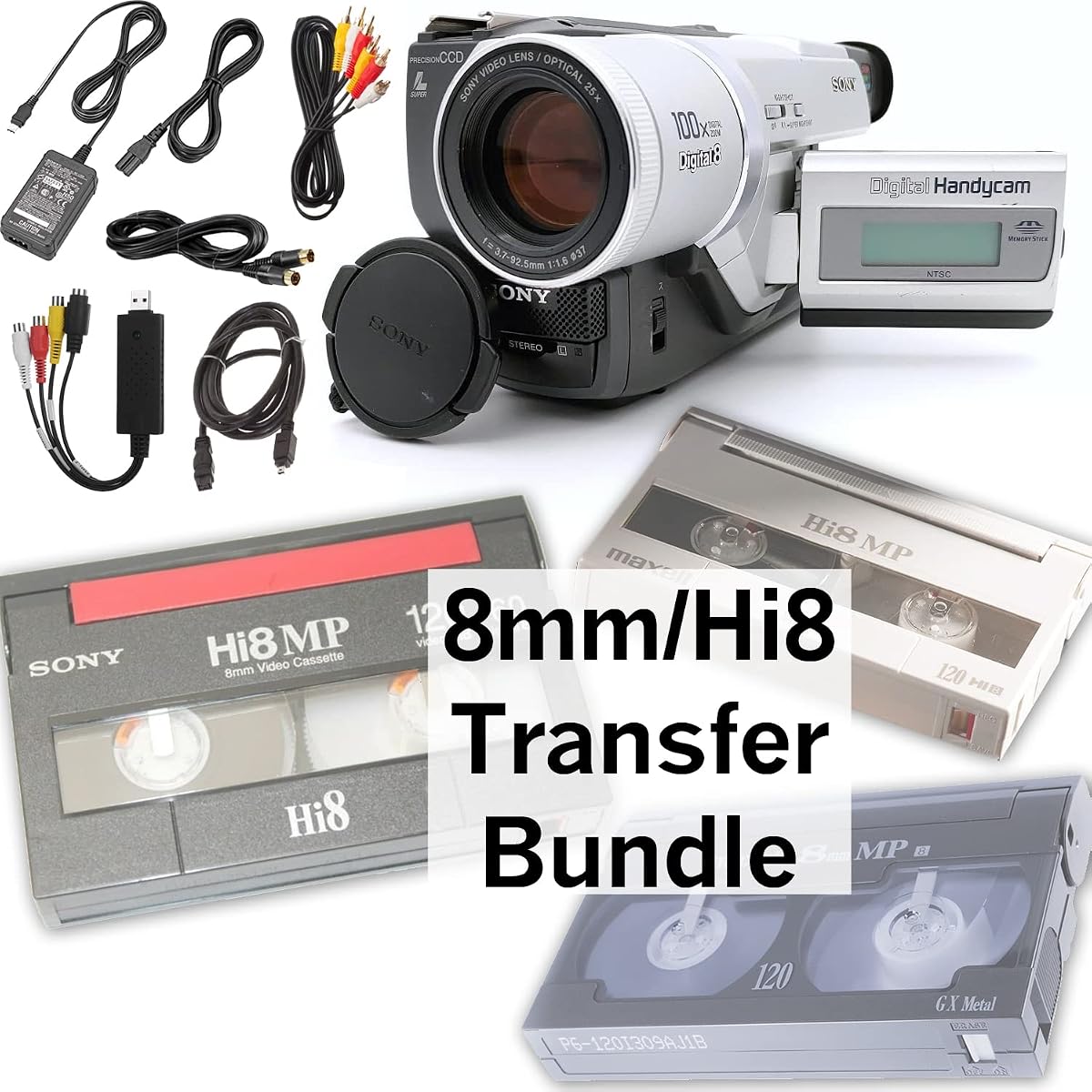
This bundle is unique because it focuses on tape formats like 8mm, Hi8, and Digital8 rather than film reels. It includes a camcorder to play tapes and a USB device to capture the signal.
We may earn a commission when you buy through this link, at no additional cost to you.
You can transfer footage to computer files or burn them to DVD directly. The included AV cables facilitate connection to TV for playback or transfer.
While it does not convert traditional film strips, it is perfect for users with old cassette tapes. The guarantee of a 100% working unit adds significant value.
This is an excellent solution for those specifically dealing with tape archives. It simplifies the transfer process by providing all necessary hardware in one package.
The inclusion of a camcorder and capture device means you do not need to source separate equipment to play and digitize your old tapes.
You have the option to burn captured footage to DVD for physical preservation, creating a durable copy alongside digital files.
We may earn a commission when you buy through this link, at no additional cost to you.
Similar to the premium bundle, this option targets tape formats but at a lower price point. It includes a camcorder and a blank tape for testing or recording.
We may earn a commission when you buy through this link, at no additional cost to you.
The USB capture device allows you to transfer tapes to computer files or burn them to DVD. This makes it a versatile tool for modernizing old video archives.
While it is not designed for film reels, it addresses a common need for preserving old cassette tapes. The guarantee ensures you receive a functional unit.
This bundle is a cost-effective choice for tape owners. It provides the essential hardware needed to digitize without buying components separately.
The inclusion of a blank tape allows you to test the transfer process immediately upon setup to ensure everything works correctly.
USB capture technology bridges the gap between analog tapes and digital computers, enabling easy access to old footage.
We may earn a commission when you buy through this link, at no additional cost to you.
This scanner positions itself as a state-of-the-art solution for digitizing old films and negatives. It features a 1080P display for high-quality previews of your converted content.
We may earn a commission when you buy through this link, at no additional cost to you.
The process is simplified by loading film onto a universal supply reel. You can send footage directly to an SD card without needing drivers or complex software.
Since there are no customer reviews yet, you are relying on the manufacturer's claims. However, the design suggests a user-friendly experience suitable for home archiving.
It is marketed as a great gift for grandparents or filmmakers. The service support promises quick response times to any questions you may have about operation.
The device promises to bring obsolete film formats into the modern era with high-quality digital conversion capabilities.
Simple on-screen prompts guide you through the loading and conversion process, reducing the technical barrier for entry.
We may earn a commission when you buy through this link, at no additional cost to you.
This scanner focuses on converting film frames into JPEG images rather than video. It includes a display screen for reviewing your captured photos immediately.
We may earn a commission when you buy through this link, at no additional cost to you.
The process involves loading film onto a universal reel and following on-screen prompts. You can save directly to an SD card without needing a computer.
As an image-focused device, it is distinct from video digitizers. This may be preferable for still film scans but less useful for motion pictures.
It serves well as a gift for special occasions. The support team is available to answer questions within twenty-four hours to ensure satisfaction.
Converting to JPEG images makes it easy to share single frames or scenes on social media and modern devices.
The included display screen allows for quick verification of scans, ensuring quality before you save files to the card.
We may earn a commission when you buy through this link, at no additional cost to you.
This scanner offers a complete kit with all necessary cables and accessories included. It supports stable and fast digitization of 8mm and Super 8 films.
We may earn a commission when you buy through this link, at no additional cost to you.
It outputs MP4 files which are widely compatible with modern devices. You can use the included USB cable to transfer scans to your computer or TV.
Like other models in this tier, it lacks user reviews. However, the promise of fast and stable digitization suggests a reliable performance for archiving.
It is marketed as a great gift for grandparents on birthdays or anniversaries. The setup is designed to be simple for users of all ages.
Having all cables and manuals included means you can start using the device immediately after unboxing without extra purchases.
The design prioritizes efficiency, allowing you to convert reels quickly so you can view your memories sooner.
We may earn a commission when you buy through this link, at no additional cost to you.
Choosing the right film digitizer depends on your specific needs and the type of media you own.
Look for devices that support at least 1080p MP4 output for high-quality digital videos. Some models may only offer 480p which is less suitable for modern displays.
Higher resolution ensures your old memories look clear on current HD televisions and monitors.
Most modern converters work without a computer by saving directly to an SD card. This simplifies the workflow and reduces setup time.
Standalone operation is ideal for users who want a plug-and-play experience without installing drivers.
Ensure the device supports the size of your film reels. Some units only take small reels while others accommodate up to nine inches.
Universal reel support prevents you from needing to manually rewind large spools to fit the converter.
Many standalone film digitizers do not capture audio from the film strips. Check if the device supports audio if sound is important to you.
If audio is a priority you may need to use a separate method to capture sound while scanning the visual frames.
Some packages include SD cards and cables while others require you to buy them separately. Included accessories can save time and money.
A complete kit with power adapters and TV cables makes the device ready to use out of the box.
Larger screens make it easier to align frames and review footage during the conversion process. A 2.4 inch screen is standard but five inches offers better visibility.
A larger interface improves usability and helps you catch alignment issues before saving files.
Consider the build quality and whether the manufacturer offers a warranty. This is important for long-term durability and peace of mind.
Warranty coverage can protect you from defects and ensures technical support is available if needed.
Confirm that the device is designed for your specific media type such as film reels versus tapes. Some bundles focus on tapes rather than film strips.
Using the wrong device for your media type will result in poor results or inability to load the film.
First load your film reel onto the universal supply reel provided with the device. Ensure the film is properly threaded through the guides to avoid jams.
Connect the power adapter to the unit and insert an SD card into the slot. If the device has a built-in screen power it on to view the settings menu.
Adjust settings like exposure and sharpness using the buttons or touchscreen. Start the conversion process and wait for the device to scan the film frame by frame.
Most modern digital converters allow you to save videos directly to an SD card without a computer. This standalone mode simplifies the workflow for most users.
Many standalone film scanners do not capture audio because it requires additional hardware. Some models focus only on video frames for simplicity.
Most units support SD cards up to 32GB in capacity. Always check the manual to ensure your chosen card type is supported by the device.
The best converters are designed to handle both Super 8 and 8mm film formats. Check the specifications to confirm universal support for your film type.
No you can view files directly from the SD card on a computer or TV. Editing is optional but you can use free software on your PC to crop or adjust.
Use a soft dusting cloth to wipe away surface dust before loading the film. This prevents scratches and ensures better image quality during conversion.
Most devices have safety mechanisms to stop jamming. You can rewind the film manually using the supply reel to clear the obstruction safely.
Many products come with a one-year warranty or online support. Always verify warranty terms on the product page before making your purchase.
We reviewed ten top devices ranging from budget-friendly options to high-end bundles. The KODAK REELS and the Budget 8mm converters offer the best balance of features.
Prioritize standalone operation and reel compatibility to ensure the device fits your needs. Consider if you need audio capture or just video preservation.
Check current availability and pricing before making your final decision as these factors change over time. Preserving your old films is a valuable investment for the future.