
Surface Docking Station Triple Displays Dual HDMI
4.8Editor score
Triple display support with HDMI and VGA
Includes 72W power supply adapter
Multiple USB ports for peripherals
This guide compares the top 10 docking stations for Surface Pro devices, evaluating connectivity, display support, charging power, and port selection for every
Finding the right docking station for your Surface Pro can transform your tablet into a full desktop workstation. You need reliable ports for monitors, storage, and networking without sacrificing charging speed or mobility.
We analyzed ten top-rated models based on compatibility, port variety, display output capabilities, and power delivery. Our comparison includes official Microsoft docks and third-party alternatives that expand your Surface's potential.
Each pick highlights key strengths and trade-offs to help you choose the best fit for your needs. Prices and availability change frequently, so verify current details before purchasing to ensure the best value.
4.8Editor score

4.4Editor score

4.5Editor score
The following table provides a side-by-side comparison of all ten docking stations. It highlights key specifications such as video output capabilities, power delivery wattage, and essential port types to help you decide quickly.




The Microsoft Surface Thunderbolt 4 Docking Station ranks as our top choice for users seeking premium connectivity. It earned a 4.4 rating from users who appreciate its speed and reliability.
We may earn a commission when you buy through this link, at no additional cost to you.
This dock features three USB-C ports and three USB-A ports alongside a 2.5G Ethernet connection. You can connect up to two 4K monitors for a powerful multitasking setup.
While it is more expensive than third-party options, the rapid charging technology reduces downtime significantly. The tactile port indicators make it easy to find the right connection quickly.
Ideal for professionals needing robust performance and sustainability, this dock delivers exceptional value. Choose this if you want a reliable, eco-friendly upgrade for your Surface Pro.
Experience lightning-fast data transfer and media streaming without lag.
Constructed with 20% recycled ocean-bound plastic to reduce environmental impact.
We may earn a commission when you buy through this link, at no additional cost to you.
The Microsoft Surface Dock (Pd9-00003) remains a popular choice for legacy users. It holds a solid 4.5 rating due to its straightforward design and compatibility with older models.
We may earn a commission when you buy through this link, at no additional cost to you.
It features four USB 3.0 ports and two Mini DisplayPorts for connecting monitors. The magnetic cable ensures a stable connection without accidental disconnections during work.
Video output is limited to older standards compared to newer docks. However, it works well for basic setups where high refresh rates are not critical.
Buy this if you have an older Surface Pro or need a simple, reliable dock. It transforms your device into a desktop PC efficiently at a lower cost.
The magnetic surface connect cable prevents accidental drops and maintains power.
Works with Surface Go, Laptop, and older Pro models seamlessly.
We may earn a commission when you buy through this link, at no additional cost to you.
This budget-friendly 12-in-1 dock offers impressive multi-monitor support. It has a 4.1 rating from users who prioritize cost-effective expansion for their Surface devices.
We may earn a commission when you buy through this link, at no additional cost to you.
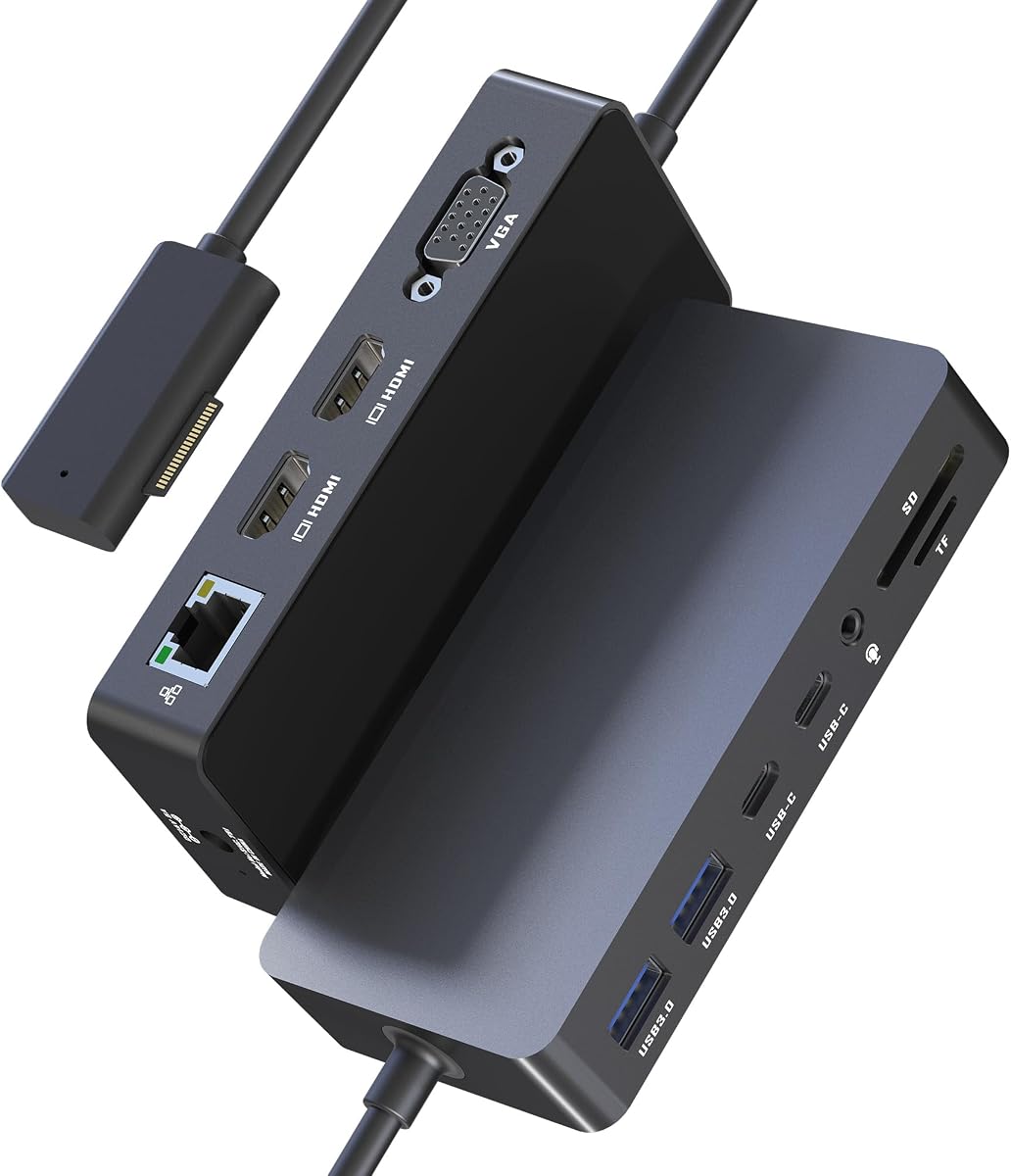
You can connect two HDMI monitors and one VGA display for a triple setup. The included 72W power adapter charges your device while running all ports.
Note that using three external screens requires turning off the Surface screen. The VGA port supports up to 1080P resolution which might limit high-end graphics work.
Choose this dock if you need multiple screens on a budget. It provides essential connectivity and power without the premium price of official docks.
Boost efficiency with extend or mirror mode across three external monitors.
USB 3.0 ports transfer files up to 5Gbps for quick access.
We may earn a commission when you buy through this link, at no additional cost to you.
This model shares similar specs but holds a higher 4.8 rating. Users praise its reliability and the high power output that supports heavy workloads effectively.
We may earn a commission when you buy through this link, at no additional cost to you.
It features two HDMI 4K ports and a VGA port for three monitors. The 72W adapter ensures your laptop stays charged while you work on multiple screens.
While the setup is robust, it requires turning off the internal screen for full triple display functionality. The Ethernet port ensures a stable internet connection without lag.
Select this for high performance at a budget-friendly price. It is ideal for designers or educators needing multiple screens without breaking the bank.
Designed for designers needing rapid file transfers and multiple views.
72W power supply handles peripherals and charging simultaneously.
We may earn a commission when you buy through this link, at no additional cost to you.
This 12-in-1 dock offers versatile connectivity for various Surface models. It earns a 4.2 rating for its ability to handle complex setups easily.
We may earn a commission when you buy through this link, at no additional cost to you.
It supports dual 4K HDMI outputs and a VGA port for triple displays. The 72W fast charging keeps your device powered throughout the day.
The Ethernet port supports 100Mbps speeds which may be slower than gigabit options. It includes SD and TF slots for photographers needing quick access.
Choose this for a balanced mix of ports and power. It simplifies your workspace and expands your capabilities without extra adapters.
Works seamlessly with Surface Pro, Laptop, and Go models instantly.
4K HDMI outputs provide crystal-clear visuals for detailed work.
We may earn a commission when you buy through this link, at no additional cost to you.
The Microsoft Surface Dock 2 offers next-gen ports for a true desktop experience. It holds a 4.5 rating for its high power delivery and display support.
We may earn a commission when you buy through this link, at no additional cost to you.
It supports dual 4K monitors at 60Hz for smooth visuals. The 199W power supply ensures your Surface remains fully charged even with heavy usage.
Front and rear USB-C ports provide flexibility for connections. While pricey, it is perfect for users needing maximum performance and reliability.
Invest in this for a premium setup. It transforms your Surface into a powerhouse workstation with high-speed data and video capabilities.
Enjoy 60Hz refresh rates for smooth and high-resolution displays.
199W power adapter runs peripherals without draining battery.
We may earn a commission when you buy through this link, at no additional cost to you.
This version of the Surface Dock 2 is highly rated for performance and build. It delivers dual 4K 60Hz support for sharp and responsive screens.
We may earn a commission when you buy through this link, at no additional cost to you.
With a 199W power supply, you can charge your device while running multiple peripherals. The multiple USB-C ports ensure you have options for modern devices.
It works with a wide range of Surface Pro and Laptop models. While it requires an outlet, it provides a stable connection for critical work.
Buy this if you need a powerful desktop conversion. It offers the best mix of ports and performance for a seamless workflow.
Works flawlessly with Surface Pro 4 through 7 and Book models.
Plug-in Surface Connect cable for instant desktop transformation.
We may earn a commission when you buy through this link, at no additional cost to you.
This 12-in-1 dock supports triple displays with impressive visual clarity. It has a 4.3 rating due to its strong power and speed features.
We may earn a commission when you buy through this link, at no additional cost to you.
It features dual 4K 60Hz HDMI ports and a 100W DC input. You can connect three monitors simultaneously for a massive workspace.
The 1000Mbps Ethernet port ensures fast downloads. However, you need to ensure your setup supports the required connections properly.
Pick this for a future-proof setup. It bridges your mobile device with a high-performance desktop using one reliable cable.
Boost productivity by 300% with seamless screen extension.
100W DC input keeps your laptop charged while working.
We may earn a commission when you buy through this link, at no additional cost to you.
This renewed dock offers high-performance expansion with warranty support. It holds a 4.7 rating for its durability and consistent thermal management.
We may earn a commission when you buy through this link, at no additional cost to you.
It includes the original 199W power supply and USB-C cable. You get dual 4K 60Hz support without the cost of a brand new unit.
Rigorously tested for reliability it is a safe choice for workspaces. The 1-year warranty gives you peace of mind for your investment.
Consider this for a cost-effective premium solution. It delivers the same performance as a new model with added sustainability benefits.
Integrated cooling ensures consistent performance during long sessions.
Original power supply and cables included for quick setup.
We may earn a commission when you buy through this link, at no additional cost to you.
This dock provides essential expansion with a clean design. It has a 4.2 rating for its simplicity and broad compatibility with Surface models.
We may earn a commission when you buy through this link, at no additional cost to you.
It features two Mini DP ports for dual monitors and four USB 3.0 ports. The 90W power supply ensures your device charges while connected.
While resolution is limited to 4K at 30Hz, it is sufficient for most office tasks. The gigabit network port ensures stable internet connections.
Choose this for a tidy workspace setup. It simplifies your desktop without clutter and keeps your data and video flowing smoothly.
Clean layout keeps your desk organized and easy to manage.
10-in-1 interfaces support essential connectivity needs simultaneously.
We may earn a commission when you buy through this link, at no additional cost to you.
Selecting the right docking station requires understanding your specific needs and device capabilities. Here are the key factors to consider.
Ensure the dock supports your specific Surface model and connection type. Official Microsoft docks use Surface Connect while third-party ones may require USB-C or Thunderbolt 4.
Always check the manufacturer list to confirm your device works with the dock before buying.
Look for docks that support the number of monitors and resolution you need. Dual 4K at 60Hz is ideal for high-end work.
Verify if the dock supports triple displays if you need extra screen real estate.
Choose a dock with sufficient wattage to charge your laptop while powering peripherals. Docks with 72W or higher are generally safe for Pro models.
A strong power supply ensures your device stays charged during heavy use.
Check that the dock has enough USB-C, USB-A, and Ethernet ports for your peripherals. SD card slots are useful for photographers.
More ports mean fewer adapters and a cleaner desk setup.
USB 3.0 ports offer faster speeds than older standards. Thunderbolt 4 docks provide the fastest data transfer rates for large files.
Prioritize high-speed ports if you work with large media files daily.
High-quality materials ensure durability and heat resistance. Look for docks with thermal management to avoid overheating.
A solid build protects your investment and ensures reliable performance over time.
Compare prices and warranty terms before purchasing. Renewed models often offer savings with reliable performance.
A longer warranty provides peace of mind for your purchase.
Ensure the included cable is long enough for your desk layout. A longer cable gives you more flexibility in positioning.
Check if the dock supports extension cables for specific setups.
Connect your Surface device to the dock using the provided cable. Ensure both the dock and device are powered before connecting to avoid errors.
Once connected, configure your display settings in Windows to extend or mirror your screens. Adjust resolution for optimal clarity on external monitors.
Clean the ports regularly with a soft cloth to prevent dust buildup. Avoid bending cables excessively to maintain their integrity over time.
Yes, many third-party docks work via USB-C if your model supports it. Check the manufacturer compatibility list before purchasing to ensure it works with your device.
Several third-party docks support triple monitors via two HDMI and one VGA ports. Official Microsoft docks usually support dual monitors unless you use a specialized setup.
Most docks include a power adapter to charge your Surface. Bus-powered hubs may not provide enough power for charging and peripherals simultaneously.
Thunderbolt 4 offers faster data speeds and more power than standard USB-C. It is ideal for high-performance tasks and multiple display setups.
Yes, renewed docks are tested and come with warranties. They often cost less than new models while providing similar performance and reliability.
Restart your device and update your graphics drivers. Ensure cables are connected securely and try a different HDMI or VGA port on the dock.
Choosing the right dock depends on your need for speed, screens, and budget. The Thunderbolt 4 dock leads for performance while third-party options offer great value.
Prioritize power delivery and display quality to ensure a smooth workflow. A well-chosen dock transforms your Surface into a true desktop powerhouse.
Prices change often so verify current offers before buying. This guide helps you find the best dock for your unique setup today.