
Mediasonic HomeWorx HW250STB
3.8Editor score
1080P HDMI Output
USB Recording Support
Clear QAM Function
This guide compares the top DVR recorders for TV including over-the-air models and analog converters to help you choose the right recording solution for your
Finding the right DVR recorder for TV can be challenging with so many options available today. Whether you want to record over-the-air broadcasts or capture analog signals from old devices, a good DVR ensures you never miss your favorite shows again. It should offer reliable storage, easy setup, and flexible viewing options for your whole home.
We have carefully compared ten leading DVR recorders based on their recording capabilities, tuner counts, storage options, and ease of use. This list includes standalone units, over-the-air DVRs, and analog-to-digital converters to cover various viewing preferences and technical requirements for modern and legacy TV setups alike.
Each pick in this guide highlights key features, pros, cons, and ideal use cases to help you make an informed decision. Prices and availability change frequently so be sure to check current listings before purchasing. Our goal is to provide clear, honest information to guide your selection process effectively.
3.8Editor score

3.2Editor score

4.1Editor score
The following table provides a side-by-side comparison of all ten DVR recorders featured in this guide. Review the key specifications, ratings, and features to quickly identify which model best fits your specific recording needs and budget constraints for your home theater setup.
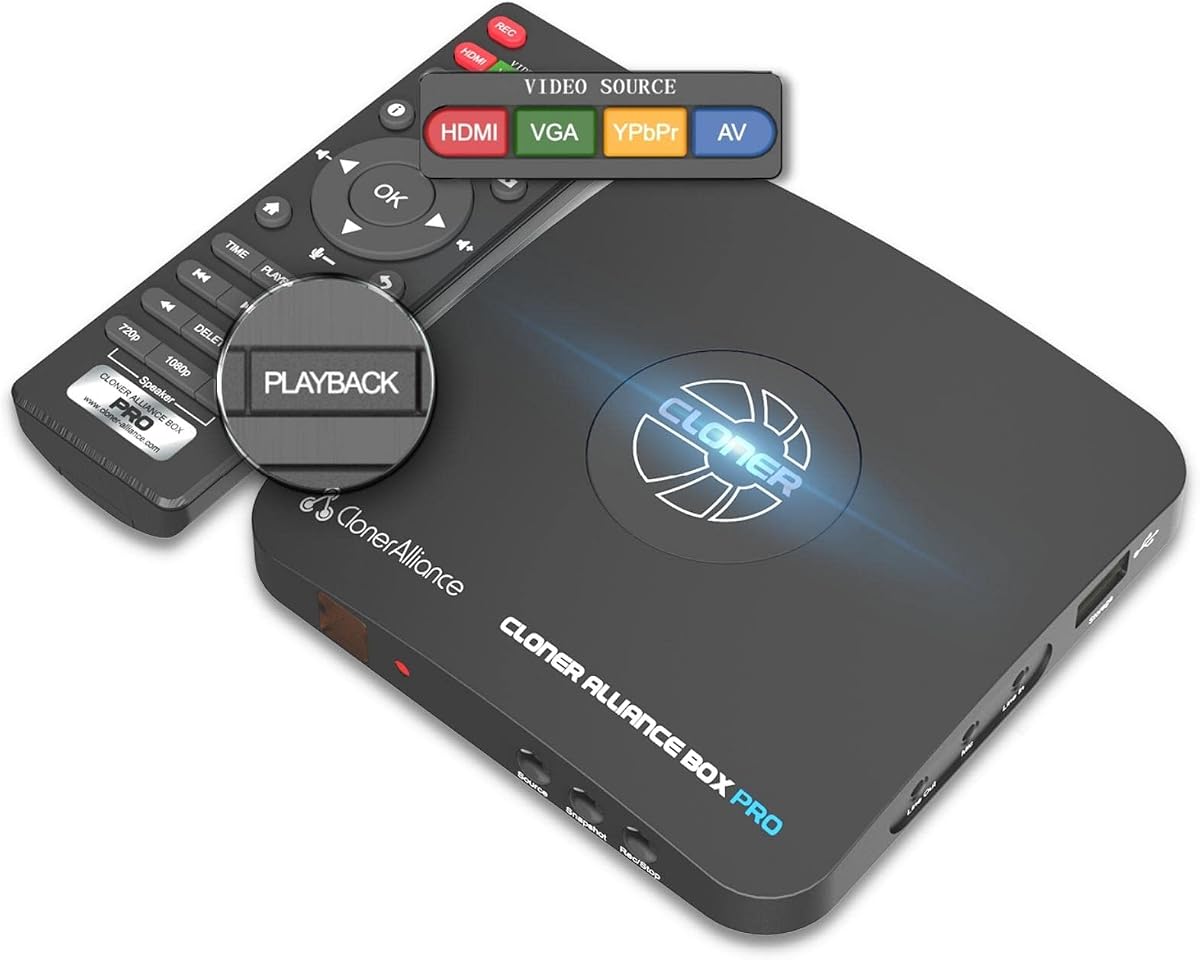


The ClonerAlliance Box Pro is a standalone 1080p capture device designed for recording video from various sources to USB storage without needing a computer. It holds a 4.0 rating for its versatility with analog and digital inputs like HDMI RCA and VGA making it ideal for digitizing old tapes or recording cable signals directly to disk.
We may earn a commission when you buy through this link, at no additional cost to you.
Its key strength lies in its broad compatibility with legacy devices including VHS players camcorders and game consoles while maintaining high resolution output. Users appreciate the ultra low latency of under 90ms which ensures smooth recording with minimal delay. The included scheduling features allow automated recording tasks making it a set and forget solution for archives.
However the device does not support content protected by HDCP which limits use with some modern streaming sticks or Blu Ray players. The included software is Windows only so Mac users cannot utilize the conversion tools. These limitations are acceptable given its primary role as a legacy digitization and local recording tool.
This DVR is best for users who want to archive old analog footage or record TV signals without a PC dependency. It offers a practical bridge between older video formats and modern digital storage. We recommend it for hobbyists and archivists needing reliable standalone capture hardware.
Convert VHS and camcorder tapes to digital MP4 files for long term preservation without needing a computer connected.
Set up recording tasks to capture specific shows or events automatically using the device built schedule capabilities.
We may earn a commission when you buy through this link, at no additional cost to you.
The Tablo TV 4th Gen 4-Tuner DVR is an over-the-air solution that lets you record live local broadcasts without any subscription fees. It has a 3.2 rating reflecting mixed user experiences but stands out for its four tuners allowing simultaneous recording and playback. This model connects to your home network to stream content to multiple devices throughout your house.
We may earn a commission when you buy through this link, at no additional cost to you.
Its standout quality is the ability to pair with any TV antenna to access major networks like ABC CBS and NBC while storing shows on onboard or external storage. Whole home access means you can watch recorded content on phones tablets or compatible smart TVs. The setup involves connecting an antenna and your Wi-Fi network which is straightforward for most users.
Some users note that performance depends heavily on having a consistent high-speed Wi-Fi connection which can be tricky in larger homes. Also it does not work with non-smart TVs or PCs limiting flexibility for some setups. These drawbacks are reasonable given the no subscription model and powerful multi-tuner capability.
This DVR is ideal for cord cutters who want to capture local news and sports without ongoing costs. It offers flexibility to watch on various devices. We recommend it for households with strong internet and smart TVs looking for a subscription-free recording experience.
Enjoy live TV from major networks and free streaming channels without any monthly subscription contracts or hidden fees.
Watch recorded and live content on smartphones tablets and smart TVs from Roku Fire TV and Apple TV platforms.
We may earn a commission when you buy through this link, at no additional cost to you.
The ClonerAlliance UHD Pro is a standalone 4K digital video recorder capable of capturing ultra high definition content from HDMI sources to USB storage. It holds a 4.1 rating for its high fidelity recording and cinematic frame rate options. This device supports both H.264 and H.265 codecs ensuring efficient storage while maintaining image quality for 4K footage.
We may earn a commission when you buy through this link, at no additional cost to you.
Its key strengths include the ability to record at 4K resolution with up to 30fps and support for 4K passthrough so you can watch in full quality while recording. The pause resume feature helps manage long recordings by keeping important moments in one file. It works with various devices like game consoles and camcorders making it versatile for content creators.
As with other ClonerAlliance models it does not support HDCP protected content which limits use with some modern streaming services. The included editing software is Windows only. These limitations are acceptable given the high performance and premium 4K capture capabilities available at this price point.
This DVR is best for professionals or enthusiasts who need to capture 4K content without a PC. It offers professional grade quality in a standalone package. We recommend it for those needing reliable high resolution recording for presentations or gaming.
Record 4K Ultra HD videos with cinematic frame rates using H.265 codec for efficient storage and high quality playback.
Use pause resume recording features to keep important moments in a single file without interrupting your recording session.
We may earn a commission when you buy through this link, at no additional cost to you.
The Tablo TV 4th Gen 2-Tuner DVR offers a more affordable entry into over-the-air recording with two tuners for simultaneous watching and recording. It holds a 3.4 rating for solid performance at a lower price point. This model provides whole home access allowing multiple devices to stream recorded content without monthly fees or hidden costs.
We may earn a commission when you buy through this link, at no additional cost to you.
Its main benefits include the ease of connecting an antenna and Wi-Fi network to start recording local channels quickly. Users appreciate the onboard storage capacity exceeding 50 hours for regular use. The setup process involves scanning a QR code and downloading the app which simplifies installation for most households.
Some users report compatibility issues with non-smart TVs and certain TV models like Vizio which can limit options. Also it relies on internet connectivity for streaming which may not suit everyone. These trade-offs are acceptable for the value it provides compared to cable solutions.
This DVR is ideal for smaller households needing basic local channel recording. It offers a budget friendly subscription free way to save shows. We recommend it for cord cutters looking for simple OTA recording without complex hardware.
Connect the included coaxial cable to your antenna and home network to begin recording local broadcasts immediately.
Pay once for the device and enjoy live TV and recordings without contracts or recurring subscription payments.
We may earn a commission when you buy through this link, at no additional cost to you.
The Tablo TV 4th Gen 2-Tuner DVR with Antenna bundle offers a complete package for capturing local broadcasts without subscriptions. It holds a 3.4 rating for providing all necessary components to get started quickly. This model includes a 35 mile range antenna ensuring better signal reception out of the box compared to buying separately.
We may earn a commission when you buy through this link, at no additional cost to you.
Its main strength is the convenience of having a DVR and antenna together simplifying setup and reducing additional costs. You can record two channels at once and stream to multiple smart devices. The whole home access feature means family members can watch recorded content from their own rooms or devices.
Some users note that antenna performance depends on local terrain and obstructions which may affect channel availability. Also streaming requires a consistent internet connection which may not work in areas with poor Wi-Fi. These factors are common to OTA DVRs and manageable with proper placement.
This bundle is best for those who want an all-in-one solution for local TV recording. It offers ease of setup and reliable performance for the price. We recommend it for households starting their cord cutting journey with local channels.
Get started immediately with the included antenna and coax cable to receive local channels without extra purchases.
Watch live and recorded content on smartphones tablets and smart TVs from Roku Fire TV and Apple TV.
We may earn a commission when you buy through this link, at no additional cost to you.
The Mediasonic HomeWorx HW250STB is a digital converter box with recording capabilities that supports 1080P HDMI output and large USB drives. It holds a 3.8 rating for reliability and straightforward functionality. This model is designed to receive over-the-air broadcasts and allows recording to external hard drives up to 2TB for substantial storage capacity.
We may earn a commission when you buy through this link, at no additional cost to you.
Its key features include Clear QAM which allows watching unscrambled cable channels when connected to certain providers and a front display panel for channel and clock info. The large remote and HDMI cable included make setup easy. It supports Dolby Digital audio and channel switches for older TVs ensuring compatibility.
Some users note it does not support ATSC 3.0 which limits future proofing as broadcasts evolve. Also it does not work with major cable providers like Comcast which limits flexibility. These are acceptable trade-offs for a budget friendly analog digital transition device.
This DVR is best for users with older TVs needing a digital transition with recording. It offers good storage options at a low price. We recommend it for basic OTA recording and media playback needs.
Support USB external hard drives up to 2TB for extensive recording of your favorite shows and movies.
Play back photos music and videos from USB drives directly through the box for family media sharing.
We may earn a commission when you buy through this link, at no additional cost to you.
The Toshiba DVR670 combines VHS and DVD recording with a built-in digital tuner for a comprehensive legacy recording solution. It holds a 3.9 rating for its dual format capability which is rare in modern units. This model allows dubbing between tapes and discs while supporting MP3 and DivX files for multimedia playback.
We may earn a commission when you buy through this link, at no additional cost to you.
Its standout quality is the ability to record from digital sources to DVD and VHS simultaneously providing backup options. The video upconversion to 1080p via HDMI ensures better quality on modern TVs. Front and rear inputs offer flexibility for recording from cameras and other devices easily.
Some users find it harder to find replacement parts or support given its age. Also VHS tapes are becoming less available for recording content. These factors are acceptable given the unique capability to preserve physical media formats.
This DVR is best for households with extensive VHS collections to preserve. It offers a bridge between old and new formats. We recommend it for collectors and those needing physical media backup options.
Record and play back VHS tapes while simultaneously burning copies to DVD for long term preservation.
Use the built-in ATSC tuner to record digital broadcasts directly to DVD or VHS without extra devices.
We may earn a commission when you buy through this link, at no additional cost to you.
The Tablo TV 4th Gen 4-Tuner DVR with Antenna bundle is the premium option for over-the-air recording with maximum flexibility. It holds a 3.3 rating for its powerful hardware combination. This model includes four ATSC tuners allowing you to record multiple shows at once while streaming to compatible devices throughout your home.
We may earn a commission when you buy through this link, at no additional cost to you.
Its main benefits include the included 35 mile antenna ensuring good signal reception without extra purchases. Whole home access lets you watch live recorded content on smart TVs streaming players and mobile devices. The no subscription model makes it cost effective over time compared to traditional services.
Some users note that performance depends on Wi-Fi network stability which can vary by home layout. Also antenna range varies by terrain and obstructions. These are standard OTA considerations and manageable with proper setup.
This DVR is best for large households needing multiple recording streams. It offers the most flexible solution for local TV. We recommend it for families wanting robust OTA recording without ongoing costs.
Record up to four live TV channels simultaneously while watching another channel for ultimate viewing flexibility.
Enjoy a complete package with a 35 mile range antenna included for reliable local channel reception.
We may earn a commission when you buy through this link, at no additional cost to you.
The Tablo TV 4th Gen 2-Tuner Renewed offers the same functionality as the new model at a lower cost. It holds a 3.8 rating for being a cost effective way to access OTA recording. This model includes Wi-Fi connectivity and supports external USB storage for expanding your recording capacity beyond onboard limits.
We may earn a commission when you buy through this link, at no additional cost to you.
Its main strength is the affordability allowing users to save on initial hardware costs while getting access to the same features like whole home streaming. It supports 50+ hours of onboard storage and can add up to 8TB externally. The setup process remains simple with QR code guidance.
Some users note renewed items may have limited warranty or cosmetic wear which should be considered. Also compatibility remains the same as new models so check your devices before purchasing. These risks are acceptable for the significant price savings.
This DVR is best for budget conscious users wanting Tablo features. It offers similar performance to new units for less money. We recommend it for those comfortable with refurbished tech looking for OTA recording.
Save money on initial hardware while enjoying the same whole home access and subscription free recording features.
Add up to 8TB of external USB storage to your 128GB onboard storage for extensive recording options.
We may earn a commission when you buy through this link, at no additional cost to you.
The Tablo TV 4th Gen 4-Tuner Renewed offers premium multi-tuner capabilities at a reduced price for budget conscious buyers. It holds a 3.6 rating for delivering solid performance as a refurbished unit. This model allows recording four channels at once and streaming to multiple devices without any ongoing subscription fees or hidden costs.
We may earn a commission when you buy through this link, at no additional cost to you.
Its key benefits include the same functionality as the new model including Wi-Fi connectivity and 50+ hours onboard storage. You can add up to 8TB externally for massive storage. The setup process is identical to new units with QR code guidance and app download.
Some users note that renewed items may have limited warranty or cosmetic wear which should be acceptable for the savings. Also compatibility remains dependent on smart home setup so check before purchasing. These trade-offs are reasonable for the price point.
This DVR is best for households needing four tuners without the premium price. It offers robust OTA recording at a discount. We recommend it for families comfortable with refurbished hardware seeking maximum recording power.
Access four tuners for recording multiple channels simultaneously while streaming live or recorded content elsewhere.
Enjoy the same features as the new model at a lower price point with reliable refurbishment standards.
We may earn a commission when you buy through this link, at no additional cost to you.
Choosing the right DVR recorder requires understanding your recording needs and technical requirements. This guide outlines key factors to consider for making an informed decision that fits your home entertainment setup and budget constraints.
Determine whether you need to record over-the-air broadcasts cable signals or analog inputs from legacy devices. OTA DVRs like Tablo work with antennas while converters like Mediasonic handle digital TV signals. Standalone units like ClonerAlliance support HDMI and RCA inputs for game consoles or camcorders.
Match the input options to your current TV setup and the sources you most want to record for seamless integration.
Tuner count dictates how many channels you can record simultaneously while watching another. A two-tuner unit allows recording one and watching one while a four-tuner unit provides more flexibility. For households with multiple viewers or sports events consider at least two tuners for smooth viewing experiences.
Prioritize higher tuner counts if you plan to record multiple programs at the same time regularly.
Onboard storage varies from 128GB to 50+ hours depending on the model. Check if the device supports external USB drives for expanding capacity to 2TB or 8TB. This is crucial for users who record frequently or keep large libraries of shows and movies.
Ensure the DVR supports the external storage size you need to avoid running out of space quickly.
Most modern DVRs like Tablo operate without monthly subscription fees requiring only a one-time purchase. Some models may require internet connectivity for streaming which uses your existing internet bill. Avoid units that lock content behind paywalls or require ongoing contracts for basic functionality.
Select models that are free with no hidden costs to maintain long-term affordability and flexibility.
Check compatibility with your smart TVs streaming players and mobile devices for whole home access. Models supporting Roku Fire TV and Apple TV allow streaming recorded content to any screen. If you use a non-smart TV you may need an HDMI connection instead of network streaming.
Ensure the DVR works with your existing devices to maximize convenience and viewing options.
Higher resolution recording ensures better quality for playback on modern TVs. Look for 1080p or 4K support depending on your needs. Some units like ClonerAlliance offer 4K passthrough and recording for ultra-high-definition content capture.
Choose a unit that matches your TV resolution to avoid quality loss during recording and playback.
Simple setup processes involving antenna connection and Wi-Fi pairing reduce frustration for non-technical users. Models with QR code guides and mobile apps streamline initial configuration. Standalone units may require minimal setup but offer less streaming flexibility.
Prioritize models with clear instructions and intuitive interfaces for a smoother user experience.
Check the warranty period and support options provided by the manufacturer. Some units offer 90-day returns or 2-year replacement services for peace of mind. Renewed products may have limited warranties so factor this into your decision.
Select brands with reliable support policies to ensure assistance if issues arise after purchase.
Begin by connecting the DVR to your antenna or video source using the appropriate cables such as coaxial HDMI or RCA. Ensure all connections are secure to prevent signal loss during recording. For networked units connect to your home Wi-Fi or Ethernet to enable streaming capabilities.
Set up recording schedules or manual recordings using the provided remote or mobile app. Adjust recording quality settings to balance storage space and video resolution. Use the onboard storage or external drives to save recordings as you record them.
Maintain your DVR by keeping it in a cool dry place to avoid overheating. Regularly update firmware to ensure compatibility and performance improvements. Clean vents with a soft cloth to prevent dust buildup that could affect cooling.
Internet is required for streaming features on network DVRs like Tablo but not for basic local recording. Standalone converters can record to USB drives without internet. Ensure your home network is stable for whole home access and app control.
Most DVRs require unscrambled cable signals or an antenna input. Some models like Mediasonic support Clear QAM for unencrypted cable channels. Check your provider's policies and device compatibility before connecting.
Storage depends on how much you record and the resolution chosen. 50 hours is sufficient for casual viewers but frequent recorders may need external hard drives. Check if the device supports expansion up to 2TB or 8TB for larger libraries.
Most modern DVRs work with smart TVs via HDMI or network streaming apps. Some require specific platforms like Roku or Apple TV. Always check the device's compatibility list before purchasing to ensure support.
If power fails the recording stops and the file may be lost depending on the unit. Some models have battery backups but most do not. It is recommended to save important recordings or use a surge protector to maintain power during outages.
Many DVRs allow file transfer via USB drives or network sharing. Standalone units store files on USB which can be plugged into PCs. Streaming models may limit access to their apps but some allow downloads for local storage.
The ClonerAlliance Box Pro Tablo TV models and Mediasonic HomeWorx offer distinct advantages for various recording needs. Whether you want standalone capture OTA streaming or budget-friendly options there is a model to fit your setup. These picks cover the most reliable and versatile solutions available today.
Prioritize tuner count storage capacity and compatibility with your existing devices when selecting a unit. Consider whether you prefer internet streaming or local storage to ensure seamless integration with your home entertainment system.
Prices and availability change frequently so verify current listings and reviews before purchasing. A good DVR is an investment in preserving your favorite content so choose wisely based on your specific needs and budget.