
Integral 4GB Crypto-197
4.1Editor score
FIPS 197 Certified
Waterproof Double Layer Design
Zero Footprint Software Free
Discover the top-rated encrypted USB flash drives for secure data storage in 2026. We compare hardware security, FIPS validation, and user-friendly features.
Secure data storage is more critical than ever in our digital age. An encrypted USB flash drive protects sensitive files from unauthorized access using robust hardware encryption. This ensures your personal and business information remains safe even if the device is lost or stolen.
We evaluated the leading secure drives based on encryption standards, durability, ease of use, and real-world performance. Our analysis covers options ranging from budget-friendly solutions to military-grade certified devices designed for enterprise environments and government compliance.
Each pick highlights key strengths and ideal use cases to help you find the perfect match. Note that product availability and pricing may fluctuate over time. Always verify current specifications before purchasing to ensure you get the latest model available.
4.1Editor score
4.6Editor score

4.5Editor score
This side-by-side comparison highlights the core specifications and unique features of each secure drive to help you make an informed decision based on your specific security and capacity needs.


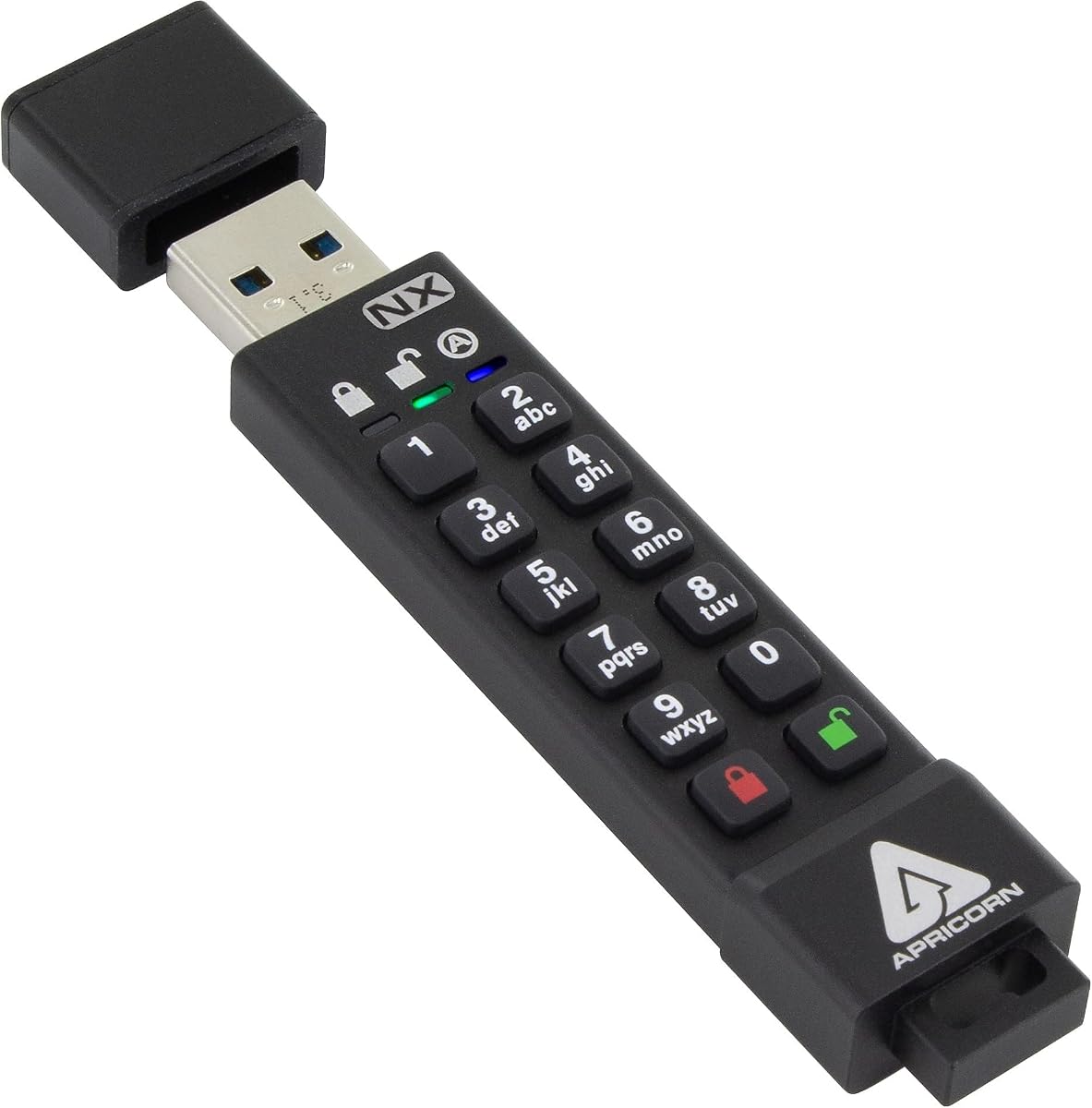
The Apricorn Aegis Secure Key 3 NX stands out as a top-tier option for secure storage. It carries FIPS 140-2 Level 3 validation ensuring government grade security for sensitive data. Its 256-bit encryption provides robust protection against unauthorized access attempts.
We may earn a commission when you buy through this link, at no additional cost to you.
This drive features separate admin and user modes allowing flexible access control. You can set read-only modes to prevent accidental data modification easily. The Aegis Configurator software enables advanced configuration without compromising the hardware security.
While the price is higher than standard drives the security features justify the cost. The limited capacity might not suit large backups but is ideal for documents. The build quality ensures longevity in various environments including industrial settings.
If you need reliable hardware encryption for compliance or personal safety this drive is excellent. It works seamlessly across platforms without software installation. We recommend it for professionals handling confidential information regularly.
This certification ensures the drive meets rigorous government security standards. It guarantees that cryptographic modules are robust against physical tampering and unauthorized access attempts effectively.
Administrators can manage security policies while users access data securely. This separation enhances control and reduces risks of accidental misconfiguration or unauthorized settings changes.
We may earn a commission when you buy through this link, at no additional cost to you.
The Kingston IronKey Vault Privacy 50 offers top-tier enterprise security with ample storage. Its FIPS 197 certification and XTS-AES 256-bit encryption deliver business-grade protection. The drive defends against brute force and BadUSB attacks effectively.
We may earn a commission when you buy through this link, at no additional cost to you.
Users can choose complex passwords or longer passphrase modes for easier recall. Dual read-only settings prevent accidental data changes when transferring files. TAA compliance makes it suitable for government procurement requirements globally.
The premium price reflects its robust security features and large capacity. It may be overkill for casual users but ideal for businesses needing high security. The physically rugged design adds durability for transport.
For organizations handling highly sensitive data this drive provides peace of mind. It balances ease of use with rigorous security protocols. We suggest it for IT managers needing reliable secure storage solutions.
Digitally signed firmware ensures only authentic code runs on the device. This prevents malicious hardware modifications and protects data from sophisticated USB-based cyberattacks effectively.
Flexible password configurations allow users to choose between complex or passphrase modes. This balance improves security without sacrificing convenience for daily access needs.
We may earn a commission when you buy through this link, at no additional cost to you.
This drive combines modern Type-C connectivity with robust hardware encryption. It supports USB 3.2 for fast data transfers. The 128GB capacity makes it versatile for larger files. FIPS validation ensures it meets strict security standards.
We may earn a commission when you buy through this link, at no additional cost to you.
Authentication happens without software installation simplifying the user experience. The internal battery allows operation even when USB power is limited. Separate admin and user modes provide flexible access control options.
While the cost is higher the speed and compatibility justify the investment. Battery management adds a minor maintenance task but ensures consistent performance. It is ideal for modern laptops with USB-C ports.
Recommend this for users needing fast secure transfers on newer devices. It bridges the gap between legacy and modern interfaces securely. IT teams will appreciate the seamless integration and compliance features.
Connects directly to modern devices without adapters for faster transfers. This ensures compatibility with current laptops and tablets while maintaining high data speed.
Allows operation even when host USB power is insufficient. This ensures reliable performance during transfers on diverse devices without interruption.
We may earn a commission when you buy through this link, at no additional cost to you.
The Integral Crypto-197 offers accessible hardware encryption for basic needs. It carries FIPS 197 certification providing government-approved security standards. The dual-layer waterproof design protects against water and physical damage effectively.
We may earn a commission when you buy through this link, at no additional cost to you.
Data auto-locks when removed from a PC ensuring safety. The brute force protection erases data after failed attempts. No software installation is required making it plug-and-play compatible.
While capacity is limited the price and protection are compelling. It suits users needing small secure files rather than media. The waterproof casing makes it reliable for outdoor use.
Buy this if budget is tight but security is non-negotiable. It delivers essential encryption without complex setups. Ideal for students or casual users needing basic data safety.
Hardened internal case and rubberized outer layer shield electronics. This ensures reliable operation even after drops or immersion in water.
The drive automatically encrypts data upon removal from a PC. This prevents unauthorized access if the drive is lost accidentally.
We may earn a commission when you buy through this link, at no additional cost to you.
The iStorage datAshur PRO uses physical PIN entry for security. It requires no software installation simplifying usage across systems. FIPS 140-2 Level 3 certification ensures robust data protection standards globally.
We may earn a commission when you buy through this link, at no additional cost to you.
Dust and water resistance add durability for field work. Transfer speeds are fast due to USB 3.2 support. The drive works on Windows macOS Linux and mobile platforms equally.
PIN entry can be tedious but ensures physical access control. The larger design accommodates the keypad but fits in pockets. It balances usability with high security levels well.
Choose this if you prefer physical authentication over software. It suits travelers needing reliable protection without installation. Compliance teams will value the regulatory adherence and ease of use.
Users enter a PIN directly on the device keypad. This ensures secure access without relying on external software or credentials.
The drive resists dust and water immersion reliably. This makes it suitable for harsh industrial or outdoor environments.
We may earn a commission when you buy through this link, at no additional cost to you.
This drive balances capacity and price effectively. It uses an independent chip for AES256-bit encryption to prevent brute force attacks. The aluminum shell provides physical protection and a premium feel.
We may earn a commission when you buy through this link, at no additional cost to you.
Automatic locking after 30 seconds ensures data safety. Resetting erases data after failed password inputs. The compact design allows easy carry on key rings or pockets.
Brand recognition may be lower but specs are solid. Transfer speeds are decent for general backup tasks. It lacks advanced software but offers essential security features.
Pick this for affordable high-capacity security needs. It fits users prioritizing value without sacrificing basic encryption. Always backup data regularly as a precaution against drive failure.
The drive locks automatically if unplugged or idle for 30 seconds. This minimizes risks of data theft when left unattended.
Ten failed password attempts trigger a full data wipe. This ensures data security even if someone tries to guess the password.
We may earn a commission when you buy through this link, at no additional cost to you.
This drive offers unique biometric security via fingerprint scanner. It reads up to 400MB/s enabling quick transfers. The fingerprint feature stores up to 10 prints for shared use.
We may earn a commission when you buy through this link, at no additional cost to you.
Hardware encryption protects data regardless of OS compatibility. Recognition is fast under one second for smooth access. Capacity is ample for large document or media backups.
Fingerprint tech may struggle in humid conditions. Price reflects convenience but might not suit strict enterprise security. It balances usability and protection well for modern users.
Ideal for users wanting password-free access quickly. It suits teams needing shared secure drives easily. Always backup important data offline due to reliance on biometric scanning.
Save up to ten fingerprints for shared access. This allows quick login without typing passwords repeatedly on different devices.
Scan times are under one second for seamless access. This minimizes wait time and maintains workflow efficiency during transfers.
We may earn a commission when you buy through this link, at no additional cost to you.
The PRO2 improves on the original with better waterproofing. IP68 certification ensures survival in submersion and dust. FIPS compliance offers secure storage for sensitive personal data.
We may earn a commission when you buy through this link, at no additional cost to you.
No software installation is required across platforms. PIN entry provides secure access without digital dependencies. Transfer speeds remain fast for modern data needs.
The rugged size may not suit slim key chains. It is built for tough environments like construction or fieldwork. Performance remains consistent in demanding conditions.
Choose this if you need extreme durability alongside security. It suits engineers or military personnel needing reliability. Ensure regular data backups to avoid loss from physical impact.
The drive survives prolonged submersion and dust ingress. This ensures reliability even in extreme environmental conditions.
FIPS 140-2 Level 3 compliance ensures strict standards. This meets requirements for handling classified or sensitive information safely.
We may earn a commission when you buy through this link, at no additional cost to you.
This drive introduces dual hidden partitions for added privacy. FIPS 140-3 Level 3 certification ensures military-grade security. BadUSB protection prevents malicious firmware execution on hosts.
We may earn a commission when you buy through this link, at no additional cost to you.
Multi-pin options allow complex passwords easily. Zinc casing offers rugged physical resistance to damage. The interface is intuitive for users new to security hardware.
Capacity is limited but suitable for essential files. Setup may take time for advanced settings customization. It balances usability with top-tier security features.
Pick this for high-security needs with flexible access. It suits executives needing covert secure storage options. Regularly test backups to ensure data integrity over time.
Store sensitive data in a separate hidden partition. This keeps files secure without requiring additional external storage.
The drive prevents malicious USB hardware attacks. This ensures connected systems remain safe from compromised firmware.
We may earn a commission when you buy through this link, at no additional cost to you.
The D300S offers straightforward encryption without extra features. It uses AES 256 XTS for strong data protection. Kingston's reputation adds confidence for personal secure use.
We may earn a commission when you buy through this link, at no additional cost to you.
The interface is simple requiring no software setup. It fits basic needs for securing documents and credentials. The small size ensures it stays with your keys easily.
Capacity is limited for backups but fine for text. It lacks advanced modes but delivers reliable core protection. It is a safe pick for casual users.
Choose this for simple encrypted storage needs. It works well for occasional file protection tasks. Always keep copies of critical data in cloud storage.
This encryption standard protects files robustly against brute-force attacks. It ensures data remains unreadable to unauthorized users.
Kingston provides consistent quality and support. This adds confidence for users needing reliable secure storage.
We may earn a commission when you buy through this link, at no additional cost to you.
Selecting the right encrypted USB flash drive depends on your security needs, capacity requirements, and usage environment. This guide covers essential factors to consider.
Look for drives with hardware-based encryption like AES-256. Ensure the device carries FIPS 140-2 or FIPS 140-3 validation for verified security standards. This ensures the encryption module meets government-approved security requirements effectively.
Prioritize hardware encryption over software to prevent OS-level attacks. Always verify certifications before purchasing to ensure compliance with your security policies.
Choose storage capacity based on your typical file sizes. Encrypted drives often cost more per GB so balance security needs with budget. Small capacities suit text files while larger ones support media backups.
Evaluate your current data volume before selecting capacity. Remember that encryption does not reduce file sizes so size matters.
Options include PIN entry, passwords, or biometrics like fingerprints. PIN or hardware keys offer higher security but might be less convenient than passwords. Choose based on how often you access data.
Multi-factor authentication adds extra protection against stolen credentials. Ensure the method suits your workflow to avoid forgetting access details.
Secure drives should be built to withstand physical stress. Look for waterproof and dust-resistant ratings like IP57 or IP68. Rugged metal cases protect the internal electronics from drops effectively.
Check warranty coverage for hardware failures. A durable build ensures the device survives accidental drops or harsh environments.
Ensure the drive works seamlessly with your operating system. Some drives offer software-free operation across Windows, macOS, and Linux. Cross-platform support ensures versatility when transferring files between devices.
Avoid drives requiring drivers specific to one OS. Plug-and-play compatibility simplifies access for all users.
High-speed USB standards like 3.2 ensure quick data transfers. Encryption adds minimal latency on modern hardware so look for fast read/write speeds. Speed matters when moving large files frequently.
Check benchmark results to confirm transfer rates. A fast drive reduces wait times during backups.
Features like automatic lock, brute-force protection, and read-only modes enhance safety. Some drives offer dual partitions to separate data. Consider these based on your specific security requirements.
Auto-locking prevents unauthorized access if the drive is left unattended. These features improve overall data security significantly.
Secure drives range from budget-friendly to premium. Higher prices often reflect better certification and build quality. Balance your security needs with available budget effectively.
Avoid the cheapest options lacking proper encryption. Investing in a reputable drive ensures long-term data safety.
Always authenticate before accessing files to maintain security. Use strong unique passwords that are hard to guess. Remember that losing the password means losing the data permanently.
Store the drive in a dry cool place away from magnets. Avoid dropping it to prevent internal damage. Some drives require internal battery charging so check this regularly.
Regularly backup data to a separate secure location. Even encrypted drives can fail over time. Test backups periodically to ensure files are accessible when needed.
Yes, hardware-encrypted drives protect data effectively even if stolen. FIPS-validated models meet strict government standards. Always choose hardware over software encryption for maximum security.
Most encrypted drives wipe data after failed attempts to protect privacy. There is usually no way to recover data without the password. Store recovery PINs securely if available.
Modern hardware encryption has minimal performance impact. Transfer speeds depend mostly on the USB standard used. Fast USB 3.0 or later models maintain good speeds.
Most modern encrypted drives support macOS without extra software. Some require specific drivers so check compatibility. Cross-platform options work seamlessly on both systems.
Many rugged drives carry IP57 or IP68 ratings for protection. Check the specific model before buying. This ensures reliability in harsh conditions.
FIPS certification ensures the cryptographic module meets security standards. It guarantees robust protection against unauthorized access. Look for FIPS 140-2 or 140-3 on product details.
We highlighted top picks like the Apricorn Aegis and Kingston IronKey for superior security. Each option offers unique strengths for different users needs. Select based on encryption standards and build durability.
Prioritize FIPS validation and hardware encryption over software. Physical protection like waterproofing matters for field work. Balance capacity with security requirements effectively.
Always verify current availability and prices before purchasing. Models may change so check product details regularly. Secure storage is worth the investment for your data safety.