
SSK Portable SSD 1TB
4.5Editor score
Up to 1050MB/s speeds
Lightweight aluminum case
Dual cable included
Find the best external SSD for Linux with this expert guide comparing top models for speed, durability, and compatibility with open source systems and tools.
Selecting the right external solid state drive for Linux requires careful consideration of file system compatibility and performance. Linux users need drives that work seamlessly with ext4 and btrfs without extra configuration or drivers.
We evaluated ten top rated portable SSDs based on speed, build quality, and cross platform support. Our analysis focuses on models that offer reliable connectivity and sustained performance for demanding workflows.
Each pick highlights specific strengths for different use cases from budget friendly options to premium high speed drives. Prices and availability change frequently so always verify current deals before purchasing.
4.5Editor score

4.7Editor score

4.6Editor score
This side by side comparison highlights key specifications for all ten selected drives to help you choose the right model for your specific Linux environment and needs.





The Samsung T7 Portable SSD stands out as the top choice for Linux users seeking a balance of performance and reliability. With a high user rating and robust build quality it delivers consistent speeds across various distributions.
We may earn a commission when you buy through this link, at no additional cost to you.
Its PCIe NVMe technology ensures that large file transfers and data backups complete rapidly. The aluminum unibody not only protects internal components but also helps dissipate heat during extended use.
While it lacks the rugged features of shielded models its shock resistance is sufficient for most daily scenarios. The included Magician software provides useful monitoring tools even if some features are Windows focused.
For developers and creators needing a dependable daily driver this drive offers the best combination of speed and portability. Its plug and play nature makes setup effortless on any Linux desktop or laptop.
Linux handles exFAT and NTFS well but often prefers ext4. This drive works flawlessly after reformatting to ext4 for native performance.
The metal casing acts as a heatsink keeping internal temperatures stable even during sustained write operations common in development workflows.
We may earn a commission when you buy through this link, at no additional cost to you.
The SSK Portable SSD delivers excellent value for Linux users on a budget without sacrificing critical performance metrics. It offers speeds comparable to premium models at a significantly lower cost.
We may earn a commission when you buy through this link, at no additional cost to you.
Its aluminum alloy case provides decent heat dissipation and protection while remaining incredibly lightweight. This makes it ideal for students or professionals traveling frequently with limited bag space.
Data security is handled through standard S.M.A.R.T diagnostics and TRIM support which helps maintain performance over time. However users should note the warranty terms may be less comprehensive than major brands.
For those prioritizing cost efficiency and raw speed this drive is a strong contender. It handles routine backups and media storage tasks with ease on any Linux system.
By focusing on core storage functions SSK avoids extra bloatware and offers a direct storage solution that works perfectly with native Linux tools.
Weighing just 36.6 grams this drive can slip into a jacket pocket or small pouch making it the most portable option in our lineup.
We may earn a commission when you buy through this link, at no additional cost to you.
The Samsung T9 Portable SSD represents the pinnacle of portable storage performance with sustained speeds up to 2000MB/s. This makes it the ideal choice for high demand workflows like video editing on Linux.
We may earn a commission when you buy through this link, at no additional cost to you.
Its advanced thermal solution ensures that the drive maintains peak performance even during heavy sustained writes. This prevents throttling which is crucial for professionals managing large data sets.
The inclusion of Magician software allows for drive health monitoring and encryption management although Linux users may rely more on native tools for these tasks. The USB 3.2 Gen 2×2 support ensures maximum throughput.
If budget is less of a concern and speed is paramount this drive offers unmatched capability. It is future proof for next generation laptops and desktops with high speed ports.
With double the bandwidth of standard Gen 2 connections the T9 significantly reduces wait times when moving terabytes of data across a Linux workstation.
The dynamic thermal guard actively manages heat ensuring that the drive stays cool to the touch and operates reliably under continuous load.
We may earn a commission when you buy through this link, at no additional cost to you.
The SanDisk Extreme Portable SSD is designed for users who need rugged durability alongside high performance. Its IP65 rating makes it resistant to water and dust which is ideal for fieldwork or outdoor use.
We may earn a commission when you buy through this link, at no additional cost to you.
With a 2TB capacity it offers ample space for extensive Linux system images or large media libraries. The included 256-bit AES hardware encryption adds a layer of security for sensitive data.
While it is slightly larger than some competitors the carabiner loop allows it to be securely attached to gear. This practical design feature enhances portability in active environments.
For Linux users working in challenging conditions this drive provides peace of mind. Its standard USB-C connectivity ensures it works with modern laptops and adapters without hassle.
The IP65 rating means you can use this drive in light rain or dusty workshops without worrying about liquid or debris damage to the internals.
Hardware encryption protects your files even if the drive is lost or stolen ensuring that unauthorized users cannot access your Linux backups.
We may earn a commission when you buy through this link, at no additional cost to you.
The Lexar ES3 is an excellent option for those prioritizing portability and style. At only 10.5mm thick it slips easily into a pocket making it one of the slimmest drives available.
We may earn a commission when you buy through this link, at no additional cost to you.
Performance is strong with speeds up to 1050MB/s which is sufficient for most general Linux computing tasks. The included DataShield software allows users to set password protection if needed.
Its compatibility extends across a wide range of devices from laptops to gaming consoles. This versatility makes it a good secondary drive for testing software or accessing data across systems.
If you need a drive that you can carry everywhere without bulk this model fits the bill. It handles daily file transfers and system backups efficiently on any Linux desktop.
The thin profile means this drive adds almost no weight to your bag allowing you to travel lighter while still carrying significant storage capacity.
Lexar includes encryption software for securing sensitive files which can be installed on Linux if the binary is available or through Wine if needed.
We may earn a commission when you buy through this link, at no additional cost to you.
The Samsung T7 Shield combines the speed of the T7 with ruggedized protection suitable for rough environments. Its IP65 rating and drop resistance make it ideal for field research or travel.
We may earn a commission when you buy through this link, at no additional cost to you.
With a 2TB capacity it offers generous storage for full system backups or extensive media archives. The rubberized exterior provides grip and adds to the overall durability of the unit.
Performance remains consistent even when the drive is exposed to dust or moisture. This reliability ensures that your Linux system data remains safe and accessible in various conditions.
For users who need a tough drive that can survive accidental drops and spills this is the top choice. It balances durability with the fast performance expected from Samsung.
Designed to withstand drops up to 9.8 feet this drive offers superior protection against accidents compared to standard consumer portable SSDs.
The 2TB option allows you to store multiple large Linux distributions and backups on a single drive reducing the need for multiple external devices.
We may earn a commission when you buy through this link, at no additional cost to you.
Western Digital My Passport SSD offers a blend of speed and security that appeals to professionals. The hardware encryption ensures that data remains safe even if the drive is physically accessed.
We may earn a commission when you buy through this link, at no additional cost to you.
Its performance is on par with other top drives in this class delivering fast read and write speeds for efficient file transfers. The compact design makes it easy to carry around.
While the password protection features often rely on specific software they are compatible with Windows and Mac. Linux users can still use the drive without encryption for open data needs.
For those who need a trusted brand with reliable support this drive is a solid choice. It works well for daily tasks and backups on any Linux laptop or desktop.
Hardware encryption protects your data at the drive level providing a robust security layer that is independent of the operating system.
Western Digital has a long history of producing dependable storage which gives users confidence in the drive's longevity and warranty support.
We may earn a commission when you buy through this link, at no additional cost to you.
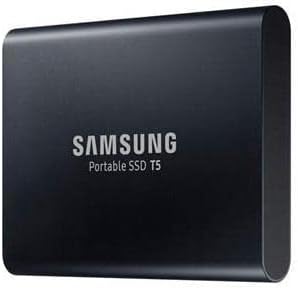
The Samsung T5 remains a reliable choice for users who do not need the latest speed standards. Its durable metal design has stood the test of time and offers excellent protection.
We may earn a commission when you buy through this link, at no additional cost to you.
With a 2TB capacity it provides ample space for storing large datasets or media files. The USB 3.1 connection is compatible with almost any modern device including Linux laptops.
While it is slower than the T7 or T9 it still offers significant speed improvements over traditional hard drives. This makes it a good balance for budget conscious buyers needing capacity.
For everyday storage needs where absolute maximum speed is not critical this drive delivers solid performance. Its high user rating reflects its long term reliability and satisfaction.
The T5 was one of the first portable SSDs to gain widespread adoption and its design continues to be trusted by users worldwide.
Being USB 3.1 it works with older ports and adapters ensuring you can use it with any computer without needing special cables or hubs.
We may earn a commission when you buy through this link, at no additional cost to you.
The Samsung T7 500GB offers the performance of the flagship T7 in a more compact and affordable form. It is ideal for students or users who need fast portable storage without excess capacity.
We may earn a commission when you buy through this link, at no additional cost to you.
Its thermal guard technology ensures that the drive does not overheat during use which is critical for maintaining consistent speeds. The drop resistance provides peace of mind for daily carrying.
At 500GB it is perfect for carrying essential documents and media files without occupying too much space in your bag. The red color gives it a distinctive look compared to standard gray drives.
For those who value speed and portability over massive storage this drive is a great option. It performs equally well on Linux as it does on Windows or Mac systems.
Dynamic thermal guard monitors temperature and adjusts performance to prevent overheating which extends the lifespan of the drive.
The compact size and fast speed make it perfect for students carrying lecture notes and code repositories across campus with ease.
We may earn a commission when you buy through this link, at no additional cost to you.
The Samsung T5 500GB is a solid entry level option for Linux users looking for reliable storage without breaking the bank. It delivers consistent performance for everyday tasks and light backups.
We may earn a commission when you buy through this link, at no additional cost to you.
Its metal design ensures durability and efficient heat dissipation even at lower speeds. The included encryption offers a standard level of security for personal files.
With a 500GB capacity it is suitable for storing essential data and documents. The 3-year limited warranty provides additional peace of mind for the investment.
For those who need a basic portable drive for occasional use this model is a safe choice. It handles Linux file systems well and requires no special setup.
Offering a trusted brand at an entry level price point this drive provides excellent value for users who do not need the latest high speed models.
The 3-year limited warranty covers manufacturing defects ensuring that you are supported if any issues arise with the drive.
We may earn a commission when you buy through this link, at no additional cost to you.
Choosing the right external SSD for Linux involves evaluating several key factors to ensure compatibility and performance.
Linux uses file systems like ext4 and btrfs which offer better performance and features for the OS. While many drives come formatted as exFAT or NTFS for general compatibility you may need to reformat to ext4 for native Linux usage.
Ensure the drive supports the file system you need or be prepared to reformat it using standard Linux tools.
Modern drives use USB-C and USB 3.2 Gen 2 which provide fast data transfer speeds. If your Linux system has older ports you may need an adapter to connect these drives.
Check your system's available ports and ensure the drive comes with the necessary cables or adapters for your setup.
Performance varies significantly between drives with Gen 2 models offering up to 1050MB/s compared to Gen 1 models around 540MB/s. For large file transfers or video editing higher speeds are essential.
Prioritize drives with Gen 2 speeds if you need fast backups or media workflows.
Rugged drives with IP ratings and drop resistance are ideal for fieldwork or travel. A metal casing helps dissipate heat which prevents throttling during heavy use.
Choose a build quality that matches your usage environment to ensure the drive lasts.
Storage needs range from 500GB for simple backups to 2TB or more for large media or system images. Consider your data size and growth potential when selecting capacity.
Higher capacity drives often offer better cost per GB so evaluate value alongside capacity.
Hardware encryption and password protection add a layer of security for sensitive data. Ensure any included software works with your Linux environment or use native tools instead.
Look for drives with standard AES encryption which can be managed even without proprietary software.
Major brands offer 3-year warranties which provide protection against defects. Reliable support ensures you have assistance if technical issues arise.
Check warranty terms to ensure they cover your region and usage type.
Some drives include management software for monitoring health or cloning data. Linux users often rely on native tools but software can simplify tasks like encryption.
Verify software compatibility with your specific Linux distribution before purchasing.
Connect the drive to a USB port and wait for the system to mount it. You may need to format the drive to ext4 using Disk Utility or command line tools for optimal Linux compatibility.
Use standard file managers like Nautilus or Dolphin to drag and drop files. For large backups consider using rsync or duplicati for efficient data transfer.
Always safely eject the drive before unplugging it to prevent data corruption. Avoid dropping or exposing the drive to extreme temperatures to maintain performance.
Yes most USB external SSDs work automatically with Linux using standard drivers. You may need to format the drive to a Linux file system like ext4 for native support.
Use the Disk application or terminal commands like mkfs.ext4 to reformat the drive. Ensure you back up existing data before formatting as the process erases all files.
Most Linux distributions support exFAT out of the box for reading and writing. It is ideal for sharing files between Linux Windows and Mac systems.
SSDs generate heat during heavy use. A metal case helps dissipate heat but if it gets too hot it may throttle performance. Ensure proper ventilation.
Gen 2 offers speeds up to 1050MB/s while Gen 2×2 supports up to 2000MB/s. You need a compatible USB port to utilize the higher speeds.
For critical data back up at least weekly. Use automated tools like cron jobs to schedule regular backups ensuring your files remain safe.
Yes you can install a Linux distro on an external SSD and boot from it. This is useful for testing systems or carrying your OS with you.
TRIM may work automatically depending on your controller and driver support. Check fstrim logs to verify if your drive supports and receives TRIM commands.
The Samsung T7 offers the best overall balance for most users while the SSK provides great budget value. The Samsung T9 is the top choice for those needing maximum speed.
Prioritize compatibility and speed when selecting a drive to ensure it meets your workflow needs. Look for models with good durability if you plan to travel with them.
Always verify current prices and availability before purchasing as deals change frequently. Choosing the right drive ensures your Linux system runs smoothly and data remains secure.