
Protectli Vault FW4B
4.6Editor score
Intel Quad Core Celeron
4 Intel Gigabit ports
Compatible with pfSense
Discover the top firewall appliances for 2026. We compare performance, security features, and ease of use to help you secure your network effectively.
Choosing the right firewall appliance is critical for protecting your network from modern cyber threats. These devices inspect traffic, block malicious activity, and manage access to ensure your data remains safe from unauthorized intrusions.
We evaluated ten top-rated models based on throughput, port configuration, security features, and ease of deployment. Our analysis covers enterprise-grade options as well as compact solutions for small offices and home labs.
Each pick highlights specific strengths like speed, software compatibility, or cost efficiency. Prices and availability can fluctuate frequently, so verify current details before making your final decision to ensure the best value for your setup.
4.6Editor score

4.4Editor score

4.7Editor score
This side-by-side comparison highlights key specifications across all ten selected models. Use this table to quickly assess performance capabilities, port counts, and unique features before diving into detailed reviews.


The FortiGate-60F stands out as a top choice for securing medium-sized networks. It combines robust performance with a versatile port configuration that supports complex network layouts. Users appreciate its reliability and the deep integration with Fortinet's security ecosystem.
We may earn a commission when you buy through this link, at no additional cost to you.
This device delivers impressive speeds with 1.4 Gbps IPS throughput and specialized hardware for SSL inspection. The inclusion of ten Gigabit Ethernet ports allows for seamless segmentation of WAN, DMZ, and internal traffic without needing extra switches. FortiGuard Labs integration ensures you benefit from continuous threat intelligence updates.
While the hardware is excellent, remember that security services and subscriptions are sold separately. You must budget for ongoing licensing to unlock advanced features like real-time threat filtering. Additionally, the initial cost might be higher than entry-level consumer routers.
Buyers seeking enterprise-grade protection for a growing office should strongly consider this model. It strikes an excellent balance between physical connectivity and advanced security capabilities. For those needing a dedicated edge device with high throughput, this appliance is a reliable investment.
Leverages AI-powered FortiGuard Labs to identify and mitigate both known and unknown threats across encrypted traffic.
Zero Touch Integration with Fortinet Security Fabric allows for streamlined setup and remote management capabilities.
We may earn a commission when you buy through this link, at no additional cost to you.
The Protectli Vault FW4B is an ideal entry point for those wanting a dedicated firewall without high costs. It offers a compact fanless design that operates silently while providing solid performance for home labs or small offices. The hardware is specifically validated for popular open-source firewall software.
We may earn a commission when you buy through this link, at no additional cost to you.
Equipped with an Intel Quad Core Celeron and AES-NI support, this unit handles encryption tasks efficiently. It ships with 8GB RAM and a 120GB mSATA SSD to ensure smooth operation of software firewalls like pfSense or OPNsense. Users benefit from four Gigabit Ethernet ports for typical network segmentation.
Keep in mind that no operating system is pre-installed, so you must install the firmware yourself. This process is straightforward for technical users but might deter those seeking a plug-and-play solution out of the box. Coreboot BIOS is optional and requires user installation.
This appliance is perfect for DIY enthusiasts who want full control over their security software. It delivers exceptional value for the price and runs quietly due to its fanless build. If you are comfortable with software installation, this is one of the best values available.
Hardware is tested with pfSense, untangle, and OPNsense to ensure seamless integration with your preferred firewall software.
Fanless construction ensures silent operation making it suitable for home offices or quiet environments.
We may earn a commission when you buy through this link, at no additional cost to you.
The SonicWall TZ280 delivers outstanding performance for businesses that need robust network security. Its Reassembly-Free Deep Packet Inspection engine ensures high speed traffic filtering without sacrificing safety. This model is designed to handle heavy loads while maintaining low latency for critical applications.
We may earn a commission when you buy through this link, at no additional cost to you.
With up to 2.5 Gbps firewall inspection, this appliance is well-suited for offices with demanding internet needs. The connectivity includes eight Gigabit Ethernet ports and two SFP ports for fiber uplinks. Zero-touch deployment simplifies setup whether you manage it on-box or via the cloud NSM.
Security services and updates are not included with the hardware purchase. You must buy separate subscriptions to activate features like Capture ATP sandboxing and advanced anti-malware protection. This adds to the total cost of ownership but ensures you get the latest threat definitions.
Select this appliance if you require high-speed inspection and flexible connectivity for branch offices. It offers a reliable foundation for securing distributed sites and remote workers. For businesses prioritizing speed and advanced gateway protection, this model is a top-tier choice.
Patented RFDPI engine provides 2.5 Gbps inspection speed to keep network performance high even under heavy loads.
Mix of Gigabit Ethernet and SFP ports allows for versatile network design and fiber uplink options.
We may earn a commission when you buy through this link, at no additional cost to you.
For users already invested in the Ubiquiti ecosystem, the Unifi Security Appliance offers seamless integration. It connects directly to your Unifi Controller for centralized network management. This ensures consistent policies across your switches and access points without complex additional configuration.
We may earn a commission when you buy through this link, at no additional cost to you.
The device includes three Gigabit ports and supports convenient VLAN management for network segmentation. Quality of Service features help prioritize enterprise VoIP traffic to ensure clear communications. Its compact white design blends well into modern office environments whether mounted on a wall or placed on a desk.
One limitation is the requirement for a Unifi Controller software to manage device settings. If you prefer standalone hardware management, this might feel restrictive. Additionally, the port count is lower than some competitors limiting physical expansion possibilities.
This appliance is best for small businesses using Unifi networking gear who want unified control. It simplifies administration by bringing routing and security into your existing dashboard. If ecosystem consistency is a priority for your setup, this device is a strong match.
Integrates with Unifi Controller for a single pane of glass to manage your entire network infrastructure.
Built-in QoS ensures enterprise VoIP traffic gets priority for reliable voice communications.
We may earn a commission when you buy through this link, at no additional cost to you.
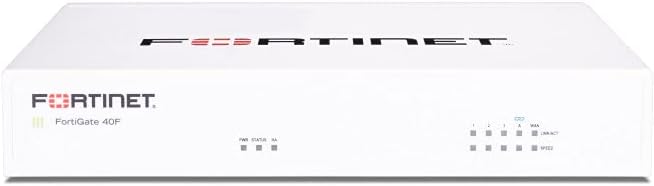
The FortiGate-40F is designed specifically for small businesses and branch offices needing reliable security. Its compact fanless form factor minimizes space usage and noise in office environments. Despite its size, it delivers powerful performance suitable for typical small business internet connections.
We may earn a commission when you buy through this link, at no additional cost to you.
With five Gigabit ports and robust security processors, it handles up to 1 Gbps IPS throughput efficiently. The device includes integration with FortiGuard Labs for AI-powered threat identification across your traffic. Management is simplified through a user-friendly console that supports comprehensive network automation.
As a standalone hardware unit, security services require separate subscription purchases to activate. You should budget for ongoing costs to maintain full protection against evolving threats. While this is standard for this category, it increases the initial budget planning needed.
Opt for this model if you need a dedicated gateway that fits easily on a desk. It balances performance and physical size well for smaller offices. With its ease of deployment and solid throughput, it is a practical choice for growing networks.
Designed for branch offices with a fanless design that ensures quiet operation and minimal footprint.
Uses FortiGuard Labs to identify threats automatically without manual configuration steps.
We may earn a commission when you buy through this link, at no additional cost to you.
The Netgate 1100 comes pre-loaded with pfSense+ to get you running quickly. It provides a complete solution for secure edge networking without needing extra setup steps. This makes it highly convenient for users who want a dedicated firewall with supported software.
We may earn a commission when you buy through this link, at no additional cost to you.
Built with an ARM dual core processor, it delivers near gigabit routing for common home traffic. The device operates silently with low power draw making it suitable for desktop or wall mounting. Three Gigabit ports allow for separate WAN and LAN configurations with switched flexibility.
Shipping requires an adult signature to ensure secure delivery of the device. While powerful for home and small office use, throughput might be lower than x86 based appliances for heavy enterprise loads. Technical support is included via Netgate TAC Lite for help with setup.
This is an excellent choice for those seeking a hassle-free pfSense deployment. It removes the complexity of installing firmware manually. If you value convenience and official support for open-source firewalls, this gateway is a reliable option.
Pre-loaded with pfSense+ software so you can start customizing your secure network immediately upon unboxing.
Includes technical support and a hardware warranty to assist with deployment and maintenance needs.
We may earn a commission when you buy through this link, at no additional cost to you.
The FORTINET FG-100E is a network security appliance designed for robust enterprise-level protection. It focuses on identifying threats and applications to maintain strict security policies. This model is built to handle the demands of larger networks with varied traffic types.
We may earn a commission when you buy through this link, at no additional cost to you.
Its primary strengths include protecting against known exploits and detecting unknown attacks efficiently. The device identifies thousands of applications to ensure granular control over network resources. This depth of inspection is critical for preventing data leaks and unauthorized access.
As with most enterprise gear, setup complexity can be higher compared to consumer routers. You may need dedicated IT resources to manage configurations properly. However, the level of security provided justifies the effort for critical business networks.
Choose this appliance if you require deep visibility and control over your enterprise traffic. It offers the protection needed for environments handling sensitive data. For organizations prioritizing advanced threat detection, this model is a strong contender.
Identifies thousands of applications to enforce precise security policies and prevent unauthorized access.
Detects unknown attacks and protects against malware to keep your network safe from emerging risks.
We may earn a commission when you buy through this link, at no additional cost to you.
The Palo Alto PAN-PA-220 brings next-generation firewall technology to compact environments. It includes an 8-port configuration to support diverse network needs. Palo Alto Networks is known for advanced threat prevention which is integrated into this appliance.
We may earn a commission when you buy through this link, at no additional cost to you.
As a new listing, specific details on throughput and features are limited. However, it represents the brand's focus on security appliance efficiency. Users generally expect high quality inspection capabilities with this hardware family.
Check recent user reviews for current satisfaction levels before purchase. Ratings can vary based on specific configurations or service bundles. Ensure compatibility with your existing network architecture before buying this hardware unit.
This is a suitable option for those seeking Palo Alto's security approach in a smaller form. It delivers modern protection features for organizations that trust the brand. Verify details to confirm it meets your specific connectivity requirements.
Delivers next-generation firewall capabilities to protect against complex modern cyber threats.
8-Port configuration provides flexible connectivity options for various network setups.
We may earn a commission when you buy through this link, at no additional cost to you.
The Protectli Vault FW4C upgrades connectivity with 2.5 Gigabit Ethernet ports. This allows for faster internal network speeds compared to standard Gigabit units. It remains a compact fanless unit suitable for quiet environments like home offices.
We may earn a commission when you buy through this link, at no additional cost to you.
Powered by an Intel J3710 Pentium Quad Core processor it handles encryption tasks with AES-NI support. Four 2.5 Gigabit ports let you build a high-speed LAN while running firewall software. It ships with 4GB RAM and 32GB SSD to support typical open-source solutions.
Keep in mind that RAM is 4GB which might limit heavy virtualization. No operating system is pre-installed so you must install your preferred software. This model is best for those wanting faster wired connections without buying a full server.
Choose this appliance if you need faster Ethernet ports in a compact footprint. It supports pfSense and OPNsense seamlessly. For users upgrading existing Gigabit networks to multi-gigabit speeds this offers a practical and affordable solution.
Four 2.5 Gigabit ports allow for higher throughput LAN connections compared to standard appliances.
Combines a powerful CPU with silent fanless operation for efficient home or office use.
We may earn a commission when you buy through this link, at no additional cost to you.
The FortiGate-60F Bundle includes one year of FortiGuard Unified Threat Protection and support. This removes the need for immediate additional purchase to get full security features. It is a complete package for businesses that want protection ready out of the box.
We may earn a commission when you buy through this link, at no additional cost to you.
Features include advanced web filtering and anti-botnet technologies to secure against online threats. FortiCare Premium ensures high-quality support for service continuity. This setup is tailored for medium-sized businesses needing robust security without extensive infrastructure.
While convenient the subscription covers only one year. You will need to renew to maintain full protection features after the term ends. This upfront cost is higher than hardware-only units but offers immediate peace of mind.
Select this bundle if you want a hassle-free start with verified security services. It ensures your network is protected from day one. For organizations that prefer bundled solutions this appliance offers a reliable and supported entry point.
Includes one year of threat protection so you do not need to buy licenses separately to secure your network.
FortiCare Premium ensures high-quality service to help you maintain continuity during security events.
We may earn a commission when you buy through this link, at no additional cost to you.
Selecting the right firewall appliance requires balancing performance, features, and budget. This guide breaks down key factors to help you make an informed decision for your specific network needs.
Throughput indicates how much traffic the appliance can process per second without slowing down your network. Look for IPS throughput ratings that match or exceed your internet connection speed to avoid bottlenecks. Enterprise models often offer higher speeds than consumer units.
Always choose a model with enough power to handle your peak traffic loads comfortably.
The number and type of Ethernet ports determine how devices connect to your firewall. Ensure you have enough LAN ports for wired devices and dedicated WAN ports for your internet line. Some units offer SFP ports for fiber connections or future expansion.
Count your current devices and plan for future growth when selecting port counts.
Many appliances run open-source software like pfSense or proprietary systems like FortiOS. Open-source options offer flexibility and free licenses but require manual installation. Proprietary systems are easier to use but often need paid subscriptions for advanced features.
Decide between flexibility and ease of use based on your technical expertise and support preferences.
Firewall appliances come in desktop or rack-mountable designs. Desktop units are easy to place on shelves but consume desk space. Rack units save space and look professional in server rooms but need mounting hardware.
Consider your available space and aesthetic preferences when choosing the physical design.
Advanced protections like antivirus and intrusion prevention often need separate service subscriptions. Check what features are included out of the box versus what requires a paid license. Budget for ongoing costs if you need continuous threat intelligence updates.
Verify if security services are included or sold separately to avoid hidden costs later.
A user-friendly interface simplifies configuration and monitoring of your firewall. Look for web-based consoles that provide clear status reports and easy rule management. Some models offer cloud management for remote control without local access.
Test demo interfaces if possible to ensure the workflow matches your management style.
Modern firewalls leverage real-time threat feeds to block known malicious IPs and domains. This proactive approach is critical for stopping new vulnerabilities before they are patched. Ensure your appliance supports automatic updates of these threat databases.
Prioritize models with strong threat intelligence to protect against evolving online risks.
Hardware failures can disrupt your network so a reliable warranty is essential. Some vendors offer technical support included with the purchase while others charge extra. Check how long the warranty lasts and what steps are needed to claim service.
Always verify support terms before buying to ensure you get help if issues arise.
Begin by connecting your modem to the WAN port and your local network to LAN ports. Log in to the admin interface using default credentials and immediately change the password for security. Configure basic rules to allow standard traffic before enabling strict filters.
Regularly update firmware to patch security vulnerabilities and add new features. Schedule routine checks to review blocked traffic logs and adjust policies as needed. Keeping your device updated ensures it remains effective against emerging threats.
Place your appliance in a well-ventilated area to prevent overheating and ensure stable operation. Avoid stacking devices on top of it if it is fanless to maintain airflow. Periodic cleaning of dust from vents helps maintain performance over long periods.
A standard router directs traffic between networks but lacks deep packet inspection capabilities. Firewall appliances add advanced security layers like intrusion prevention and content filtering. They protect data beyond simple routing to defend against sophisticated cyber attacks.
Basic firewall functions often work without a subscription. However features like antivirus threat intelligence and web filtering usually require paid licenses. Check specific model details to see which services are free and which need ongoing fees.
No pfSense works on specific hardware with compatible network cards. Appliances like Protectli and Netgate are pre-validated for pfSense to ensure stability. Verify hardware support lists before installing software on generic or other devices.
For a small office with 100 Mbps internet a device with 500 Mbps to 1 Gbps IPS throughput is sufficient. This ensures your firewall does not become a bottleneck during peak hours. Higher throughput is needed if you have fiber or multi-gigabit connections.
Most modern appliances offer cloud management portals or web interfaces over secure connections. You can log in from anywhere to adjust settings or view logs. Always use strong passwords and two-factor authentication to protect remote access.
Setup complexity varies by model. Some come pre-configured for quick plug-and-play use. Others require detailed network planning and rule configuration. Basic users should opt for managed solutions while tech-savvy users may prefer customizable open-source options.
Choosing the right firewall appliance depends on your specific performance needs and budget. The FortiGate-60F offers top-tier performance while the Protectli Vault FW4B provides excellent value for DIY users.
Prioritize features like throughput, port count, and software compatibility to match your environment. Ensure you account for subscription costs if you require advanced threat protection services for your network.
Prices and availability change regularly so verify current details before completing your purchase. Investing in the right security hardware today protects your data and network infrastructure for the future.