
Thrustmaster TCA Sidestick Airbus Edition
4.4Editor score
Officially licensed by Airbus
21 action buttons
Compact sidestick design
Discover the top flight sticks for the Xbox Series X in this detailed guide comparing controls, comfort, and compatibility for immersive simulator gaming
Flight sticks for the Xbox Series X transform your gaming setup into a realistic cockpit experience. These controllers offer precision input and ergonomic designs tailored for simulation enthusiasts seeking deeper immersion.
We compared ten leading models based on build quality, button layout, and software compatibility. Our analysis focuses on how each stick performs across popular flight simulators available on the Xbox platform today.
Each pick highlights unique strengths such as detachable throttles, hall effect sensors, or official licensing. Note that prices fluctuate frequently so check current listings before making your final purchasing decision online.
4.4Editor score

4.4Editor score

4.3Editor score
The following table provides a side-by-side overview of all ten models included in this roundup to help you quickly compare key specifications and features.


The Thrustmaster T-Flight Hotas One stands out as a reliable entry point for flight simulation on Xbox. It holds a solid 4.4 rating from users who appreciate its realistic control layout and hands-on flying experience.
We may earn a commission when you buy through this link, at no additional cost to you.
Its ergonomic stick design features adjustable resistance and multiple programmable buttons for smooth aircraft control. The detachable throttle allows you to use the stick on your lap or separate it for a desk setup.
While it lacks advanced features like vibration feedback, the plug-and-play setup ensures instant compatibility with Windows PC and Xbox Series X. It adapts well to various flight simulation types from commercial aviation to combat jets.
This controller is ideal for beginner pilots and enthusiasts looking for a budget-friendly option. We recommend it for anyone wanting to start simulating flights without a massive financial investment or complex calibration.
The detachable throttle lets you position the joystick on your lap while keeping the throttle on a desk for tailored comfort.
It works seamlessly with Thrustmaster TFRP rudder pedals for enhanced steering control if you wish to upgrade later.
We may earn a commission when you buy through this link, at no additional cost to you.
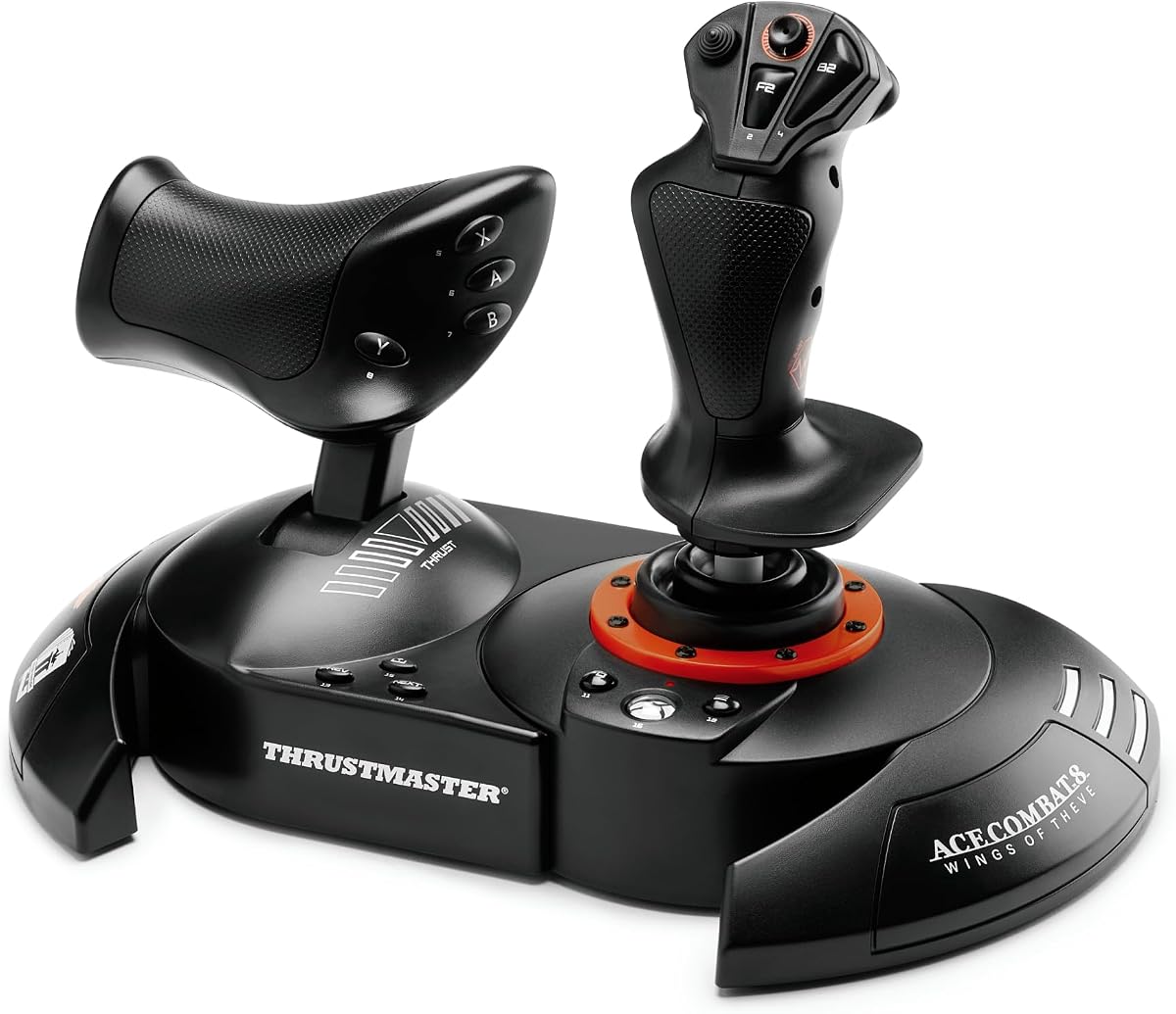
This controller brings a specialized combat focus with official licensing for Ace Combat 8. Although the rating is currently N/A, the technology promises absolute combat precision with 16-bit sensors and vibration feedback.
We may earn a commission when you buy through this link, at no additional cost to you.
Feel every missile impact and cannon burst directly in your palm thanks to the built-in vibration motor. The H.E.A.R.T. technology guarantees precision that does not degrade over time even after intense dogfighting sessions.
You can customize your joystick resistance and detach the throttle to suit your gaming style. The dual rudder system offers two options for controlling aircraft rotation giving you total freedom in combat situations.
We suggest this for players who prioritize realism and tactile feedback. It is a strong choice for those deeply invested in the Ace Combat universe and seeking a professional-grade controller.
The proprietary H.E.A.R.T. technology ensures your controls remain accurate without the drift common in potentiometers.
The vibration motor enhances the sense of speed and impact making every maneuver feel authentic and connected.
We may earn a commission when you buy through this link, at no additional cost to you.
The Turtle Beach VelocityOne Flightstick offers a high-tech approach with an integrated OLED display and touchpad. It scores a 4.2 rating from users who value customization and modern interface features.
We may earn a commission when you buy through this link, at no additional cost to you.
Its non-contact main axes ensure long-term reliability while the OLED screen provides real-time flight management data. The touchpad navigation sensor allows for full cursor control without switching away from your flight deck.
You get 27 programmable buttons and customizable RGB lighting to match your cockpit style. The multi-function throttle and flaps levers provide deep control over aircraft systems during simulation flights.
This model is best for tech enthusiasts who want a modern interface. We recommend it if you need detailed flight data at a glance and enjoy customizing your setup heavily.
The OLED display keeps you informed on vital parameters without cluttering your game screen unnecessarily.
The design supports both left and right-handed users making it versatile for various seating arrangements.
We may earn a commission when you buy through this link, at no additional cost to you.
This premium setup boasts 73 programmable inputs and high-resolution Hall-Effect sensors for precision. The rating is 2.5 which suggests some user feedback challenges despite its advanced features and robust build.
We may earn a commission when you buy through this link, at no additional cost to you.
You can adjust stick tension and throttle resistance to match your preference. The full-color display provides real-time flight data and quick performance tuning to enhance your simulation experience.
Its expandable ecosystem supports pedals and mounting solutions for a full cockpit setup. The VelocityOne Flight Hangar app enables full customization and personalized settings for your specific aircraft.
We advise caution given the rating but acknowledge the potential for a complete cockpit. It fits users willing to invest heavily in a professional-grade setup for serious simulation.
With over 70 inputs you can map nearly every cockpit function to your control surface.
Adjusting stick tension helps reduce fatigue during long hours of intensive gameplay or practice.
We may earn a commission when you buy through this link, at no additional cost to you.
This kit includes the stick throttle and rudder pedals for a complete flight experience. With a 4.5 rating it is highly regarded for its plug-and-play simplicity and immediate functionality.
We may earn a commission when you buy through this link, at no additional cost to you.
The pedals feature slide rails for smooth precise steering while the joystick offers adjustable resistance for a great fit. All functions are already configured for immediate takeoff without complex calibration.
It allows for customized positioning of the joystick and throttle to suit your space. The compact design fits well in home setups where space might be limited but realism is key.
We recommend this for users who want a ready-to-fly package. It removes the friction of finding compatible pedals and ensures all components work harmoniously from the start.
Configured out of the box you can start your first mission within minutes of unpacking.
Adding rudder pedals gives you full three-axis control essential for realistic flight simulation.
We may earn a commission when you buy through this link, at no additional cost to you.
This sidestick is an ergonomic replica inspired by iconic Airbus airliners. It holds a 4.4 rating and is officially licensed for Xbox Series X offering a professional aesthetic for your setup.
We may earn a commission when you buy through this link, at no additional cost to you.
It features 21 action buttons with tact switch technology for reliable input. The swappable head button modules allow for a multitude of possibilities in flight and on the ground.
The simplified connectivity makes it easy to integrate into the Thrustmaster Airbus ecosystem. You get Xbox specific configuration options like the Guide and Share buttons right out of the box.
We suggest this for fans of commercial aviation who prefer a sidestick over a yoke. It provides a compact and authentic feel that fits well in smaller spaces.
Replicating the A320 style gives you a direct connection to real-world cockpit designs.
Swap out the joystick head to change the layout to match your specific game preferences.
We may earn a commission when you buy through this link, at no additional cost to you.
This version builds on the Airbus design with enhanced throttle and rudder control. It matches the 4.4 rating and adds contactless magnetic sensor technology for an unlimited lifespan.
We may earn a commission when you buy through this link, at no additional cost to you.
The built-in thrust reverser mechanism allows you to manage engine settings without extra pedals. Lockable and unlockable rudder control gives you flexibility depending on your setup and game.
It integrates automatically into Microsoft Flight Simulator 2020 on Xbox for seamless operation. The 14 remappable buttons provide further customization for various aircraft types and missions.
We recommend this over the base model if you want more features. The inclusion of throttle functions makes it a more complete solution for simulating airliners.
Magnetic sensors eliminate wear and tear ensuring your controller stays precise for years.
Manage throttle and reversers from one unit reducing the need for external components.
We may earn a commission when you buy through this link, at no additional cost to you.
This edition carries an official Microsoft Flight Simulator license and holds a 4.6 rating. It offers 10-bit accuracy and a complete flight equipment set tailored for this specific game.
We may earn a commission when you buy through this link, at no additional cost to you.
The removable gas controller lets you place it on your lap or detach it for desk play. It supports dual rudder systems either through the joystick axis or the throttle lever.
Ergonomic button configuration ensures comfort during long flight sessions. It works seamlessly with Thrustmaster TFRP pedals to enhance fluid control surfaces and steering precision.
We recommend this specifically for players focused on MSFS. The tailored license and high rating suggest a seamless experience with minimal setup hassles for fans of that title.
The official license ensures button mapping works instantly with MSFS menus and functions.
10-bit accuracy provides smooth inputs for precise maneuvers during complex flight operations.
We may earn a commission when you buy through this link, at no additional cost to you.
This pack brings the thrill of a real airliner simulator to your home. It is a 1:1 scale replica of the Boeing 787 controls with a 4.3 rating for realism and build quality.
We may earn a commission when you buy through this link, at no additional cost to you.
The pendulum mechanism replicates the movement of a Dreamliner for responsive control. A 100% metal internal structure ensures durability and a balanced weight feel for professional simulation.
You get a throttle quadrant with autopilot functions to control altitude and heading. The 35 action buttons unlock a full range of maneuvers for complex flight sim controls.
We recommend this for aspiring pilots or enthusiasts wanting ultimate realism. It is an investment that transforms your room into a true flight simulator cockpit experience.
The swinging mechanism mimics real yoke movement for a tactile and authentic feel.
Dedicated throttles give you precise control over engine power without relying on keys.
We may earn a commission when you buy through this link, at no additional cost to you.
While not a traditional flight stick this controller offers a versatile alternative. It holds a 4.3 rating and is officially licensed for Xbox Series X with a focus on customization and durability.
We may earn a commission when you buy through this link, at no additional cost to you.
The chassis opens for easy maintenance and customization allowing you to swap out top housing artwork. Assignable buttons and a profile button give you flexibility for various gaming genres.
It works with Xbox One and Windows 10 ensuring broad compatibility. The key lock mode helps prevent accidental inputs during intense gameplay or setup adjustments.
We mention this for users seeking a different input style. It provides a robust alternative if you prefer a stick design that prioritizes customization over flight simulation.
Open the chassis to swap parts and personalize your controller to match your style.
Use the profile button to switch button layouts instantly for different games.
We may earn a commission when you buy through this link, at no additional cost to you.
Selecting the right controller requires understanding your specific needs and the types of flights you plan to simulate.
Flight sticks range from simple joysticks to full yokes and quadrant setups. Joysticks are versatile and save space while yokes offer realistic airliner controls.
Choose a type that matches your preferred aircraft such as a stick for jets or a yoke for airliners.
Look for Hall Effect sensors which offer durability and precision without physical wear. Older potentiometer sensors may drift over time with heavy use.
Hall Effect technology ensures long-term reliability and consistent input quality.
Detachable throttles offer flexibility for your desk or lap setup. Some models include integrated throttles for a single unit experience.
Decide if you want a separate unit or an all-in-one device based on your space.
More buttons allow for deeper control over aircraft systems without keyboard shortcuts. Consider how many functions you need to map directly.
A higher button count provides better accessibility for complex simulations.
Comfort is key for long sessions. Check the grip shape and weight distribution to ensure it fits your hand well.
Prioritize designs that reduce strain during extended gameplay.
Official licenses for games like Microsoft Flight Simulator ensure plug-and-play compatibility. Check if the device supports custom mapping apps.
Good software support simplifies setup and enhances customization.
Some ecosystems allow adding rudder pedals or additional throttles later. This helps you upgrade your setup incrementally.
Consider future expansion potential when choosing a primary controller.
Metal internal structures and robust materials extend the life of the device. Read user feedback for long-term reliability signs.
A durable controller saves money in the long run.
Connect the controller via USB to your Xbox Series X console. Ensure you are using the provided cable to avoid connection issues.
Navigate to the devices section in the Xbox menu to confirm the controller is recognized. Test all axes and buttons to ensure they respond correctly.
Regularly clean the buttons and stick with a soft dry cloth. Avoid liquids and store it in a dry place when not in use.
Most controllers are compatible with major titles like Microsoft Flight Simulator and Ace Combat. However check the specific game support list on the product page.
Yes many models listed support Windows PC in addition to Xbox Series X. Ensure drivers or software is installed for PC functionality.
A throttle quadrant is a separate unit with multiple levers for engine control. It provides more realistic management of power and fuel.
While not strictly necessary they enhance realism significantly. They provide precise control over yaw which is hard to simulate with just a stick.
Most units are plug-and-play and take minutes to configure. Advanced mapping may take longer but is usually straightforward.
Yes most modern controllers allow you to remap buttons using official software. This helps match your specific flight simulation needs.
We highlighted the Thrustmaster T-Flight Hotas One and Airbus Sidestick as top picks for value and specialization respectively. These models offer excellent entry and intermediate options.
Prioritize sensor quality and ergonomics to ensure a comfortable and accurate experience. Choose based on the specific aircraft types you wish to fly most often.
Prices change frequently so verify the latest listings before purchasing. Investing in the right tool will elevate your simulation sessions significantly.