
Redragon K585
4.4Editor score
42-key layout
Onboard macro keys
RGB lighting modes
Explore our expert guide on the best Gaming Keypads available in October 2026 to enhance your control and performance during intense gameplay.
Gaming keypads offer a unique advantage for players seeking specialized control over their favorite titles. These devices streamline complex commands into a single-hand operation, freeing up space and focus for critical mouse movements during high-stakes matches.
Our selection process involved rigorous analysis of user feedback, technical specifications, and real-world performance metrics across various genres. We prioritized models with robust customization options, durable build quality, and ergonomic designs that support extended gaming sessions without discomfort.
Each pick in this list highlights specific strengths such as programmability, connectivity options, and switch technology to help you find the perfect fit for your setup. Please note that availability and pricing may fluctuate, so verifying current details before purchasing is always recommended for the best experience.
4.4Editor score

4.3Editor score

4.2Editor score
This side-by-side comparison evaluates all ten selected keypads based on their unique features, switch types, and overall suitability for different gaming styles and user preferences.




The Razer Tartarus V2 stands out as a highly capable one-handed gaming keypad designed to streamline complex inputs for gamers. With a 4.3 star rating, it offers a blend of mechanical feedback and membrane comfort through its mecha-membrane switches. The device is fully programmable, allowing users to map any key or combination to execute complex commands effortlessly.
We may earn a commission when you buy through this link, at no additional cost to you.
One of its key strengths is the 8-way directional thumbpad which provides natural movement controls especially beneficial for console-oriented players. The Hypershift feature doubles the functionality of the 32 keys ensuring you have ample access to skills and commands without cluttering your desk. Additionally, the Chroma integration allows for stunning visual immersion that syncs with games and other hardware for a cohesive setup experience.
While the software dependency might be a slight hurdle for those preferring plug-and-play simplicity it is necessary to unlock the device's full potential. The thumbpad is ergonomic but may require adjustment depending on individual hand size preferences which is a minor trade-off given the overall performance benefits. The switch technology offers a satisfying tactile response without the noise level of traditional mechanical keyboards making it suitable for shared spaces.
This keypad is ideal for gamers who prioritize customization and ergonomic design in their battlestation setup. Whether you are managing MMO rotations or creative workflows the Tartarus V2 delivers reliable performance and impressive lighting effects. It remains a top contender for those seeking a balance between comfort functionality and aesthetic integration with their existing peripherals.
The integrated thumbpad offers a more natural way to handle movement controls which complements mouse usage on the right hand effectively.
Chroma RGB support provides 16.8 million colors individually backlit across keys to match popular games and other compatible gear.
We may earn a commission when you buy through this link, at no additional cost to you.
The Redragon K585 offers an impressive entry point into the world of specialized gaming keypads with a 4.4 star rating. It features a 42-key layout designed specifically for tactical gameplay allowing players to bind multiple commands to specific keys for instant access. This makes it particularly useful for MMO and MOBA titles where rapid ability rotations are crucial for success during intense matches.
We may earn a commission when you buy through this link, at no additional cost to you.
A standout feature is the hot-swappable switch capability which allows users to customize the tactile feel without any soldering skills required. The USB pass-through port helps keep your desk organized by letting you connect a mouse or headset directly to the keypad. The detachable magnetic wrist rest adds to the ergonomic comfort ensuring you can maintain long gaming sessions without unnecessary strain on your hand.
The software provided for deeper customization is powerful but might present a learning curve for users unfamiliar with macro programming. While the build quality is solid the cable length is standard and might not reach far for all desk configurations depending on your specific setup needs. The RGB lighting offers 16.8 million colors to match the rest of your battlestation aesthetics effectively and vibrantly.
For gamers seeking a cost-effective solution that does not compromise on functionality this keypad is a strong candidate for your setup. Its ability to handle complex macros and provide ergonomic support makes it a reliable choice for various game genres. The flexibility of switch swapping adds a layer of longevity and personalization that is rare at this price point.
The 42-key layout is strategically designed to provide quick access to abilities reducing the need to fumble for keys on a full keyboard.
Hot-swappable sockets accept almost any 3-pin or 5-pin switch allowing you to tune the tactile response to your preference.
We may earn a commission when you buy through this link, at no additional cost to you.
The Keychron C0 HE represents a shift towards competitive-grade performance with its 8K polling rate and Hall Effect magnetic switches. Rated at 4.2 stars it targets high-level FPS players who require ultra-low latency and instant key reset capabilities. The Rapid Trigger technology ensures that inputs are detected based on real-time key travel rather than fixed actuation points providing a significant edge in movement-heavy titles.
We may earn a commission when you buy through this link, at no additional cost to you.
Users can enjoy adjustable actuation points with 0.01 mm precision allowing for highly fine-tuned control over every keystroke. The web-based configurator simplifies the customization process by eliminating the need for software installation on Windows and macOS systems. This feature ensures that your settings are accessible across different computers making it versatile for multi-system setups or LAN parties.
The premium price reflects the advanced technology included but may be a barrier for casual gamers who do not need extreme performance features. The 35-key layout is efficient but might limit access to extensive command sets compared to models with more keys for complex MMO strategies. However the build quality and responsiveness justify the investment for serious competitive players seeking reliability and speed.
This device is perfect for those who demand the best responsiveness and customization options available in a compact one-handed form factor. Whether you are aiming for precise movements in Valorant or managing streaming shortcuts the C0 HE delivers consistent performance. It stands as a top choice for users prioritizing technical superiority over basic functionality in their gaming peripherals.
The 8K polling rate and Rapid Trigger switches provide the ultra-low latency necessary for high-level competitive gameplay in FPS titles.
Web-based configurator allows for easy customization of actuation settings and RGB lighting without needing to install external software.
We may earn a commission when you buy through this link, at no additional cost to you.
The AZERON Cyborg II distinguishes itself with an advanced Hall Effect thumbstick that replaces traditional D-pads with analog precision. This feature supports WASD or 360-degree analog movement in compatible games offering a level of control rarely found on standard keypads. The device is designed for right-handed gamers and aims to replace the keyboard for left-hand use while keeping the mouse on the right side.
We may earn a commission when you buy through this link, at no additional cost to you.
Customization is key to this product as the 3D printed design ensures a perfect fit for various hand sizes ranging from 6.3 to 7.5 inches. The software allows for fine-tuned thumbstick settings including dead zones and sensitivity which can significantly enhance gameplay accuracy. The 30 mappable inputs can be configured as keyboard inputs controller inputs or macros ensuring that every action is optimized for your specific needs.
The cost is significantly higher than other options on the market which reflects the specialized technology and ergonomic design provided. Users may need time to adjust to the analog functionality and calibration features which might feel different from standard button presses initially. However the absence of stick drift and the smoothness of movement control make it a viable investment for serious FPS and RPG gamers.
This keypad is ideal for those who value ergonomic adjustability and precision movement control in their gaming experience. The ability to save multiple control layouts directly on the device adds convenience for users who switch between different games frequently. It remains a unique option for players looking to innovate their setup beyond standard keyboard and mouse configurations.
The Hall Effect thumbstick eliminates drift and supports analog movement for smoother control in games that allow 360-degree inputs.
3D printed design offers adjustability to ensure the keypad fits different hand sizes perfectly reducing fatigue over long sessions.
We may earn a commission when you buy through this link, at no additional cost to you.
The RedThunder One Handed Gaming Keyboard focuses on portability and essential gaming features with a 4.4 star rating. It includes a built-in game chip that ensures a 3ms response speed making it fluent for fast-paced gameplay scenarios. The compact 35-key layout is fully anti-ghosting ensuring that all key presses register accurately even during complex command inputs.
We may earn a commission when you buy through this link, at no additional cost to you.
Macro recording is accessible without the need for drivers as users can press FN+ESC to start and stop recording sequences. The ergonomic design includes a large wrist rest to help reduce hand fatigue during extended sessions. With seven RGB colors to choose from the lighting effects add a customizable visual appeal that complements various gaming styles and setups.
While the macro system is user-friendly it lacks the depth of dedicated software found in higher-end models. The build quality uses standard plastic materials which may not feel as premium as aluminum or reinforced options but it serves its purpose well for casual users. The small size makes it easy to carry for travel or LAN parties though the wrist rest is not detachable.
This keypad is a great choice for gamers who need a reliable portable companion without sacrificing essential performance metrics. The driver-free operation simplifies setup allowing you to plug and play immediately on compatible systems. It is well-suited for those who prioritize mobility and ease of use over advanced customization options.
The macro recording function uses simple key combinations allowing users to record and execute complex sequences without external software.
Its portable design saves desk space and is easy to carry making it ideal for gaming on the go or limited setups.
We may earn a commission when you buy through this link, at no additional cost to you.
The AJAZZ AK029 delivers tournament-grade performance with its Bingyu Hall Effect magnetic switches that eliminate debounce delay. Rated at 4.5 stars it offers a zero dead zone ensuring every tap registers instantly for consistent results. The 29-key design saves desk space allowing for lower sensitivity mouse movements which is crucial for competitive FPS gameplay.
We may earn a commission when you buy through this link, at no additional cost to you.
Users can adjust actuation points with 0.01mm precision and enable Rapid Trigger for instant reset on lift-off. This capability gives players the edge in executing advanced combo moves or counter-strafing quickly without lag. The web-based driver opens directly in the browser avoiding the need for downloads or admin rights which simplifies setup significantly.
The compact 29-key layout means fewer programmable inputs compared to larger models which may limit those needing complex macros. However the aluminum-reinforced build and gasket mount design provide a stable yet cushioned feel that balances responsiveness with comfort. The 20 RGB modes and sound-dampening structure ensure both visual appeal and acoustic satisfaction during use.
This keypad is suitable for competitive gamers who want high-performance switches without the need for heavy software installations. The ability to store profiles directly on the device ensures your setup travels with you regardless of the computer used. It is an excellent option for those prioritizing speed and precision in their gaming environment.
The Hall Effect switches enable instant reset and zero debounce delay providing a consistent edge in high-speed gaming.
Its compact design saves space while the aluminum plate and PBT keycaps ensure durability and stable feel over time.
We may earn a commission when you buy through this link, at no additional cost to you.
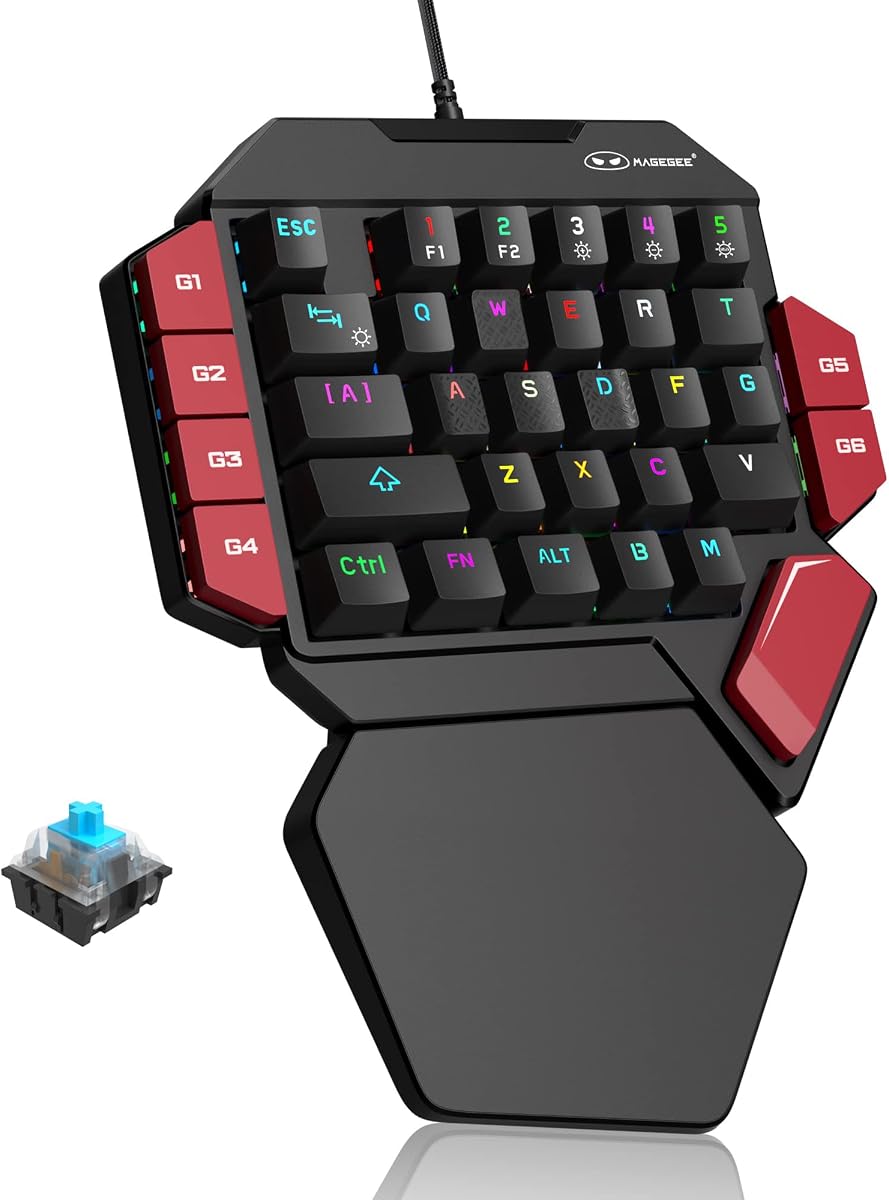
The MageGee One Handed Professional Gaming Keyboard features blue switches that provide strong mechanical feedback for precise input. With a 4.3 star rating it offers 35 non-conflict keys ensuring that all inputs are registered accurately. The device is designed to be loud and crisp which appeals to those who enjoy tactile confirmation of every keystroke.
We may earn a commission when you buy through this link, at no additional cost to you.
Users can record macros directly using the FN+G1 to FN+G6 keys which simplifies complex command sequences for MMOs. The ergonomic design includes a big palm rest to reduce hand fatigue and support comfortable gaming sessions. RGB lighting can be customized with static and dynamic modes adding a vibrant look to your setup without software dependency.
The loud clicking sound of blue switches might be disruptive in quiet environments or shared spaces which is a trade-off for tactile feedback. Macro recording steps require memorization and might take time to master compared to software-driven solutions. However the plug and play compatibility makes it accessible for users across Windows and Linux systems without needing additional tools.
This keypad is ideal for gamers who prefer traditional mechanical feel and straightforward functionality. It offers a balance of performance and customization suitable for various game genres. The ergonomic support ensures comfort even during extended use making it a solid choice for mechanical keyboard fans.
Blue switches provide a crisp paragraph feeling and tactile feedback ensuring precise and satisfying key presses.
Six macro recording keys allow for quick binding of commands directly on the device for efficient gameplay management.
We may earn a commission when you buy through this link, at no additional cost to you.
This variant of the Razer Tartarus V2 offers the same robust performance as the left-handed model with a 4.2 star rating. It features mecha-membrane switches that provide tactile feedback without the noise level of mechanical keys making it comfortable for long sessions. The 32 programmable keys allow for extensive customization to fit various gaming and creative workflows seamlessly.
We may earn a commission when you buy through this link, at no additional cost to you.
Razer Chroma sync enables full personalization allowing lighting effects to react to game events and other hardware. The thumbpad provides ergonomic support for movement control which is useful for players transitioning from console experiences. This model ensures reliable performance for those seeking a trusted brand in the gaming peripheral market.
Users may find the feature set similar to other versions which could impact decision making based on color or design preference. Software dependency for remapping keys means you cannot use advanced features without connecting to a PC with Razer Synapse. The build quality remains high ensuring durability for daily gaming use across multiple titles.
This device is a reliable option for gamers looking for a proven and comfortable one-handed solution. The integration with Razer ecosystems makes it a convenient choice for existing users. It delivers consistent performance and customization options for both competitive and casual gameplay styles.
Chroma sync supports 16.8 million colors and integrates with popular games and gear for a fully immersive experience.
Mecha-membrane switches offer a balance between mechanical feedback and soft-cushioned comfort for extended use.
We may earn a commission when you buy through this link, at no additional cost to you.
The Redragon RM104 is a versatile wireless keyboard that offers a smart control knob for volume and RGB adjustment. Rated at 4.4 stars it supports Bluetooth 2.4GHz and USB-C connectivity ensuring flexibility across multiple devices. The 4000mAh battery provides extended usage time which is perfect for uninterrupted gaming or work sessions.
We may earn a commission when you buy through this link, at no additional cost to you.
The multifunction knob allows for smoother and faster adjustments compared to standard keyboard shortcuts enhancing user experience. Customizable software enables macro assignment and profile creation tailored to specific games or applications. RGB effects can be synchronized with other Redragon gear to match moods or game themes effectively.
This device functions more like a full keyboard than a dedicated keypad which may not suit those strictly looking for one-handed solutions. While it is useful for volume control it may take up more desk space than a dedicated gaming keypad. The stable mounting and refined internal structure ensure reliable performance during intense use.
It is a great choice for users who value wireless freedom and media control alongside gaming functionality. The wide system compatibility ensures it works well across various operating systems and consoles. This hybrid design offers convenience for those needing both media controls and gaming keys in one device.
The smart control knob offers intuitive audio and lighting adjustments which simplifies common tasks during gameplay.
Tri-mode connectivity keeps the desk clean and allows seamless switching between different devices without cables.
We may earn a commission when you buy through this link, at no additional cost to you.
The Redragon K585 PRO brings wireless freedom to the tactical layout with a 4.2 star rating. It features BT and 2.4GHz connectivity allowing you to place the keypad anywhere on your desk without cables. The 42-key layout supports 7 onboard macro keys which bind multiple commands for instant ability rotations during intense gameplay sessions.
We may earn a commission when you buy through this link, at no additional cost to you.
Users can swap switches without soldering allowing for customization of the tactile feel over the device's lifespan. The battery supports 15-20 hours of continuous play which is sufficient for extended gaming sessions. The detachable wrist rest adds to the comfort and allows for a smaller footprint when needed.
Wireless convenience comes with the responsibility of keeping the device charged which might be an interruption during very long play marathons. The macro software provides deep customization but requires setup to take advantage of all features. Despite these minor issues the device offers strong versatility for a variety of gaming genres.
This keypad is ideal for gamers who prefer a clean desk and do not want to be tethered to their PC. It combines performance features like hot-swappable switches with the convenience of wireless connectivity. It remains a practical choice for those balancing mobility and functionality in their gaming setup.
Bluetooth and 2.4GHz connectivity allow for untethered placement giving you the freedom to position the keypad optimally.
The upgraded socket accepts various switches allowing you to tune the feel of your off-hand setup without special tools.
We may earn a commission when you buy through this link, at no additional cost to you.
Selecting the right gaming keypad depends on several factors that affect performance comfort and usability during extended gaming sessions.
Switch technology determines the feel and responsiveness of the keypad. Mechanical switches offer distinct tactile feedback and durability while membrane switches provide a quieter and softer experience. Magnetic Hall Effect switches offer ultra-precise actuation and rapid trigger capabilities which are beneficial for competitive FPS games.
Look for a switch type that matches your preference for sound and tactile response to ensure comfort during long sessions.
The number of keys on the keypad influences how many commands you can access at once. Models with 42 keys or more provide more room for macros and complex commands compared to 29 or 35-key layouts. Consider your specific game genre such as MMOs which require more keys than FPS games which prioritize movement precision.
Choose a layout that balances key availability with desk space and your need for complex command access.
Connectivity plays a vital role in setup flexibility and stability. Wired models ensure zero latency while wireless options provide cleaner desk management and portability. Tri-mode connectivity allowing Bluetooth and 2.4GHz plus USB-C offers versatility for multi-device setups and different usage scenarios.
Evaluate your connection needs based on whether you prioritize portability or guaranteed stable performance without cables.
Programmability is essential for mapping specific commands and macros to individual keys. Software tools should allow you to create profiles for different games and save macros on the device or computer. Advanced features like web-based configurators simplify the process and remove the need for heavy installations.
Ensure the device offers sufficient customization depth to handle your specific command sequences and profile management needs.
Comfort is critical for prolonged gaming sessions so look for ergonomic designs including wrist rests and adjustable layouts. The build materials should feel solid and stable to avoid unnecessary movement or flex during intense gameplay. A detachable wrist rest adds versatility to keep the footprint small when needed.
Prioritize a model that supports your hand size and posture to minimize fatigue and strain during use.
RGB lighting enhances the visual appeal of your setup and can sync with games or other peripherals. Some models offer extensive color ranges and lighting modes while others provide static or limited options. Personalization of lighting can help identify different profiles or modes during gameplay quickly.
Select a device with lighting features that match your aesthetic goals and provide functional visual cues during play.
Start by connecting the keypad to your computer via the appropriate port and ensure any necessary software is installed for full functionality. Configure your preferred key mappings and macros through the provided application or onboard controls to suit your gaming needs.
Clean the keys regularly using compressed air or a soft brush to prevent dust buildup that can affect switch responsiveness. Avoid spilling liquids on the device and store it in a dry and cool environment when not in use to extend its lifespan.
Update firmware and software regularly to access new features and improvements provided by the manufacturer. Adjust the ergonomic position and wrist rest as needed to maintain a comfortable setup that supports healthy gaming habits over time.
A gaming keypad streamlines complex commands into one-handed operations freeing up your other hand for precise mouse control. This setup reduces key clutter and improves response times especially beneficial for genres like MMOs and strategy games. It enhances overall workflow efficiency and immersion during intense gameplay sessions.
Yes many models are designed to be user-friendly with plug-and-play features that work well for casual gaming. While they offer advanced customization casual users can simply use them as additional programmable keys to simplify common tasks. Their ergonomic design often improves comfort even for non-competitive players.
Most keypads include software where you can record keystrokes and assign them to specific keys. Some models allow onboard recording via key combinations which simplifies the process without needing extra tools. Follow the provided instructions to set and save macros for quick execution during play.
Many models support both Windows and macOS ensuring cross-platform compatibility for broader use. Check the product specifications to confirm driver availability and software support for your operating system. Some brands provide universal software that works seamlessly across different platforms.
High-quality wireless models often use 2.4GHz or low-latency Bluetooth to minimize input delay effectively. Wired models generally offer the lowest latency but modern wireless options perform well for most gaming scenarios. Always check polling rate specifications to ensure the device meets your performance needs.
Battery life varies by model but many wireless keypads offer 15 to 20 hours of continuous use on a single charge. Some devices feature power-saving modes to extend usage time further. Regular charging ensures consistent performance during extended gaming sessions.
Our guide highlights ten standout gaming keypads that offer diverse features from analog thumbsticks to Hall Effect switches. The Razer Tartarus V2 stands out for its balance of performance and comfort while the Redragon K585 offers great value for budget-conscious gamers. Those seeking competitive edge may prefer the Keychron C0 HE for its advanced polling capabilities.
Consider your specific needs such as layout size connectivity preferences and switch type before making a decision. The best keypad for you will depend on the game genres you play and the level of customization you require. Ensuring ergonomic comfort and reliable performance should be top priorities for any setup.
Prices and availability may change so always verify the latest details before purchasing to secure the best deal. With the right gaming keypad you can enhance your control and immersion in the virtual world. Stay tuned for future updates as technology continues to evolve in this space.