
maxsun GeForce RTX 3050 6GB
4.3Editor score
Slim Low Profile Design
6GB GDDR6 Memory
PCI Express 4.0 Support
This guide compares the top GPUs for Small Form Factor Sff PC builds to help you find the best graphics card for your compact gaming or workstation setup.
Choosing the right GPU for a Small Form Factor Sff PC requires careful consideration of size and performance. Compact cases often limit physical dimensions and power availability. You need a card that fits perfectly while delivering the graphical power you expect from modern gaming or professional applications.
We evaluated ten top models based on size, efficiency, and raw power. Our analysis focuses on low profile designs and compact cooling solutions that maintain stability. Each entry represents a carefully selected option for builders who prioritize space efficiency without sacrificing visual fidelity.
Each pick highlights key strengths and potential trade-offs specific to SFF builds. You will find detailed specs and real world performance insights. Prices fluctuate so always check current availability before finalizing your purchase decision for your unique build requirements.
4.3Editor score

4.7Editor score

4.8Editor score
Here is a side by side comparison of all ten models. We break down dimensions memory power draw and output options for each to help you make an informed decision based on your specific case constraints and performance goals.


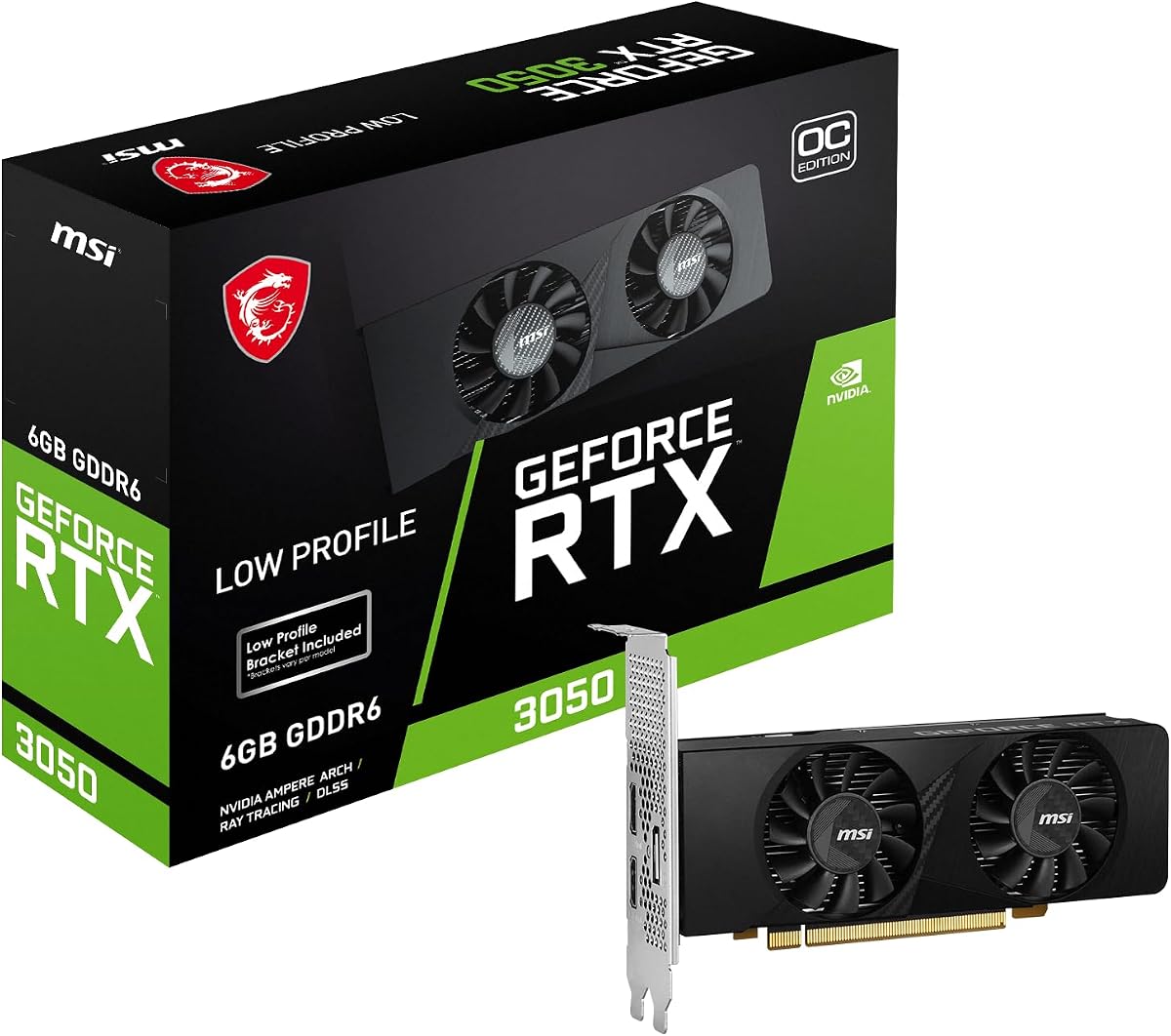


The maxsun RTX 3050 is a solid entry level option for compact builds. It scores 4.3 stars and offers a balance of size and performance. This card is designed specifically for mini ITX cases that struggle with standard cards.
We may earn a commission when you buy through this link, at no additional cost to you.
Its 6GB GDDR6 memory ensures smooth gaming at 1080p resolutions. The Ampere architecture enables DLSS support which boosts frame rates in modern titles. Low profile design means it fits where others cannot. HDMI 2.1 and DP 1.4a give you versatile connectivity options.
The trade-off is limited cooling compared to larger models. It runs cooler due to low power draw but lacks advanced thermal solutions. This is acceptable for basic gaming or home office tasks. You should ensure your case airflow is decent for best results.
Buy this if you need a compact card for casual gaming or media consumption. It is ideal for upgrading office PCs or entry level home theater PCs. The price point makes it accessible for budget constrained builders looking for reliable performance.
This card measures 6.65 inches so it fits almost any SFF case easily.
Support for HDMI 2.1 allows you to connect 4K displays without adapters.
We may earn a commission when you buy through this link, at no additional cost to you.
MSI delivers a refined low profile card here with a 4.5 rating. It uses the reliable RTX 3050 architecture. This model fits well in small cases while maintaining stable performance for daily tasks and gaming.
We may earn a commission when you buy through this link, at no additional cost to you.
The boost clock of 1492MHz ensures consistent performance across applications. Two HDMI ports allow easy dual monitor setups without adapters. The custom PCB improves reliability which is crucial in small cases where heat buildup is a risk.
It does not offer significant raw power improvements over base models. 6GB VRAM is sufficient for gaming but limits heavy rendering. This is acceptable for general use where stability matters more than bleeding edge speed.
Choose this for office setups or light gaming in tight enclosures. It is a safe choice for builders who want MSI reliability in a small package. The cooling is sufficient for low power draw scenarios.
Boosted speeds help maintain frame rates even in smaller thermal envelopes.
Multiple HDMI and DisplayPort connections support multi screen productivity.
We may earn a commission when you buy through this link, at no additional cost to you.
The ASUS RTX 5070 SFF is the best overall card for enthusiasts needing power in small space. With a 4.7 rating it offers top tier performance. It brings Blackwell architecture to compact builds which is rare in this category.
We may earn a commission when you buy through this link, at no additional cost to you.
12GB GDDR7 memory handles heavy workloads and high resolution textures easily. Axial-tech fans with barrier rings optimize airflow to keep temperatures low. The 2.5 slot design fits many mini ITX cases while providing ample cooling surface area.
Power requirements are higher than entry level cards so check PSU compatibility. The price reflects its premium status and advanced features. This is acceptable for users who prioritize performance and future proofing in their build.
Buy this for high end gaming or AI workloads in a small footprint. It bridges the gap between compact convenience and desktop performance. The warranty adds peace of mind for such a significant investment.
Blackwell architecture delivers superior efficiency and AI performance.
Axial-tech fans push more air through tighter spaces effectively.
We may earn a commission when you buy through this link, at no additional cost to you.
PNY A400 offers professional grade reliability in a single slot profile. Rated 4.7 stars it is designed for business systems where space is tight. The low power draw makes it perfect for silent office environments.
We may earn a commission when you buy through this link, at no additional cost to you.
Four Mini DisplayPorts allow extensive multi-monitor setups without extra hubs. 768 CUDA cores handle professional rendering tasks well. The single slot design frees up space for other components which is rare in SFF builds.
Gaming performance is limited compared to consumer models. It lacks dedicated gaming features but excels at precision rendering. This trade-off is acceptable for professionals needing stability over frame rates.
Choose this for CAD workstations or multi-monitor office setups. It fits in cases where standard cards simply will not fit. The efficiency ensures stable operation without excessive heat generation.
This design frees up PCIe slots for other add-on cards.
Four outputs let you manage multiple tasks simultaneously on one PC.
We may earn a commission when you buy through this link, at no additional cost to you.
ASRock Arc A380 brings Intel's Xe architecture to ITX builds. Rated 4.3 it offers modern features like AV1 encoding at a low price. It is a great option for media centers needing high resolution output.
We may earn a commission when you buy through this link, at no additional cost to you.
0dB Silent mode ensures zero noise at low loads. This is perfect for quiet home theater PCs where fans are annoying. DP 2.0 support means it handles high resolution displays better than older cards.
Driver support has improved but may lag behind NVIDIA. Some legacy games require tweaks to run smoothly. This is acceptable for users who prioritize modern video encoding over raw gaming speed.
Buy this for media PCs or basic gaming on a budget. It is one of the cheapest ways to get modern display standards. The single fan cooling is sufficient for its low power draw.
0dB silent mode stops fans when the card is cool and quiet.
Accelerates video creation workflows with next-gen efficiency.
We may earn a commission when you buy through this link, at no additional cost to you.
This MSI model adds dual fans for better thermal performance in low profile. Rated 4.6 it improves on base models with more robust cooling. It is ideal for cases with limited airflow options.
We may earn a commission when you buy through this link, at no additional cost to you.
MSI Center software allows precise control over fan curves and clocks. The custom PCB is optimized for stable performance under load. Two HDMI 2.1 ports support modern displays natively without dongles.
It is slightly taller than single fan variants. This limits compatibility in extremely shallow cases. The benefit is quieter operation which justifies the extra height for many users.
Choose this for small cases that struggle with single fan cards. The extra cooling helps maintain boost clocks longer. It is a balanced pick for users needing reliable stability.
Two fans move more air to keep temperatures lower efficiently.
Real-time control helps tune performance to your specific case.
We may earn a commission when you buy through this link, at no additional cost to you.
GIGABYTE brings 5070 power to SFF with a 4.8 rating. The WINDFORCE system ensures it runs cool despite high performance. This card is for builders who want desktop power in a mini case.
We may earn a commission when you buy through this link, at no additional cost to you.
192-bit GDDR7 interface delivers massive bandwidth for textures. PCIe 5.0 ensures forward compatibility with modern motherboards. The cooling system is tuned for high efficiency which lowers acoustic noise.
It requires a strong power supply. The cost is high but performance matches top desktop cards. This is acceptable for users needing the best possible SFF solution.
Buy this for high-end gaming or content creation in a small case. It handles demanding titles at 4K or 1440p. The premium features justify the investment for power users.
High performance fans deliver massive airflow for optimal thermal control.
Next gen interface ensures bandwidth headroom for future upgrades.
We may earn a commission when you buy through this link, at no additional cost to you.
MSI 5060 Ti offers solid mid tier performance for compact cases. Rated 4.5 it uses the new Blackwell architecture for efficiency. This card targets users needing strong gaming power without flagship pricing.
We may earn a commission when you buy through this link, at no additional cost to you.
TORX Fan 5.0 optimizes airflow through specialized ring arcs. 8GB GDDR7 memory handles modern game textures well. HDMI 2.1b and DP 2.1a outputs connect to latest displays easily.
The power draw requires a decent PSU. It is not ideal for tiny cases with weak power supplies. The performance is strong enough for high refresh gaming at 1440p.
Choose this for balanced gaming builds in compact cases. It delivers reliable frame rates without breaking the bank. The cooling is adequate for the power output in most cases.
Blades linked by rings stabilize high-pressure airflow efficiently.
New architecture delivers better performance per watt.
We may earn a commission when you buy through this link, at no additional cost to you.
AMD Radeon Pro WX 4100 offers professional grade compact performance. Rated 4.4 it is designed for workstation builds in small footprints. The low power draw allows passive cooling in some cases.
We may earn a commission when you buy through this link, at no additional cost to you.
It supports four 4K displays simultaneously. This is useful for control centers or trading setups. PowerTune technology optimizes efficiency ensuring consistent performance under load.
It lacks modern gaming features compared to RTX cards. GDDR5 memory is slower than newer standards. This is acceptable for specialized workflows where stability is paramount.
Buy this for business workstations or media control setups. It fits in cases where power limits are strict. The reliability makes it a staple for professional environments.
Drive four 4K displays simultaneously for complex workflows.
Optimized drivers ensure stability for CAD and editing apps.
We may earn a commission when you buy through this link, at no additional cost to you.
ASUS Dual RX 9060 XT offers 16GB VRAM in a compact profile. Rated 4.7 it handles heavy textures and large scenes well. This card is ideal for 3D modeling and large datasets.
We may earn a commission when you buy through this link, at no additional cost to you.
Dual BIOS switch lets you toggle between quiet and performance modes. Axial-tech fans push air down effectively. 0dB technology ensures silence when gaming lightly which is rare in high VRAM cards.
It is physically larger and draws more power. Some very small cases might not fit it. The performance benefits justify the size for serious content creators.
Choose this for high VRAM needs in a semi compact case. It delivers desktop power in a smaller package. The cooling is robust enough for heavy workloads.
Switch profiles to balance noise and performance instantly.
16GB ensures smooth rendering of complex scenes and textures.
We may earn a commission when you buy through this link, at no additional cost to you.
Selecting a graphics card for small cases involves more than just performance. You must balance physical dimensions with power limits and thermal constraints to ensure stable operation.
Measure your case clearance carefully. Low profile cards fit 1 to 2 slot slots. Standard cards may require custom brackets. Check height and depth specifically.
Ensure the card fits without touching other components like RAM or CPU coolers.
SFF PSUs often have limited wattage. Look for cards that draw power from the slot or use minimal connectors. High performance cards may need external cables.
Check if your unit supports the required wattage before buying.
Small cases have poor airflow. Choose cards with active fans for best stability. Passive cards only work in cases with strong system fans.
Ensure the card has sufficient surface area for heat dissipation.
Higher VRAM helps with 4K textures. 6GB is sufficient for 1080p gaming. 12GB or more is needed for workloads.
Match memory to your use case to avoid bottlenecks.
SFF builds often need multiple screens. Ensure HDMI or DP count meets your needs. Mini ports are common and need adapters.
Verify port versions match your monitor standards.
Balance performance with case size. Low power cards run cooler. High performance cards need robust cooling solutions.
Prioritize your main task whether gaming or work.
Install the card carefully aligning PCIe slots. Secure the bracket firmly to prevent movement during use. Ensure power cables are connected correctly for stability.
Monitor temperatures using software tools. SFF cases can heat up quickly. Ensure airflow is maintained by cleaning fans regularly.
Keep drivers updated for best performance. Check for firmware updates for cooling features. Verify software settings optimize performance in compact spaces.
Low profile cards like the maxsun RTX 3050 fit most mini ITX cases. You should verify your case dimensions first. Dual fan models offer better cooling in tight spaces.
Most low profile models run on slot power. Some high performance cards need external connectors. Check your PSU wattage before installing a larger GPU.
Single slot cards are the smallest. Low profile cards fit in 1 or 2 slots. Length varies so check chassis clearance specifically before buying.
Professional cards like PNY A400 are very efficient. They offer stability for workloads but lower gaming power. They fit in cases with strict power limits.
Yes modern cards support 4K output easily. Ensure ports match your monitor requirements. High bandwidth cards help for smooth high res display.
Choose active fan solutions for better cooling. Clean dust from case regularly. Limit GPU load in confined spaces to maintain stability.
This guide covered ten top models for compact cases. The maxsun RTX 3050 leads for budget. The ASUS RTX 5070 SFF offers best overall performance for enthusiasts.
Prioritize physical fit and power compatibility first. High VRAM matters for modern gaming. Choose cooling that matches your case size.
Always check current prices and availability before buying. Prices change based on stock levels. Verify specs match your case requirements.