
NOYAFA NF-488 POE Cable Tester
4.5Editor score
Affordable price point
Backlit LCD screen visibility
Detects open and short circuits
This guide compares the top ten Inline POE Tester models for network professionals, evaluating features like voltage detection, pass-through testing, and OLED
An Inline POE Tester is an essential tool for network engineers and installers who need to verify power delivery over Ethernet cables. These devices help identify voltage, current, and wattage to ensure powered devices like cameras and phones function correctly without interruption.
We compared ten leading models based on their testing modes, display clarity, and compatibility with IEEE standards. Our analysis focuses on how each tool handles active troubleshooting, battery requirements, and the ability to measure non-standard passive PoE systems accurately.
Each pick in this list highlights specific strengths such as OLED screens, battery-free operation, or compact designs. Prices change frequently online so check current listings before purchasing. This guide helps you find the right tester for your specific network installation needs today.
4.5Editor score

4.1Editor score

4.1Editor score
The following table provides a side-by-side comparison of all ten Inline POE Tester models. It highlights key specifications such as supported standards, display types, and unique features to help you differentiate between similar options quickly.


The TRENDnet TC-NTP1 is a robust choice for installers who need compliance without sacrificing functionality. It supports standard PoE up to 100W and passes government standards for sensitive projects.
We may earn a commission when you buy through this link, at no additional cost to you.
Its T-mode tests PSE devices while N-mode handles non-standard passive PoE. The step button locks readouts for real-time monitoring which helps during long cable runs or active troubleshooting tasks.
While it lacks a bright OLED screen the battery-free operation ensures you never carry extra power sources. The trade-off is a simpler display that might be harder to read in direct sunlight compared to newer models.
Installers working on federal contracts or needing reliable support should choose this model. It balances compliance with ease of use making it a strong contender for professional environments.
Being NDAA compliant ensures this tool meets strict government requirements for security and sourcing in public infrastructure projects.
The locking step button lets you focus on specific metrics like wattage while monitoring live connections without distractions.
We may earn a commission when you buy through this link, at no additional cost to you.
The PoE-T100 stands out with its bright OLED display that presents voltage current and power simultaneously. This eliminates the need to cycle through screens when you need quick diagnostic data.
We may earn a commission when you buy through this link, at no additional cost to you.
It supports PD Inline and DC modes ensuring versatility across different network setups. The self-powered design draws directly from the line so you are always ready for field work without battery anxiety.
The only drawback is the price point which is higher than basic testers. However the clarity of the OLED screen and the wide DC voltage support justify the cost for professional engineers.
Network engineers who prioritize visual clarity and comprehensive testing modes should invest in this tool. It streamlines troubleshooting by providing immediate detailed insights into power delivery.
The single-page display lets you see all critical metrics like polarity and power levels at a glance during inspections.
Testing up to 57V DC ensures compatibility with non-standard legacy systems that might use different voltage inputs.
We may earn a commission when you buy through this link, at no additional cost to you.
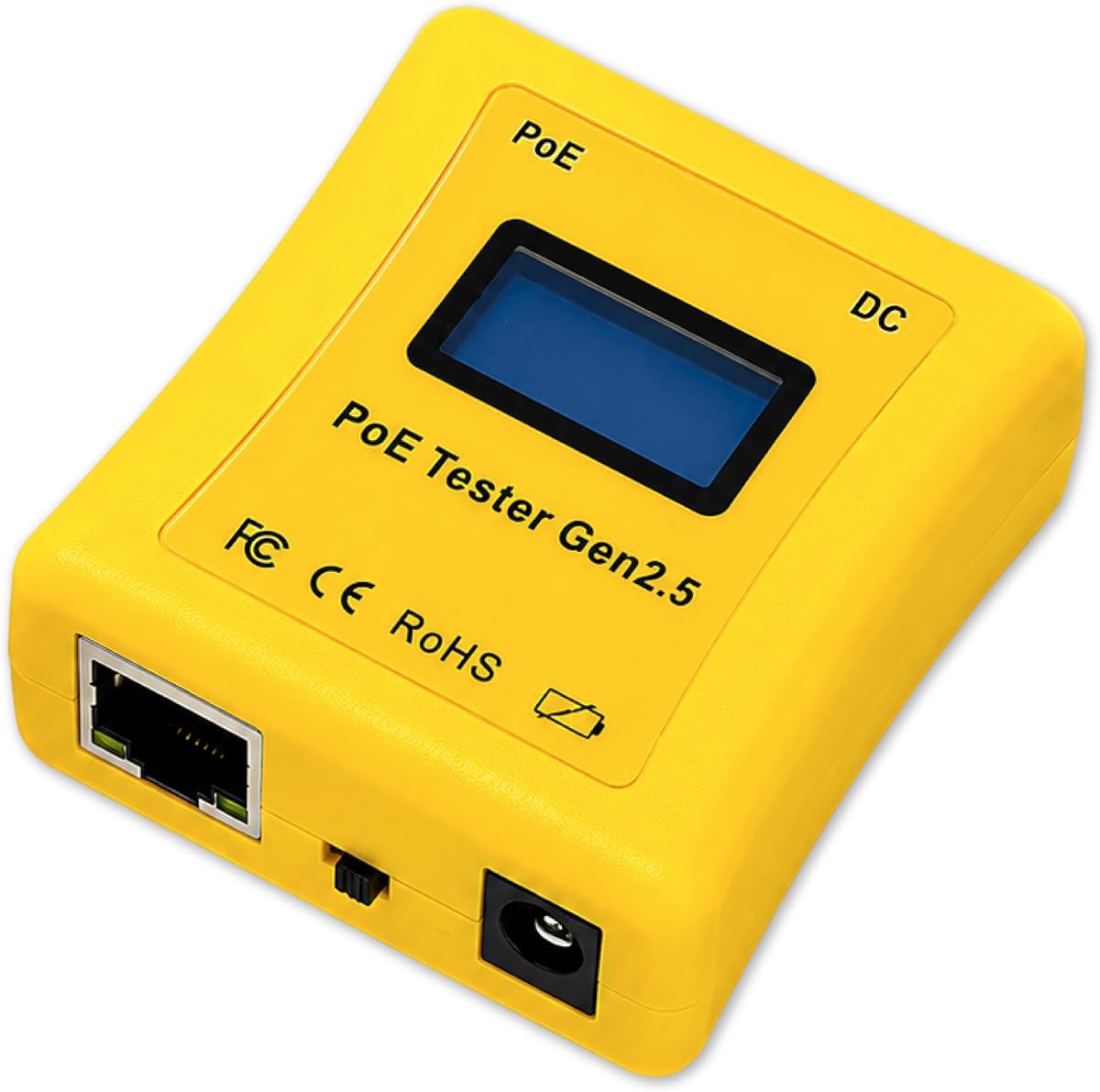
The NOYAFA NF-488 is an excellent entry-level tool for those who need basic PoE detection and cable continuity. It combines affordability with practical features like remote wiring tests.
We may earn a commission when you buy through this link, at no additional cost to you.
Its backlit LCD ensures visibility in dark server rooms or outdoor conduits. The anti-slip casing makes it comfortable to hold during long testing sessions without slipping out of your hand.
While it does not offer detailed wattage analysis it covers the basics of voltage and polarity identification. This limitation is acceptable for quick checks where high precision is not required.
Installers with tight budgets or needing a backup tester should consider this model. It offers reliable performance for standard installations at a fraction of the cost of premium tools.
You get essential PoE detection and continuity checks without paying for advanced features you might not need.
The independent backlighting ensures you can read results clearly even in low-light environments like crawlspaces.
We may earn a commission when you buy through this link, at no additional cost to you.
This PoE Texas model is designed for portability and speed. Its compact body fits easily in a pocket making it ideal for technicians moving between multiple sites.
We may earn a commission when you buy through this link, at no additional cost to you.
The Simulate PoE Device mode is a standout feature that allows you to test managed switches without a real device attached. This saves significant time during initial setup and diagnostics.
It handles power readings up to 280 watts which covers almost all standard PoE+ and BT scenarios. The only downside is the automatic cycling display which might be annoying if you need to hold a specific value.
Technicians who need a pocketable tool with high power capacity should choose this. It balances size with performance effectively for daily on-site work.
The small footprint ensures you can keep it in your pocket without adding bulk to your tool belt.
Simulating a powered device lets you verify switch power output directly without needing extra hardware for tests.
We may earn a commission when you buy through this link, at no additional cost to you.
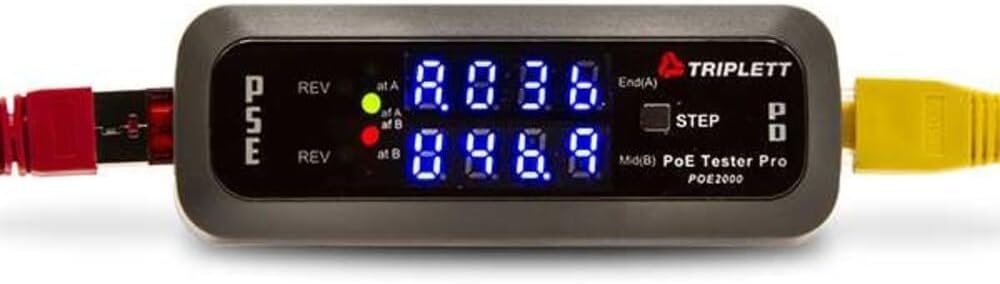
The Triplett POE2000 uses LEDs instead of a screen to communicate status. This makes it highly visible in bright conditions where screens might fail.
We may earn a commission when you buy through this link, at no additional cost to you.
It clearly distinguishes between End Span and Mid Span power sources which is crucial for identifying where power enters the network. The yellow LED for polarity alerts you to potential wiring issues instantly.
However the 3.5 rating suggests some users have experienced durability problems over time. It is a solid tool for simple checks but might not hold up to heavy industrial use.
Workers who prefer simple LED logic over complex screens may find this useful. It provides the essential data without the complexity of digital displays.
Bright LEDs ensure you can see the status even in sunlight where LCD screens might appear blank.
The dedicated yellow LED warns you immediately if the polarity is reversed saving you from potential damage.
We may earn a commission when you buy through this link, at no additional cost to you.
The Triplett POE3000 is a newer model that focuses on precise standard detection. It uses four LEDs to show if your device is working with IEEE 802.3af or at standards.
We may earn a commission when you buy through this link, at no additional cost to you.
It detects PSE type and class which is helpful when verifying switch configurations. The inline monitoring allows you to watch power levels while the system is running.
Since it is newer there are fewer user reviews to judge reliability. However the design follows the trusted Triplett brand standards which usually ensure quality control.
Professionals needing strict IEEE compliance checks should look at this model. It provides clear visual confirmation of standards without needing to interpret digital numbers.
The dedicated LEDs make it easy to confirm if your switch is using the correct IEEE standard for your device.
Inline monitoring helps you track power usage during operation to ensure stability and efficiency.
We may earn a commission when you buy through this link, at no additional cost to you.
Jonard Tools is known for reliability and the POE-1 follows this tradition. It adds resistance and continuity checks which are essential for verifying cable health before testing power.
We may earn a commission when you buy through this link, at no additional cost to you.
The kit includes a remote and adapters which adds value compared to standalone testers. The battery-free design ensures it works as long as there is power on the line.
While it lacks high-end display features it offers solid performance for basic diagnostics. The inclusion of a belt clip makes it easy to carry around a jobsite.
Technicians needing both data and power testing should consider this kit. It covers both aspects in one device without requiring extra tools.
Measuring resistance ensures the cable itself is not damaged before you even start checking for power issues.
Having a remote and adapter included means you have everything needed for immediate testing without extra purchases.
We may earn a commission when you buy through this link, at no additional cost to you.
This tester stands out for its ability to measure cable length which is a feature rarely found on PoE testers. It covers up to 300 meters so you can verify runs instantly.
We may earn a commission when you buy through this link, at no additional cost to you.
It has a high rating of 4.6 indicating strong customer satisfaction. The rechargeable battery ensures long sessions but also requires periodic charging unlike battery-free options.
Port flash detection helps you find which specific port is active on a switch. This saves time when dealing with unmanaged networks where labels might be missing.
Installers who need cable length data should choose this model. It combines standard PoE testing with length verification in one compact unit.
Measuring the length up to 300 meters helps you quickly confirm compliance with Ethernet distance standards.
This feature lights up the port LED on the switch so you can trace lines easily in a crowded rack.
We may earn a commission when you buy through this link, at no additional cost to you.
This unit offers a DVM power panel which is typically found in larger professional setups. It supports CAT5 and CAT6 networks for broad compatibility.
We may earn a commission when you buy through this link, at no additional cost to you.
The high price suggests it is built for heavy duty use where precision is critical. It is designed for professional diagnostics in structured cabling environments.
Because details are limited it is best for those who already know the specifications they require. It is a specialized tool for high-end cabling projects.
Professionals needing integrated power panel diagnostics should consider this option. It serves as a central testing point for large networks.
The DVM panel allows for centralized power management and testing across multiple network lines.
Higher price points often correlate with better build quality and longevity for industrial environments.
We may earn a commission when you buy through this link, at no additional cost to you.
The NF-488 offers a good balance of current and power testing capabilities. Its loop-back test helps diagnose switch loop issues which are common causes of network failures.
We may earn a commission when you buy through this link, at no additional cost to you.
The built-in LED lamp makes it a two-in-one tool for testing and illumination. This is a handy feature for working in dark server rooms or closets.
While its power limit is 180W it covers most standard devices effectively. The customer service promise adds confidence for buyers who need support.
Technicians who need loop diagnostics and basic lighting should choose this. It is a versatile tool for general network maintenance.
Loop-back tests help identify misconfigured switches or loops that slow down network traffic.
The LED lamp helps you see ports clearly without needing a separate flashlight.
We may earn a commission when you buy through this link, at no additional cost to you.
Choosing the right tester involves understanding your network environment and the specific data you need to collect. Here are key factors to consider before buying.
Ensure the tester supports the specific IEEE standards your devices use such as 802.3af at or bt. Many modern cameras and phones require higher wattage for PoE+ so verify voltage ranges like 57V.
Always check the voltage and power limits to ensure your device covers both active and passive systems.
Screens vary from simple LEDs to advanced OLED panels. OLED screens show all data on one page which is faster for diagnostics but may be harder to read in direct sunlight.
Choose a screen that matches your work environment visibility needs.
Some testers are self-powered drawing energy from the PoE line while others need batteries. Self-powered units save you from carrying spare batteries but require an active line to work.
If you test unpowered cables frequently choose a model with a battery option.
Inline testers allow pass-through testing where you monitor power flowing to a device. Device testers simulate a load to test the switch itself without connecting the real device.
Look for both modes if you need to test switches in isolation and while connected.
This feature lights up a specific port on a switch so you can identify it easily. It is extremely useful in crowded racks where labels might be missing or incorrect.
If you work in large server rooms this feature saves significant time.
Advanced testers measure resistance and cable length which helps verify if a cable is within standards. This prevents issues related to long runs exceeding 100 meters.
Verify if your model includes these advanced physical testing features.
Field work exposes tools to drops and dust so look for anti-slip casings and rugged designs. Higher price points often reflect better materials that last longer.
Prioritize build quality to avoid frequent replacements.
Government projects may require NDAA compliance which ensures secure sourcing. Also consider the availability of technical support and warranty coverage.
Check warranty terms to ensure protection for your investment.
Plug the tester directly into the Ethernet port on the switch or the powered device to begin. Observe the display for immediate feedback on voltage and power availability.
Use the step button if available to cycle through voltage current and wattage readouts. Lock the display on a specific value if you need to monitor it closely over time.
Store the tester in a dry safe place to protect the display and ports. Keep the screen clean with a soft cloth to maintain visibility during future use.
Many models are self-powered drawing energy directly from the Ethernet line so you do not need batteries. However some models include a battery option for testing unpowered cables or passive DC systems.
Yes modern testers support IEEE 802.3bt and 4PPoE standards which provide up to 90W power. Always verify the wattage rating to ensure compatibility with high-power devices.
Inline mode passes power through to a device while device mode simulates a load to test the switch. Both modes are useful for identifying whether a power issue lies with the switch or the cable.
OLED screens provide high contrast and show all data on one page which speeds up diagnostics. They are generally easier to read than standard LCDs but may be more expensive.
Many advanced testers support non-standard passive PoE voltages like 24V or 48V. Ensure your chosen model lists non-standard support to avoid compatibility issues with legacy devices.
Store the tester in a padded case when not in use to prevent scratches or drops. Avoid exposure to extreme heat or moisture which can damage the screen and internal electronics.
We reviewed ten models ranging from budget-friendly options like the NOYAFA NF-488 to premium choices like the PoE-T100. Each tool offers unique strengths depending on whether you need OLED clarity or compliance features.
Prioritize your main needs such as portability or advanced power readings when making a decision. A tester that matches your workflow will save you time and reduce troubleshooting stress.
Remember to check current prices and listings before buying as offers change frequently. Choose the model that best fits your network requirements today.