
ASRock Intel Arc B570 Challenger 10GB OC
4.7Editor score
10GB GDDR6 Memory
XeSS 2 Technology
Dual Fan Cooling
Explore the top Intel Arc GPU options for gaming and workstations. We compare performance, memory, and features to help you choose the right card.
The Intel Arc GPU lineup has evolved significantly, offering compelling choices for gamers and creators alike. These graphics cards deliver strong performance across various price points. Whether you need raw power for rendering or budget-friendly gaming, there is a model designed to meet your specific needs today.
We evaluated each product based on architectural efficiency, memory bandwidth, and real-world usability. Our comparison covers everything from entry-level options to high-end workstation solutions. By focusing on key specifications and user feedback, we ensure this guide reflects the current landscape of Intel graphics technology accurately.
Each selection highlights unique strengths, such as AI acceleration capabilities or specific form factors. You will find detailed breakdowns of what makes each card stand out in its category. Please note that pricing and availability fluctuate frequently, so verify current details before making your final purchase decision online.
4.7Editor score

3.9Editor score

This side-by-side comparison outlines the core specifications and features of every selected Intel Arc GPU. Use this table to quickly identify differences in memory capacity, cooling design, and connectivity options across the entire range of available models.



The ASRock Intel Arc Pro B60 Creator stands out as the premier workstation choice among current Intel Arc GPUs. With a robust 3.9 rating from early adopters, it delivers exceptional memory capacity and bandwidth designed specifically for professional workflows. Its massive 24GB GDDR6 memory ensures you can handle large datasets without hitting bottlenecks during intensive rendering tasks.
We may earn a commission when you buy through this link, at no additional cost to you.
Built on the Intel Xe2-HPG architecture, this card provides 197 INT8 TOPS for AI acceleration. It supports PCIe 5.0, offering maximum bandwidth for modern workstation platforms. The dual media transcoders enable rapid video export in AV1 and HEVC formats. Additionally, its four DisplayPort 2.1 outputs allow expansive multi-monitor setups for complex engineering projects.
While the blower-style cooling ensures airflow in tight chassis, it can generate more noise compared to open-air designs under heavy loads. Also, while excellent for compute, it is less optimized for gaming compared to consumer-focused Arc models. These trade-offs are acceptable given its targeted focus on reliability and professional software validation.
If your workflow demands large local memory for AI models or 3D rendering, this GPU is the ideal choice. It eliminates the need for multi-card setups by providing ample VRAM on a single card. For professionals requiring ISV certification and stable drivers, the ASRock Intel Arc Pro B60 Creator remains the top recommendation in this lineup.
The 24GB memory capacity allows you to run 70B-class quantized models locally without needing cloud services. This reduces latency and data privacy concerns significantly for enterprise users.
Connecting four high-resolution 8K displays simultaneously provides unmatched workspace real estate for video editors and designers. DisplayPort 2.1 ensures bandwidth for these high-refresh rate setups.
We may earn a commission when you buy through this link, at no additional cost to you.
The ASRock Intel Arc B570 Challenger earns the top spot for budget-conscious gamers seeking high performance. Boasting a strong 4.7 rating, this GPU delivers smooth 1440p gaming experiences thanks to its high clock speeds. The 10GB GDDR6 memory provides a solid buffer for modern textures, while the dual fan design ensures effective thermal management without excessive noise.
We may earn a commission when you buy through this link, at no additional cost to you.
Its Xe2-HPG architecture supports advanced AI acceleration and Intel XeSS 2 technology for improved image quality. The metal backplate adds structural rigidity to prevent GPU sag during vertical mounting. Connectivity is future-ready with three DisplayPort 2.1 and one HDMI 2.1a output, supporting high refresh rates and latest display standards easily.
While the 10GB memory is sufficient for current titles, it might limit performance in highly demanding future games requiring more VRAM. Additionally, while strong at 1440p, it may not deliver consistent frame rates at native 4K resolutions. These limitations are typical for this price segment and do not detract from its value proposition.
Gamers looking for the best value at 1440p will find this card compelling. It balances performance, efficiency, and build quality effectively. With dedicated support available through Amazon, you get a reliable product backed by good warranty terms. This model is highly recommended for budget gaming PC builds today.
The 160-bit bus combined with 10GB VRAM handles high-resolution textures efficiently. This ensures smooth gameplay without stuttering in most popular titles.
Striped axial fans with 0dB silent cooling technology keep the card quiet during light loads. This makes it perfect for quiet office or home theater setups.
We may earn a commission when you buy through this link, at no additional cost to you.
The WEELIAO MAXSUN Intel Arc Pro B60 48G Turbo redefines premium workstation performance with dual GPUs on one card. This unique design combines two Arc Pro B60 units for a staggering 48GB of GDDR6 memory. It allows you to run massive 70B-class models like DeepSeek-R1 entirely on a single card without complex multi-card configurations.
We may earn a commission when you buy through this link, at no additional cost to you.
Each GPU delivers 197 TOPS of INT8 compute power, totaling 394 TOPS for high-concurrency workloads. The turbo edition features a triple-thermal design with a blower fan and vapor chamber for efficient heat dissipation. It supports standard ISV applications and open-source models like Qwen3 and DeepSeek series natively. The PCIe 5.0 x8 interface works well with bifurcation-enabled consumer motherboards.
Implementing this card requires a motherboard that supports x16 lane bifurcation, which adds some setup complexity. The high power draw also necessitates a robust PSU and cooling solution within your chassis. However, the performance gains for local inference make these trade-offs worthwhile for serious developers.
Professionals needing local AI inference power will find this solution unmatched. It provides the memory headroom for large-scale rendering and complex visual computing tasks. For those deploying AI models locally, this card offers a streamlined path forward. It is the best option for premium workstation requirements today.
Running 70B-class quantized models locally eliminates cloud dependency and latency. This ensures data privacy and faster response times for enterprise applications.
Using PCIe 5.0 x8 interfaces allows full bandwidth on standard platforms. This significantly lowers the total system cost compared to enterprise server solutions.
We may earn a commission when you buy through this link, at no additional cost to you.
The ASRock Intel Arc A580 Challenger offers a solid middle ground for budget builders. Rated 4.6 by users, it delivers excellent bandwidth thanks to its wide 256-bit bus. The 8GB GDDR6 memory running at 16 Gbps provides smooth performance for 1440p gaming and creative workloads without breaking the bank.
We may earn a commission when you buy through this link, at no additional cost to you.
It features factory overclocked speeds at 2000 MHz out of the box. The dual-fan cooling design includes an ultra-fit heatpipe and metal backplate for durability. With three DisplayPort 2.0 and one HDMI 2.0b, you can connect up to four displays. DirectX 12 Ultimate support ensures compatibility with modern game features and visual effects.
This card requires two 8-pin PCIe power connectors and a 650W PSU, which may be challenging for smaller builds. The dimensions are also relatively large, so chassis clearance is a critical consideration. These physical constraints limit its portability compared to lower-wattage alternatives in the market today.
For users needing strong performance at an affordable price, this card is a strong contender. It balances memory bandwidth and clock speeds effectively. Verify your PSU and case clearance before purchasing to ensure compatibility. This model is recommended for mid-range PC builds seeking value.
The 256-bit interface delivers superior bandwidth compared to typical 128-bit cards. This improves texture loading times and frame rates in demanding games.
The metal backplate prevents PCB warping and adds structural rigidity. Combined with striped axial fans, thermal management is efficient during long sessions.
We may earn a commission when you buy through this link, at no additional cost to you.
The Sparkle Intel Arc B580 Titan OC delivers high-end performance with a massive 2760MHz boost clock. It stands out with 12GB of GDDR6 memory, which is ideal for high-texture gaming and creative rendering. The 4.5 rating reflects its strong reliability and thermal efficiency in various real-world scenarios.
We may earn a commission when you buy through this link, at no additional cost to you.
Featuring Torn Cooling 2.0 and an axial fan, it maintains stable temperatures during intense loads. A blue breathing light adds a touch of aesthetic flair to your build. The metal backplate protects the PCB and adds rigidity to the overall structure. This design ensures longevity and consistent performance over years of use.
The unique cooling design requires specific airflow planning to avoid heat accumulation. Without detailed documentation, optimizing thermal performance may require trial and error initially. Also, the lighting feature might not appeal to those seeking a minimalist workstation look. These minor issues do not significantly impact the core performance.
Gamers and creators who need higher memory buffer will appreciate this model. The boost clock speed provides excellent headroom for demanding applications. Check your case airflow capabilities before finalizing your purchase. This GPU is recommended for high-performance builds needing extra VRAM.
The 2760MHz boost clock ensures maximum throughput for rendering tasks. This provides a competitive edge in benchmark scores and daily usability.
The blue breathing light offers a subtle visual upgrade for your PC. It complements modern builds looking for a premium aesthetic without RGB chaos.
We may earn a commission when you buy through this link, at no additional cost to you.
The MAXSUN Intel Arc Pro B60 Dual 48G Turbo is engineered for heavy professional workloads. Its dual-GPU design offers exceptional parallel processing power for rendering and inference tasks. The compact dual-slot form factor ensures it fits neatly without monopolizing motherboard expansion slots excessively.
We may earn a commission when you buy through this link, at no additional cost to you.
Massive 48GB of dedicated graphics memory provides ample headroom for complex visual computing tasks. A single large-diameter turbo fan efficiently exhausts heat out of the chassis, keeping thermals in check. This design ensures stable performance during long inference sessions. It is specifically tailored for high-bandwidth memory access needs.
High power consumption is a requirement for this level of performance, needing a robust PSU. The dual-GPU architecture also demands specific motherboard support for optimal operation. These technical requirements make it unsuitable for casual users. However, professionals get significant value from the raw compute power available.
For those needing enterprise-level compute in a workstation, this is a top choice. It balances performance with physical size effectively. Verify your system compatibility before purchasing. This model is recommended for specialized AI and rendering applications.
Despite dual GPU power, it occupies only two slots. This saves space in crowded workstations needing multiple PCIe cards.
The 48GB memory ensures no bottlenecks in large datasets. It allows smooth multitasking across complex rendering and inference tasks.
We may earn a commission when you buy through this link, at no additional cost to you.
This bundle offers a complete solution for new builders targeting 1440p gaming. The Arc B570 GPU paired with a PRO-650G 650W PSU ensures a ready-to-go setup. The 5.0 rating reflects user satisfaction with this convenient and efficient package. It simplifies the upgrade process significantly for those without a compatible power supply.
We may earn a commission when you buy through this link, at no additional cost to you.
The 2600MHz clock speed delivers smooth gaming performance with XeSS 2 upscaling technology. The PSU is 80 PLUS Gold certified for high efficiency and stable power delivery. Cooling is handled by dual striped axial fans that operate silently at light loads. This ensures the system remains quiet during casual usage.
While convenient, the 650W PSU might limit future high-end component upgrades significantly. Cable management options are often limited in bundled kits compared to standalone units. However, for a balanced mid-range build, this combination is highly effective. It saves time selecting compatible components individually.
This bundle is perfect for first-time buyers or system upgraders needing a PSU. It ensures reliable power and gaming performance out of the box. Verify your total system power requirements before purchase. This solution is recommended for hassle-free 1440p gaming builds.
The included PSU removes guesswork for compatible power needs. It ensures stable performance right out of the box without extra purchases.
Gold certification means less energy waste and cleaner power output. This extends the lifespan of components and reduces electricity costs.
We may earn a commission when you buy through this link, at no additional cost to you.
The GUNNIR Intel ARC PRO B50 LP is a powerhouse in an ultra-compact form factor. It measures 167x69x18.4mm and fits any single-slot low profile chassis. The 16GB GDDR6 memory offers plenty of room for AI models and 3D rendering tasks without needing external power connectors.
We may earn a commission when you buy through this link, at no additional cost to you.
Powered by Intel Xe2 architecture with 128 XMX engines, it delivers 170 TOPS of INT8 compute power. This efficiency makes it perfect for edge workstations and small form factor PCs. The turbo fan design handles heat dissipation well for a 70W TDP card. It is a rare find for low-profile systems needing serious compute.
The slim profile limits cooling surface area, so it may run warmer under sustained loads. It is not designed for AAA gaming workloads at high resolutions. However, for office workloads, local inference, and edge AI, it performs exceptionally. Its compactness is its defining advantage.
If you need high VRAM in a tiny case, this is the ideal choice. It supports flexible resource allocation for virtualization tasks. Verify your case dimensions before purchase. This GPU is recommended for SFF and edge workstation upgrades.
The 70W power draw draws all power directly from the slot. This simplifies builds in cases lacking available PCIe power cables.
170 TOPS of compute power accelerates local machine learning tasks. It runs models efficiently without needing cloud connections or servers.
We may earn a commission when you buy through this link, at no additional cost to you.
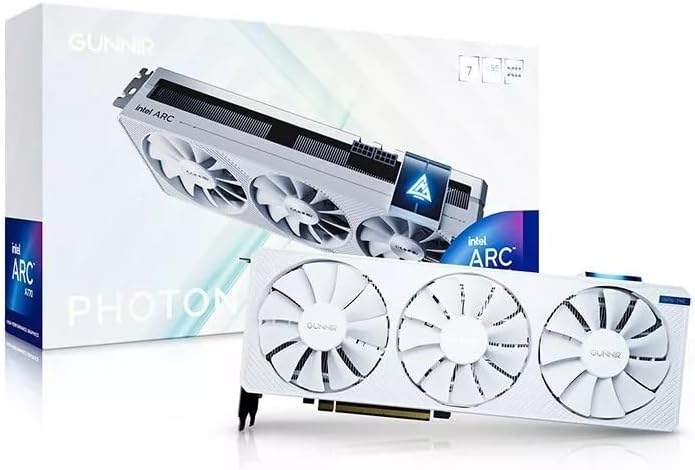
The WEELIAO GUNNIR Intel Arc A770 Photon blends high performance with a sleek white aesthetic. It delivers exceptional performance for gaming and content creation with 8GB GDDR6 running at 2400MHz. The triple fan design ensures efficient cooling to maintain stable temperatures during intense workloads.
We may earn a commission when you buy through this link, at no additional cost to you.
It supports PCIe 4.0 and offers versatile connectivity for 4K monitors. The 256-bit bus width ensures smooth data transfer for demanding applications. This card is designed to handle demanding graphics workloads with ease. It appeals to those looking to build a visually cohesive white PC system.
White surfaces require regular dusting to maintain their pristine appearance. The triple fan design adds physical bulk that requires good case airflow. While powerful, it may not match top-tier competitor performance. These factors are acceptable trade-offs for the unique look and solid performance.
Gamers and creators building a white-themed PC should consider this option. It balances aesthetics and utility well. Verify your case clearance for the triple fan setup. This model is recommended for style-conscious users.
Three fans ensure efficient heat dissipation for sustained loads. This maintains stable clock speeds even during long rendering sessions.
Support for HDMI and DisplayPort allows connection to latest displays. It is ready for 4K setups without adapters or extra hardware.
We may earn a commission when you buy through this link, at no additional cost to you.
The Sparkle Intel Arc A310 Omni View is unique for its four HDMI display outputs. Rated 4.6 by users, it offers versatile connectivity ideal for digital signage or office workstations. The 4GB GDDR6 memory and 50W power budget make it highly efficient. It runs silently with a single fan single slot configuration.
We may earn a commission when you buy through this link, at no additional cost to you.
Its low power draw ensures it fits systems with weak PSUs or limited slots. You can connect multiple monitors without needing adapters or dongles. This makes it a practical choice for multi-monitor setups in enterprise environments. It handles basic graphics and video playback tasks reliably without issues.
It is not suitable for gaming or heavy rendering tasks due to limited VRAM. Performance is tailored for productivity and display connectivity rather than compute. However, for its specific use case, it performs exactly as designed. These limitations are acceptable given the specific connectivity benefits.
Professionals needing multi-monitor setups on a budget will find this perfect. It ensures reliable display output without complex wiring. Verify your HDMI needs before purchase. This model is recommended for office or signage use.
Four HDMI outputs eliminate the need for DisplayPort adapters. This simplifies cabling and monitor placement in office environments.
The 50W budget ensures it works with low-power systems. It runs silently and cool with minimal thermal impact on your case.
We may earn a commission when you buy through this link, at no additional cost to you.
Selecting the right Intel Arc GPU requires understanding your specific needs and system compatibility. This guide outlines the key factors to consider before making your purchase decision.
Memory capacity determines how many textures and data you can hold locally. Look for higher GDDR6 VRAM if you plan to run AI models or render 3D scenes. Bandwidth is equally critical for 1440p and 4K gaming performance.
Always prioritize cards with sufficient memory buffers to avoid stutters during peak workloads.
Verify your PSU wattage before buying a GPU. Many workstation models require dual 8-pin connectors and higher wattage ratings. Budget options usually need less power but still check specific requirements.
Ensure your power supply meets the recommended wattage for stable operation.
Check your case clearance for length and height. Larger cards need better airflow to maintain thermal limits. Blower-style coolers are compact but can be louder than dual fan models.
Choose a cooling solution that balances noise and heat dissipation.
Match your GPU outputs to your monitors. Some workstation cards offer four DisplayPort 2.1 outputs for multi-monitor setups. Budget models often rely on HDMI 2.1 or DisplayPort 2.0.
Confirm the available ports on your monitor and the GPU before purchasing.
ISV certification is essential for professional stability and rendering workflows. Consumer models often rely on community feedback for gaming optimizations. Intel updates drivers frequently to improve performance.
Prioritize models with active driver support for your target software applications.
Look for XMX engines and TOPS ratings if you plan to run AI models. Higher compute power allows faster local inference and processing speeds. Ensure your system supports PCIe bifurcation for dual GPU cards.
Focus on compute specs if your primary use case is AI and machine learning.
Compare features against the price point to find the best value. Budget models may have less VRAM but still offer solid 1440p gaming. Premium models justify costs with higher memory and compute capabilities.
Set a clear budget before starting your search to narrow down options quickly.
Always install the latest Intel Arc drivers before installing Windows to ensure stability. Use the official Intel website for the most current optimization patches.
Keep your PC case clean to prevent dust from clogging cooling fans and heatsinks. Regular cleaning maintains optimal temperatures and extends component lifespan.
Monitor your GPU temperatures using software tools during initial setup. This helps identify if you need better case airflow or additional fans.
Most modern PCIe 4.0 and 5.0 slots work with Intel Arc GPUs. However, ensure your system supports Resizable BAR for optimal performance. Check BIOS settings to enable this feature before installing the card.
Yes, Intel Arc GPUs support hardware AV1 encoding and decoding natively. This is ideal for streaming and video editing tasks. It significantly reduces CPU usage during content creation workflows.
24GB VRAM models are best for large local AI model inference and complex 3D rendering. They allow running larger datasets locally without needing cloud services. This is crucial for enterprise privacy and low-latency applications.
Yes, workstation-certified Intel Arc GPUs support ISV applications for CAD and design. Check the specific software validation list on Intel's site before purchasing. This ensures stability and certification for professional engineering tasks.
Intel XeSS uses AI to upscale lower resolution images to higher resolution. It boosts gaming performance without sacrificing visual quality too much. It is available on many modern titles and games.
Intel Arc GPUs generally require an Intel CPU from the 10th Gen or later for optimal features. Older platforms might lack specific firmware support. Check your CPU generation before upgrading the GPU alone.
Dual GPU models require high-wattage PSUs to handle combined TDP loads. Ensure your power supply has enough PCIe power connectors. Bifurcation support on the motherboard is also required.
The ASRock Intel Arc Pro B60 Creator leads the lineup for professionals needing massive memory. For budget gamers, the ASRock B570 Challenger offers unmatched value. Workstation seekers should consider the WEELIAO MAXSUN 48G Turbo for raw AI power.
Prioritize memory capacity and cooling based on your primary workload. Ensure your power supply and case fit the card physically. These factors determine long-term satisfaction and stability.
Prices and availability change quickly in the GPU market. Check current listings before purchasing to confirm stock. This ensures you get the best deal for your build today.