
Lamicall Adjustable iPad Stand for Desk
4.6Editor score
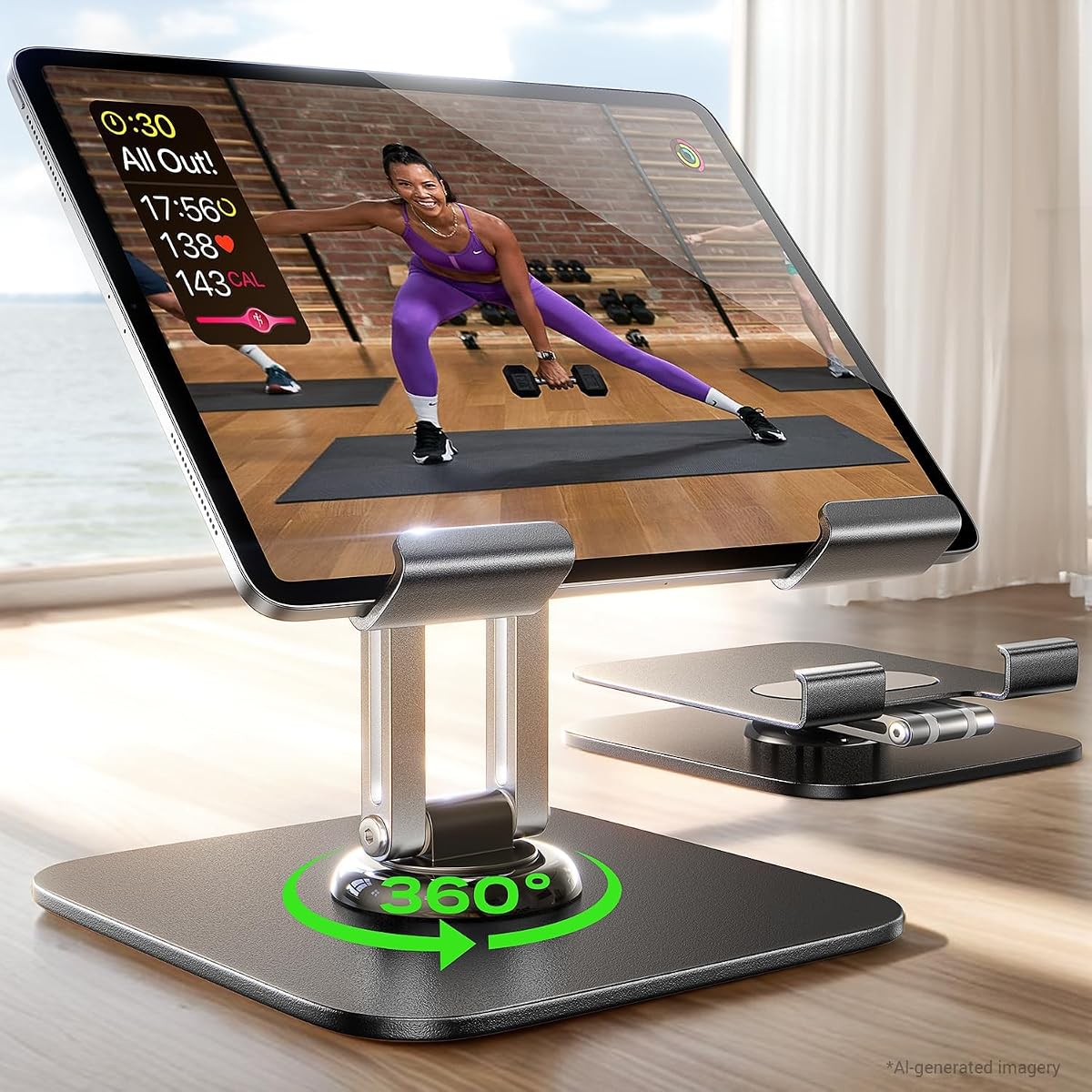
Ultra-slim foldable design
Full 360 degree rotation
Widened hooks for cases
Finding the perfect stand for your tablet can transform your daily workflow significantly. A good iPad stand for desk provides stability and ergonomic viewing angles that reduce neck strain during long work sessions or entertainment periods.
We evaluated the top-rated options available this month based on build quality, adjustability, and compatibility. Our list covers diverse needs from portable travel solutions to heavy-duty commercial mounts for professional environments.
Each pick highlights key strengths and potential trade-offs to help you decide quickly. Remember that availability and stock levels change frequently so check the latest details before making your final purchase choice today.
4.6Editor score

4.8Editor score

4.5Editor score
As an Amazon Associate we earn from qualifying purchases.
This side-by-side comparison highlights the core specifications of each top-rated tablet holder to help you identify the best match for your specific device size and usage requirements.



This Lamicall stand sets the benchmark for desk tablet holders with its robust build and versatile angles. It holds a 4.8 star rating from thousands of users who appreciate its reliability.
We may earn a commission when you buy through this link, at no additional cost to you.
Constructed from spaceflight aluminum and high-strength steel it remains stable even during active use. The rubber pads protect your device while the multi-angle design suits everything from typing to video calls.
The only trade-off is a maximum thickness limit for cases which might exclude heavy protective shells. However for most users this does not impact functionality significantly during daily tasks.
If you need a reliable permanent desk companion for your iPad this model delivers exceptional value and durability. It is the safest bet for professionals seeking stability and style.
The combination of aluminum and steel alloys ensures the stand does not wobble during typing or gaming sessions.
Rubber pads on the base and holding hooks prevent scratches and keep your device secure on smooth surfaces.
We may earn a commission when you buy through this link, at no additional cost to you.
This premium stand excels at ergonomic positioning by lifting screens to eye level to reduce neck strain. It is rated 4.6 stars and supports heavier devices like portable monitors up to 4.4 pounds.
We may earn a commission when you buy through this link, at no additional cost to you.
Its triple stability design includes a weighted base and non-slip padding to prevent tipping on any surface. The telescoping range allows fine-tuned height adjustments for diverse workspaces and user heights.
While robust the extra weight and size make it less ideal for frequent travelers. The complexity of setup is also a consideration for users seeking quick deployment.
For fixed workstations requiring heavy device support and ergonomic comfort this model offers premium features. It is ideal for traders or professionals using larger screens for multitasking.
Designed to hold up to 4.4 pounds it accommodates large tablets and portable monitors without bending or tipping.
Bringing screens to eye level reduces neck pain during long work sessions compared to low-profile stands.
We may earn a commission when you buy through this link, at no additional cost to you.
Affordable yet robust this foldable stand offers 360 degree rotation and a slim profile perfect for travel. With a 4.6 rating it balances cost and durability effectively for casual and business users.
We may earn a commission when you buy through this link, at no additional cost to you.
The hinges allow you to adjust tightness for stable support while the metal base ensures it stays grounded. Widened hooks fit devices with cases up to 0.75 inches thick for convenience.
Unfolding it requires some firm force which might deter users seeking effortless setup. The smaller base footprint also means care is needed on uneven surfaces to prevent tipping.
Budget-conscious buyers will appreciate the feature set without compromising on core functionality. It is an excellent choice for students or travelers who need portability and style.
At just 0.59 inches thick it folds flat into bags or pockets for easy transport anywhere.
The 360 degree rotation lets you turn the screen for colleagues during meetings without moving the base.
We may earn a commission when you buy through this link, at no additional cost to you.
This stand stands out for its ability to hold devices up to 16.9 inches including large portable monitors. With a 4.7 rating it offers exceptional compatibility and stability for versatile setups.
We may earn a commission when you buy through this link, at no additional cost to you.
An innovative locking mechanism lets you secure the viewing angle firmly once set. The all-metal design ensures durability while non-slip pads keep the unit stable on any desk.
It is not suitable for laptops so users must verify their device size before purchasing. The setup process involves dual rods which can be slightly complex for new users.
Ideal for those needing a larger viewing surface beyond standard tablet sizes this model is highly capable. It bridges the gap between tablet holders and monitor stands effectively.
Supporting up to 16.9 inches allows it to hold portable monitors and large tablets that others cannot.
The locking mechanism ensures the height and angle stay fixed during vigorous typing or tapping activities.
We may earn a commission when you buy through this link, at no additional cost to you.
This LISEN stand features a unique gravity-based system that secures devices without clips or magnets. Rated 4.6 stars it combines portability with a clever locking mechanism for secure placement.
We may earn a commission when you buy through this link, at no additional cost to you.
The bridge screw adjustment allows you to tighten joints over time to prevent loosening. It folds flat to pocket size making it ideal for business trips or commuting.
Users should note that portrait mode is not supported for phones which limits versatility for some. The ABS plastic construction is lightweight but less premium than metal alternatives.
For travelers needing a simple secure solution this model delivers reliable performance. The gravity lock makes it easy to place and remove devices quickly.
The design relies on back tilt to secure the device so no magnets or clips are needed.
A bridge screw truss rod allows periodic tightening to ensure joints remain firm over time.
We may earn a commission when you buy through this link, at no additional cost to you.
Designed for commercial environments this stand handles frequent interactions with robust swivel and locking features. Its 4.5 rating reflects reliability in high-traffic settings like retail counters and offices.
We may earn a commission when you buy through this link, at no additional cost to you.
The folding arm and 360 degree base allow instant switching between cashier and shopper views. Quick attach detach mechanisms enable fast repositioning or storage as needed.
It is heavier and pricier than consumer models which makes it less suitable for casual home use. The design prioritizes durability and visibility over compactness.
Businesses requiring a reliable docking station for public interfaces will find this invaluable. It ensures devices remain secure and accessible during customer interactions.
The quick attach detach system allows staff to remove and reattach tablets rapidly during busy shifts.
A weighted base ensures the stand does not tip over even with frequent handling or adjustment.
We may earn a commission when you buy through this link, at no additional cost to you.
While labeled for bed use this model provides stable tabletop support with full rotation capabilities. It has a 4.5 rating and uses aircraft-grade aluminum for durability during relaxed viewing.
We may earn a commission when you buy through this link, at no additional cost to you.
Integrated cable clips help manage charging cords which keeps the desk area tidy. The stand supports devices from 4.7 to 15.6 inches covering most standard tablets and e-readers.
It is not suitable for headboards as the base requires a flat stable surface. Adjusting the joints requires a wrench which may take a moment to set up initially.
Ideal for users who want a sturdy and flexible stand for media consumption at home. It balances comfort and stability for watching movies or reading.
Full rotation and adjustable height allow you to find a comfortable angle for long viewing sessions.
Built-in clips secure charging cables to prevent tangling and maintain a clean workspace.
We may earn a commission when you buy through this link, at no additional cost to you.
This stand addresses common stability issues with a truss rod and wide aluminum base. Rated 4.5 it supports bulk purchasing making it a smart choice for offices with multiple iPads.
We may earn a commission when you buy through this link, at no additional cost to you.
The 360 degree rotation and adjustable locking mechanism let users customize their viewing angle precisely. A bridge screw allows maintenance to prevent loosening over time ensuring long-term durability.
The heavier build makes it less travel-friendly but ideal for fixed desk setups. The adjustment process may be slightly more involved than simpler models.
Businesses or classrooms needing multiple consistent units will find this model efficient and durable. It combines office-ready features with robust build quality.
Designed for businesses this unit supports bulk orders which streamlines procurement for multiple desks.
A bridge screw adjustment truss rod keeps joints stable and prevents loosening during daily use.
We may earn a commission when you buy through this link, at no additional cost to you.
This compact stand offers multiple angles in a tiny footprint that slips into pockets easily. With a 4.6 rating it is a favorite for users prioritizing portability and simplicity.
We may earn a commission when you buy through this link, at no additional cost to you.
The ABS material provides decent durability while silicone pads protect devices and desks from scratches. It fits tablets up to 11 inches and supports various angles for media or browsing.
Limited height adjustment means it may not suit ergonomic needs for typing. Users requiring more vertical lift might prefer larger models.
For travel or small desks where space is tight this model is unmatched. It provides essential functionality without taking up desk real estate.
At 4.7 by 4.2 inches it folds small enough to fit into most standard pockets or bags.
Silicone pads on the bottom keep your desk and device free from scratches during use.
We may earn a commission when you buy through this link, at no additional cost to you.
This stand reaches up to 20 inches height making it ideal for eye-level video calls. It is rated 4.5 stars for eliminating neck strain and supporting heavy monitors.
We may earn a commission when you buy through this link, at no additional cost to you.
Zero hassle assembly ensures you can start using it in under 30 seconds. The 360 degree rotation allows quick switching between portrait and landscape modes for versatility.
Its height makes it less suitable for compact desks or low-profile setups. The price point is higher than basic stands but justified by the ergonomic benefits.
Professionals seeking an ergonomic solution for video conferencing will appreciate this model. It delivers comfort and stability for long hours of screen time.
The 20-inch reach brings screens to eye level to prevent neck pain during long calls.
Assembling the stand takes just 30 seconds making it ready for use immediately.
We may earn a commission when you buy through this link, at no additional cost to you.
Choosing the right stand involves balancing stability adjustability and material quality to fit your specific workflow needs.
Ensure the stand supports your iPad size and weight range. Most models accommodate devices from 4 to 13 inches but check specifications for larger portable monitors.
Always verify thickness limits especially if you use a protective case as wide hooks are necessary for bulkier setups.
Metal alloys like aluminum or steel offer better durability and heat dissipation than plastic options. Look for weighted bases to prevent tipping during use.
Premium materials ensure the stand remains stable over time even with frequent adjustments or typing activity.
Consider how many angles the stand offers. Models with 360-degree rotation or dual hinges provide more flexibility for various tasks.
A locking mechanism helps keep your preferred angle in place without constant readjustment during work.
If you travel frequently choose a foldable design that fits into a laptop bag or pocket. Slim profiles are ideal for shared workspaces.
Larger stands with tall bases offer better stability but may consume too much desk space for compact environments.
Check the maximum weight limit to ensure the stand can hold your tablet plus any accessories. Heavier monitors require reinforced structures.
Underestimating weight capacity can lead to bending or tipping which damages your device or causes injury.
A good stand should allow eye-level viewing to reduce strain during video calls or reading. Look for adjustable height features.
Prioritize models that lift the screen to reduce neck pain during extended usage sessions.
Non-slip pads protect both your device and your desk from scratches. Silicone or rubber coatings are preferred.
Choose stands that cushion contact points to prevent wear on your tablet over time.
Consider how quickly you can set up the stand. Some require wrenches or tools while others are tool-free.
Quick assembly saves time if you plan to move the stand between locations or use it in meetings.
Place the stand on a flat stable surface and adjust the height to eye level. Ensure the base is flush with the desk to prevent tipping during use.
Clean the stand periodically with a damp cloth to remove dust that could scratch your device. Avoid harsh chemicals that may degrade the rubber or silicone pads.
If the stand feels loose over time tighten the hinge or screw joints using the provided tools to restore stability.
Most stands support cases up to a certain thickness often around 0.75 inches. Check the product specs to ensure your specific case fits within the hook clearance.
Yes many models support up to 13 or 16 inches with enough weight capacity. Verify the weight limit and hook width before using it with a larger monitor.
Ensure the non-slip pads are clean and intact. Position your iPad so it rests securely against the hooks without overhanging the edge.
No reputable metal stands use protective silicone or rubber pads to shield your device. These coatings prevent metal-to-metal contact.
Absolutely stands that allow eye-level positioning are ideal for video calls. Look for models with adjustable tilt for better framing.
Most stands support both modes though some may have limited flexibility. Check if the stand allows rotating the device if you need both orientations.
We reviewed ten top-rated stands ranging from portable budget options to heavy-duty premium models. Each pick offers unique strengths for different needs and workspaces.
Prioritize ergonomics and material quality if you use your iPad daily for work. Budget models may suffice for occasional media consumption.
Check current availability and stock levels before purchasing since these popular items often sell out quickly during peak seasons.