
V-one Wired USB Gaming Controller Gamepad Joystick for PC
4.2Editor score
Multi-mode support for PC and Android
Vibration feedback for immersion
Plug and play compatibility
Discover the top joysticks for Windows 11 with this expert guide comparing features, compatibility, and performance for flight sims and gaming.
Finding the right joystick for Windows 11 can transform your gaming experience. Whether you love flight sims or arcade shooters, a quality controller offers precision and comfort. This guide highlights the best options available today for immersive control.
We evaluated ten top-rated joysticks based on compatibility, build quality, and features like vibration and programmable buttons. Our comparison ensures you find a device that works seamlessly with your PC setup. From budget picks to premium models, we cover it all.
Each selection includes detailed pros, cons, and setup tips to help you decide quickly. Prices and availability may change, so check current listings before purchasing. Trust our expert analysis to upgrade your Windows 11 gaming with confidence.
4.2Editor score

4.4Editor score

4.0Editor score
This table compares key specs across all ten joysticks to help you find the perfect match for your Windows 11 setup and gaming preferences quickly.



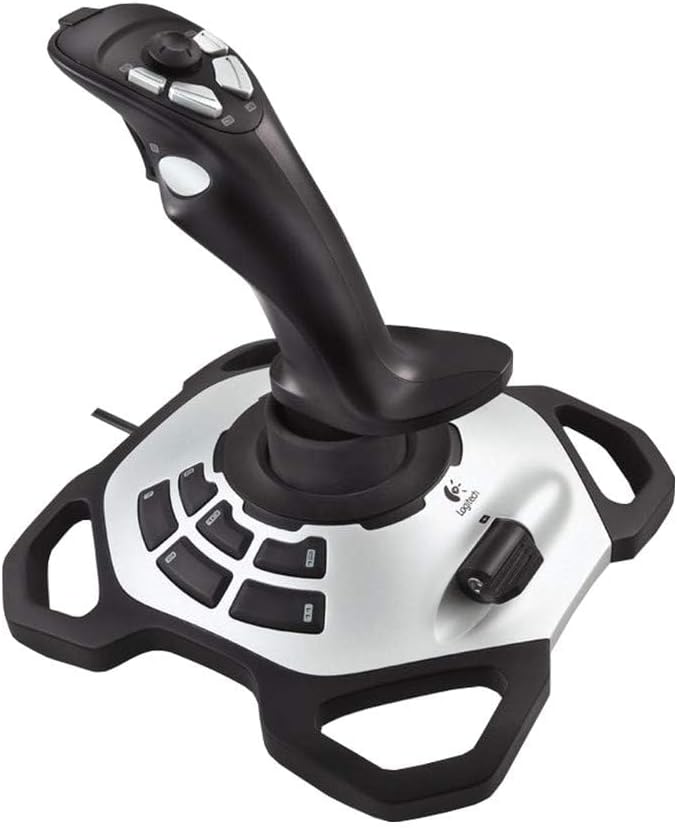



The PXN 2113PRO offers a solid entry point for flight sims on Windows 11. With 12 programmable buttons and vibration feedback, it delivers a good experience. Its affordable price makes it a strong contender for budget gamers.
We may earn a commission when you buy through this link, at no additional cost to you.
Users praise its realistic fly experience and ergonomic design. The 4 axis controls and 8-way hat switch allow precise movements in games like War Thunder and Microsoft Flight Simulator. Setup is straightforward once drivers are configured.
Some users note vibration needs high strength settings to feel noticeable. It does not work on Mac or consoles. However, for PC flight sims, its versatility and comfort outweigh these minor drawbacks.
Buy this if you want an affordable flight stick with many buttons. It suits beginners and casual pilots seeking immersion without breaking the bank. Check driver support before purchase to ensure compatibility.
The 4 axis and hat switch allow smooth maneuvers in complex sims.
Get many features without a premium price tag.
We may earn a commission when you buy through this link, at no additional cost to you.
The Thrustmaster T-Flight Hotas One is ideal for versatile setups on Windows 11. Its detachable throttle lets you use the stick on a lap or desk. This flexibility suits both desk and cockpit environments comfortably.
We may earn a commission when you buy through this link, at no additional cost to you.
Featuring adjustable resistance and responsive triggers, it handles combat maneuvers smoothly. The ergonomic design reduces fatigue during long sessions. Its plug-and-play USB connection ensures instant compatibility with most flight sim software.
While it lacks advanced programmable features, it covers basics well. Beginners and casual pilots will appreciate its simplicity. However, pros might find it limiting for complex missions requiring extensive button mapping.
Choose this for a reliable, adaptable flight controller. It balances cost and function well. Whether on Xbox or PC, its modular design offers convenience and immersion without overwhelming complexity.
Use the stick alone or with throttle for different setups.
Plug in and play with no drivers needed.
We may earn a commission when you buy through this link, at no additional cost to you.
The V-one Wired USB Gaming Controller provides exceptional value for Windows 11 users. Priced affordably, it supports Xinput, Dinput, and Android modes. This makes it a versatile choice for PC and mobile gamers alike.
We may earn a commission when you buy through this link, at no additional cost to you.
Its vibration feedback and turbo function enhance gameplay in various titles. The design is compact and comfortable for extended use. Users report good compatibility with Steam games and older Windows systems.
While not a dedicated flight stick, it handles general gaming well. The build is plastic and simple. For those needing a basic controller without extra features, it meets expectations without overspending.
Ideal for casual gamers or those seeking an extra controller. Its low price reduces risk for testing. Ensure your games support the modes offered for the best experience.
Use it on PC, Android, and PS3 easily.
High features at a very low cost.
We may earn a commission when you buy through this link, at no additional cost to you.
The Thrustmaster USB Joystick serves as a simple option for Windows PC users. Its POV button allows quick camera changes during games. With 3 axes and 4 buttons, it covers basic needs without bulk.
We may earn a commission when you buy through this link, at no additional cost to you.
The ergonomic handle with enlarged rest improves comfort. It is easy to connect via USB and works with many titles. Users find it suitable for arcade and action games needing light control.
However, it lacks programmability and advanced features. The build feels simple compared to modern controllers. For those needing only core functions, it is a straightforward tool without extra cost.
Select this if you want minimal setup and essential controls. It works well for lighter gaming. Check if your games support the limited button count before buying.
The POV button lets you adjust views instantly.
Small size fits well on any desk setup.
We may earn a commission when you buy through this link, at no additional cost to you.
The Microsoft Sidewinder Precision 2 brings a classic feel to Windows 11. Its rotating handle gives precise rudder control for flight sims. With 16 programmable functions, it offers flexibility for various game types.
We may earn a commission when you buy through this link, at no additional cost to you.
Users love the 146 degree action throttle for complete control. It saves game-specific profiles for quick access. The USB connection ensures plug-and-play ease without driver issues.
While modern, its design reflects older standards. Some new games may not map buttons as expected. Still, it remains a solid choice for those preferring tangible knobs and reliable rudder input.
Buy this for a nostalgic yet functional controller. It suits flight sim fans who need rudder twist. Check game compatibility for best results on newer systems.
Rotate the handle for smooth flight control.
Save settings for different games easily.
We may earn a commission when you buy through this link, at no additional cost to you.
The Logitech Extreme 3D Pro delivers precision combat control for Windows 11. Its stick design allows smooth maneuvers in flight games. Users report a durable build that withstands heavy use over time.
We may earn a commission when you buy through this link, at no additional cost to you.
The handle fits comfortably for extended sessions. USB connectivity ensures easy setup without extra steps. It is a trusted choice for those needing reliable performance without complex features.
While it lacks a separate throttle, its focus is on stick accuracy. This suits arcade shooters or sims using keyboard for throttle. The price is higher than basic options but matches build quality.
Choose this for durable, accurate handling. It works well for serious gamers. Ensure you need stick-only control before purchase to avoid missing throttle needs.
Designed to last through intense gaming sessions.
Precision axis for exact control in air.
We may earn a commission when you buy through this link, at no additional cost to you.
The VOYEE PC Controller offers great Xbox 360 compatibility on Windows 11. Its rumble feedback enhances immersion in supported titles. The 7.2ft cord provides flexibility for seating arrangements.
We may earn a commission when you buy through this link, at no additional cost to you.
Users appreciate the sensitive triggers and buttons for quick commands. It is affordable and works plug-and-play on most PCs. Design contours fit hands comfortably for long use.
Note it may not suit FPS games well due to layout. Trigger response is enhanced but not pro-grade. For casual gaming, it delivers solid value without extra cost.
Buy this for an extra controller with Xbox features. It suits general gamers needing comfort. Ensure your games match its layout before relying on it.
Feel vibrations during key game moments.
Contours reduce hand fatigue during play.
We may earn a commission when you buy through this link, at no additional cost to you.
The Thrustmaster SimTask FarmStick targets Farming Simulator 25 on Windows 11. Its 3-axis joystick mimics heavy machinery controls. With 33 inputs, you manage functions without relying on a keyboard.
We may earn a commission when you buy through this link, at no additional cost to you.
Hall effect sensors ensure long-term precision without drift. The ambidextrous design suits various setups. Users find it delivers a lifelike farming experience with smooth operation.
Note it works best with a racing wheel. Without one, some features may be limited. It is specific to farming sims, so check if you play these games.
Ideal for serious farming sim players. It improves immersion greatly. Ensure your setup matches its design needs before purchase.
Realistic controls for tractors and loaders.
Hall effect tech ensures lasting accuracy.
We may earn a commission when you buy through this link, at no additional cost to you.
The Logitech G X56 H.O.T.A.S is a premium flight controller for Windows 11. With 189 programmable controls, it offers unmatched customization. Military-grade sensors ensure precise movements in complex flight sims.
We may earn a commission when you buy through this link, at no additional cost to you.
Its RGB lighting adds a customizable touch to rigs. Advanced springs adjust force feel to preference. Users report high immersion and professional-grade performance for serious aviators.
It requires setup time and space. The cost is high compared to basic sticks. For pros or enthusiasts, it is worth the investment. Others may find it excessive for casual play.
Buy this for ultimate control and features. It suits combat sim fans. Ensure you need so many inputs before buying.
Sensors deliver elite-level accuracy for sims.
Match RGB to your gaming setup.
We may earn a commission when you buy through this link, at no additional cost to you.
The Guillemot Thrustmaster T.16000M Fcs is fully ambidextrous on Windows PC. Its H.E.A.R.T technology ensures precision that does not decrease over time. Users find it reliable for long-term flight simulation use.
We may earn a commission when you buy through this link, at no additional cost to you.
With 16 action buttons and an 8-way hat switch, it covers key controls. The design allows removal of components to fit left or right-handed players. Setup is straightforward via USB.
It is PC-only and may need driver installation. While high-quality, some features are specific to certain setups. It suits precision seekers who need consistent accuracy over years.
Choose this for durable, accurate performance. It works well for serious pilots. Check OS compatibility before purchase to ensure support.
H.E.A.R.T technology maintains accuracy over time.
Removable parts suit left or right-handed gamers.
We may earn a commission when you buy through this link, at no additional cost to you.
Selecting the right joystick requires considering compatibility, features, and your gaming needs.
Ensure the joystick explicitly supports Windows 11. Some older models may need driver updates or have limited support. Check the product page for system requirements before purchasing.
Always verify Windows 11 support to avoid connection issues.
Flight sims need throttles and rudder controls, while arcade shooters may work with gamepads. Identify your main use case. Flight-focused models offer more axes and programmable buttons.
Choose a design matching your primary game type.
More buttons allow mapping complex actions without keyboard use. Look for 8 to 189 inputs based on needs. This reduces key clutter and enhances immersion during gameplay.
More buttons mean better control for complex missions.
Ergonomic designs reduce hand fatigue during long sessions. Durable materials withstand heavy use. Check weight and grip comfort in reviews before buying.
Comfortable builds support longer gaming sessions.
Vibration adds immersion by feeling impacts in games. Some models have adjustable force feedback. This feature is optional but enhances realism in sim titles.
Feedback features add immersion to gameplay.
Prices vary from under $20 to over $200. Budget options suit casual use. Premium models offer advanced features for dedicated pilots. Balance cost with needed functionality.
Set a budget matching your needs.
Wired USB ensures stable connection without lag. Wireless models offer flexibility but need batteries. Check for required ports on your PC for best setup.
Wired USB avoids lag and battery issues.
Good software lets you map buttons and calibrate controls. Some models need drivers, others are plug-and-play. Verify support tools are available for Windows 11.
Easy software simplifies setup and customization.
Start by plugging the joystick into a USB port before launching games. Windows 11 should recognize it automatically. Check device settings to confirm detection.
Map buttons using provided software to suit your game needs. Adjust axis sensitivity if available for comfort. Test inputs in a simulator mode to verify.
Keep the joystick clean with a dry cloth to avoid dust buildup. Store it safely when not in use to prevent damage. Update drivers as needed for new game support.
Not all older models guarantee Windows 11 compatibility. Check the product page for system requirements. Many modern options list explicit support for Windows 11 to avoid issues.
A gamepad uses two small sticks, while a flight stick has one large control handle. Flight sticks offer more axes like throttle and rudder. Use a gamepad for arcade games and a stick for flight sims.
Many modern joysticks are plug-and-play on Windows 11. However, some need drivers for advanced features. Check the product details and install software if provided for full functionality.
Some models like Thrustmaster support Xbox Series X|S. Others are PC only. Verify console compatibility on the product page. Use official Xbox controllers for guaranteed support.
Use the included software or game control settings. Select the button and assign its function. Test in game to ensure it works. Save profiles for quick access.
Check if vibration is enabled in game or driver settings. Ensure the strength is set high enough. Some models require switches to be turned on for feedback.
Wireless models offer flexibility but may have latency. Wired USB ensures stable connection. Choose based on your setup. Wired is safer for competitive sims.
Yes, most joysticks work with any game that supports controllers. Configure profiles per game for best experience. Save settings in software to switch easily between titles.
Our top picks include the V-one for budget buyers, Thrustmaster T-Flight for versatile setups, and Logitech G X56 for premium control. Each suits different needs.
Prioritize compatibility and features that match your main games. Comfort and programmability enhance immersion. Choose based on your balance of cost and function.
Prices may change, so check current listings before purchase. We update our guide regularly. Trust our analysis to find the best joystick for your Windows 11 setup today.