
Lenovo V15 Gen 4 Business Laptop
4.7Editor score
Military Grade MIL-SPEC tested
16GB DDR5 RAM included
Full-size keyboard with numpad
Finding a laptop that lasts for years requires more than just checking specs. You need devices built with durable materials, efficient processors, and robust support systems. This guide highlights machines designed to withstand daily wear and tear while maintaining performance over time.
We evaluated ten top-rated laptops based on build quality, component reliability, and user feedback. Each model offers unique strengths for different needs, from rugged field use to professional office work. Our comparisons focus on longevity factors like thermal management and update support.
Each pick showcases specific features that contribute to a longer lifespan. We include detailed reviews and buying advice to help you decide. Please note that product availability and pricing can change frequently, so verify details before purchasing your next reliable computer.
4.7Editor score

4.4Editor score

4.2Editor score
As an Amazon Associate we earn from qualifying purchases.
This side-by-side comparison reviews all ten selected laptops to highlight their key specifications and strengths for long-term use. Check the details below to find the model that matches your specific workflow and durability requirements.






The Lenovo ThinkPad L16 stands out as a top choice for longevity due to its enterprise-grade design and reliable components. With a rating of 4.4 stars, users praise its durability and consistent performance over time. This machine is built to handle demanding daily tasks without slowing down.
We may earn a commission when you buy through this link, at no additional cost to you.
Its MIL-STD-810H certification ensures it can withstand drops and extreme conditions. The Intel Core Ultra 5 processor provides efficient power management which helps extend battery life significantly. Users report up to ten hours of usage on a single charge during standard workloads.
Trade-offs include a slightly heavier chassis compared to consumer laptops. The premium build quality adds weight but ensures long-term structural integrity. For users prioritizing lifespan over portability, this is a minor drawback that pays off over years of use.
Business professionals and students seeking a reliable daily driver should consider this model. Its robust construction and upgrade options make it an excellent investment for long-term productivity needs. We recommend verifying current stock levels before purchasing.
The ThinkPad L16 is engineered to resist physical stress. This design philosophy ensures that the laptop remains functional even in busy environments where accidents might happen.
Modern Intel processors in this model optimize energy usage. This efficiency translates directly to longer battery life and less frequent charging cycles.
We may earn a commission when you buy through this link, at no additional cost to you.
The HP 17 inch Business Laptop offers a substantial screen for users who value visibility and productivity. With a 4.5 rating, it is known for its stable performance and useful features like a numeric keypad. The large display reduces eye strain during long working sessions.
We may earn a commission when you buy through this link, at no additional cost to you.
Its AMD Ryzen 5 processor delivers reliable speed for everyday tasks. The inclusion of Office 365 for Web ensures you can start working immediately. Long battery life features allow for extended use without hunting for power outlets.
A larger 17.3 inch screen means the device is less pocketable. It is best suited for desk use or environments where mobility is not a top priority. This trade-off is worth it for those who need a big workspace.
Ideal for office workers or students who need a desktop replacement. The robust build and clear display support years of heavy use. Check the latest availability before ordering to ensure you get the current edition.
The expansive screen real estate allows for multitasking without external monitors. This helps maintain workflow efficiency over many years of daily use.
HP Fast Charge technology minimizes downtime. You can get significant power in a short time, keeping you productive during busy days.
We may earn a commission when you buy through this link, at no additional cost to you.
Dell 16 Laptop DC16251 prioritizes eye comfort and visual clarity for long sessions. With a 4.4 rating, it delivers solid performance through its Intel Core 7 processor. The ComfortView Plus feature is a key asset for users working late into the night.
We may earn a commission when you buy through this link, at no additional cost to you.
This model adjusts power and thermals based on surface conditions. This adaptive technology helps prevent overheating which extends component life. The 16 inch screen offers a nice balance between portability and workspace.
Battery life is decent but not industry leading. Users might need to keep a charger nearby for full day travel. However, the onboard performance and screen quality outweigh this for stationary or light mobile work.
Great for professionals who prioritize visual comfort. The onsite service option adds a layer of longevity by ensuring quick repairs if issues arise. Verify the warranty terms before purchase.
Reducing blue light emissions protects your eyes over time. This makes the laptop suitable for extended work sessions without discomfort.
Dell Services includes onsite support which speeds up resolution. This service commitment enhances the overall longevity of the device experience.
We may earn a commission when you buy through this link, at no additional cost to you.
The Lenovo V15 Gen 4 offers impressive specs for its price point. A 4.3 rating reflects its ability to handle multiple apps efficiently. The inclusion of Windows 11 Pro adds features that support long-term business management.
We may earn a commission when you buy through this link, at no additional cost to you.
High bandwidth RAM allows for smooth multitasking. The PCIe NVMe SSD ensures fast boot times and quick file access. These hardware choices contribute to a responsive experience that lasts.
The chassis is primarily plastic which may feel less premium. However, it remains functional and durable for standard office environments. Users should handle it with care to maintain structural integrity.
Best for students and professionals needing reliable power. The combination of speed and OS features makes it a smart long-term pick. Check for updates on stock availability in your region.
Windows 11 Pro includes tools for better device management. These features help maintain security and organization over years of use.
PCIe NVMe technology provides rapid data transfer speeds. This ensures that the laptop feels fast even as software demands increase.
We may earn a commission when you buy through this link, at no additional cost to you.
This Lenovo V15 model is a standout for reliability with a 4.7 rating. It meets MIL-SPEC standards ensuring it can handle harsh conditions. The DDR5 RAM provides a future-proof advantage for long-term performance.
We may earn a commission when you buy through this link, at no additional cost to you.
The AMD Ryzen 5 processor offers efficient performance for daily tasks. Users appreciate the privacy shutter for security during video calls. This feature adds a layer of safety that supports ongoing usage.
Design is utilitarian which might not appeal to everyone. However, functionality is prioritized over aesthetics for better durability. It is a tool designed to work consistently over time.
Ideal for users needing a sturdy workhorse. The combination of certification and modern RAM ensures longevity. Confirm warranty details before finalizing your purchase decision.
DDR5 RAM offers faster speeds and lower power usage. This technology choice helps the laptop stay relevant longer.
The physical shutter on the webcam gives direct control. This hardware feature ensures privacy without needing software toggles.
We may earn a commission when you buy through this link, at no additional cost to you.
The ThinkBook 16 Gen 8 is a powerhouse designed for long-term heavy use. With a 4.2 rating, it offers robust specs that handle demanding workloads. The 32GB DDR5 RAM ensures smooth operation for complex tasks.
We may earn a commission when you buy through this link, at no additional cost to you.
Intel Core Ultra 7 brings next-gen AI capabilities for efficiency. This helps optimize performance and battery use automatically over time. The aluminum chassis adds a premium look and feel that resists scratches.
It is heavy and expensive compared to basic models. This investment is worth it if you need top specs for years. The durability of the chassis supports this long-term investment.
Best for power users and creators. The ample storage and memory make it a reliable choice for large projects. Verify current shipping times to ensure timely delivery.
Built-in AI helps manage resources intelligently. This feature extends battery life and keeps the system responsive longer.
Aluminum construction offers better resistance to wear. This material choice ensures the laptop looks good for many years.
We may earn a commission when you buy through this link, at no additional cost to you.
This Lenovo V15 Gen 4 variant focuses on robust build and value. A 4.5 rating highlights its reliability for daily tasks. Military grade testing ensures it can handle physical stress well.
We may earn a commission when you buy through this link, at no additional cost to you.
Lenovo Smart Appearance improves video call quality for collaboration. Dolby Audio adds an elegant experience for multimedia consumption. These features enhance the user experience significantly.
8GB RAM might limit heavy multitasking over time. However, for general office work, it remains stable and efficient. Users who need more memory might look at higher tier models.
Great for small businesses seeking reliability. The sustainability certifications also reflect a commitment to quality. Verify stock status to ensure you get the right spec.
Enhanced camera effects help you stand out in calls. This feature supports productive remote work environments.
Encryption and responsible sourcing show attention to detail. This approach supports a trustworthy and safe user experience.
We may earn a commission when you buy through this link, at no additional cost to you.
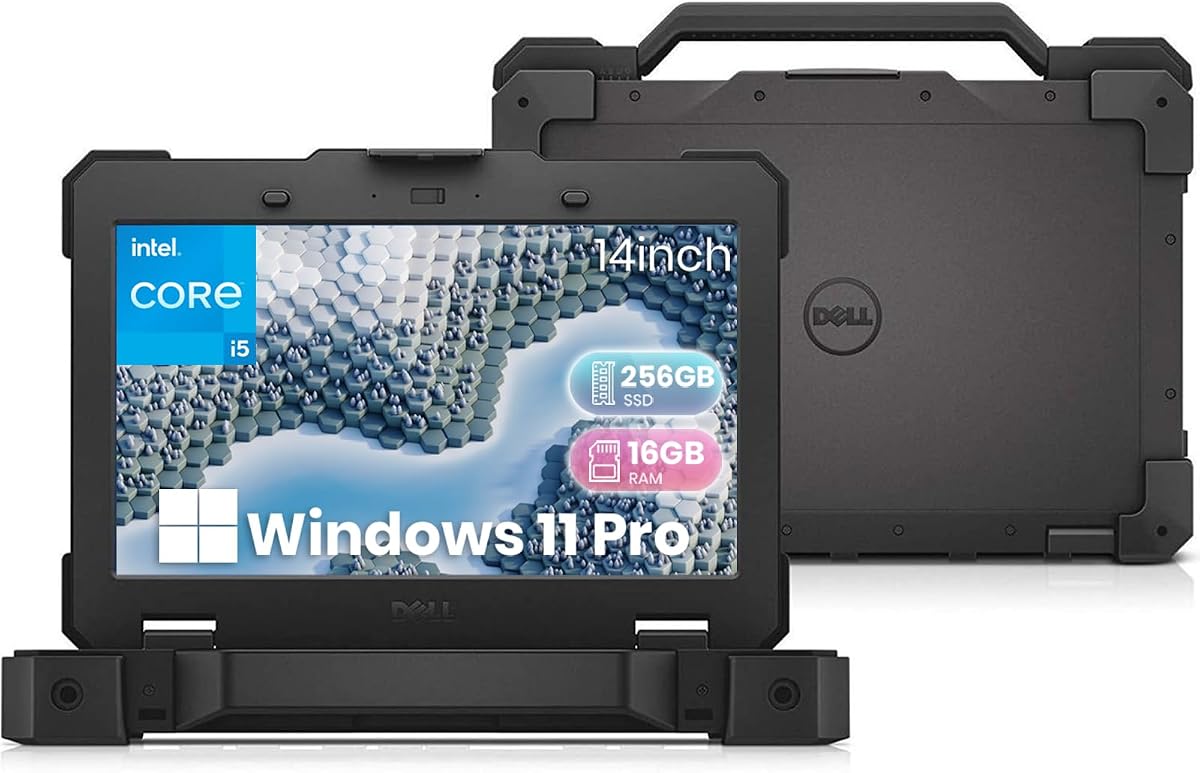
The Dell Latitude Rugged 5420 is designed for tough environments. With a perfect 5.0 rating, users love its resilience and field readiness. It handles drops and harsh weather better than standard laptops.
We may earn a commission when you buy through this link, at no additional cost to you.
Outdoor visible technology ensures you can see the screen anywhere. This is critical for field work and reliability in all conditions. The 16GB RAM supports stable multitasking even on older cores.
It is a renewed product which means prior use. Inspect the item upon arrival for any cosmetic issues. Performance remains solid for business applications and inspections.
Ideal for industrial or construction teams. The rugged nature ensures it survives where others would fail. Check warranty terms for renewed items carefully.
Designed to withstand construction sites and warehouses. This toughness ensures your work continues without hardware interruptions.
High brightness screen works well in sunlight. This feature is essential for users who work outside daily.
We may earn a commission when you buy through this link, at no additional cost to you.
The Dell Latitude 5414 offers rugged features at a budget-friendly price. A 5.0 rating confirms its reliability for basic computing. It stands up to drops and spills with its reinforced design.
We may earn a commission when you buy through this link, at no additional cost to you.
Certified Refurbished status means it was professionally inspected. This offers a balance of cost and quality assurance. The 16GB RAM helps keep workflows moving smoothly.
Legacy ports might require adapters for modern devices. However, for industrial tasks, these connections are often vital. The device prioritizes function over modern aesthetics.
Great for budget-conscious rugged needs. The certified status adds confidence to the purchase. Confirm shipping details to ensure secure delivery.
Professional inspection ensures it meets working standards. This process gives buyers peace of mind regarding reliability.
Includes many ports for various equipment. This flexibility supports integration with older industrial tools easily.
We may earn a commission when you buy through this link, at no additional cost to you.
The Lenovo V-Series V15 provides massive memory for demanding users. With a 4.2 rating, it supports heavy multitasking well. The 40GB RAM allows for extensive browser tabs and apps.
We may earn a commission when you buy through this link, at no additional cost to you.
AMD Ryzen 7 ensures efficient processing power. Combined with a 1TB SSD, you have plenty of room for files. This setup supports long-term productivity without needing frequent upgrades.
The build is functional but not flashy. Weight may be higher due to internal components. For stationary office use, this is not a major concern for most.
Best for power users needing RAM on a budget. The specs are impressive for the price point. Check current stock for your preferred configuration.
1TB SSD allows ample space for large datasets. This ensures you can work without worrying about full drives.
Windows 11 Pro offers better management tools. This supports secure and organized workflows for years.
We may earn a commission when you buy through this link, at no additional cost to you.
Selecting a laptop that lasts requires balancing performance, build quality, and warranty support. Consider these key factors to ensure your investment remains reliable over years of daily use.
Durability starts with the chassis. Aluminum or magnesium alloys resist dents and scratches better than plastic. Look for military-grade certifications like MIL-STD-810H to ensure the device can handle drops or extreme temperatures.
Prioritize laptops with reinforced hinges and sturdy ports. These weak points often fail first in older machines. A robust frame ensures the laptop survives daily commuting or travel.
Modern processors from Intel or AMD with low power modes are crucial for longevity. They generate less heat which reduces stress on internal components. AI enabled chips can optimize resource usage to extend battery life over time.
Choose a processor that fits your workflow without overkill. Excessive power often leads to higher heat. Balancing performance with efficiency keeps the device running smoothly for years.
16GB RAM or more is recommended for future-proofing. Modern apps demand more memory for smooth operation. NVMe SSDs provide faster speeds and better endurance than traditional hard drives.
More capacity means you won't need to upgrade soon. It also ensures your laptop handles future software updates gracefully. This investment extends the useful life of your system.
Lithium-ion batteries degrade over time. Look for models with advanced power management systems. Fast charging capabilities help reduce wear by minimizing plug-in time.
Consider batteries with removable or replaceable designs if possible. This allows you to restore performance later without replacing the whole laptop. Long battery life is key to daily usability.
The keyboard is the most used part of a laptop. Ensure it has good travel and resistance to wear. Backlit keys help in low light and improve typing efficiency.
A reliable input device prevents frustration. High-quality keycaps resist fading and sticking over time. This small detail impacts your daily experience significantly.
Versatile connectivity ensures you can attach peripherals easily. HDMI and USB-C with DisplayPort support allow for flexible external displays. Ethernet ports are useful for stable connections.
Fewer dongles mean less strain on ports. Look for models that offer enough native connectivity. This reduces the risk of damaged adapter ports over the years.
Longevity includes data protection. Look for fingerprint scanners or TPM chips. Privacy shutters on webcams prevent unauthorized access.
Physical security features add value over time. They ensure your data remains safe even if the device is lost. This peace of mind is crucial for long-term users.
A good warranty can save you from premature replacement. Check for onsite service options that minimize downtime. Extended support means you can get repairs quickly if needed.
Prioritize brands known for reliable customer service. This ensures you can maintain your laptop effectively. Strong support is a hidden factor in total lifespan.
To maximize lifespan, keep your laptop clean by wiping the screen and keyboard regularly with a microfiber cloth. Dust and debris can damage vents and cause overheating. Use compressed air to clear out internal fans gently without forcing them.
Protect the device from extreme temperatures. Avoid leaving it in a hot car or direct sunlight. Heat is a primary cause of battery degradation. Use a padded bag for transport to prevent physical impact during commutes.
Manage your battery by avoiding constant full charges when plugged in for long periods. Use power settings to limit charge to 80 percent if supported. This slows down chemical aging in the battery cells and extends overall life.
Look for models with military-grade certifications and metal chassis. Components like SSDs and high RAM counts also contribute to longer performance. Check reviews for durability over time rather than just initial speed.
Not necessarily. Many mid-range laptops offer excellent build quality. Focus on specific durability features like reinforced hinges and reliable batteries. These details matter more than the price tag alone.
Most business laptops are designed to last 3 to 5 years. With proper care like regular cleaning and safe transport, they can last longer. Warranty support often covers this period effectively.
Yes if they are certified by the manufacturer. Refurbished units are tested for functionality. They offer a cost-effective way to get durable hardware. Check the warranty included with the purchase.
Excess heat degrades internal components faster. Poor ventilation can lead to throttling and hardware failure. Ensure your laptop has free air flow during use to maintain longevity.
Many business models allow RAM and SSD upgrades. Check the manual to see if these are accessible. Upgradable components let you refresh performance without buying a new device.
A failing battery disrupts workflow and reduces mobility. Batteries degrade naturally but slow charging helps. Some laptops have settings to preserve battery health over years of use.
We reviewed ten excellent options that balance durability with performance. Models like the ThinkPad L16 and V15 Gen 4 offer robust designs suited for long-term use. Choosing the right one depends on your specific budget and workspace needs.
Prioritize build quality and component reliability over flashy features. A sturdy chassis and efficient processor will serve you better. Over time than a thin device with fragile internals. Check warranty options to secure your purchase.
Prices and availability can change frequently so verify current details before buying. Use this guide to find a machine that fits your workflow. Investing in quality ensures you get years of reliable productivity.