
MokerLink 8 Port 10G Managed Ethernet Switch
4.3Editor score
8 x 10G Ports
Web CLI L3 Managed
Metal Desktop Rackmount
This guide compares the top ten Layer 3 Network Switch models for performance, routing features, and reliability to help you choose the right networking gear.
Modern networks demand smarter hardware that can route traffic efficiently without relying solely on routers. A Layer 3 Network Switch provides this capability by integrating routing functions directly into the switching fabric for faster data movement.
We evaluated ten leading models based on port density, routing protocols, manageability, and build quality. Our analysis focuses on real-world performance metrics and feature sets that matter for enterprise and advanced home lab environments.
Each pick highlights specific strengths like PoE capabilities, fiber options, or user interfaces. Prices and availability change frequently, so check current listings before purchasing to ensure you get the best deal for your needs.
4.3Editor score

4.7Editor score

4.7Editor score
This side-by-side comparison highlights the key specifications and capabilities of each selected Layer 3 Network Switch to help you identify the model that fits your network topology best.
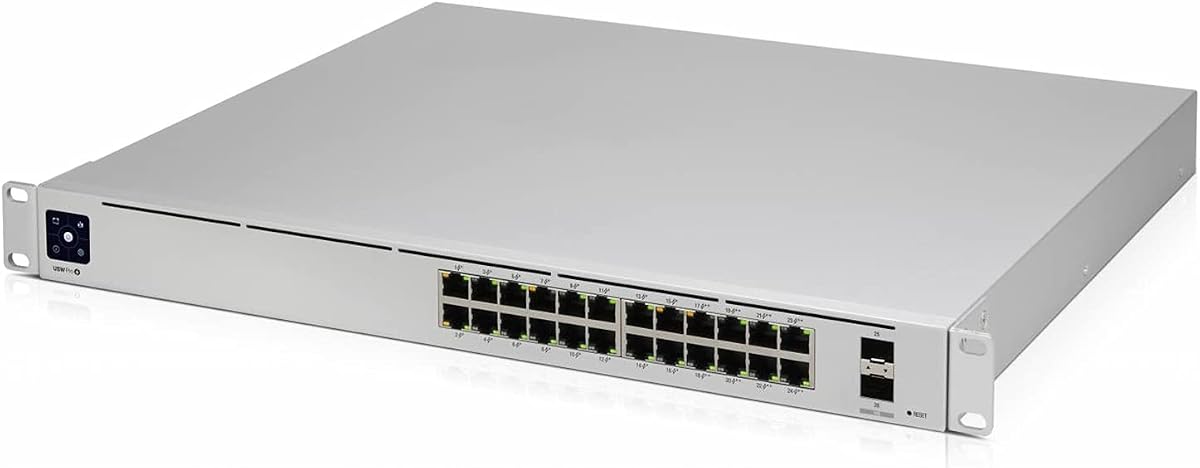




This switch ranks first for its robust Layer 3 capabilities and integration within the UniFi ecosystem. It receives high marks from users for stability and performance in demanding network environments.
We may earn a commission when you buy through this link, at no additional cost to you.
The device includes 24 ports that support advanced routing protocols essential for segmenting networks efficiently. Users benefit from the seamless management interface that simplifies complex configuration tasks significantly.
While it requires a controller for full functionality, the trade-off is a highly intuitive management experience. The lack of standalone CLI can limit flexibility for some advanced administrators.
Ideal for businesses already using UniFi gear, this switch delivers the performance needed for scalable networks. Its combination of features makes it a top choice for professional deployments.
Integration with UniFi controllers allows centralized management of all network devices easily.
Built-in Layer 3 routing reduces the load on primary routers and improves traffic flow.
We may earn a commission when you buy through this link, at no additional cost to you.
This model offers exceptional value for those needing Layer 3 features without a high price tag. It provides eight 10G ports that adapt automatically to different device speeds for convenience.
We may earn a commission when you buy through this link, at no additional cost to you.
Security features like DoS protection and dynamic ARP inspection help safeguard the network effectively. The metal case and fan design ensure durability and proper cooling during heavy usage.
While it lacks the port density of larger units, it fits well in smaller setups. The fan may be audible in quiet rooms but ensures components stay cool.
Budget-conscious users needing high-speed connectivity will find this switch compelling. It balances performance and cost effectively for home labs or small offices.
Provides enterprise-grade 10G connectivity at a fraction of the typical cost.
Built-in protections prevent common network attacks and unauthorized access attempts.
We may earn a commission when you buy through this link, at no additional cost to you.
This premium switch stands out for its silent operation and intelligent port lighting features. It supports high-power devices with a substantial 180W PoE budget for various endpoints.
We may earn a commission when you buy through this link, at no additional cost to you.
Etherlighting ports make troubleshooting easier by showing status visually without needing software. The 2.5GbE connectivity future-proofs connections for modern high-speed devices efficiently.
Though priced higher, the build quality and silent operation justify the investment for quiet spaces. Some users may want more ports than the 16 available.
Best for high-end offices or studios where noise is a concern, this switch delivers reliability. Its features cater to users prioritizing convenience and advanced power delivery.
Visual indicators show link status and speed instantly for simplified troubleshooting.
Delivers up to 90W per port for powering demanding wireless access points.
We may earn a commission when you buy through this link, at no additional cost to you.
Designed for data traffic primarily, this switch omits PoE to lower costs while keeping core routing. It delivers reliable connectivity for devices that do not need power via Ethernet.
We may earn a commission when you buy through this link, at no additional cost to you.
The inclusion of fiber media support allows for flexible uplink options to distant networks. It helps maintain high performance without bandwidth bottlenecks in server rooms.
Users needing to connect many non-PoE devices find this model cost-effective. However, those needing to power access points will need separate injectors.
This is an ideal choice for core network segments where power is handled elsewhere. Its focus on data routing ensures efficient network traffic management.
Supports optical fiber for extended reach and reliable uplink connectivity.
Layer 3 features ensure fast inter-VLAN routing without external routers.
We may earn a commission when you buy through this link, at no additional cost to you.
This switch excels in providing high wattage power to modern devices like Wi-Fi 7 access points. It combines Layer 3 routing with specific power delivery for demanding setups.
We may earn a commission when you buy through this link, at no additional cost to you.
Ports 1 to 4 support 90W PoE++, allowing connection of energy-heavy equipment safely. Physical console access ensures robust control for IT professionals needing CLI management.
The small port count may limit expansion but focuses on quality over quantity. The metal housing helps dissipate heat generated during intense operations.
Ideal for studios or tech enthusiasts needing high power and speed, it delivers. Use it where high wattage ports are critical for device functionality.
Delivers up to 90W per port for advanced wireless and camera systems.
Provides web UI and CLI options for detailed traffic control.
We may earn a commission when you buy through this link, at no additional cost to you.
MikroTik offers a compact solution with strong routing features suitable for rack environments. It supports 10G connectivity on multiple ports for high-speed network segments.
We may earn a commission when you buy through this link, at no additional cost to you.
The device is built with quality materials to ensure durability over time. It is known for being easy to use once configured properly by trained admins.
New users might find the learning curve steep compared to consumer brands. Support options are more community-driven than traditional vendor support.
For skilled network admins, this unit provides powerful features in a small box. It is a solid choice for data centers needing efficient routing.
Supports 10G speeds on multiple ports for bandwidth-heavy applications.
Fits standard 1U racks to save valuable space in server rooms.
We may earn a commission when you buy through this link, at no additional cost to you.
This model specializes in fiber connectivity with sixteen SFP+ slots for long-distance links. It delivers Layer 3 routing to manage complex network traffic efficiently.
We may earn a commission when you buy through this link, at no additional cost to you.
The RJ-45 console port allows direct management without network dependencies. It suits fiber-heavy environments where optical cabling is standard.
Using SFP+ modules adds cost but provides necessary speed and reach. Users should be ready for MikroTik's specific interface nuances.
Perfect for backbone connections, this switch handles high traffic loads well. Ensure you have compatible fiber modules before purchasing.
Sixteen SFP+ ports provide abundant connections for optical networks.
Console port enables secure out-of-band configuration management.
We may earn a commission when you buy through this link, at no additional cost to you.
Designed for high-density environments, this unit provides 48 ports for many connected devices. It includes four 10G uplinks to handle aggregated bandwidth efficiently.
We may earn a commission when you buy through this link, at no additional cost to you.
A touchscreen display offers quick status checks without logging into software. It integrates with UniFi controllers for centralized network oversight and updates.
The user rating is lower likely due to complexity or heat concerns. It requires adequate cooling due to its high port density.
Ideal for large offices needing many ports, this switch scales well. Ensure your infrastructure can support its power and cooling needs.
Forty-eight ports support large numbers of end devices effectively.
Built-in screen shows device status for quick visual monitoring.
We may earn a commission when you buy through this link, at no additional cost to you.
This switch is designed for silent operation in noise-sensitive areas. It offers eight 10G ports suitable for creative studios or quiet offices.
We may earn a commission when you buy through this link, at no additional cost to you.
Its compact design and passive cooling make it easy to place anywhere. The Layer 3 routing features handle inter-VLAN traffic efficiently without external devices.
Transceivers are sold separately which adds to the initial setup cost. Users must ensure all ports match the selected global rate mode.
For those needing speed without noise, this model is a standout choice. It is perfect for environments where silence is critical.
Fanless design ensures silent performance in quiet workspaces.
Inter-VLAN routing reduces router load for better efficiency.
We may earn a commission when you buy through this link, at no additional cost to you.
This switch brings 2.5G speeds to sixteen ports for modern network needs. It fits well in UniFi setups for advanced users managing complex layouts.
We may earn a commission when you buy through this link, at no additional cost to you.
The Pro Max series offers improved capabilities over previous standard models. It handles Layer 3 features well for efficient traffic distribution.
Lack of PoE on this specific model limits device power capabilities. It requires an external controller for full feature access.
Best for data-heavy environments needing faster than Gigabit speeds, it performs well. Check if PoE is required before finalizing your decision.
2.5G ports bridge the gap between Gigabit and 10G effectively.
Built-in enhanced features for scalable and robust networks.
We may earn a commission when you buy through this link, at no additional cost to you.
Selecting the right switch requires balancing port count, speed, and routing features against your budget and network goals.
Determine if you need standard Gigabit or faster 2.5G and 10G ports. Fiber ports like SFP+ are vital for long-distance uplinks.
Prioritize speed that matches your server or NAS capabilities to avoid bottlenecks.
Check if the switch supports OSPF or static routing for advanced segmentation. These features help manage traffic between different subnets efficiently.
Ensure the protocols match your existing network infrastructure requirements.
Calculate total wattage needed for connected devices like cameras and access points. Some models offer higher wattage per port for specialized hardware.
Select a switch with sufficient PoE budget to avoid power shortages.
Decide if you prefer a web UI, CLI, or mobile app for configuration. Some brands require external controllers while others work standalone.
Choose a method that aligns with your technical comfort level.
Assess if you need a rackmount unit or a desktop model for your space. Silent fanless designs are essential for noise-sensitive environments.
Ensure cooling is adequate for the heat generated by high-performance parts.
Look for ACLs, storm control, and ARP inspection to protect your network. These tools prevent unauthorized access and internal network threats.
Verify that the security suite covers your compliance needs.
Consider future growth when choosing port density to avoid buying again soon. Uplink capacity should handle increased traffic loads effectively.
Opt for scalability to protect your long-term investment.
Balance the upfront cost with the value of included features and warranty. Consider vendor support availability if professional help is needed.
Allocate funds for potential accessories like transceivers and cables.
Begin by mounting the unit securely in a well-ventilated rack or desktop area. Connect your cables carefully to avoid stress on the ports.
Log in to the management interface using default credentials and change them immediately. Configure VLANs and routing rules based on your network design.
Regularly check firmware updates to ensure security patches are applied. Monitor temperature and port status to prevent overheating or errors.
A Layer 3 switch can route traffic between different VLANs directly without needing a separate router. This improves speed and reduces load on the main router.
Not all models include SFP+ slots, so check the specs before buying. Some are designed for copper cables only and lack fiber uplinks.
Some units offer standalone web interfaces while others require an external controller. Verify the management options for the specific model you choose.
Add up the wattage requirements of all powered devices you plan to connect. Always include a safety margin to account for peak usage demands.
Fanless models may have lower wattage limits due to passive cooling. They are ideal for light loads but active fans help in high-performance scenarios.
PoE++ delivers more wattage per port than standard PoE for high-demand devices. It is necessary for advanced Wi-Fi access points and PTZ cameras.
We reviewed ten powerful Layer 3 Network Switch models ranging from budget-friendly to premium enterprise solutions. Each offers unique features suited to different network needs.
Prioritize your specific needs like port count, speed, and power requirements before buying. Choosing the right model ensures your network runs smoothly for years.
Prices and availability fluctuate so check current listings before you finalize your purchase. This guide remains a reliable starting point for making a smart decision.