
SteelSeries Apex 3 Gaming Keyboard – Black
4.6Editor score
Water resistant design
RGB zone illumination
Quiet gaming switches
This guide compares the top Mac gaming keyboards for performance and comfort, reviewing ten models with wireless options, mechanical switches, and RGB lighting.
Finding the right Mac gaming keyboard requires balancing compatibility with macOS and gaming performance. You need reliable switches and responsive inputs that work seamlessly with your Apple ecosystem without sacrificing quality.
We evaluated ten top-rated keyboards based on build quality, connectivity, and user feedback. Each model offers unique features like wireless connectivity, mechanical switches, or compact layouts designed for modern setups.
Every pick highlights key strengths and potential trade-offs to help you decide. Prices and availability change frequently, so verify current details before purchasing to ensure you get the best value today.
4.6Editor score
4.3Editor score

4.6Editor score
This side-by-side comparison highlights the distinct features of each keyboard to help you identify the right match for your Mac gaming needs and workspace requirements.



The SteelSeries Apex 3 offers an accessible entry point for Mac users seeking a durable gaming keyboard. With a 4.6 rating from users, it delivers solid performance for casual gaming and daily tasks alike.
We may earn a commission when you buy through this link, at no additional cost to you.
Its IP32 water resistant design protects against accidental spills, making it practical for busy setups. The 10-zone RGB illumination adds visual flair, while whisper quiet switches ensure minimal noise during intense sessions.
While it lacks mechanical switches, the low friction keys provide a comfortable typing feel. The included magnetic wrist rest enhances ergonomics, though the lack of detachable cables limits portability slightly.
This model is ideal for budget-conscious gamers who prioritize durability and comfort. Its Mac OS X compatibility ensures smooth integration, making it a reliable choice for everyday use without breaking the bank.
The water resistant design and premium wrist rest ensure long-lasting comfort and protection during extended gaming or work sessions.
RGB lighting zones allow personalization to match your desktop theme, enhancing your setup without complex software requirements.
We may earn a commission when you buy through this link, at no additional cost to you.
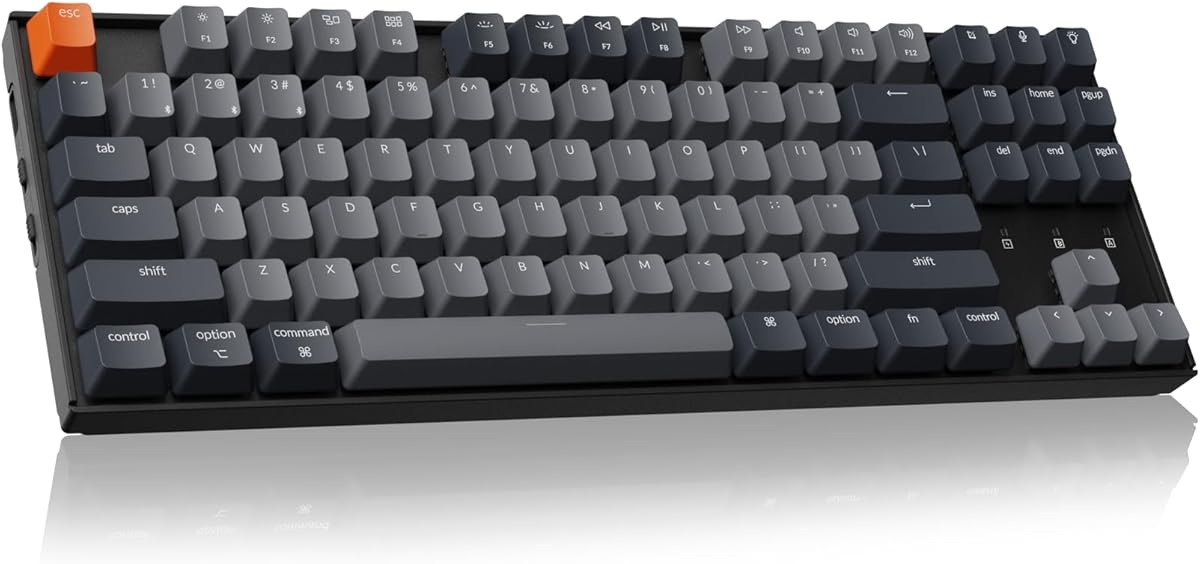
The Keychron K8 stands out as a top choice for Mac users who want mechanical precision with wireless flexibility. Its optimized layout includes essential macOS keys, ensuring seamless functionality without extra setup.
We may earn a commission when you buy through this link, at no additional cost to you.
With dual connection modes, you can switch between Bluetooth for multitasking and wired for low-latency gaming. The massive 4000 mAh battery supports extended use, while tactile brown switches offer a satisfying typing experience.
Though the weight might be higher than average, the ergonomic support and large battery life justify it. Keep in mind wireless mode limits keystroke rollover slightly compared to wired mode for competitive play.
This keyboard balances productivity and gaming effectively. It is perfect for hybrid users who need a reliable companion for both work and play across multiple devices including Macs and PCs.
Included Mac-specific keycaps and layout optimization make switching between systems effortless for macOS users.
A 4000 mAh battery ensures weeks of usage on a single charge, reducing downtime for uninterrupted productivity.
We may earn a commission when you buy through this link, at no additional cost to you.
The EPOMAKER X Aula F75 MAX delivers a high-end experience with unique features like a TFT screen and gasket mounting. Its 4.6 rating reflects strong user satisfaction with its build quality and customization potential.
We may earn a commission when you buy through this link, at no additional cost to you.
The TFT screen allows battery monitoring and GIF display, adding a futuristic touch. Hot-swappable switches let you tweak the feel without soldering, while the gasket mount reduces harsh bottom-out for a softer typing experience.
Although it comes at a higher price, the versatility and premium build justify the investment. The learning curve for software customization may require patience, but the resulting setup is highly personalized.
Ideal for enthusiasts who demand advanced features, this keyboard supports Mac and other OS seamlessly. Its 1000Hz polling rate ensures responsiveness for competitive gaming while maintaining productivity for daily tasks.
Hot-swappable sockets and software remapping offer endless flexibility for tailoring the keyboard to specific needs.
The TFT display provides real-time system data and visual flair, enhancing the overall user experience.
We may earn a commission when you buy through this link, at no additional cost to you.
The Logitech G915 X features a low profile design for a modern, streamlined setup. With a 4.0 rating, it offers precision engineering, though it lacks the wireless convenience of other G series models.
We may earn a commission when you buy through this link, at no additional cost to you.
Low profile GL switches provide rapid actuation, increasing actions per minute for competitive gamers. The full-size layout includes a numpad, ensuring versatility for productivity while maintaining gaming performance.
The aluminum top plate adds durability and a premium look, but the price reflects this premium build. Users seeking wireless freedom might look elsewhere, though the wired connection ensures consistent performance.
This keyboard suits gamers preferring a slim, professional aesthetic without sacrificing functionality. Its Mac compatibility is solid for wired setups, making it a reliable tool for those focused on precision.
Slim switches reduce finger travel, offering speed and comfort for rapid keystrokes during gaming.
The aluminum top plate ensures long-lasting resilience against wear and tear from daily use.
We may earn a commission when you buy through this link, at no additional cost to you.
The Logitech G413 TKL SE provides a compact mechanical solution with durable PBT keycaps. Its 4.6 rating highlights reliable performance for gaming and typing with a clean aesthetic.
We may earn a commission when you buy through this link, at no additional cost to you.
The brushed aluminum case offers stability and a premium feel. Tactile switches deliver clear feedback for responsive gaming. White LED backlighting remains functional for low-light environments.
While the single-color light limits customization, the focus on durability keeps costs reasonable. The lack of an included wrist rest might be a downside for long sessions, but the layout maximizes desk space.
This model is great for gamers needing a sturdy, space-efficient mechanical keyboard. Its compatibility with Mac makes it suitable for work-and-play setups where reliability is a top priority.
PBT material resists shine and wear, ensuring keys remain textured and functional over time.
The TKL design frees up desk area for mouse movement, improving comfort during extended gameplay.
We may earn a commission when you buy through this link, at no additional cost to you.
The Redragon K742 blends versatility with a compact 98% layout, saving desk space while retaining essential keys. A 4.6 rating reflects strong performance and customization potential for enthusiasts.
We may earn a commission when you buy through this link, at no additional cost to you.
Tri-mode connectivity allows switching between Bluetooth, 2.4GHz, and wired modes seamlessly. The volume knob offers quick control, while QMK/VIA support lets advanced users remap keys for tailored workflows.
The gasket structure dampens noise, creating a pleasant typing experience. While the software configuration requires a JSON file for full QMK features, the customization is unmatched in this price range.
Ideal for hybrid setups, this keyboard supports Mac and other systems. It is a strong pick for users wanting advanced features without a premium price tag.
QMK/VIA programmability allows macro editing and key mapping for highly personalized setups.
Tri-mode options ensure reliable connections across multiple devices for flexible workspace management.
We may earn a commission when you buy through this link, at no additional cost to you.
The Keychron K4 offers a compact 96% layout with a numpad, balancing space efficiency and full functionality. With a 4.4 rating, it provides reliable performance for Mac users seeking wireless convenience.
We may earn a commission when you buy through this link, at no additional cost to you.
Super Brown switches deliver tactile feedback suitable for typing and gaming. The large 4000 mAh battery ensures up to 240 hours of use, minimizing frequent charging needs. Wireless and wired modes offer flexibility.
White LED backlighting is functional but limited to static or flashing modes. While small numpad keys may take adjustment, the layout fits well on limited desks. It is a versatile option for productivity.
This keyboard is ideal for professionals who need compact efficiency. Its Mac-specific keycaps and seamless Bluetooth switching make it a reliable choice for hybrid environments.
The 96% design retains essential keys while minimizing footprint, maximizing desk utility.
A massive battery supports weeks of use on a single charge, reducing maintenance interruptions.
We may earn a commission when you buy through this link, at no additional cost to you.
The Logitech MX Mechanical combines productivity and comfort with low-profile tactile switches. A 4.2 rating shows strong approval for its smart features and wireless convenience in professional settings.
We may earn a commission when you buy through this link, at no additional cost to you.
Smart illumination adjusts to your hands approaching the keyboard, conserving battery while maintaining visibility. Multi-device pairing allows seamless switching between Macs and PCs via Bluetooth or USB receiver.
While it offers quiet switches and ergonomics, the premium price may deter budget buyers. The low-profile design is less tactile than traditional mechanicals but suits those seeking quiet and comfort.
Ideal for professionals managing multiple devices, this keyboard optimizes workflow with Flow cross-computer control. It suits users prioritizing ergonomics and smart automation over raw gaming performance.
Flow technology enables seamless copy-paste and control across multiple connected computers effortlessly.
Low-profile keys reduce wrist strain, promoting comfort during extended work or typing sessions.
We may earn a commission when you buy through this link, at no additional cost to you.
The GravaStar Mercury K1 features a futuristic aluminum exoskeleton that stands out visually. Its 4.7 rating indicates strong user satisfaction with both aesthetics and performance in gaming scenarios.
We may earn a commission when you buy through this link, at no additional cost to you.
Tri-mode connectivity allows flexible switching between devices, while the gasket-mounted design enhances typing comfort. The aluminum build is robust but adds weight, making it best suited for stationary setups.
Customizable RGB lighting provides visual personalization. While the unique design appeals to gamers, it may be heavy for travel. The sound dampening foam ensures pleasant acoustics during extended use.
This keyboard suits those prioritizing looks and feel. It is a strong choice for dedicated gaming setups where style and performance are equally important for user experience.
An aluminum alloy body creates a futuristic look that enhances desktop visual appeal.
Gasket mounting and foam layers reduce vibrations, providing a softer typing feel.
We may earn a commission when you buy through this link, at no additional cost to you.
The Logitech G213 Prodigy offers a full-size layout with spill resistance and integrated palm rest. With a 4.2 rating, it provides reliable entry-level gaming performance with solid build quality.
We may earn a commission when you buy through this link, at no additional cost to you.
Five customizable lighting zones allow color personalization without full RGB complexity. Dedicated media controls enable easy management of audio during gaming. The durable build handles crumbs and liquids effectively.
While not mechanical, the tuned keys offer responsive feedback. The integrated palm rest adds comfort but reduces portability. It remains a solid choice for desktop setups needing durability and basic gaming features.
This keyboard suits users seeking a durable full-size option. Its affordability and media controls make it practical for daily use and casual gaming on Mac or PC systems.
Designed to repel liquids and debris, ensuring longevity in active gaming environments.
An attached palm rest provides support during long sessions without extra accessories.
We may earn a commission when you buy through this link, at no additional cost to you.
Selecting the right Mac gaming keyboard involves evaluating layout, switches, connectivity, and build quality to match your specific workflow and gaming demands.
Consider whether you need a full-size, TKL, or compact layout. A TKL keyboard saves desk space for mouse movement, while a full-size includes a numpad for productivity tasks.
Choose a layout that fits your desk and workflow needs without sacrificing essential keys.
Mechanical switches come in tactile, linear, or clicky variants. Tactile switches offer feedback for typing, while linear switches provide smooth strokes ideal for rapid gaming inputs.
Select a switch type that matches your preference for feedback and noise levels during use.
Wireless keyboards offer flexibility and reduce cable clutter but may introduce slight latency. Wired models ensure consistent performance without battery concerns, making them reliable for competitive gaming.
Decide between wireless freedom and wired reliability based on your tolerance for latency and power needs.
Ensure the keyboard supports macOS natively or includes switchable keycaps. Some models require specific drivers to function perfectly with Mac features like multimedia controls.
Prioritize keyboards explicitly designed for Mac to avoid layout or function key issues.
Materials like aluminum or high-quality plastics impact durability and weight. A sturdy frame minimizes flex during intense gaming, providing a stable typing surface.
Look for durable materials that ensure longevity and resistance to wear over time.
Software support allows key remapping and macro creation. RGB lighting customization adds personalization, while programmable keys can streamline complex tasks.
Check for software compatibility with your OS to unlock advanced features.
Features like wrist rests, adjustable feet, and ergonomic key profiles reduce strain. Comfort is vital for extended typing or gaming sessions to maintain productivity.
Opt for designs that support natural wrist positioning for long-term comfort.
Prices vary widely across models, from affordable entry-level options to premium feature-rich keyboards. Determine your budget to balance essential features with desired extras.
Identify a price range that meets your needs without overspending on unnecessary features.
Connect your keyboard via USB or Bluetooth to pair it with your Mac. Install necessary drivers or software to unlock full functionality and customize keys.
Clean the keyboard regularly using compressed air to remove dust. Wipe keys with a damp cloth to remove oils and debris, ensuring smooth key movement.
Store the keyboard away from direct sunlight and moisture. For wireless models, recharge the battery before it fully depletes to maintain optimal performance.
Yes, most mechanical keyboards are compatible with Mac, but some may require keycap swapping or software configuration for full functionality. Ensure the product explicitly supports macOS to avoid layout issues.
Linear switches are often preferred for gaming due to smooth strokes, while tactile switches offer feedback suitable for mixed use. Choose based on your preference for noise and touch feedback.
Modern wireless keyboards with 2.4GHz or low-latency Bluetooth can perform well for gaming. Check polling rates and latency specs to ensure they meet competitive demands.
Basic functionality usually works without drivers, but advanced customization like macros or RGB lighting may need specific software. Verify driver support for your Mac operating system.
TKL or compact layouts are ideal for saving desk space while retaining essential keys. Full-size layouts are better if you frequently use a numpad for productivity.
Use compressed air to remove debris and a microfiber cloth for the surface. Remove keycaps for deep cleaning only if the design allows without damaging internal components.
These ten keyboards offer diverse options for Mac users balancing gaming performance with productivity. Each model brings unique strengths, whether it is wireless flexibility, tactile precision, or compact design.
Prioritize features that match your specific needs, such as layout size, switch type, and connectivity. Comfort and durability are essential for long-term satisfaction and performance consistency.
Always verify current availability and compatibility before purchasing. Prices and details may change, so double-check product listings to ensure you select the right option today.