
Elgato Wave XLR MK.2 USB Audio Interface and DSP Mixer
4.3Editor score
Ultra low latency monitoring
Onboard voice effects
Touch control with LED feedback
This guide compares the top audio interfaces with built in dsp for low latency monitoring and effects, helping you choose the right gear for recording and
Audio interfaces with built in dsp allow musicians and creators to record with near zero latency. These devices handle effects processing internally so your computer CPU stays free. This feature is essential for live monitoring and professional recording workflows today.
We analyzed ten top models based on sound quality, connectivity, and onboard processing power. Each product offers unique strengths for different budgets and recording needs. Our list covers everything from portable units to desktop powerhouses.
Every pick highlights key specifications and real world performance traits. Prices and availability may change over time so verify details before purchasing. We focus on reliable hardware that delivers studio grade sound consistently.
4.3Editor score

4.6Editor score

4.0Editor score
This side-by-side comparison highlights the core strengths of each interface. Review the specs and features to find the perfect match for your studio setup.




The Focusrite Scarlett Solo 4th Gen brings big studio sound to home setups. It earns an Editor's Choice badge for its exceptional conversion quality. The 120dB dynamic range ensures pristine recordings for any source.
We may earn a commission when you buy through this link, at no additional cost to you.
This interface features improved Air mode to lift vocals and guitars. It adds musical presence and rich harmonic drive to tracks. The included software bundle gives you everything needed to record and master.
While it lacks dedicated DSP hardware, the low latency driver works well. The USB-C connection ensures modern compatibility. Some users might wish for more inputs for multi mic sessions.
Beginners and solo creators should buy this for reliable performance. It offers the best balance of quality and simplicity. Verify current availability before making your final decision today.
Air mode adds a top end lift that makes vocals stand out.
Includes Pro Tools Intro and Ableton Live Lite for immediate production.
We may earn a commission when you buy through this link, at no additional cost to you.
The Elgato Wave XLR MK.2 is perfect for streamers on a budget. It delivers ultra-low-latency monitoring so you hear yourself clearly. The Wave FX Processor unifies DSP effects and VST plugins effectively.
We may earn a commission when you buy through this link, at no additional cost to you.
Built-in voice enhancer and compressor improve your sound instantly. Touch control with LED feedback lets you adjust levels quickly. The Wave Link App provides powerful routing and monitoring controls.
Preamps are solid but lack Hi-Z inputs for guitars. You might need a separate DI for instruments. However, for vocal and stream setups it performs very well.
Content creators should pick this for its ease of use. It simplifies live audio production significantly. Check current stock before purchasing to avoid delays.
Onboard DSP allows real-time voice effects without CPU load.
Customizable LED lighting shows levels and status at a glance.
We may earn a commission when you buy through this link, at no additional cost to you.
The Universal Audio Apollo Twin X QUAD is the ultimate pro choice. It lets you record through authentic emulations of legendary gear. The Unison preamps bring real analog tones to digital workflows.
We may earn a commission when you buy through this link, at no additional cost to you.
You get access to the full library of 200 plus UAD DSP plugins. Mix with confidence using Apollo Monitor Correction powered by Sonarworks. Auto-Gain helps set levels across inputs instantly.
The price is steep and you need a Thunderbolt port. It might be overkill for casual users. Yet for serious producers the sound quality justifies the cost.
Professional studios should buy this for its unmatched sound. It offers the best DSP and plugin ecosystem available. Verify your system requirements before investing in this unit.
Neve API and Avalon preamp emulations run in real time.
Sonarworks integration ensures accurate monitoring in any room.
We may earn a commission when you buy through this link, at no additional cost to you.
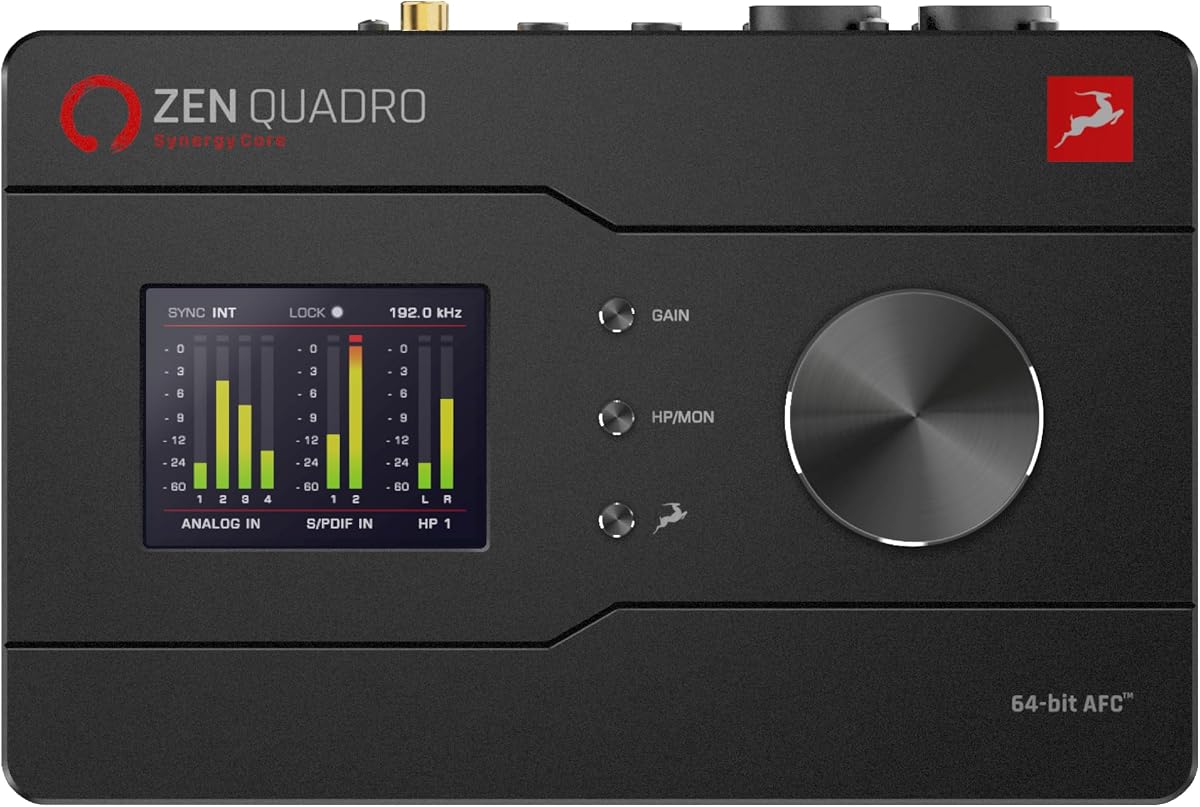
The Antelope Audio Zen Quadro offers near-zero-latency recording workflows. Its Synergy Core FX run on dedicated DSP and FPGA hardware. This ensures analog-modeled effects do not load your host CPU.
We may earn a commission when you buy through this link, at no additional cost to you.
Capture vocals with four Discrete 6-transistor mic preamps. The 130 dB AD/DA dynamic range delivers flagship studio sound. Dual USB-C ports support modern creator workflows and loopback.
The interface is compact but the software can be complex. There are fewer inputs than some desktop units. However the sound quality and DSP power are exceptional.
Mobile creators should buy this for its portable studio power. It handles complex sessions without CPU lag. Check compatibility with your OS before finalizing your purchase.
FPGA hardware allows near-zero-latency recording without CPU load.
64-bit AFC clocking is trusted by Grammy-winning engineers.
We may earn a commission when you buy through this link, at no additional cost to you.
The Universal Audio Apollo Twin X DUO provides real time analog tones. Unison preamps let you record through authentic emulations of classic gear. Access the full library of 200 plus UAD DSP plugins.
We may earn a commission when you buy through this link, at no additional cost to you.
Apollo Monitor Correction powered by Sonarworks helps you mix in any room. Auto-Gain sets your levels across multiple inputs quickly. Bass management adds a subwoofer for accurate low-end details.
It requires Thunderbolt and has a high price tag. Some may find it heavy for travel. But the sound quality and plugin library are top-tier.
Producers seeking analog character should buy this unit. It delivers the best DSP performance for home studios. Ensure your system supports Thunderbolt 3 connectivity today.
Bass management adds a subwoofer to your monitor setup.
Auto-Gain sets levels across multiple inputs in seconds.
We may earn a commission when you buy through this link, at no additional cost to you.
The Solid State Logic 2 MKII Plus is ideal for Mac and Windows. It features 32-bit 192 kHz converters for studio quality audio. Legacy 4K Analog Enhancement adds a unique character to your tracks.
We may earn a commission when you buy through this link, at no additional cost to you.
Zero-Latency Monitoring ensures you hear your inputs in real time. Stereo Loopback allows easy capture of system audio. It is bus powered so you do not need external power.
There are only two mic inputs and no DSP onboard. You rely on software for effects and mixing. Yet the build quality and sound are exceptional.
Musician and podcasters should buy this for reliability. It offers classic SSL sound in a small package. Verify current stock availability before ordering.
Legacy 4K Analog Enhancement provides a distinct SSL sound.
Bus powered design means no extra power supply needed.
We may earn a commission when you buy through this link, at no additional cost to you.
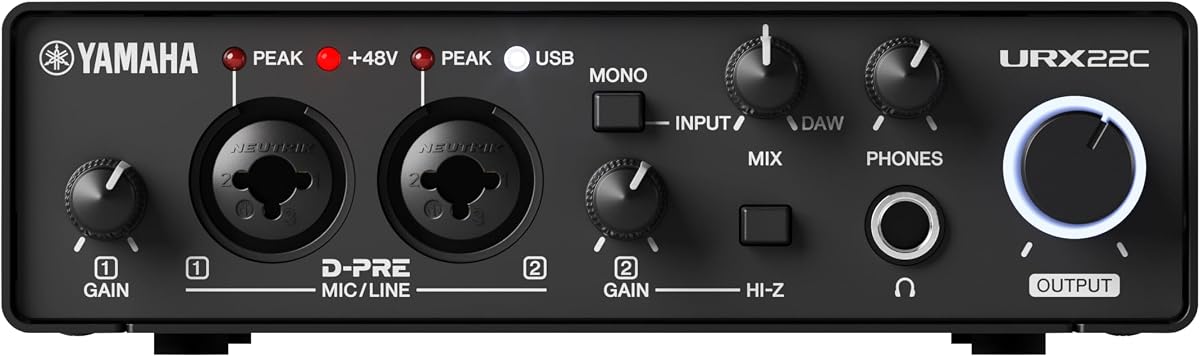
The Yamaha URX22C delivers latency-free DSP-powered monitoring. Use REV-X reverb and Channel Strip directly on hardware. The Class-A D-PRE mic preamps support +48 V phantom power.
We may earn a commission when you buy through this link, at no additional cost to you.
Its rugged full-metal housing ensures ultimate durability on the road. It supports 32-bit Integer 192 kHz for high resolution recording. The Steinberg Software Suite includes Cubase AI for production.
There is no dedicated Hi-Z input for guitars. The design is functional but not flashy. However the DSP features provide a smooth workflow.
Touring musicians should buy this for its durability. It handles harsh environments better than plastic units. Check OS compatibility before adding this to your setup.
DSP-Powered Mixing allows effects without CPU load.
Rugged full-metal housing provides ultimate durability.
We may earn a commission when you buy through this link, at no additional cost to you.
The MOTU UltraLite-mk5 supports 40 simultaneous audio channels. Analog outputs deliver 125 dB dynamic range for superb quality. DSP-driven monitor mixing allows separate unique mixes for each output.
We may earn a commission when you buy through this link, at no additional cost to you.
The high-resolution OLED display shows all signal activity at a glance. CueMix 5 app provides control from Mac PC or iOS. Perfromer Lite software gives you instruments and loops immediately.
It is bus-powered and uses USB 2.0 which may limit speed. The size is larger than portable options. Yet the I/O and mixing power are unmatched.
Small studios should buy this for its expandability. It handles complex sessions with ease. Confirm USB port availability before finalizing your choice.
Create a separate unique mix for each output pair.
High-resolution OLED display provides detailed metering.
We may earn a commission when you buy through this link, at no additional cost to you.
The Yamaha URX22 B features a 4.3 inch touchscreen for easy control. It supports 32-bit 192 kHz with a Multi-Stream Audio Driver. Built-in DSP processor enables professional sound and latency-free monitoring.
We may earn a commission when you buy through this link, at no additional cost to you.
Dual MAIN SUB USB ports allow flexible connection options. Premium Microphone preamps offer 78 dB gain range. The Steinberg Plus bundle includes Cubase AI and WaveLab Cast.
There is no verified user rating yet. This is a newer product with less feedback. However the hardware specs suggest strong performance.
Tech-savvy users should buy this for the touchscreen. It simplifies mixing and routing tasks. Verify current stock and return policy before purchasing.
4.3 inch touchscreen and 5 control knobs offer quick access.
Dual USB ports enable multi-stream audio driver support.
We may earn a commission when you buy through this link, at no additional cost to you.
The Antelope Audio Zenith 2 works seamlessly without drivers. It features 123 dB 192 kHz 32bit conversion for pristine sound. Onboard DSP ensures zero lag recording and monitoring.
We may earn a commission when you buy through this link, at no additional cost to you.
Studio Wizard allows precise adjustment of compression and EQ. Unique in its class it features two headphone outputs with independent mixes. Bitwig Studio Essentials and Lifeline Lite are included.
It is newer so long term reliability is unproven. The inputs are limited to two mics and Hi-Z. Yet the features are packed for the price.
Content creators should buy this for its flexibility. It works on PC Mac iOS and Android. Check system requirements before making your final decision.
Two headphone outputs with fully independent mixes for collaboration.
Vibrant display with smooth sliders for precise adjustments.
We may earn a commission when you buy through this link, at no additional cost to you.
Choosing the right interface depends on your workflow needs and budget. Consider these key factors to find the perfect unit.
Built-in DSP allows you to apply effects like reverb and compression with near-zero latency. This offloads processing from your CPU which is crucial for live performance or heavy tracks. Look for units with dedicated chips like Synergy Core or UAD DSP.
Prioritize interfaces with strong DSP if you rely on real-time monitoring.
Check how many mic and instrument inputs you need. Some interfaces offer combo XLR TRS jacks while others have dedicated Hi-Z for guitars. Ensure the layout matches your typical session size.
Select inputs that fit your current and future recording setup.
USB-C is now the standard for modern interfaces. Thunderbolt offers faster bandwidth for higher track counts. USB 2.0 still works but may limit speed for large projects. Verify your computer port compatibility before buying.
Choose a connection that matches your computer ports.
Many units come with DAWs and plugins. This adds value by reducing extra costs. Look for Pro Tools Live or Cubase. Included software speeds up your workflow immediately.
Confirm the software bundle meets your production needs.
Higher rates like 192 kHz provide greater resolution. Most modern interfaces support 32-bit float or integer. This ensures your recordings capture fine details without distortion.
Opt for high sample rates to ensure studio grade audio.
A rugged metal housing protects against drops. This matters if you travel or use the interface in live settings. Check the materials used for durability over time.
Pick a unit with solid construction for longevity.
Zero latency monitoring is essential for comfort. Look for direct monitor knobs or DSP routing. This lets you hear yourself without digital delay while recording.
Ensure the interface offers flexible monitoring options.
Reliable drivers prevent crashes and dropouts. Some units are class compliant and need no drivers. Others require software for full functionality. Check compatibility with your operating system.
Verify driver support to avoid technical issues.
Connect your mic or instrument securely to the input jacks. Ensure cables are in good condition to avoid noise. Plug the interface into a power source or USB port to start.
Install any required drivers and software before recording. Configure your audio settings to match the interface sample rate. Use the DSP controls to enable effects for monitoring.
Clean the interface with a dry cloth to remove dust. Store it in a safe place when not in use. Proper care maintains sound quality and extends its life.
Built in dsp handles effects processing internally reducing CPU load. This enables near-zero latency monitoring for better performance. It also allows you to hear your sound with effects during recording.
Most units require a computer for full control. Some offer standalone modes for basic monitoring. Check the manual for specific offline capabilities before buying.
Zero latency monitoring lets you hear your input without digital delay. DSP ensures the signal is processed and played instantly. This helps you sing or play more accurately during sessions.
USB interfaces work well for most home projects. Thunderbolt offers higher track capacity and bandwidth. For basic recording USB-C is often sufficient and cost effective.
Install the control software provided by the manufacturer. Load your desired DSP plugins into the mixer. Route your inputs through the effects chain for monitoring.
Yes many interfaces support live workflows via DSP. They allow real-time monitoring without CPU lag. Look for units with multiple outputs for flexible speaker routing.
Most include DAWs and plugins in a bundle. Examples are Pro Tools Live and Cubase. Check the product page to verify included software versions.
Most recording tasks work well with 48kHz. Higher rates like 192kHz offer more detail but use more space. Match your interface settings to your DAW preferences.
We highlighted top models including the Scarlett Solo and Apollo Twin X QUAD. These units offer different strengths from budget to pro options. Each brings unique DSP and sound quality benefits to your studio.
Prioritize features like DSP latency and inputs for your specific needs. Consider your computer connection type and software preferences too. The right interface improves your workflow and sound significantly.
Verify current prices and availability before you make a purchase. Deals can change quickly so check the latest details. Ensure you have the correct accessories for your new setup.