
HiLetgo MAX7219 Dot Matrix Module
4.4Editor score
8×8 common cathode matrix
5V operating voltage
Includes fixing screws and holes
This guide compares the top LCD Dot Matrix Modules for 2026, analyzing display resolution, backlight quality, and compatibility to help you choose the right
LCD Dot Matrix Modules are essential components for embedding visual feedback into electronics projects. Whether you need simple text or complex graphics, selecting the right display ensures reliable performance and clarity for your users.
We evaluated ten highly-rated modules based on resolution, backlight type, driver compatibility, and ease of integration. Our analysis covers both character displays and graphical matrices to provide a comprehensive overview for hobbyists and professionals.
Each pick highlights specific strengths like contrast ratios or interface options. Prices and availability fluctuate frequently, so always check the latest listings before purchasing to ensure you get the best value for your specific application needs.
4.4Editor score

4.1Editor score

4.5Editor score
The following table provides a side-by-side comparison of all ten selected modules. It highlights key specifications such as display format, interface type, and physical dimensions to help you quickly identify the best fit for your project.




The Ximimark 12864 LCD Display Module stands out as a top choice for projects requiring graphical output. With a 128×64 dot matrix, it offers significantly more space than standard character displays. Its blue backlight ensures readability even in low-light environments.
We may earn a commission when you buy through this link, at no additional cost to you.
This module simplifies integration with microcontrollers like the Arduino. The availability of library examples means you can start displaying graphics quickly. The integrated potentiometer allows precise contrast adjustment without external components.
While the blue backlight enhances visibility, it may consume more power than white variants. The need for basic soldering might be a slight hurdle for absolute beginners, but it ensures a stable connection for long-term use.
Choose this module if you need detailed graphics and high contrast. It is ideal for dashboard interfaces or media players where visual clarity is paramount. The balance of features and price makes it a strong contender.
The 128×64 resolution allows for custom icons and waveforms that standard LCDs cannot display.
Pre-installed libraries and examples reduce development time significantly for new users.
We may earn a commission when you buy through this link, at no additional cost to you.
This generic module provides a reliable graphical display solution for various microcontroller projects. It features a 128×64 pixel grid, allowing for detailed text and simple graphics. The wide viewing angle ensures the content remains visible from different perspectives.
We may earn a commission when you buy through this link, at no additional cost to you.
Compatibility is a major strength here, working seamlessly with boards like the MEGA 2560 and Nano. The inclusion of two 20-pin headers simplifies wiring into breadboards or custom PCBs. The bright contrast makes characters stand out clearly against the background.
Users may need to source their own libraries since no specific documentation is bundled with the module. The blue backlight, while clear, might be too bright for battery-powered applications without dimming control via software or hardware.
This module is a solid choice for general-purpose graphical interfaces. Its standard pinout ensures it fits into many existing designs. It is best suited for projects where high visibility and broad compatibility are key requirements.
Works with a wide range of Arduino boards including MEGA and Due for flexible prototyping.
High contrast and wide viewing angles ensure readability in varied lighting conditions.
We may earn a commission when you buy through this link, at no additional cost to you.
This pack offers two classic 1602 LCD modules, providing excellent value for projects needing multiple displays. Each module shows 16 characters across two lines with a clear blue backlight. The parallel interface makes them straightforward to connect to most microcontrollers.
We may earn a commission when you buy through this link, at no additional cost to you.
The compact dimensions allow for fitting these modules into tight spaces on a PCB or enclosure. They operate reliably across a wide temperature range from -20 to 70 degrees Celsius. This makes them suitable for both indoor and rugged outdoor applications.
The parallel interface requires more GPIO pins than serial options, which might be a limitation for pin-constrained boards. The blue backlight is effective but standard, lacking the low-power benefits of newer technologies like OLED or transflective displays.
Ideal for multi-panel displays or budget-friendly builds, this pack saves money compared to buying singles. It is perfect for sensor arrays or status indicators where text feedback is sufficient. Ensure you have enough free pins on your controller.
Buying in a two-pack reduces the per-unit cost for projects needing multiple displays.
Wide temperature tolerance ensures reliability in environments with fluctuating conditions.
We may earn a commission when you buy through this link, at no additional cost to you.
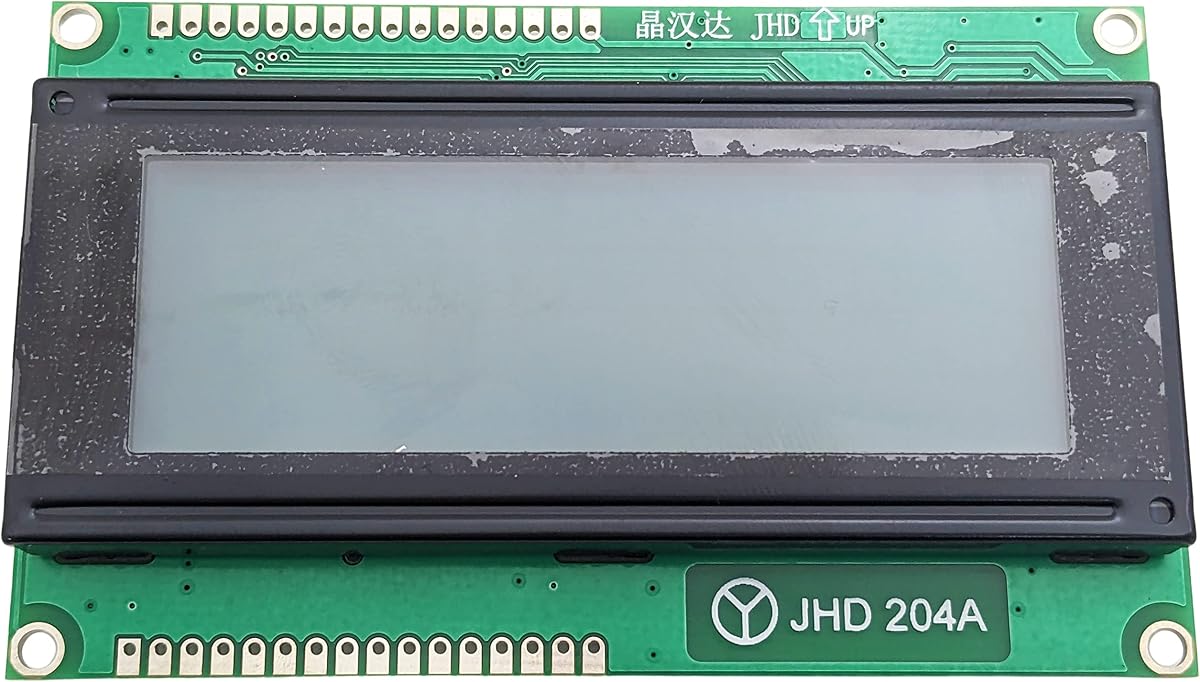
This module offers a larger text capacity with 20 characters across four lines. It uses a reflective positive gray display which is excellent for environments with sufficient ambient light. The integrated driver and controller simplify the wiring process significantly.
We may earn a commission when you buy through this link, at no additional cost to you.
The physical dimensions are slightly larger than standard modules to accommodate the extra text lines. Character size is optimized for readability without becoming bulky. This makes it a great choice for logging data or displaying extended status messages.
Because it is reflective, you will need an external light source or active backlight to use it in dark areas. The gray background might appear less vibrant than blue or green options in bright sunlight. It prioritizes text density over graphical capabilities.
Use this for text-heavy applications like loggers or diagnostic tools. The added lines provide space for detailed information without scrolling. Ensure you have adequate lighting in the installation area to maximize the reflective screen's clarity.
The 20×4 layout provides significantly more text area than standard 16×2 modules.
Built-in driver and controller reduce external components and simplify circuit design.
We may earn a commission when you buy through this link, at no additional cost to you.
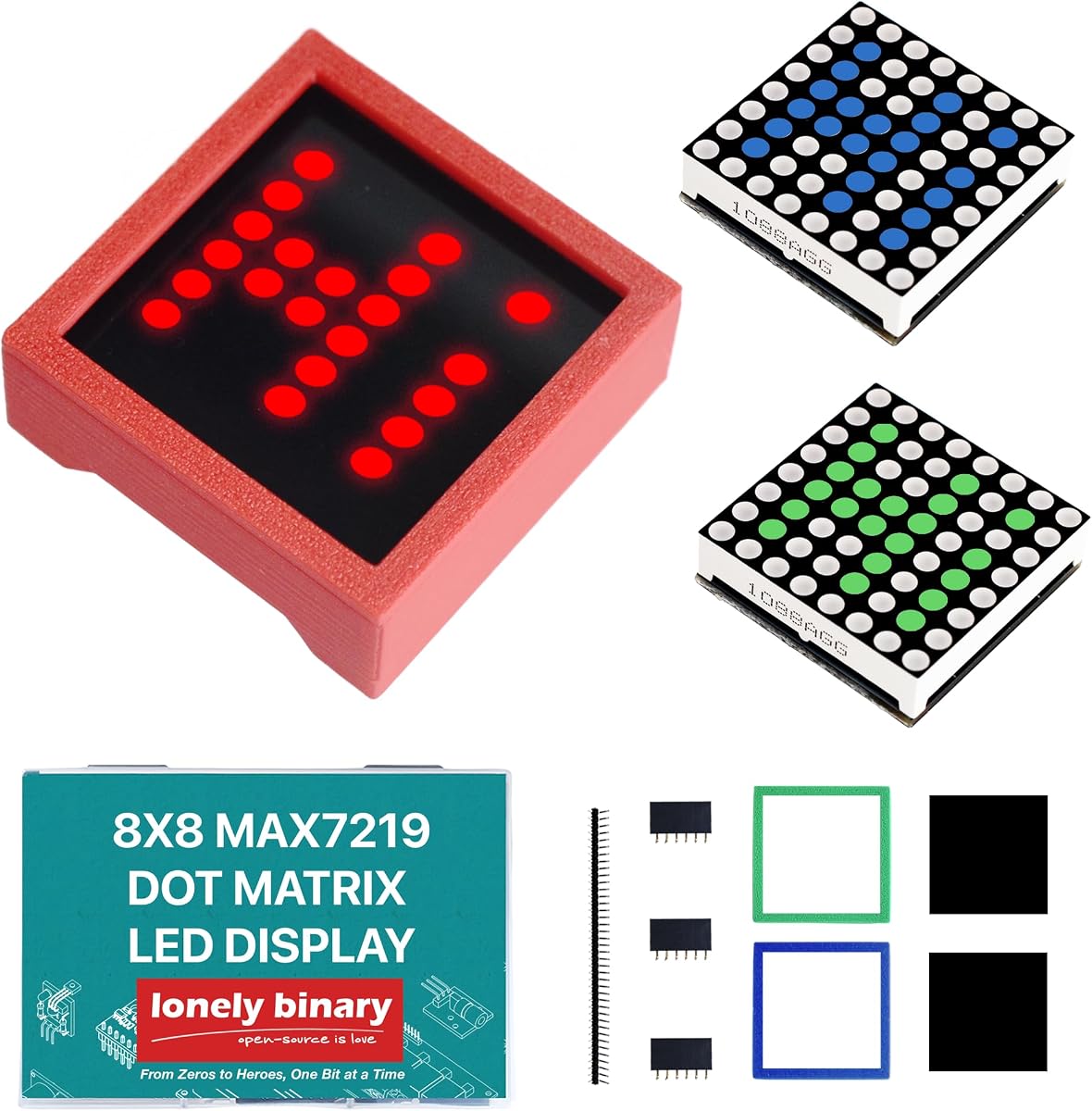
This kit provides three separate 8×8 matrix modules in red, green, and blue. Each module includes the MAX7219 driver, making them ready to connect via SPI. The package also comes with 3D-printed enclosures for a polished, finished look.
We may earn a commission when you buy through this link, at no additional cost to you.
The chainable design allows you to connect multiple modules to create larger displays. This is perfect for scrolling text or expanding visual real estate without complex wiring. The 3D-printed cases protect the LED circuitry from dust and scratches effectively.
Soldering is required to attach pin headers, which adds a step to the setup process. Each module is a single fixed color, so full RGB effects require stacking or placing multiple modules side by side carefully. The cost is very low for the included extras.
Choose this kit for retro games or visual indicators needing color variety. The enclosures save time and effort on custom housing. It is an excellent entry point for LED matrix projects due to the comprehensive nature of the package.
The three-color pack allows for distinct visual signaling or layered pixel art projects.
Included cases provide immediate physical protection and a professional aesthetic.
We may earn a commission when you buy through this link, at no additional cost to you.
This module features an 8×8 common cathode LED matrix driven by the MAX7219 IC. It operates on 5V, making it compatible with most standard microcontroller boards. The physical design includes 64 holes for screws to secure it into enclosures or panels.
We may earn a commission when you buy through this link, at no additional cost to you.
The simplicity of the board ensures you have full control over individual pixels. It is designed for easy integration into breadboards or soldered projects. The compact size means it fits easily into small gadgets without taking up too much space.
Unlike kits with enclosures, this module requires you to plan your own housing. Chainning modules together requires careful attention to pin labels to ensure data flows correctly. It is a utilitarian choice for makers who prefer custom designs.
Use this for DIY custom interfaces where mounting holes are necessary. The fixing holes add significant utility for permanent installations. It is a solid choice for builders who prioritize flexibility and standard mounting features.
5V voltage ensures compatibility with a wide range of microcontrollers without logic shifters.
Pre-drilled holes and included screws simplify permanent panel or enclosure installation.
We may earn a commission when you buy through this link, at no additional cost to you.
This module is optimized for driving 8-digit displays or up to 64 individual LEDs using the MAX7219 driver. It connects via a simple 4-wire SPI interface, which reduces the number of GPIO pins required on your microcontroller. Brightness control allows for adjustments.
We may earn a commission when you buy through this link, at no additional cost to you.
The design includes advanced features like scan limit settings and a test mode for easy debugging. These features ensure you can manage power usage and verify connections before full integration. It is highly efficient for data displays.
Since it is often used for digits, graphical patterns might be less intuitive compared to a full dot matrix. However, with manual programming, you can still create custom graphics. Ensure you have the right segment layout for your specific needs.
Choose this for time displays or data counters where digits are the primary focus. The low power features make it suitable for battery projects. It balances feature richness with a simple connection method.
Features a dedicated shutdown mode to minimize power consumption when the display is idle.
Adjustable brightness and scan limits allow for tailored performance and battery life.
We may earn a commission when you buy through this link, at no additional cost to you.
SunFounder is known for quality components, and this LCD2004 module is no exception. It offers a 20×4 layout with white characters on a blue background for high visibility. The 50K potentiometer provides precise control over contrast levels.
We may earn a commission when you buy through this link, at no additional cost to you.
The backlight is bright and clear, making it easy to read in various environments. The dimensions are slightly larger to accommodate the bigger screen, which is worth the trade-off for the extra text area. It works seamlessly with Arduino libraries.
The parallel interface requires enough digital pins, which might be tight on smaller boards. The larger size requires careful planning for your enclosure design. Despite this, the visual quality and contrast make it a premium option for text-based info.
Select this for complex displays needing significant text area. It is perfect for system dashboards or multi-line messages. The build quality ensures longevity and consistent performance over time.
The white on blue background offers excellent legibility for critical information readouts.
The included potentiometer allows for fine-tuning contrast to suit specific lighting conditions.
We may earn a commission when you buy through this link, at no additional cost to you.
This pack provides three 32×8 LED matrix modules in red, green, and blue. The wider layout is ideal for scrolling text banners or long animation sequences. Each module is protected by a custom 3D-printed enclosure for a polished finish.
We may earn a commission when you buy through this link, at no additional cost to you.
The daisy-chain design allows you to connect these modules to create even larger displays. It includes all necessary pin headers for soldering and integration. The software support is extensive, allowing for various animation effects.
Power consumption can be high if all LEDs are lit at full brightness. You need to manage brightness settings to avoid overheating or power supply issues. Soldering headers requires basic electronics skills and tools.
Choose this for wide scrolling signs or complex animations. The variety pack lets you match colors to specific project requirements. It is a comprehensive kit for makers who want wider displays without building custom PCBs.
The 32×8 grid offers more horizontal space for text and wider animations than standard modules.
Modules are designed to be chained, allowing for seamless expansion of display width.
We may earn a commission when you buy through this link, at no additional cost to you.
This pack offers two compact 8×8 LED matrix modules designed for seamless integration. Each module operates on 5V and features a common cathode layout. The footprint is compact yet includes 64 holes for secure mounting into enclosures.
We may earn a commission when you buy through this link, at no additional cost to you.
The 5-pin SPI interface allows for easy daisy-chaining without consuming many GPIO pins. The slim profile is ideal for space-constrained projects. User ratings indicate high satisfaction with build quality and functionality.
The slim profile might be less robust for rough handling compared to thicker modules. You need to align mounting holes carefully during assembly. For delicate electronics or internal use, this design is sufficient.
Select this for tight projects needing multiple displays. The mounting holes simplify permanent installation. It is a practical solution for hobbyists who need reliable and compact visual feedback modules.
The slim profile allows installation into tight spaces without sacrificing functionality or mounting options.
SPI connectivity ensures fast data transfer and easy chaining for larger visual setups.
We may earn a commission when you buy through this link, at no additional cost to you.
Selecting the right module depends on your project needs, budget, and technical constraints. Consider these key factors to ensure optimal performance and ease of use.
Choose between character displays like 1602 or graphical matrices like 12864 based on your content needs. Graphical modules support icons and waveforms, while character modules are simpler and often cheaper.
Higher resolution provides more visual detail but requires more processing power and memory.
Backlights affect visibility and power usage. Blue and white LEDs offer high contrast, while green or red options might consume less power.
Consider dimmable backlights to save power in battery-powered applications.
Modules may use parallel or serial interfaces. Parallel uses more pins but is simpler for older systems, while SPI uses fewer pins and is faster.
Verify your microcontroller has enough available pins for the chosen interface.
Secure mounting ensures longevity in handheld or outdoor devices. Look for modules with pre-drilled holes or included cases.
Consider whether a custom enclosure is needed for protection.
Most modules operate at 5V, but some support 3.3V directly. Ensure your power supply matches the module requirements to prevent damage.
Check current draw if using multiple modules on a single power source.
Modules with built-in drivers like MAX7219 simplify coding. Ensure there are available libraries for your development platform.
Well-documented products save time during the prototyping phase.
If the module will be used outdoors, check operating temperature and humidity ratings. Industrial-grade displays handle harsh conditions better.
Consider protection against dust and water if needed.
Evaluate the total cost including shipping and any extra components like headers. Buying packs often reduces per-unit costs.
Ensure the supplier has stock to avoid project delays.
Start by connecting the module to your microcontroller using the specified interface pins. Ensure all power lines are connected to the correct voltage rails to prevent electrical damage.
Install the necessary driver libraries in your development environment. Test basic display functions like clearing the screen or printing simple text to verify the connection is working correctly.
Avoid exposing the module to direct sunlight or extreme temperatures to prolong its lifespan. Keep the display screen clean using a soft cloth to prevent scratches or permanent residue buildup.
Character modules display predefined text characters like letters and numbers, while graphical modules can display any pattern or image. Graphical modules are better for custom icons and complex layouts but are harder to program.
Yes, but you must ensure you have enough free GPIO pins. Serial modules like SPI-based ones are easier to daisy-chain and share pins, making them better for multiple displays.
Most modules have a built-in potentiometer on the back. Turn the screw carefully until the text or image becomes clear. Some digital modules allow contrast control via software commands.
Most standard modules operate at 5V, which is common for Arduino boards. Always check the specific model to confirm if it supports 3.3V directly to avoid damaging the display.
Yes, they are compatible as long as you use the correct voltage level shifters. Since Raspberry Pi GPIO is 3.3V, you may need to convert the 5V logic level for safe operation.
LED backlights can last tens of thousands of hours under normal use. However, continuous operation without dimming may reduce their lifespan faster compared to intermittent use scenarios.
Some 12864 modules have built-in controllers, while others require a separate driver board. Check the product description to see if it is a self-contained unit before purchasing.
Yes, ESP32 supports 5V logic levels or can interface via level shifters. Many modules like MAX7219 are designed to work seamlessly with ESP32's SPI pins directly.
We have reviewed ten top modules ranging from graphical 12864 displays to versatile LED matrices. The Ximimark module leads for graphics, while the HiLetgo offers the best budget LED option.
Prioritize display resolution and interface compatibility based on your specific project requirements. Ensure your power supply and pin count can support the chosen module configuration.
Prices change frequently on online marketplaces so always verify the current listing before making a purchase. This ensures you get the best value and compatibility for your build.