
NetumScan USB 1D Barcode Scanner
4.4Editor score
Plug and play USB connection
Durable anti shock design
Affordable price point
This guide compares the top barcode scanner for library operations evaluating wireless connectivity battery life scanning speed and compatibility with common
Libraries need reliable tools to manage collections efficiently. A good barcode scanner should read worn ISBNs quickly, work wirelessly across shelves, and last all day on a single charge without frequent interruptions.
We analyzed ten highly rated models focusing on library-specific needs like silent modes, long battery life, and strong decoding for damaged spines. Each option was reviewed for connectivity ease of use and overall durability.
Each pick shows key strengths ideal scenarios and real-world trade-offs. Prices and availability change frequently so check the official links for the latest deals before making your final purchasing decision for your facility.
4.4Editor score

4.4Editor score

4.3Editor score
The following table compares all ten selected models side by side highlighting their primary connectivity methods decoding capabilities battery endurance and unique features relevant to daily library circulation tasks.




The NETUM Bluetooth Barcode Scanner stands out as the top choice for libraries needing reliability and versatility. With a 4.4 star rating it delivers consistent performance across various scanning tasks including worn ISBNs and damaged barcodes.
We may earn a commission when you buy through this link, at no additional cost to you.
Its standout feature is the massive 2600mAh battery which lasts up to a month on a single charge under normal library use. The scanner supports 2.4G wireless Bluetooth and wired modes ensuring you stay connected regardless of your setup.
While the configuration process involves scanning setting barcodes which may take time initially the flexibility it offers is worth the effort. The silent mode is essential for maintaining quiet in reading areas during inventory checks.
This scanner is ideal for medium to large libraries requiring durable handheld units that can handle heavy daily use. Its robust battery and multiple connectivity options make it a dependable investment for circulation desks.
The 2600mAh battery ensures continuous operation throughout long shifts without needing frequent recharging which is crucial for busy library environments.
Users can mute the buzzer to prevent noise disruption allowing for discreet scanning in quiet zones like study halls or reading rooms.
We may earn a commission when you buy through this link, at no additional cost to you.
For libraries on a tight budget the NetumScan USB 1D Barcode Scanner offers exceptional value without sacrificing performance. It holds a 4.4 star rating and is built to handle daily wear and tear in busy circulation areas.
We may earn a commission when you buy through this link, at no additional cost to you.
The CCD sensor technology allows it to read 1D barcodes from screens and paper with high accuracy even if they are damaged or smudged. Its sturdy design can withstand drops from two meters ensuring longevity.
The main limitation is the lack of wireless connectivity which means staff are tethered to a USB port during use. This is acceptable for fixed desk setups but less ideal for roaming inventory checks.
This model is perfect for small libraries or those needing a reliable backup scanner at fixed workstations. Its simplicity and low cost make it an easy choice for basic scanning tasks.
Constructed from high quality ABS plastic the scanner is designed to survive accidental drops and rough handling common in high traffic environments.
The plug and play USB connection means no drivers or software installation is required allowing immediate use upon connecting to a computer.
We may earn a commission when you buy through this link, at no additional cost to you.
The Tera Barcode Scanner with Screen provides advanced features for libraries that need to scan 2D codes like QR or PDF417. With a 4.3 star rating it combines premium functionality with ease of use through its unique display.
We may earn a commission when you buy through this link, at no additional cost to you.
Its CMOS imaging system excels at reading challenging barcodes including those on silver paper or reflective surfaces. The built in screen allows staff to customize settings like language and volume without needing external tools.
While more expensive than basic models the included charging cradle adds convenience for keeping the device charged and organized. The 2500mAh battery supports all day operation ensuring uninterrupted workflow during busy periods.
This scanner is best suited for libraries managing complex collections or integrating with systems requiring 2D barcode scanning. Its versatility and premium build quality justify the investment for growing institutions.
The superior global CMOS imaging allows for fast and accurate reading of both standard and high density barcodes including complex formats.
The included charging cradle provides a dedicated spot for the scanner to charge keeping the workspace organized and ensuring the device is always ready.
We may earn a commission when you buy through this link, at no additional cost to you.
The Eyoyo Mini 1D Bluetooth Barcode Scanner is designed for portability and comfort during long scanning sessions. With a 4.3 star rating it appeals to staff who need to carry a device around the library for extensive inventory checks.
We may earn a commission when you buy through this link, at no additional cost to you.
Weighing only 35 grams it reduces hand fatigue significantly compared to bulkier models. The vibration mode offers a silent way to confirm scans without disturbing patrons in quiet study zones.
The 650mAh battery supports about eight hours of continuous use which is sufficient for daily shifts though less than larger models. It supports 2.4G wireless Bluetooth and wired connections for flexibility.
This scanner is ideal for libraries prioritizing staff comfort and mobility. Its compact size makes it easy to store and transport while still delivering reliable performance for standard 1D barcode needs.
The ultralight 35 gram design ensures that staff can hold the scanner for extended periods without experiencing hand strain or fatigue.
By enabling vibration mode users receive tactile feedback upon scanning allowing for quiet operation in environments where sound is disruptive.
We may earn a commission when you buy through this link, at no additional cost to you.
The Tera Barcode Scanner with Battery Indicator offers practical features for maintaining operational efficiency. With a 4.5 star rating it is highly praised for its durability and user friendly design elements that reduce downtime.
We may earn a commission when you buy through this link, at no additional cost to you.
The battery indicator light solves a common pain point by showing remaining power levels so staff know exactly when to recharge. This prevents unexpected shutdowns during critical tasks like end of day closing.
Its IP54 rating protects against dust and water spills which is useful in busy library settings. The ergonomic curved handle ensures a comfortable grip during prolonged use reducing hand fatigue.
This scanner is a great choice for libraries needing a reliable and long wireless range. The combination of protection features and user comfort makes it suitable for high volume environments.
The built in battery indicator light provides clear visual feedback on power levels preventing unexpected interruptions during important scanning operations.
IP54 technology protects the internal components from dust and water ensuring the device remains functional in challenging or messy environments.
We may earn a commission when you buy through this link, at no additional cost to you.
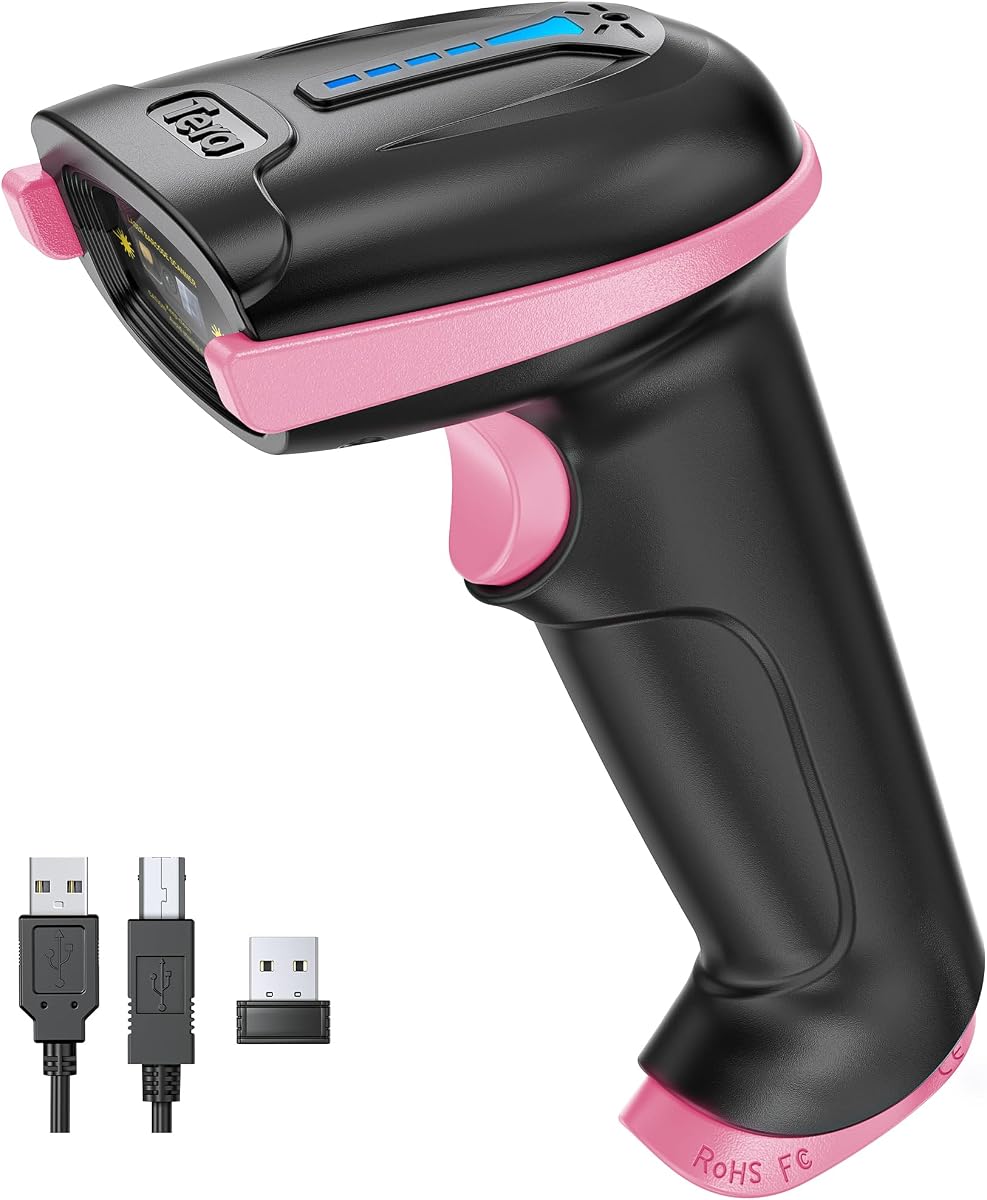
The Tera Barcode Scanner with Battery Indicator Pink combines the same robust features as the purple version with a distinct aesthetic appeal. It holds a 4.5 star rating and is appreciated for its thoughtful design and color variety.
We may earn a commission when you buy through this link, at no additional cost to you.
The battery indicator light is a key feature that ensures staff are always aware of the device status. This practicality paired with the stylish pink finish makes it a desirable tool for modern library staff.
Like the other Tera models it offers IP54 protection and an ergonomic handle. The 328ft wireless range allows for mobility across large library spaces without losing connection to the main computer.
This scanner is perfect for libraries that value both functionality and style. The reliable performance and unique color make it a standout choice for teams looking to personalize their equipment.
The pink finish adds a touch of personality to the workspace making the scanner a visually appealing tool for staff to use daily.
Despite the unique look the scanner maintains the same high standards of durability and functionality as other models in the Tera lineup.
We may earn a commission when you buy through this link, at no additional cost to you.
The WoneNice USB Laser Barcode Scanner delivers fast and reliable performance for standard library tasks. With a 4.5 star rating it is known for its quick scan speed and ease of use in various operating environments.
We may earn a commission when you buy through this link, at no additional cost to you.
Its laser technology scans up to 200 times per second which is significantly faster than many CCD models. This speed is ideal for high volume checkouts where efficiency is critical.
The scanner is fully compatible with Windows Mac and Linux systems without requiring extra drivers. However it cannot read barcodes from digital screens so physical labels are necessary for this model.
This model is best for libraries focused on fast throughput at fixed counters. Its speed and low cost make it a practical choice for institutions needing simple and efficient scanning.
The ability to perform up to 200 scans per second ensures that checkout lines move quickly even during peak library usage times.
Supporting multiple operating systems and software platforms ensures the scanner integrates seamlessly into existing library management setups.
We may earn a commission when you buy through this link, at no additional cost to you.
The Symcode Wireless Barcode Scanner is designed for scenarios where connectivity might be intermittent. With a 4.4 star rating it supports up to 100000 codes in offline mode making it useful for large scale inventory projects.
We may earn a commission when you buy through this link, at no additional cost to you.
Staff can scan items in distant areas of the library and upload the data later when within range of the receiver. This flexibility is valuable for shelf audits in large facilities with weak signal zones.
The rechargeable battery supports over a week of continuous scanning which reduces the need for frequent charging. It also features a 2.4G wireless connection for reliable data transfer.
This scanner is ideal for libraries managing large inventories or seasonal stock checks. Its offline capabilities ensure no data is lost even in areas with poor wireless coverage.
The ability to store up to 100000 barcodes internally allows for uninterrupted scanning even when the wireless signal is temporarily unavailable.
With a transmission distance of up to 328 feet the scanner maintains a stable connection across expansive library floors and buildings.
We may earn a commission when you buy through this link, at no additional cost to you.
The Eyoyo Portable Mini 1D Bluetooth Barcode Scanner adds a vibrant touch to library operations. With a 4.3 star rating it is valued for its design and versatile connectivity options that suit various library setups.
We may earn a commission when you buy through this link, at no additional cost to you.
The pink color makes it easy to distinguish among other equipment and adds a pleasant visual element to the workspace. It also supports vibration and sound toggling to suit different noise requirements.
Weighing only 35 grams it is easy to carry around the library for quick checks. The 650mAh battery provides sufficient power for typical daily tasks without being too heavy.
This scanner is best for small to medium libraries looking for an affordable and colorful device. Its compact size and multiple connection modes make it a flexible tool for daily circulation.
The bright pink finish sets it apart from standard black scanners making it easily identifiable and adding a cheerful touch to the work environment.
Supporting 2.4G wireless Bluetooth and USB connections allows staff to choose the best method for their current task or location.
We may earn a commission when you buy through this link, at no additional cost to you.
The Barcode Scanner with Stand offers a hands free solution for libraries needing to keep hands available. With a 4.0 star rating it provides a convenient setup for scanning tasks that require manual handling.
We may earn a commission when you buy through this link, at no additional cost to you.
The adjustable stand allows the scanner to be positioned at an optimal angle for auto sensing scanning. This is useful for scanning books as they pass over the sensor on a checkout desk.
It supports both 1D and 2D QR codes providing versatility for different label types. The USB wired connection ensures stable performance without needing to manage wireless signals.
This scanner is best for fixed checkout counters where hands free operation is a priority. The included stand and auto sensing capability make it a practical addition to any circulation desk.
The included stand allows for auto sensing scanning which keeps hands free to handle books or other items during the checkout process.
The stand is adjustable allowing staff to set the scanner at the perfect angle to capture barcodes accurately from various book positions.
We may earn a commission when you buy through this link, at no additional cost to you.
Selecting the right barcode scanner for library use requires balancing connectivity, battery life, and durability to match your facility's specific workflow and volume.
Libraries should consider whether wireless or wired connectivity is more suitable. Wireless scanners offer freedom of movement for inventory checks across aisles while wired models provide a stable connection for fixed checkout desks.
Evaluate your current infrastructure and choose a model that supports your existing systems without requiring complex software installation or extra dongles.
For all day operations a scanner with a long lasting battery is essential. Look for models with capacities above 2000mAh to ensure they last through peak hours without needing a recharge.
Check if the scanner supports quick charging or has a stand by time that minimizes downtime during busy periods.
CCD sensors are better for reading from screens and damaged barcodes while laser scanners offer faster speeds for clean labels. Choose based on the condition of your book barcodes and typical scanning environment.
Ensure the scanner supports the specific barcode formats your library uses such as ISBN or 2D QR codes if applicable.
Staff who scan hundreds of items daily need a comfortable grip to avoid fatigue. Look for ergonomic handles and lightweight designs that reduce strain during prolonged use.
Consider the weight and shape of the device to ensure it fits well in different hand sizes for all members of your team.
Libraries can be high traffic environments where equipment may get dropped or exposed to dust. Choose a scanner with drop resistance and protective features like IP ratings to extend its lifespan.
A sturdy build ensures the scanner remains functional over years of use reducing the need for frequent replacements.
Quiet operation is crucial in library settings to avoid disturbing patrons. Look for scanners with silent modes or vibration feedback options for scanning without audible beeps.
Ensure the device can be easily configured to mute sounds for use in reading areas or study zones.
Verify that the scanner is compatible with your library management system and operating system. Most modern scanners support Windows Mac and Linux but checking specific compatibility prevents integration issues.
Ensure the scanner works with your software without needing additional drivers or complex configuration steps.
For large libraries with weak wireless signals offline storage is a valuable feature. It allows staff to scan items in remote areas and upload data later when within range.
Look for models that support storage of at least 100000 barcodes to handle large inventory tasks without interruption.
To begin using your barcode scanner connect it to your computer or charging dock according to the manufacturer instructions. For wireless models pair the device via Bluetooth or connect the USB receiver first.
Keep the lens clean by wiping it gently with a soft cloth to remove dust or fingerprints. Avoid using harsh chemicals that could damage the sensor or plastic housing.
Charge the battery regularly to maintain its lifespan and avoid leaving it empty for extended periods. Store the scanner in a dry place when not in use to prevent moisture damage.
Yes most modern barcode scanners can read ISBNs even if the book is old or the spine is slightly worn. CCD and laser sensors are designed to handle varying contrast levels and minor damage.
Battery life varies by model but high capacity units can last up to a month on a single charge under normal use. Lighter models may require daily or weekly charging depending on usage volume.
Wireless scanners are reliable if the building has strong network coverage. Models with extended range and offline storage ensure no data is lost in areas with weaker signals.
Most scanners work plug and play without special software. They emulate a keyboard input so any system that accepts text entry can use them directly.
CCD and imaging scanners can read barcodes from computer or phone screens but laser scanners typically cannot. Choose an imaging scanner if you need to scan from digital displays.
Yes many models offer silent modes or vibration feedback to avoid noise. This is essential for maintaining quiet in study areas during inventory or checkout processes.
Check that the USB receiver is properly inserted or the Bluetooth pairing is active. Restarting the scanner and the computer usually resolves temporary connection issues.
Not all scanners support 2D QR codes so check the specs before buying. Imaging scanners generally handle both 1D and 2D formats while laser scanners are limited to 1D.
We reviewed ten top models offering a range of wireless and wired options to suit different library needs. The NETUM Bluetooth model leads overall while the Tera and Eyoyo options excel in portability and specialized features.
Prioritize battery life and silent operation for staff comfort and patron experience. Choose a scanner that supports your existing software and barcode formats to ensure smooth integration.
Check current prices and availability before purchasing as deals can change frequently. The right scanner will improve workflow efficiency and support your library's daily operations effectively.